Intro to JS - Day 1


What will we cover?
JavaScript Fundamentals
- Values, Types and Operators
- Program Structure
- Functions
- Loops
- Data Structures (Arrays, Objects)

What is JavaScript?
- JavaScript, built by Netscape, is a functional and object-oriented programming language
- It's Popularity is exploding on both, the front-end and back-end
- Front-end is your browser
- Back-end is the UNIX web server (using Node.js)
- It's OK if you don't know what exactly this means yet
Variables
Variables
- How does a program remember values?
- To hold values JavaScript provides variables
- Example Variable Definition:
var numUSStates = 50;
var futureYear = 2029;
var cityName = "New York";varThe "var" keyword indicates we are declaring a local variable.
JavaScript Value Types
- Numbers
- Strings
- Booleans
-
Objects
- Functions, Arrays
- Null
- Undefined
var oneDozen = 12;var myName = "Scott"var theSkyIsBlue = truevar macBook = {
model: "2014 Air",
price: 1400
}
nullundefined;Adding Variables
var numCats = 2;
var numDogs = 1;
var totalPets = numCats + numDogs;

// what will the value of totalPets be?
Adding Numbers
Adding Strings
var first_name = "Grace";
var second_name = "Hopper";
var full_name = first_name + second_name;

// What's the value of full_name?
+= and ++ for Numbers
var numCats = 2;

// Three ways to adding one to numCats
numCats++;
numCats += 1;
numCats = numCats + 1;
Three ways to add one
var numCats = 2;
numCats += 4;
// How many cats do we have now?
Adding more than 1
+= for Strings
var name = "John";

/* Appending a string to the end of
   another string
*/
name += " Doe";

// Name is now "John Doe"
Appending Strings
++ does not work for Strings
Functions
What is a Function?
- Functions define reusable chunks of code.
- Writing a function is similar to a writing a recipe
- Like Recipes, Functions have parameters that customize the output and make functions dynamic
function bakeCake(flavor, numServings){
    //sample instructions for baking cake
    makeBatter(numServings);
    addFlavoring(flavor);
    return createCake();
}
bakeCake("Chocolate", 5);bakeCake("Vanilla", 18);

Functions: The Details
- A function is a block of reusable code.
- Executing a function is called invoking, calling, or applying it.
- Values inside the parentheses are passed to the program inside the function.
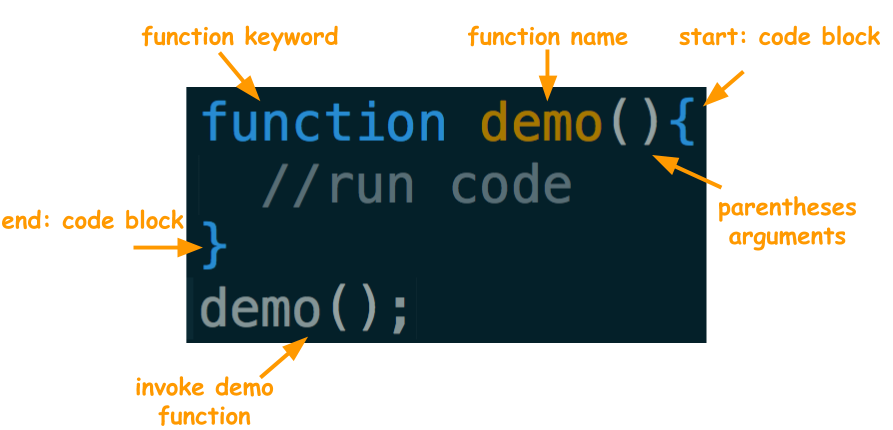
Dissect a Function Call
alert("My Name Is Scott");This is a JavaScript Statement that invokes the alert function and accepts a string value argument
The "return" Keyword
- The "return" keyword gives back data from a function to another line of code
- When the "return" keyword is used, anything after the return keyword will not execute.
- Self-check: What will alert from the code below?
function doYouLikeJavaScript(){
  return "You Bet I Do";
}
function whatIsYourName(theName){
  return "Scott";
  alert(theName);
}

var name = whatIsYourName("Jim");
alert(name);
If/Else Statements
Conditional Statements
- During your morning routine you make a series of decisions in a conditional format.
- If it is cold out you will wear a jacket
- If you are hungry you will have breakfast
- If you are running late you will move faster
- IF/ELSE Statement:
var someValue = true;

if(someValue){
  console.log(true);
} else {
  console.log(false);
}
Booleans
- Two Possible Values:
- True
- False
Conditional Operators
- Compare between two or more things
- The end goal is to return 'true' or 'false' so that our 'if statement' knows which block of code to execute
-
Basic Conditional Operators
- " > ": Greater Than
- " < ": Less Than
- " >= ": Greater Than or Equal To
- " <= ": Less Than or Equal To
- " === ": Equal To (Identity Operator)
- " !== ": Not Equal To
if(7 < 10){
  console.log("7 is less than 10");
} else {
  console.log("7 is greater than 10");
}
Truthy and Falsey Values
- Truthy: Something which evaluates to TRUE.
-
Falsey: Something which evaluates to FALSE.
Falsey Values
- undefined
- NaN
- null
- 0 (zero)
- false
- "" (empty string)
Everything else is Truthy
function truthyOrfalsey(val){
    if(val){
        return "The value is TRUTHY";
    } else {
        return "The value is FALSEY"
    }
}
Truthy and Falsey Values
"else if" Statement Example
function isBakersDozen(guess){
    if(guess === 13){
        return "You are Correct";
    } else if(guess === 12){
        return "Close! But wrong Dozen";
    } else {
        return "Try Again";
    }
}- Adds more than one option to your program
- Checks from Top to Bottom
- Statements can be nested
Logical Operators
- Typically used with Boolean Values
- 3 Logical Operators
- " && " : AND - Both Conditions must be true
- " || " : OR - One Condition must be true
- " ! " : NOT - Toggles a Statement between true/false
var skyColor = 'gray';
var isThundering = false;

if (skyColor === "gray" && isThundering === true) {
    console.log("It's Raining!");
}
JavaScript
Value
Types
Numbers
Numbers
var oneDozen = 12;
var twoDozens = 2 * oneDozen;
Common Arithmetic Operators in JavaScript
- Addition
- Subtraction
- Multiplication
- Division
function add(num1, num2){
    return num1+num2;
}
add(5,6);
Strings
Strings
- String: A series of characters enclosed by an apostrophe ( ' ) or quotation marks ( " )
- Concatenation: Combines strings together
var jS = "JS";
var jump = ' Jump';
var start = 'Start';
var currentClass = jS + jump + start;"JS JumpStart"Accessing Individual Characters

Strings look like one cohesive unit but they are actually made up of a series of characters
Zero-Based Index (the count starts from 0 instead of 1)
Index positions start at 0 and increment by 1
var hello = "Hello";Accessing Individual Characters
"Hello Fullstack".charAt(8);"Hello Fullstack"[4];charAt method: returns a character at a specified (the arguments) index value
Bracket Notation: returns the character at the specified index value.
"Hello Fullstack"[2+2];Common String Properties
and Methods
"hello world".length;.length property: returns the length of the string starting from the count of 1
"hello world".toUpperCase();.toUpperCase() method: returns the calling string value converted to upper case characters
"hello world".slice(2,5);.slice method: returns a string based on the start and end point specified by the first and second argument
Common String Methods
.indexOf method: the arg is the substring or character to search for in the string. The return value is the index location of character or string
"Hello World".indexOf("W");