Application Layer
Overview
- HTTP/1.0
- HTTP/1.1
- HTTP/2.0
- SMTP
- POP3
- IMAP
- DNS
HTTP 1.0
- TCP-Port 80
- PULL - Protocol
- Request / Response
- Stateless Protocol
- Non-Persistent Connections
- Supported Methods (GET, HEAD, POST)
Operation
Simplified Operation

General Operation

Using Caches

Request format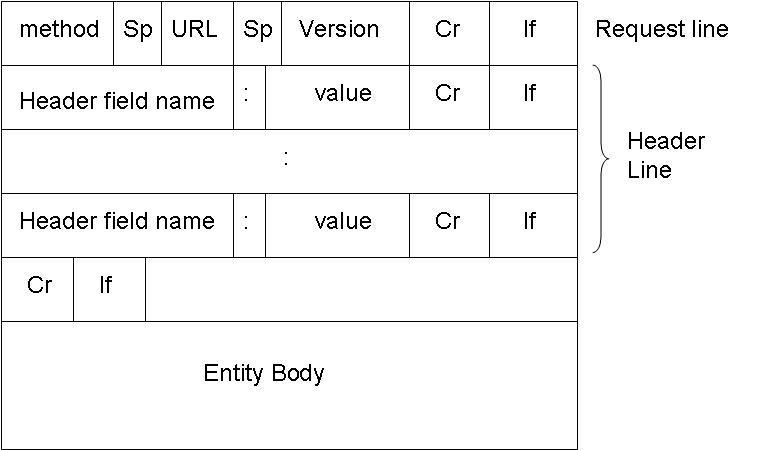
Response FORMAT
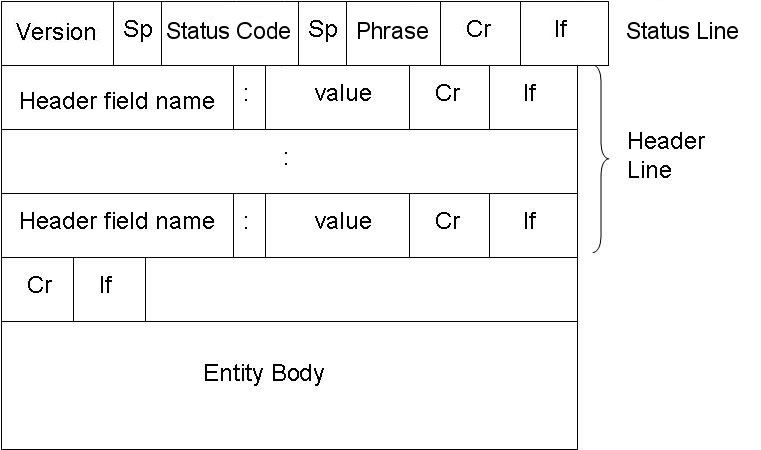
Example - Requests I
//Request
GET /wireshark-labs/HTTP-wireshark-file1.html HTTP/1.0
Host: gaia.cs.umass.edu
//Response
HTTP/1.0 200 OK
Date: Tue, 05 Nov 2013 09:37:56 GMT
Server: Apache/2.2.3 (CentOS)
Last-Modified: Tue, 05 Nov 2013 09:37:01 GMT
Content-Length: 128
Content-Type: text/html


Congratulations.  You've downloaded the file
http://gaia.cs.umass.edu/wireshark-labs/HTTP-wireshark-file1.html!
Example requests II
//Request
HEAD /wireshark-labs/HTTP-wireshark-file1.html HTTP/1.0
Host: gaia.cs.umass.edu
//Response
HTTP/1.0 200 OK
Date: Tue, 05 Nov 2013 09:37:56 GMT
Server: Apache/2.2.3 (CentOS)
Last-Modified: Tue, 05 Nov 2013 09:37:01 GMT
Content-Length: 128
Content-Type: text/html
Questions / Did i miss something?
HTTP/1.0
HTTP/1.1
What has changed?
- Persistent connections
- New Methods
- HTTP-Pipelining
- Transfer Encoding
- Partial GET
- Better control over caches
- Validators
- 1** - Status Codes are used now
Persistent connections I
Create TCP-Connection ONCE and use it for several request/response pairs. (Reduces Load on Network and gets Results faster)
Usage of Header 'Connection: keep-alive' in request indicates the intention to use a persistent connection
Servers have the last word, only if Header 'Connection: keep-alive' is included in request ==> connection is persistent now
PERSISTENT CONNECTIONS II
GET /wireshark-labs/HTTP-wireshark-file1.html HTTP/1.1
Host: gaia.cs.umass.edu
Connection: keep-alive
Accept: text/html,application/xhtml+xml,application/xml;q=0.9,image/webp,*/*
User-Agent: Mozilla/5.0 (X11; Linux x86_64) AppleWebKit/537.36 (KHTML, like Gecko) Chrome/30.0.1599.114 Safari/537.36
Accept-Encoding: gzip,deflate,sdch
Accept-Language: en-US,en;q=0.8
If-None-Match: "8734d-80-c649c940"
If-Modified-Since: Tue, 05 Nov 2013 09:37:01 GMT
HTTP/1.1 200 OK
Date: Tue, 05 Nov 2013 09:59:49 GMT
Server: Apache/2.2.3 (CentOS)
Last-Modified: Tue, 05 Nov 2013 09:59:01 GMT
ETag: "8734d-80-14f76340"
Accept-Ranges: bytes
Content-Length: 128
Keep-Alive: timeout=10, max=100
Connection: Keep-Alive
Content-Type: text/html; charset=UTF-8

Congratulations.  You've downloaded the file http://gaia.cs.umass.edu/wireshark-labs/HTTP-wireshark-file1.html!
persistent connection III
//Request
GET / HTTP/1.1
Host: www.orf.at
Connection: keep-alive
Accept: text/html,application/xhtml+xml,application/xml;q=0.9,image/webp,*/*
User-Agent: Mozilla/5.0 (X11; Linux x86_64) AppleWebKit/537.36 (KHTML, like Gecko) Chrome/30.0.1599.114 Safari/537.36
Accept-Encoding: gzip,deflate,sdch
Accept-Language: en-US,en;q=0.8
//Response
HTTP/1.1 200 OK
Date: Tue, 05 Nov 2013 10:08:50 GMT
Server: Jetty(6.1.22)
X-Cache: HIT from localhost
ETag: "XOyamG4ZEJIhX3vZRY0UvA=="
Content-Length: 15805
Content-Encoding: gzip
Content-Type: text/html; charset=utf-8
Accept-Ranges: none
Connection: close
NEW Methods
- PUT (make content available under given URL)
- DELETE (remove [content of] given URL)
- OPTIONS (display options available on URL)
- TRACE (request - loopback)
- CONNECT (set proxy behavior to 'tunnel')
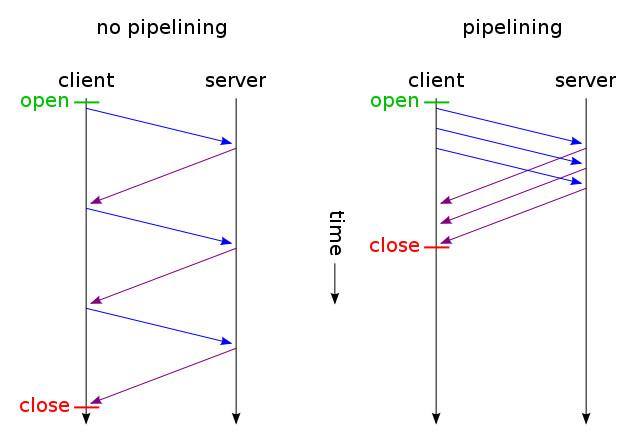
http-pipelining
Client can issue several requests in a row without having to wait for each response (Speedup)
Transfer encoding
GET / HTTP/1.1
User-Agent: Wget/1.13.3 (linux-gnu)
Accept: */*
Host: homegateway.lan
Connection: Keep-Alive
Message Body is transferred in separate CHUNKS and reassembled to a response in the client.HTTP/1.1 200 OK Connection: close Date: Thu, 15 Sep 2011 08:48:47 GMT Transfer-Encoding: chunked Content-Type: text/html//Body //CHUNK1 //CHUNK2 //CHUNK3 //CHUNK4
PARTIAL GET
Request only part of a Object (saves Bandwidth)
//Request
GET /examples/dog.jpg HTTP/1.1
Host: www.someschool.edu
Range: bytes=0-999
HTTP/1.0 206 Partial Content
Date: Mon, 05 May 2008 00:36:57 GMT
Server: Apache/2.0.52 (Red Hat)
Accept-Ranges: bytes
Content-Length: 1000
Content-Range: bytes 0-999/3980
Content-Type: image/jpeg

binary data.....binary data...
NEW header cachecontrol
//cache-request-directives

"no-cache"
"no-store"
"max-age" "=" delta-seconds
"max-stale" [ "=" delta-seconds ]
"min-fresh" "=" delta-seconds
"no-transform"
"only-if-cached"
//cache-response-directives

"public"
"private" [ "=" <"> 1#field-name <"> ]
"no-cache" [ "=" <"> 1#field-name <"> ]
"no-store"
"no-transform"
"must-revalidate"
"proxy-revalidate"
Validators
HTTP/1.0 had only the field 'LastModified' to check if a cached website is still fresh
HTTP/1.1 introduces ETag as new Validator and a bunch of new Header-Fields for conditional GET
cond. GET - HeaderFields
- If-Modified-Since
- If-Unmodified-Since
- If-Match
- If-Non-Match
- If-Range
Questions / Did i miss something?
HTTP/1.1
HTTP/2.0
- Why?
- Asynchronous connection multiplexing
- Change of Message-format
- Stream
- Header Compression
- HTTP-FlowControl
- Serverside push
- Development-Status
Source: http://tools.ietf.org/html/draft-ietf-httpbis-http2-04
WHY?
Today, important features of HTTP/1.1 like persistent connections and pipelining are used only sparsely because often, not all hosts on the request/response chain support it.(e.g proxys)
HTTP/2.0 is a way to demand that all participants support those features
It will include a broad use of security-mechanisms like encryption
It reduces the number of TCP-Connections needed by using individual ones more efficiently (connection multiplexing)
Connection Multiplexing
This is achieved by letting independent Streams (>100) share one HTTP/2.0 connection
The streams allow a concurrent execution of different requests/responses
FlowControl is present for the DATA-frames of each stream and for the connection as well
Change of Message-format
No more Text, instead binary encoded frames
Smallest unit of transfer is a 'Frame'
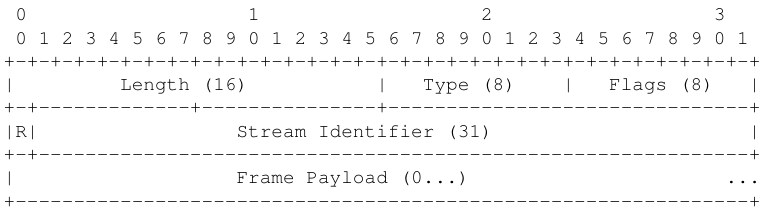
- size of header 8 octets
- payload max 65 535 octets
- type of frame determined by value of field 'type'
- separate frames for header / body
- every message is assigned to a stream
CHANGE of Message-Format
Different types of frames
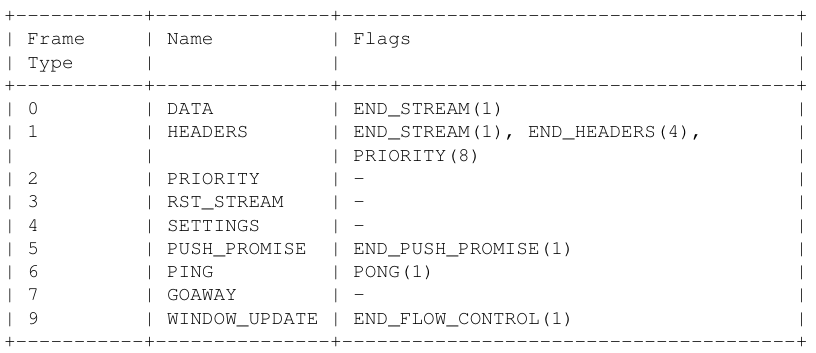
STREAM
Encapsulates one request-response pair
- The client opens a stream to the server and sends HEADER-FRAMES, the last one carries a flag denoting the end of header
- Then, the client sends the DATA-Frames and closes the Frame on his side (analogous to Pipe in OS)
- Now, that server knows that the request is finished, he gets the required objects and sends the frames (HEADER and DATA) to the client
- Finally, the server closes the stream also on his side
Each stream has a state (idle, reserved, open, halfclosed, closed)
Header-Compression
Today - HTTP-Headers can be relatively large and redundant, the goal is to transmit them more efficiently
- HTTP Header Fields and Values are serialized and stored in the body of HEADER-frames
- If one frame doesn't suffices , HTTP Headers can be transported with multiple HEADER-frames
FLOW-CONTROL
- Credit - based System, receivers advertise how many bytes they can receive at the moment
- There is an initial value, when the reciever processes data, it adds the new free space to the amount of bytes the Sender can send
- The reciever does so by sending WINDOW_UPDATE events to the sender
- FlowControl only applies to DATA-frames
Serverside-push
After receiving a certain request, a server can decide that it is the best to send neccessary files without being asked for it
That way, a server can speed up the transfer of Objects by sending them without request if it is inevitable to send them
- Server gets a request and he deems it necessary to send files proactively
- Server sends a PUSH_PROMISE-frame containing the details (streamid,..) of the stream he wants to initiate
- Client prepares to recieve from given streamid, ...
This way, mediafiles can be present at the client before he starts to realize that he has to request them, saving precious bandwith
DEVELOPMENT STATUS
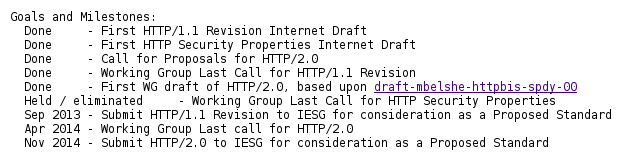
Questions / Did i miss something?
HTTP/2.0
SMTP
- Simple Mail Transfer Protocol
- PUSH - Protocol
- Uses TCP - Port 25
- between useragent and mailserver
- between mailserver and mailserver
- 7 bit ASCII
SMTP Example
telnet mailsrv.uni.at 25
Trying 123.204.666.43...
Connected to mailsrv.uni.at.
Escape character is '^]'.
220 mailsrv.at ESMTP Postfix
HELO foobar.example.net
250 mailsrv.uni.at
MAIL FROM:
250 2.1.0 Ok
RCPT TO:
250 2.1.5 Ok
DATA
354 End data with .
From: user@edu.uni.at
To: user@gmail.com
Subject: Vorzeigeeffekt
Hi,
don't panic
sincerely you
Lg
.
250 2.0.0 Ok: queued as CE22E160A77
Questions / Did i miss something?
SMTP
POP 3
- Post Office Protocol (Version 3)
- Mail-Access Protocol, used to retrieve Emails from user's Inbox on Mailserver
- Uses TCP Port 110
- Server doesn't maintains state between sessions
3 phases of interaction
- authorization with username and password
- transaction, where the UserAgent retrieves Emails and can mark them for deletion
- update, server commits changes when UserAgent issues 'quit'
POP3 - Example
C: telnet mailServer 110
S: +OK POP3 server ready
C: user bob
C: pass swordfish
S: +OK user successfully logged on
C: list
S: 1 498
S: 2 912
S: .
C: retr 1
S: (blah blah ...
S: ..............
S: ........blah)
S: .
C: dele 2
C: quit
S: +OK POP3 server signing off
POP 3 - PRO/CON
+
- POP 3 is rather simple to understand and implement
- 'download and delete' -> Mails stuck on a single device
-
- lacks functionality like managing remote folders
Questions / Did i miss something?
POP 3
IMAP
- Mail Access Protocol
- Uses TCP Port 143
- More Features than POP 3 but much more complex
- Allows UserAgent to retrieve only parts of Emails
- Every Mail is assigned to a folder
- Received Mail is in the Folder INBOX by default
- Users can move Mails between folders, create, rename and remove folders
- Folders can be searched for Mails
- Server maintains state between sessions (e.g. folder-structure)
Questions / Did i miss something?
IMAP
DNS
- Domain Name System
- Provides a core-functionality of the internet
- Hierachically structured distributed database
- Provides Translation between Hostname and IP-Address
- Uses UDP - Port 53
- Also used for Host-Aliasing, Mail-Aliasing, Load-Distribution
DNS - Involved Servers
Root DNS Server: Map the top level domain - part of the hostname to Ip-Adresses of TLD-servers
Top-level domain servers (TLD): Map the domainName - part of the hostname to the IP-Address of the responsible Authoritative Servers
Authoritative DNS server: Knows the translation of Hostname -> IP-Adress of host in his domain
Local DNS server: Acts like a proxy for DNS-Requests, first asked, caches responses
dns message-format
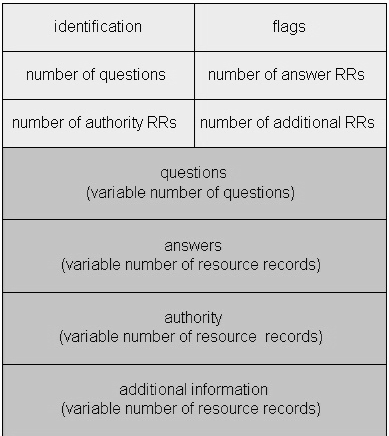
RESOURCERECORD - TYPES
(Name, Value, Type, TTL)
- Type=A: (relay1.bar.foo.com, 145.37.93.126, A, 54321)
- Type=NS: (foo.com, dns.foo.com, NS, 54321)
- Type=CNAME: (foo.com, relay1.bar.foo.com, CNAME, 54321)
- Type=MX: (foo.com, mail.bar.foo.com, MX, 54321)