C4: Session 11
The HTML DOM
Concept: The HTML DOM
The HTML DOM
- It stands for Document Object Model
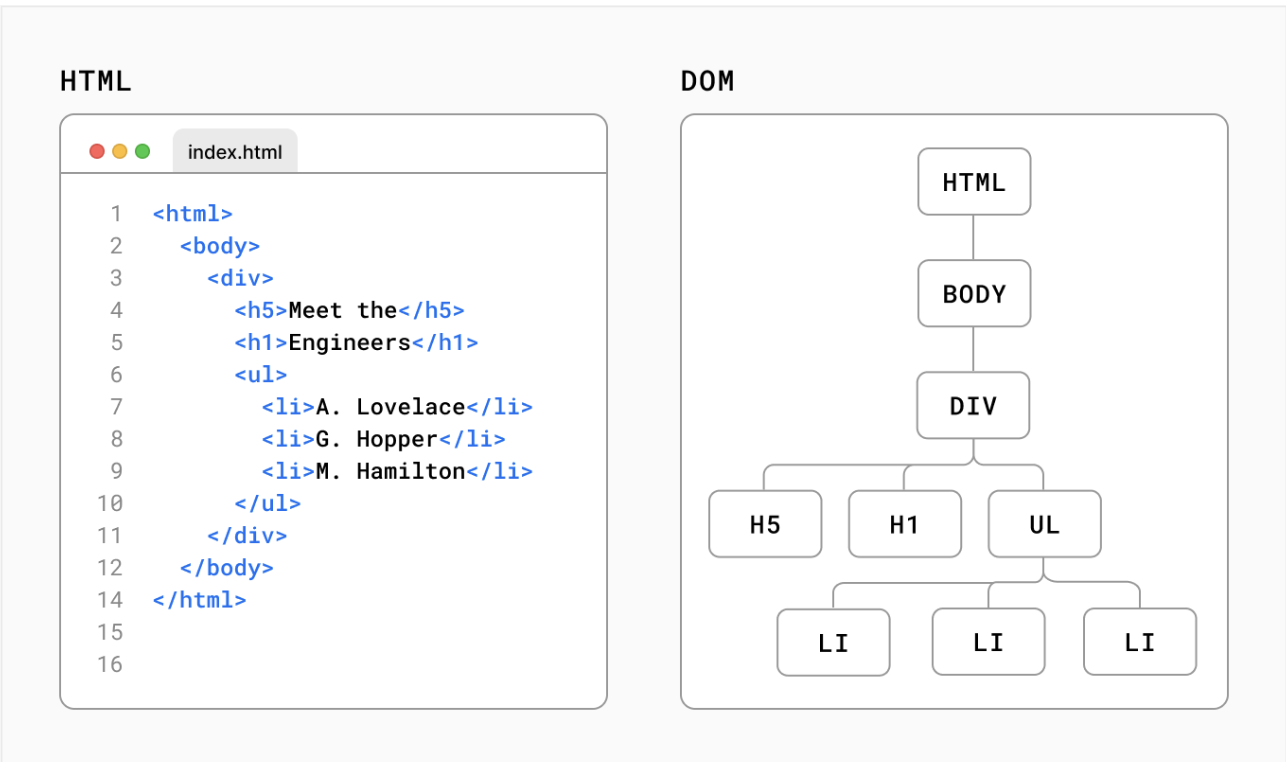
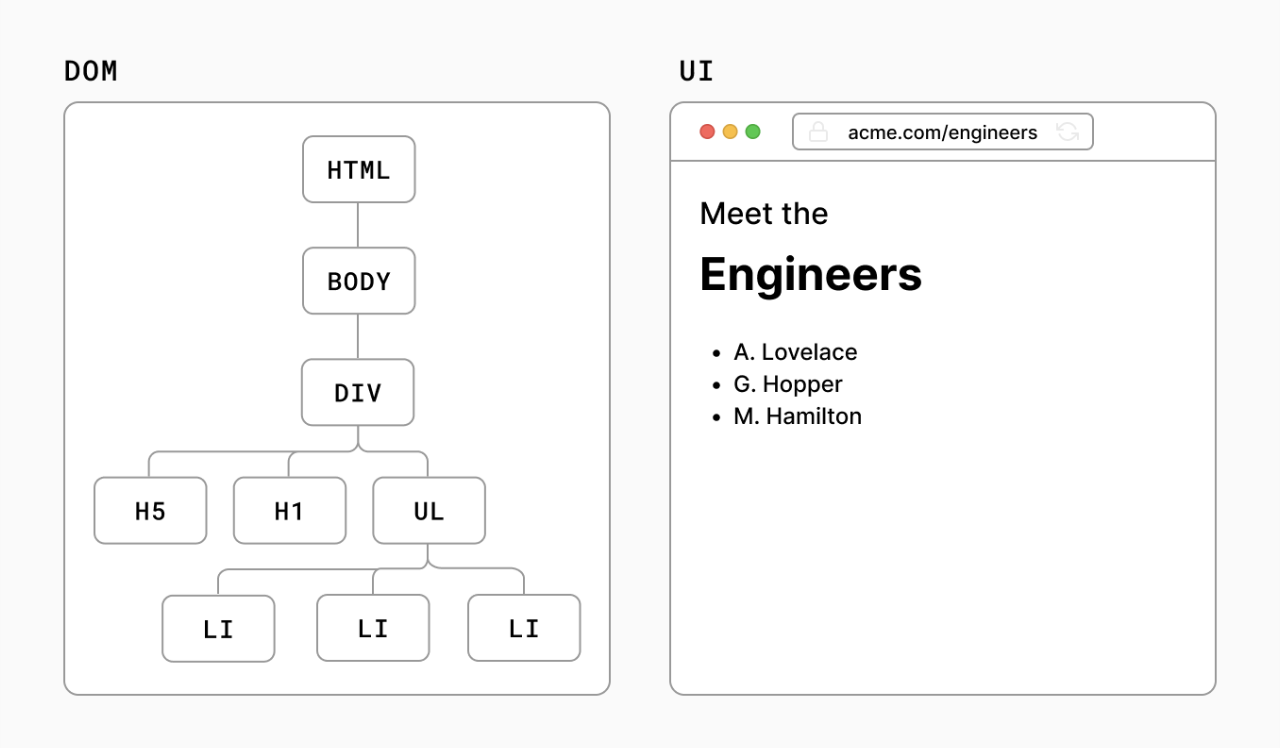
- A representation of the page so that programs can change the document structure, style, and content
- The DOM is constructed as a tree of objects, where each object represents an element in your HTML document
- With JavaScript,
- We can create, change, or remove elements from the document
- We can also listen and respond to different events triggered by elements on the page
Concept: The HTML DOM
The DOM Tree Structure
The DOM is represented as a tree structure and each node in the tree is an HTML object with properties and methods that can be accessed and manipulated through JavaScript.
Concept: The HTML DOM
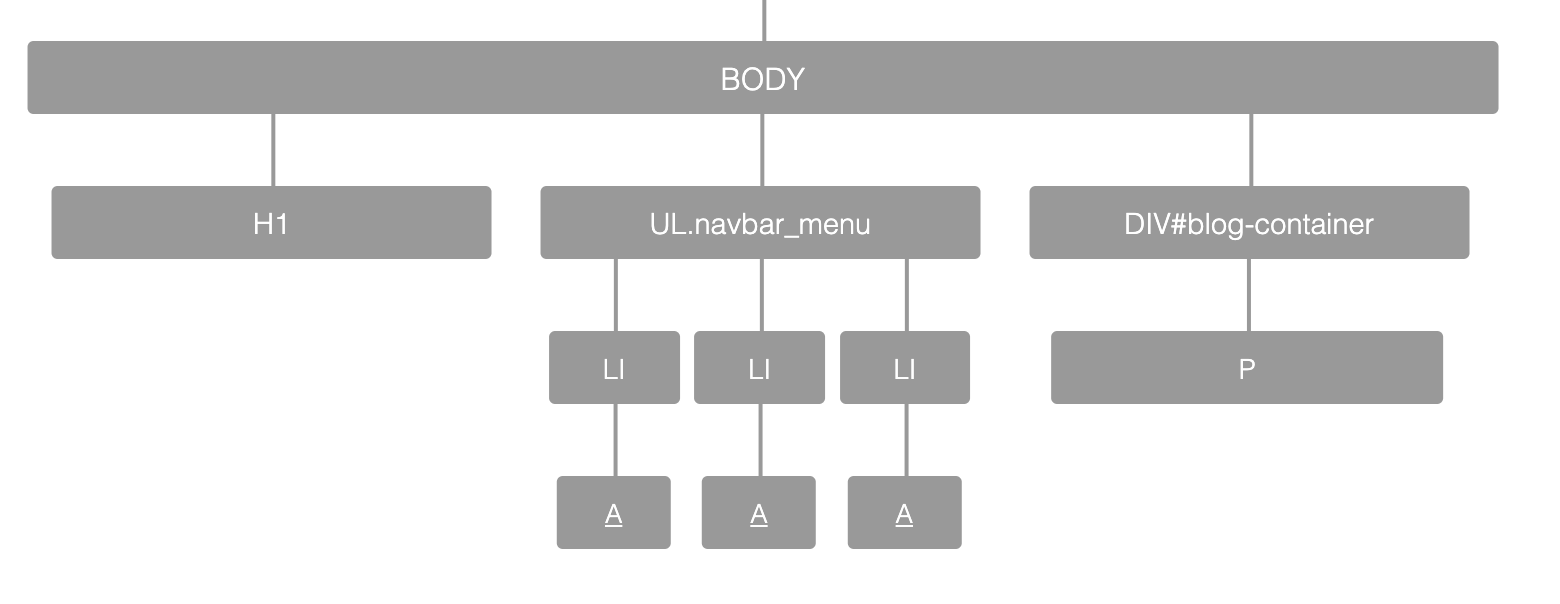
CSS also utilizes the DOM tree
CSS selectors are used to select and style HTML elements in DOM.
<body>
  <h1>My Webpage</h1>
  <ul class="navbar-menu">
    <li><a href="www.example.com">Item 1</a></li>
    <li><a href="www.example.com">Item 2</a></li>
    <li><a href="www.example.com">Item 3</a></li>
  </ul>
  <div id="blog-container">
    <p>Lorem Ipsum</p>
  </div>
</body>
Concept: The HTML DOM
CSS also utilizes the DOM tree
CSS selectors are used to select and style HTML elements in DOM.
Concept: The HTML DOM
CSS also utilizes the DOM tree
CSS selectors are used to select and style HTML elements in DOM.
h1 {
  font-size: 24px;
  color: #000;
}

.navbar-menu li a {
  background-color: #2e5ff6;
  padding: 10px;
}

#blog-container p {
  padding: 20px;
  font-size: 18px;
  line-height: 20px;
}
Concept: The HTML DOM
CSS also utilizes the DOM tree
CSS selectors are used to select and style HTML elements in DOM.
Concept: The HTML DOM
JavaScript DOM Methods
JavaScript DOM methods are used to interact with the HTML DOM and manipulate its content. Some of the most commonly used methods include:
-
document.getElementById -
document.getElementsByClassName -
document.getElementsByTagName -
document.querySelector -
document.querySelectorAll
Concept: The HTML DOM
Get Methods
-
document.getElementById("name-of-id");- Selects a single element by its unique ID and returns a reference to the element as an object
-
document.getElementsByClassName("name-of-class");- Selects elements by their class name and returns an array of elements
-
document.getElementsByTagName("tag-name");- Selects elements by their tag name and returns an array of elements
Concept: The HTML DOM
Query Methods
-
document.querySelector("selector-pattern");- Selects an element using a CSS selector and returns the first matching element found in the DOM
-
document.querySelectorAll("selector-pattern");- Selects elements using a CSS selector and returns an array of matching elements found in the DOM
Concept Practice: DOM Methods
Concept: The HTML DOM
Modifying Elements
There are several methods available in JavaScript to modify elements in the DOM. Here are a few examples:
-
innerHTML- used to get or set the HTML content of an element -
textContent- used to get or set the text-only content of an element -
style- used to get or set the CSS style properties of an element -
classList.add(className)- used to add a CSS class to an element -
setAttribute(attrName, attrValue)- used to set an attribute on an element
Next Session
Creating HTML Content with JavaScript