Agentic
AI
Langgraph
〞
You don’t have to be great to start, but you have to start to be great. So start now.
– Akarsh Vyas
I think this is understandable
functions, classes, decorators, type hints, dictionaries, and some more basic things
1.Python
tokens, system prompts, user prompts, temperature etc
2.LLM's
ChatModels, messages, prompts, and at least one chain built before. If you have watched my LangChain course, you are fully ready.
3.Langchain
Prerequisites
Go watch these before starting



It's not necessary to watch only my videos
if you have knowledge still it will work😒🙂↔️
But before starting anything you should first know the difference between Agentic AI and Generative AI.
So lets go one by one
Generative AI
- AI that generates content text, code, images, audio, video
- You give it a prompt, it gives you a response
- One input, one output. The interaction ends there.
- The model does not take actions, does not use tools on its own, does not make decisions about what to do next
- Examples: ChatGPT writing an email, Midjourney creating an image, GitHub Copilot suggesting code
- The human is in control of every step. The AI only generates when asked.
Agentic AI
- AI that takes actions to achieve a goal
- You give it a goal, it figures out the steps and executes them
- Multiple inputs, multiple outputs, multiple decisions in between
- The model uses tools, calls APIs, reads and writes data, decides what to do next, and can loop until the goal is done
- Examples: an AI that researches a topic on the web and writes a report, a coding agent that fixes bugs across files, a customer support agent that resolves tickets end-to-end
- The AI is in control of the steps. The human only sets the goal.
key differences
| Generative AI | Agentic AI |
|---|---|
| Answers a Question | Solves a problem |
| Single Step | Multiple Steps |
| No tools | Uses tools |
| No memory between calls | has memory and state |
| You drive the process | The AI drives the process |
| Stateless | Stateful |
| Reactive | Proactive |
key differences
Generative AI is the foundation. Agentic AI is built on top of it. Every agent uses an LLM inside, but adds reasoning loops, tools, memory, and control flow around it. That extra layer is what we are going to learn to build in this course using LangGraph.
Hold up
In this video we saw how to create an agent we also saw how to create tools how to connect tools with the AI agent and how to actually create an agent with the
function
Clarification
Yes, you were building agents but they were "agent-shaped," not fully agentic
What you built in your LangChain course using create_agent() is technically called an agent, but it sits at the beginning of the agentic AI spectrum, not the full thing. Let me show you the AI agent spectrum
The Agent Spectrum
| Level | What it does | Example |
|---|---|---|
| Level 0 -Pure generation | LLM answers a prompt, no tools | ChatGPT writing a poem |
| Level 1 - Tool-using LLM | LLM calls a tool once, returns answer | LLM checking weather via a tool |
| Level 2 - ReAct agent(we are here) | LLM loops: think → call tool → observe → think → call tool, until done | Agent answering "what's the weather and convert it to Fahrenheit" using two tools |
| Level 3 - Stateful agent | Agent remembers across turns, has persistent memory, can pause for humans | Customer support bot that remembers your past tickets |
| Level 4 - Multi-agent system | Multiple agents coordinate to achieve a goal, each with their own role | Research system: planner agent + researcher agent + writer agent |
| Level 5 - Autonomous agent | Long-running, self-correcting, self-improving, plans across days/weeks | Devin-like coding agent that ships PRs |
*This is not some well known spectrum I am just creating to give you understanding that there are so many types of agents
confusion removal
The word "agent" is overloaded. In LangChain's create_agent(), "agent" means "an LLM that can use tools in a loop." That's it. That's the whole definition.
But "agentic AI" as an industry term means much more it implies the agent has:
- State — it remembers what happened
- Persistence — it can be paused and resumed
- Control flow — it can branch, loop, and coordinate
- Tools at scale — not just 2-3 tools, sometimes hundreds
- Human oversight — humans can approve sensitive actions
- Multi-agent coordination — multiple specialized agents working together
Why Langgraph
You can create any type of Agent and workflows using Langchain but the question is why we need langgraph at first place.
The best way to understand this will be via an example.
Why Langgraph
So lets go to varkala a place where clean beaches exists.
but you dont want to book flight , book places or do anything so you spend 1 month to create a system that does this automatically (typical developer)
so lets see the workflow how it is going to look like.
Why Langgraph
INPUT
Trip Planner
AI will plan the full trip like where to stay what to do and evaluates a budget.
{
"itinerary": [
"Day 1: Arrival + Beach",
"Day 2: Water sports + Nightlife",
"Day 3: Local market + Departure"
],
"flights": "suggested options",
"hotels": "mid-range stays",
"activities": ["beach", "clubs"],
"estimated_cost": 24000
}
Decision
NO
Re-eva luation
Yes
You will be gitting multiple options here.
INPUT
Trip Planner
Decision
NO
Re-eva luation
Yes
Flight Finder
This will tell the dates that it is going to book flight and you can adjust that according to you
Decision
NO
Yes
Re-eva luation
Hotel Finder
this will tell you the locality and area where it is booking the hotel
INPUT
Yes
Hotel Finder
this will tell you the locality and area where it is booking the hotel
But here a twist came and that is you wanted a specific hotel but that hotel has a waiting time of 24 hrs after that bookings will open so the AI has to wait for 24 hrs
24hrs
And the workflow will go on according to your needs
Why Langgraph
ok whole workflow is ready but lets get the things that Langchain will struggle and langgraph will excel in them.
Why Langgraph
Handling Loops Becomes Messy
In LangChain, workflows are mostly linear.
When an AI needs to retry, re-evaluate, or loop based on user feedback, we have to manually manage loops and conditions, which quickly makes the code complex and difficult to maintain.
Why Langgraph
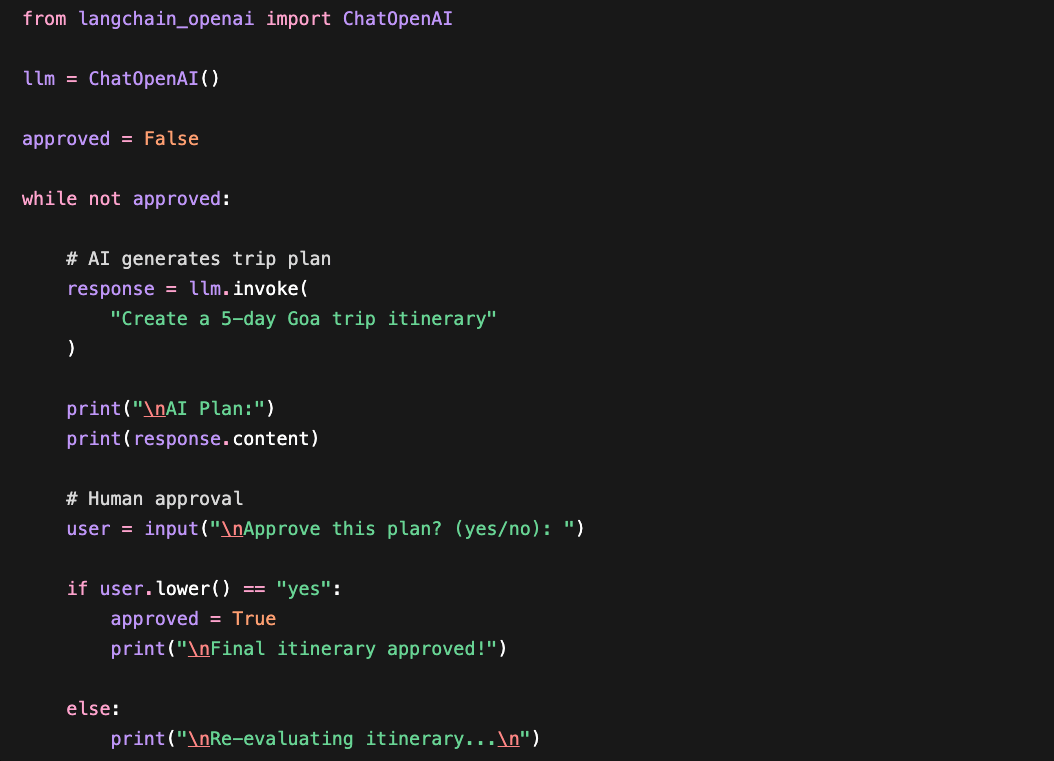
Here you can see we have to manually write while loops
and manage conditions.
Why Langgraph
In LangGraph, loops are a native part of the workflow, so instead of manually managing while loops and conditions, we simply define nodes, edges, and conditional paths if the user rejects the itinerary, the workflow automatically returns to the planner node, otherwise it proceeds to the next step, making the system cleaner, easier to visualize, debug, and scale for multi-agent workflows.
Why Langgraph
In LangGraph, loops are a native part of the workflow, so instead of manually managing while loops and conditions, we simply define nodes, edges, and conditional paths if the user rejects the itinerary, the workflow automatically returns to the planner node, otherwise it proceeds to the next step, making the system cleaner, easier to visualize, debug, and scale for multi-agent workflows.
I am not going to show code of langgraph cause you have not studied it yet
Why Langgraph
In LangChain, managing shared memory between multiple agents is mostly manual. As the number of agents increases, passing data like user preferences, dates, and budgets between chains becomes complex and error-prone, making the workflow hard to maintain and scale.
Why Langgraph
In LangGraph, all agents can work on a shared state, so data like dates, budget, and user preferences automatically flow across the workflow, making multi-agent systems cleaner, more reliable, and easier to scale.
Why Langgraph
In LangChain, workflows are expected to run continuously, so tasks like waiting 24 hours for hotel booking availability become difficult to manage. We need external databases, schedulers to save and resume the workflow manually, which increases system complexity.
Why Langgraph
LangGraph supports persistent and resumable workflows, so the system can pause, save its state, wait for long durations like 24 hours, and continue execution later without losing context.
Difference
| Problem | Langchain | Langgraph |
|---|---|---|
| Loops & Re-evaluation | Manual while loops and condition handling make workflows messy | Native graph loops with conditional edges make workflows clean and scalable |
| Multi-Agent State Management | Shared memory between agents must be managed manually | Centralized shared state automatically flows across all agents |
| Long Waiting Tasks | Requires external databases or schedulers to pause/resume workflows | Built-in persistent and resumable workflows handle waiting naturally |
| Human-in-the-Loop Approval | Approval and branching logic become complex quickly | Human decisions are handled cleanly using graph transitions |
| Scalability | Complex systems become difficult to maintain | Designed for scalable multi-agent orchestration |
lets start now
LangChain helps you call LLMs.
LangGraph helps you orchestrate intelligent systems.
The moment your AI needs memory, decisions, retries, waiting, or multiple agents you are no longer building a chain. You are building a graph.
Learning plan
Langgraph is famous for one thing and that is Building AI workflows in this video we are going to learn 5 workflows create project using those workflows and along the way you are naturally going to understand all the major components of Langgraph so now lets start with the first workflow.
1) Sequential workflow
In LangGraph, a Sequential Workflow is the simplest, most straightforward way to connect tasks. It is a linear pipeline where data flows in a single direction from one step to the next like an assembly line in a factory.
Analogy

Take the cake ingredients

Then preparing and baking the cake
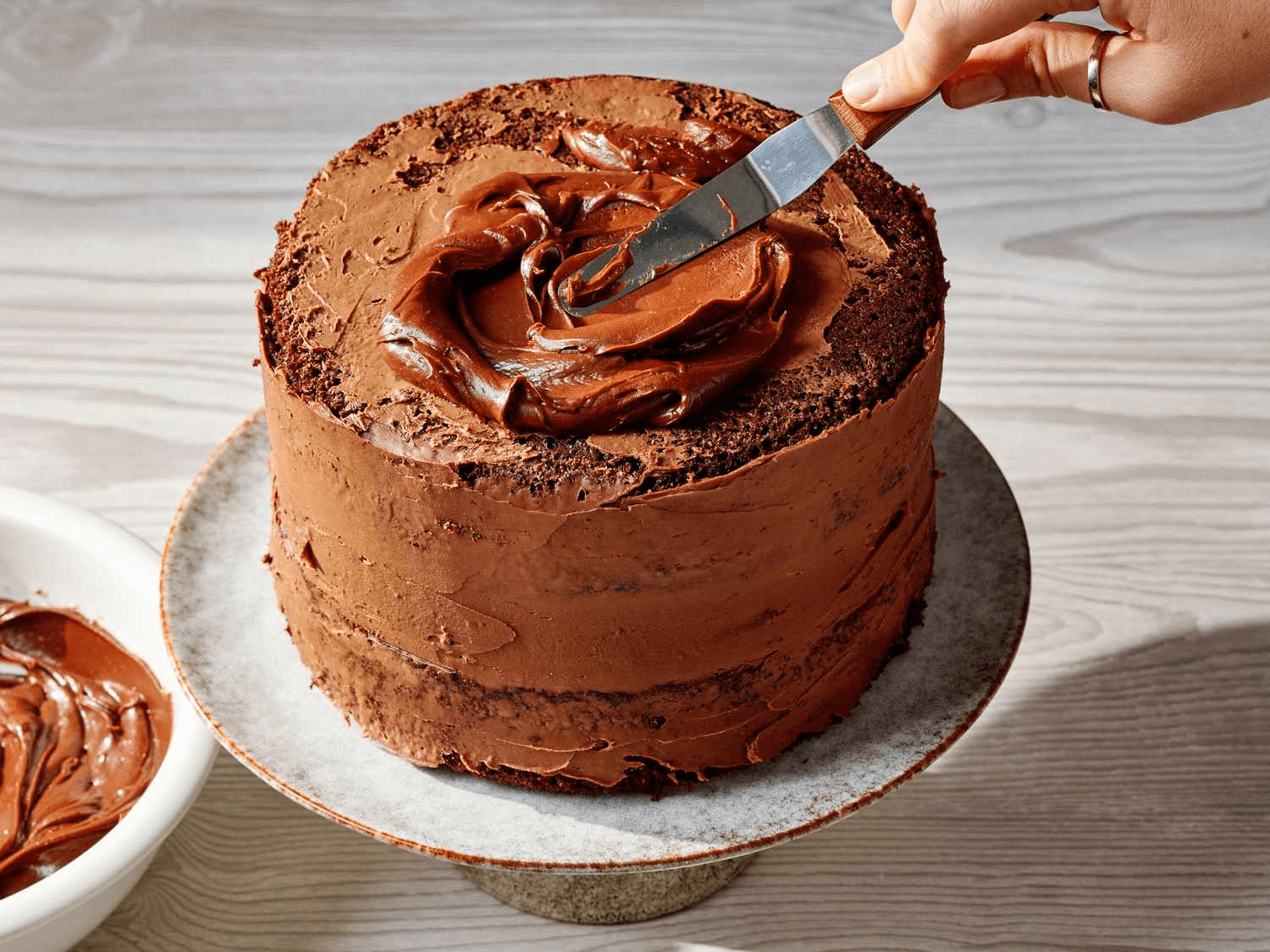
Then putting the frosting after baking it
1) Sequential workflow
Take the cake ingredients
Then preparing and baking the cake
Then putting the frosting after baking it
You cannot frost the cake before it's baked, and you can't bake it before mixing the ingredients. Each step must wait for the previous one to finish, and it relies entirely on the output of that previous step.
In the context of AI, we use these workflows
When every step is predictable and the order never changes. Examples:
1) Sequential workflow
- A blog writing pipeline: topic → outline → draft → proofread → final article
- A data processing pipeline: raw data → clean → transform → summarize → output
- A translation pipeline: text → translate → grammar check → format → output
- An email generator: user input → draft email → check tone → add signature → output'
Here every step is predictable and the order never changes
1) Sequential workflow
Now I am pretty sure you can create all of these projects using LangChain but if we want to use langgraph we first have to understand 3 things whcih we use to write code in langgraph and we are going to use these 3 things in every workflow.
1. State
2. Node
3. Edges
These three things make a graph to understand lets see on HTML file.
1) Sequential workflow
Now that you've mastered the core DNA of LangGraph, the workflows just become a game of how we configure these edges and nodes.
Lets see the code implementation for creating a project in which we are going to create a sequential workflow in which we will create a Graph and always before starting the project make sure to create a proper structure of what we are going to do.
1) Project sequential workflow
So I am a content creator and I write scripts but the raw script is not as good as I want so I will create a multi stage content pipeline to generate a good script.
Ideation :-
Raw Data
Editor Node
Cleans up grammar and tone
Scriptwriter node
Formats it into an engaging script
Hinglish node
Converts it into hinglish format
[start]
O/P
[END]
1) Looking back
So your sequential workflow is completed but its not only about the workflow you
have also completed :-
- State
- Nodes (Python functions)
- StateGraph (the graph container)
- Edges (normal edges)
- START and END
- Compile and Invoke
- How data flows through state
1) Looking back
So yeah you are not only learning workflows you are learning many other things at the same time so do watch every workflow to genuinely complete langgraph
2) parallel workflow
Imagine you run a fast-paced tech news channel, but you are the only one working in your company. A big tech update drops. To cover it, you have to do everything yourself step-by-step:
-
Step 1: You sit down and write the technical news article.
-
Step 2: After finishing the article, you open Photoshop and create the YouTube thumbnail.
-
Step 3: After making the thumbnail, you finally write a punchy tweet for X.
Because you are alone, you are doing everything sequentially (in a straight line). If each task takes 30 minutes, your final output takes 1.5 hours to go live. It is time-consuming, and by the time you publish, the news might already be old!
2) parallel workflow
You quickly realize that writing an article, designing a graphic, and drafting a tweet are three completely independent tasks. A thumbnail designer doesn't need to read your final polished text to start working on a background image!
So, you hire 3 different specialized people and assign the tasks simultaneously:
-
Person 1 starts writing the news article.
-
Person 2 starts creating the thumbnail for YouTube.
-
Person 3 starts drafting the tweet for X.
Since all three people are working at the exact same time (in parallel), your entire media kit is fully ready in just 30 minutes instead of 1.5 hours!
2) parallel workflow
In LangGraph, a Parallel Workflow works exactly like Scenario B:
In LangGraph, a Parallel Workflow (often called a Fan-Out / Fan-In pattern) is when a single node splits the flow into two or more independent branches that execute concurrently.
Later, those branches merge back into a single point (called a Join Node) before the graph completes.
2) parallel workflow
Start
Article node
Thumbnail node
Tweet node
End
Start
Article node
Tweet node
End
Thumbnail node
A small visual representation of parallel workflow
2) parallel workflow (state)
End
In a parallel workflow, the State becomes even more magical. When the graph splits, multiple nodes are writing to the State simultaneously. LangGraph handles this safely by letting Node A write to its key (e.g., article_text) and Node B write to its key (e.g., tweet_text) without overriding or breaking each other's data.
2) parallel workflow (nodes)
You define separate, specialized functions for each task that can run independently. yup not that big difference they are at the end python functions.
2) parallel workflow ( Edges)
In a parallel workflow, edges change from a simple "A to B" pathway into two specialized structural movements: Fan-Out and Fan-In.
Fan-Out (The splitter)
This occurs when a single node connects to multiple downstream nodes. Instead of creating a chain, you point one source to multiple targets. LangGraph detects this and automatically fires those target nodes concurrently.
you will see it in code.
Start
Article node
Tweet node
Thumbnail node
2) parallel workflow ( Edges)
Fan-In (The Merger)
This occurs when multiple parallel nodes point to a single destination node. This acts as a synchronization barrier. LangGraph will automatically pause the workflow at this junction and wait until every single parallel branch completes its task before letting the final node execute.
Article node
Tweet node
End
Thumbnail node
2) Project Idea
In this project, we build an automated AI Content Moderation & Brand Safety Pipeline using LangGraph and Groq.
Instead of processing an input text sequentially (which is slow and inefficient), our pipeline takes any raw piece of text whether it's a video script, a blog draft, or a user comment and broadcasts it to three specialized AI Agents running simultaneously in parallel. Each agent evaluates the text from a completely different perspective and scores it on a scale from 0 to 100.
2) Project Idea
-
The Toxicity Monitor: Scans the text for aggressive language, profanity, or hate speech.
-
The Copyright Cop: Analyzes the text for plagiarism, trademark violations, or unoriginal copy risks.
-
The Cultural Guide: Flags regional sensitivities or political landmines that could offend a global audience.
2) Project Idea
-
The workflow will look like this
Start
Toxicity node
Copyright node
End
Cultural node
And as I told you in every workflow you will learn something new and in this you will learn reducers see the code implementation for understanding.
2) Project Idea
-
By default, if three nodes return the same key
safety_scores, LangGraph will crash or overwrite them. But we will use a dictionary update reducer (a custom function or a lambda function) that merges these dictionaries together automatically!
2) Project Idea
-
By default, if three nodes return the same key
safety_scores, LangGraph will crash or overwrite them. But we will use a dictionary update reducer (a custom function or a lambda function) that merges these dictionaries together automatically!
2) Looking back
-
From Workflow 2 Parallel
- Reducers (
Annotated[list, operator.add]) - Fan-out (one node connecting to many)
- Fan-in (many nodes connecting to one)
- Multiple nodes writing to the same state field
- How parallel execution works in LangGraph
3) Conditional workflow
Before starting the 3rd workflow brace yourself cause we are going to learn these things:
From Workflow 3 Conditional
- Conditional edges
- Router functions
- LLM-based decision making
- RAG inside LangGraph (retrieval as a conditional path)
add_messagesreducer
3) Conditional workflow
But don't worry we will see everything step by step and lets start by basics
what is conditional workflow ?
Q - In python you have already seen what are conditional statement in langgrapg conditional workflows are same.
3) Conditional workflow
A workflow where the next step is decided based on a condition. The graph looks at the current state and chooses which path to take.
In a sequential workflow, the path is fixed - A → B → C, every single time.
In a conditional workflow, the path changes - A → (check something) → go to B or go to C depending on the answer.
3) Conditional workflow
Now usually to create a conditional workflow you need 2 pieces.
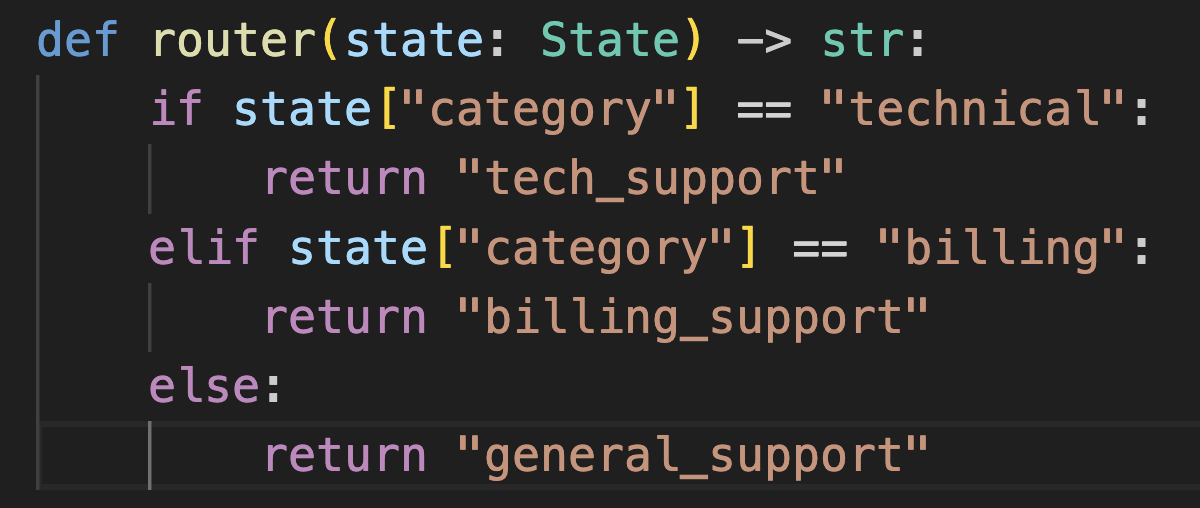
Piece 1 - A router function
A regular Python function that reads the current state and returns the name of the next node.
This function doesn't do any real work. It only makes a decision "based on what I see in the state, where should we go next?"
3) Conditional workflow
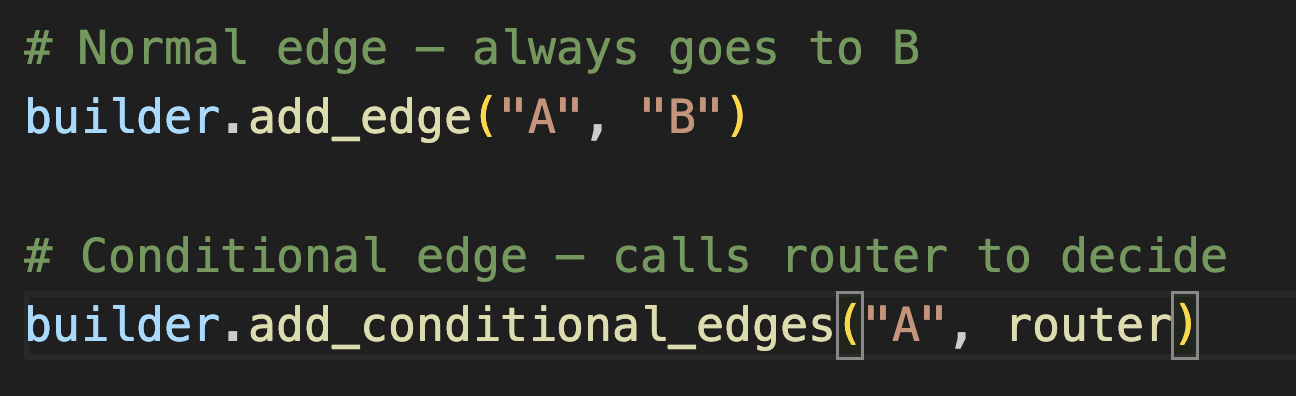
Piece 2 add_conditional_edges
Instead of add_edge (which always goes to the same node), you use add_conditional_edges (which calls the router function to decide).
3) Conditional workflow
The router can make decisions in two ways:
Way 1 Rule-based (Python logic)
You write the rules yourself. Simple, predictable, fast.
Way 2 LLM-based (the AI decides)
You ask the LLM to classify or decide, and route based on its answer. More flexible, handles ambiguity, but slower.
3) Conditional workflow
Ok so now you know what is conditional workflow now lets create a good project using this workflow in which we are going to introduce the RAG aswell.
but its a request to watch every step slowly and understand what is going on cause this is the step where most of the students fail to grasp and understand but if you go step by step and understand what is going on it will be very easy for you.
3) Conditional workflow
so we are going to create a smart college chatbot you can create it for your own college aswell and show it as a major or minor project.
3) Conditional workflow
So lets say there are 3 branches in our college BCA , BBA and B COM
A student will choose one of these 3 options, and then a chatbot will be activated. You can ask any question to that chatbot, but the LLM you are using in that chatbot does not have knowledge of the college programme. For that, you will have 2 PDFs the first one will be for academics, and the second one will be for fee-related things. So technically, we will have 3 conditional paths:
- Answering the question using the academic PDF (using RAG)
- Answering the question using the fee PDF (using RAG)
- Answering general questions based on the LLM's own knowledge
And every conditional path's response converges to a single node.
3) Conditional workflow
so lets start the project and watch it carefully to understand everything.
3) Conditional workflow
ok so we again learned many things from workflow 3
From Workflow 3 Conditional
- Conditional edges
- Router functions
- LLM-based decision making
- RAG inside LangGraph (retrieval as a conditional path)
add_messagesreducer
4) Iterative workflow
Now its time to move forward with our 4th workflow and that is iterative workflow and again it's not only about workflow we are going to see many things again in this workflow.
- Cycles (backward edges)
- Two loops in one graph (writer↔tools, reviewer→writer)
- Tools + ToolNode
- Tavily web search
- Tool calling (LLM decides when to search)
- ReAct-style loop for tool use
- Quality-refinement loop with reviewer
- Loop-stopping conditions (approval + max attempts)
recursion_limitconfig- Two LLMs with different temperatures (creative vs judgment)
4) Iterative workflow
Now there is not much to explain what is iterative workflow iterative means loops.
4) Iterative workflow
project that we are making now
An AI agent that takes any topic from you and iteratively drafts a publish-ready LinkedIn post. The writer uses Tavily to search the web for the latest information on the topic, drafts a post, and then a separate reviewer evaluates it against quality criteria. If the draft isn't good enough, it loops back to the writer with feedback for a rewrite. The cycle continues until the post gets approved or hits the max attempt limit
4)Human is the loop
Human in the loop (HITL)
Look, let’s be honest about real-world scenarios: You simply cannot trust an AI blindly.
That is exactly why you need human approval for critical tasks. Imagine you are executing a full, end-to-end workflow, and something high-stakes comes up. You can't just let the AI run wild. You have to stop the workflow right in the middle, pause it, and wait for a human to give the green light.
In the world of AI architecture, this exact mechanism is known as Human-in-the-Loop (HITL).
4)Human is the loop
Right now, your graph for previous project looks like this:\
writer → tools → writer → extract_draft → reviewer (AI) → back to writer OR END
for HITL we will change one thing and that will be
writer → tools → writer → extract_draft → human_review (PAUSE) → back to writer OR END
4)Human is the loop
for human in the loop you need 2 new things
1. interrupt() the pause function
Inside a node, when you call interrupt(some_data), LangGraph:
- Stops execution immediately
- Sends
some_dataup to your code (so you can show it to the user) - Waits for input
2. Command(resume=...) — the resume function
After the graph is paused, you resume it by calling app.invoke() again but with a Command:
4)Human is the loop
Now to understand Human in the loop we are going to change the code of our last project and add human in the loop.