
Node.js
A survival guide.
Why?
I/O takes time.
Threads spend most of their time waiting.
What?
Node.js
JavaScript + libuv + V8
JavaScript
const exec = require('child_process').exec;
const argv = process.argv.slice(2);
const dir = argv[0];

if (!dir) throw new ReferenceError('Missing arg: dir');

exec(`git -C ${dir} log`, (err, log) => {
  if (err) throw err;
  console.log(log);
});

Good ol' js.
V8
JavaScript to native code compiler.
C++ JavaScript engine.

libuv
C library to manage asynchronous I/O.

Allows nodejs to play with I/O events (file systems, TCP/UDP, etc.).
JavaScript
Callbacks
Non-blocking I/O
NPM
Callbacks
console.log('Hello!');
require('fs').readFile('./data.json', (err, data) => {
    if (err) throw err;
    console.log('Wait... Am I?');
    console.dir(JSON.parse(data), {depth: null});
});
console.log('I am a unicorn!');

// output:
// Hello!
// I'm a unicorn!
// Wait... Am I still?
// "./data.json" content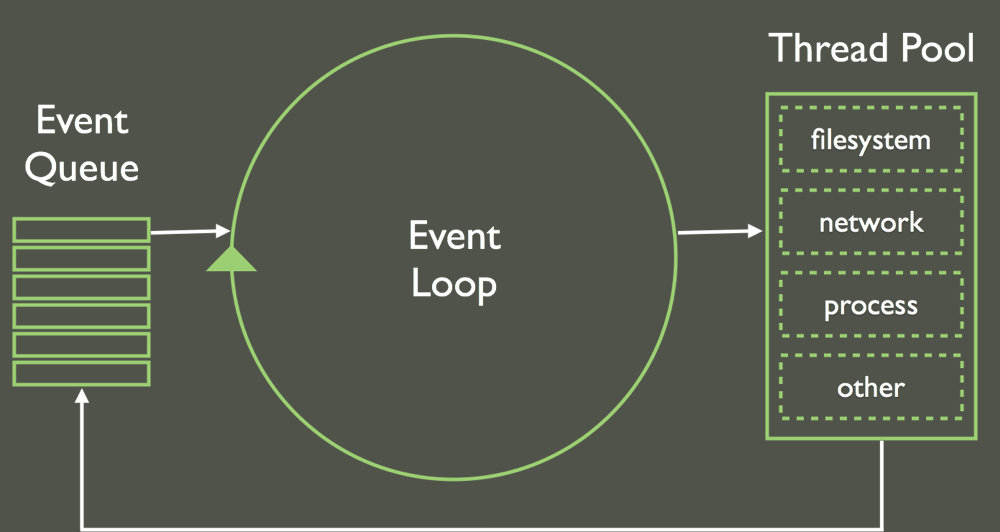
Non-blocking I/O
CPU-heavy tasks :(
NPM
{
  "name": "day-1",
  "version": "0.0.0",
  "description": "An API server in Hapi.js",
  "main": "server.js",
  "directories": {
    "test": "test"
  },
  "scripts": {
    "test": "mocha",
    "start": "bin/www"
  },
  "repository": {
    "type": "git",
    "url": "https://github.com/simonrenoult/octo-day-1"
  },
  "author": "SRE & FJA",
  "license": "ISC"
}
package.json
$ npm install hapiInstall local package
Install global package
$ npm install -g nodemon$ npm install --save hapiSave as project dependency
Save as dev dependency
$ npm install --save-dev mocha$ npm adduserSetup user
Publish!
$ npm publish"Hello world!" server
const http = require('http')
const PORT = 8080

function handleRequest(request, response){
    response.end('It Works!! Path Hit: ' + request.url)
}

const server = http.createServer(handleRequest)

server.listen(PORT, function(){
    console.log("Server listening on: http://localhost:%s", PORT)
});
$ node server.jsRun the server
Hello world!
Additional resources
Official website:
Learn:
Practice: