REGULAR EXPRESSIONS
Some people, when confronted with a problem, think:
“I know, I'll use regular expressions”. Now they have two problems. - Jamie Zawinski
-
Long Story Short
- Metacharacters And Metasequences
- Regex Engines
- A Few Words About Optimizations
- Regex at Work With .NET
- Finally..
LONG STory short
SO.. What are REGEx'es?
-
At a low level, a regular expression describes a chunk of text;
-
At a higher level, regular expressions allow you to master your data. Control it. Put it to work for you;
-
Regular expressions are used by many text editors, utilities, and programming languages to search and manipulate text based on patterns;
- Some languages (Perl, Ruby, AWK, and Tcl) integrate regex into the syntax of the core language itself, others ( .NET, Java, Python and C++) provide regex functionality through standard libraries.
LONG STory short
WHEN DO THEY COME IN HANDY?
- When dealing with user input validation;
- When doing search or search&replace work within large amounts of data, maybe contained in multiple files;
WHEN TO AVOID REGEX?
- When there are parsers;
- When you have better tools to do your job;
- When your code will be read by multiple developers;
- When you won't overuse regex. Not that regular expressions are evil, but that overuse of regular expressions is evil.
LONG STory short
REAL LIFE scenarios
- Removing duplicate words from a book along with the need of listing the line number where the duplicated word was found;
- Checking if the number of open brackets or parantheses is equal to the closed ones in the source files of a project;
- Filtering email messages by subject/content/sender/etc.;
- Extracting the file name from a given path with or without its extension;
- Extract only the relevant data from a large CSV file;
- Having to strip dangerous HTML from input;
- And more..
METACHARACTERS AND METAsequences
About metacharacters
- Full regular expressions are composed of two types of characters: special characters (metacharacters) and text characters (literal).
- Metacharacters sets regular expressions apart by providing advanced expressive powers.
- It might help to consider regular expressions as their own language, with literal text acting as the words and metacharacters as the grammar. The words are combined with grammar according to a set of rules to create an expression that communicates an idea.
METACHARACTERS AND METASEQUENCES
metacharacters LIST
^ - start of line$ - end of line[] - character class. Matches any character in range with "or".
Examples: 1. <H[123456]> will match <h1> .. <h6> HTML tags;
          2. [0-9a-fA-F] - it doesn't matter the position of ranges inside the character class.
! Metacharacters have different meaning when used inside the ch. classes. For example "-" is a metacharacter only when used inside a ch. class and if and only if it is not the first ch. in the class.
Ex: [-1-3] -> this will match one single ch. which can be: -/1/2/3 ![^...] - negated ch. class matches any ch. that isn't listed.
Examples: 1. [^1-6] matches any character that's not 1-6;
          2. q[^u] applied on "Qantas" or "Iraq" fail. Why?. - matches any ch. Some flavors of regex have an options which allows . to match a new line| - "or"
Examples: 1. Bob|Robert - Bob and Robert are called "alternatives";
          2. gr[ea]y is the same as gray|grey;
          3. gr[e|a]y - | is not a metacharacter in a ch. class!() - used to constrain the alternation
Examples: 1. gr(a|e)y == gr[ea]y
          2. (First|1st) [Ss]treet == (Fir|1)st [Ss]treet
METACHARACTERS AND METASEQUENCES
Word boundaries - metasequences
\<cat\> - means: match if we can find a start-of-word position followed immediately by "cat" followed immediately by an end-of-word positionOPTIONAL ITEMS
? - optional. It is placed after the ch. that is allowed to appear at that point in the expression.
Examples: 1. (July|Jul) (fourth|4th|4) == (July?) (fourth|4(th)?) == July? (fourth|4(th)?)
! This expression always succeeds. !
Repetition
+ - one ore more of the immediately-preceding item. Should match at least once, fails otherwise
* - any member, including none, of the item. Allows but not requires.
METACHARACTERS AND METASEQUENCES
! This expression always succeeds. ! ! + and * are quantifiers because they influence the quantity of what they govern ! Examples: 1. <H[1-6] *> -> matches: <H1 >; <H1>; <H1 > and so on; 2. An expression to match an HTML tag like: <HR SIZE=14> :<HR +SIZE *= *14 *> or, to match any SIZE: <HR +SIZE *= *[0-9]+ *> or, to match tag with optional SIZE: <HR( +SIZE *= *[0-9]+)? *>
DEFINED RANGE OF MATCHES
{min, max} - interval quantifier. Matches the preceding sequence from min to max times{n} - matches the preceding sequence n times
METACHARACTERS AND METASEQUENCES
BACKREFERENCES
! Backreferencing is a regular-expression feature that allows you to match new text that is the same as some text matched earlier in the expression !
Examples: to match doubled words in a text: "the the":
          \<the +the\> == \<([A-Za-z]+) +\1\>
! \1 - counts the parentheses set from left to right !
Escaping
Examples: 1. ega.att.com -> can match -> "megawatt computing"
             To avoid this we will use: ega\.att\.com
NON-CApturing parentheses
(?:...) - non capturing parentheses.
! To understand this take a look at the example given in "BACKREFERENCES" section: \<([A-Za-z]+) +\1\>. If we use here a non-capturing parentheses:    \<(?:[A-Za-z]+) +\1\> the \1 will not work because the parentheses didn't get counted by the regex engine !
METACHARACTERS AND METASEQUENCES
SOME EXAMPLES
1. Variable names: [a-zA-Z][a-zA-Z_0-9]*2. A string with double quotes: "[^"]*"3. Dollar amount with optional cents: \$[0-9]+(\.[0-9][0-9])?4. HTML/HTTP URL: \<http://[-a-z0-9_.:]+/[-a-z0-9_:@&?=+,.!/~*%$]*\.html?\>5. An HTML tag:- the wrong way :) -> <.*> will match "<i>short</i> example ";- a better way might be: <[^>]*>
METACHARACTERS AND METASEQUENCES
SHORTHANDS
Like most languages .NET strings have metacharacters of their own and these are completely distinct from
regex metacharacters. It is a common mistake to get them confused.
\b - matches a word boundary. It doesn't matter if it's the start-of-word or end-of-word. Inside a class it matches a backspace\s - whitespace. Includes: space, tab, newline, CR
Examples: 1. \s* -> matches 0 or more spaces\S - anything not \s\t - a tab character\r - a CR character\n - a newline character\w - [a-zA-Z0-9_]
Examples: 1. \w+ to match a word\W - anything not \w
METACHARACTERS AND METASEQUENCES
SHORTHANDS
\d - [0-9] a digit\D - [^0-9]\G - specifies that the matches must be consecutive, without any intervening non-matching characters.
METACHARACTERS AND METASEQUENCES
LOOKAROUND
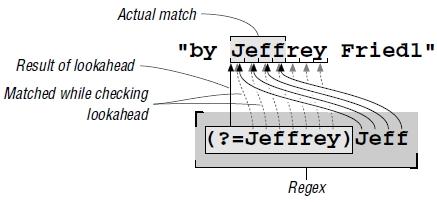
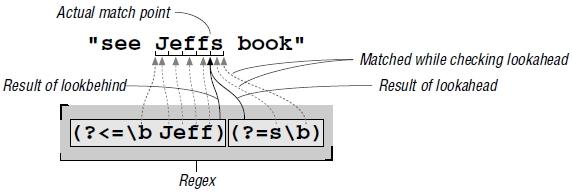
1. Lookahead - peeks forward in the text (towards the right) to see if its subexpression can match. Examples: (?=...) ; (?=\d) -> is successful at positions where a digit comes next.2. Lookbehind - looks back (towards the left). Examples: (?<=...) ; (?<=\d) -> is successful at positions with a digit to the left.! These are non-consuming expressions !Examples:
METACHARACTERS AND METASEQUENCES
Negative LOOKAROUND
1. Positive Lookahead - (?=...) -> successful if can match to the right;2. Negative Lookahead - (?!...) -> successful if can not match to the right;3. Positive Lookbehind - (?<=...) -> successful if can match to the left4. Negative Lookbehind - (?<!...) -> successful if can not match to the left
NAMED CAPTURE
(?<groupName>...) - This will assign a name to the captured group in the parentheses.
Example: \b(?<Area>\d\d\d)-(?<Exch>\d\d\d)-(?<Num>\d\d\d)\b
Quiz:
Put dots inside a number to make it easier to read.
Ex: 12.656.235
REGEX ENGINES
Engine types
- NFA (Nondeterministic Finite Automation) - is used by languages as: Perl, .NET, PHP, Phyton, Ruby, less, more, Java;
- DFA (Deterministic Finite Automation) - is used mainly by: awk, egrep, flex, lex, MySQL;
- Some languages use either NFA or DFA using the most appropriate engine depending on the job: GNU awk, GNU grep/egrep, Tcl
NFA can be compared with a gasoline car engine while DFA can be compared with an electric engine. NFA uses backtracking, DFA builds a "map" of the regex then starts to "look" into the text for matches.
REGEX ENGINES
Engine types
DFA is able to match very quickly but it doesn't support backreferences. NFA has support for backreferences but is a little slower in finding matches.
The important fact here is to know what to expect from either versions or otherwise being said: not to put fuel in the electric engine and to watch out for sparks if you have a gasoline engine.
REGEX ENGINES
Which engnie is yours?
Here is how to test:
apply the following regex:
1. nfa|nfa not
- if only "nfa" match -> NFA
- if the match is "nfa not" -> DFA or POSIX DFA2. X(.+)+X on a string like: =XX===============
- if it takes long -> NFA
- short -> DFA
A Few Words About OptimiZations
1. The longest the string that can be pre-checked, the fewer "false starts": Example: (this|that|other) - can match only at locations beginning with [ot];2. Avoid superfluous parentheses;3. Use leading anchors in a regex: $ or ^;4. Being more specific shortens the number of cycles backtracking has to do before finding a match. Example: - apply ".*" on: The name "McDonald's" is said "makudonarudo" in Japanese;
- replacing the dot with [^"] gives less surprising results because it is more specific, and the end result is that with it, the new regex is more efficient to boot. With "[^"]*" the [^"]* can't get past the closing quote, eliminating much matching and subsequent backtracking.
Regex at Work With .NET
ABOUT THE ENVIRONMENT
-
Each language has a different syntax for handling objects and methods, but those
underlying objects and methods are the same regardless of the language, so even
complex examples shown in one language directly translate to the other languages
of the .NET language suite;
- .NET has a NFA Traditional engine implementation.
ADDITIONAL FEATURES
- C# verbatim strings. C# supports common double-quoted strings but also "verbatim strings" which look like: @"...".
Regex at Work With .NET
-
Verbatim strings recognize no backslash sequences, but instead, just one special sequence: a pair of double quotes inserts one double quote into the target string.
Example: you can use "\\t\\x2A" or @"\t\x2A" to create the "\t\x2A" example.
Allowed modifiers
.SingleLine - causes dot to match any character;.Multiline - expands where ^ and $ can match;.IgnorePatternWhitespace - sets free-spacing and comment mode;.IgnoreCase - turns on case-insensitive matching;.ExplicitCapture - turns capturing off for (...), so only (?<groupName>) capture will be captured;.ECMAScript - Restricts \w, \s and \d to match ASCII characters only, and more;.RightToLeft - The transmission applies the regex normally, but in the opposite direction (starting at the end of the string). Unfortunately, buggy;.Compiled - Spends extra time up front optimizing the regex so it matches more quickly when applied.
Regex at Work With .NET
Regex objects
-
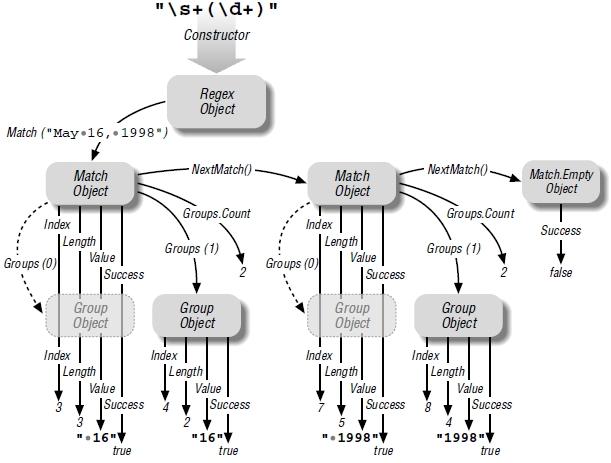
Match objects - provides information about a match result by creating and returning a Match object. It contais a number of properties including the text actually matched (Value), the position at which the match has occured (Index), the match length (Length) and a boolean indicating if the match was successfully (Success).
You can obtain the text matched in each of the capturing parentheses by examining the Groups collection; - Group objects - there is a group object for each set of capturing parentheses and a virtual group numbered 0 which always exists and holds the information about the overall match.
Regex at Work With .NET
Regex objects
Regex at Work With .NET
USING REGEX METHODS
Doing a Match:
1. RegexObj.IsMatch(target [,offset])
Returns: bool
IsMatch applies the object's regex to the target string indicating whether the attempt is successful.2. RegexObj.Match(target [,offset] [,maxlength])
Returns: the first Match object
Match applies the object's regex to the target string, returning a Match object.3. RegexObj.Matches(target [,offset])
Returns: a collection of Match objects: MatchCollection
Matches is similar to Match method, except Matches returns a collection of Match objects representing all the matches in the target, rather than just the first match.
Doing a Replace:
RegexObj.Replace(target, replacement [,count] [,offset])
Returns: string (a possibly changed copy of target)
The Replace method does a search-and-replace on the target returning a possibly changed copy of it. It applies the Regex object's regular expression, but instead of returning a Match object, it replaces the matched text.
Regex at Work With .NET
Special Per-Match Replacement Sequences:
 $& - text matched by the regex;
 $1, $2, ... - text matched by the corresponding set of capturing parentheses;
 ${groupName} - text matched by the corresponding named capture;
 $` - text of the target string before the match location;
 $' - text of the target string after the match location;
 $$ - a single '$' character;
 $_ - a copy of the entire original target string
Splitting strings:
 RegexObj.Split(target [,count] [,offset])
 Return: string[]
 The Split method applies the object's regex to the tar get string,  returning an array of the strings separated by the matches.
Static "Convenience" Functions:
Regex.IsMatch(target [,pattern] [,options]);Regex.Match(target [,pattern] [,options]);Regex.Matches(target [,pattern] [,options]);Regex.Replace(target [,pattern] [,replacement] [,options]);Regex.Split(target [,pattern] [,options]);
Regex at Work With .NET
MATCH EXAMPLE
Import the regex namespace:
import System.Text.RegularExpressions;Create the regex object:
Regex myRegex = new Regex("\d+\w+", RegexOptions.IgnoreCase);
Create the Match object:
Match myMatch = myRegex.Match(sourceString);Navigate through the Match object:
 while (myMatch != Match.Empty)
 {
     // do something whith myMatch properties
     // then advance to the next match if any
     myMatch = myMatch.NextMatch();
 }
Regex at Work With .NET
Examining groups capture for every matched object:
 while (myMatch != Match.Empty)
 {
     // do something whith myMatch properties
     string[] groupNames = myRegex.GetGroupNames();
     for (var i=0; i<groupNames.Length; i++)
     {
          Group currentGroup = myMatch.Groups[groupNames[i]];
          // do something with currentGroup object properties
     }

     // then advance to the next match if any
     myMatch = myMatch.NextMatch();
 }
Regex at Work With .NET
REplace EXAMPLE
Import the regex namespace:
import System.Text.RegularExpressions;Create the regex object:
Regex myRegex = new Regex("\d+\w+", RegexOptions.IgnoreCase);
Create the resultant String object:
string replacedText = myRegex.Replace(sourceString, "<b>$1</b>");Regex at Work With .NET
SPLIT EXAMPLE
Import the regex namespace:
import System.Text.RegularExpressions;Create the regex object:
Regex myRegex = new Regex("\.");
Create the resultant string[] object:
 string[] splittedText = myRegex.Split("209.204.146.22");
 // splittedText will be ["209", "204", "146", "22"]
Finally..
THE half the battle thing
"Selecting the proper tool to use when faced with a problem seems to be half the battle." - Mastering Regular Expressions 2nd Edition, Jeffrey E.F. Friedl
"Half the battle when writing regular expressions is getting successful matches when and where you want them. The other half is to not match when and where you don't want." - Mastering Regular Expressions 2nd Edition, Jeffrey E.F. Friedl