Première application Android
Hello World
Aperçu de notre première application Android développée avec Android Studio
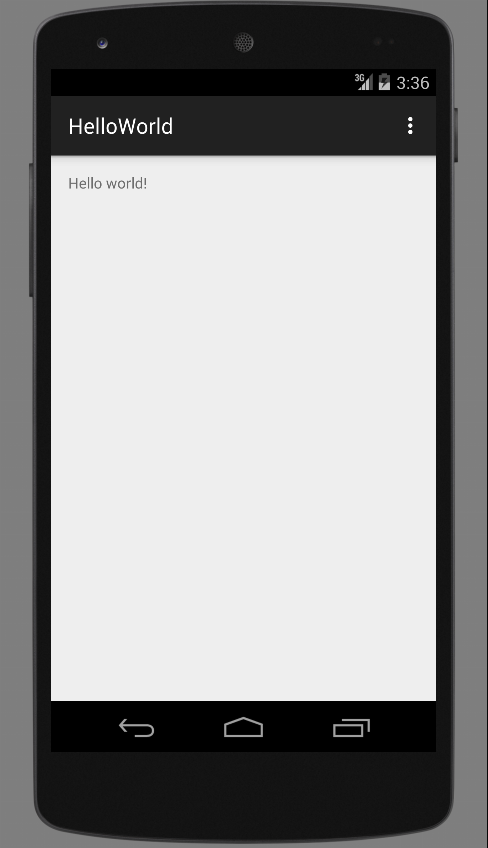
Création d'un projet Android
- Ouvrir le menu principal d'Android Studio
- Vérifier les chemins par défaut du JDK et du SDK :
Configure > Project Defaults > Project Structure - Cliquer sur Start a new Android Studio project pour démarrer l'assistant de création de projet
- Ecran 1 : saisir HelloWorld comme nom d'application et android.edu comme domaine ainsi que le chemin du nouveau projet
- Ecran 2 : sélectionner la plateformes d'exécutions Phone and Tablet et configurer l'API 19 comme la version minimum requise du SDK
- Ecran 3 : sélectionner le modèle Blank Activity comme activité principale
- Ecran 4 : laisser les informations pré-saisies en cliquer sur Finish pour lancer la création du nouveau projet
- Le projet s'ouvre automatiquement dans l'IDE une fois créé
- Il faut fermer le projet pour revenir au menu principal d'Android Studio : File > Close Project
Création d'un projet Android
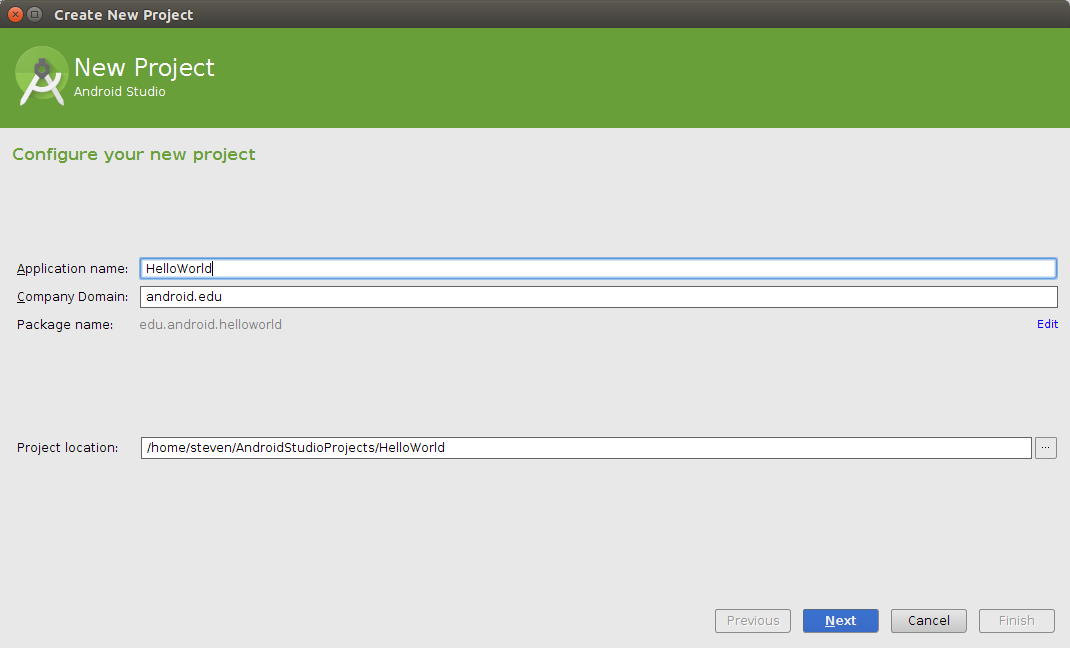
Assistant de création d'un nouveau projet : étape 1/4
Création d'un projet Android
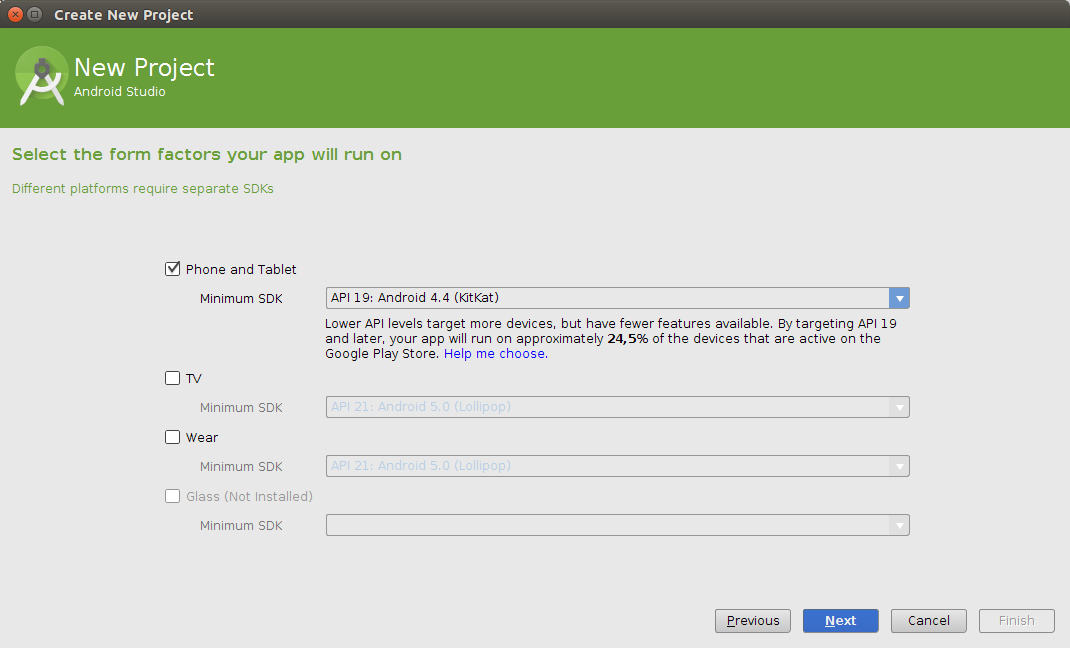
Assistant de création d'un nouveau projet : étape 2/4
Création d'un projet Android
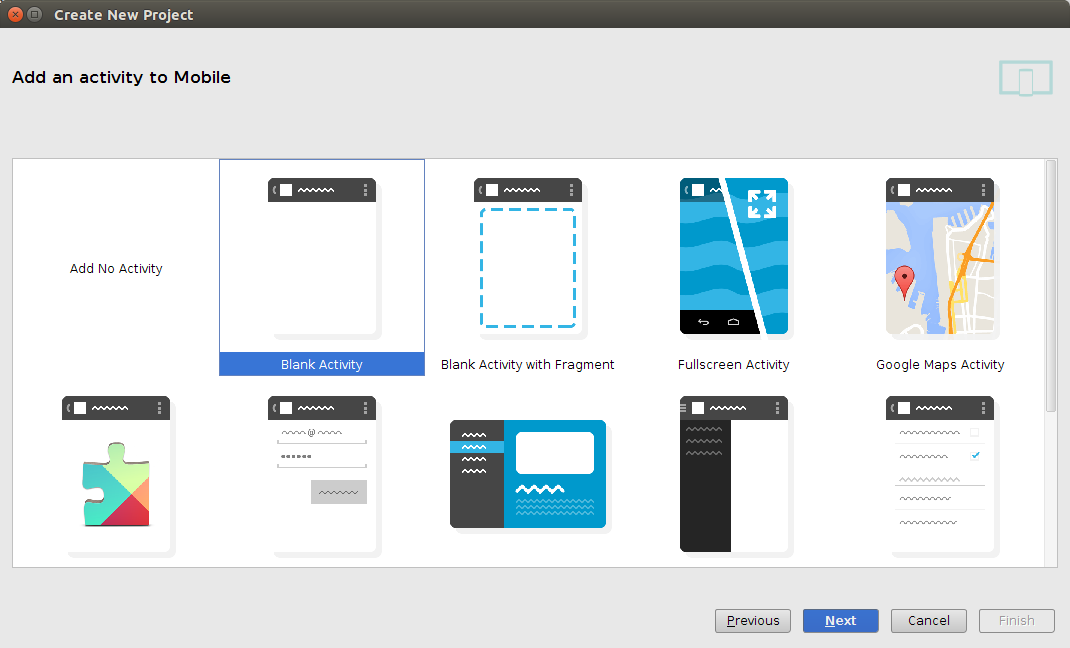
Assistant de création d'un nouveau projet : étape 3/4
Création d'un projet Android
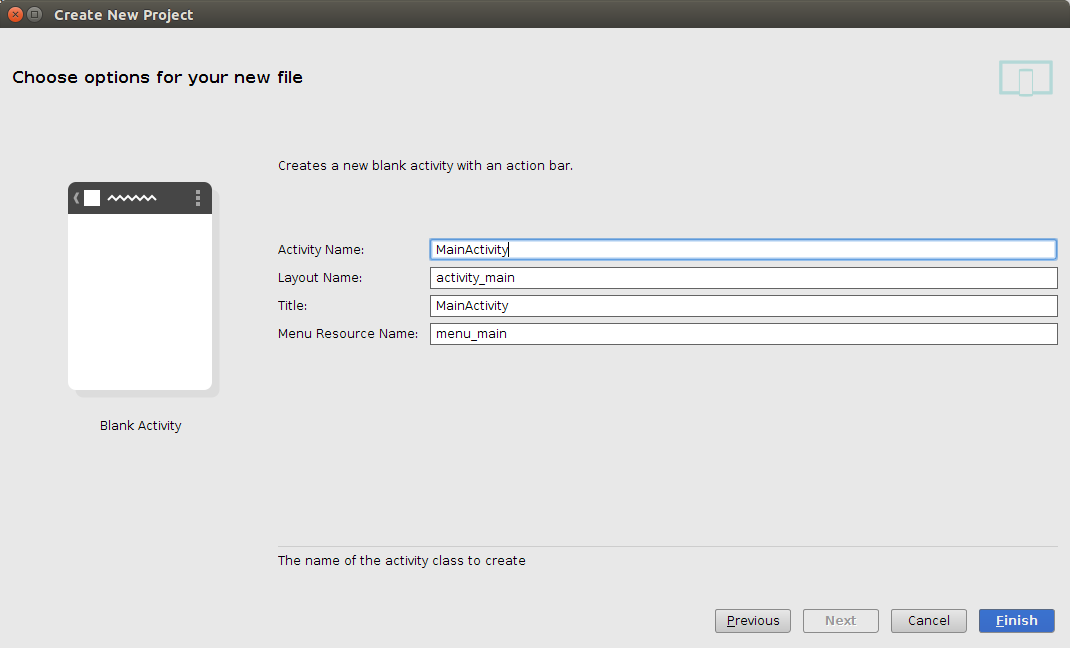
Assistant de création d'un nouveau projet : étape 4/4
Fenêtre principale
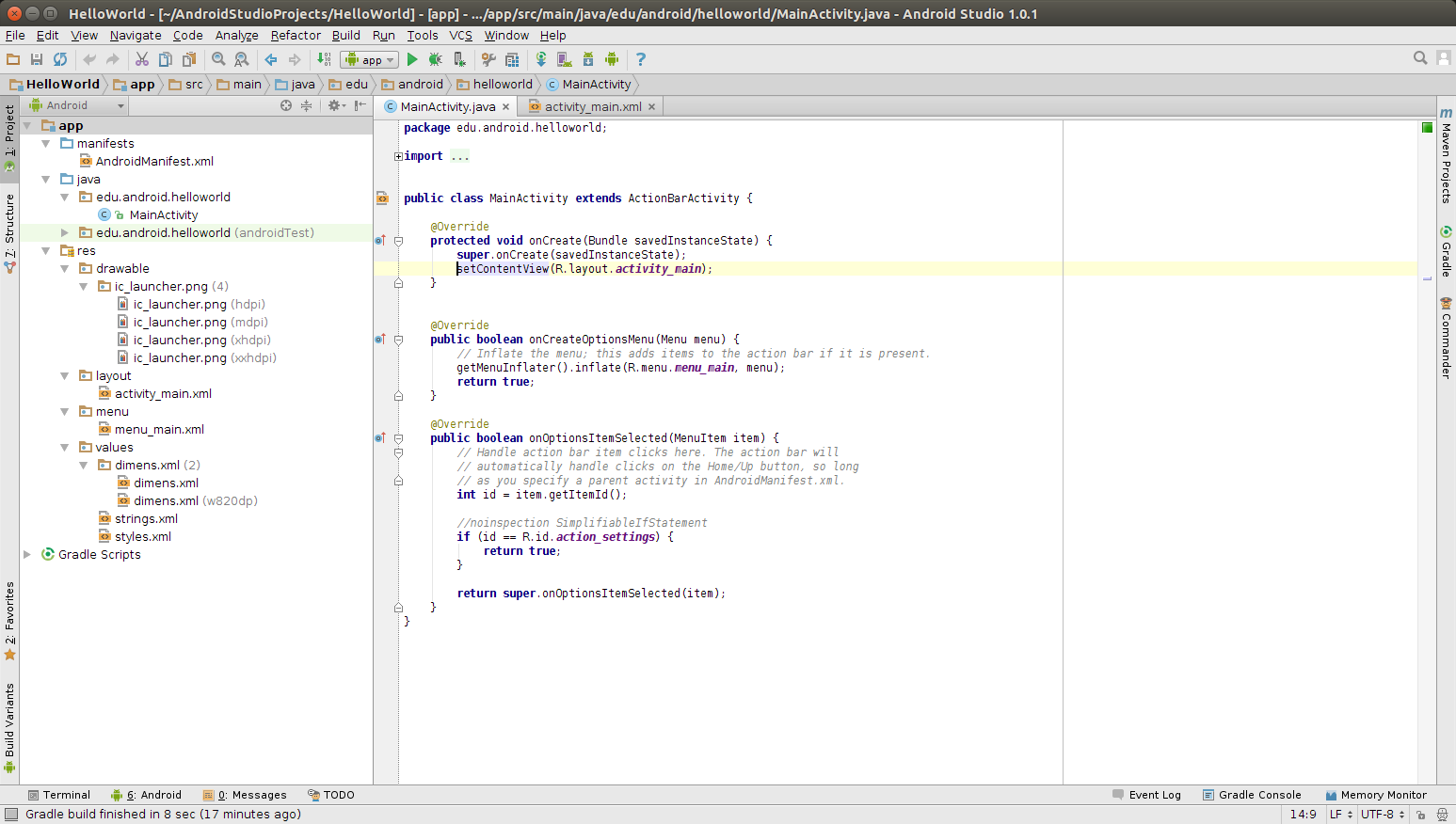
Fenêtre principale d'un nouveau projet Android Studio
A
B
C
D
E
F
Fenêtre principale
- A - Barre de menus
Contient des actions regroupées par menus thématiques - B - Barre d'outils
Contient des raccourcis vers des actions fréquentes - C - Barre de navigation
Permet de naviguer rapidement dans l'arborescence du projet - D - Fenêtre d'outil
Fenêtre affichant un outil par défaut une l'arborescence du projet - E - Fenêtre d'édition
Fenêtre affichant un éditeur adapté au fichier ouvert - F - Barre d'état
Affiche des informations sur le projet et les actions lancées
Création d'un appareil virtuel
- Un Android Virtual Device (AVD) est un émulateur d'appareil Android
- Le programme AVD Manager du SDK permet de gérer des appareils virtuels (AVDs)
- L'utilisation d'un AVD est un moyen rapide de tester une application développée
- L'AVD Manager peut être ouvert depuis Android Studio
- Menu Tools > sous-menu Android > bouton AVD Manager
- Raccourci dans la barre d'outils
- Cliquer sur Create Virtual Device pour démarrer l'assistant
- Ecran 1 : choisir l'appareil Nexus 5 dans la catégorie Phone
- Ecran 2 : choisir la version Kitkat 19 armeabi-v7a
- Ecran 3 : vérifier la configuration de l'AVD (ajuster la taille de la mémoire interne par exemple) et cliquer sur Finish

Création d'un appareil virtuel
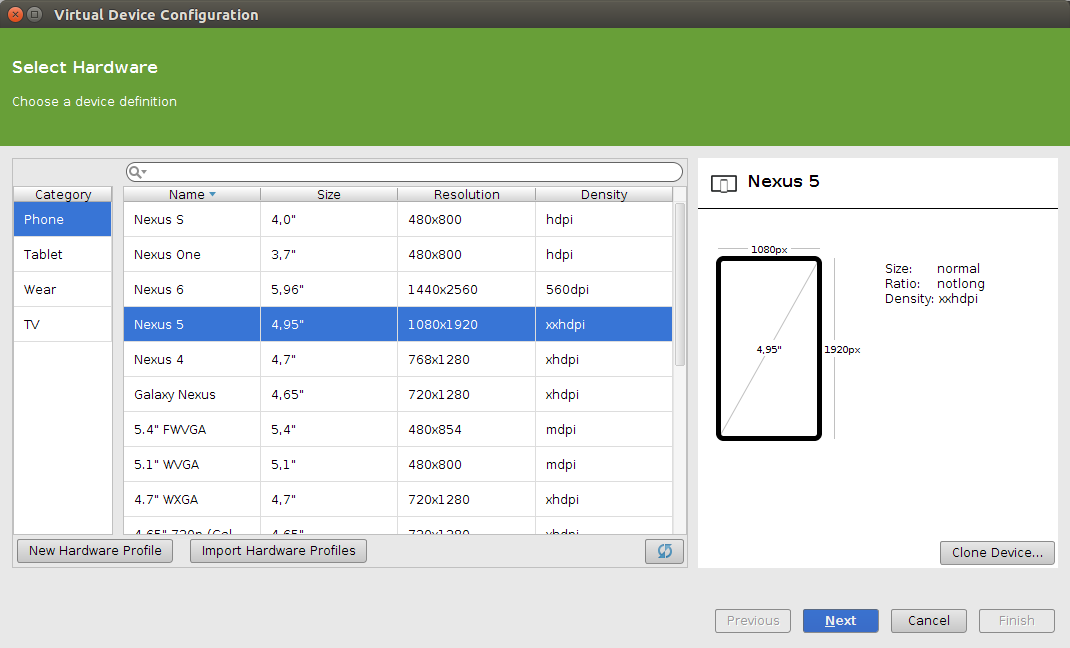
Assistant de création d'un AVD : étape 1/3
Création d'un appareil virtuel
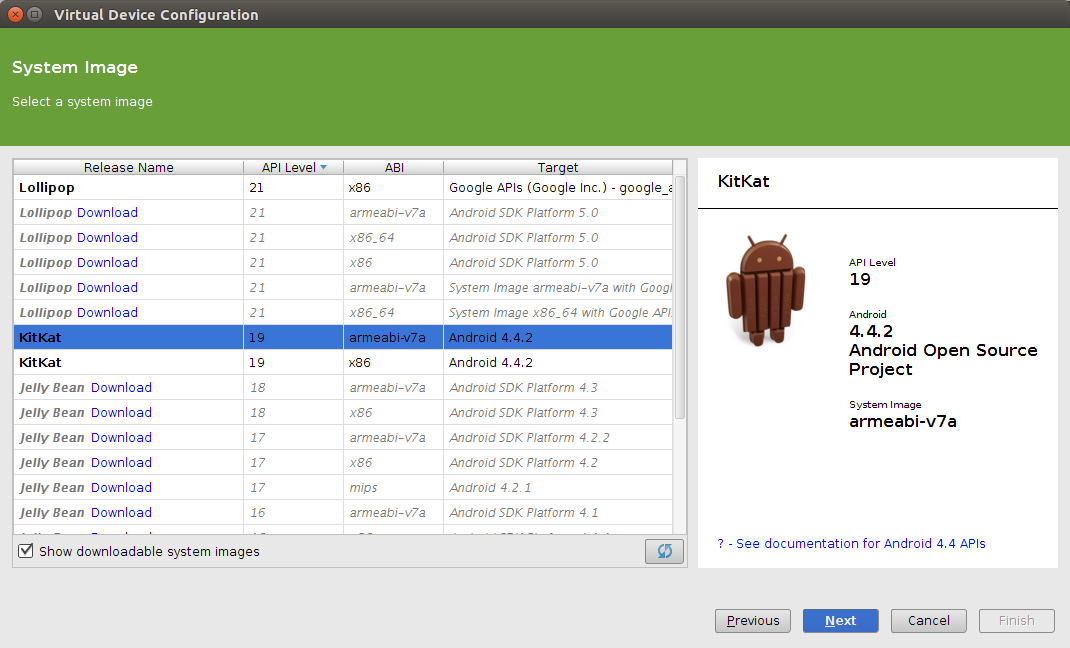
Assistant de création d'un AVD : étape 2/3
Création d'un appareil virtuel
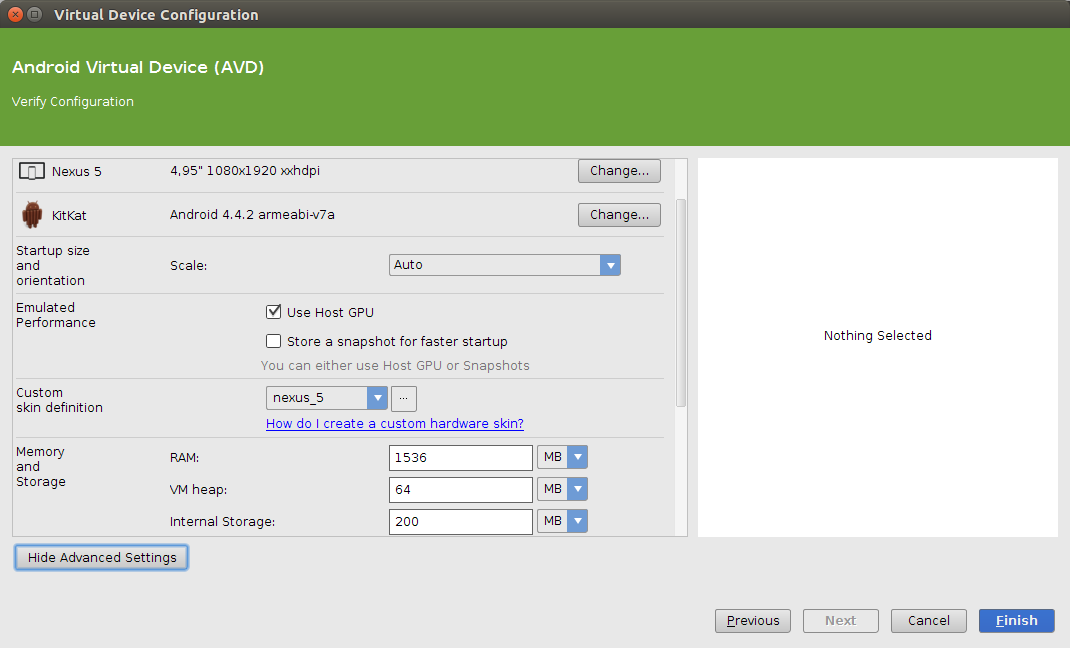
Assistant de création d'un AVD : étape 3/3
Execution de l'application
- Pour exécuter l'application développée
- Menu Run > bouton Run 'app' (ou Maj+F10)
- Raccourci la barre d'outils
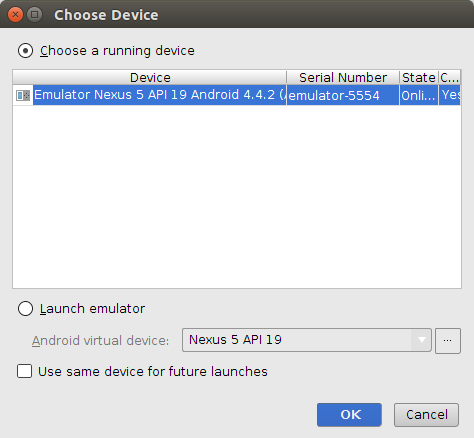
- Une fenêtre de sélection s'ouvre pour choisir l'AVD pour exécuter l'application
- Il est possible de choisir un émulateur déjà lancé
- Ou de choisir un émulateur à lancer
- Une case à cocher permet de mémoriser l'AVD utilisé pour l'exécution

Structure d'un projet
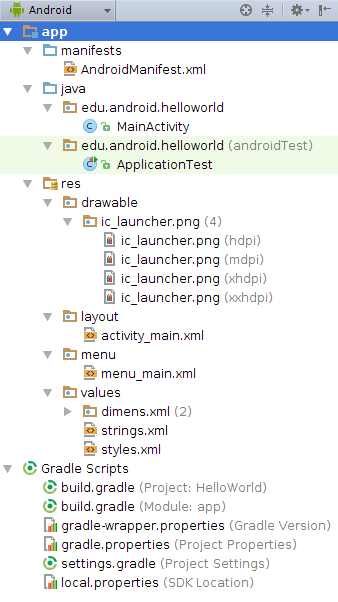
- manifests : manifeste de l'application
- java : code sources Java
-
res : ressources de l'application (identifiées par la classe spéciale R.java)
- drawable : dessins et images
- layout : définitions d'interfaces
- menu : définitions de menus
- raw : données brutes
- values : différentes variables
- Gradle Scripts : scripts utilisés par le moteur de production Gradle
AndroidManifeste.xml
- Configuration de l'application écrite en XML
- Un nom d'attribut commence toujours par le préfix android: (à quelques exceptions près)
- Informations non-exhaustives du manifeste :
- Nom de l'application : attribut package du tag manifest
- Version minimum du SDK : noeud uses-sdk du tag manifest
- Titre de l'application : attribut android:label du tag application
- Thème de l'application : attribut android:theme du tag application
- Composants de l'application : noeuds du tag application (activity, activity-alias, provider, receiver, service et uses-library)
- Fonctionnalités utilisées à l'application : noeuds uses-feature du tag manifest
- Permissions d'accès : noeuds uses-permission du tag manifest
AndroidManifeste.xml
<?xml version="1.0" encoding="utf-8"?>
<manifest xmlns:android="http://schemas.android.com/apk/res/android"
    package="edu.android.helloworld" >

    <uses-sdk
        android:minSdkVersion="19"
        android:targetSdkVersion="21" />

    <application
        android:allowBackup="true"
        android:icon="@drawable/ic_launcher"
        android:label="@string/app_name"
        android:theme="@style/AppTheme" >
        <activity
            android:name=".MainActivity"
            android:label="@string/app_name" >
            <intent-filter>
                <action android:name="android.intent.action.MAIN" />

                <category android:name="android.intent.category.LAUNCHER" />
            </intent-filter>
        </activity>
    </application>

</manifest>
Classe R.java
- Classe Java générée automatiquement par l'outil aapt du SDK
- R.java contient des constantes permettant d'identifier les ressources de l'application
- Le nom des constantes de R.java font référence à des fichiers du répertoire res
- Par exemple, R.drawable.ic_launcher fait référence au fichier res/drawable/ic_launcher.png
- Les chaînes de caractères du fichier res/values/strings.xml sont accessibles par R.strings.name
- Les descripteurs d'interfaces du répertoire res/layout/ sont accesibles par R.layout.name
- Les éléments graphiques ont un identifiant déclaré via l'attribut android:id sous la forme @+id/myId et accessible par R.id.myId
Classe R.java
package edu.android.helloworld;

public final class R {
    public static final class attr {
    }
    public static final class dimen {
        public static final int activity_horizontal_margin=0x7f070025;
        public static final int activity_vertical_margin=0x7f070026;
    }
    public static final class drawable {
        public static final int ic_launcher=0x7f020000;
    }
    public static final class id {
        public static final int title=0x7f080027;
    }
    public static final class layout {
        public static final int activity_main=0x7f030017;
        public static final int support_simple_spinner_dropdown_item=0x7f030018;
    }
    public static final class menu {
        public static final int menu_main=0x7f0c0000;
    }
    public static final class string {
        public static final int action_settings=0x7f0a0010;
        public static final int app_name=0x7f0a0011;
        public static final int hello_world=0x7f0a0012;
    }
}
Le composant Activity
- Une activité correspond à une seule classe Java héritant de la classe Activity (package android.app)
- Une activité gère la logique applicative ainsi que l'affichage et les interactions de l'écran
- Les intentions permettent de lancer d'autres activités
- Une activité a un cycle de vie déterminé
- Chaque étape du cycle de vie correspond à une méthode de la classe Activity
- Chaque activité doit pouvoir être utilisée de manière autonome
- Une activité peut en lancer une autre via la méthode startActivity() et lui passer des donner via un Intent
Le composant Activity
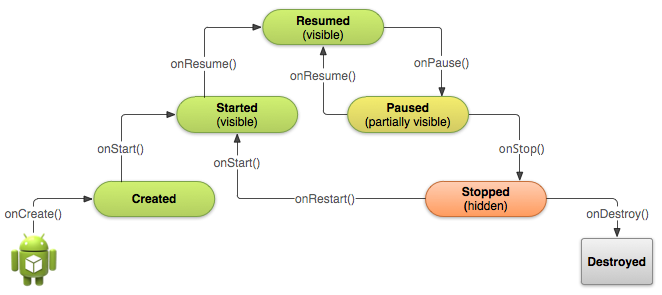
-
Created
L'activité est initialisée -
Started
L'activité démarre -
Resumed
L'activité est au premier plan
-
Paused
L'activité est en arrière plan -
Stopped
L'activité est arrêtée -
Destroyed
L'activité est détruitre
Exercice 1
Première interface graphique
Résultat
MainActivity
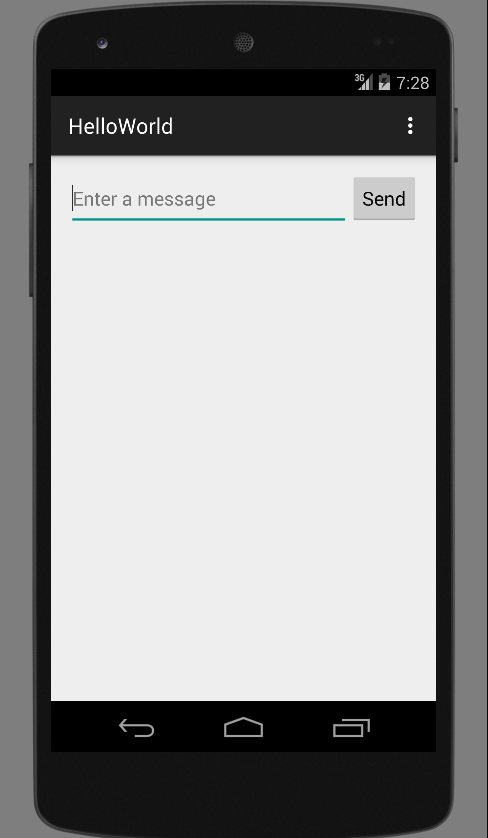
Consignes (1/2)
- L'objectif est de modifier le layout de l'activité principale pour afficher un champ de saisie et un bouton
- Nous allons commencer par éditer le layout de l'activité
- Ouvrir le fichier res/layout/activity_main.xml
- Remplacer le tag <RelativeLayout> par <LinearLayout>
- Supprimer le tag <TextView> affichant le texte Hello world!
-
Créer un champ de saisie : utiliser le tag <EditText>
- Ayant editTxt comme ID (attribut android:id)
- Ayant une taille adaptée au contenu (valeur wrap_content des attributs android:layout_with et android:layout_height)
- Ayant comme message par défaut la chaîne editMsg (valeur @string/editMsg de l'attribut android:hint)
- Créer un bouton affichant la chaîne sendBtn (attribut android:text) ayant une taille adaptée au contenu : utiliser le tag <Button>
Consignes (2/2)
- Il faut maintenant éditer le fichier strings.xml pour ajouter les nouvelles chaînes de caractères
- Ouvrir le fichier res/values/strings.xml
- Créer la chaîne editMsg avec comme valeur "Enter a message"
- Créer la chaîne sendBtn avec comme valeur "Send"
- Tester le résultat en exécutant l'application dans un appareil virtuel
Exercice 1
Correction
activity_main.xml
<LinearLayout xmlns:android="http://schemas.android.com/apk/res/android"
    xmlns:tools="http://schemas.android.com/tools"
    android:layout_width="match_parent"
    android:layout_height="match_parent"
    android:paddingLeft="@dimen/activity_horizontal_margin"
    android:paddingRight="@dimen/activity_horizontal_margin"
    android:paddingTop="@dimen/activity_vertical_margin"
    android:paddingBottom="@dimen/activity_vertical_margin"
    tools:context=".MainActivity">

    <EditText android:id="@+id/editTxt"
        android:hint="@string/editMsg"
        android:layout_height="wrap_content"
        android:layout_weight="1"
        android:layout_width="0dp" />

    <Button
        android:layout_height="wrap_content"
        android:layout_width="wrap_content"
        android:text="@string/button_send" />

</LinearLayout>
strings.xml
<?xml version="1.0" encoding="utf-8"?>
<resources>

    <string name="app_name">HelloWorld</string>
    <string name="hello_world">Hello world!</string>
    <string name="action_settings">Settings</string>
    <string name="editMsg">Enter a message</string>
    <string name="sendBtn">Send</string>

</resources>
Exercice 2
Démarrer une autre activité
Résultat
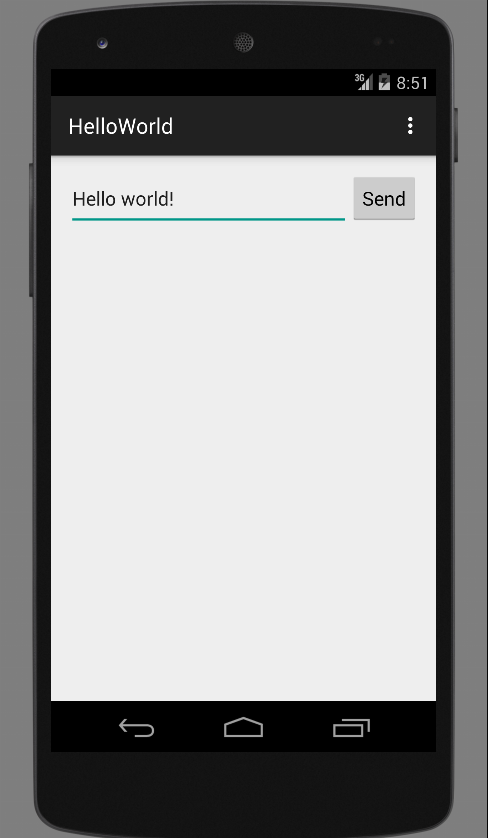
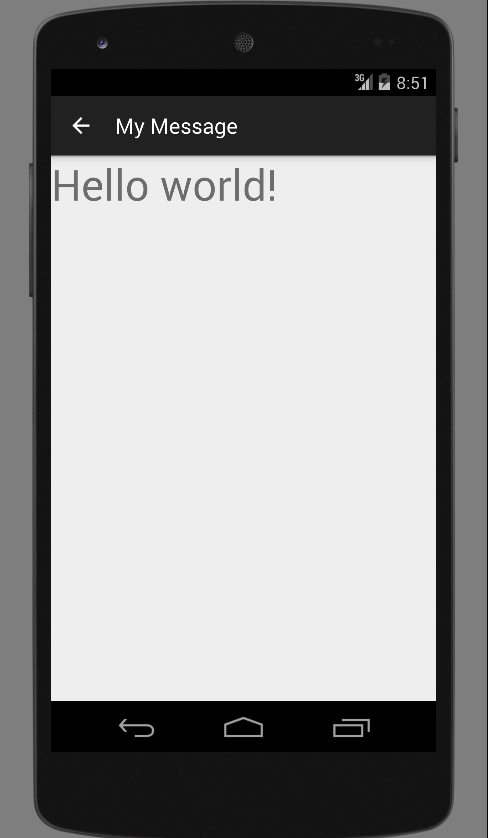
MainActivity
DisplayMessageActivity
Consignes (1/3)
- L'objectif est de créer une activité pour afficher le message saisie lorsque l'utilisateur clique sur le bouton Send
- Nous allons commencer par associer une méthode traitant le clique de l'utilisateur sur le bouton
- Ouvrir le fichier res/layout/activity_main.xml
- Ajouter l'attribut android:onClick au tag Button pour déclencher la méthode sendMessage de l'activité
- Ensuite il nous faut créer la méthode sendMessage()
- Ouvrir la classe MainActivity (package edu.android.helloworld)
- Ajouter le code de la méthode sendMessage()
/** Called when the user clicks the Send button */
public void sendMessage(View view) {
    Intent intent = new Intent(this, DisplayMessageActivity.class);
    EditText editText = (EditText) findViewById(R.id.editTxt);
    String message = editText.getText().toString();
    intent.putExtra("edu.android.helloworld.MESSAGE", message);
    startActivity(intent);
}
Consignes (2/3)
- Créer la classe DisplayMessageActivity
package edu.android.helloworld;

import android.content.Intent;
import android.os.Bundle;
import android.support.v7.app.ActionBarActivity;
import android.view.MenuItem;
import android.widget.TextView;

public class DisplayMessageActivity extends ActionBarActivity {
    @Override
    protected void onCreate(Bundle savedInstanceState) {
        super.onCreate(savedInstanceState);

        //TODO

    }
    @Override
    public boolean onOptionsItemSelected(MenuItem item) {
        // Handle action bar item clicks here. The action bar will
        // automatically handle clicks on the Home/Up button, so long
        // as you specify a parent activity in AndroidManifest.xml.
        int id = item.getItemId();
        if (id == R.id.action_settings) {
            return true;
        }
        return super.onOptionsItemSelected(item);
    }
}- Déclarer la nouvelle activité dans le manifeste de l'application
<application ... >
    ...
    <activity
        android:name="edu.android.helloworld.DisplayMessageActivity"
        android:label="@string/title_activity_display_message"
        android:parentActivityName="edu.android.helloworld.MainActivity" >
        <meta-data
            android:name="android.support.PARENT_ACTIVITY"
            android:value="edu.android.helloworld.MainActivity" />
    </activity>

</application>- Déclarer la nouvelle chaîne title_activity_display_message
<resources>...
    <string name="title_activity_display_message">My Message</string>
</resources>
Consignes (3/3)
- Compléter le code de la méthode onCreate()
-
Récupérer le message saisie transmis par une intention
- Utiliser la méthode getIntent() pour récupérer l'intention
- Utiliser la méthode getStringExtra() de l'intention pour récupérer le message envoyé par l'activité principale
-
Créer une zone de texte
- Utiliser la classe TextView (package android.widget) avec l'activité courante en paramètre constructeur
- Utiliser la méthode setTextSize() pour définir une longueur de 40
- Utiliser setText() pour afficher le message envoyé par l'activité principale
- Utiliser la méthode setContentView() pour définir la zone de texte créée comme le layout de l'activité courante
-
Récupérer le message saisie transmis par une intention
- Astuce pour résoudre un problème de code (indiqué en rouge) : placer le curseur sur un problème et appuyer sur Alt+Entrée
Exercice 2
Correction
DisplayMessageActivity.java
    @Override
    protected void onCreate(Bundle savedInstanceState) {
        super.onCreate(savedInstanceState);

        // Get the message from the intent
        Intent intent = getIntent();
        String message = intent.getStringExtra("edu.android.helloworld.MESSAGE");

        // Create the text view
        TextView textView = new TextView(this);
        textView.setTextSize(40);
        textView.setText(message);

        // Set the text view as the activity layout
        setContentView(textView);
    }