Angular 2

Jmadih



@Jmadih
@JaafarMADIH
Jaafar MADIH
Sommaire
-
Angular 1 (Rappel)
-
Angular 2 (Une maj ?)
-
Live Demo
- La migration du ng1 au ng2*
Bonus :
* si on a le temps
ngular 1.x
Text


Misko Hevery et Adam Abronsw
- Première version sortie le 30 juin 2011
- Aujourd'hui elle est en 1.5.x
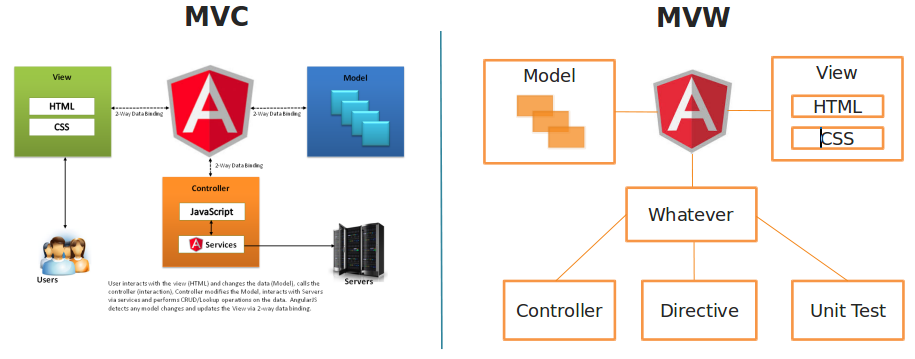
ngular 1.x architecture
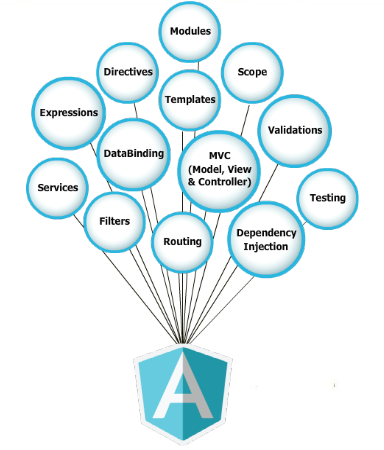
ngular 1.x features
ngular 1.x KO
- Performance
- Dirty checking !
- Pas de rendering coté serveur
- Syntaxe parfois compliqué

Il fallait que ça change !
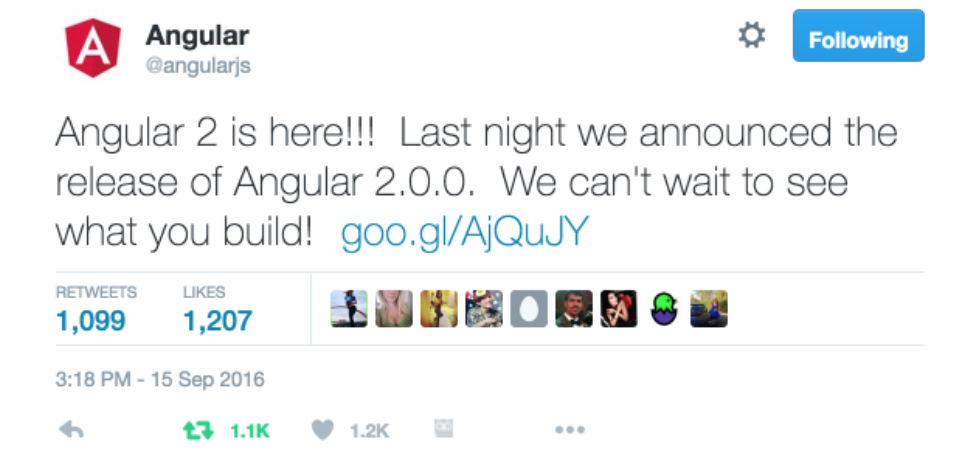
L'annonce de la release Angular 2 le 15/09/2016

En collaboration




Performance
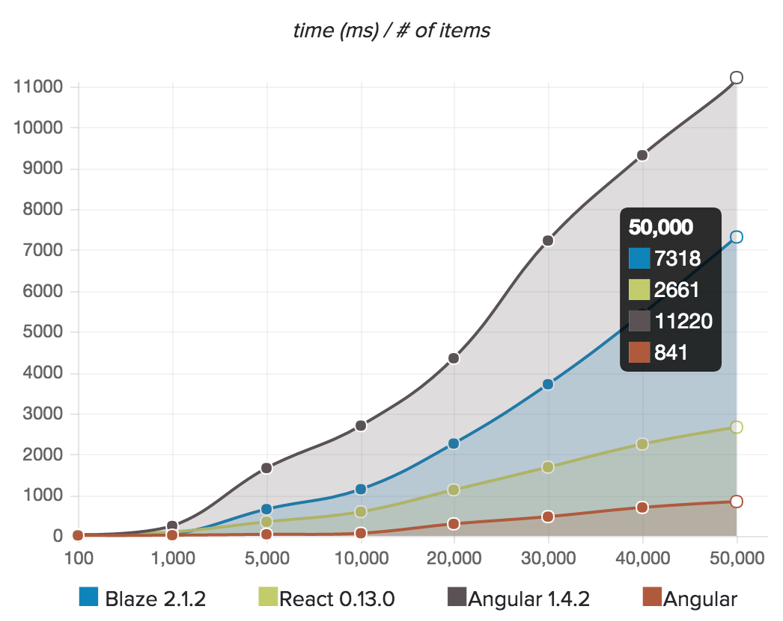
http://rafaelaudy.github.io/angular-1-and-2-state/
“Today, Angular2 is 5x faster than Angular 1”
Misko, 02/10/15
Perspectives
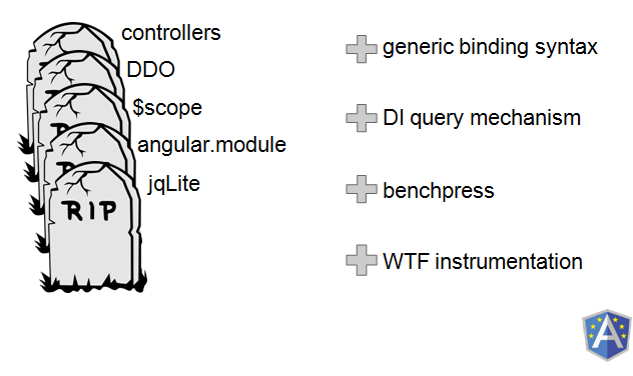
Les objectifs de ce reboot
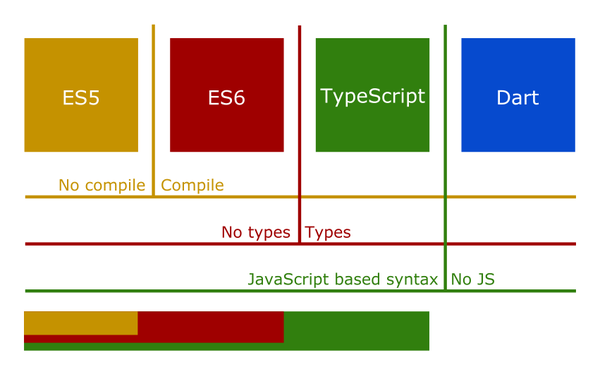
- Nouveaux langages : ES5, ES6, Typscript, Dart
- Performance
- Simplicité
- Mobile first
- Web Components
- Universalité
Text
http://www.typescriptlang.org/docs/
ES5
ES2015
ES2016
ES+
TS
Text
Architecture globale
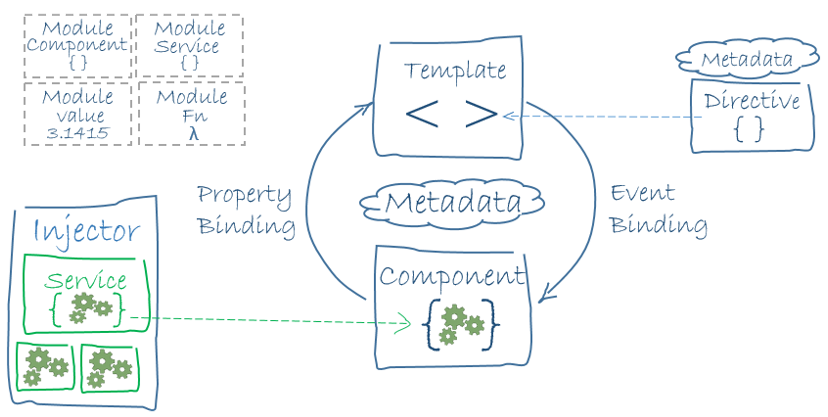
Une application est un arbre de modules et de composants
Un arbre de modules
AppModule
CoreModule
SharedModule
FeaturesModule
Un module
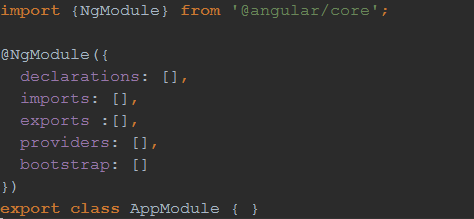
Une classe avec un décorateur @NgModule
Avec des paramètres :
declarations, imports , exports, providers, bootstrap
Un module est un arbre de composants
AppComponent
HeaderComponent
FooterComponent
WComponent
ToolBarComponent
BannerComponent
AppComponent
Un composant
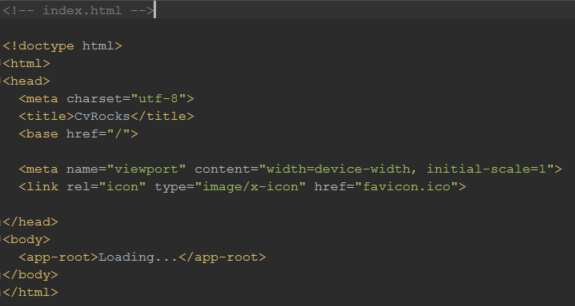
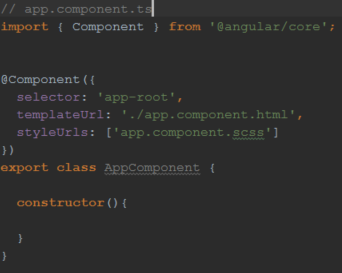
Notion introduite dès Angular 1.5 !
You can visit https://codepen.io/Jmadih/pen/dXXEbo
Un composant
a un cycle de vie
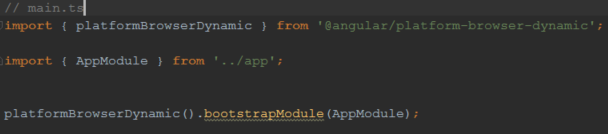
Bootstrapping
Un composant
a un cycle de vie
Initializing, destroying ...
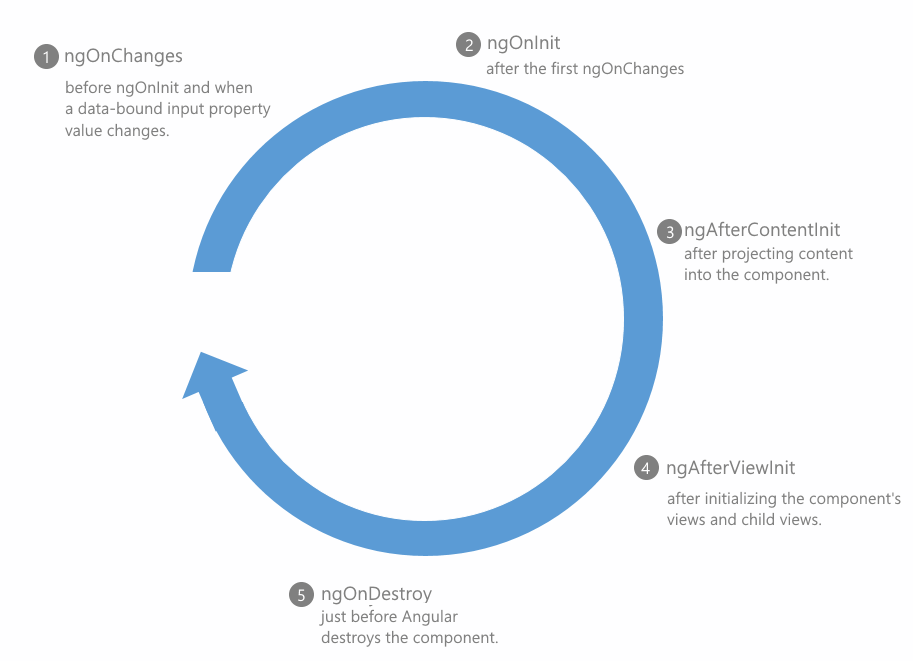
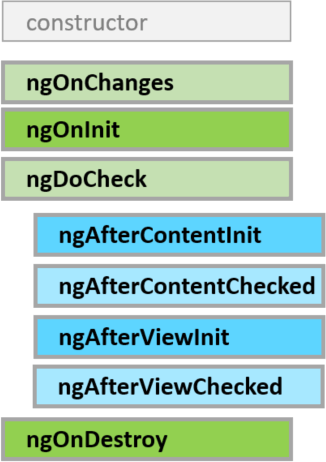
Un composant
a un cycle de vie
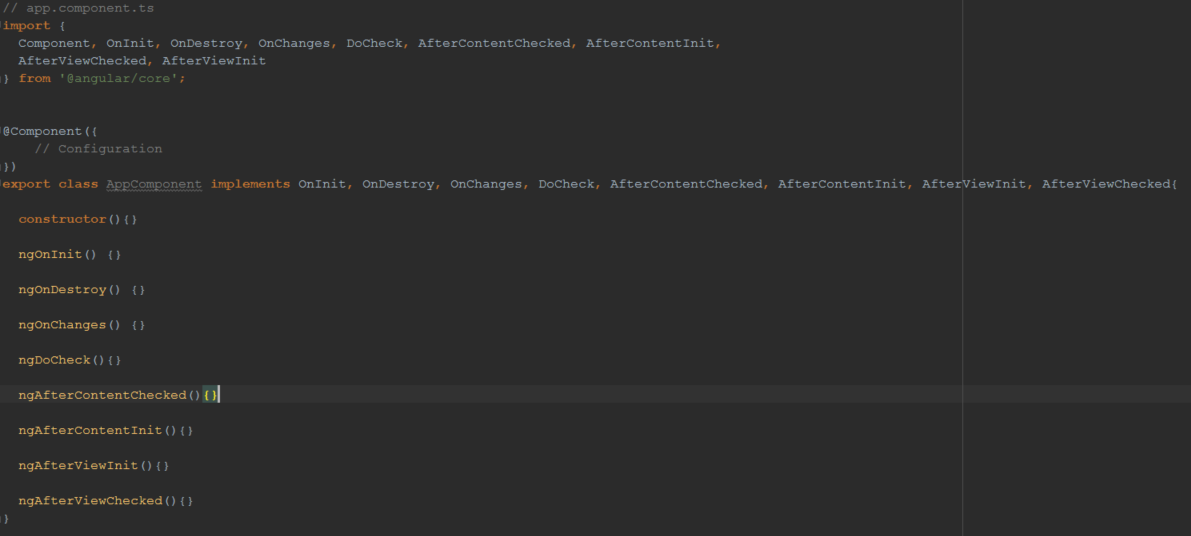
Initializing, destroying ...
Chaque composant a son
template
Un template
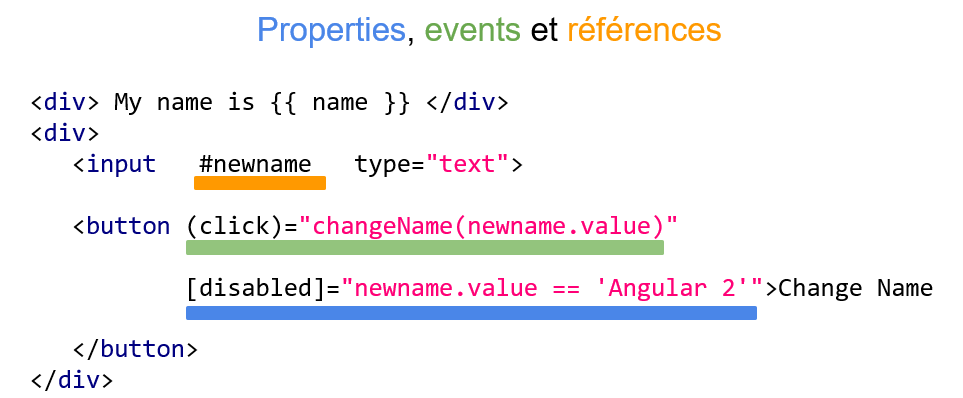
Un template :
3 catégories de bindings
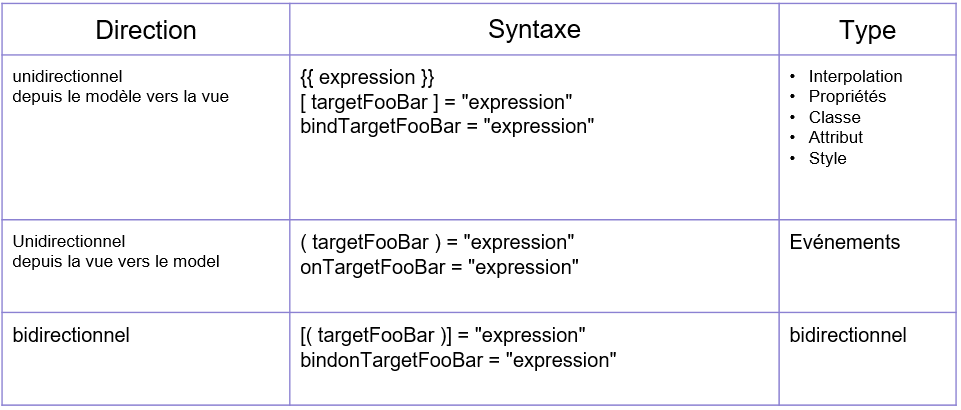
Un template :
3 catégories de bindings
<-- Interpolation --!>

<-- Angular 1 --!>
<h1>{{vm.employee.name}}</h1>

<-- Angular 2 --!>
<h1>{{employee.name}}</h1>


<-- One way binding property --!>

<-- Angular 1 --!>
<h1 ng-bind="vm.employee.name"></h1>

<-- Angular 2 --!>
<h1 [innerText]="employee.name"></h1>
<span [style.backgroundColor]="employee.favouriteColor"></span>
Exemples
<-- Two way binding property --!>

<-- Angular 1 --!>
<input ng-model="vm.employee.name"/>

<-- Angular 2 --!>
<input [(ngModel)]="employee.name"/>
<-- Event binding--!>

<-- Angular 1 --!>
<button ng-click="vm.sendForm()">Send</h1>


<-- Angular 2 --!>
<button (click)="sendForm()">Send</h1>
Un template :
3 catégories de bindings
Exemples
Aperçu
attributs vs propriétés
- Les attributs c'est du HTML, les propriétés c'est du DOM
- Les attributs servent à initialiser les propriétés mais pas vice versa !
- Propriété sans attribut : (textContent)
- Attribut sans propriété : (colspan)
Aperçu
attributs vs propriétés
<input type="text" value="foo"> <!-- attributs value et type -->

Le navigateur interprète cette balise et crée un objet node en mémoire :

input:
  ...
  value: "foo" // <-- propriétés value et type
  type: "text"
  ...
Aperçu
attributs vs propriétés
Pas d'attributs, on est que sur des propriétés (des éléments, composants ou directives)
<button  [disabled]="true" >Click</button>

//EQUIVALENT

<button disabled>Click</button>
Aperçu
attributs vs propriétés
Et si on veut cibler un attribut ?
Utiliser:
- - attr
- - class
- - style
<td [attr.colspan]="5*5">cell</td>

<div [class.isSpecial]="isSpecial">Special class</div>

<div [style.color]="isSpecial ? 'red' : 'green'">Special class</div>
Event binding
3 catégories
//Element event
<button (click)="onSave()"></button>

//Component event
<hero-detail (deleted)="onDeleted($event)">

//Directive event
<input (change)="firstName = $event" />
On passe la référence de l'événement grâce à $event
Directives
Directives
3 types :
- -Structurel
- -Attribut
- -Composant
Directives structurels
Modifie le DOM en ajoutant ou en supprimant des éléments.
<div *ngIf="sopra">{{sopra}}</div>
<div *ngFor="let soprasien of soprasiens">{{soprasien}}</div>
<div [ngSwitch]="status">
  <template [ngSwitchCase]="'in-mission'">In Mission</template>
  <template [ngSwitchCase]="'ready'">Ready</template>
  <template ngSwitchDefault>Unknown</template>
</div>
Directives structurels
<!-- *ngIf -->

<div *ngIf="sopra">{{sopra}}</div>
<!-- Equivalent à ça -->
<template [ngIf]="sopra" >
    <div>{{sopra}}</div>
</template>

<!-- *ngFor-->

<div *ngFor"let collab of sopra.collabs;trackBy:custumTrackBy">
    {{collab}}
</div>
<!-- Equivalent à ça -->
<template ngFor [ngForOf]="sopra.collabs" [ngTrackBy]="custumTrackBy">
    <div>{{sopra}}</div>
</template>
Modifie le DOM en ajoutant ou en supprimant des éléments.
Directives d'attributs
Change l'apparence ou le comportement d'un élement
<div [style.width.px]="size"></div>

<td [attr.colspan]="5*5">cell</td>

<div [class.isSpecial]="isSpecial">Special class</div>

<div [style.color]="isSpecial ? 'red' : 'green'">Special class</div>
Directives d'attributs
//superSkill.directive.ts

import {Directive, ElementRef, Renderer} from '@angular/core';

@Directive({
    selector: 'superSkill'
})
export class SuperSkillDirective {

    @Input() score;

    constructor(el: ElementRef, renderer: Renderer) {
        if(score > 90){
          renderer.setElementStyle(el.nativeElement, 'background', 'red');
        }
    }
}

//skill.component.html

<div superSkill [score]="skill._score">Super Skill</div>
CUSTUM
Directives d'attributs
Ne toucher pas le DOM directement
this._element.nativeElement.style.color = 'orange';
this._element.nativeElement.innerHTML = ':/';
this._renderer.setElementStyle(this.element.nativeElement, 'color', '#0f0');

this._renderer.setElementProperty(
        this.element.nativeElement, 'innerHTML', ':)'
);
Directives de composant
Juste une directive avec un template
<app-component>
  Hello world...
</app-component>
Pipes
Ou comment formater les données dans les composants
Pipes
filter
@Pipe()
app.filter('myFilter', function() {

  return function(input, optional1, optional2) {

    var output;

    // Do filter work here

    return output;

  }

});
import {Pipe,
PipeTransform} from '@angular/core';
@Pipe({
name: 'mypipe'
})
export class MyPipe implements PipeTransform{
transform(value: number, args: any[]) {
return newValue;
}
}
Pipes
Les pipes peuvent être asynchrone !
- Accepte une promesse ou un observable en entrée
- La mise à jour de la vue se fait après la résolution de la promesse ou que l'observable émet une nouvelle valeur.
Les composants sont
routables
Routes
import {ModuleWithProviders} from '@angular/core';
import { Routes, RouterModule } from '@angular/router';
import {IntroductionComponent} from "./introduction/introduction.component";
import {SkillsComponent} from "./skills/skills.component";
import {AboutComponent} from "./about/about.component";

const routes: Routes = [
  {path: '', redirectTo: 'introduction', pathMatch: 'full'},
  {path : 'introduction', component: IntroductionComponent},
  {path : 'skills', component: SkillsComponent },
  {path : 'about',  component : AboutComponent},
  {path : '**', component: IntroductionComponent}
];

export const AppRouting: ModuleWithProviders = RouterModule.forRoot(routes, {useHash: true});
Configuration
Routes
import {ModuleWithProviders} from '@angular/core';
import { Routes, RouterModule } from '@angular/router';
import {IntroductionComponent} from "./introduction/introduction.component";
import {SkillsComponent} from "./skills/skills.component";
import {SkillsResolve} from "./skills/skills.resolve";
import {AboutComponent} from "./about/about.component";

const routes: Routes = [
  {path: '', redirectTo: 'introduction', pathMatch: 'full'},
  {path : 'introduction', component: IntroductionComponent},
  {path : 'skills', component: SkillsComponent, resolve: {skills: SkillsResolve} },
  {path : 'about',  component : AboutComponent},
  {path : '**', component: IntroductionComponent}
];

export const AppRouting: ModuleWithProviders = RouterModule.forRoot(routes, {useHash: true});
Utilisation d'un resolver
Routes
import {ModuleWithProviders} from '@angular/core';
import { Routes, RouterModule } from '@angular/router';
import {IntroductionComponent} from "./introduction/introduction.component";
import {SkillsComponent} from "./skills/skills.component";
import {SkillsResolve} from "./skills/skills.resolve";
import {AboutComponent} from "./about/about.component";

const routes: Routes = [
  {path: '', redirectTo: 'introduction', pathMatch: 'full'},
  {path : 'introduction', component: IntroductionComponent},
  {path : 'skills',
   component: SkillsComponent,
   resolve: {skills: SkillsResolve},
   canActivate : ['CanAlwaysActivateGuard']},
  {path : 'about',  component : AboutComponent},
  {path : '**', component: IntroductionComponent}
];

export const AppRouting: ModuleWithProviders = RouterModule.forRoot(routes, {useHash: true});
Protection des routes en utilisant les Guards
Routes
import {ModuleWithProviders} from '@angular/core';
import { Routes, RouterModule } from '@angular/router';
import {IntroductionComponent} from "./introduction/introduction.component";
import {SkillsComponent} from "./skills/skills.component";
import {SkillsResolve} from "./skills/skills.resolve";

const routes: Routes = [
  {path: '', redirectTo: 'introduction', pathMatch: 'full'},
  {path : 'introduction', component: IntroductionComponent},
  {path : 'skills',
    component: SkillsComponent,
    resolve: {skills: SkillsResolve},
    canActivate : ['CanAlwaysActivateGuard']},
  {path : 'about',  loadChildren : 'app/about/about.module#AboutCompnent'},
  {path : '**', component: IntroductionComponent}
];

export const AppRouting: ModuleWithProviders = RouterModule.forRoot(routes, {useHash: true});
Lazy loading
Routes
Configuration complète
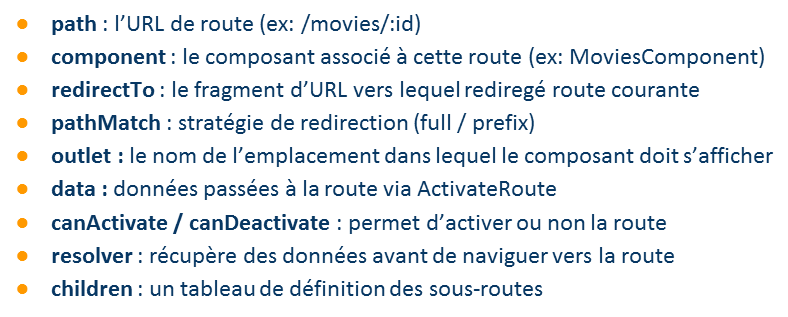
Routes
Template
<!--app.component.html-->
<header>
  <app-menubar></app-menubar>
</header>
<body>
<router-outlet></router-outlet>
</body>
<footer>
  <app-footer></app-footer>
</footer>
<!-- menubar.component.html-->
<md-card class="banner">
<button class="btn" routerLink="/introduction" md-button>Home</button>
<button class="btn" md-raised-button routerLink="/skills" color="primary">Skills </button>
<button class="btn" md-raised-button routerLink="/about" color="primary">About </button>
</md-card>
Les composants ont des
States
State management
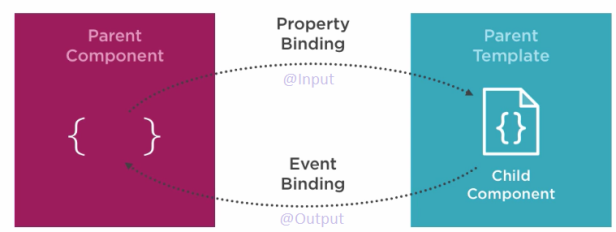
State management
import {Component, Output, Input, EventEmitter, AfterViewInit} from '@angular/core';

@Component({
  selector: 'app-skill-form',
  templateUrl: './form.component.html',
  styleUrls: ['form.component.scss']
})
export class SkillsFormComponent implements AfterViewInit {

  @Input() model: any = {};

  @Output() submit$;

  constructor() {
    this.submit$ = new EventEmitter();
  }

  ngAfterViewInit() {
    console.log(this.model);
  }

  submit(model){
    this.submit$.emit(model);
  }

}
State management
<!-- skills.component.html -->
<div class="parentCards">
  <div class="cards">
    <br>
    <img class="skicon" src="/assets/images/skills.jpg" />
    <br>
    <br>
    <div *ngFor="let skill of skills">
      <md-card>
        <md-card-actions>
          <button md-button (click)="edit(skill)" color="primary">EDIT</button>
        </md-card-actions>
      </md-card>
      <br/>
    </div>
  </div>
</div>

<section class="dialog-modal" [ngClass]="{ 'active': dialogStatus == 'active' }">
  <app-skill-form [model]="model" (submit$)="save($event)"></app-skill-form>
</section>
Services
Services
import { Injectable } from '@angular/core';
import {Http} from "@angular/http";
import {BASE_URL} from "../shared/constants";
import {Skills} from "./skills";

@Injectable()
export class SkillsService {

  constructor(private _http: Http) { }

  get(){
    return this._http.get(`${BASE_URL}/api/skills`)
      .map( res => res.json() );
  }

  update(skill : any){
    return this._http.put(`${BASE_URL}/api/skills/${skill._id}`, skill)
      .map( res => res.json() );
  }
}
Services
Local :
@NgModule({
  ...
  providers: [
    SkillsService
  ],
  bootstrap: [AppComponent]
})
export class AppModule { }
Global :
(root injector)
Accessible par tous les composants sous le module
@Component({
  selector: 'app-skills',
  templateUrl: './skills.component.html',
  styleUrls: ['./skills.component.scss'],
  provider : [SkillsService]
})
export class SkillsComponent implements OnInit {

  constructor(private _service : SkillsService) { }

}
Accessible que dans ce composant et ces enfants
Services
Configuration des providers :
  // Values
  { provide: 'CanAlwaysActivateGuard',
      useValue: () => {
        return true;
      }
   }

  // Alias
  { provide: SkillsService, useClass : SkillsClass}
  { provide: MockedData, useExisting : SkillsService}


  // Factory
  { provide: SkillsService,
    useFactory : SkillsServiceFactory,
    deps: [Logger, UserService]
  }

 //skills.service.provider.ts

  let SkillsServiceFactory= (logger: Logger, userService: UserService) => {
      return new SkillsService(logger, userService.user.isAuthorized);
  };
Formulaires
2 types :
Template Driven Forms
Model Driven Forms
Template Driven Forms
// app.module.ts

import { NgModule }      from '@angular/core';
import { BrowserModule } from '@angular/platform-browser';
import { FormsModule } from '@angular/forms';

import { AppComponent }   from './app.component';

@NgModule({
  imports:      [ BrowserModule, FormsModule ], // import forms module here
  declarations: [ AppComponent ],
  bootstrap:    [ AppComponent ]
})

export class AppModule { }
Déclaration
Template Driven Forms
// form.component.ts

import {Component} from '@angular/core';
import {Skill} from "../skills";

@Component({
  selector: 'app-skill-form',
  templateUrl: './form.component.html',
  styleUrls: ['form.component.scss']
})
export class SkillsFormComponent implements OnInit {
  skill: Skill = {};

  ngOnInit(){
   this.skill= {
    img: '',
    title: '';
    score: 0;
   };
  }

  save(value, valid){
  console.log(value,valid);
 }

}
Syntaxes
Template Driven Forms
// form.component.html

<div>
    <h1>Add skill</h1>
    <form #f="ngForm" (ngSubmit)="save(f.value, f.valid)" novalidate>
       <div>
        <label>Image</label>
            <input type="text"
                name="img" [(ngModel)]="skill.img"
                #img="ngModel" required>
        </div>
       <div>
        <label>title</label>
            <input type="text"
                name="title" [(ngModel)]="skill.title"
                #title="ngModel" required>
        </div>
       <div>
       <label>score</label>
            <input type="number"
                name="title" [(ngModel)]="skill.score"
                #score="ngModel" required>
        </div>
      <button type="submit">Submit</button>
    </form>
</div>
Syntaxes
Template Driven Forms
Les états d'un contrôle
● control.pristine : l’utilisateur n’a pas interagit avec le contrôle
● control.dirty : l’utilisateur a déjà interagit avec le contrôle
● control.valid : le contrôle est valide
● control.invalid : le contrôle n’est pas valide
● control.touched : le contrôle a perdu le focus
● control.untouched : le contrôle n’a pas encore perdu le focus
Click
Pour + d'infos :
Template Driven Forms
Model Driven Forms
// app.module.ts

import { NgModule }      from '@angular/core';
import { BrowserModule } from '@angular/platform-browser';
import { ReactiveFormsModule } from '@angular/forms';

import { AppComponent }   from './app.component';

@NgModule({
  imports:      [ BrowserModule, ReactiveFormsModule], // import forms module here
  declarations: [ AppComponent ],
  bootstrap:    [ AppComponent ]
})

export class AppModule { }
Model Driven Forms
Déclaration
Model Driven Forms
Syntaxe
<md-card class="md-whiteframe-2dp">

    <md-card-content>
        <form novalidate [formGroup]="form">
            <table>
                <tr>
                    <div [class.errors]="form.controls._title.errors">
                        <md-input placeholder="Title" formControlName="_title" minlength="2"
                        required name="_title" ></md-input>
                        <span *ngIf="form.controls._title.errors?.minlength"><br>Title is 2 chars min</span>
                    </div>
                </tr>
            </table>
        </form>
    </md-card-content>
    <md-card-actions align="end">
        <button md-button type="button" (click)="cancel()">Cancel</button>
        <button md-button color="primary" type="submit" (click)="submit(form.value)"
             [disabled]="!form.valid">Save</button>
    </md-card-actions>
</md-card>
<md-card class="md-whiteframe-2dp">

    <md-card-content>
        <form novalidate [formGroup]="form">
            <table>
             <tr>
              <div [class.errors]="form.controls._title.errors">
              <md-input placeholder="Title" formControlName="_title">
              </md-input>
              <span *ngIf="!form.controls['_title'].valid"><br>Title is 2 chars min</span>
              </div>
              </tr>
            </table>
        </form>
    </md-card-content>
    <md-card-actions align="end">
        <button md-button type="button" (click)="cancel()">Cancel</button>
        <button md-button color="primary" type="submit" (click)="submit(form.value)"
             [disabled]="!form.valid">Save</button>
    </md-card-actions>
</md-card>
Model Driven Forms
Syntaxe
<md-card class="md-whiteframe-2dp">

    <md-card-content>
        <form novalidate [formGroup]="form">
            <table>
                <tr>
                    <div [class.errors]="form.controls._title.errors">
                        <md-input placeholder="Title" formControlName="_title" minlength="2"
                        required name="_title" ></md-input>
                        <span *ngIf="form.controls._title.errors?.minlength"><br>Title is 2 chars min</span>
                    </div>
                </tr>
            </table>
        </form>
    </md-card-content>
    <md-card-actions align="end">
        <button md-button type="button" (click)="cancel()">Cancel</button>
        <button md-button color="primary" type="submit" (click)="submit(form.value)"
             [disabled]="!form.valid">Save</button>
    </md-card-actions>
</md-card>
import {Component, OnInit} from '@angular/core';
import {Mode} from "../../shared/mode.enum";
import {FormGroup, FormControl} from "@angular/forms";

@Component({
  selector: 'app-skill-form',
  templateUrl: './form.component.html',
  styleUrls: ['form.component.scss']
})
export class SkillsFormComponent implements OnInit {


 constructor() {
    this.form = this._buildForm();
  }

 private _buildForm() {
    return new FormGroup({
      _img: new FormControl('', Validators.compose([Validators.required])),
      _title : new FormControl('', Validators.compose([Validators.required, Validators.minLength(2)])),
      _score: new FormControl('', Validators.compose([Validators.required,Validators.maxLength(2)]))
    });
  }

}
Récapitulation des concepts
Module , Component, Pipe, Service Provider, Router, Directive, Template syntax, Forms
Autres concepts
HTTP, Observable, Animation, I18N, Material design, Web worker,
Server side rendering (Universal)
Toolings




IDE
Languages
Builders
Toolings
Les commandes de base
- Component : ng g component my-new-component
- Directive : ng g directive my-new-directive
- Pipe : ng g pipe my-new-pipe
- Service : ng g service my-new-service
- Class : ng g class my-new-class
- Interface : ng g interface my-new-interface
- Enum : ng g enum my-new-enum
- Build : ng build -prod
- Lint : ng lint
- Directives : ng doc directives

Pourquoi Angular 2
-
Un framework complet (Le web de demain)
-
Le TypeScript (organisation du code avec les interfaces, le typage et les annotations)
-
Une communauté solide
-
Universalité (Le seul framework a le faire)

Pourquoi pas Angular 2
-
Beaucoup de concept à comprendre avant d'être efficace
-
La syntaxe typescript qui peut être parfois complexe
-
Les erreurs tombent au runtime et parfois silencieux
Tout de suite !
Ahead-of-Time Compilation (AOT) fix it

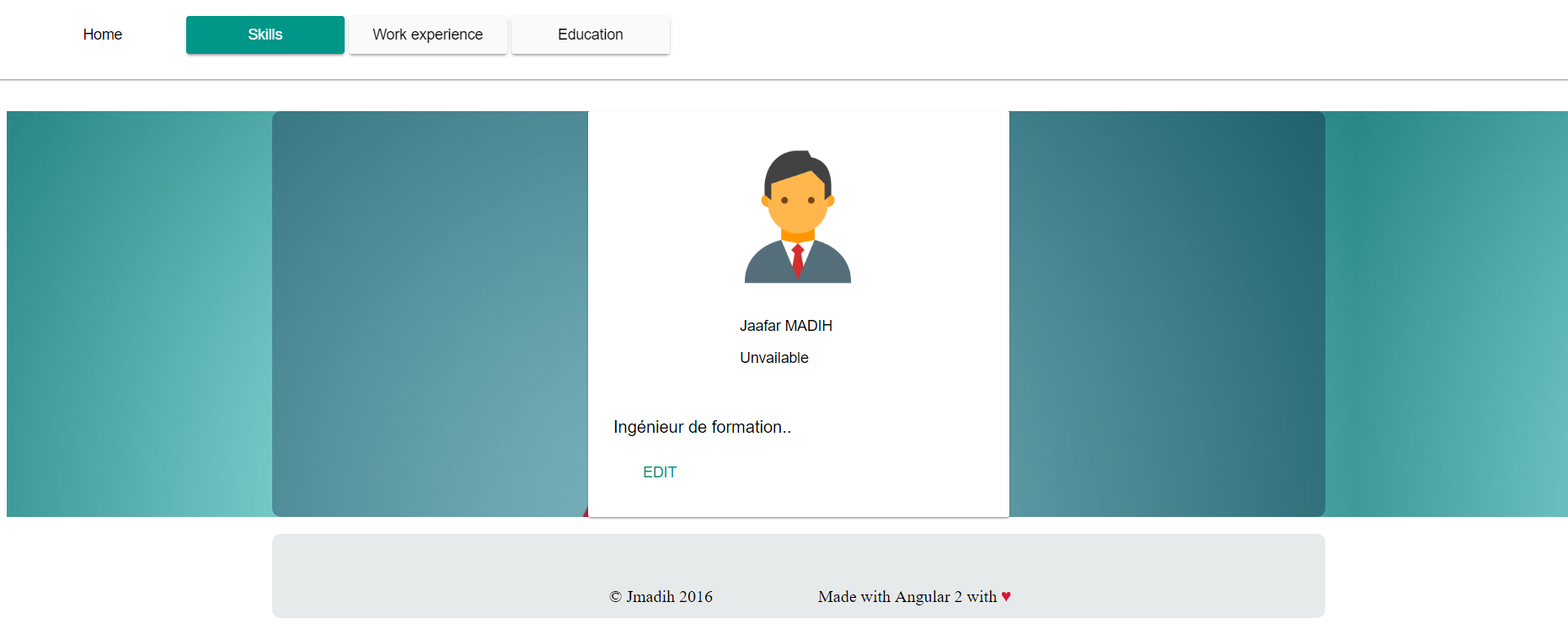
CvRocks !
Step 0
Initier un projet
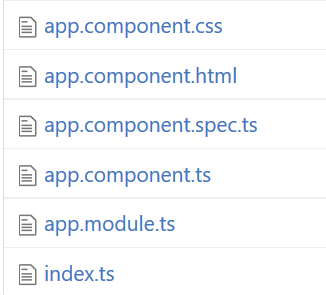
Step 1
Structurer son application :
Header
Body
Footer
Récupération des données REST
Création d'un service (HTTP)
Step 2
Création des routes
Step 3
- Resolver
- Guard
- Lazy loading
Ajout des fonctionnalités sur le composant Skills
*ngFor, *ngIf
Step 4
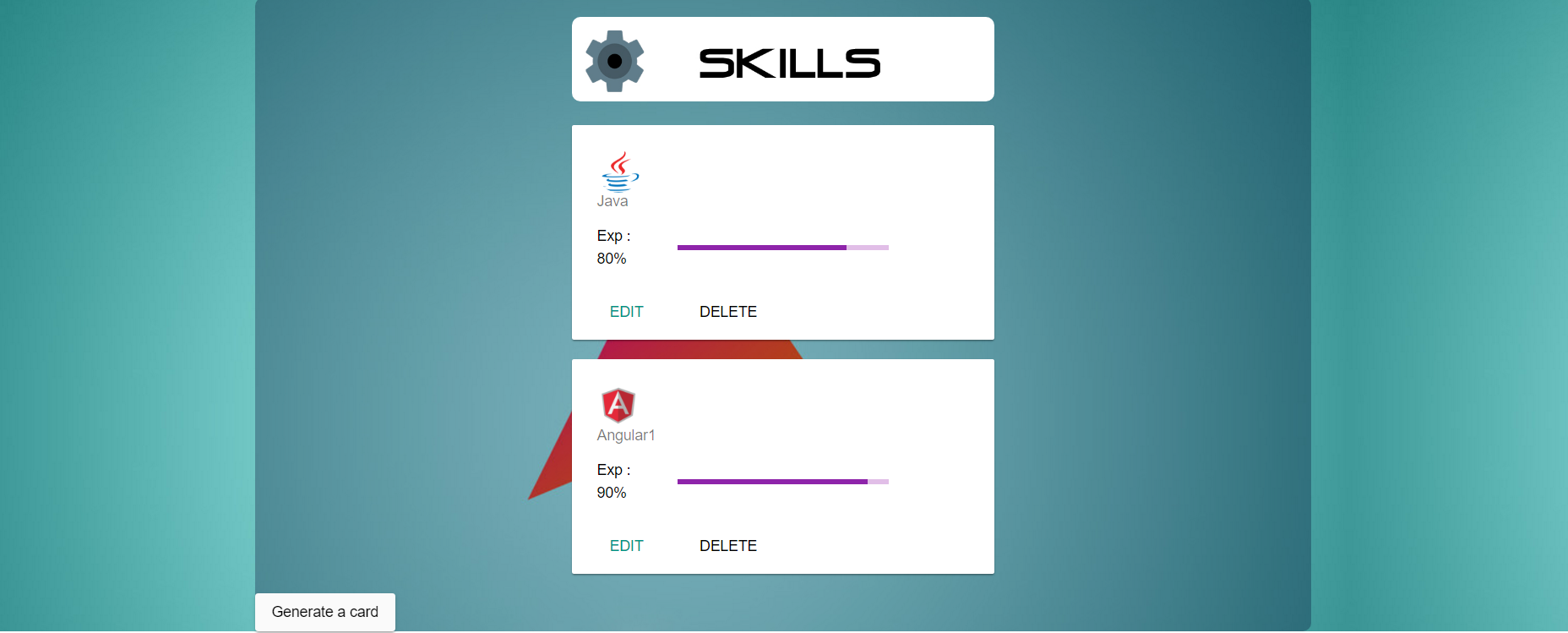
Ajout d'une directive d'attribut
super-skill
Step 5
Ajout d'un custum pipe
undefined
Step 6
Ajout d'un composant form
CRUD on Skills avec un
Model Driven Form
Step 7
@Input, @Output

No way !
Bonus
La stratégie de Migration

1. Suivez les bonnes pratiques
2. Utiliser un Module loader

3. Migrer sur Typescript
4. Migrer sur
Angular 1.5

Utilisation des composants
5. Migrer avec le UpgradeModule
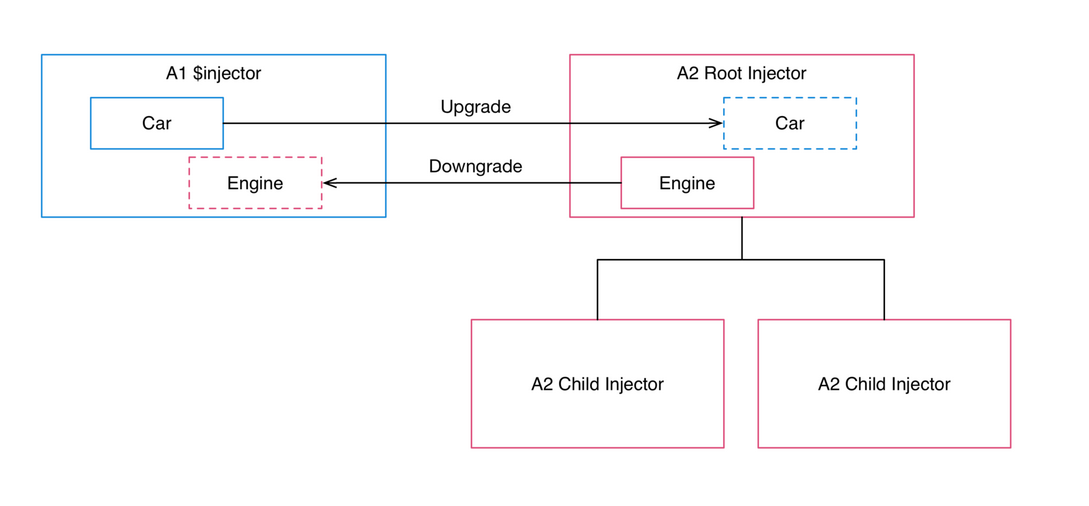
5. Migrer avec le UpgradeModule
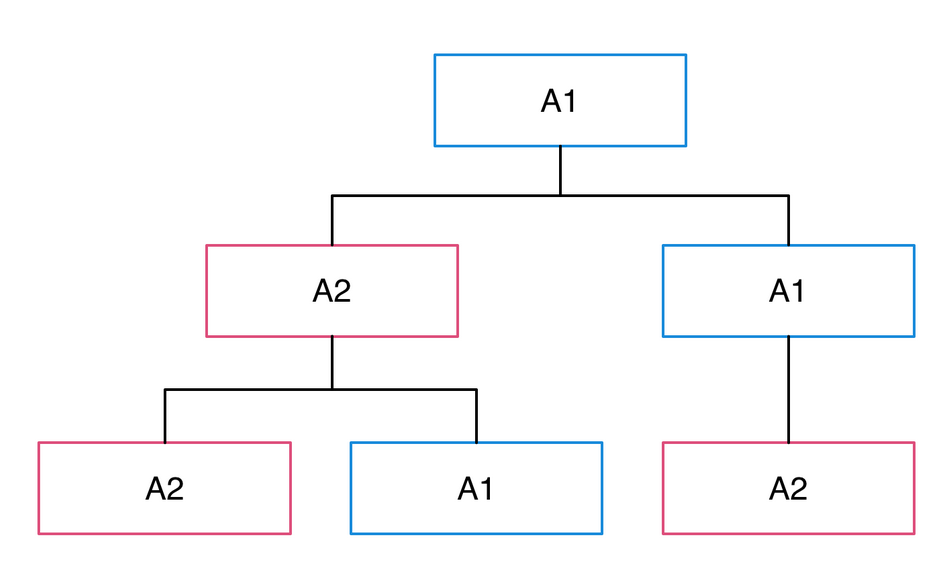
La doc officiel
Click me
Click me
TH NK YOU FOR COMING
Jmadih
@Jmadih
@JaafarMADIH
Jaafar MADIH