Angular JS Training
Training Overview
- Introduction to Angular (What, Why and How)
- Angular Concepts
- Translating Concepts to Code
- Creating Sample Angular Code (Ground Up)
Introduction to Angular
- AngularJS is a structural framework for dynamic web apps.
- Lets you extend HTML's syntax
- What HTML would have been, had it been designed for applications
- Created by Misko Hevery in 2009
- Open Source, supported by Google
- AngularJS closes the gap between Javascript and HTML.
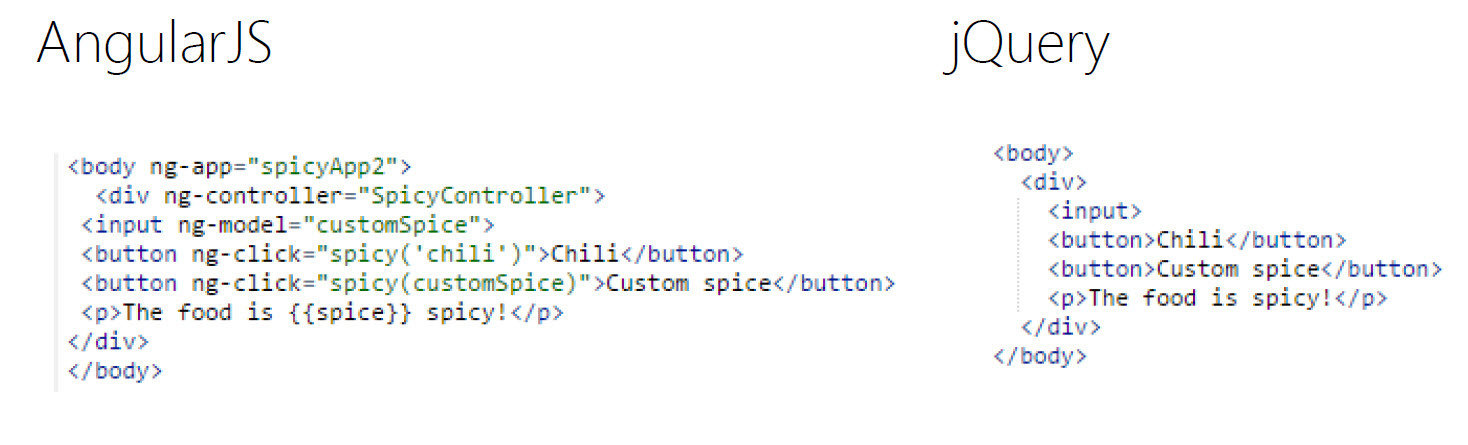
- Declarative programming
Declarative
The intention of the application is expressed or declared in the HTML for AngularJS
Why Use Angular?
- Good for dynamic web sites / web apps (CRUD based)
- Easy to test - to create software that is easily maintained
- Framework imposes a structure that is good for organization
- Helps create responsive (fast) website
How Angular Works?
-
AngularJS will initialize when the DOM content is loaded
- It will load the module associated with the directive if specified
-
Looks for the ng-app directive – if its found, that is the root of the app
- Directives can be declared a variety of ways: typically with the ng- prefix, but you can use data-ng
Angular Concepts
| Concept | Description |
|---|---|
| Template | HTML with additional markup |
| Directives | extend HTML with custom attributes and elements |
| Expressions | access variables and functions from the scope |
| Data Binding | sync data between the model and the view |
| Scope | context where the model is stored so that controllers, directives and expressions can access it |
| Service | reusable business logic independent of views |
| Module | a container for the different parts of an app including controllers, services, filters, directives which configures the Injector |
| Controller | the business logic behind views |
| Filter | formats the value of an expression for display to the user |
Template
In Angular, templates are written with HTML that contains Angular-specific elements and attributes. Angular combines the template with information from the model and controller to render the dynamic view that a user sees in the browser.
These are the types of Angular elements and attributes you can use:
-
Directive — An attribute or element that augments an existing DOM element or represents a reusable DOM component.
-
Markup — The double curly brace notation {{ }} to bind expressions to elements is built-in Angular markup.
-
Filter — Formats data for display.
-
Form controls — Validates user input.
Directives
At a high level, directives are markers on a DOM element (such as an attribute, element name, comment or CSS class) that tell AngularJS's HTML compiler ($compile) to attach a specified behavior to that DOM element (e.g. via event listeners), or even to transform the DOM element and its children.
Angular comes with a set of these directives built-in, like ngBind, ngModel, and ngClass. Much like you create controllers and services, you can create your own directives for Angular to use. When Angular bootstraps your application, the HTML compiler traverses the DOM matching directives against the DOM elements.
Expression
Angular expressions are JavaScript-like code snippets that are mainly placed in interpolation bindings such as<span title="{{ attrBinding }}">{{ textBinding }}</span>, but also used directly in directive attributes such asng-click="functionExpression()".
For example, these are valid expressions in Angular:
- 1+2
- a+b
- user.name
- items[index]
Expressions are used to bind application data to html. Expressions are written inside double braces like {{ expression}}. Expressions behaves in same way as ng-bind directives. AngularJS application expressions are pure javascript expressions and outputs the data where they are used.
Data Binding
Data-binding in Angular apps is the automatic synchronization of data between the model and view components. The way that Angular implements data-binding lets you treat the model as the single-source-of-truth in your application. The view is a projection of the model at all times. When the model changes, the view reflects the change, and vice versa.
Scope
The scopes of the application refer to the application model. Scopes are the execution context for expressions. The $scope object is where we define the business functionality of the application, the methods in our controllers, and properties in the views.
Scopes serve as the glue between the controller and the view. Just before our app renders the view to the user, the view template links to the scope, and the app sets up the DOM to notify Angular of property changes.
Service
Services provide a method for us to keep data around for the lifetime of the app and communicate across controllers in a consistent manner.
Services are singleton objects that are instantiated only once per app (by the $injector) and lazy-loaded (created only when necessary). They provide an interface to keep together those methods that relate to a specific function.
Module
In Angular, a module is the main way to define an AngularJS app. The module of an app is
where we’ll contain all of our application code. An app can contain several modules, each one containing code that pertains to specific functionality.
Using modules gives us a lot of advantages, such as:
- Keeping our global namespace clean
- Making tests easier to write and keeping them clean so as to more easily target isolated functionality
- Making it easy to share code between applications
- Allowing our app to load different parts of the code in any order
Very important to identify between setting up a module angular.module ('moduleName',[ ] )
and getting the module angular.module ('moduleName')
Controller
The role of controllers in Angular is to expose data to our view via $scope, and to add functions to $scope that contain business logic to enhance view behavior.
Angular application mainly relies on controllers to control the flow of data in the application. A controller is defined using ng-controller directive. A controller is a JavaScript object containing attributes/properties and functions. Each controller accepts $scope as a parameter which refers to the application/module that controller is to control.
Filter
In AngularJS, a filter provides a way to format the data we display to the user. Angular gives us several built-in filters as well as an easy way to create our own.
We invoke filters in our HTML with the | (pipe) character inside the template binding characters {{ }}. For instance, let’s say we want to capitalize our string. We can either change all the characters in a string to be capitalized, or we can use a filter.
{{ name | uppercase }}
Angular Concepts with Code
Template
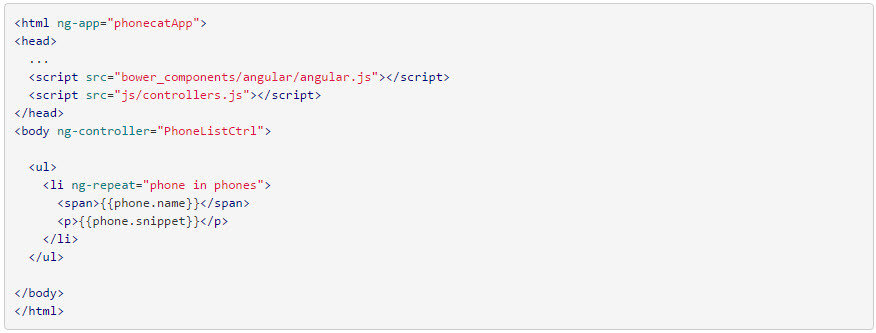
In Angular, the view is a projection of the model through the HTML template. This means that whenever the model changes, Angular refreshes the appropriate binding points, which updates the view.
The view component is constructed by Angular from this template:
Directives
Expressions
Data Binding
Scope
Service
Module
Controller
Filter
Coding Sample Application with Angular 1
What are needed?
- Text Editor (Notepad, Brackets,Sublime Text, Eclipse, TextPad, Notepad++)
- Browser with Developer Tools (Chrome, Firefox, IE)
- Angular JS scripts (CDN, Local Copy)
- Javascript Libraries (JQuery) - optional
- CSS Frameworks (Bootstrap) - optional
Sample App - Token Generator (PartnerLogin)
Objective: Create a partner login url and call partner login service. Generated token Id should be displayed.
Features:
- Upon load the provided snippet (below) should display on the textbox
- URL automatically updates when parameter values changed.
Steps:
- Create a filename called app.js.
- Create an angular module for the app ("partnerLogin") in app.js.
- Put ng-model for every form elements that are needed to generate a url and to call partnerLogin in index.html.
- Specify a controller by putting ng-controller on the selected element in index.html.
- Create an angular module app's controller in app.js.
- Replace all those placeholders in the partnerLogin url with the value from the textboxes in the form accordingly.
- Create a service module (use ngFactory) that will be used to call partnerLogin service in app.js.
- Inject $resource to the service module.
- Partner login service response should be converted to JS object.