Lunch and Learn
Shazizzle
Like Shazam - but much shitter
Why ?

Where To Start
- Shazam Paper
- An Industrial-Strength Audio Search Algorithm
- A bit vague
- No code
Let's Start With A Demo
- Matching 🙏
- Later...
- Experiments 🔬
- Matching + diagnostics 📈
Beer Driven Development

Broad Approach
- 🍺 Read the main publicly available paper
- 🍺 Read other online material e.g. blogs
- 🍺 Experiment with the Web Audio API
- 🍺 Figure out how to fingerprint a sample/track
- 🍺 Figure out how to match a fingerprint
Some DSP Basics: Sampling


Some DSP Basics: Nyquist Theorem
The Nyquist Theorem states that in order to adequately reproduce a signal it should be periodically sampled at a rate that is 2X the highest frequency you wish to record
Some DSP Basics: FFT

Some DSP Basics: Frequency Bins
- FFT size = number of samples used in FFT
- Bin count = FFT size / 2 (symmetry for real inputs)
- Bin size = (sample rate / 2) / bin count
- Bin size = sample rate / FFT size
- Bin index = frequency / bin size
sample rate = 16000
FFT size = 1024
bin count = 1024/2 = 512
bin size = 8000 / 512 = 15.625
bin size = 16000/1024 = 15.625
frequency = 4000
bin index = 4000/15.625 = 256
Example
Web Audio API (1)
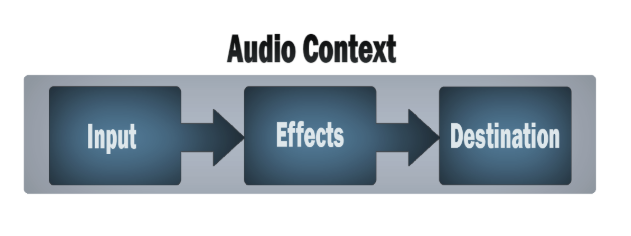
https://developer.mozilla.org/en-US/docs/Web/API/Web_Audio_API
Web Audio API (2)
- AudioContext
- OscillatorNode
- AnalyserNode
- AudioBuffer
- BiquadFilterNode
- IIRFilterNode
- ConvolverNode
- PannerNode
- etc.
Web Audio API (3)

https://www.w3.org/TR/webaudio/#ModularRouting
Web Audio API Experiments
- 🍺 Single oscillator node => FFT analysis
- 🍺 Multiple oscillator nodes => FFT analysis
- 🍺 Read audio file (mp3, m4a) => FFT analysis
- 🍺 Record from microphone => FFT analysis
- 🍺 In-browser unit tests using Mocha
- 🍺 Draw charts using Chart.js
- 🍺 Draw spectrogram using custom chart type
- 🍺 Draw constellation map using custom chart type
- 🍺 Calibration using Audio Test Tones on Spotify
Web Audio API Example
const findTopBins = frequencyData => {
  const binValues = Array.from(frequencyData)
  const zipped = binValues.map((binValue, index) => ({ binValue, index }))
  return zipped.sort((a, b) => b.binValue - a.binValue)
}

const DURATION = 1
const SAMPLE_RATE = 44100
const FFT_SIZE = 1024
const options = {
  length: DURATION * SAMPLE_RATE,
  sampleRate: SAMPLE_RATE
}
const audioContext = new OfflineAudioContext(options)
const frequency = 440
const source = new OscillatorNode(audioContext, { frequency })
const analyserNode = new AnalyserNode(audioContext, { fftSize: FFT_SIZE })
source.connect(analyserNode)
analyserNode.connect(audioContext.destination)
source.start()
source.stop(DURATION)
await audioContext.startRendering()
const frequencyData = new Uint8Array(analyserNode.frequencyBinCount)
analyserNode.getByteFrequencyData(frequencyData)
const binSize = SAMPLE_RATE / FFT_SIZE
const topBinIndex = Math.round(frequency / binSize)
const topBins = findTopBins(frequencyData)
chai.expect(topBins[0].index).to.equal(topBinIndex)
Architecture

- Supported browsers
- Chrome on Mac
- Firefox on Mac
- Chrome on Android
How Fingerprinting Works
- Obtain an AudioBuffer containing a sample or track
- Divide into slivers of time e.g. 20th of a second
- Perform FFT on each sliver
- Choose prominent peaks in set of frequency bands
- Each peak is treated as an anchor point
- Associate each anchor point with several target points
- Process all pairs: (anchor point, target point)
- Create a 32 bit hash of each pair: (f1, f2, delta time)
- The fingerprint is the collection of hashes
Shazam Paper Diagrams: Fingerprinting

https://www.ee.columbia.edu/~dpwe/papers/Wang03-shazam.pdf
Hashes
- f1 = frequency bin 1
- f2 = frequency bin 2
- dt = sliver delta = t2 - t1
| 12 bits | 12 bits | 8 bits |
|---|---|---|
| f1 | f2 | dt |
- Sample: each hash associated with t1
- (f1, f2, dt) => t1
- Track: each hash associated with t1 and trackId
- (f1, f2, dt) => (t1, trackId)
Frequency Bands
export const FREQUENCY_BANDS = [
  0,
  100,
  200,
  400,
  800,
  1600,
  8000
]
- Bin index = frequency / bin size
const binSize = audioBuffer.sampleRate / C.FFT_SIZE
const binBands = R.aperture(2, C.FREQUENCY_BANDS.map(f =>
  Math.round(f / binSize)))
How Matching Works
- Match each fingerprint hash against all the database hashes
- Group by track id
- Group by differences of time offsets
- Find the biggest group
- This identifies both the track and the offset into the track
Shazam Paper Diagrams: matching hashes

https://www.ee.columbia.edu/~dpwe/papers/Wang03-shazam.pdf
Example of Matching Hashes


PostgreSQL Schema
CREATE TABLE IF NOT EXISTS track_metadata (
  id serial PRIMARY KEY,
  album_title VARCHAR (128) NOT NULL,
  track_title VARCHAR (128) NOT NULL,
  artist VARCHAR (128) NOT NULL,
  artwork VARCHAR (128) NOT NULL
);

CREATE TABLE IF NOT EXISTS track_hashes (
  id serial PRIMARY KEY,
  tuple int NOT NULL,
  t1 int NOT NULL,
  track_metadata_id INTEGER REFERENCES track_metadata(id)
);

CREATE INDEX IF NOT EXISTS track_hashes_tuple_idx
ON track_hashes USING HASH (tuple);
PostgreSQL Query
SELECT
  track_hashes.track_metadata_id,
  (track_hashes.t1 - samples.t1) AS offset,
  COUNT (track_hashes.t1 - samples.t1) AS count
FROM track_hashes
INNER JOIN samples ON track_hashes.tuple = samples.tuple
GROUP BY
  track_hashes.track_metadata_id,
  (track_hashes.t1 - samples.t1)
HAVING COUNT (track_hashes.t1 - samples.t1) >= 50
ORDER BY count DESC
LIMIT 1
Deployment
- Heroku (free tier)
- https://shazizzle.herokuapp.com/
- Heroku PostgreSQL (Hobby Basic plan - $9 / month)
- 10,000,000 row limit
Tuneable Parameters
- Sample rate
- FFT size
- Number of slivers per second
- Frequency bands
- Minimum threshold for prominent frequencies
- Number of target points
- Minimum threshold for peak in hash matches
Next Steps
- Streaming match
- Speed up seeding a tracks using hamsters
- AWS Serverless Application
- Tune the fingerprinting parameters
- Server-side fingerprinting of tracks
- Add a listening animation
- Write a React Native client
Key Source Code Locations
- Recording/Analysing Sample (40 LOC)
- Fingerprinting (94 LOC)
- Matching (72 LOC)
- Web Audio API Utils (179 LOC)
(everthing else is just fluff and boilerplate)
Links
Final Thought