Building a SaaS with Meteor
Technical considerations for building and running a SaaS product with Meteor.

by Ryan Glover (@themeteorchef)
http://talks.themeteorchef.com/building-a-saas-with-meteor
Disclaimer
I am not a millionaire. Or a thousandaire. I'm just a nerd who spent a lot of his time trying to understand how this stuff works so I could build my own stuff. In the process, I learned a few things that may help others who are curious about building a SaaS with Meteor. None of this is a prescription for success.

What we'll be covering
- Know what you're building and who you're building it for.
- Organization, version control, and continuous integration.
- Implementing subscriptions with Stripe.
- Tracking customer behavior.
- Managing data, deployments, and backups.
- Lowering your expectations.
Know what you're building
- What features am I building (map it out)?
- What is technically required to implement those features?
- What packages and libraries do I need? Can I trust them?
- What do I need to research (i.e. "What don't I know for sure")? When?

Know who you're building for
- Are you building for people at home? Businesses? Hospitals?
- What are their expectations?
- What needs to be "perfect" in their eyes?
- What can I revisit later on?
- Understand the importance of each feature in respect to the customer's workflow.
- You're building for CUSTOMERS not for other developers.
Organization
- Think about how your application is structured.
- What is the folder structure?
- What is the general pattern for my templates? Controllers? Routes?
- Documentation in a team setting is priceless.
- How do I keep track of features, bugs, and improvements?
- Keep a dictionary of logins.
- Create a set of snippets, gists, etc. that will be reused.
- This is the most important thing you can do as an engineer.
Version control
- Where are you storing your code? GitHub? Bitbucket? Elsewhere?
- Abuse issue trackers. Everything should have an issue/ticket before it's implemented.
- Have a branching strategy. Be able to identify features, bugs, and refactors.
- Only commit customer-ready work to your master branch.
- In a team? Use Pull Requests.
- Have a versioning scheme and tag your releases. Semantic Versioning is friendly.
- Git Extras by TJ Holowaychuk is awesome for managing all of this.
# Implementing a new feature: descriptive name, issue number from GitHub.
git checkout -b feature/name_of_feature_#01

# Fixing a bug: descriptive name, issue number from GitHub.
git checkout -b bug/name_of_bug_#01

# Improving some existing code: descriptive name, issue number from GitHub.
git checkout -b refactor/name_of_refactor_#01
Continuous Integration
- I don't fully understand this, or practice it, but I'm learning it/working on it.
- Velocity is really well done and getting better by the day. Install it in your app, play with it, and get an understanding for how to use it.
- Test the important stuff: payments, critical features, etc.
- Play with a CI service early on (e.g. Codeship) and know how it works.
- Develop a philosophy around testing early on. You're either doing TDD/BDD or you're not, but don't try to implement stuff part way through later on.
- Don't panic. You *can* go into production without tests, but it can get murky and present headaches down the road.
Implementing subscriptions with Stripe
- Stripe API vs Stripe Checkout? When to use which?
- Installing Stripe: Atmosphere packages (e.g. mrgalaxy:stripe) vs. NPM.
- Pre-made implementations on Atmosphere (e.g. woody:stripe-easy).
- Mostly server-side code, API methods are asynchronous so need to make them blocking to play friendly w/ the client.
- Two parts: API method calls and webhooks.
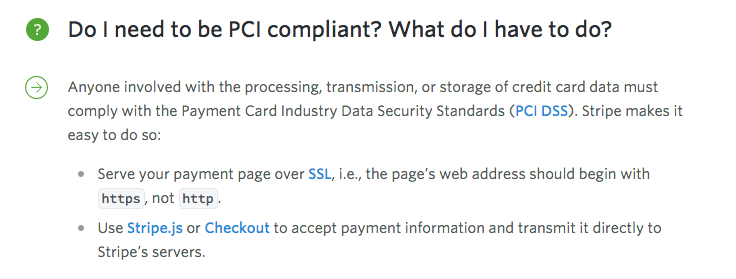
- SSL/Security/PCI compliance?
Stripe (cont.): API Methods
Which API methods do I need to support? It depends. The basics:
Stripe.customers.create
Creates a customer on Stripe to associate a subscription with.
Stripe.customers.createSubscription
Creates the actual subscription to a plan you specify (and associates it with a customer).
Stripe.customers.updateSubscription
Updates an existing subscription (e.g. changing a plan).
Stripe.customers.cancelSubscription
Cancels an existing subscription for a customer.
Stripe (cont.): API Methods in Practice
Stripe is incredibly simple to use. An example API call:
// Include Stripe via NPM using the meteorhacks:npm package.
var Stripe = Meteor.npmRequire('stripe')(secret);

// With a card object.
{
  number: String,
  exp_month: String,
  exp_year: String,
  cvc: String
}

// Calling on Stripe
Stripe.customers.create({
  card: card,
  email: email
}, function(error, response){
  if (error){
    // Do something with the error.
  } else {
    // Do something with the response.
  }
});
Stripe (cont.): Webhooks
How do I handle webhooks in my Meteor app? An example using Iron Router:
Router.route('/webhooks/stripe', function () {
  var request = this.request.body;

  switch(request.type){
    case "customer.subscription.updated":
      stripeUpdateSubscription(request.data.object);
      break;
    case "invoice.payment_succeeded":
      stripeCreateInvoice(request.data.object);
      break;
  }

  // Let Stripe know that we receive its request as expected.
  this.response.statusCode = 200;
  this.response.end('Oh hai Stripe!\n');
}, {where: 'server'});
{
  "created": 1326853478,
  "livemode": false,
  "id": "evt_00000000000000",
  "type": "customer.subscription.created",
  "object": "event",
  "request": null,
  "pending_webhooks": 1,
  "api_version": "2015-01-11",
  "data": {
    "object": {
      "id": "sub_00000000000000",
      "plan": {
        "interval": "month",
        "name": "Tiny",
        "created": 1421530286,
        "amount": 500,
        "currency": "usd",
        "id": "tiny_00000000000000",
        "object": "plan",
        "livemode": false,
        "interval_count": 1,
        "trial_period_days": 1,
        "metadata": {},
        "statement_descriptor": "todoodle - tiny plan"
      },
      "object": "subscription",
      "start": 1423772500,
      "status": "trialing",
      "customer": "cus_00000000000000",
      "cancel_at_period_end": false,
      "current_period_start": 1423772500,
      "current_period_end": 1423858900,
      "ended_at": null,
      "trial_start": 1423772500,
      "trial_end": 1423858900,
      "canceled_at": null,
      "quantity": 1,
      "application_fee_percent": null,
      "discount": null,
      "tax_percent": null,
      "metadata": {}
    }
  }
}
Tracking customer behavior
This recently just got really easy thanks to the okgrow:analytics package and Segment. Once the package is installed, configure it in settings.json and then log events:
{
  "public": {
    "analyticsSettings": {
      // Add your analytics tracking id's here
      "Google Analytics" : {"trackingId": "Your tracking ID"},
      "Mixpanel"         : {"token": "your token"},
      "KISSmetrics"      : {"apiKey": "your api key"},
      "UserVoice"        : {"apiKey": "your api key"},
      "Sentry"           : {"config": "your config key"},
      "Segment.io"       : {"apiKey": "your api key"}
    }
  }
}
Template.exampleTemplate.events({
'click .money-making-button': function(){
analytics.track("Clicked the money making button" {
eventName: "scrooge-mcduck-dive",
propertyToTrack: "I'm a string of some sort."
});
}
});In /settings.json...
Somewhere in your client code...
Managing Data & Backups
- For MongoDB deployments: Compose.io makes it incredibly easy. Replica sets, ability to turn on oplog tailing, daily backups to Amazon S3.
- A little paranoia is good: have a backup database provider and use a remote backup service in addition to Compose.io (e.g. MongoLab is good for this and you control backup location).
Hope for the best, expect the worst." - Mel Brooks
Deployments
- Modulus is the easiest/most roboust for hosting at the moment. Makes deployments as easy as running a single command. Bonus: auto-scaling of instances, easy to use interface, and easy to reach support team.
- If you prefer to be in control of deployments, Arunoda's meteor-up command line tool makes deployments to Digital Ocean (and friends) a bit easier.
- Multiple servers for an app: production, staging, and operations.
- Make use of Meteor's DDP.connect() method to connect to remote instances. Allows you to call methods remotely, subscribe to collections, etc.
- Install Kadira & Use it. Read through Bulletproof Meteor.
Lower your expectations
- Writing a few hundred lines of code does != champagne wishes and caviar dreams.
- Focus on quality of product, not payday.
- Do it right the first time, don't be lazy.
- Have fun! You're building software for a living, that's awesome!

Resources
Building a SaaS with Meteor: Stripe (Part 1 & 2)
https://themeteorchef.com/recipes/building-a-saas-with-meteor-part-1
https://themeteorchef.com/recipes/building-a-saas-with-meteor-part-2
Velocity (Testing): Getting Started
http://velocity.meteor.com/getting-started
Git Extras
https://github.com/tj/git-extras
woody:stripe-easy
https://atmospherejs.com/woody/stripe-easy
Abigail Watson: Meteor Cookbook
https://github.com/awatson1978/meteor-cookbook/tree/master/cookbook
Resources
Bulletproof Meteor
https://bulletproofmeteor.com/
The Long Slow SaaS Ramp of Death by Gail Goodman
https://vimeo.com/54076835
Arunoda: Meteor Up
https://github.com/arunoda/meteor-up
Thanks for listening!
If you'd like to learn more about Meteor, make sure to check out themeteorchef.com and follow @themeteorchef on Twitter.
Review these slides: http://talks.themeteorchef.com/building-a-saas-with-meteor