elm-native-ui introduction
Thomas Brisbout
Freelance developer
@tbrisbout
Elm Paris Meetup / 2017-06-01
Introduction

Project Objective
- Provide a new target platform
- Compile to React Native bindings
- It may change to other target in the future
Naming
Why now ?
Installing
React native install
docker run -it --rm \
       -e DISPLAY=$DISPLAY \
       -v /tmp/.X11-unix:/tmp/.X11-unix \
       /opt/android-studio/studio/bin.sh
Docker ?
create-react-native-app ?
$ npm install -g create-react-native-app
$ create-react-native-app my-app
$ cd my-app/
$ npm start
React native install quirks

=> avoid unsaved local elm install
elm-native-ui install quirks
# Assuming elm is installed globally

$ react-native init Counter
$ git clone https://github.com/ohanhi/elm-native-ui
$ cp -R elm-native-ui/examples/Counter/* Counter
$ cd Counter
$ npm install
Use elm_self_publish or edit elm-package.json
 "source-directories": [
     ".",
     "../elm-native-ui/src"
 ],
Build & Run
# Run packager
$ npm start
# Build
$ npm run compile
# Run
$ react-native run-android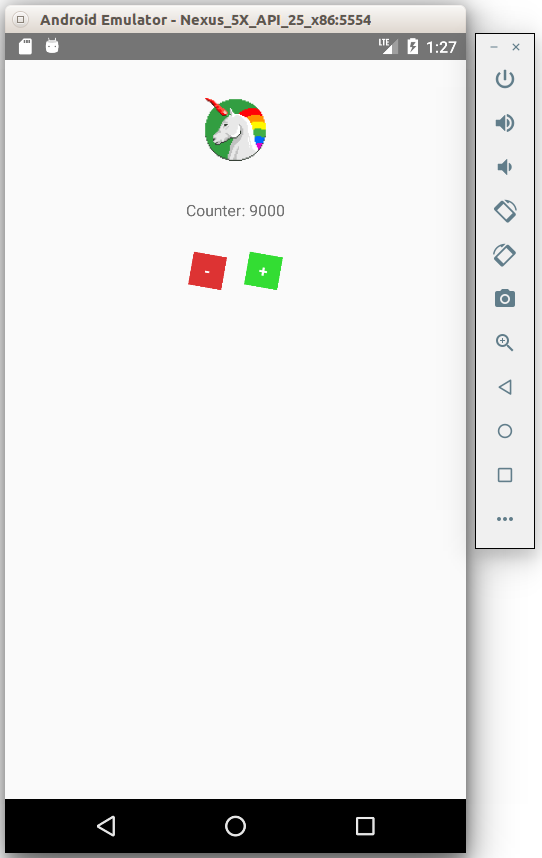
Code
Project structure
.
├── android/
├── ios/
├── app.json
├── elm.js
├── elm-package.json
├── elm-stuff
├── index.android.js
├── index.ios.js
├── Main.elm
├── package.json
├── README.md
├── __tests__/
└── node_modules/
index.{android/ios}.js
const { AppRegistry } = require('react-native');
const Elm = require('./elm');
const component = Elm.Main.start();

AppRegistry
  .registerComponent('Counter', () => component);
Elm Side - NativeUi Imports
module Main exposing (..)

import NativeUi as Ui exposing (Node)
import NativeUi.Style as Style exposing (defaultTransform)
import NativeUi.Elements as Elements exposing (..)
import NativeUi.Events exposing (..)
import NativeUi.Image as Image exposing (..)
Elm Architecture
-- MODEL

-- UPDATE

-- VIEW

-- PROGRAM
View
view : Model -> Node Msg
view count =
    let
        imageSource =
            { uri = "https://raw.githubusercontent.com/futurice/spiceprogram/master/assets/img/logo/chilicorn_no_text-128.png"
            , cache = Just ForceCache
            }
    in
        Elements.view
            [ Ui.style [ Style.alignItems "center" ]
            ]
            [ image
                [ Ui.style
                    [ Style.height 64
                    , Style.width 64
                    , Style.marginBottom 30
                    , Style.marginTop 30
                    ]
                , source imageSource
                ]
                []
            , text
                [ Ui.style
                    [ Style.textAlign "center"
                    , Style.marginBottom 30
                    ]
                ]
                [ Ui.string ("Counter: " ++ toString count)
                ]
            , Elements.view
                [ Ui.style
                    [ Style.width 80
                    , Style.flexDirection "row"
                    , Style.justifyContent "space-between"
                    ]
                ]
                [ button Decrement "#d33" "-"
                , button Increment "#3d3" "+"
                ]
            ]


button : Msg -> String -> String -> Node Msg
button msg color content =
    text
        [ Ui.style
            [ Style.color "white"
            , Style.textAlign "center"
            , Style.backgroundColor color
            , Style.paddingTop 5
            , Style.paddingBottom 5
            , Style.width 30
            , Style.fontWeight "bold"
            , Style.shadowColor "#000"
            , Style.shadowOpacity 0.25
            , Style.shadowOffset 1 1
            , Style.shadowRadius 5
            , Style.transform { defaultTransform | rotate = Just "10deg" }
            ]
        , onPress msg
        ]
        [ Ui.string content ]
Conclusion
- Setup not well automated
- Not yet prod ready
- Elm 0.19 will help