Custom Collection View Layout
Dimitri James Tsiflitzis
CocoheadsSKG
UICollectionView
UICollectionView is an object that manages an ordered collection of data items and presents them using customisable layouts.
It's powerful, with support for scrolling, tap recognition, layout changes, and performance. There is also a high quality ecosystem of third party libraries built on top of it.
I dare say that every screen in an app could be a collection view.
CocoheadsSKG
UICollectionView
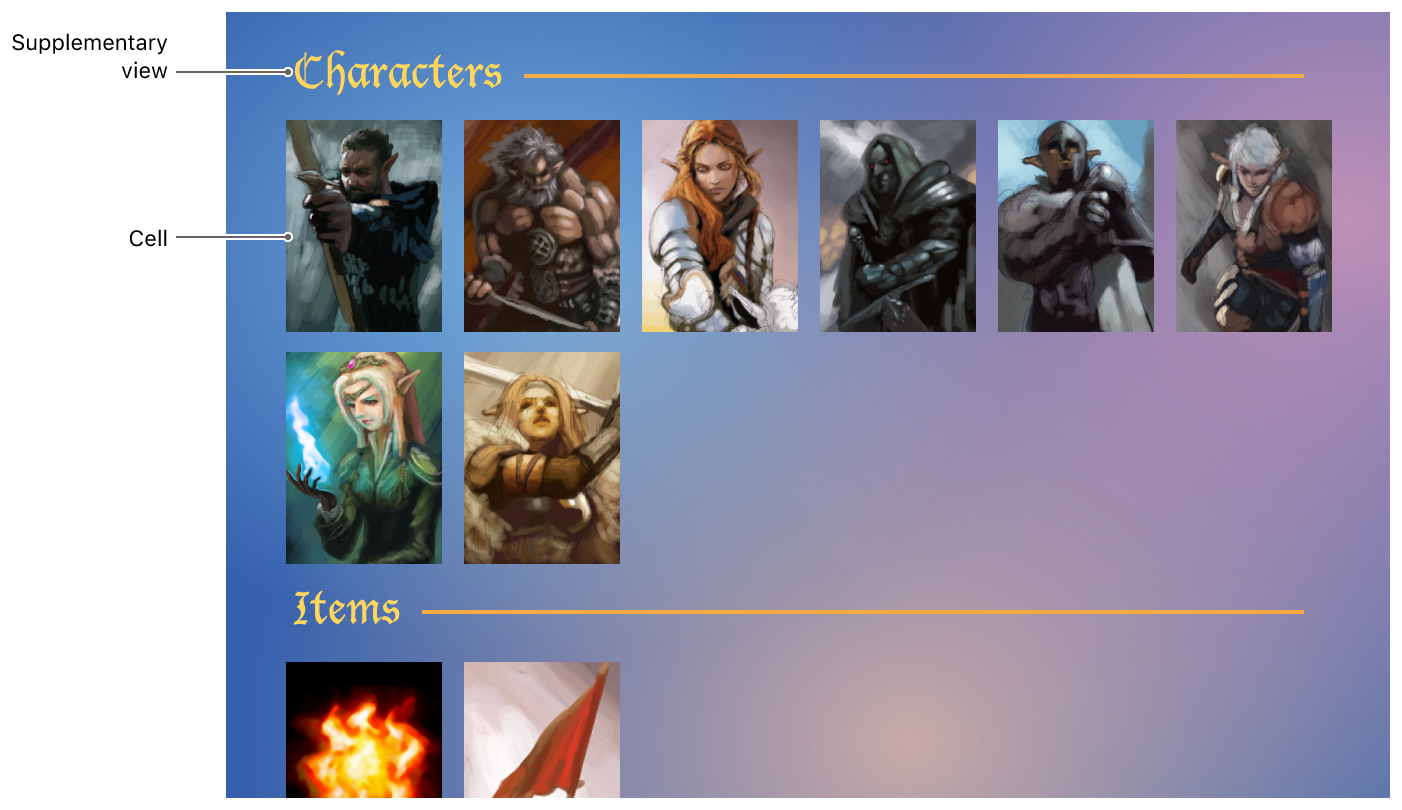
CocoheadsSKG
Major difference with UITableView
Unlike UITableView, UICollectionView gives you the freedom to specify your own layout.
You can render your datasource in any way you please.
It could be argued that you don't really need to use a table view ever again
CocoheadsSKG
Documentation and further reading
Documentation is available from Apple, and other sources.
Today we will be going over a template you can use for your own layout along with some layouts of varying complexity.
CocoheadsSKG
The layout process
When it comes down to it, the layout is responsible for two things:
- Defining the size of the content i.e. what is the size of the scrollable area of the collection view? This is achieved with collectionViewContentSize.
- Defining the size and position of cells (and supplementary views) by using UICollectionViewLayoutAttributes objects.
CocoheadsSKG
UICollectionViewLayoutAttributes
var frame: CGRect                // The frame rectangle of the item.

var bounds: CGRect               // The bounds of the item.

var center: CGPoint              // The center point of the item.

var size: CGSize                 // The size of the item.

var transform3D: CATransform3D   // The 3D transform of the item.

var transform: CGAffineTransform // The affine transform of the item.

var alpha: CGFloat               // The transparency of the item.

var zIndex: Int                  // Specifies the item’s position on the z axis.

var isHidden: Bool               // Determines whether the item is currently displayed.
CocoheadsSKG
Methods to override
- prepare()
- collectionViewContentSize
- layoutAttributesForElements(in:)
UIKit (Cocoa?) will call the following methods in the following order:
CocoheadsSKG
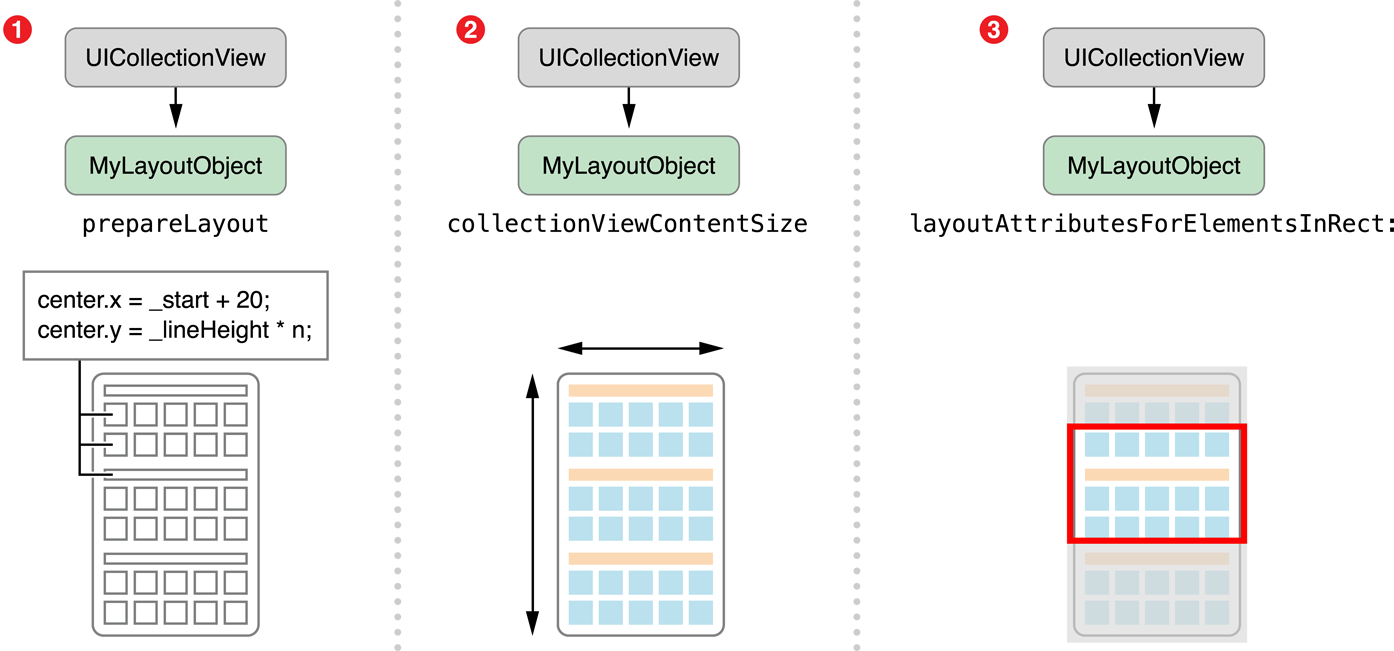
Methods to override
CocoheadsSKG
prepare( )
- Compute the size and position of every cell (or supplementary view).
- Compute the size of the collection view’s content area.
- Create layout attributes and cache them.
CocoheadsSKG
prepare( )
var contentSize: CGSize = .zero
var cachedAttributes = [IndexPath: UICollectionViewLayoutAttributes]()

override func prepare() {

  contentSize = .zero // Clear out previous results
  cachedAttributes = [IndexPath: UICollectionViewLayoutAttributes]()

  for section in 0 ..< collectionView.numberOfSections {
    for item in 0 ..< collectionView.numberOfItems(inSection: section) {
      let itemFrame = // ...Compute the frame of your cell...

      // Create the layout attributes and set the frame
      let indexPath = IndexPath(item: item, section: section)
      let attributes = UICollectionViewLayoutAttributes(forCellWith: indexPath)
      attributes.frame = itemFrame

      // Store the results
      cachedAttributes[indexPath] = attributes
    }
  }

  contentSize = // Store computed content size
}
CocoheadsSKG
collectionViewContentSize
private var contentSize: CGSize = .zero

override var collectionViewContentSize: CGSize {
  return contentSize
}
CocoheadsSKG
layoutAttributesForElements(in:)
var cachedAttributes = [IndexPath: UICollectionViewLayoutAttributes]()

override func layoutAttributesForElements(in rect: CGRect)
              -> [UICollectionViewLayoutAttributes]? {

  var attributeList = [UICollectionViewLayoutAttributes]()

  for (_, attributes) in cachedAttributes {
    if attributes.frame.intersects(rect) {
      attributeList.append(attributes)
    }
  }

  return attributeList
}
CocoheadsSKG
layoutAttributesForElements(in:)
CocoheadsSKG
Your collection view may also ask for layout attributes at specific index paths at any given time:
Protocol conformance
- layoutAttributesForItem(at:) for cells.
- layoutAttributesForSupplementaryView(ofKind:at:) for supplementary views).
- layoutAttributesForDecorationView(ofKind:at:) for decoration views.
CocoheadsSKG
layoutAttributesForItem(at:)
var cachedAttributes = [IndexPath: UICollectionViewLayoutAttributes]()

override func layoutAttributesForItem(at indexPath: IndexPath)
              -> UICollectionViewLayoutAttributes? {
  return cachedAttributes[indexPath]
}
CocoheadsSKG
Summarizing
-
Return the size of the content area in collectionViewContentSize
-
Return UICollectionViewLayoutAttributes with set frames in:
-
layoutAttributesForElements(in:)
-
layoutAttributesForItem(at:),
-
layoutAttributesForSupplementaryView(ofKind:at:)
-
layoutAttributesForDecorationView(ofKind:at:)
-
CocoheadsSKG
Reference
CocoheadsSKG
Let's code

CocoheadsSKG
Ευχαριστούμε 🎈
CocoheadsSKG