Python. Standard stack.
Oleksandr Rehush,
python developer
А ви ще не знали про ці зручні інструменти для рішення ваших задач? В цій темі ми обговоримо стандартні пакети та підходи для рішення типових задач засобами Python.
Тема буде цікавою для початківців та впевнених розробників.
Python. Standard stack.
Про себе
Про себе
- Мене звуть Олександр Регуш
- Досвід роботи в ІТ - 4 роки
- Працюю в bvblogic
- Ключові технологої: Python, React.js, React Navite, Angular, Ionic
- Не витрачаю час на серфінг соцмереж
Освіта
МІФ, ПНУ - Інформатика, магістр
- Сильний математичний бекграунд
- Розвиток логічного мислення
- Вивчив плюси і не тільки
- Почув про роботу в ІТ

А починав в ІТ з ...
РНР

Python? Так, знаю. Там можна великі числа помножити...
2 weeks hardworking...
Junior Python developer... Еммм... Та я не знаю, чи я зможу...
Кажете, що то не важко?
...
4 years ago
Full Stack Developer







Що ми розглянемо?
Типові задачі
- Робота з даними
- обробка
- фільтрація
- сортування
- візуалізація
- Робота із зображеннями
- HTTP запити
- Фреймворки
- веб (синхронні та асинхронні)
- для створення GUI
Python бібліотеки
- numpy
- pandas
- matplotlib
- Pillow
- requests
- Flask
- Sanic
- Django
- django rest framework
- django all auth
- celery
- Kivy
Робота з даними
Numpy
NumPy є основним пакетом для наукових обчислень в Python. Пакет містить:
- N-вимірний об'єкт масиву
- складні функції
- інструменти для інтеграції C / C ++ і коду Fortran
- функції для лінійної алгебри, перетворення Фур'є та ін.
import numpy as np

arr = np.array([1,2,3,4,5])

print(arr.ndim) # 1

print(arr.size) # 5

print(arr.shape) # (5,)

arr2 = np.array([[1,2,3,4,5], [2,4,6,8,10]])

print(arr2.ndim) # 2

print(arr2.size) # 10

print(arr2.shape) # (2, 5)
Numpy
import numpy as np

arr = np.array([1,2,3,4,5])
arr2 = np.array([[1,2,3,4,5], [2,4,6,8,10]])

print(arr + arr2)
# array([[ 2,  4,  6,  8, 10],
#        [ 3,  6,  9, 12, 15]])

a = np.zeros((2,2))
print(a)
# [[ 0.  0.]
#  [ 0.  0.]]"

b = np.ones((1,2))
print(b)
# [[ 1.  1.]]

c = np.full((2,2), 7)
print(c)
# [[ 7.  7.]
#  [ 7.  7.]]

d = np.eye(2)
print(d)
# [[ 1.  0.]
#  [ 0.  1.]]

e = np.random.random((2,2))
print(e)
# [[ 0.91940167  0.08143941]
#  [ 0.68744134  0.87236687]]
Numpy
import numpy as np

def distance_L2(a, b):
    """
    :param a - np.ndarray
    :param b - np.ndarray
    :return float
    """
    return ((a-b)**2).sum()

a = np.random.random(4)
print(a)
# array([ 0.62118135,  0.9600108 ,  0.84022489,  0.55372924])

b = np.random.random(4)
print(b)
# array([ 0.45873813,  0.12493711,  0.80636291,  0.93912522])

print(distance_L2(a, b))
# 0.87341256692496827
Numpy
import numpy as np
def reshape_to_vector(a):
    """
    :param a - np.ndarray
    :return np.ndarray
    """
    return np.array(a.reshape((a.shape[0]**2, 1)), dtype=np.int16)

a = np.random.random((4,4))
print(a)
# array([[ 0.55206853,  0.30658551,  0.84145866,  0.37926292],
#        [ 0.88968549,  0.42673438,  0.47431736,  0.74421548],
#        [ 0.0800564 ,  0.919614  ,  0.46828862,  0.97317616],
#        [ 0.28684353,  0.67264068,  0.26134366,  0.41890796]])

print(reshape_to_vector(a))
# array([[ 0.55206853],
#        [ 0.30658551],
#        [ 0.84145866],
#        [ 0.37926292],
#        [ 0.88968549],
#        [ 0.42673438],
#        [ 0.47431736],
#        [ 0.74421548],
#        [ 0.0800564 ],
#        [ 0.919614  ],
#        [ 0.46828862],
#        [ 0.97317616],
#        [ 0.28684353],
#        [ 0.67264068],
#        [ 0.26134366],
#        [ 0.41890796]])
Numpy
import numpy as np

def merge_with_ones_vector(a: np.ndarray) -> np.ndarray:
    """
    :param a - np.ndarray
    :return np.ndarray
    """
    ones_vector = np.ones(a.shape, dtype=np.int16)
    return np.concatenate((ones_vector, a), axis=1)

b = np.array([[5],[2],[24]])

c = merge_with_ones_vector(b)
print(c)
# array([[ 1,  5],
#        [ 1,  2],
#        [ 1, 24]])
Numpy
import numpy as np

def ols(A, b):
    """
    Y = AX + b

    :param A - np.ndarray - square block
    :param b - np.ndarray - vector
    :return np.ndarray, float - coeficients of ols, error
    """
    X = np.dot(np.linalg.inv(A.T.dot(A)), A.T.dot(b))
    return X, distance_L2(A.dot(X), b)

A = np.array([[4,2,5], [-1,3,-2], [5,-2,4]])
b = np.array([[1],[2],[3]])


X, error = ols(A, b)
print(X)
# array([[ 1.88888889],
#        [ 0.33333333],
#        [-1.44444444]])

print(error)
# 4.6542793408039697e-29
Pandas
pandas - надає високопродуктивні, прості у використанні структури даних та інструменти аналізу даних в Python.
Основними структурами в pandas є DataFrame i Series.
DataFrame в Python - двовимірна структура даних з колонками потенційно різних типів, які дуже подібні до датафреймів в мові R.
Загалом, можна сказати, що Pandas DataFrame складається з трьох основних компонентів: даних, індексу та стовпців.
DataFrame складається із об'єктів типу Series: одновимірний маркований масив, здатний утримувати будь-який тип даних з мітками осей або індексом.
Pandas
import pandas as pd

df = pd.DataFrame({
    'a': [1,2,3,4],
    'b': [True, False, False, True],
    'c': ['Ala', 'ma', 'kota', 'Markiza']
})

print(type(df))
# pandas.core.frame.DataFrame

print(type(df.a))
# pandas.core.series.Series

print(df.index)
# RangeIndex(start=0, stop=4, step=1)


print(df)
#    a      b        c
# 0  1   True      Ala
# 1  2  False       ma
# 2  3  False     kota
# 3  4   True  Markiza
Pandas
import pandas as pd

print(df)
#    a      b        c
# 0  1   True      Ala
# 1  2  False       ma
# 2  3  False     kota
# 3  4   True  Markiza


print(df[df.b == True])
#    a     b        c
# 0  1  True      Ala
# 3  4  True  Markiza


print(df[df.c.str.len() >= 3])
#       a	b	c
# 0	1	True	Ala
# 2	3	False	kota
# 3	4	True	Markiza
Pandas
import pandas as pd

print(df)
#    a      b        c
# 0  1   True      Ala
# 1  2  False       ma
# 2  3  False     kota
# 3  4   True  Markiza

c = df.c.str.len() > 3
b = df.b == True
print(c & b)
# 0    False
# 1    False
# 2    False
# 3     True
# dtype: bool

print(df[c & b])
#       a	b	c
# 3	4	True	Markiza


print(df.sort_values(by='c'))
#    a      b        c
# 0  1   True      Ala
# 3  4   True  Markiza
# 2  3  False     kota
# 1  2  False       ma
Pandas
import pandas as pd

df = pd.DataFrame({
    'a': [1,2,3,None],
    'b': [True, False, None, True],
    'c': ['Ala', None, 'kota', 'Markiza']
})


print(df)
#      a      b        c
# 0  1.0   True      Ala
# 1  2.0  False     None
# 2  3.0   None     kota
# 3  NaN   True  Markiza

df2 = df[~pd.isnull(df.a) & ~pd.isnull(df.b)]
print(df2)
#      a      b     c
# 0  1.0   True   Ala
# 1  2.0  False  None
Pandas
import pandas as pd

df1 = pd.DataFrame({'a': [1,2], 'b': [0, 6]})
df2 = pd.DataFrame({'a': [7,8], 'b': [1.5, 3]})

df3 = df1.append(df2)

print(df3)
#    a    b
# 0  1  0.0
# 1  2  6.0
# 0  7  1.5
# 1  8  3.0


print(df3.reset_index(drop=True))
#    a    b
# 0  1  0.0
# 1  2  6.0
# 2  7  1.5
# 3  8  3.0
Pandas
"""
Rule to extract partner info to separate table

Example:

input df:

---|-----------------------------------------------------------------------|---
...| p1_deeplink | p1_price | p1_attr1 | p2_deeplink | p2_price | p2_attr2 |...
---|-----------------------------------------------------------------------|---
...| deeplink1.1 | 5.0      | value1.1 | deeplink2.1 | 1.0      | val2.1   |...
---|-----------------------------------------------------------------------|---
...| deeplink1.2 | 7.0      | value1.2 | deeplink2.2 | 4.0      | val2.2   |...
---|-----------------------------------------------------------------------|---

output df:
    partner1 has id 1
    partner2 has id 2

    |---------------------------------------------------------------------|
    | product_id | partner_id |  deeplink   | price | attributes          |
    |---------------------------------------------------------------------|
    | 1          | 1          | deeplink1.1 | 5.0   | {"attr1": value1.1} |
    |---------------------------------------------------------------------|
    | 2          | 1          | deeplink1.2 | 7.0   | {"attr1": value1.2} |
    |---------------------------------------------------------------------|
    | 1          | 2          | deeplink2.1 | 1.0   | {"attr2": val2.1}   |
    |---------------------------------------------------------------------|
    | 2          | 2          | deeplink2.2 | 4.0   | {"attr2": val2.2}   |
    |---------------------------------------------------------------------|

"""
Pandas
import pandas as pd

def apply(self):
    result_df = pd.DataFrame()
    for partner in Partner.objects.all():
        cols = self.columns(partner.name)
        if not cols:
            continue
        result_df = result_df.append(
            self.perform_one_partner(partner, cols)
        )
    return result_df

def perform_one_partner(self, partner, columns):
    df = pd.DataFrame({
        self.product_id: self.products_pks,
        self.partner_id: partner.id
    })

    for col, attr in columns:
        df[attr] = self.df[col]

    # keeps all rows with at least 3 non-na cols:
    # (partner_id, product_id  and one more)
    df.dropna(thresh=3, inplace=True)
    return self.extract_extra_attrs(df)
Pandas
import pandas as pd

def extract_extra_attrs(self, df: pd.DataFrame):
    extra_df = pd.DataFrame()
    for col in df.columns:
        if col not in self.partner_columns:
            extra_df[col] = df[col]
            df.drop(col, axis=1, inplace=True)

    if extra_df.any().any():
        df['attributes'] = json.loads(extra_df.to_json(orient='records'))
    return df
Matplotlib
Matplotlib - це бібліотека Python для побудови 2D графіків, яка вміє працювати з різноманітними форматами та в інтерактивних середовищах на різних платформах.
Matplotlib
import numpy as np
import matplotlib.pyplot as plt

# Fixing random state for reproducibility
np.random.seed(19680801)

mu, sigma = 100, 15
x = mu + sigma * np.random.randn(10000)

# the histogram of the data
n, bins, patches = plt.hist(x, 50, density=True, facecolor='g', alpha=0.75)


plt.xlabel('Smarts')
plt.ylabel('Probability')
plt.title('Histogram of IQ')
plt.text(60, .025, r'$\mu=100,\ \sigma=15$')
plt.axis([40, 160, 0, 0.03])
plt.grid(True)
plt.show()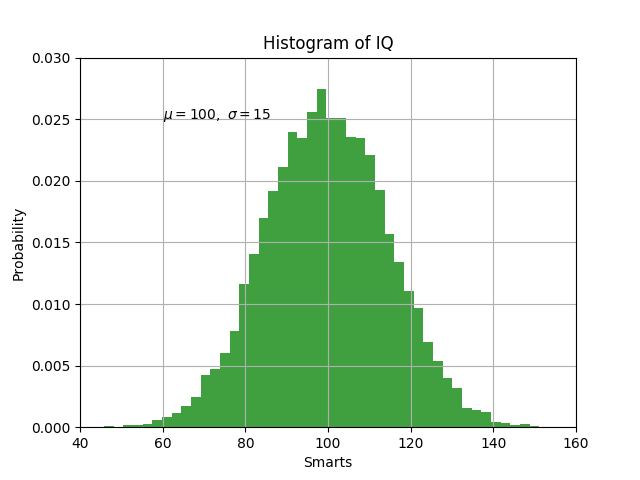
Робота з зображеннями
Pillow
Бібліотека PIL (Python Imaging Library) надає можливості для обробки зображень.
Ця бібліотека надає велику підтримку різноманітних форматів файлів, ефективне внутрішнє представлення та досить потужні можливості обробки зображень.
Основа бібліотеки призначена для швидкого доступу до даних. Вона слугує міцною основою для загального інструменту обробки зображень.
Pillow
from PIL import Image

im = Image.open("bird.png")

print(im.format, im.size, im.mode)
# PNG (512, 512) RGBA

im.show()
Pillow
from PIL import Image

size = (64, 64)

try:
    im = Image.open('bird.png')
    im.thumbnail(size)
    im.save('bird-thumb.png')
except IOError as e:
    print("cannot create thumbnail", e)
Pillow
from PIL import Image

im = Image.open("bird.png")
box = (100, 100, 400, 400)
region = im.crop(box)
region.save('cropped.png')

Pillow
from PIL import Image

im = Image.open("bird.png")
box = (100, 100, 400, 400)
region = im.crop(box)
region = region.transpose(Image.ROTATE_180)

im.paste(region, box)
im.save('transposed.png')
Pillow
from PIL import ImageFilter

im = Image.open("bird.png")

out = im.filter(ImageFilter.BLUR)
out.save('blured.png')

Pillow
from PIL import ImageFilter

im = Image.open("bird.png")

r, g, b, a = im.split()
im1 = Image.merge("RGB", (r, g, b))
im1.save('without-a.jpg')
Pillow
import numpy as np
from PIL import ImageFilter

def noise_filter(im):
    arr = np.array(im)
    noise = np.random.random(arr.shape)
    result = np.array(np.round(arr + noise), dtype=np.int8)
    return Image.fromarray(result, 'RGBA')

im2 = noise_filter(im)
im2.save('with-noise.png')
HTTP запити
requests
HTTP for humans
Requests allows you to send organic, grass-fed HTTP/1.1 requests, without the need for manual labor. There’s no need to manually add query strings to your URLs, or to form-encode your POST data. Keep-alive and HTTP connection pooling are 100% automatic, thanks to urllib3.
requests
import requests

response = requests.get('https://api.github.com')

print(response.status_code)
# 200

print(response.headers)
# {
# 'Server': 'GitHub.com',
# 'Date': 'Tue, 14 May 2019 16:36:53 GMT',
# 'Content-Type': 'application/json; charset=utf-8',
# 'X-GitHub-Request-Id': '8E86:5BA4:23FB888:4D8A680:5CDAEEA5',
# ...
# }

print(response.json())

# {
# 'current_user_url': 'https://api.github.com/user',
# 'current_user_authorizations_html_url': 'https://github.com/settings/connections/applications{/client_id}',
# 'authorizations_url': 'https://api.github.com/authorizations',
# ...
# }
requests
import requests
from getpass import getpass

with requests.Session() as session:
    session.auth = ('orehush', getpass())
    response = session.get('https://api.github.com/user')

print(response.json())
# {
# 'login': 'orehush',
# 'id': 22370432, 'node_id': 'MDQ6VXNlcjIyMzcwNDMy',
# 'avatar_url': 'https://avatars1.githubusercontent.com/u/22370432?v=4',
# 'public_repos': 11,
# 'public_gists': 3,
# 'created_at': '2016-09-22T12:15:26Z',
# 'updated_at': '2019-05-13T13:49:17Z',
# ...
# }
requests
>>> requests.post('https://httpbin.org/post', data={'key':'value'})
>>> requests.put('https://httpbin.org/put', data={'key':'value'})
>>> requests.delete('https://httpbin.org/delete')
>>> requests.head('https://httpbin.org/get')
>>> requests.patch('https://httpbin.org/patch', data={'key':'value'})
>>> requests.options('https://httpbin.org/get')
requests
import requests

response = requests.post('https://httpbin.org/post', data={'key':'value'})

print(response.status_code)
# 200

print(response.json())
# {
#  'args': {}, 'data': '', 'files': {}, 'form': {'key': 'value'},
#  'headers': {
#    'Accept': '*/*', 'Accept-Encoding': 'gzip, deflate', 'Content-Length': '9',
#    'Content-Type': 'application/x-www-form-urlencoded', 'Host': 'httpbin.org',
#    'User-Agent': 'python-requests/2.21.0'
#  },
#  'json': None,
#  'origin': '93.175.204.45, 93.175.204.45',
#  'url': 'https://httpbin.org/post'
# }
Web-frameworks
Flask
Flask
Flask - це легкий веб-додаток WSGI. Він призначений для того, щоб розпочати роботу швидко і легко, з можливістю масштабування до складних додатків. Flask почанався як проста обгортка навколо Werkzeug і Jinja і став одним з найпопулярніших фреймворків веб-додатків Python.
Flask надає пропозиції, як створювати додаток, але не застосовує ніяких залежностей або макет проекту. Розробник самостійно обирає інструменти та бібліотеки, які вони хочуть використовувати. Спільнота надає багато розширень, що полегшує додавання нових функцій.
Flask - Hello World
# hello.py

from flask import Flask
app = Flask(__name__)

@app.route("/")
def hello():
    return "Hello World!"
$ FLASK_APP=hello.py flask run
* Serving Flask app "hello.py"
* Environment: production
WARNING: Do not use the development server in a production environment.
Use a production WSGI server instead.
* Debug mode: off
* Running on http://127.0.0.1:5000/ (Press CTRL+C to quit)
127.0.0.1 - - [14/May/2019 20:15:40] "GET / HTTP/1.1" 200 -
127.0.0.1 - - [14/May/2019 20:15:40] "GET /favicon.ico HTTP/1.1" 404 -
Flask - Telegram Bot
import telebot
import os
from flask import Flask, request

bot = telebot.TeleBot('{TOKEN}')
server = Flask(__name__)


@bot.message_handler(commands=['start'])
def start(message):
    bot.reply_to(message, 'Hello, ' + message.from_user.first_name)

@bot.message_handler(func=lambda message: True, content_types=['text'])
def echo_message(message):
    bot.reply_to(message, message.text)


@server.route("/{TOKEN}", methods=['POST'])
def getMessage():
    bot.process_new_updates([
        telebot.types.Update.de_json(request.stream.read().decode("utf-8"))
    ])
    return "!", 200

@server.route("/")
def webhook():
    bot.remove_webhook()
    bot.set_webhook(url="https://{DOMAIN}/{TOKEN}")
    return "!", 200

server.run(host="0.0.0.0", port=os.environ.get('PORT', 5000))
Sanic
Sanic
Sanic - веб-сервер і веб-платформа, написаний щоб бути швидким. Він дозволяє використовувати синтаксис async / await, доданий у Python 3.5, що робить код неблокуючим і швидким.
Мета проекту полягає в тому, щоб забезпечити простий спосіб створення і роботи високопродуктивного HTTP-сервера, який можна легко створювати, розширювати і в кінцевому підсумку масштабувати.
Sanic - Hello World
from sanic import Sanic
from sanic.response import json

app = Sanic()

@app.route('/')
async def test(request):
    return json({'hello': 'world'})

if __name__ == '__main__':
    app.run(host='0.0.0.0', port=8000)
$ python hello.py
[2019-05-14 21:26:41 +0300] [18182] [INFO] Goin' Fast @ http://0.0.0.0:8000
[2019-05-14 21:26:41 +0300] [18182] [INFO] Starting worker [18182]$ curl -i http://0.0.0.0:8000
HTTP/1.1 200 OK
Connection: keep-alive
Keep-Alive: 5
Content-Length: 17
Content-Type: application/json
{"hello":"world"}Sanic - WS (Server)
from sanic import Sanic
from sanic.response import file

app = Sanic(__name__)

@app.route('/')
async def index(request):
    return await file('websocket.html')

@app.websocket('/feed')
async def feed(request, ws):
    while True:
        data = 'hello!'
        print('Server sending: ' + data)
        await ws.send(data)
        data = await ws.recv()
        print('Server received: ' + data)

if __name__ == '__main__':
    app.run(host="0.0.0.0", port=8000, debug=True)
Sanic - WS (Client)
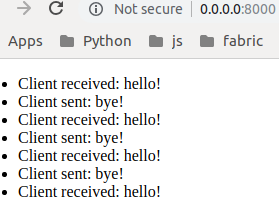
var ws = new WebSocket('ws://'+document.domain+':'+location.port+'/feed'),
    messages = document.createElement('ul');
ws.onmessage = function (event) {
    var messages = document.getElementsByTagName('ul')[0],
        message = document.createElement('li'),
        content = document.createTextNode('Client received: ' + event.data);
    message.appendChild(content);
    messages.appendChild(message);
};
document.body.appendChild(messages);
window.setInterval(function() {
    data = 'bye!'
    ws.send(data);
    var messages = document.getElementsByTagName('ul')[0],
        message = document.createElement('li'),
        content = document.createTextNode('Client sent: ' + data);
    message.appendChild(content);
    messages.appendChild(message);
}, 1000);
Sanic - WS (Test)
$ python ws.py
[2019-05-14 21:40:08 +0300] [19020] [DEBUG]

                 Sanic
         Build Fast. Run Fast.


[2019-05-14 21:40:08 +0300] [19020] [INFO] Goin' Fast @ http://0.0.0.0:8000
[2019-05-14 21:40:09 +0300] [19024] [INFO] Starting worker [19024]
[2019-05-14 21:41:11 +0300] - (sanic.access)[INFO][127.0.0.1:43104]:
   GET http://0.0.0.0:8000/  200 1155
Server sending: hello!
Server received: bye!
Server sending: hello!
Server received: bye!
Server sending: hello!
Server received: bye!
Server sending: hello!
Server received: bye!
Server sending: hello!
[2019-05-14 21:41:16 +0300] [19024] [DEBUG] KeepAlive Timeout.
  Closing connection.
Django
Django
Django - це високорівнева веб-платформа Python, яка заохочує до швидкого розвитоку, чистого та прагматичного дизайну. Побудований досвідченими розробниками, він піклується про більшу частину проблем веб-розробки, тому розробник може зосередитися на написанні додатку без необхідності винаходити колесо.

Django
Смішно швидкий.
Django був розроблений, щоб допомогти розробникам створювати додатки від концепції до завершення якнайшвидше.
Заспокійливо безпечний.
Django серйозно ставиться до безпеки і допомагає розробникам уникнути багатьох поширених помилок безпеки.
Надзвичайно масштабований.
Деякі з найбільш завантажених веб-сайтів використовують здатність Django швидко і гнучко масштабувати.
Чому Django?
- Легкий для початку
- Відмінно задокументований
- Своя ORM з можливістю підтримки найбільш популярних СУБД
- Адмінка з коробки
- Інтернаціоналізація/локалізація з коробки
- Базова структура для роботи з користувачами з коробки
- Величезне число plug-in "батерейок"
- Легкомасштабований
Django - Hello World
$ mkdir helloworld
$ cd helloworld
$ pip install django==2.2.0
$ django-admin startproject helloworld_project
$ tree
.
├── helloworld_project
│   ├── __init__.py
│   ├── settings.py
│   ├── urls.py
│   └── wsgi.py
└── manage.py

$ python manage.py runserver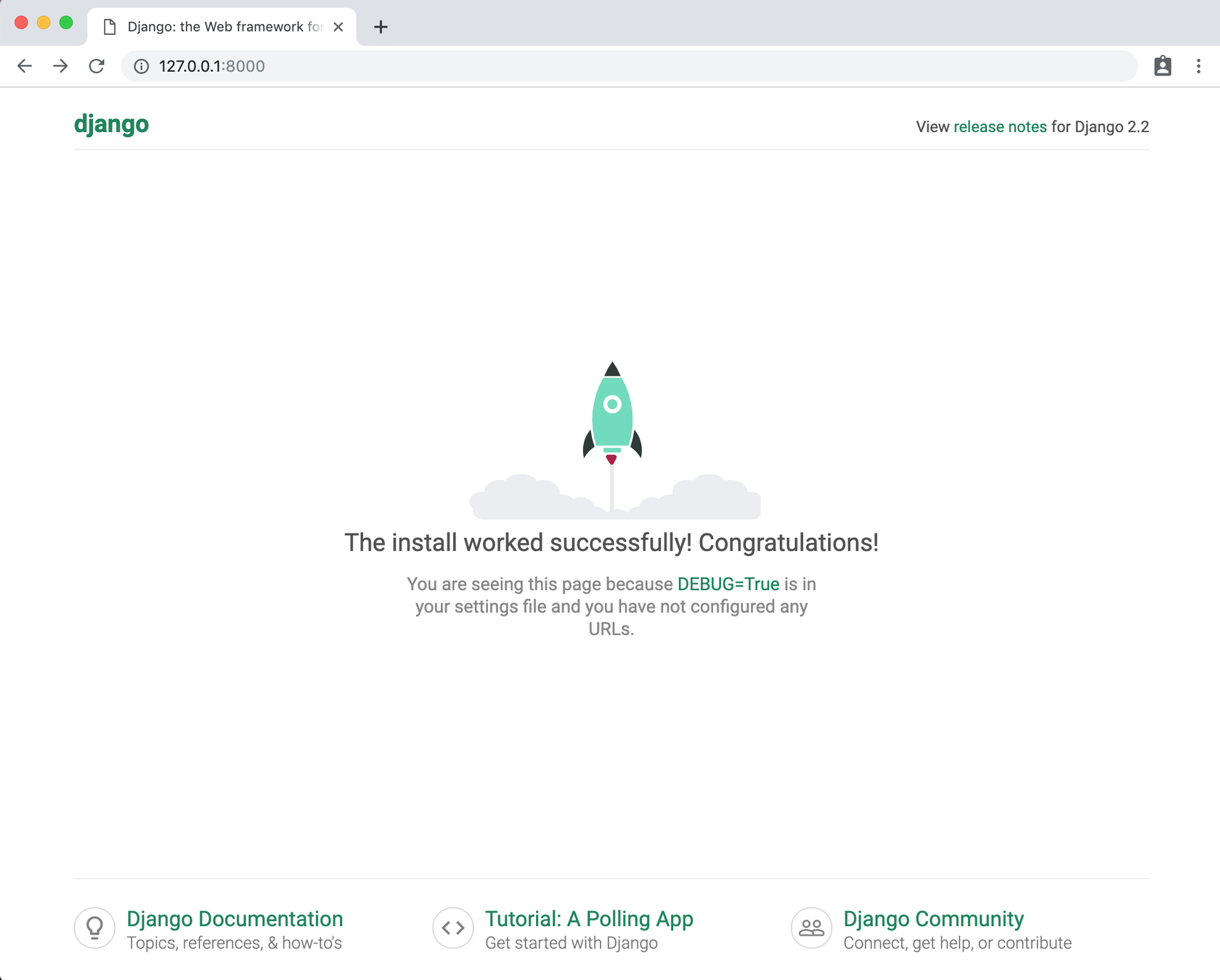
Django ORM
from django.db import models

class Person(models.Model):
    name = models.CharField(max_length=128)

    def __str__(self):
        return self.name

class Group(models.Model):
    name = models.CharField(max_length=128)
    members = models.ManyToManyField(Person, through='Membership')

    def __str__(self):
        return self.name

class Membership(models.Model):
    person = models.ForeignKey(Person, on_delete=models.CASCADE)
    group = models.ForeignKey(Group, on_delete=models.CASCADE)
    date_joined = models.DateField()
    invite_reason = models.CharField(max_length=64)
Django ORM
>>> ringo = Person.objects.create(name="Ringo Starr")
>>> paul = Person.objects.create(name="Paul McCartney")

>>> beatles = Group.objects.create(name="The Beatles")

>>> m1 = Membership(person=ringo, group=beatles,
...     date_joined=date(1962, 8, 16),
...     invite_reason="Needed a new drummer.")
>>> m1.save()

>>> beatles.members.all()
<QuerySet [<Person: Ringo Starr>]>

>>> ringo.group_set.all()
<QuerySet [<Group: The Beatles>]>

>>> m2 = Membership.objects.create(person=paul, group=beatles,
...     date_joined=date(1960, 8, 1),
...     invite_reason="Wanted to form a band.")

>>> beatles.members.all()
<QuerySet [<Person: Ringo Starr>, <Person: Paul McCartney>]>
Django ORM
# Find all the groups with a member whose name starts with 'Paul'
>>> Group.objects.filter(members__name__startswith='Paul')
<QuerySet [<Group: The Beatles>]>


>>> Person.objects.filter(
...     group__name='The Beatles',
...     membership__date_joined__gt=date(1961,1,1))
<QuerySet [<Person: Ringo Starr]>

>>> Person.objects.filter(
...     group__name='The Beatles')
... .exclude(
...     membership__date_joined__lte=date(1961,1,1))
<QuerySet [<Person: Ringo Starr]>


>>> ringos_membership = Membership.objects.get(group=beatles, person=ringo)
>>> ringos_membership.date_joined
datetime.date(1962, 8, 16)
>>> ringos_membership.invite_reason
'Needed a new drummer.'
DRF
from django.conf.urls import url, include
from django.contrib.auth.models import User
from rest_framework import serializers, viewsets, routers

# Serializers define the API representation.
class UserSerializer(serializers.HyperlinkedModelSerializer):
    class Meta:
        model = User
        fields = ('url', 'username', 'email', 'is_staff')


# ViewSets define the view behavior.
class UserViewSet(viewsets.ModelViewSet):
    queryset = User.objects.all()
    serializer_class = UserSerializer


# Routers provide a way of automatically determining the URL conf.
router = routers.DefaultRouter()
router.register(r'users', UserViewSet)


# Wire up our API using automatic URL routing.
# Additionally, we include login URLs for the browsable API.
urlpatterns = [
    url(r'^', include(router.urls)),
    url(r'^api-auth/', include('rest_framework.urls', namespace='rest_framework'))
]
DRF
GET /users/
GET /users/{pk}/
POST /users/
PUT /users/{pk}/
PATCH /users/{pk}/
DELETE /users/{pk}/


$ curl -H 'Accept: application/json' -u admin:password http://127.0.0.1:8000/users/
[
    {
        "url": "http://127.0.0.1:8000/users/1/",
        "username": "admin",
        "email": "admin@example.com",
        "is_staff": true,
    }
]
DRF - full example
Trusted Posts
$ tree api/
api/
├── migrations
│   ├── 0001_initial.py
│   └── __init__.py
├── __init__.py
├── admin.py
├── apps.py
├── filters.py
├── helpers.py
├── models.py
├── permissions.py
├── serializers.py
├── urls.py
└── views.py
DRF - model first
from django.contrib.auth.models import User
from django.db import models
from django_extensions.db.models import TimeStampedModel
from api.helpers import get_sub_obj

class InheritanceMixin:
    @property
    def child(self):
        return get_sub_obj(self)

class Author(InheritanceMixin, User):
    rating = models.FloatField(default=0)

class Reviewer(InheritanceMixin, User):
    level = models.PositiveIntegerField(default=0)

class Tag(models.Model):
    name = models.CharField(max_length=100)
    def __str__(self):
        return self.name

class Post(TimeStampedModel):
    class Meta:
        ordering = ('-updated', )
    title = models.CharField(max_length=255)
    body = models.TextField()
    tags = models.ManyToManyField(Tag, related_name='posts')
    author = models.ForeignKey(Author, models.CASCADE, related_name='posts')
    reviewed_by = models.ManyToManyField(Reviewer)
    def __str__(self):
        return self.title
DRF - serializers.py
from django.contrib.auth.models import User
from rest_framework import serializers
from api.models import Tag, Author, Reviewer, Post

class UserSerializer(serializers.ModelSerializer):
    class Meta:
        model = User
        fields = ('id', 'first_name', 'last_name', 'email', )

class AuthorSerializer(UserSerializer):
    class Meta:
        model = Author
        fields = UserSerializer.Meta.fields + ('rating', )

class ReviewerSerializer(UserSerializer):
    class Meta:
        model = Reviewer
        fields = UserSerializer.Meta.fields + ('level', )

class TagSerializer(serializers.ModelSerializer):
    class Meta:
        model = Tag
        fields = '__all__'
DRF - serializers.py
class PostSerializer(serializers.ModelSerializer):
    class Meta:
        model = Post
        fields = '__all__'
        read_only_fields = ('reviewed_by', 'updated', 'created', )

    author = PresentablePrimaryKeyRelatedField(
        presentation_serializer=AuthorSerializer,
        default=serializers.CreateOnlyDefault(CurrentChildUserDefault())
    )
    tags = PresentablePrimaryKeyRelatedField(
        presentation_serializer=TagSerializer, many=True
    )
    reviewed_by = ReviewerSerializer(many=True, read_only=True)
DRF - permissions.py
from rest_framework.permissions import IsAuthenticatedOrReadOnly, IsAuthenticated
from api.models import Post

class IsAuthorOrReadOnly(IsAuthenticatedOrReadOnly):
    def has_permission(self, request, view):
        if request.method == 'post':
            return hasattr(request.user, 'author')
        return super(IsAuthorOrReadOnly, self).has_permission(request, view)

    def has_object_permission(self, request, view, obj: Post):
      return (
        super(IsAuthorOrReadOnly, self).has_object_permission(request, view, obj) and
        hasattr(request.user, 'author') and
        obj.author == request.user.author
      )

class IsReviewer(IsAuthenticated):
    def has_permission(self, request, view):
        return (
            super(IsReviewer, self).has_permission(request, view) and
            hasattr(request.user, 'reviewer')
        )
DRF - filters.py
from django_filters import FilterSet

from api.models import Post


class PostFilterSet(FilterSet):
    class Meta:
        model = Post
        fields = ('tags', 'author', 'reviewed_by', )
DRF - views.py
from rest_framework import viewsets
from rest_framework.decorators import action
from rest_framework.permissions import AllowAny
from rest_framework.response import Response
from api.filters import PostFilterSet
from api.permissions import IsAuthorOrReadOnly, IsReviewer
from api.serializers import *

class TagViewSet(viewsets.ReadOnlyModelViewSet):
    """
    List/retrieve tags
    """
    queryset = Tag.objects.all()
    serializer_class = TagSerializer
    permission_classes = (AllowAny, )

class AuthorViewSet(viewsets.ReadOnlyModelViewSet):
    """
    List/retrieve authors
    """
    queryset = Author.objects.filter(is_active=True)
    serializer_class = AuthorSerializer
    permission_classes = (AllowAny, )

class ReviewerViewSet(viewsets.ReadOnlyModelViewSet):
    """
    List/retrieve experienced reviewers
    """
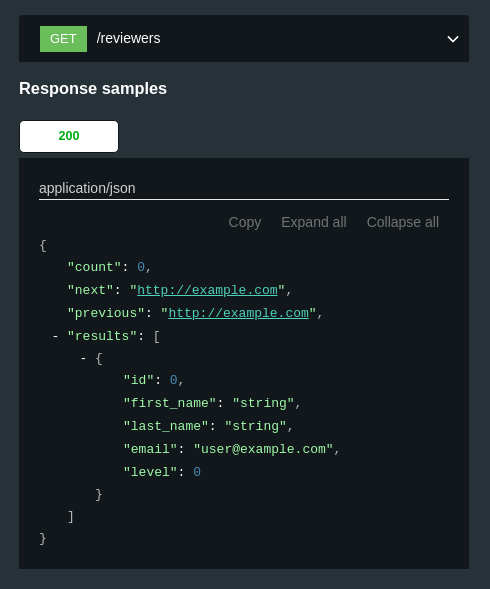
    queryset = Reviewer.objects.filter(is_active=True, level__gte=1)
    serializer_class = ReviewerSerializer
    permission_classes = (AllowAny, )
DRF - views.py
class PostViewSet(viewsets.ModelViewSet):
    """
    CRUD posts
    """
    queryset = Post.objects.exclude(is_deleted=True)
    serializer_class = PostSerializer
    permission_classes = (IsAuthorOrReadOnly, )
    filterset_class = PostFilterSet

    def perform_destroy(self, instance):
        instance.is_deleted = True
        instance.save()

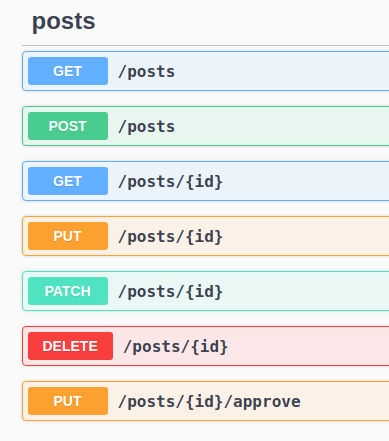
    @action(detail=True, methods=['put'],
            permission_classes=[IsReviewer],
            serializer_class=serializers.Serializer)
    def approve(self, request, **kwargs):
        """
        Endpoint to approve post by reviewer
        """
        post = self.get_object()
        post.reviewed_by.add(request.user.reviewer)
        serializer = PostSerializer(post)
        return Response(serializer.data)
DRF - urls.py
from rest_framework.routers import DefaultRouter
from api import views

router = DefaultRouter(trailing_slash='')
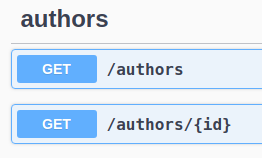
router.register('authors', views.AuthorViewSet)
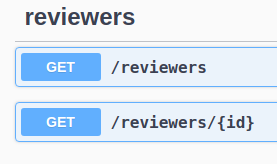
router.register('reviewers', views.ReviewerViewSet)
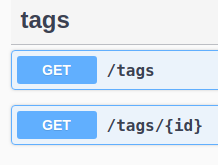
router.register('tags', views.TagViewSet)
router.register('posts', views.PostViewSet)

urlpatterns = router.urls
DRF-yasg
from django.contrib import admin
from django.urls import path, include
from rest_framework import permissions
from drf_yasg.views import get_schema_view
from drf_yasg import openapi

schema_view = get_schema_view(
   openapi.Info(
      title="Posts API",
      default_version='v1',
   ),
   public=True,
   permission_classes=(permissions.AllowAny,),
)

urlpatterns = [
    path('admin/', admin.site.urls),
    path('api-auth/', include('rest_framework.urls')),
    path('api/', include('api.urls')),
    path('swagger/', schema_view.with_ui('swagger', cache_timeout=0), name='swagger-ui'),
    path('redoc/', schema_view.with_ui('redoc', cache_timeout=0), name='redoc'),
]
DRF-yasg
DRF-yasg
DRF-yasg
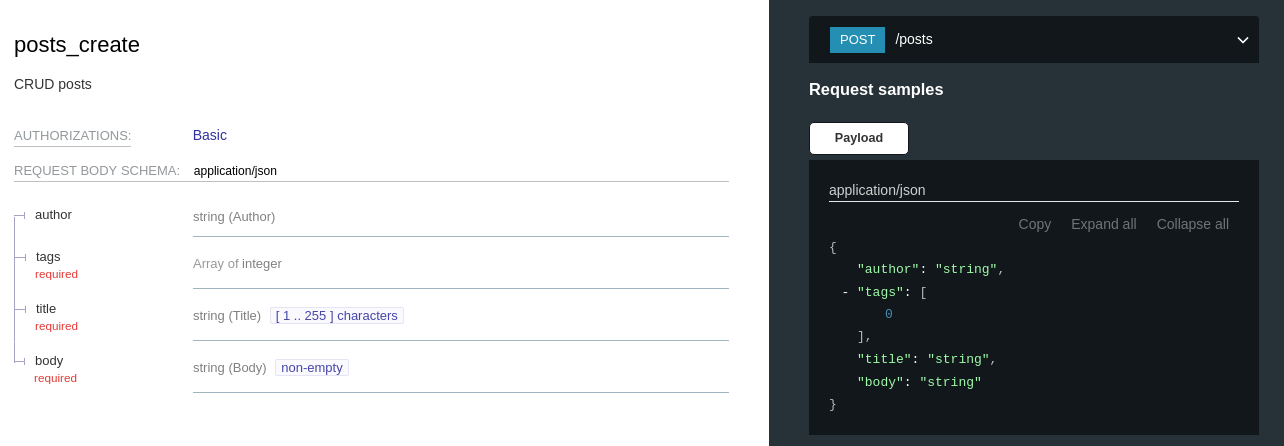
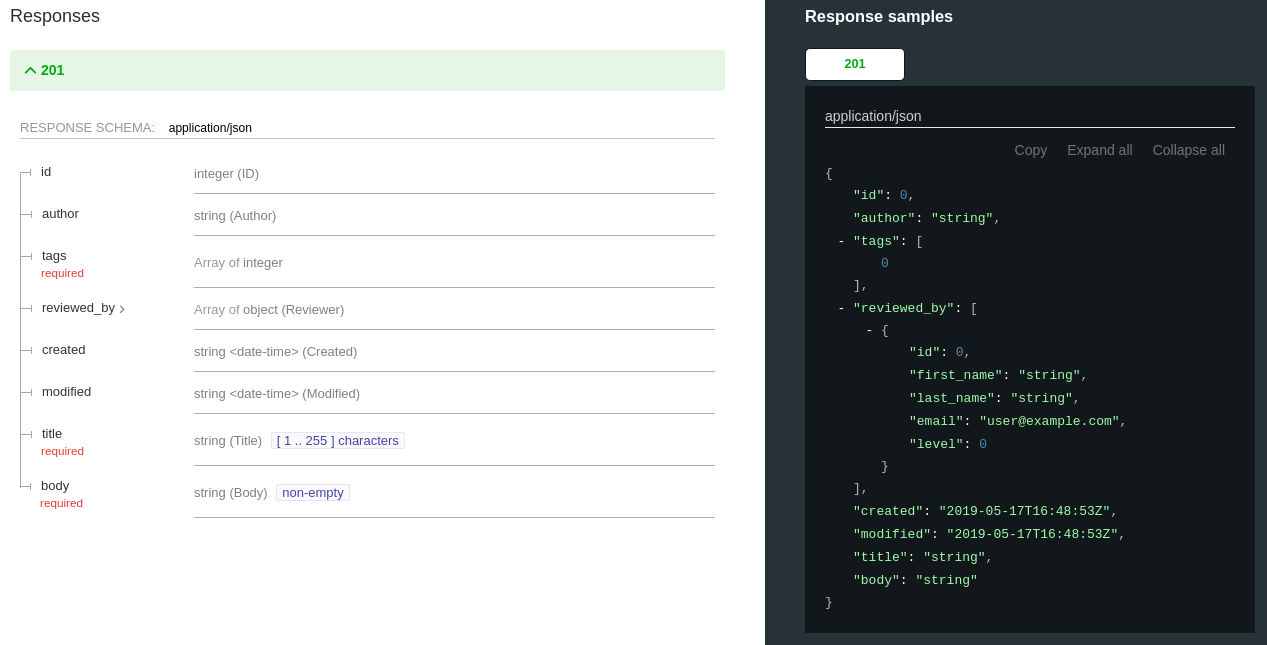
Django all auth
# Install
$ pip install django-allauth

# settings.py
AUTHENTICATION_BACKENDS = (
    ...
    # Needed to login by username in Django admin, regardless of `allauth`
    'django.contrib.auth.backends.ModelBackend',
    # `allauth` specific authentication methods, such as login by e-mail
    'allauth.account.auth_backends.AuthenticationBackend',
    ...
)
INSTALLED_APPS = (
    ...
    # The following apps are required:
    'django.contrib.auth',
    'django.contrib.messages',
    'django.contrib.sites',
    'allauth',
    'allauth.account',
    'allauth.socialaccount',
    # ... include the providers you want to enable:
    'allauth.socialaccount.providers.facebook',
)
SITE_ID = 1

# urls.py:
urlpatterns = [
    ...
    url(r'^accounts/', include('allauth.urls')),
    ...
]
Django all auth
agave
amazon
angellist
asana
auth0
authentiq
azure
baidu
basecamp
battlenet
bitbucket
bitbucket_oauth2
bitly
box
cern
coinbase
dataporten
daum
digitalocean
discord
disqus
douban
doximity
draugiem
dropbox
dwolla
edmodo
eventbrite
eveonline
evernote
facebook
feedly
fivehundredpx
flickr
foursquare
fxa
github
gitlab
globus
google
hubic
instagram
jupyterhub
kakao
line
linkedin
linkedin_oauth2
mailchimp
mailru
meetup
microsoft
naver
nextcloud
odnoklassniki
openid
orcid
patreon
paypal
...
Celery: Distributed Task Queue
Celery - це асинхронна черга завдань, заснована на передачі розподілених повідомлень. Він орієнтований на операцію в реальному часі, але також підтримує планування (періодичні таски).
Виконавчі блоки, звані завданнями, виконуються одночасно на одному або декількох робочих серверах, використовуючи мультипроцесорність, Eventlet або gevent. Завдання можуть виконуватися асинхронно (у фоновому режимі) або синхронно (очікуючи на виконання).
Celery використовується в продакшині для обробки мільйонів завдань на день.
Celery + Django
# celery.py

import os

from celery import Celery

# set the default Django settings module for the 'celery' program.
os.environ.setdefault('DJANGO_SETTINGS_MODULE', 'project.settings')

app = Celery('project')

# Using a string here means the worker doesn't have to serialize
# the configuration object to child processes.
# - namespace='CELERY' means all celery-related configuration keys
#   should have a `CELERY_` prefix.
app.config_from_object('django.conf:settings', namespace='CELERY')

# Load task modules from all registered Django app configs.
app.autodiscover_tasks()


@app.task(bind=True)
def debug_task(self):
    print('Request: {0!r}'.format(self.request))
Celery + Django
# tasks.py

@app.task()
def process_outlook_notifications(calendar_id, event_id, status):
    try:
        calendar = ExternalCalendar.objects.get(id=calendar_id)
    except ExternalCalendar.DoesNotExist:
        logger.error('External calendar {} does not exists'.format(calendar_id))
        return

    try:
        calendar.processing_data(
            event_id, status, **OutlookAdapter.retrieve(event_id)
        )
    except Exception as e:
        logger.error(e)


# views.py

def calendar_web_hook(request):
    sz = HookSerializer(data=request.data)
    sz.is_valid(raise_exceptions=True)
    process_outlook_notifications.delay(**sz.validated_data)
    return HttpResponse('Ok')
GUI - Kivy
Kivy - Бібліотека з відкритим вихідним кодом Python призначена для швидкої розробки додатків, які використовують інноваційні інтерфейси користувача, такі як мультисенсорні програми.
Kivy
# Install
$ pip install kivy


# app.py
from kivy.app import App
from kivy.uix.button import Button

class TestApp(App):
    def build(self):
        return Button(text='Hello World')

TestApp().run()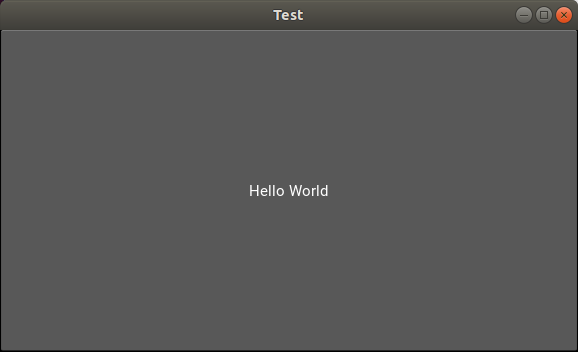
Ой, а де АІ ?
AI, ML
-
Scikit-learn
-
Scipy
-
Tensorflow
-
Keras
-
Theano
-
nltk
Посилання
- https://github.com/orehush/itrally2019
- https://www.numpy.org/
- https://pandas.pydata.org/
- https://matplotlib.org/
- https://pillow.readthedocs.io/en/stable/
- https://2.python-requests.org/en/master/
- http://flask.pocoo.org/
- https://sanicframework.org/
- https://www.djangoproject.com/
- https://www.django-rest-framework.org/
- http://www.celeryproject.org/
- https://kivy.org/