
MAKING SOFTWARE
Vaidas Mikalauskas
DEV@DATADOG
THINGS I DO:
Write code
Review / Test code
Fix servers
THINGS I LIKE:
Delete code
Green tests
Do stuff with servers
0...100%
Trial and error
# failing is first step to succeding
BIG
Project
What is
This is BIG
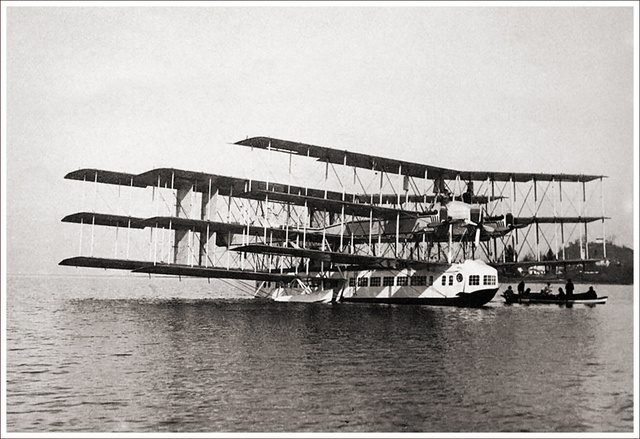
Caproni Ca 60
This is ambitious

Antonov A-40
Additional features

Kalinin K-7
- Choosing components
- Setting up dev environment
- Writing application
- Setting up infrastructure
- Deploying application
- Monitoring live
PLANNING
# CHOOSE YOUR WEAPONS
PLANNING
- Features
- Libraries
- Language
- Framework
- Team
FEATURES
Owner decides them
Developers do not...
Not always...
LIBRARIES
- Minimal dependencies
- Solve one problem, but solve it good
- Avoid libraries that wrap other libraries
LANGUAGE & FRAMEWORK
- Don't be hipster about it
- Trends change
- Bugs stay

Flettner airplane
DEV Environment
# setup
Minimal project
- Execution env
- Database
- HTTP server
- Frontend + Backend
- Cache
Environment requirements
- Reproducible
- Easy to setup
- Fast
To setup project:
- Install required software
- Modify configuration
- Load initial state
Available solutions
- Install manually
- VirtualBox or similar...
- Linux containers
It's easy
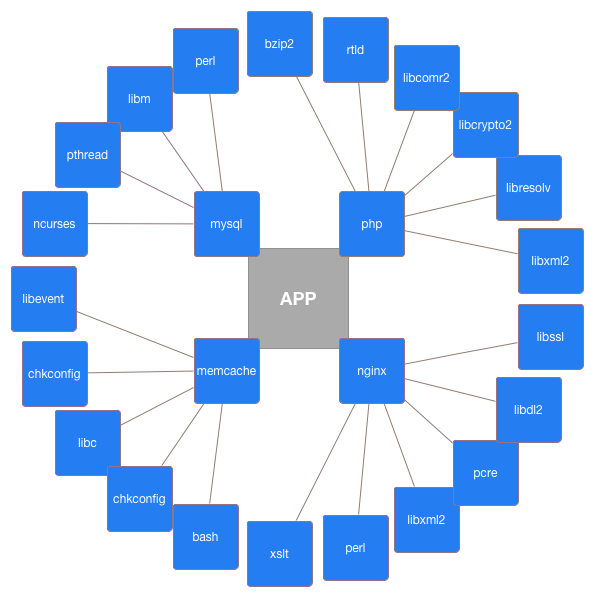
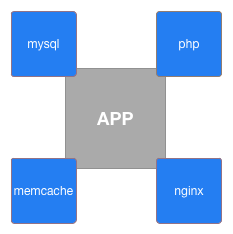
just install a few things
Matrix of hell
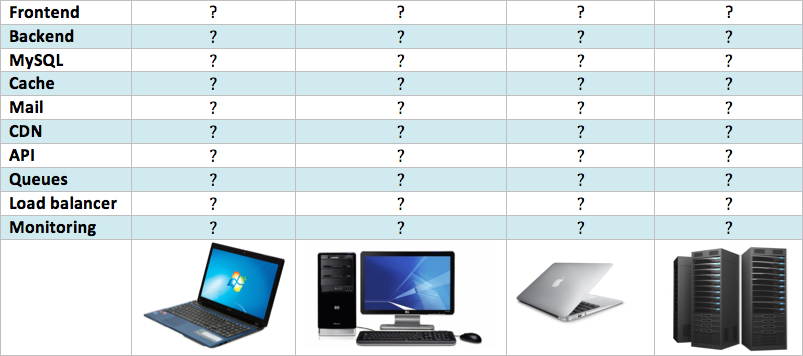
Virtualisation
- Sounds good
- Reproducible environment
- Problems with speed
- Resource hungry
- Problems with network
- Does not really work with many services
- Hard to share
Linux containers
(docker)
- Fast, really fast
- Reproducible environment
- Takes time to learn

NASA AD-1
Containers explained

Docker compose
php:
  image: datadoglt/php56
  volumes:
    - ".:/var/www"
    - "init.sh:/init.sh"
    - "app/session:/var/lib/php/session"
  links: [mysql]

web:
  build: docker/nginx
  ports: ["80", "443"]
  volumes:
    - ".:/var/www"
  links: [php]
  environment:
    VIRTUAL_HOST: giftoff.dev

mysql:
  image: mysql
  env_file: .env
  hostname: mysql
  volumes:
   - "app/mysql:/var/lib/mysql"
DO NOT
FORGET
To run full development stack:
1 command
Write your app
# coding
USE
VERSION CONTROL
Use GitLab, Github, BitBucket or etc...
Make pull requests
Do code reviews
CODE
REVIEWS
DO
Work on feature branches
Make master branch protected
Let someone review code
Review it yourself
DONT
Make it personal
Be too strict
Laugh at others code
Rubber duck
debugging

MAKE IT
WORK
- Do not over optimise things
- Keep it simple
- Minimal features
- Solve problems when they exist

Lackner HZ-1 Aerocycle
TESTS SHOULD FAIL
BUT ONLY WHILE YOU ARE FIXING THEM
Tests should be fast
If you have tests - always run them
Tests is code, it should be clean
BEHAT
# BDD
Feature: ls
  In order to see the directory structure
  As a UNIX user
  I need to be able to list the current directory's contents

  Scenario: List 2 files in a directory
    Given I am in a directory "test"
    And I have a file named "foo"
    And I have a file named "bar"
    When I run "ls"
    Then I should get:
      """
      bar
      foo
      """
Server setup
# production
Real world web application
# application services
- Frontend / Backend / API / etc...
- Database replication
- Cache server
- Load balancing
- Mailing service
- Queue / Messaging service
- Session storage
- Deployment
Infrastructure
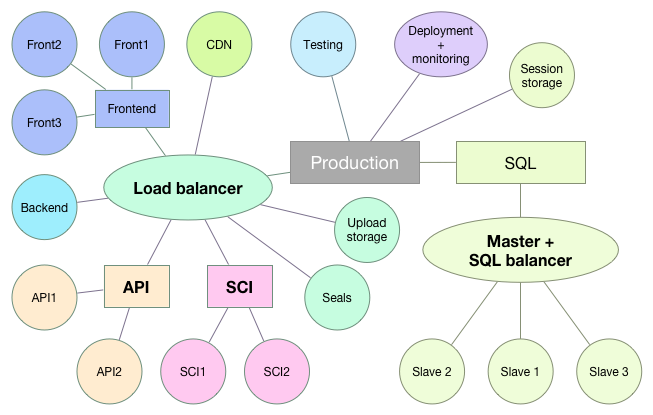
# servers
Project components
# toolset
- Package manager // Bower, NPM, Composer, etc...
- JS/CSS building // SASS, LESS, CoffeScript...
- Execution environment // PHP, Ruby, Python, NodeJS, etc...
- Caching // memcached, redis, etc...
- Monitoring // sentry, logstash, statsd, collectd, graphite...
- Queues // beanstalk, redis, etc...
- Building // Grunt/gulp, Jenkins, phing, etc...
- Database sever
Configurations needed:
Configuratios = Steps X Application X Server
Example:
50 steps
2 developers
production + testing
application + backend
= 400
Current project:
~70 steps per configuration
4 developers
16 production servers + testing + staging
11 applications
~ 10000
Environment differences
- Hardware
- OS (Windows/Linux/OS X)
- x86 / x86_64
- OS version/distribution
- Installed software
- Configuration

Convair XFY Pogo
Automation
# provisioning
Provisioning
Automated process of configuring servers
Provisioners
- Ansible
- Chef
- Puppet
- Other
Inventory
- Comunication
- Server location
- Server roles
Recipe
- Install software
- Change configuration
- Create files
- Ensure system state
Example recipe
---

- name: MYSQL | INSTALL
  apt: name=mysql-server state=present

- name: MYSQL | ENABLE AT STARTUP
  service: name=mysql-server state=started enabled=yes

- name: MYSQL | CREATE DATABASES
  mysql_db: name={{item}} state=present
  with_items:
    - app_prod
    - app_dev

- name: MYSQL | CREATE USERS
  mysql_user: name="john" password="pass" state=present

- name: MYSQL | GRANT PERMISSIONS
  mysql_user: name="john" priv=app_prod.*:ALL state=present
Running provisioner
- On initialization
- Manual
- Push (on schedule)
- Pull (on schedule)
Rolling updates
- For balanced services only
- Sequence:
- Remove from pool
- Run provisioner
- Check state
- Put back to pool
- Continue with next
Tips & tricks
- Use version control
- Use recipes for everything
- Don't update image, update recipe
- Share recipe, not image
- Provision production
- Keep organized
- Use --dry-run for testing

Hafner Rotabuggy
Deployment
# releases
Managed deployments
- Anyone can deploy
- Rollback
- Secret management
- Deploy configs
- Share resources
Available tools
- Capistrano (ruby)
- Deployer (php)
- Rocketeer (php)
- Ansible (python)
- other...
SECRETS
# we have them
Hide secrets
- Keep passwords safe
- Do not commit them
- Skype is no place for passwords
- Use encrypted storage
DO NOT!

Password vault
http://vaulthq.com
https://github.com/private-vault/vault

- Store your passwords privately
- Internally they are encrypted
- Teams
- Sharing
- Access through API
Deploy@DATADOG
# how we do it
Deploy to staging
Staging don't need:
- Data persistence
- High availability
Staging servers should:
- Deploy fast
- Bring up any commit
- QA can deploy it
DOGDEP
GOING LIVE:
DOGPRO
- Based on Ansible
- Deploys code
- Deploys services
- Easy for all
- Manages secrets
- Zero downtime
http://dogdep.github.io/dogpro
https://github.com/dogdep/dogpro

DOGPRO
DEMO
Monitoring
# stats
Monitor application
- Nobody reads logs
- Logs get lost
- Use tools like sentry or fabric
- Get alert on every error
Monitor your server
- Disk space
- CPU utilization
- Trafic
- DB activity
But don't forget users
- Collect user events:
- Logins / unsuccessful logins
- Registrations
- Purchases
- Other important actions
- Errors
Collect metrics
- Application
- statsd
- metricsd
- bucky
- Server/services:
- collectd
- diamond
- many others
- Logs:
- logstash
- fluentd
Aggregate data
- Graphite
- Carbon
- Logstash
Analyze data
- Grafana
- Giraffe
- Kibana
Receive alerts
- Seyren
- Cabot
- RearView
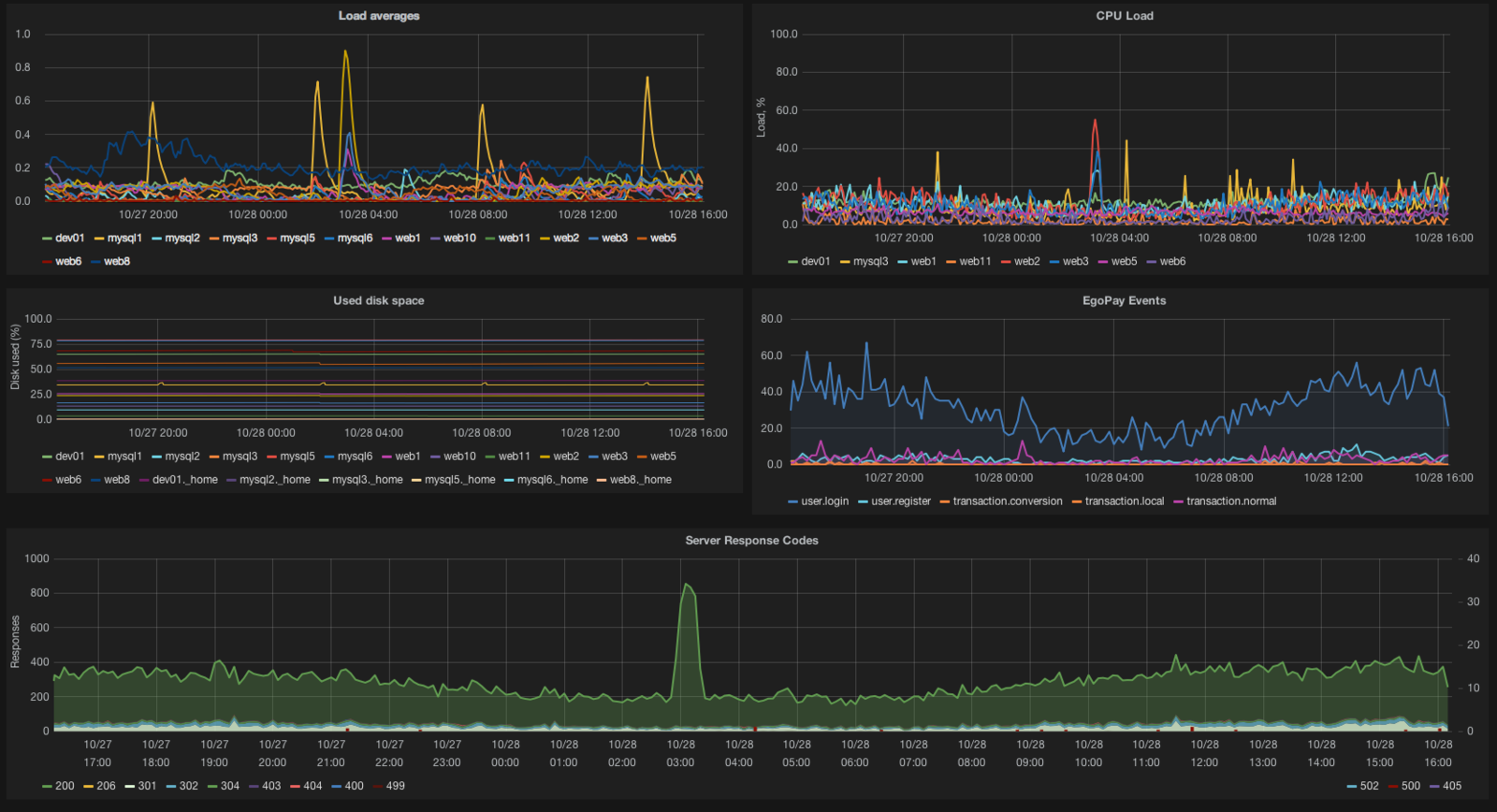
Or use what's
- New Relic
- DataDog
- LogicMonitor
already there
Monitoring is not about
- Get alerts
- Have stats on display
- Explain why things happen
beautiful graphs
Q&A
Thank you
https://slides.com/vaidasmikalauskas/ktu-2015
vaidas.m@datadog.org