web组件化开发
By William.D.King

Catalog
1.什么是组件和组件化开发
2.为什么需要组件化
3.组件化思想以及实现
4.Web Components标准
1.什么是组件和组件化开发
在前端web应用中,设计为通用性的,用于构建大型应用的软件。
组件可以带有UI,也可以是纯服务的逻辑代码。
web前端应用中标准的UI组件就有按钮、输入框等等。而提供服务的组件就有浏览器自带的跨浏览器ajax请求服务、本地数据持久化(如localStorage)
1.什么是组件和组件化开发
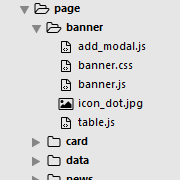
前端的组件化开发就是在浏览器提供的基本组件的基础上,通过基本组件的组合构成新的组件。
2.为什么需要组件化
模块
高内聚
重用性
互换性强(松耦合)

3.组件化思想以及实现
  // ====== 1 $scope变量初始化 ======
  function initScopeVariable() {
  }

  // ====== 2 $rootScope变量初始化 ======
  function initRootScopeVariable() {

  }

  // ====== 3 $resource变量初始化 ======
  function initResourceVariable() {

  }

  // ====== 4 页面元素初始化 ======
  function initPageDom() {

  }

  // ====== 5 页面数据初始化 ======
  function initPageData() {

  }

  // ====== 6 页面初始化接口 ======
  function initPage() {

    initScopeVariable();
    initRootScopeVariable();
    initResourceVariable();

    initPageData();
    initPageDom();

  }

  // ====== 10 初始化函数执行 ======
  initPage();
“面向过程"代码结构的弊端:随着页面内容的增加,逻辑复杂化,”过程”越来越长,没有一个规范限制,难以维护。
3.组件化思想以及实现
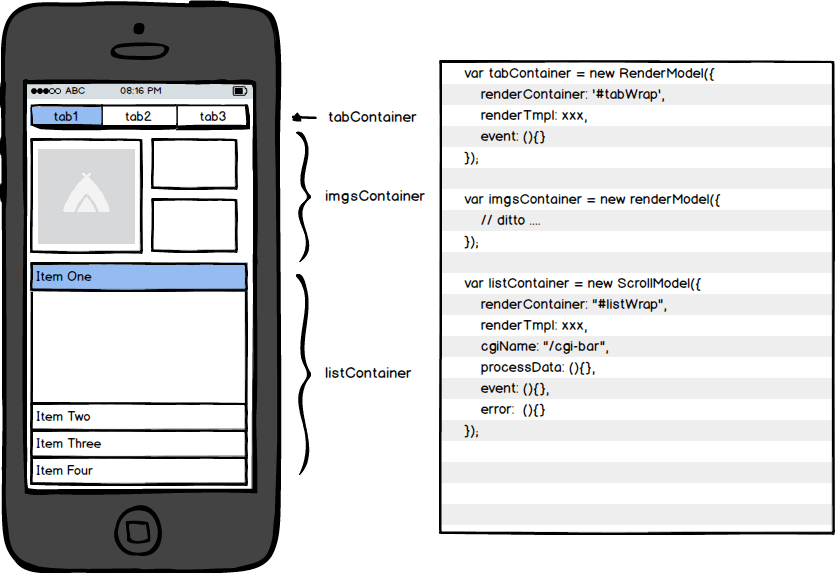
页面内容分成多个块(包含html、css、javascript),总结出块的整个生命流程,封装成抽象的方法,在编写时,只需在规定的方法内填写代码。
优点:封装,逻辑高度统一规范,易于管理维护。
3.组件化思想以及实现
一个web组件应当具有:
- 相对独立的作用域(JS和CSS)
- 模板(可选,HTML)
- 组件间规范化的交互接口
- 组件内嵌组合
- 生命周期机制
- 资源的内聚

3.组件化思想及其实现
Angular的组件化——directive
angular
  .module('matrixui.components.radio', [])
  .directive('muRadio', muRadioDirective);

function muRadioDirective() {
  return {
    restirct: 'E',
    controller: muRadioController
    template: '<div class="radio-container>"' +
                '<input type="radio" ng-click="hanldeClick()"></input>' +
                '<div class="radio-label">' +
              '</div>',
  }

  function muRadioController($scope) {
    // 注册事件
    $scope.handleClick = function($event) {
      // 事件处理代码
    }
  }
}
Angular框架的组件化主要体现在directive中,通过directive我们可以自定义一个html标签或者是属性,通过$scope变量来进行数据绑定以及事件绑定。
3.组件化思想及其实现
ReactJS的组件化
module.exports = React.createClass({
    mixins: [LinkedStateMixin],

    getInitialState: function() {
    	return {
    		username: '',
    		password: ''
    	}
    },

    componentDidMount: function() {

    },

    componentDidUpdate: function() {

    },

    render: function() {
    	return(
    		<div className="login-form-wrapper">
                    <div onClick={ this.props.login }>Login</div>
                    <div onClick={ this.props.cancel }>Cancel</div>
    		</div>
    	);
    },

    cancel: function() {

    },

    login: function(event) {

    }
});
ReactJS框架比较体现组件“生命周期”的抽象,每一个生命周期都是一个组件对象的方法,定义组件时只需在其适合的生命周期方法中编写代码即可。

3.组件化思想及其实现
组件资源的内聚——webpack
// webpack.config.js
module.exports = {
    entry: {
     entry: './index.jsx',
    },
    output: {
        path: __dirname,
        filename: '[name].min.js'
    },
    module: {
        loaders: [
            {test: /\.css$/, loader: 'style!css' },
            {test: /\.(jsx|js)?$/, loader: 'jsx?harmony', exclude: /node_modules/},
            {test: /\.(png|jpg|jpeg)$/, loader: 'url-loader?limit=10240'}
        ]
    }
};
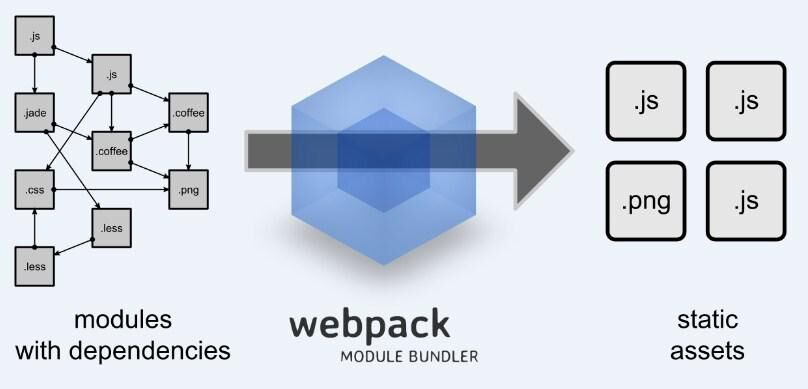
webpack实现了对模块依赖资源的打包,与requirejs这种处理机制不同,它的依赖关系在js文件中通过require函数表达,最终打包成一个js文件供组件使用。
// 这是一个模块文件

// 通过require引用ReactJS库,得到React对象
var React = require('react');

var Panel = React.createClass({
  // 创建Panel组件
});

// 模块导出
module.exports = Panel;
4.Web Components标准
Web Components是w3c组织为web组件化制定的一个新标准,未来有望成为组件化的技术主流。

4.Web Components标准
Four Technologies
- Custom Elements
- HTML Template
- Shadow Dom
- HTML Imports
4.Web Components标准
Custom Elements
var MyElement = Object.create(HTMLElement.prototype, {
  createCallback: function() {
    // dealWithTheElement
  }
});

document.registerElement('my-element', {
  prototype: MyElement
});
<!-- This is a HTML file -->
<my-element></my-element>
4.Web Components标准
Template
<!-- This is a HTML file -->

<template id="wallpaper-template">
  <li><span></span></li>
</template>
Shadow Dom
document.createElement('div');

var shadowRoot = div.createShadowRoot();

shadowRoot.innerHTML = '<p>This is a shadow dom</p>';
HTML Imports
<link rel="import" href="./my_component.html" />4.Web Components标准
一些关于Web Components的资料:
4.Web Components标准
Google Polymer

Polymer是Google发布的一款基于Web Components标准的新型UI类库。
Thanks!


Matrix公众号