DOM
文件物件模型
瘟溫莎殺鯊

Document Object Model
Document Object Model
由全球資訊網協會制定的標準,
把HTML裡的每一個標籤都定義成一個物件,
各個物件依照相互間的附屬關係形成一個樹狀結構
讓 Javascript 程式可以存取網頁裡的元素。
Document Object Model
<!DOCTYPE html>
<html lang="en">
<head>
    <meta charset="UTF-8">
    <meta name="viewport" content="width=device-width, initial-scale=1.0">
    <title>Document Name</title>
    <style>
        a {
            size: 20px;
        }
    </style>
</head>
<body>
    <h1>Title</h1>
    <a href="https://example.com">Link</a>
    <button style="background-color: white; color: blue" id="button">Click Me</button>
    <script>
        let button = document.getElementById("button");
        button.addEventListener("click", () => {
            button.style.backgroundColor = "red"
        });
    </script>
</body>
</html>
Document Object Model
<!DOCTYPE html>
<html lang="en">
<head>
    <meta charset="UTF-8">
    <meta name="viewport" content="width=device-width, initial-scale=1.0">
    <title>Document Name</title>
    <style>
        a {
            size: 20px;
        }
    </style>
</head>
<body>
    <h1>Title</h1>
    <a href="https://example.com">Link</a>
    <button style="background-color: white; color: blue" id="button">Click Me</button>
    <script>
        let button = document.getElementById("button");
        button.addEventListener("click", () => {
            button.style.backgroundColor = "red"
        });
    </script>
</body>
</html>
document
html
title
style
h1
a
button
script
a {size: 20px;}
Title
Link
程式碼
href="..."
style="..."
id="button"
head
body
Document Name
Click Me
Text
Element
Attribute
document
Document Object Model
document
html
title
style
h1
a
button
script
a {size: 20px;}
Title
Link
程式碼
href="..."
style="..."
id="button"
head
body
Document Name
Click Me
Text
Element
Attribute
Document
整個文件
一個元素標籤
元素的內容
元素標籤的屬性
Selector
ID & CLASS
可以加在 HTML 元素上的屬性 (attribute)
/*style.css*/
#gray {
	color: gray;
}
.ugly {
	color: red;
	background-color: cyan;
}
<html>
<head>
<link rel="stylesheet" href="./style.css">
</head>
<body>
<h1 class="ugly">Hello!</h1>
<h1 id="gray">Didn't see you there.</h1>
</body>
</html>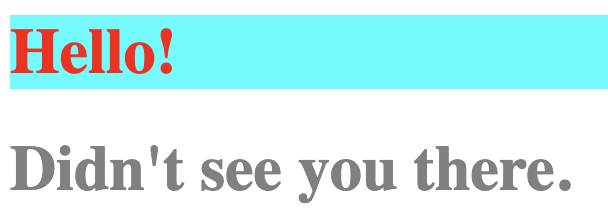
ID & CLASS
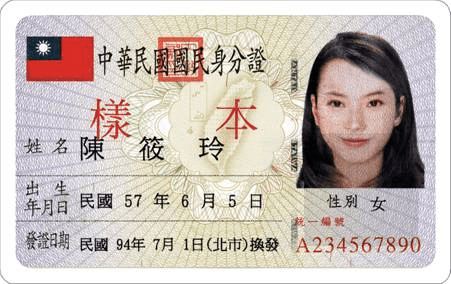
ID:身分證字號(獨一無二,每個元素的都應該要不一樣)
class:性別(群體特性,可以把同一個 class 放在許多不同元素上作為分類)
| SELECTOR | EFFECT |
|---|---|
document.getElementById(id) |
依 ID 選取 單一 元素 |
element.getElementsByClassName(class) |
依 class 類別 選取 多個 元素 |
element.getElementsByTagName(tag) |
依 標籤名 選取 多個 元素 |
element.querySelector(CSS_selector) |
CSS 選擇器 選第一個相符元素 |
element.querySelectorAll(CSS_selector) |
CSS 選擇器 選每一個相符元素 |
DOM SELECTOR
| SELECTOR | EFFECT |
|---|---|
element.getElementById(id) |
依 ID 選取 單一 元素 |
element.getElementsByClassName(class) |
依 class 類別 選取 多個 元素 |
element.getElementsByTagName(tag) |
依 標籤名 選取 多個 元素 |
element.querySelector(CSS_selector) |
CSS 選擇器 選第一個相符元素 |
element.querySelectorAll(CSS_selector) |
CSS 選擇器 選每一個相符元素 |
document.getElementById("67").innerHTML = "Hello";

console.log(document.getElementsByClassName("important"));
console.log(document.getElementsByClassName("important")[1]);

let paragraphs = document.getElementsByTagName("p");
paragraphs[1].style.fontSize = "10px";

paragraphs[0].querySelector(".short").style.color = "blue";

paragraphs[0].querySelectorAll(".short").forEach(shortPara => {
    shortPara.style.backgroundColor = "yellow";
});
<!DOCTYPE html>
<html>
<body>
	<h1 id="67" class="important">Bananas</h1>
	<hr class="important">
	<p>
    	This is the first (#0) paragraph.
	    <span class="short">T's sntns's shrt.</span>
 	    <span class="short">This too.</span>
	</p>
	<p>The second (#1) paragraph should appear smaller.</p>
</body>
</html>
Modifying
修改 HTML 元素
<!DOCTYPE html>
<html lang="en">
<head>
    <title>Document</title>
    <style>.BIG {font-size: 30px;}</style>
</head>
<body>
    <script>
        let elementA = document.getElementById("A");
        let elementB = document.getElementById("B");

        // 修改內容
        elementA.innerText = "新的文字內容"; // 修改純文字
        elementB.innerHTML = "<strong>加粗的文字</strong>"; // 插入 HTML

        // 修改屬性
        elementA.setAttribute("class", "classOne"); // 設置屬性
        elementA.id = "new-id"; // 直接修改 id

        // 修改樣式 .style
        elementB.style.color = "red"; // 改變文字顏色
        elementB.style.fontSize = "20px"; // 改變文字大小

        // 管理 class .classList
        elementA.classList.add("classTwo"); // 添加 class
        elementA.classList.remove("classOne"); // 移除 class
        setInterval(
            () => {elementA.classList.toggle("BIG")}, // 切換 class
            1000
        )
    </script>
    <p id="A">paragraph A</p>
    <p id="B">paragraph B</p>
</body>
</html>Event Listening
<button style="background-color: white; color: blue" id="button">Click Me</button>
<script>
	let button = document.getElementById("button");
	button.addEventListener("click", () => {
		button.style.backgroundColor = button.style.backgroundColor === "red" ? "white" : "red";
	});
</script>
事件監聽
練習~
記得來報寒訓!!!!!!
12/28前有早鳥優惠喔!