Authentication & Authorisation

STRATGIES, HASHING, PASSPORT.JS
Presenter:
Yauheni Pozdnyakov
Will talk about
Authorization
Strategies
Types of authorization
Crypto Hashing
Authentication
Authentication
What is authentication?
“Determining the identity of a person”
Why would I need to authenticate you?
“To be sure that you are the person that you claim to be”
How can you be authenticated?
Something that you know
Password, PIN number, secret key, secret handshake, secret questions ...
Something that you have
Fingerprint, voice recognition, face recognition ...
Something that you are (biometrics)
IDs, badges, physical key ...
Something that you know
Good as long as
- You remember the secret
- Nobody can uncover the secret
Gets compromised as soon as
- Someone else knows the secret and is able to use it
Identification and Authentication?
Identification
- Assigning a set of data to a person or an organization (subject)
Authentication
- Making a safe link between a subject and one or several identifiers
To sum up
Authentication is the process of verifying who you are. When you log on to a PC with a user name and password you are authenticating.
Authentication is about who somebody is
Why do we need to identify you?
An information system where
- Different type of information or resources are available
- Different type of users
- depending on who you are, you may not have the same rights to access to some information or ressources
Objectives
Security issues
In order to preserve confidentiality and integrity of data, some people can have more or less privileges to access to some contents
Secure an information system
- Define what are the authorized access to the information system
- Prevent non authorized access
Access Control
Complete mediation
Every access to every object is checked
Least privilege
Do not grant a subject more rights than he needs
Separation of privileges
Avoid conflicts of interests
Non-intrusiveness and user-friendly
User acceptance
Come along with admin model
Creation
Who can create an object and define its rights?
Modification
Who can modify the rights?
Delegation
Is it possible to give a right to do something to someone else?
Reasoning Access Control
Core
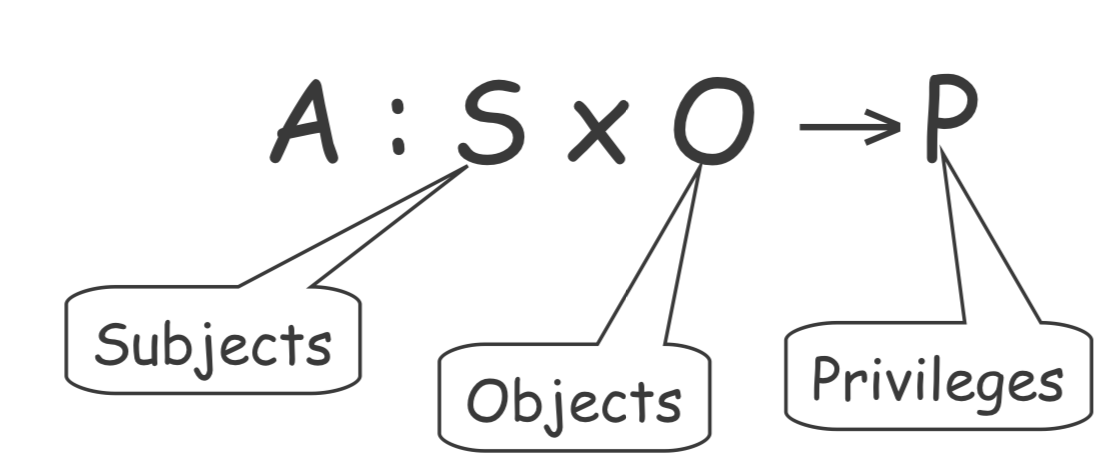
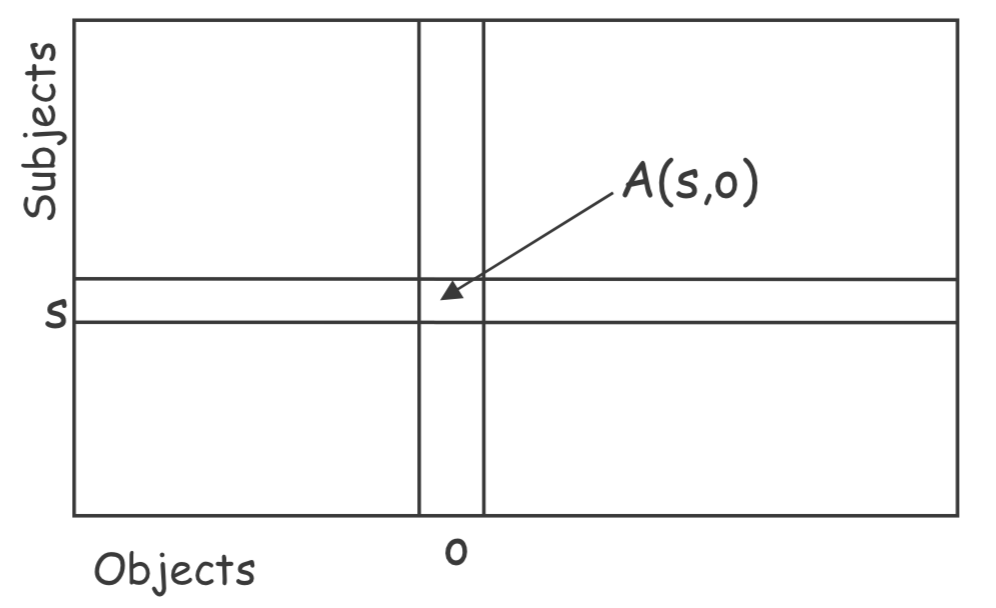
"Who can do what?": Access Control Matrix
Administration model
Based on the principe of ownership
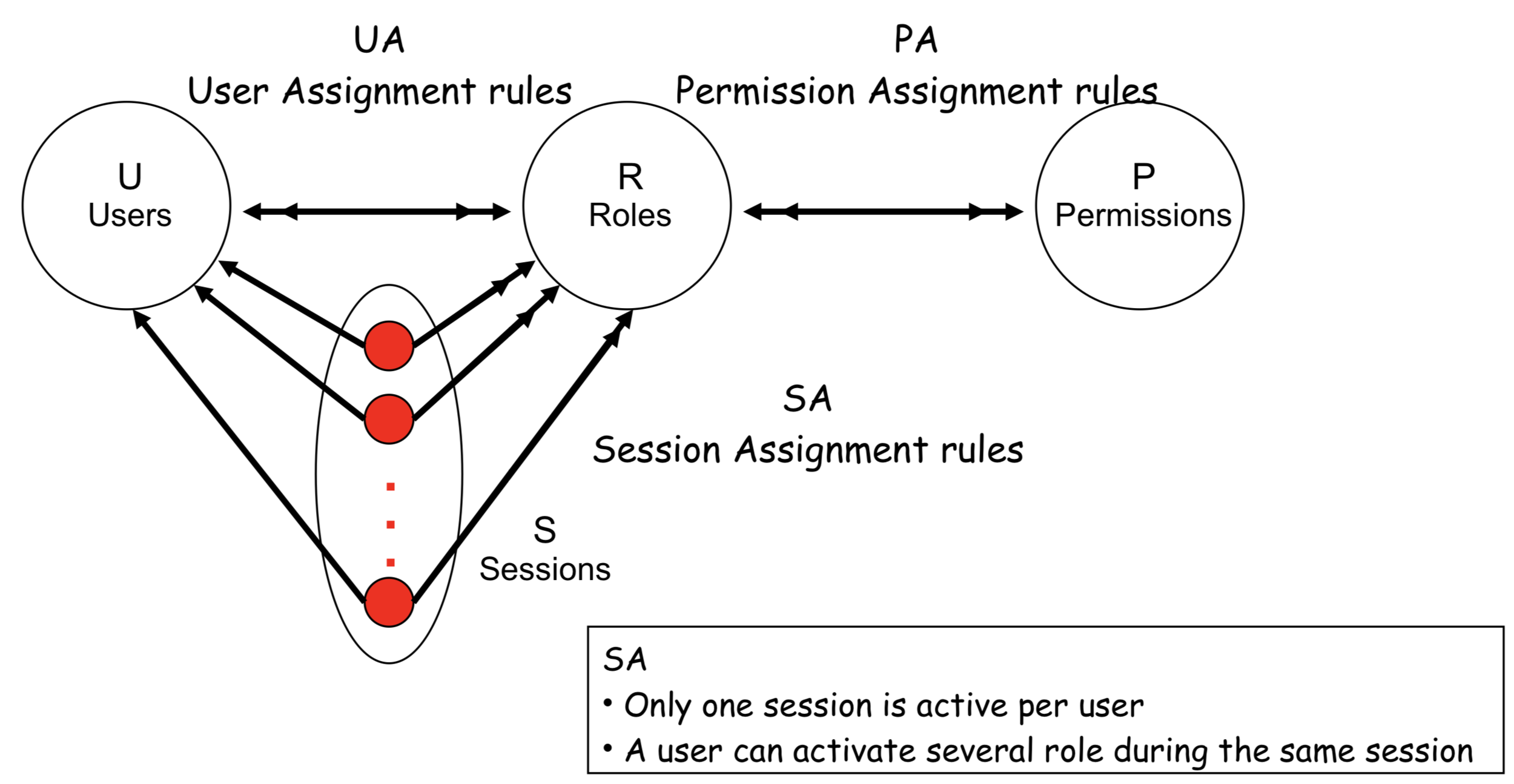
RBAC: Role Based Access Control
DAC: Discretionary Access Control Model
Core
Introduction of the concept of role
Administration model
ARBAC'97
ACCESS Control Matrix
Store by column: access control lists
Store by row: capability lists
ACCESS Control List
Idea:
The good

- Implement access matrix by columns
- Each object is tied with a list of “who can access and for what”
- Compact
- Useful when many objects and few subjects or simple grouping
The eval
- Revoking a subject can be hard
- Follow-up on the principle of least privilege
Capability List
Idea:
The good
- Implement access matrix by rows
- Each subject is associated with a list of “what can be access and for what”
- Easy to follow up on the principle of least privilege
The eval
- Can be very hard to maintain for big IS
- Deleting an object can be hard

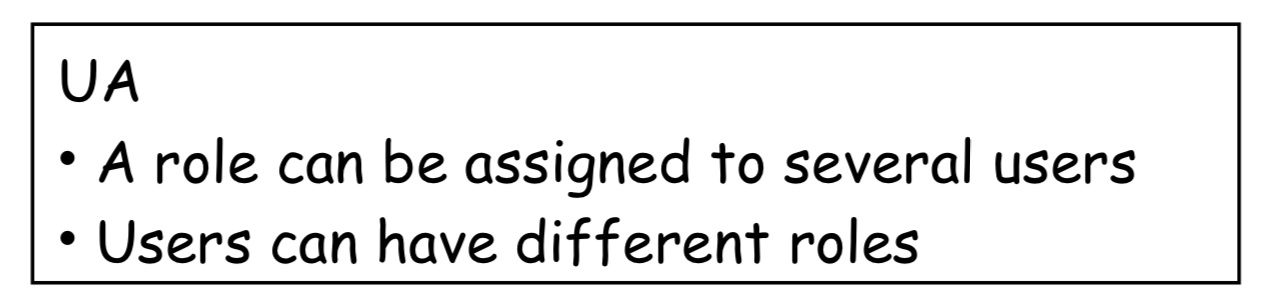
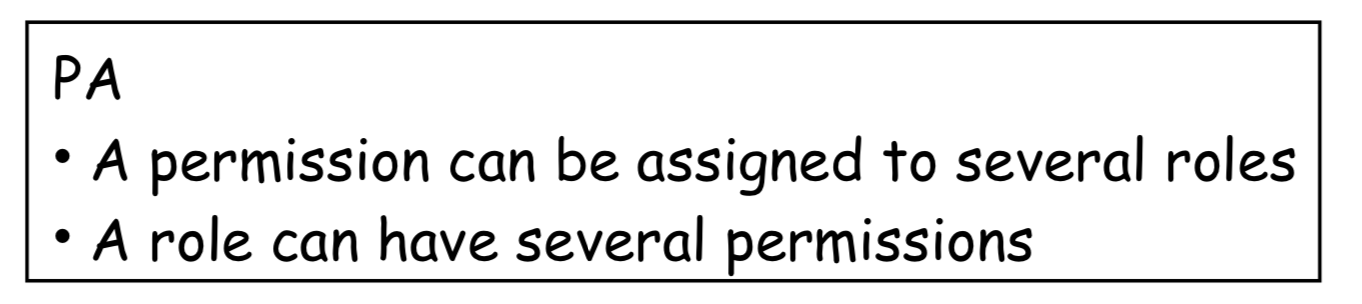
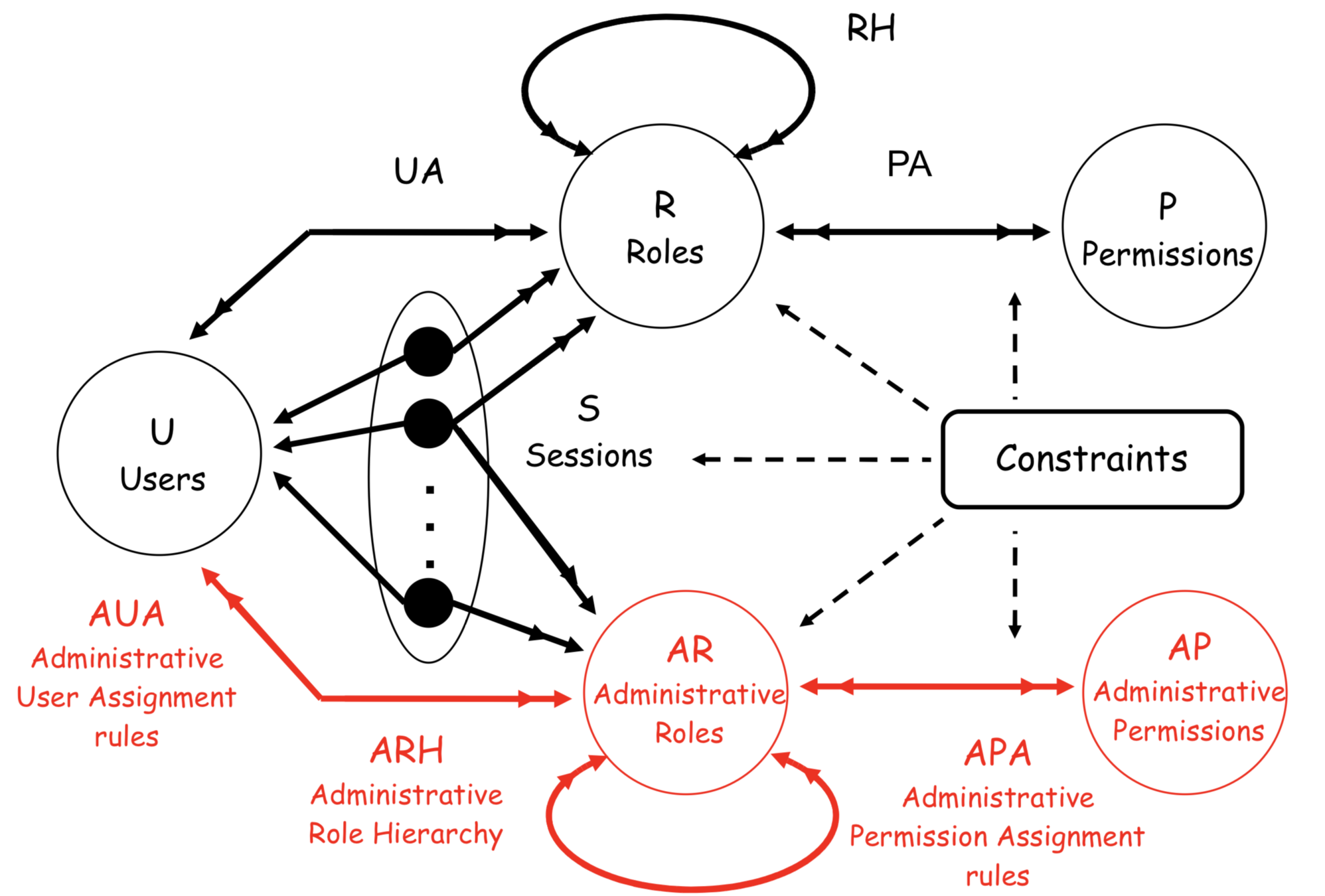
RBAC0: ROLE BASED ACCESS CONTROL
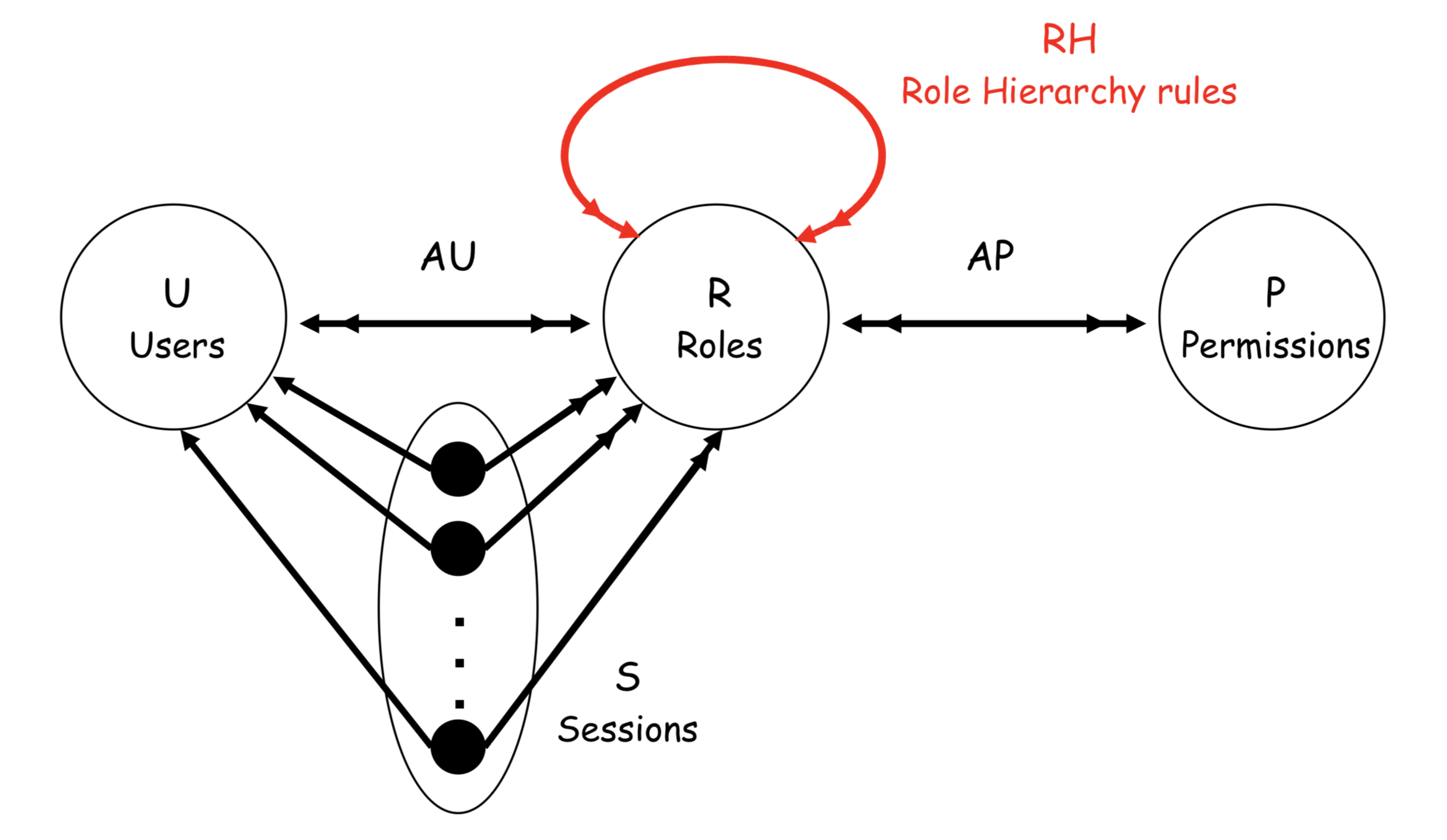
RBAC1: ROLE HIERARCHY
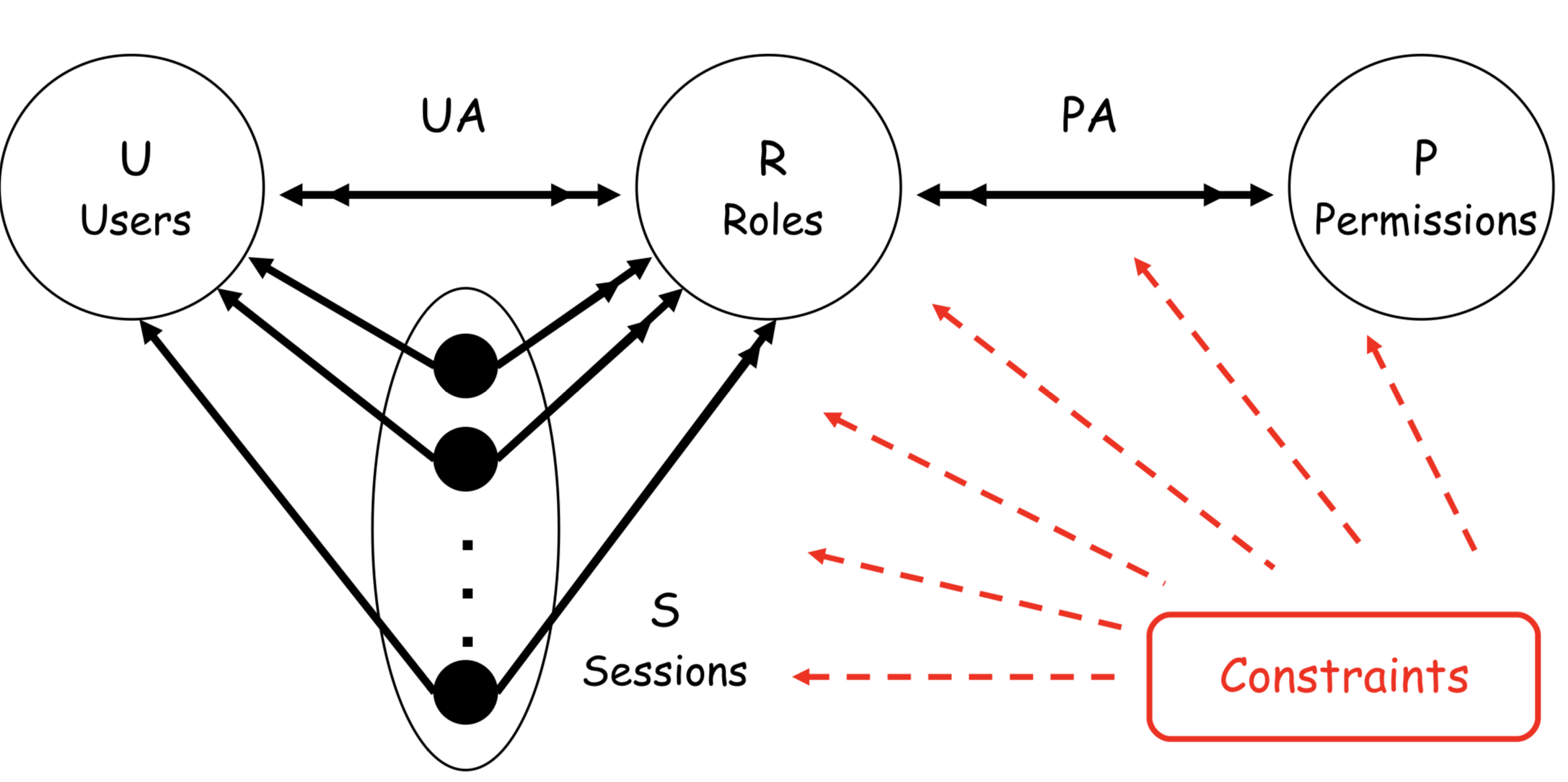
RBAC2: RBAC with CONSTRAINTS
RBAC3: ARBAC'97
To sum up
Authorization is the function of specifying access rights to resources, which is related to information security and computer security in general and to access control in particular.
Authorization is the process to confirm what you are authorized to perform. For example, you are allowed to login to your Unix server via ssh client, but you are not allowed to browser / data2 or other file systems. Authorization occurs after authentication is successful. Authorization can be controlled at the level of file system or use a variety of configuration options such as application level chroot. Normally, the connection attempt should be good authentication and authorization by the system. You can easily find out why the connection attempts are either accepted or rejected with the help of two factors.
Strategies
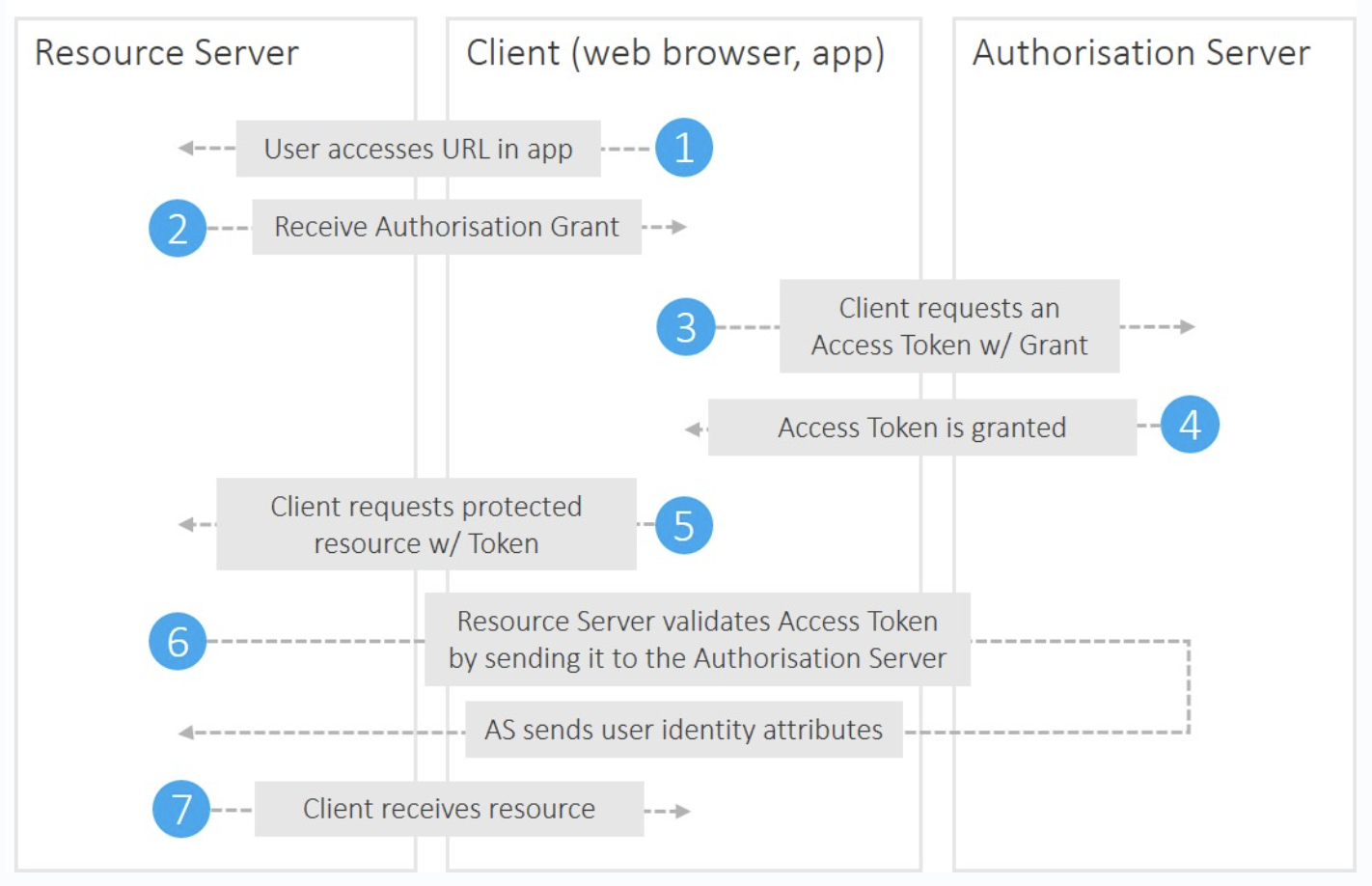
OAuth is an open-standard authorization protocol or framework that describes how unrelated servers and services can safely allow authenticated access to their assets without actually sharing the initial, related, single logon credential. In authentication parlance, this is known as secure, third-party, user-agent, delegated authorization.
Basic authentication is a simple way of protecting a website at the edge. Users enter a username and password combination to access pages protected by basic authentication. You can use basic authentication to restrict access to low-risk assets like testing and staging environments.
SAML (Security Assertion Mark-up Language) is an umbrella standard that covers federation, identity management and single sign-on (SSO).
The SAML workflow

The OAuth workflow
Passport.js
Passport.js
Passport.js
// Use the LocalStrategy within Passport to register/"signup" users.
passport.use('local-signup', new LocalStrategy(
  {passReqToCallback : true}, //allows us to pass back the request to the callback
  (req, username, password, done) => funct.localReg(username, password)
    .then(function (user) {
      if (user) {
        console.log("REGISTERED: " + user.username);
        req.session.success = 'You are successfully registered and logged in ' + user.username + '!';
        done(null, user);
      }
      if (!user) {
        console.log("COULD NOT REGISTER");
        req.session.error = 'That username is already in use, please try a different one.'; //inform user could not log them in
        done(null, user);
      }
    })
    .fail(function (err){
      console.log(err.body);
    });
));
Passport.js
passport.use('local-signin', new LocalStrategy(
  {passReqToCallback : true}, //allows us to pass back the request to the callback
  (req, username, password, done) => funct.localAuth(username, password)
    .then(function (user) {
      if (user) {
        console.log("LOGGED IN AS: " + user.username);
        req.session.success = 'You are successfully logged in ' + user.username + '!';
        done(null, user);
      }
      if (!user) {
        console.log("COULD NOT LOG IN");
        req.session.error = 'Could not log user in. Please try again.'; //inform user could not log them in
        done(null, user);
      }
    })
    .fail(function (err){
      console.log(err.body);
    });
));
Passport.js
passport.serializeUser(function(user, done) {
  console.log("serializing " + user.username);
  done(null, user);
});

passport.deserializeUser(function(obj, done) {
  console.log("deserializing " + obj);
  done(null, obj);
});
function ensureAuthenticated(req, res, next) {
if (req.isAuthenticated()) { return next(); }
req.session.error = 'Please sign in!';
res.redirect('/signin');
}Passport public&private API
  // create private and public routes
  const publicApi = express.Router();
  const secureApi = express.Router();


// add private middleware
  if (config.app_env() !== 'test') {
    secureApi.use(isAuthenticated);
    secureApi.use(anyRole);
  }

 // some public routes
  publicApi.use('/auth', formParser, authRoute.init(app));
  publicApi.get('/api/account/current', accountRoute.get);
  publicApi.get('/api/user/current', userRoute.get);
  publicApi.use('/healthcheck', healthCheck);

 // some private routes
  secureApi.use('/api/myfirstapi', firstRoute);
  secureApi.use('/api/mysecondapi', secondRoute);
  secureApi.use('/api/methirdapi', thirdRoute);
  secureApi.use('/api/myfourthapi', fourthRoute);

  app.use(publicApi);
  app.use(secureApi);
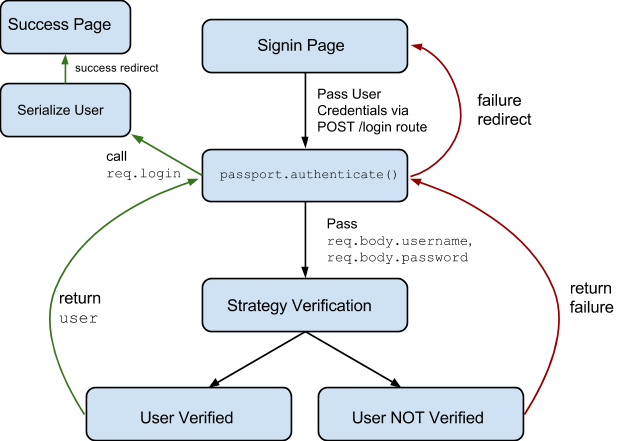
Passport authentication flow
- Requiring the module and using its passport.initialize() and passport.session() middleware with express.
- Configuring passport with at least one Strategy and setting up passport's serializeUser and deserializeUser methods.
- Specifying a route which uses the passport.authenticate middleware to actually authenticate a user.
AUTHENTICATION REQUEST FLOW
- When the user submits the login form, a POST request to /login is made resulting in the execution of the passport.authenticate middleware we've set up.
- As the authenticate middleware for that route is configured to handle the local strategy, passport will invoke our implementation of the local strategy.
- Passport takes the req.body.username and req.body.password and passes it to our verification function in the local strategy.
- Now we do our thing: loading the user from the database and checking if the password given matches the one in the database.
- In case of an Error interacting with our database, we need to invoke done(err). When we cannot find the user or the passwords do not watch, we invoke done(null, false). If everything went fine and we want the user to login we invoke done(null, user).
AUTHENTICATION REQUEST FLOW
- Calling done will make the flow jump back into passport.authenticate. It's passed the error, user and additional info object (if defined).
- If the user was passed, the middleware will call req.login (a passport function attached to the request).
- This will call our passport.serializeUser method we've defined earlier. This method can access the user object we passed back to the middleware. It's its job to determine what data from the user object should be stored in the session. The result of the serializeUser method is attached to the session as req.session.passport.user = { // our serialised user object // }.
- The result is also attached to the request as req.user.
- Once done, our requestHandler is invoked. In the example the user is redirected to the homepage.
SUBSEQUENT AUTHENTICATED REQUESTS FLOW
- Express loads the session data and attaches it to the req. As passport stores the serialised user in the session, the serialised user object can be found at req.session.passport.user.
- The general passport middleware we setup (passport.initialize) is invoked on the request, it finds the passport.user attached to the session. If is doesn't (user is not yet authenticated) it creates it like req.passport.user = {}.
- Next, passport.session is invoked. This middleware is a Passport Strategy invoked on every request. If it finds a serialised user object in the session, it will consider this request authenticated.
- The passport.session middleware calls passport.deserializeUser we've setup. Attaching the loaded user object to the request as req.user.
SUMMARY PASSPORT METHODS AND MIDDLEWARE
- passport.initialize middleware is invoked on every request. It ensures the session contains a passport.userobject, which may be empty.
- passport.session middleware is a Passport Strategy which will load the user object onto req.user if a serialised user object was found in the server.
- passport.deserializeUser is invoked on every request by passport.session. It enables us to load additional user information on every request. This user object is attached to the request as req.user making it accessible in our request handling.
- Our Local Strategy is only invoked on the route which uses the passport.authenticate middleware.
- Only during this authentication passport.serializeUser is invoked allowing us the specify what user information should be stored in the session.
Crypto hashing
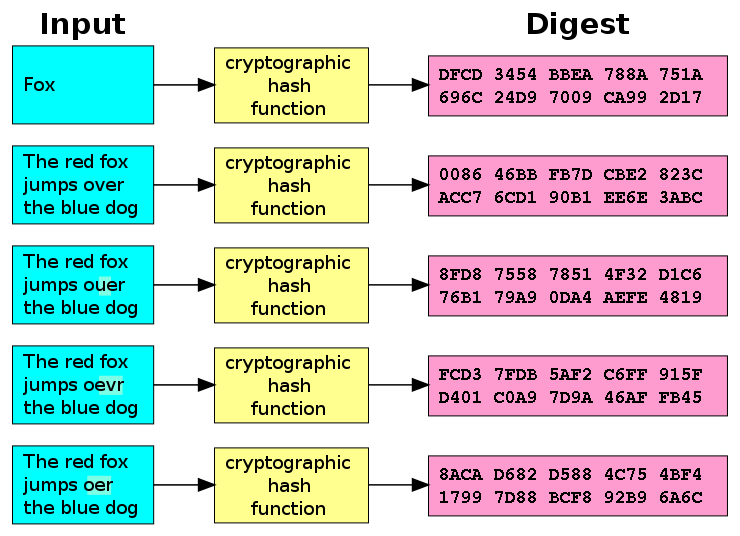
MD5
SHA256
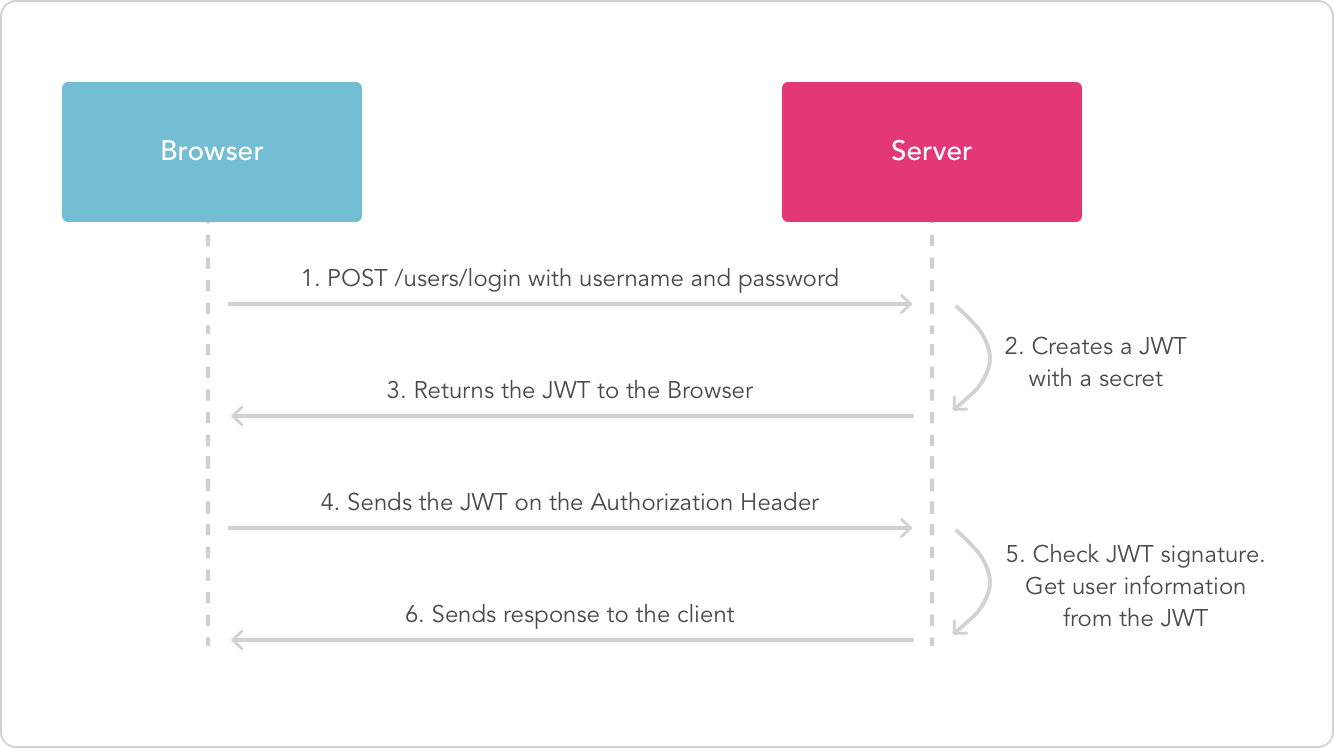
JWT token
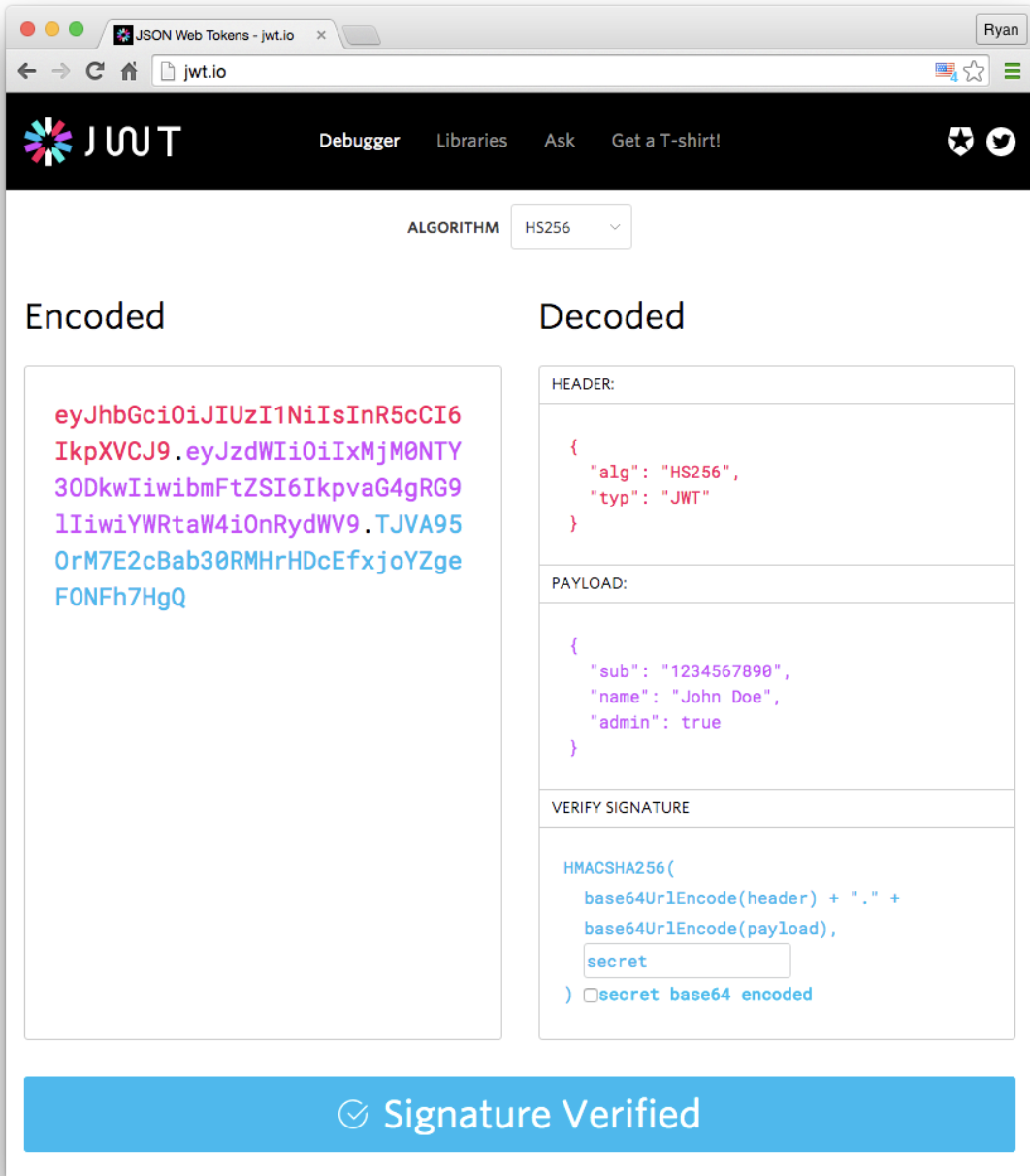
JSON Web Token (JWT) is an open standard (RFC 7519) that defines a compact and self-contained way for securely transmitting information between parties as a JSON object. This information can be verified and trusted because it is digitally signed. JWTs can be signed using a secret (with the HMAC algorithm) or a public/private key pair using RSA.
-
Compact: Because of their smaller size, JWTs can be sent through a URL, POST parameter, or inside an HTTP header. Additionally, the smaller size means transmission is fast.
-
Self-contained: The payload contains all the required information about the user, avoiding the need to query the database more than once
JWT token
JWT token