Intro to Kubernetes
January 2018
Things we'll cover..
- Docker refresher
- The challenges running lots of containers
- How Kubernetes deals with these challenges
- Touch on some related technologies.
Docker overview
- Not virtualization
- EC2, VMware, VirtualBox
- EC2, VMware, VirtualBox
- Linux kernel features +
- Namespaces for partitioning
- Control groups for security
- Share host Kernel
- Docker Engine, Docker Machine
- rkt (Rocket) CNCF competing project
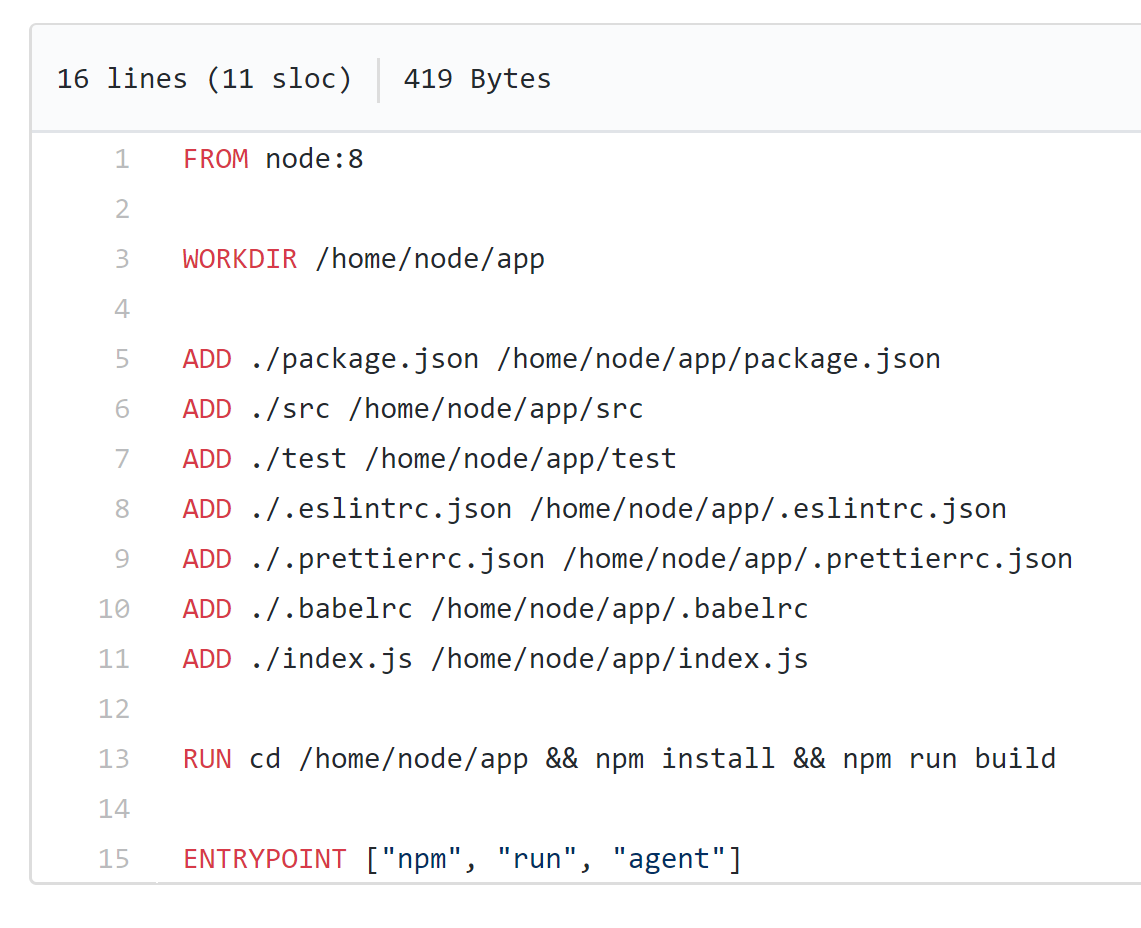
Dockerfile
- Container image descriptor.
- Lives with your code.
- Used to build images to deploy to registries.
Docker engine components
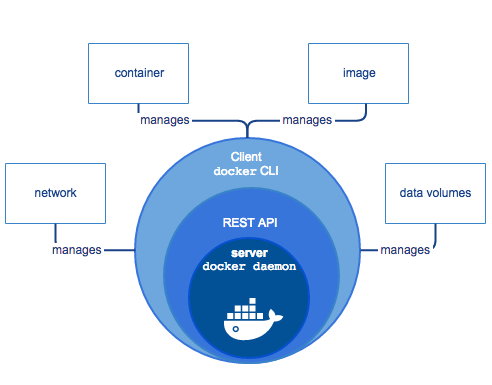
Image from: https://docs.docker.com/engine/docker-overview
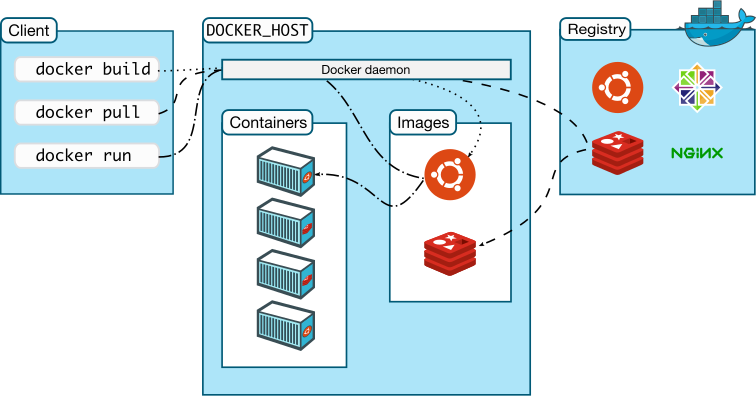
Docker architecture
Image from: https://docs.docker.com/engine/docker-overview
First set of challenges
- containers that depend on each other
- eg. webserver => appserver cluster
- eg. webserver => appserver cluster
-
containers that reference external resources
- eg. app => persistent storage
- eg. app => persistent storage
- centralised logging, config and "debugability"
- ie. when containers die, what next?
- ie. when containers die, what next?
- portable configuration as code
.. and all of this at scale.
Docker compose
A simple way of describing a set of containers to run.
Example:
version: '3'
services:
  web:
    build: .  (in this case no image req'd)
    ports:
     - "5000:5000"
    volumes:
     - .:/code
  redis:
    image: "redis:alpine"
..then code can refer to container by name, eg:
cache = redis.Redis(host='redis', port=6379)
Docker swarm
Docker centric container orchestration. A swarm is a cluster of docker engine 'nodes' running in swarm mode.
- Manually manage standalone swarm, or..
- Purchase EE, for Universal Control Plane (UCP)
- Roll your own autoscaling of nodes
- No cloud provider managed services
Docker have recently added initial Kubernetes support to service deployment apis, which indicates the broad industry support k8s has gained.
Kubernetes : Intro
- Google partnered with the Linux Foundation to form the Cloud Native Computing Foundation (CNCF) and offered Kubernetes as a seed technology.
- K8s is based on the learnings from Google's 'Borg' container management platform that they had been using internally for 10+ years.

Kubernetes : Progress
- All major cloud providers will have a managed k8s offering by the end of 2018.
- CNCF Platinum Members: AlibabaCloud, AWS, Azure, Cisco, CoreOS, Dell, Docker, Fujitsu, GoogleCloud, Huawei, IBM, Intel, Mesosphere, Oracle, Pivotal, Redhat.
https://www.cncf.io/about/members/
- K8s has been running mission critical production workloads for a number of years.
Kubernetes : how?
How does k8s deal with containers at scale?
- Abstracts away Cloud providers, and containers.
- Provides a declarative framework to describe desired service state.
- Handles key Orchestration mechanisms "Out of the box".
- "stacks" workloads on nodes cost-effectively.
Kubernetes : Orchestration
K8s provides the following features out of the box in a cloud agnostic/extensible manner.
- Autoscaling of nodes
- Discovery of services and config/secrets mgmt
- Rolling releases and rollbacks
- Automated platform upgrades
- CPU and RAM based workload stacking
- Namespacing, versioning and healthchecks
Some of these can be swapped out with other products if desired, eg. Consul for discovery and config mgmt.
Kubernetes : Control Plane
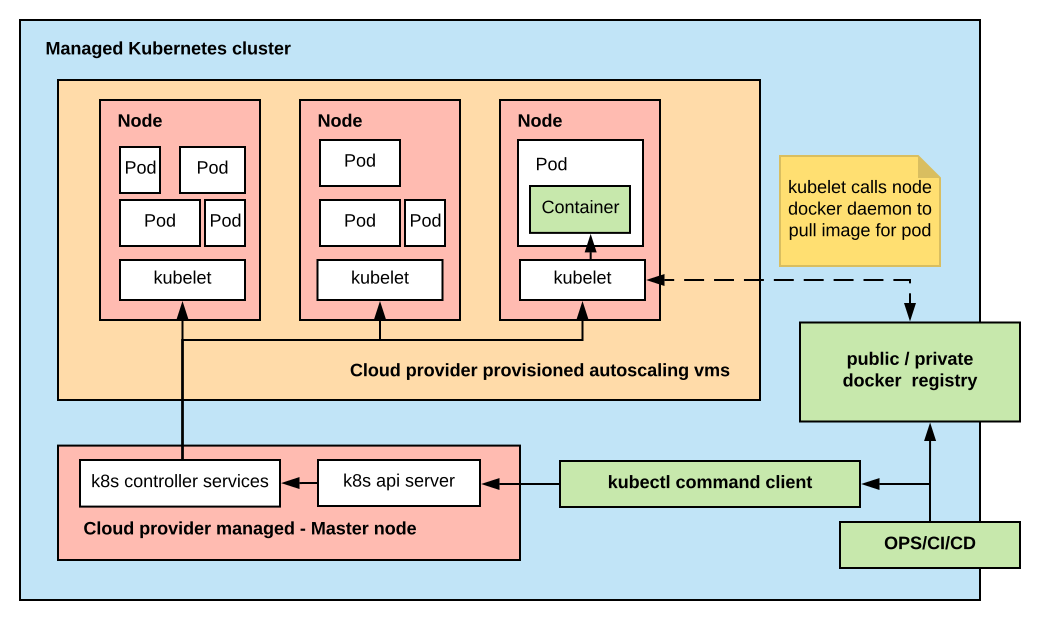
The k8s control plane consists of a 'Master' node, and services used to orchestrate the cluster.
A manual install of k8s requires that you take responsibility for these more complex aspects.
Managed k8s such as Google Kubernetes Engine (GKE), or EKS look after this for you, including node upgrades.
Kubernetes : Managed
Kubernetes : kubectl
- command line tool
- allows full control of cluster
- accepts yaml manifests as input
- works with "minikube" envs too

Kubernetes : ConfigMap
ConfigMaps can be used to inject environment variables that can be referenced within containers.
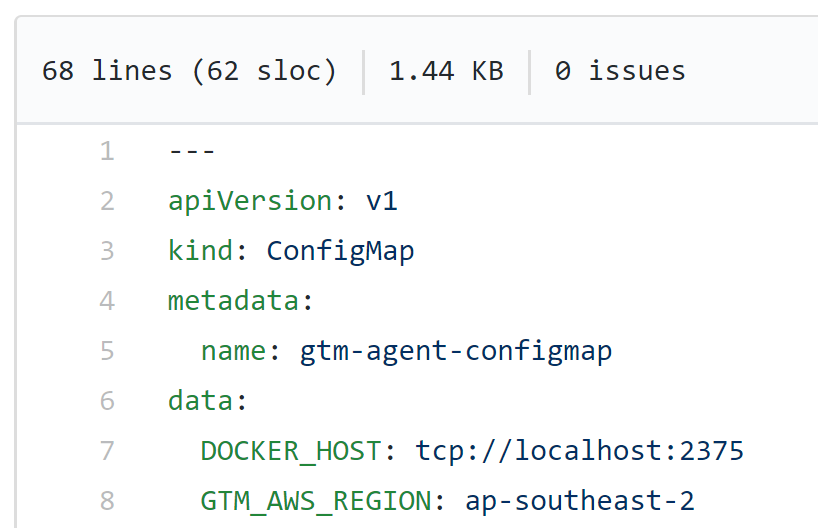
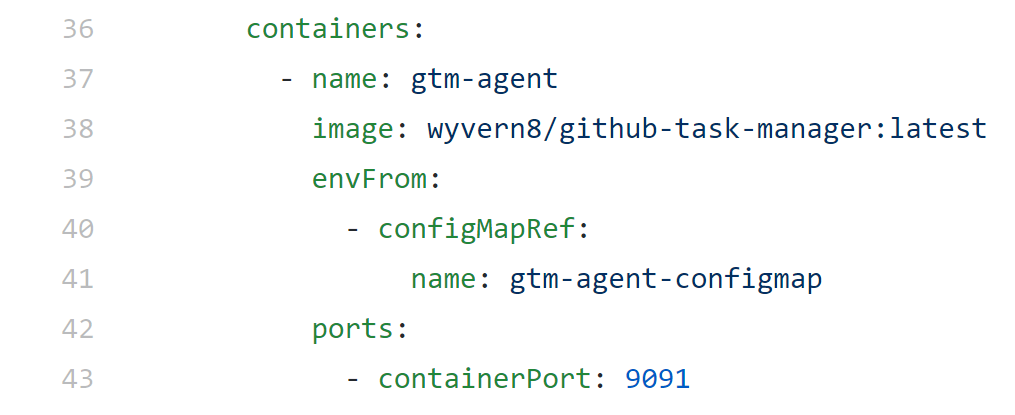
note: a similar construct "secret" is used for sensitive values
Kubernetes : Pods
Pods are the smallest deployable workload, and are the mechanism of container abstraction.
They generally contain a single container, with perhaps a 'sidecar' container for platform ops.
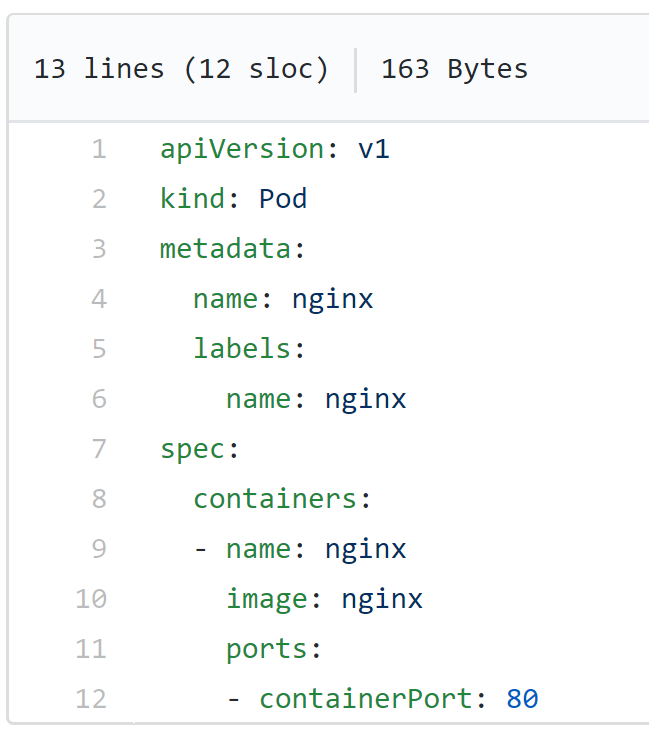
Labels are name/value pairs assigned to pods, and can be targetted by services, and other actions. eg. release: stable, environment: dev1.
Kubernetes : Stacking
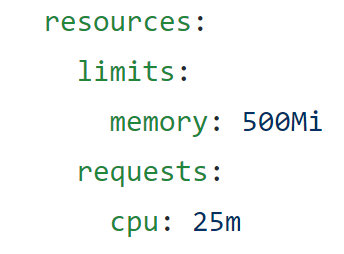
Containers in a pod instance are always on the same node. And the system is monitored continually to ensure the correct scale, and that pods are scheduled efficiently to nodes.
The following properties affect which node a pod is scheduled to:
spec.containers[].resources.limits.cpu
spec.containers[].resources.limits.memory
spec.containers[].resources.requests.cpu
spec.containers[].resources.requests.memory
Kubernetes : Scaling
The k8s "Deployment" schema defines a replica set template to be used to scale pods.
This means that we scale out using kubectl on a passed in "deployment" eg.
kubectl scale --replicas=2 deployment/jenkins-jenkins
Note that the node autoscaling approach below this is provider specific. If the cluster has capacity in existing nodes, no new nodes are created - and if the autoscaling group is at capacity, the scale event will fail.
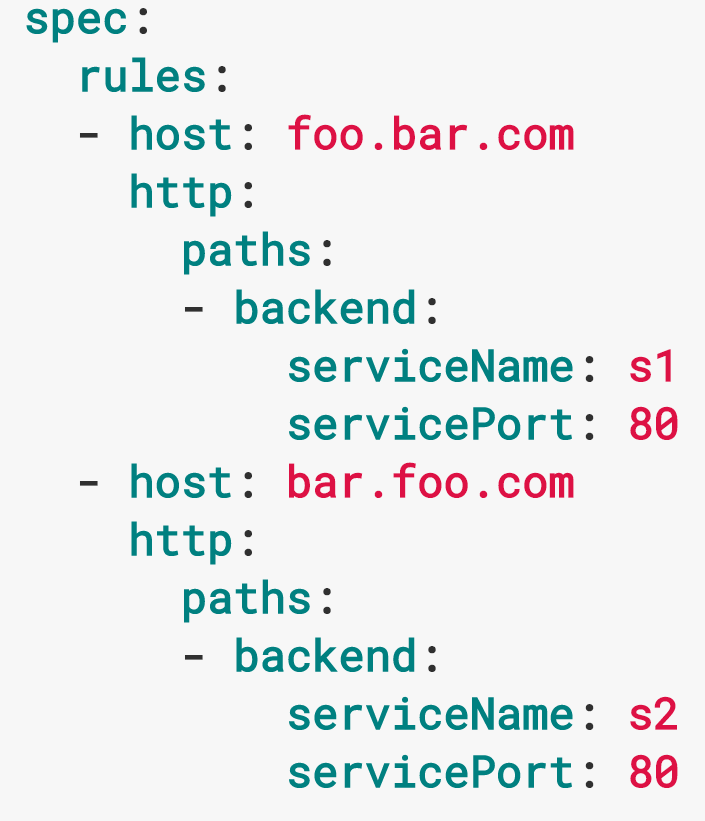
Kubernetes : Ingress
Managed k8s ingress can be mapped to an instance of the ELB/ALB of the given service.
Alternatively, an nginx ingress controller among others is available, supporting name and path based virtual hosting, with support for LetsEncrypt cert mgmt via KubeLego
Kubernetes : DaemonSet
Defines a pod that must run on all nodes. Pods specified in this way will be automatically provisioned and garbage collected accordingly.
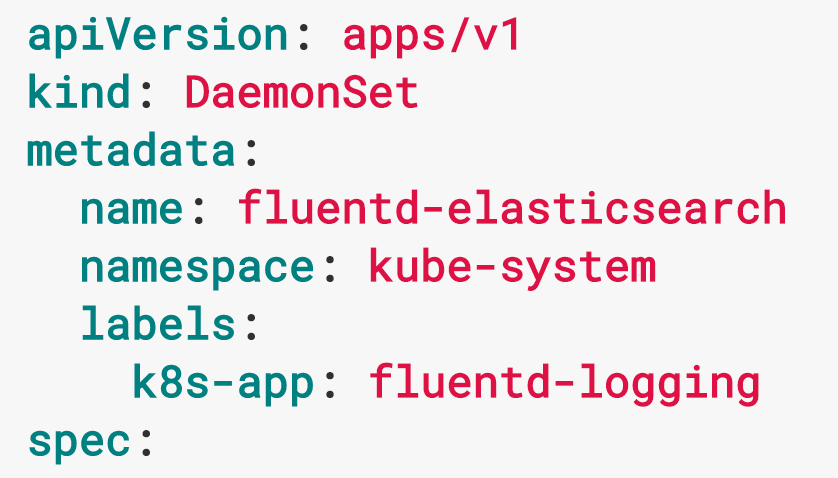
DaemonSets are typically used for purposes such as logging and monitoring.
Kubernetes : Discovery
The kube-dns add-on causes each created 'Service' to have a unique private DNS name auto allocated. ie.
my-svc.my-namespace.svc.cluster.local
Each service has a dedicated private cluster ip assigned, which does not change as pods come and go. The namespace domain is added as a search domain to each node via etcd, so reference to 'my-svc' works.
For details:
https://kubernetes.io/docs/concepts/services-networking/dns-pod-service/
Kubernetes : Logging
Follow Pod container logs
kubectl logs -f <pod> --container=<container>
Container logs by label
kubectl logs --label env=dev1 --container=<container>
Centralized logging is implementation specific. In GKE it is StackDriver. Kubernetes uses Fluentd log collector, so this can be plugged into other systems such as Splunk.
Kubernetes : Tracing
Centralized tracing can be acheived by instrumenting the OpenTracing APIs in deployed apps, and deploying CNCF Jaeger to Kubernetes. Jaeger is backwards compatible with Zipkin.
Jaeger was contributed to the CNCF by Uber, and is easily deployable to a k8s cluster, including a modern web ui.
Kubernetes : Monitoring
Monitoring and alerting for k8s clusters can be achieved by deploying a monitoring DaemonSet leveraging tools such as CNCF Prometheus.
Depending on cloud provider this area may be provided via managed service tools such as Stackdriver/CloudWatch.

Kubernetes : Helm
Helm is the k8s package manager. It's intent is to simplify the distribution and control of deployments, via a construct called a 'Chart'.
https://helm.sh/
Charts for many popular services are available directly from the K8s github org.
https://github.com/kubernetes/charts/tree/master/stable
or via a web app store:
https://kubeapps.com/
One key advantage of using Helm, is versioning and simplified rollback of deployments

Kubernetes : ServiceMesh
Linkerd supported by CNCF can easily be deployed as a DaemonSet to k8s nodes. Istio sidecar containers are also supported.
ServiceMesh is a separate topic, but briefly this brings:
- sophisticated service discovery
- monitoring and control of connectivity
- circuit breaker capability
- retry capability

References & links
Intro to Kubernetes
By Andrew Vaughan