Progressive Web Apps
What are PWAs?
Web apps that are progressively enhanced so they feel more 'native' on supporting devices
Engaging
They should feel at home on a device. They're installable, support push notifications, background sync and an immersive browser-UI-less experience.
Reliable
They should load as quickly as native apps, and should never show the browser's "You're offline" page.
Fast
They should load quickly. User-interactions should be smooth and navigation instant (just like native apps).
Why build PWAs?
Install prompt
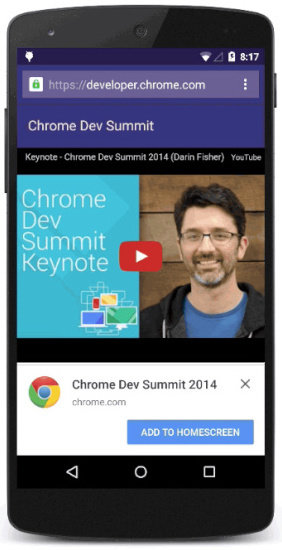
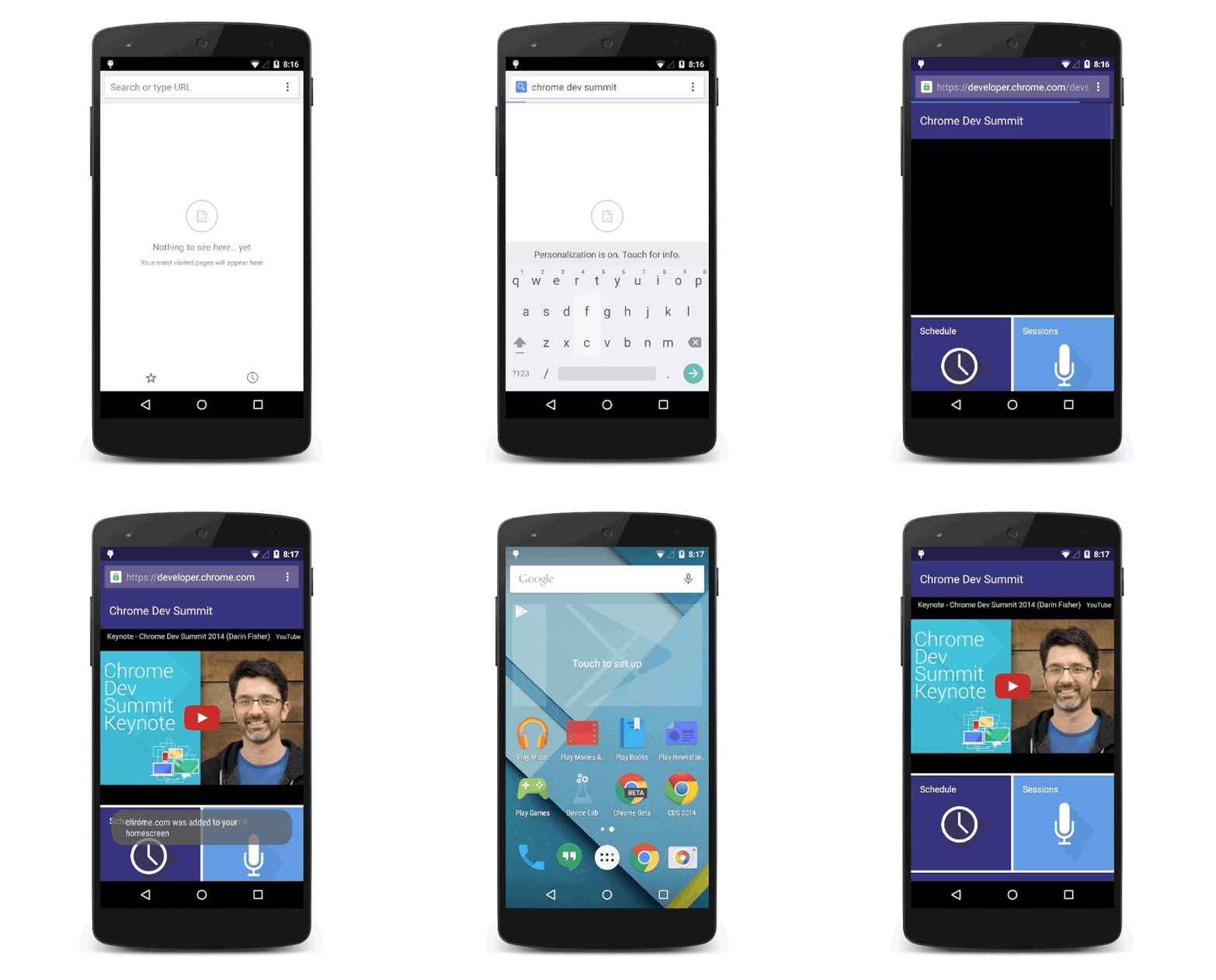
Supporting browsers will prompt the user to install or add to homescreen after certain criteria are met.
Android Chrome will ask the user if they'd like to install if they visit twice within five minutes (as long as the site meets certain PWA criteria).
User-experience
They offer an incredible user-experience, combining the discoverability and accessibility of the web with the immersive and offline experiences of native apps.
pwastats.com
Publish everywhere
PWAs work anywhere with a web browser. They progressively improve if the browser supports certain features, eventually becoming almost indistinguishable from native apps.
Windows
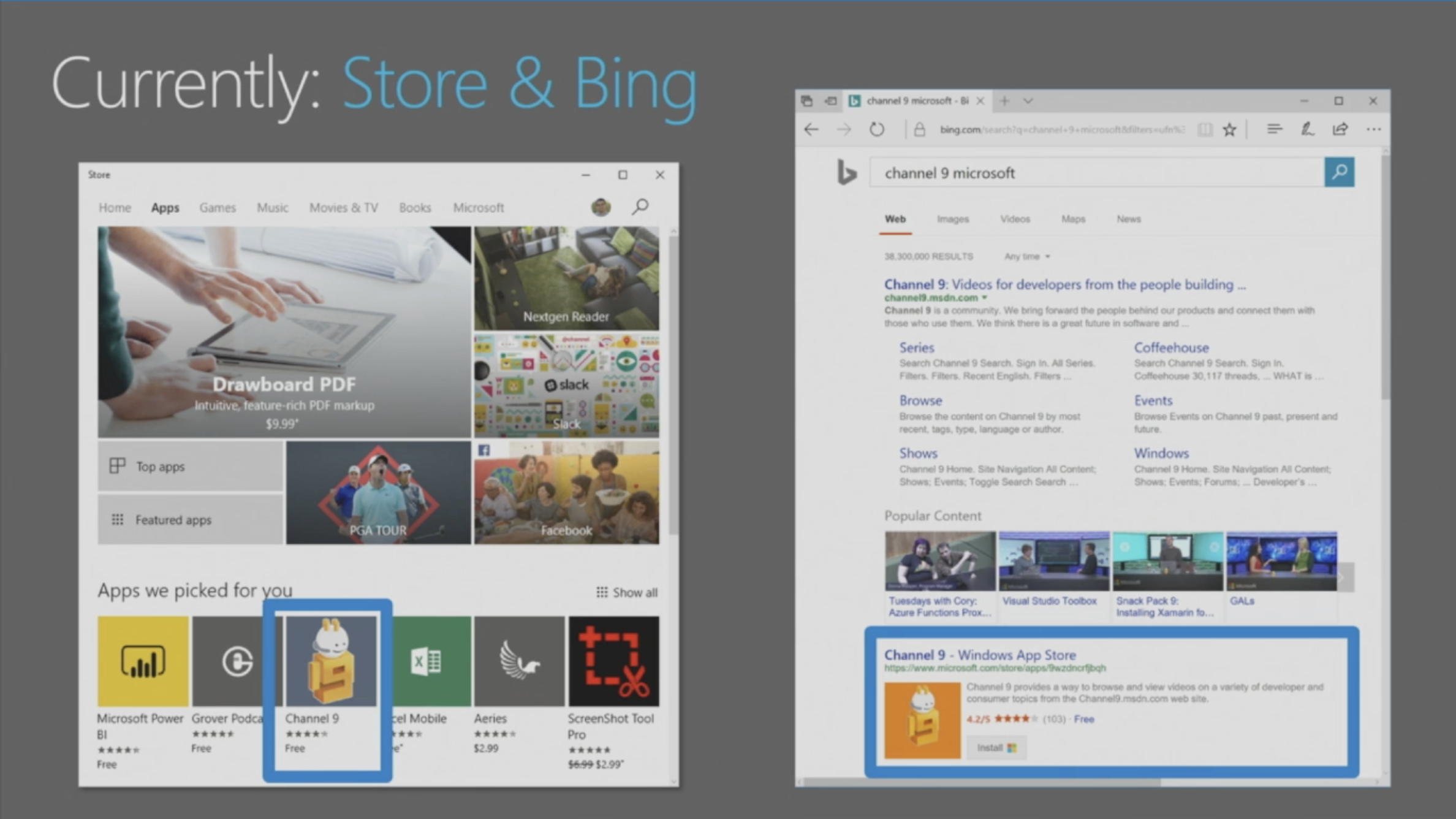
Microsoft just announced first-class support for PWAs in Bing and Windows 10. The search engine will automatically index PWAs and add them to the Windows Store. Users won't see any distinction between these and native Windows applications.
Android
Google have been evangelising PWAs for a long time. The latest version of Chrome makes the 'Add To Homescreen' process look almost identical to the native Android app installation.
It also puts the app into the app drawer with all the native apps, rather than on the homescreen. PWAs will soon have access to many of Androids native APIs too.
Samsung
Samsung Internet on Android now fully supports PWAs. They're indicated in the URL bar — the usual button to bookmark the site (a star) gets dynamically replaced by a new + icon.
Samsung
The new Dex hardware (a dock for turning your phone into a desktop) relies on PWAs to provide native-like experiences:
iOS
Apple still don't support service workers on iOS. That doesn't mean PWAs aren't still valuable. Blazing fast performance and a focus on engaging UX are always good things.
The Washington Post's PWA saw 5x engagement from users, on Android and iOS.
cloudfour.com/thinks/why-does-the-washington-posts-progressive-web-app-increase-engagement-on-ios/
Caveats
The new browser APIs are very powerful. To ensure they're used for good PWAs must be served over HTTPS.
How do we do this?
New browser APIs give our web apps superpowers:
- Service workers
- Cache API
- Push API
- Background Sync API
Service worker
A service worker is effectively a server that lives in the browser. This is what serves files locally when the browser has no network connection.
It can run even when the browser tab isn't open, which enables features like push notifications and background data syncing.
Web app manifest
The manifest.json file allows us to tell browsers how to display our PWA. We can set brand colours, icons and configure how much browser UI gets shown.
{
  "short_name": "PWA",
  "name": "My nice PWA",
  "icons": [
    {
      "src": "icon.png",
      "type": "image/png",
      "sizes": "192x192"
    }
  ],
  "start_url": "index.html",
  "display": "standalone",
  "theme_color": "blue"
  "background_color": "red"
}
Registering service worker
The service-worker needs to be registered before it can activate on a page.
if ('serviceWorker' in navigator) {
  navigator.serviceWorker
    .register('/service-worker.js')
    .then(() => {
      console.log('Service worker registered');
    })
    .catch(err => {
      console.log('Service worker registration failed: ' + err);
    });
}
JS Framework Support
Create React App, Preact CLI and Vue Templates all create performant PWAs by default now. This includes a service worker that caches the initial files.
Addy Osmani's talk from Google I/O:
Caching initial files
To allow your PWA to work offline you need to cache the static HTML, CSS and JS files when the page loads for the first time.
self.addEventListener('install', function(event) {
  event.waitUntil(
    caches.open('myCache-v1').then(function(cache) {
      return cache.addAll([
        'index.html',
        'style.css',
        'app.js',
      ]);
    })
  );
});
Intercepting requests
A service worker can intercept network requests, responding instead of the actual remote server.
self.addEventListener('fetch', function(event) {
  event.respondWith(
    caches.match(event.request).then(function(response) {
      return response || fetch(event.request);
    })
  );
});
Generating service workers
SW-Precache is a great simple library from Google that will automatically generate your service worker for you. You configure it with a JS file, then run it from the command line (or in a build script).
module.exports = {
  stripPrefix: 'build/',
  staticFileGlobs: [
    'build/*.html',
    'build/*.css',
    'build/*.js',
  ],
  swFilePath: 'build/service-worker.js',
};
$ sw-precache --config=sw-precache-config.jsGenerating service workers
There is also a new Google library called Workbox, which integrates with most build tools and has built in modules for lots of common PWA patterns

Generating service workers
SW-Precache also lets you easily configure runtime-caching of resources.
module.exports = {
  ...
  runtimeCaching: [{
    urlPattern: /^https:\/\/example\.com\/api/,
    handler: 'networkFirst'
  }, {
    urlPattern: /\/articles\//,
    handler: 'fastest',
    options: {
      cache: {
        maxEntries: 10,
        name: 'articles-cache'
      }
    }
  }]
};
User Expectations
It's worth considering that users will likely not have encountered this paradigm before.
Websites don't usually install themselves to the phone and work offline. It's best to notify them when unusual things happen (like offline availability).
Example code
Resources
PWA Introduction
By Oliver Phillips