Welcome to Intro to JavaScript
My name is Robin,
and my TAs are RayAna, David, Andrew and JB
about me
I'm a developer.
I love to solve problems.
My mother programmed computers.
My secret
I really love my job.
But I find this stuff hard too (sometimes).
Introductions
what's your name?
do you know any html or css?
what do you want to get out of this?
share something about yourself that we would never guess
Rule #1
Buzz words are bad!
Take scrap paper. Crumple it into a ball. If I use a word you don’t know, chuck it at me.
Rule #2
If you have a question, answer it!
You can ask me, or any TA, or you can ask the person next to you, or you can look it up.
Rule #3
Help Each Other
Coding is a community! That’s one of the best things about it! Everyone helps everyone, even if you are brand new you may see something a different way…
What are we doing today
Understanding JavaScript
Creating with JavaScript
Seeing what JavaScript is for
How to Learn All the Things
Slides are at:
What JavaScript is For
validation
widgets
graphics
networking
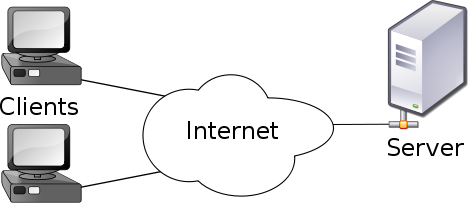
Client / Server
client = front end
server = back end
runs in your web browser
runs somewhere else
facebook post
google
yahoo mail
What is JavaScript?
It gives your website a brain!

JavaScript
<p>
<h2>
<h1>
web page
How we use JavaScript
Variables, Statements and Functions
Character names
Stage instructions
Acts
Variables
Variables are like a vocabulary that we make up, and that we use to speak to our program.
hey computer, what's my name?
what's a name?
Statements
The sky is blue.
We use statements to define variables and talk with our program.
My name is Grace Hopper.
var name = 'Grace Hopper';name = 'Adele Goldberg';
Functions
do this, do that, do some other thing
reusable
mini programs
wrap up statements and logic and variables
Function Exercise
I want ice cream, but only ice cream that has chocolate in the name. Lets teach this to our program, so it can tell us if we want a certain ice cream.
What's the logic we would want here?
Pretend We are an App
Cast of characters (variables)
Left bin, Middle bin, Right bin,
Counter, Order, Bowl, Customer
Actors (values)
"vanilla", "strawberry", "chocolate",
whatever the customer says
Instructions (statements)
ask, assign order, assign bowl, present bowl
Script (functions)
main, check order
The Story
The app asks what flavor the customer wants.
The customer tells the app a flavor.
The app checks whether it has that flavor.
If it does, it puts the flavor in a bowl and presents it to the customer.
Can you write that in JavaScript?
Yes.
But it might not work quite the same way.
If there is time, we'll work on the app later.
Part II
"Sail out to sea and do new things"
- Admiral Grace Hopper
Open Chrome!!!!!
Developer tools are awesome!
Super fast feedback loop!
Let's chat with Chrome
F12 to open developer tools.
Click the Console tab.
Click inside the Console window, and type:
console is a built-in object.
log is a built-in function.
'Hi' is an argument to log.
Lets try a variable
var name = 'Grace';
console.log(name);
Hey computer, this is a variable called name,
and it's equal to 'Grace'.
Now log it on the console.
Punctuation is important!
Variables are Variable
name = 'Adele';
console.log(name);
Hey computer, now name equals 'Adele'.
Log that on the console.
Types of Values
Strings (in quotes - names, words...)
Numbers (not in quotes - math-able)
Truthy (not in quotes - easy to test)
Comments
name = 'Fancy pants';
console.log(name); // logs "Fancy pants"
The browser ignores comments.
Remember, everything after // is a comment.
console.log(name) // logs "Fancy pants" ;
// Oops!name = // Try a new name, 'Silly Goose';// Uh oh!
Let's Annoy the Browser
console.log(Grace);
Reference error: Grace is not defined
The program is saying what's this 'Grace' you speak of?
Typos happen all the the time. We use the console to troubleshoot and figure out what's going on.
Annoy the browser some more
var myName = 'Adele';
console.log(myname); // reference error
or
var greeting = 'What's up?'; // syntax error
or
var myName = 'Adele';
console.log(my Name); // syntax error
Combining
Lets make that prettier
name = 'Grace';
console.log('My name is ' + name);
Variables made of variables
We can also make a variable equal other variables.
Lets do that with what we just did.
var firstName = 'Grace';
var lastName= 'Hopper';
var greeting = 'Hello';
var whatsUp = greeting + ' ' + firstName    + ' ' + lastName;
console.log(whatsUp);
Project: Combine!
Create 5 variables and console.log a sentence with them.
e.g.
var firstName = 'Grace';
var lastName= 'Hopper';
var greeting = 'Hello';
console.log(greeting + " " + firstName + " " + lastName);
Update that variable
What happened? It's the same!?
greeting = "What's up";
console.log(whatsUp);
Functions!!
Let's make whatsUp a function so it auto updates!
whatsUp = function () {
    console.log(greeting + ' ' + firstName        + ' ' + lastName);}
and let's update greeting again and run our function
greeting = "What's up";
whatsUp();
You do it
Write the function
Click the Sources tab, then the Snippets tab.
Right-click in the Snippets panel.
Choose new and name it what's up.
Write your whatsUp function in the space on the right.
var whatsUp = function () {
    console.log(greeting + ' ' + firstName        + ' ' + lastName);}
You do it, continued
Evaluate the function
whatsUp = function () {
    console.log(greeting + ' ' + firstName        + ' ' + lastName);}
Right-click in the selection.
Choose Evaluate in Console.
You will see a little console panel pop up at the bottom,
with the text of your function, then the word undefined.
Don't worry about undefined. More on that, later.
You do it, continued
Run the function
whatsUp = function () {
    console.log(greeting + ' ' + firstName        + ' ' + lastName);}
Change the greeting.
Run whatsUp.
Arguments
They have nothing to do with disagreement!
Arguments are for making functions reusable.
Function with Arguments
At the bottom of the what's up Snippet, type
var greet = function(firstName, lastName, greeting) {
    console.log(greeting + ' ' + firstName + ' ' + lastName);}
Select it, right-click, choose Evaluate in Console.
In the console, to run it, type
greet('Grace', 'Hopper', 'Hello');
greet('Adele', 'Goldberg', 'Hi There');greet(); // What happened???
Default Arguments
Modify the snippet:
var greet = function (firstName, lastName, greeting) { greeting = greeting || 'Hello'; lastName = lastName || ''; firstName = firstName || 'World'; console.log(greeting + ' ' + firstName + ' ' + lastName);}
In the little console, try:
greet();
greet('Grace');
greet('Grace', 'Hopper');
Return Values
modify the
what's up snippet again:
var greet = function (firstName, lastName, greeting) {
    greeting = greeting || 'Hello';
    lastName = lastName || '';
    firstName = firstName || 'World';
    var message = greeting + ' ' + firstName + ' ' + lastName;
    return message;
}
Select the new what's up function,
Right click, choose
Evaluate in Console.
Click in the little console, and type:
greet('Hey', 'Grace', 'Hopper');
console.log(greet('Hey', 'Grace', 'Hopper'));
console.log(greet('Hey', 'Grace', 'Hopper') + ', I admire you!');
Lesson: What's on a Page
New Buzzword
DOM
Document Object Model
HTML vs DOM
Each HTML tag
corresponds to
a DOM element
corresponds to
a DOM element with tagName = 'P'
How Do You See Stuff?
To see anything on the web page,
you need DOM elements!
JavaScript libraries
Remember functions?
That they are reusable?
There are libraries of functions out there on the internet,
to make all sorts of tasks easy.
Library examples
Let's look at code with two popular ones:
jQuery
lodash
What are they for?
jQuery makes it easier to do stuff with DOM elements.
lodash makes it easier to do stuff with collections.
var petNames = ['Fluffy', 'Rover', 'Mr. Ed'];
var petTypes = ['cat', 'dog', 'horse'];
var petTypesForNames = _.zipObject(petNames, petTypes);
Let's make a web page!
On your desktop, double-click on Materials.
It opens an Explorer window.
In Explorer, double-click on index.html.
It opens a new tab in Chrome.
Right-click on Code for Fun,
and choose Inspect Element.
It opens Developer Tools on the Elements tab.
Explore the HTML
Click the arrows next to <head> and <body>
to see what's inside.
<head> has three <script> tags:
jQuery
lodash
our own JavaScript
Use jQuery
Press the esc key.
A little console window pops up. Click in it.
type:
What do you see?
What was that, anyway?
it's an object.
a special kind of object, called a
jQuery wrapped element.
It's like a DOM element,
but easier to use.
How did it work?
$ is a jQuery function which means,
"Give me a jQuery wrapped element."
$ takes an argument.
If the argument is a String,
and it's form is a CSS Selector,
and it matches a DOM element,
Then jQuery wraps that DOM element,
and returns it.
jQuery chaining
In the little console, type:
$('.hello').html('HELLO');
Look what that did!
Congratulations!
You just injected DOM.
There, two fancy buzzwords in one sentence,
and you know what they mean!
jQuery chain parts
$('.hello').html('HELLO');
The jQuery-wrapped element returned by $('.hello')
is an
object,
which has a
method named
html.
A
method is just a function
that's attached to an
object.
More on jQuery chaining
Previous example:
$('.hello').html('HELLO');
is the same as:
var helloElement = $('.hello');helloElement.html('HELLO');
But Wait, There's More
Click on the Sources tab.
All the way on the left, click the right-pointing arrow.
A panel opens up.
If it is not on the Sources panel-tab, click that Sources.
Right-click on script.js.
Choose Map to File System Resource.
Choose script.js in the Materials folder.
Follow Chrome's prompts.
Now click on script.js in the panel.
Let's make rainbow text
script.js defines a function called makeRainbow.
In the little console, type:
What did it do to the word HELLO?!!!
Let's remove the HELLO we injected before...
and replace it with this new weird HELLO.
var rainbowHello = makeRainbow('HELLO');
$('.hello').html(rainbowHello);
does it stick?
Refresh the page.
Awwww!!!
Wait a minute, though.
We can make it stick.
In the script.js tab,
click the end of the line
window.makeRainbow = makeRainbow;
Make it Stick
Type Enter,
and then type the same things you typed into the little console, earlier.
var rainbowHello = makeRainbow('HELLO');$('.hello').html(rainbowHello);
Ctrl-S to save.
Refresh the page.
Wow!
Now there's a page you would not want to code
in plain static HTML.
Congratulations.
You know some JavaScript.
You've even put it to good use.
Bonus Exercise
If we have time...
Remember our Ice Cream Parlor?
Let's look at a sample implementation!
The github source is more up-to-date than your computer,
so delete the icecream folder on your desktop,
download the zip, open it, and view in Explorer
Ready Made Ice Cream
In Explorer, in the icecream folder, double-click on
index.html.
It opens a new tab in Chrome.
Type in a flavor, click Order, and see what it does.
Right-click on Ice Cream Parlor,
and choose
Inspect Element.
Take a few minutes to examine the HTML and styles.
Improve It!
Here are some ideas for improvement...
- Make it say I'm Sorry when the customer picks a flavor we don't have. (Hint: use else { })
- Let the customer pick by clicking on an ice cream bin (Hint: use .on('click'))
- Ask for payment before presenting the bowl of ice cream (Hint: use prompt())
- Ask again if they don't pay the right amount (Hint: use if { })
PART III
LEARN ALL THE THINGS
Resources
Codecademy.org
Khanacadamy.org
Stackoverflow
w3schools.com
Google | Learn to search for whatever you want to do.
Ask your folks how to be safe on the internet.
Me: @RobinIsTheBird or robin@likethebird.com
The future
Javascript is becoming more and more powerful. New technology is making it possible to create entire apps in nothing but Javascript.
The End
Today, you learned some things.
You understand some JavaScript
You created some things with JavaScript
You know what JavaScript is good for
and
How to Learn All the Things
Have fun! Be creative!