ASD Yearly Update
Please take the time to fill out the annual update. They are required for permission slips and data verification.

Log Into Parent Portal on your phone or a computer.
If you do not remember your parent portal account or password, please contact your child's school.

On your phone scroll to the bottom where it says ASD Online Registration and click.

You will be brought into the Existing Student Registration Page. This is to verify all contact information and to sign permission forms. This needs to be done yearly.

You will see a list of the student you have registered and assigned to your parent portal account. If you have a new kindergartener, it will say you have already submitted their registration. You will still verify their information and sign their permission forms.

You will verify your name. Only one guardian needs to fill this out for the family. This lets us know who that person is.

The Primary Phone, Home Address, and Mailing Address need to be verified. If you have moved, please put your new address in when it asks.
Verify and click next.
When everything looks correct Save/Continue

You will then verify your Parent/Guardian Information
Click on the arrow to start processing that information. There is also an area to Add New Parent/Guardian. Guardians must be legal guardians to have access to parent portal.
Verify your information and click next to process through the questions.

Contact preference should be selected and can be setup for each guardian. Below is the standard setup. The highlighted yellow area gives details for how each checkmark works.


These are federal required questions. They may already be answered. If you cannot select the dropdown item just move to next.

Once you finish you will get a complete notice. You can then start on the next guardian. After all are complete Save/Continue.

All families are required to have at least one emergency contact who is not a primary guardian. Their information needs to be verified as well.


Other household is for children who are not yet school age. This gives the school the ability to get information ready about Kindergarten Screenings and help with early registration.

You will need to verify all of your students in the student tab. This is where you will also sign permission forms.
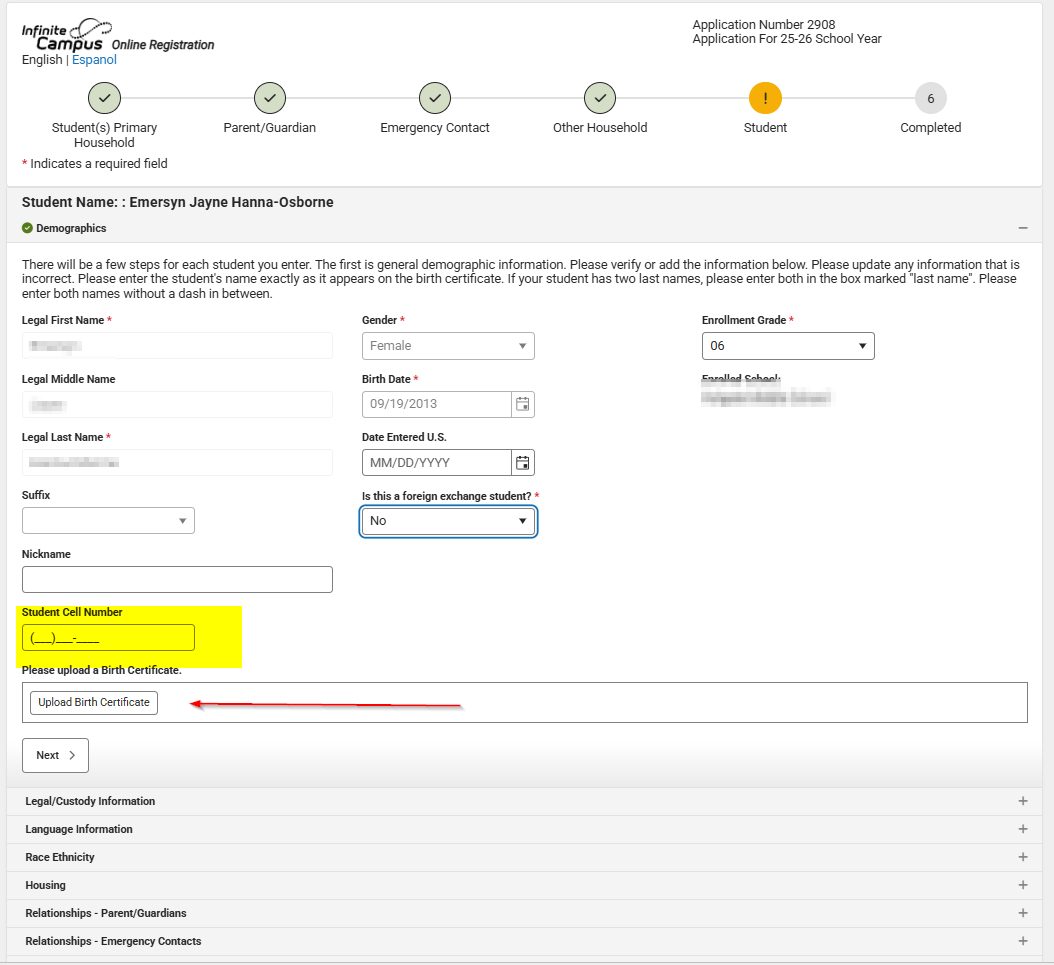
If your child has a cell phone, please put the number in the field below.
You do not need to upload any documents as this is just a verification. You can skip any area that asks for an upload.

Heath Services - This information is not required but beneficial in the event we cannot get ahold of a guardian or emergency contact.

If your student has any medical conditions, it is important to put them down. This will inform the school nurse.

You do not need to upload any immunizations.

Depending on students age there may be more Release Agreements than the ones below.

Once all is completed add your signature and click submit. You will receive an email with completion notice and the Application Summary. You can also open the application summary from this screen for your records.
deck
By aberdeenschooldistrict