Лекция 2
Ахтаров Данил
Tinkoff Python
Модули, пакеты. Автотесты

Pathlib
Без Pathlib
import os

directory = '/home/user/temp/'
filepath = os.path.join(directory, 'data.csv')

if os.path.exists(filepath):
    print('exist')
Pathlib
import os

directory = '/home/user/temp/'
filepath = os.path.join(directory, 'data.csv')

if os.path.exists(filepath):
    print('exist')
from pathlib import Path

directory = Path('/home/user/temp/')
filepath = directory / 'data.csv'

if filepath.exists():
    print('exist')
Pathlib заменит вам
- open
- os.mkdir
- os.rmdir
- os.path.join
- os.path.*
- glob
О чем будем говорить?
-
Модули и пакеты в python
-
Управление зависимостями
-
Декораторы, генераторы
-
Написание автотестов
Modules
$ ls
foo.py
bar.py
https://docs.python.org/3/tutorial/modules.html
def hello(name):
  print(f'Hello from {name}')

hello('cat.py')
$ python cat.py
Hello from cat.pyТипичный модуль
cat.py <from cat import hello
hello('dog.py')$ python dog.py
Hello from cat.py
Hello from dog.pyИмпорт модуля
cat.py
dog.py <
from cat import *
hello('dog.py')$ python dog.py
Hello from cat.py
Hello from dog.py*
cat.py
dog.py <
Код импортируемого модуля выполнится,
но только один раз!
(во время первого импорта)
__name__
__name__ is a built-in variable which evaluates to the name of the current module
- __main__
- cat
- animals.some_package.dog
def hello(name):
  print(f'Hello from {name}')

if __name__ == '__main__':
  hello('cat.py')
$ python dog.py
Hello from dog.pycat.py <
dog.pyif __name__ == "__main__": ...
Packages
from animals.cat import hello

hello('dog.py')
$ python dog.py
Hello from dog.pyanimals/
__init__.py
cat.py
dog.py <Типичный пакет
from .cat import hello

hello('animals.__init__')
$ python dog.py
Hello from animals.__init__
Hello from dog.pyanimals/
__init__.py <
cat.py
dog.py__init__.py
from animals.cat import hello

hello('dog.py')
$ python dog.py
Hello from animals.__init__
Hello dog.pyanimals/
__init__.py
cat.py
dog.py <Скрываем структуру пакета в __init__.py
А что, если мы хотим запустить пакет как скрипт?
from .cat import hello

if __name__ == '__main__':
  hello('animals.__main__')
$ python -m animals
Hello from animals.__init__
Hello from animals.__main__animals/
__init__.py
__main__.py <
cat.py
dog.py__main__.py
Типы импортов
from .cat import hello - относительный
from animals.cat import hello - абсолютный
Где python ищет код, когда мы что-то импортируем?
PYTHONPATH
$ python -c "import sys; print(sys.path)"
['', ... '.../python3.7/site-packages']Кольцевые импорты
# cat.py
from dog import hello_dog

def hello_cat():
    print('hello_cat')

hello_dog()
# dog.py
from cat import hello_cat
def hello_dog():
print('hello_dog')
hello_cat()$ python dog.py
ImportError: cannot import name ...
(most likely due to a circular import) ...Проблема решается
- Перепланировкой модулей
- Переносом импорта внутрь функции/кода, в которой он необходим
- Ещё некоторыми ужасными способами
Управление зависимостями
PIP - package manager
https://pip.pypa.io/en/stable/
pip install <package>
requirements.txt
$ cat requirements.txt
pytest==4.1.1
flake8==3.7
pylint==2.2

# установка всех пакетов из requirements.txt
$ pip instal -r requirements.txt
Фиксация зависимостей
requirements.txt
$ pip freeze > requirements.txt

$ cat requirements.txt
tomicwrites==1.2.1
attrs==18.2.0
more-itertools==5.0.0
pluggy==0.8.1
py==1.7.0
pytest==4.1.1
six==1.12.0

# установка всех пакетов из requirements.txt
$ pip instal -r requirements.txt
Зависимости можно разделять
# requirements-dev.txt
-r requirements.txt
pytest==4.1.1
flake8==3.7
pylint==2.2
Почему ставить все пакеты глобально — плохая идея?
Почему ставить все пакеты глобально плохая идея?
- Конфликты версий
- Невоспроизводимость окружения
Venv
$ python -m venv .venv
https://docs.python.org/3/library/venv.html
Venv
.venv/
  bin/
    ...
    activate
    python
    python3.8
  lib/
    python3.8/site-packages/
      attr/
      pip/
      ...
Venv
$ python -m venv .venv

$ source .venv/bin/activate
https://docs.python.org/3/library/venv.html
$ source .venv/bin/activate

$ pip list
Package    Version
---------- -------
pip        20.0.2
setuptools 41.2.0
$ deactivate

$ pip list
Package                      Version
---------------------------- ----------
apns                         2.0.1
asn1crypto                   0.24.0
...
Как сделать свой пакет?
setup.py
import setuptools

with open("README.md", "r") as fh:
    long_description = fh.read()

setuptools.setup(
    name="example-pkg-your-username",
    version="0.0.1",
    author="Example Author",
    author_email="author@example.com",
    description="A small example package",
    long_description=long_description,
    long_description_content_type="text/markdown",
    url="https://github.com/pypa/sampleproject",
    packages=setuptools.find_packages(),
)
https://packaging.python.org/tutorials/packaging-projects/
Имея setup.py, мы можем
# установить пакет
# с указанием пути
# до директории с setup.py
$ pip install .
Имея setup.py, мы можем
# установить пакет
# из внешней vcs,
# например с github
$ pip install \
-e git+https://git.repo/some_pkg.git#egg=SomeProject
Имея setup.py, мы можем
# собираем архив с пакетом
$ python setup.py sdist bdist_wheel
twine
# ставим дополнительную утилиту для сборки
$ pip install twine
...

$ twine upload dist/*  # заливаем пакет в реестр
Uploading distributions to https://pypi.org/
Enter your username: [your username]
Enter your password:
Uploading example_pkg_your_username-0.0.1-py3-none-any.whl
100%|█████████████████████| 4.65k/4.65k [00:01<00:00, 2.88kB/s]
Uploading example_pkg_your_username-0.0.1.tar.gz
100%|█████████████████████| 4.25k/4.25k [00:01<00:00, 3.05kB/s]
Декораторы
@my_decorator
def some_func():
  ...


some_func()
Синтаксический сахар
def some_func():
  ...


some_func = my_decorator(some_func)
some_func()
Пример декоратора
def div(func):
  def wrapper():
    return f'<div>{func()}</div>'
  return wrapper


@div
def hello():
  return 'Hello'
Пример использования
In [11]: hello()
Out[11]: '<div>Hello</div>'
@div
@p
def hello():
return 'Hello'
Последовательность декораторов
In [5]: hello()
Out[5]: '<div><p>Hello</p></div>'
def timeit(func):
def wrapper(*args, **kwargs):
st = time()
result = func(*args, **kwargs)
print(func.__name__, time() - st)
return result
return wrapper
@timeit
def square(x):
sleep(0.1)
return x*x
Ещё пример
In [15]: square(2)
square 0.1
Out[15]: 4
def my_decorator(func):
...Как написать свой декоратор
def my_decorator(func):
  ...
return wrapper # callable objectКак написать свой декоратор
def my_decorator(func):

  def wrapper():
    # ...
    result = func()
    # ...

    return result

  return wrapper
Как написать свой декоратор
def my_decorator(func):

  def wrapper(*args, **kwargs):
    # ...
    result = func(*args, **kwargs)
    # ...

    return result

  return wrapper
*args, **kwargs
@my_docorator
def some_func():
  ...


print(some_func.__name__)  # wrapper
Проблема
from functools import wraps


def my_decorator(func):

  @wraps(func)
  def wrapper(*args, **kwargs):
    # ...
    result = func(*args, **kwargs)
    # ...

    return result

  return wrapper
from functools import wraps
@my_docorator
def some_func():
  ...


print(some_func.__name__)  # some_func
Нет проблемы, если использовать wraps
@logtime(0.2)
def square(x):
  sleep(0.1)
  return x*x
Конфигурируемый декоратор
In [6]: square(2)
Out[6]: 4
def logtime(max_time=0.1):
def decorator(func):
def wrapper(*args, **kwargs):
st = time()
result = func(*args, **kwargs)
executed_time = time() - st
if executed_time >= max_time:
print(...)
return result
return wrapper
return decoratorКонфигурируемый декоратор
Генераторы
Объект, который сохраняет состояние между вызовами

g = (i for i in some_list)


def my_generator():
  yield 'Hello'
Пример
def my_generator():
  print('start')
  yield 1
  yield 2
  yield 3

  return
Генератор
g1 = my_generator()
In [2]: next(g1)
start
Out[2]: 1

In [3]: next(g1)
Out[3]: 2

In [4]: next(g1)
Out[4]: 3

In [5]: next(g1)
StopIteration:
Пример использования
for i in my_generator():
  print(i)
for ... in ...
start
1
2
3
def my_generator():
yield 1
return 'Hello'
g = my_generator()In [7]: next(g)
Out[7]: 1
In [8]: next(g)
StopIteration: HelloВозвращаем значение при каждом вызове
yield from
def generator1():
  yield 1
  yield 2
  yield 3


def generator2():
  yield from generator1()
def generator2():
yield from [1, 3, 4, 5, 6]def generator():
a = yield 'Hello'
print(a)
yield 'Goodbye'
g = generator()In [8]: next(g)
Out[8]: 'Hello'
In [9]: g.send('Hi')
Hi
Out[9]: 'Goodbye'Зачем нужны генераторы?
import re


def filter_lines(filename, regex):
  with open(filename) as f:
    for line in f:
      if re.search(regex, line):
        yield line.rstrip()
...


for line in filter_lines('my_file.txt', '^word'):
  print(line)
Перерыв?

Автотесты
Зачем?

Зачем?
- Проверяют корректность и делают это быстро
- Баги всплывают раньше (bug cost)
- Изменения в код вносить проще (feature cost)
Тесты тоже код!
assert
def square(x):
    assert isinstance(x, int), 'type error'
    if __debug__:
        print('debug')
    return x * x
Unittests
# tests/test_utils.py
import unittest

def square(x):
    return x * x

class SquareTestCase(unittest.TestCase):

    def test_square_ok(self):
        self.assertEqual(square(3), 9)

    def test_square_error(self):
        self.assertEqual(square(3), 8)
$ python -m unittest
F.
======================================================================
FAIL: test_square_error (tests.test_utils.SquareTetsCase)
----------------------------------------------------------------------
Traceback (most recent call last):
  File "./tests/test_utils.py", line 14, in test_square_error
    self.assertEqual(square(3), 8)
AssertionError: 9 != 8

----------------------------------------------------------------------
Ran 2 tests in 0.001s

FAILED (failures=1)
Pytest
Меньше шаблонного кода
# tests/test_utils.py
import unittest

def square(x):
    return x * x

class SquareTetsCase(unittest.TestCase):

    def test_square_ok(self):
        self.assertEqual(square(3), 9)

    def test_square_error(self):
        self.assertEqual(square(3), 8)
# tests/test_utils.py

def square(x):
    return x * x


def test_square_ok():
    assert square(3) == 9


def test_square_error():
    assert square(3) == 8
Удобные assert`ы
# tests/test_utils.py
import unittest


class TetsCase(unittest.TestCase):

    def test_dict_equal(self):
        self.assertDictEqual({'x': 1}, {'x': 2})
# tests/test_utils.py

def test_dict_equal():
    assert {'x': 1} == {'x': 2}
Удобные assert`ы
# tests/test_utils.py

def test_dict_equal():
    assert {'x': 1, 'y': 3, 'z': 0} == {'x': 2, 'y': 3}
    def test_dict_equal():
>       assert {'x': 1, 'y': 3, 'z': 0} == {'x': 2, 'y': 3}
E       AssertionError: assert {'x': 1, 'y': 3, 'z': 0} == {'x': 2, 'y': 3}
E         Omitting 1 identical items, use -vv to show
E         Differing items:
E         {'x': 1} != {'x': 2}
E         Left contains more items:
E         {'z': 0}
E         Use -v to get the full diff

tests/test_utils.py:4: AssertionError
А так же
- фикстуры
- плагины
- параметризованные тесты
- etc.
Структура типичного теста
-
Подготовка (опционально) -
Действие
-
Проверка
- Завершение (опционально)
Начнем с начала
def square(x):
    return x * x

def test_square():
    assert square(2) == 4
    assert square(-2) == 4
    assert square(2.) == 4.
    assert square(0) == 0
$ pytest
==================== test session starts ===================
platform darwin -- Python 3.7.2, pytest-4.1.1, py-1.7.0, pluggy-0.8.1
rootdir: ., inifile:
collected 4 items

tests/test_utils.py ....                                           [100%]
==================== 4 passed in 0.05 seconds ==============
Много маленьких тестов лучше одного большого
Начнем с начала
def square(x):
    return x * x

def test_square_int():
    assert square(2) == 4

def test_square_float():
    assert square(2.) == 4.

def test_square_zero():
    assert square(0) == 0

def test_square_negative_number():
    assert square(-2) == 4
$ pytest
==================== test session starts ===================
platform darwin -- Python 3.7.2, pytest-4.1.1, py-1.7.0, pluggy-0.8.1
rootdir: ., inifile:
collected 4 items

tests/test_utils.py ....                                           [100%]
==================== 4 passed in 0.05 seconds ==============
Изменим реализацию
def square(x):
    return x ** 2  # тут!

def test_square_int():
    assert square(2) == 4

def test_square_float():
    assert square(2.) == 4.

def test_square_zero():
    assert square(0) == 0

def test_square_negative_number():
    assert square(-2) == 4
$ pytest
==================== test session starts ===================
platform darwin -- Python 3.7.2, pytest-4.1.1, py-1.7.0, pluggy-0.8.1
rootdir: ., inifile:
collected 4 items

tests/test_utils.py ....                                         [100%]
==================== 4 passed in 0.05 seconds ==============
Параметризованные тесты
import pytest

def square(x):
    return x ** 2

@pytest.mark.parametrize(('number', 'result'), [
    (2, 4),
    (2.0, 4.0),
    (0, 0),
    (-2, 4),
])
def test_square(number, result):
    assert square(number) == result
$ pytest -v
==================== test session starts ===================
platform darwin -- Python 3.7.2, pytest-4.1.1, py-1.7.0, pluggy-0.8.1 -- ./.venv/bin/python3
cachedir: .pytest_cache
rootdir: ., inifile:
collected 4 items

tests/test_utils.py::test_square[2-4] PASSED                                        [ 25%]
tests/test_utils.py::test_square[2.0-4.0] PASSED                                    [ 50%]
tests/test_utils.py::test_square[0-0] PASSED                                        [ 75%]
tests/test_utils.py::test_square[-2-4] PASSED

==================== 4 passed in 0.05 seconds ==============
Добавим проверку
import math

import pytest

def square(x):
    return x ** 2

@pytest.mark.parametrize(('number', 'result'), [
    (2, 4),
    (2.0, 4.0),
    (0, 0),
    (-2, 4),
    (math.inf, math.inf)  # +1
])
def test_square(number, result):
    assert square(number) == result
Тесты являются контрактами того, как работает наш код
Проверка исключений
import pytest

def square(x):
    return x ** 2

def test_square_not_number():
    with pytest.raises(TypeError):
        square('string')
Подготовка данных
class User:
  ...


def test_user_hello():
  user = User('Vasya', 20)
  assert user.hello() == 'hello'


def test_user_bye():
  user = User('Vasya', 20)
  assert user.bye() == 'bye'
Фикстуры
class User:
    ...


@pytest.fixture()
def user():
    return User('Vasya', 20)


def test_user_hello(user):
    assert user.hello() == 'hello'


def test_user_bye(user):
    assert user.bye() == 'bye'
Fixture scope
@pytest.fixture(scope='session')
def user():
    return User('Vasya', 20)
Фикстуры для фикстур
@pytest.fixture(scope='session')
def parent():
    return User('Petya', 40)

@pytest.fixture()
def user(parent):
    return User('Vasya', 20, parent)
Before/After test actions
import pytest

@pytest.fixture()
def prepare_env():
    # our before test actions
    yield
    # our after test actions


def test_env(prepare_env):
    # our test
    pass
Before/After test actions
import pytest

@pytest.fixture()
def prepare_env():
    init_db()
    yield
    clean_db()


def test_env(prepare_env):
    # our test
    pass
usefixtures
import pytest

@pytest.fixture()
def prepare_env():
    # our before test actions
    yield
    # our after test actions

@pytest.mark.usefixtures('prepare_env')
def test_env():
    # our test
    pass
autouse
import pytest

@pytest.fixture(autouse=True)
def prepare_env():
    # our before test actions
    yield
    # our after test actions

def test_env():
    # our test
    pass
Mock
from unittest.mock import MagicMock

def test_with_mock():
    # preparing
    thing = ProductionClass()
    thing.method = MagicMock(return_value=3)

    # action
    thing.method(3, 4, 5, key='value')

    # asserts
    thing.method.assert_called_with(3, 4, 5, key='value')
Зачем?
- Подменяем реальные объекты
- Задаем нужные нам возвращаемые значения/исключения
- Проверяем вызывался ли нужный метод/функция на самом деле
pytest-mock
import os

class UnixFS:
    @staticmethod
    def rm(filename):
        os.remove(filename)

def test_unix_fs(mocker):
    mocker.patch('os.remove')
    UnixFS.rm('file')
    os.remove.assert_called_once_with('file')
Пример
@pytest.fixture()
def user(mocker):
    mock = mocker.MagicMock()
    mock.hello.return_value = 'hello'
    mock.bye.return_value = 'bye'
    return mock
spec
@pytest.fixture()
def user(mocker):
    return mocker.MagicMock(spec=User)
mocker.patch
import requests
import pytest


def get_page():
    return requests.get('www.google.com')


@pytest.fixture()
def requests_mock(mocker):
    return mocker.patch('requests.get')


def test_get_page(requests_mock):
    requests_mock.return_value.json.return_value = {'id': 1}
    response = get_page()
    assert response.json() == {'id': 1}
mocker.patch.object
def test_mocked_user_1(mocker, user):
    mock = mocker.patch.object(user, 'bye')
    mock.return_value = 'hello'
    assert user.bye() == 'hello'


def test_mocked_user_2(mocker, user):
    mocker.patch.object(user, 'bye', return_value='hello')
    assert user.bye() == 'hello'


def test_mocked_user_3(mocker, user):
    mocker.patch.object(user, 'bye').return_value = 'hello'
    assert user.bye() == 'hello'
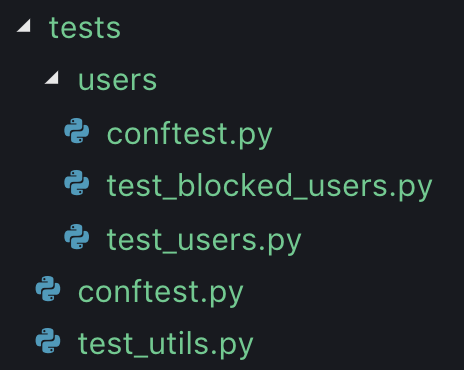
conftest.py
Code coverage
Pytest-cov
$ pytest --cov=app tests/
...


-------------------- coverage: ... ---------------------
Name                 Stmts   Miss  Cover
----------------------------------------
app/__init__          2      0     100%
app/__main__          257    13    94%
app/utils             94     7     92%
----------------------------------------
TOTAL 353 20 94%Debugger
breakpoint etc.
Debugger
def test_dict_equal():
    ... # many code lines
    breakpoint()
    assert {'x': 1, 'y': 3, 'z': 0} == {'x': 2, 'y': 3}
>>>>>>> PDB set_trace (IO-capturing turned off) >>>>>>>>>>>>>
> ./tests/test_utils.py(6)test_dict_equal()
-> assert {'x': 1, 'y': 3, 'z': 0} == {'x': 2, 'y': 3}
(Pdb) h

Documented commands (type help <topic>):
========================================
EOF    cl         display  interact  n     restart  step       up
a      clear      down     j         next  return   tbreak     w
...
Debugger
$ pytest --pdb testsPEPs
Python Enhancement Proposal
PEP8
Структура проекта
README.md
# My project

Descriptions bla-bla-bla...

## Run tests

```
make test
```
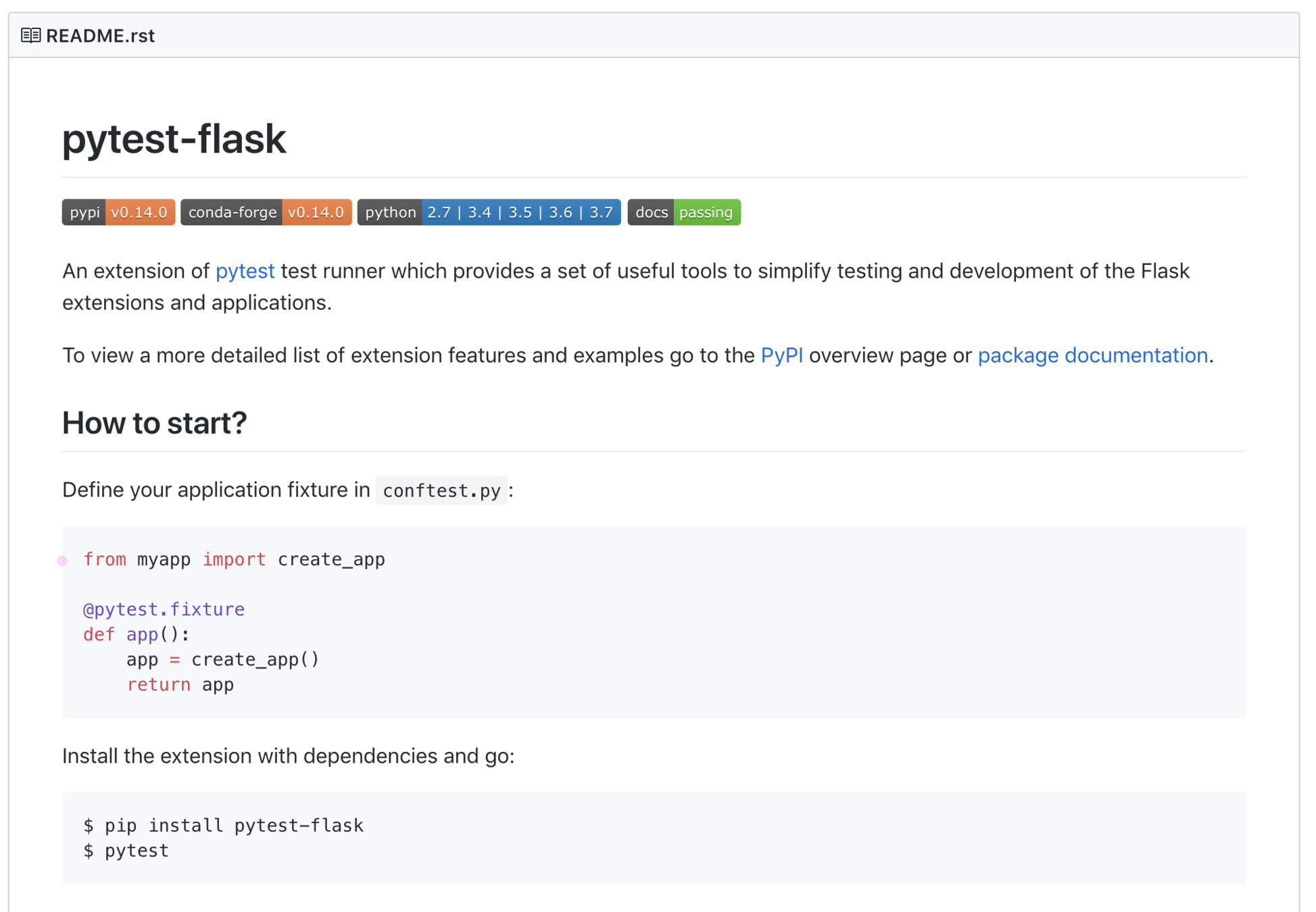
Makefile
Makefile
PYTHONPATH = PYTHONPATH=./

TEST = $(PYTHONPATH) pytest --verbosity=2 ... $(arg)
CODE = tests app


.PHONY: test test-failed

test:
  $(TEST) --cov

test-failed:
  $(TEST) --last-failed
.gitignore
В итоге типичный проект будет выглядеть как-то так
app/
   __init__.py
   __main__.py
   utils.py
   ...
tests/
   conftest.py
   test_utils.py
   ...
 .gitignore
 Makefile
 requirements.txt # or setup.py
 README.md
ДЗ
Tinkoff Python 2020 - 2
By Afonasev Evgeniy


