Custom scripting within Koha
Catalyst Rōpū kohinga training for Koha
Customising Koha with code
Koha provides a number of ways to insert your own script (code) into the system.
- HTML
- CSS
- JS
- Perl
HTML
Refers to the markup of the page.
Creates elements on the page such as text, images, forms, tables, menus and more.
- HTML customisations
- News items
- Pages
- Some system preferences which are yet to be moved into HTML customisations tool
CSS
Refers to style rules (sometimes we will call this theming or branding) including colours, fonts, sizes and more.
- OPACUserCSS
- IntranetUserCSS
- Library specific CSS
- CSS for self-check
JS
Koha supports Javascript and jQuery
Refers to dynamic changes to the page, such as hiding/showing elements, animation and more
- OPACUserJS
- IntranetUserJS
- Library specific JS
- JS for self-check
Perl
Koha is primarily written in a language called Perl
The main way to get code changes into Koha is through the standard upstreaming process (i.e. Bugzilla)
Alternatively, you can write and install plugins which will place custom Perl scripts amongst the standard Koha code
Your Koha vendor must enable this for you on the server
Today
We'll look at custom JS, in particular on the staff interface
- IntranetUserJS
- Inline JS through HTML customisations
JS to insert HTML
var useful_link = "/cgi-bin/koha/reports/guided_reports.pl?reports=8&phase=Show SQL";
varuseful_link"/cgi-bin/koha/reports/guided_reports.pl?reports=8&phase=Show SQL"Breaking it down...
Initialising a variable
Naming a variable
Strings in speechmarks
Omit base URL for links within Koha
JS to insert HTML
$("element").append("<li><a href='" + useful_link + "'>Report</a></li>");
"element"useful_link$
Breaking it down...
Identifier for the element
Refer to variable storing HTML
Insert into the end of the element
Using jQuery
append
"<li><a href='"HTML to go around the variable
+
Join strings and variables
The element identifier
$("#header_search")- Use HTML IDs, or tags, or classes
- Use Inspector or View page source to see the HTML
- Be as specific as you need
- Chain together identifiers
$(".circ-button")$("h3")$("body#circ_circulation-home h3")$("body[id='circ_circulation-home'] h3")Put it all together
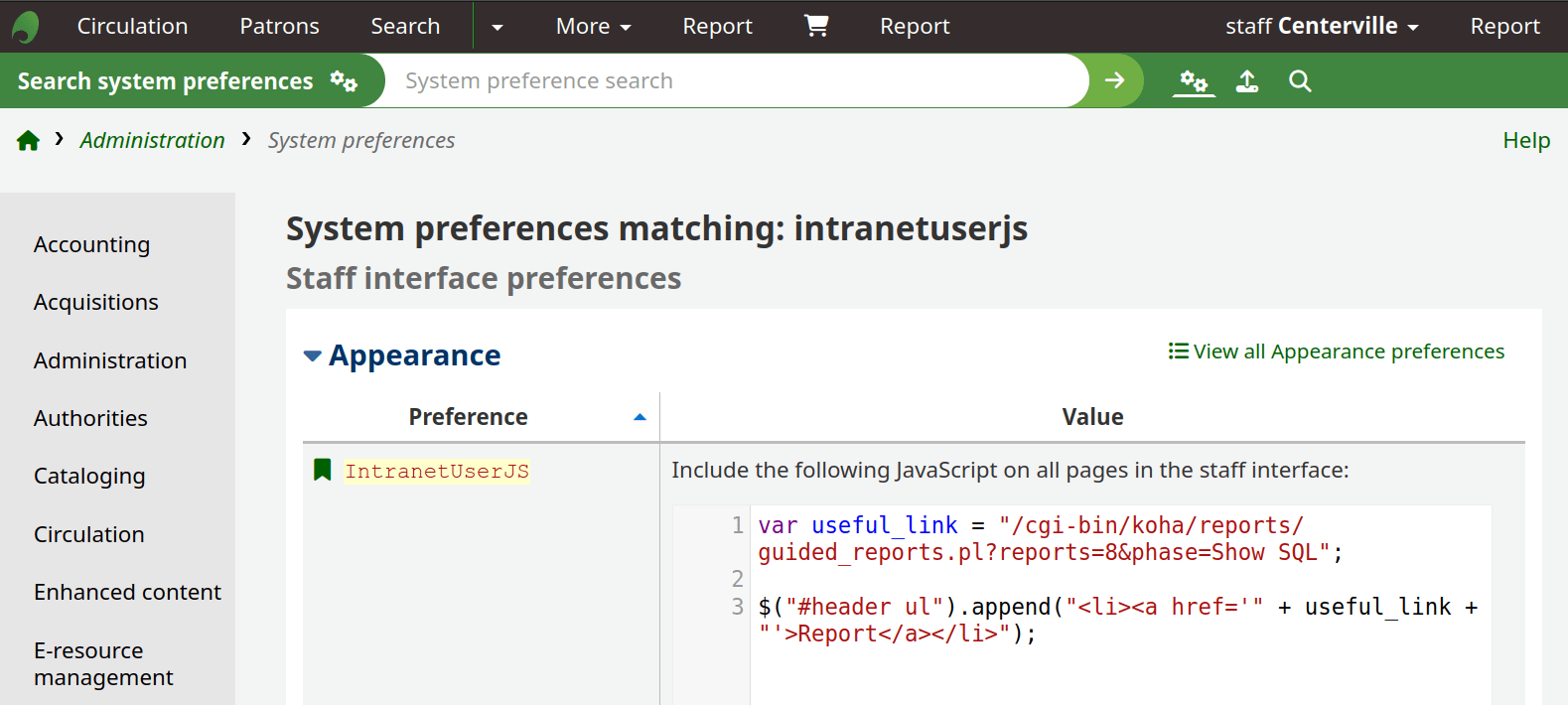
var useful_link = "/cgi-bin/koha/reports/guided_reports.pl?reports=8&phase=Show SQL";
$("#header ul").append("<li><a href='" + useful_link + "'>Report</a></li>");
What happens?
Be as specific as you need
var useful_link = "/cgi-bin/koha/reports/guided_reports.pl?reports=8&phase=Show SQL";
$("#header #toplevelmenu").append("<li><a href='" + useful_link + "'>Report</a></li>");
Hiding elements
$("#offline-circulation").hide();Check first - is there a permission or a system preference I can disable that will hide this module/tool?
$("#menu li:contains('ISBD')").hide();$(".results_summary.description").hide();$("#menu li:contains('ISBD'), .results_summary.description").hide();Default selections
$("#no-autorenew_checkouts") .prop("checked",true);
Functions
$("button").click(function(){
   // do something when a button is clicked
});
$("form").submit(function(){
   // do something when a form is submitted
});
Pop-ups
$("#toolbar #duplicate").click(function(){
  return confirm("Are you sure you want to duplicate this patron?");
});
$("#toolbar #duplicate").click(function(){
  return alert("Duplicating patron, going to patron add form");
});
Apply CSS
$("#patron_messages").css("font-size", "20px");
$("#patron-cardnumber")
.css("color", "blue")
.css("font-weight","800");
Conditions
if ( $("input").val().length == 0 ) {
  // do something if a field is empty
}
if ( $("input").val() .is(":contains('something')) ) {
  // do something if a field contains 'something'
}
if ( $("#checkbox" ).prop("checked") {
  // do something if a checkbox is checked
}
Other resources
- Koha Community jQuery library
- W3 schools has useful resources for the basics
- Stack Overflow for shared solutions - just google what you're trying to do!
koha-js-training
By aleisha