Koha Librarians Workshop
Alex Buckley and Aleisha Amohia
18 June 2021
Agenda
- Introductions
- What's new in Koha 20.11?
- Customising your OPAC/public interface
- Making Koha data useful to your users
- Customising your staff client
- Resources for writing SQL reports
- Writing SQL reports
- What's new in Koha 21.05?
- Contributing to the Koha Community
- Q&A
Introductions
- Who you are
- How long you have been using Koha
- What you hope to get out of this workshop
Alex Buckley
- Koha Developer at Catalyst since 2015
- Based in Nelson
- Data migrations, new implementations, integrations, training

Aleisha Amohia
- Koha Developer at Catalyst since 2014
- Development, mentoring, communications
Test sites for today's training
What's new in Koha 20.11?
Read the blog post
- Group circulation by item type
- Specify a reason when cancelling a hold, send a notice
- Hide chosen fields from the OPAC suggestions form
- Custom destination for failed overdue notices
- Add ability to attach a cover image an item level
- Enhanced high holds
- Default lost item fee refund on return policy
- Holds history for patrons in OPAC
- Accessibility
Customise the OPAC
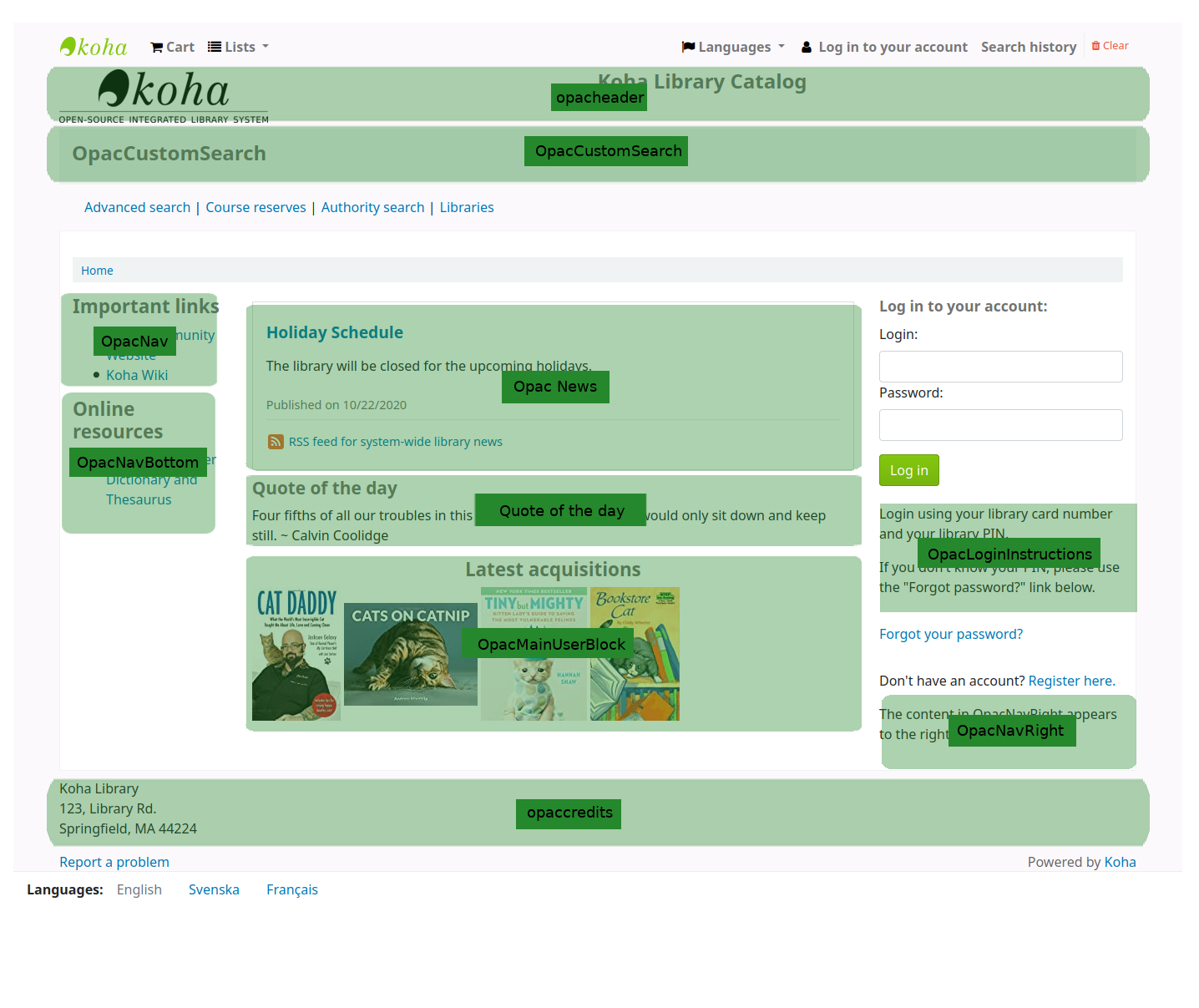
OPAC system preferences
- OPACAdvSearchOptions - Hide options from the OPAC advanced search page
- OPACSuggestionsUnwantedFields - Hide fields from OPAC suggestion page
- hidelostitems - Hide lost items from search and detail pages
- HighlightOwnItemsOnOPAC & HighlightOwnItemsOnOPACWhich - Move items to the front and increase font size from patrons home library
OPAC system preferences
- OPACHighlightedWords - Choose if patrons search terms are highlighted in result and detail pages
- NotHighlightedWords - Stopwords that should never be highlighted
- OPACMySummaryHTML - Add a column in the tables on the 'My summary' and 'My checkout history' pages for logged in OPAC users
- OPACNoResultsFound - HTML to be displayed when no results are found for an OPAC search
OPAC system preferences
- OPACUserSummary - Show summary of checkouts, overdues, holds and charges on OPAC home page
- OPACReportProblem - Allow patrons submit problems in OPAC to KohaAdminEmailAddress
- OPACHiddenItems - Rules to hide items from OPAC
- OPACHiddenItemsExceptions - Patron categories that can see otherwise hidden items
Style your OPAC
- Additional stylesheets
- OPACUserCSS
/* Hide the no image found image */
.no-image { display: none; }


/* Hide the MARC view and ISBD view tabs */
#views > .view > a:not(#Normalview)
{ display: none; }
Make your OPAC accessible
- Use headings well
- Use Koha News to show custom content in your installed languages
- Avoid including images of text, just use text
- Images that add information must have alt text
Take a break
Making Koha data useful to your users
Read the blog post
- Put Koha data on other webpages that your users are on
- Collect useful data about patrons using Koha extended attributes
- Exhibit your catalogue
Customise the staff client
- IntranetCirculationHomeHTML
- IntranetmainUserblock
- IntranetNav
- IntranetReportsHomeHTML
- IntranetCatalogSearchPulldown
- IntranetUserJS
- IntranetUserCSS
Using system preferences!
- Hide fields from forms
- Hide columns in tables
Resources for writing SQL reports
Koha reports wiki
Resources for writing SQL reports
Koha Database Schema
Writing SQL reports
Important
Always run your report on your test site before trying it in production.
Do not query the action_logs table, use the Log Viewer Tool instead.
Do not refresh the page which running a report, and do not press Run more than once.
SELECT
SELECT biblionumber
FROM biblio
SELECT count(*)
FROM auth_header
SELECT firstname, surname, email
FROM borrowers
SELECT + WHERE
SELECT count(*)
FROM statistics
WHERE type = "issue"
SELECT count(*)
FROM items
WHERE barcode IS NULL
SELECT count(*)
FROM items
WHERE barcode IS NOT NULL
SELECT + LIKE
SELECT surname AS Surname,
firstname AS "First Name",
cardnumber AS "Card Number",
email AS Email
FROM borrowers
WHERE email NOT LIKE '%_@__%.__%'
ORDER BY email DESC
SELECT + DISTINCT
SELECT DISTINCT(itype) AS 'item types'
FROM items
SELECT + AND
SELECT itemnumber, barcode
FROM items
WHERE homebranch = 'CPL'
AND ccode = 'FIC'
SELECT + OR
SELECT b.title, b.author, i.itemcallnumber, i.barcode
FROM items i
LEFT JOIN biblio b USING (biblionumber)
WHERE i.barcode IS NOT NULL
OR i.ccode IS NOT NULL
SELECT + NOT
SELECT DISTINCT firstname
FROM borrowers
WHERE NOT firstname LIKE "A%"
PARAMETERS
SELECT biblio.biblionumber, biblio.title
FROM biblio
WHERE biblio.frameworkcode=<<Please enter the framework code to filter on>>
SELECT itemnumber, barcode, ccode
FROM items
WHERE homebranch= <<Select the homebranch|branches>>
PARAMETERS
SELECT itemcallnumber, barcode
FROM items
WHERE ccode = <<Enter a collection code|CCODE>>
SELECT + ORDER BY
SELECT surname, firstname
FROM borrowers
WHERE branchcode=<<Select the borrower branch|branches>>
ORDER BY surname, firstname ASC
SELECT surname, firstname
FROM borrowers
WHERE branchcode=<<Select the borrower branch|branches>>
ORDER BY surname DESC, firstname ASC
SELECT + LIMIT
SELECT *
FROM statistics
WHERE branch = 'CPL'
LIMIT 20
JOIN
SELECT b.biblionumber, b.title, i.barcode
FROM biblio b
LEFT JOIN items i USING (biblionumber)
WHERE b.frameworkcode=<<Please enter the framework code to filter on>>
SELECT + GROUP BY
SELECT count(items.itemcallnumber) AS 'Number of Items',
items.itemcallnumber
FROM items
GROUP BY items.itemcallnumber
ORDER BY items.itemcallnumber ASC
SELECT + HAVING
SELECT GROUP_CONCAT(biblionumber SEPARATOR ', ') AS 'Duplicate biblionumbers', isbn
FROM biblioitems
GROUP BY isbn
HAVING COUNT(isbn)>1
MARC
SELECT ExtractValue(metadata,'//datafield[@tag="245"]/*') AS 'Full Title information'
FROM biblio_metadata
WHERE biblionumber=<<Enter a biblionumber>>
SELECT
ExtractValue(metadata,      '//datafield[@tag="260"]/subfield[@code="b"]') AS PUBLISHER
FROM biblio_metadata
WHERE biblionumber=14
Display your data
SELECT c.description,
COUNT(*) AS 'Number of patrons expiring after this date'
FROM borrowers b
LEFT JOIN categories c
USING (categorycode)
WHERE b.dateexpiry > <<Choose a date|date>>
GROUP BY b.categorycode
Take a break
What's new in Koha 21.05?
What's new in Koha 21.05?
Read the blog post
- Automatically link authorities to biblios while cataloguing
- Default order of MARC subfields
- 'Transfers to send' report
- Shibboleth-only mode for single sign-on
- Easy printing of patron check-in slip
- Automatic checkin at end of loan period
- Default hold expiration date
- Preview SQL from list of saved reports
- Take a list parameter in reports
Contributing to Koha
Any questions?
Thank you for coming!
Koha Librarians Workshop 18 June
By aleisha
Koha Librarians Workshop 18 June
Koha Librarians Workshop 18 June