Adventures in Software Craftsmanship
Day 2 - September 15, 2015
- Design Patterns
- Group Activity
- Unit Testing and TDD
- TDD Class Activity
- Plan for coding project
Software Design Patterns
-
Helps developers reuse successful designs by basing new designs on prior experience.
-
Improves understandability for developers familiar with the pattern.
-
Identifies participating classes and instances, their roles and collaborators, and the distribution of responsibilities. This helps ensure adherence to Design Principles.
A design pattern is a general reusable solution to a commonly occurring problem within software design. It is a description or template for how to solve a problem that can be used in many different situations.
Software Design ANTI-Patterns
Common processes or solutions that, although might seem effective, have been found to be ineffective.
- Lasagna code: consisting of too many layers
- God object: granting and object too much control
- Sequential coupling: requiring methods to be called in order
- Gold plating: working on a project past the point of adding value


Software Design Patterns
Creational
- Factory
- Builder
- Singleton
Structural
- Adapter
- Facade
- Decorator
Behavioral
- Iterator
- Command
- Observer
- Strategy
Creation of objects for you rather than instantiating objects directly
Composition of classes and objects to obtain new functionality
Communication and interaction between objects
Factory Pattern
Encapsulates object creation logic by delegating to implementations of a common Factory interface without specifying the exact class of object to create.
Use when
- creation of a concrete object is complex
- deciding which object to create depends on state that is not the responsibility of the created class or the creating class
- the created object is not available at compile time
- framework classes are expected to be overridden
Logger logger = LoggerFactory.getLogger(HelloWorld.class);
logger.info("Hello World");
There are lots of of different types of loggers and which one to use is decided at runtime.
So how does the application determine which logger to use? The separate logger classes shouldn't nor should the classes using the logger.
Here, the factory maintains a separation of concerns by isolating the loggers and classes using the loggers from application state.
CreditCardAccountFactory accountFactory = new CreditCardAccountFactory();

foreach (Transaction transaction : customer.getTransactionHistory())
{
    AccountType accountType = transaction.getAccountType();
    CreditCardAccount account = accountFactory.AccountFactory(accountType);
    totalRewards += account.calculateRewards();
}- The types of card do not need to be known at compile time, they can be loaded in via plugins.
- Only accounts that are needed are created and can be cached or leverage object pools.
Factories are useful for creating curtains where systems need to be plug and play or details may not be known at compile time.
Real World Example
the JDBC
The JDBC allows you to interact with various RDBMS without knowing about the specifics of each connector.
At runtime the GetConnection iterates though all of the drivers loaded into the JVM (information not know at compile time) and returns one is able to create a connection using the provided URL.
Connection conn = DriverManager.getConnection(URL, USER, PASS);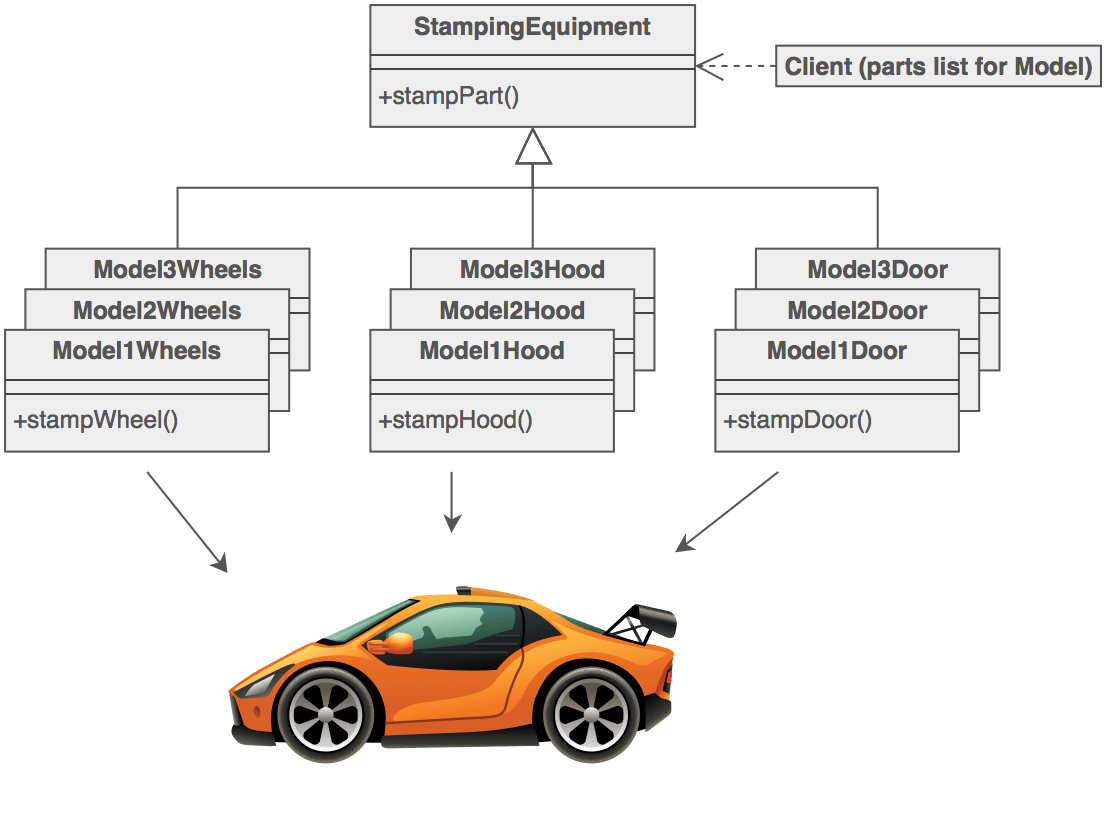
sourcemaking.com
interface Account {
    String getAccountNumber();
}

interface AccountFactory {
    Account createAccount();
}

class BankAccountFactory implements AccountFactory {
    Account createAccount() {
        Account account = new BankAccount("01234567890");
        account.setInterestRate(0.01);
        return account;
    }
}

class CreditCardAccountFactory implements AccountFactory {
    Account createAccount() {
        Account account = new CreditCardAccount("0000123456789999");
        account.setCreditLimit(5000);
        return account;
    }
}

    ...

    switch (accountType) {
        case BANK:
            return new BankAccountFactory();
        case CREDIT:
            return new CreditCardAccountFactory();
    }

    ...
public interface StreamEmitterFactory {
/**
* Creates and returns a new instance of a StreamEmitter holding a specific StreamMessageEntryPoint implementation
* using the given Map of properties. The properties map should contain properties from the DFS stream configuration
* file with the prefixes removed from the keys. For example, "upf.dfs.stream1.host" => "localhost" should be passed
* in the map as "host" => "localhost".
*
* @param streamProperties a Map of properties from the DFS stream configuration for the specific type of stream being created
* @return a new instance of a StreamEmitter with an implementation of StreamMessageEntryPoint
*/
StreamEmitter newInstance(Map<String, String> streamProperties);
}
@Component
@Scope(BeanDefinition.SCOPE_PROTOTYPE)
public class HttpStreamEmitterFactory implements StreamEmitterFactory {
@Inject
private StreamEmitter emitter;
@Inject
private ApplicationContext applicationContext;
/**
* Creates and returns a new instance of a StreamEmitter holding a new HttpMessageEntryPoint using the given Map of
* properties. The properties required in the map are "host" and "port" and a EPFSystemException will be thrown if
* either is missing.
*
* @param streamProperties a Map of properties from the DFS stream configuration for an HTTP stream
* @return a new instance of a StreamEmitter with a configured HttpStreamMessageEntryPoint
* @throws com.capitalone.epf.exception.model.EPFSystemException if required properties are missing from the given Map
*/
@Override
public StreamEmitter newInstance(final Map<String, String> streamProperties) {
//Extraction of properties from Map parameter
URL streamConnectionUrl = (URL) applicationContext.getBean("upf-dfs-httpURL", PROTOCOL, this.host, this.port);
HttpStreamMessageEntryPoint entryPoint = new HttpStreamMessageEntryPoint(streamConnectionUrl, dfsConfig);
emitter.setStreamMessageEntryPoint(entryPoint);
return emitter;
}
}
@Configuration
public class DFSSpringConfig {
@Bean(name = {"upf-dfs-httpURL"})
public URL httpURL(final String protocol, final String host, final int port) {
URL url = null;
try {
url = new URL(protocol, host, toUsePort, "");
}
catch (final MalformedURLException mue) {
logger.error("Could not construct URL: Malformed", mue);
throw new EPFSystemException("Unable to create HttpStreamMessageEntryPoint due to bad URL parameters", mue);
}
return url;
}
}public enum StreamEmitterFactoryType {
HTTP("http", HttpStreamEmitterFactory.class),
QUEUE("queue", QueueStreamEmitterFactory.class),
TCP("tcp", TcpStreamEmitterFactory.class);
private final String name;
private final Class factoryClass;
StreamEmitterFactoryType(final String name, final Class factoryClass) {
this.name = name;
this.factoryClass = factoryClass;
}
public String getName() {
return name;
}
public Class getFactoryClass() {
return factoryClass;
}
public static StreamEmitterFactoryType getByName(final String name) {
for (StreamEmitterFactoryType type : StreamEmitterFactoryType.values()) {
if (type.getName().equalsIgnoreCase(name)) {
return type;
}
}
return null;
}
}void readStreamProperties(final String streamName) {
String streamType = null;
final String streamPropsPrefix = StreamEmitterFactory.PROPS_KEY_STREAM_PREFIX + "." + streamName;
//Get the stream type from the properties for the current stream
streamType = appConfig.getString(streamPropsPrefix + "." + StreamEmitterFactory.PROPS_KEY_TYPE);
//Load all of the properties for the current stream into a Map to pass onto the stream factory
Map<String, String> streamProps = new TreeMap<String, String>();
Iterator streamPropKeys = appConfig.getKeys(streamPropsPrefix);
while (streamPropKeys.hasNext()) {
String key = (String) streamPropKeys.next();
String value = appConfig.getString(key);
//Replace the whole key prefix, the factory only wants the last part
key = key.replace(streamPropsPrefix + ".", "");
streamProps.put(key, value);
}
StreamEmitterFactoryType streamEmitterFactoryType = StreamEmitterFactoryType.getByName(streamType);
StreamEmitter emitter = createEmitter(streamName, streamEmitterFactoryType, streamProps);
streamEmitters.put(streamName, emitter);
}
StreamEmitter createEmitter(final String streamName, final StreamEmitterFactoryType streamFactoryType, final Map<String, String> streamProps) {
//Get the class for the factory to build the current stream and create a Spring bean for it
Class configurerClass = streamFactoryType.getFactoryClass();
StreamEmitterFactory streamEmitterFactory = (StreamEmitterFactory) applicationContext.getBean(configurerClass);
//Create the emitter and put it into the emitters map
StreamEmitter emitter = streamEmitterFactory.newInstance(streamProps);
return emitter;
}Builder Pattern
Solves the "telescoping constructor" problem by encapsulating individual construction steps that can be invoked individually.
Use when
- class has too many or too complex constructors (many parameters or multiple optional parameters)
- creation logic is highly conditional
- constructors are doing real work
- the algorithm for creating a complex object should be independent of the parts of object and how they're assembled
- the object needs to be immutable after creation

sourcemaking.com
Sandwich blt = new Sandwich("BLT", Bread.WHEAT, 3);
blt.addCondiment(Condiment.MAYO);
blt.addMeat(Meat.BACON);
blt.addVegetable(Vegetable.Lettuce);
blt.addVegetable(Vegetable.Tomato);

. . .

public class Sandwich {

    // private instance variables

    public Sandwich() { }

    public Sandwich(String name) {
        this();
        this.name = name;
    }

    // telescoping constructors
    public Sandwich(String name, Bread bread) {
        this(name, bread, bread.minNumSlices);
    }

    public Sandwich(String name, Bread bread, int numSlices) {
        this(name);
        this.bread = bread;
        this.numBreadSlices = numSlices;
    }

    public void addCondiment(Condiment meat) { ... }
    public void addMeat(Meat meat) { ... }
    public void addVegetable(Vegetable veggie) { ... }
}
Sandwich blt = new Sandwich.Builder()
.name("BLT")
.withBread(Bread.WHEAT, 3)
.withCondiment(Condiment.MAYO)
.withMeat(Meat.BACON)
.withVegetable(Vegetable.Lettuce)
.withVegetable(Vegetable.Tomato)
.build();
. . .
public class Sandwich {
// private instance variables
public Sandwich() { }
public void addCondiment(Condiment meat) { ... }
public void addMeat(Meat meat) { ... }
public void addVegetable(Vegetable veggie) { ... }
public class Builder {
//private instance variables
public Sandwich build() {
Sandwich s = new Sandwich();
s.setName(this.name);
...
return s;
}
public SandwichBuilder withBread(Bread bread, int numSlices) {
this.bread = bread;
this.numBreadSlices = numSlices;
}
}
}// Quartz scheduler Trigger builder
public T build() {
if(scheduleBuilder == null)
scheduleBuilder = SimpleScheduleBuilder.simpleSchedule();
MutableTrigger trig = scheduleBuilder.build();
trig.setCalendarName(calendarName);
trig.setDescription(description);
trig.setEndTime(endTime);
if(key == null)
key = new TriggerKey(Key.createUniqueName(null), null);
trig.setKey(key);
if(jobKey != null)
trig.setJobKey(jobKey);
trig.setPriority(priority);
trig.setStartTime(startTime);
if(!jobDataMap.isEmpty())
trig.setJobDataMap(jobDataMap);
return (T) trig;
}
// Build then schedule a Job and a Trigger
JobDetail job = newJob(MyJob.class)
.withIdentity("myJob")
.build();
Trigger trigger = newTrigger()
.withIdentity(triggerKey("myTrigger", "myTriggerGroup"))
.withSchedule(simpleSchedule()
.withIntervalInHours(1)
.repeatForever())
.startAt(futureDate(10, MINUTES))
.build();
scheduler.scheduleJob(job, trigger);Singleton Pattern
Restricts the number of instantiations of a class to one single instance.
Use when
- Almost never!
- To store immutable read-only state or there is no state
Don't use when
- you want to be able to unit test your code
- you can use DI or a Factory instead
- it results in your API being a liar
What's wrong with Singletons?
You should be able to understand how to use an API without memorizing all of the source code.
testDebitAccount()
{
    Account c =  new Account("1234123412341234", "360", 5000);
    c.debit(200);
    assert(c.availableBalance == 4800);
}
In the background there is some stuff going on.
- There is an AccountTransactionProcessor
- There is an AccountTransactionQueue
But you can't know this from the API because it lied to you. The API clearly states that you can create an account and then debit it.
What's wrong with Singletons?
testDebitAccount()
{
    AccountTransactionQueue.getInstance();
    AccountTransactionProcessor.getInstance();

    Account c =  new Account("1234123412341234", "360", 5000);
    c.debit(200);
    assert(c.availableBalance == 4800);
}
testDebitAccount()
{
AccountTransactionQueue atQueue =
new AccountTransactionQueue();
AccountTransactionProcessor atProcessor =
new AccountTransactionProcessor(atQueue);
Account c = new Account("1234123412341234", "360", 5000);
atProcessor.debit(c, 200);
assert(c.availableBalance == 4800);
}So when are Singletons ok?
- They do not effect the execution of your code.
- The singleton is immutable and all objects returned by the singleton are immutable.
A common example is loggers which have a global state but do not impact the execution of the application.
An example of this is environmental variables pulled at the application's launch.
        public class Singleton {

            private static Singleton instance = null;

            private Singleton() { }

            public static Singleton getInstance() {
                if (instance == null) {
                    instance = new Singleton();
                }

                return instance;
            }

        }
Adapter Pattern
The adapter pattern works as a bridge between two incompatible interfaces. This type of design pattern comes under structural pattern as this pattern combines the capability of two independent interfaces.
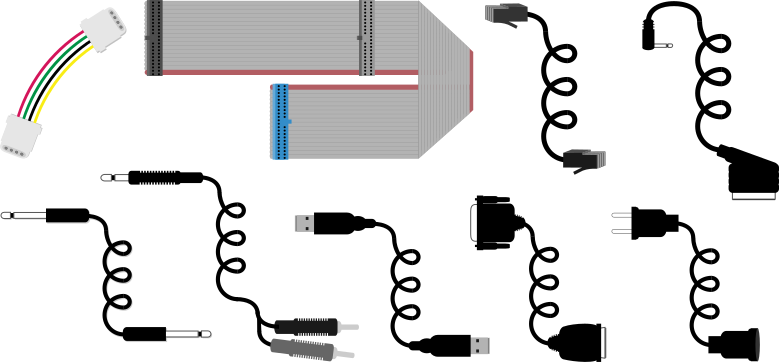
Square peg in a round hole
class LegacySquarePeg {
    private double width;
    public SquarePeg(double w) { width = w; }
    public double getWidth() { return width; }
    public void setWidth(double w) { width = w; }
}

class RoundHole {
    private int radius;
    public RoundHole( int r ) { radius = r; }
    public int getRadius() { return radius; }
}

class SquarePegAdapter {

    private LegacySquarePeg sp;

    public SquarePegAdapter(double w) {
        sp = new LegacySquarePeg(w);
    }

    public void makeFit(RoundHole rh) {
        double amount = sp.getWidth() - rh.getRadius() * Math.sqrt(2);
        if (amount > 0) {
            sp.setWidth(sp.getWidth() - amount);
        }
    }
}
Facade Pattern
A facade object provides a simplified interface to a larger body of code to make a subsystem easier to use.
Use when
- a simpler to use interface is desired
- making a software library easier to use
- using a poorly designed API or legacy code that is difficult to understand
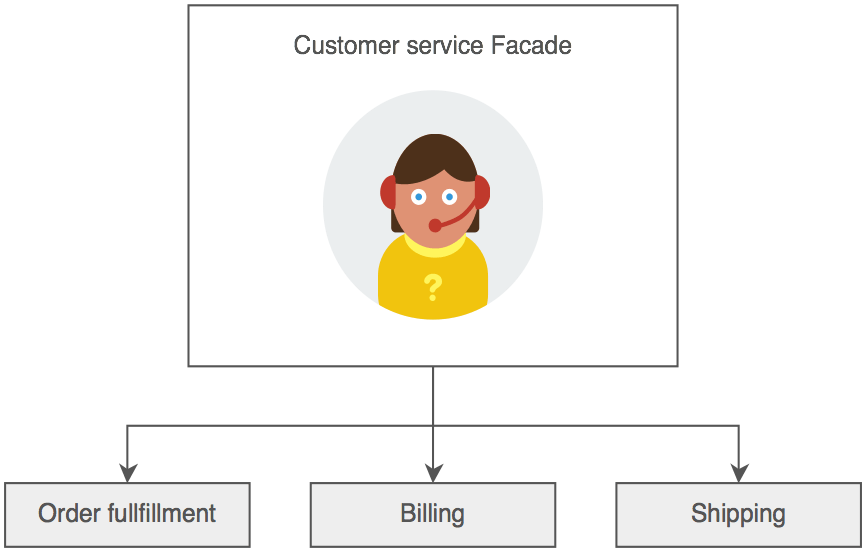
sourcemaking.com
    public boolean createNewFile() throws IOException {
      SecurityManager security = System.getSecurityManager();
      if (security != null) security.checkWrite(path);
      return fs.createFileExclusively(path);
    }

    public boolean delete() {
      SecurityManager security = System.getSecurityManager();
      if (security != null) {
        security.checkDelete(path);
      }
      return fs.delete(this);
    }

    public String getName() {
      int index = path.lastIndexOf(separatorChar);
      if (index < prefixLength) return path.substring(prefixLength);
        return path.substring(index + 1);
      }
    }
Decorator Pattern
Attach additional responsibilities to an object dynamically. Decorators provide a flexible alternative to subclassing for extending functionality.
Use when
- attaching additional responsibilities to an object dynamically
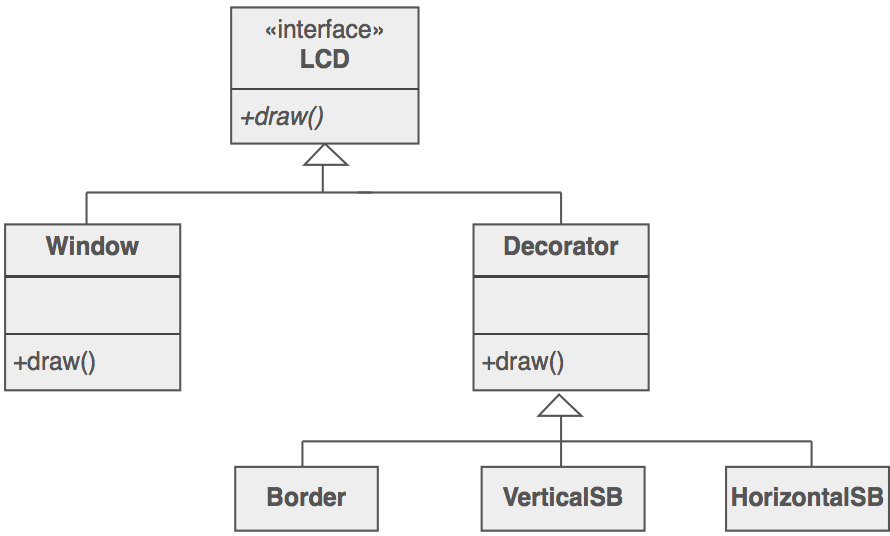
public class BorderDecorator extends Lcd {

   private Lcd decoratedLcd;

   public BorderDecorator(Lcd decoratedLcd) {
      this.decoratedLcd = decoratedLcd;
   }

   public void draw() {
      decoratedLcd.draw();
      drawBorder(this.decoratedLcd);
   }

   public void drawBorder(Lcd decoratedLcd) {
        //Logic to draw border on decoratedLcd
   }
}
Iterator Pattern
Encapsulates and decouples the algorithm for traversing a data structure, providing a way to access the elements sequentially without exposing the structure's underlying implementation.
Use when
- a uniform traversal interface is required
- a complex data structure is traversed in multiple places
public boolean hasNext() {
    return cursor != size();
}

public E next() {
    checkForComodification();
    try {
        int i = cursor;
        E next = get(i);
        lastRet = i;
        cursor = i + 1;
        return next;
    } catch (IndexOutOfBoundsException e) {
        checkForComodification();
        throw new NoSuchElementException();
    }
}

public void remove() {
    if (lastRet < 0)
        throw new IllegalStateException();
    checkForComodification();

    try {
        AbstractList.this.remove(lastRet);
        if (lastRet < cursor)
            cursor--;
        lastRet = -1;
        expectedModCount = modCount;
    } catch (IndexOutOfBoundsException e) {
        throw new ConcurrentModificationException();
    }
}
public void removeNaughtyWords(final List<String> words) {
    Iterator<String> wordIter = words.iterator();

    while (wordIter.hasNext()) {
        String next = wordIter.next();

        if (NAUGHTY_LIST.contains(next)) {
            wordIter.remove();
        }
    }
}
Command Pattern
Uses a command object to represent the information needed to call a method at a later time. Command information includes the method's name, object that owns the method, and values for the method's parameters.
Use when
- a sequence of various method calls needs to occur at a later time
- a collection of different method calls needs to be handled by a shared invoker
- a history of actions is needed

sourcemaking.com
interface TransactionExecutor {
    void addTransactionCommand(TransactionCommand transaction);
}

interface TransactionCommand {
    void execute();
}


class DepositCommand implements TransactionCommand {
    Account account;
    double amount;

    void execute() {
        account.addFunds(amount);
    }
}

class WithrawalCommand implements TransactionCommand {
    Account account;
    double amount;

    void execute() {
        account.removeFunds(amount);
    }
}
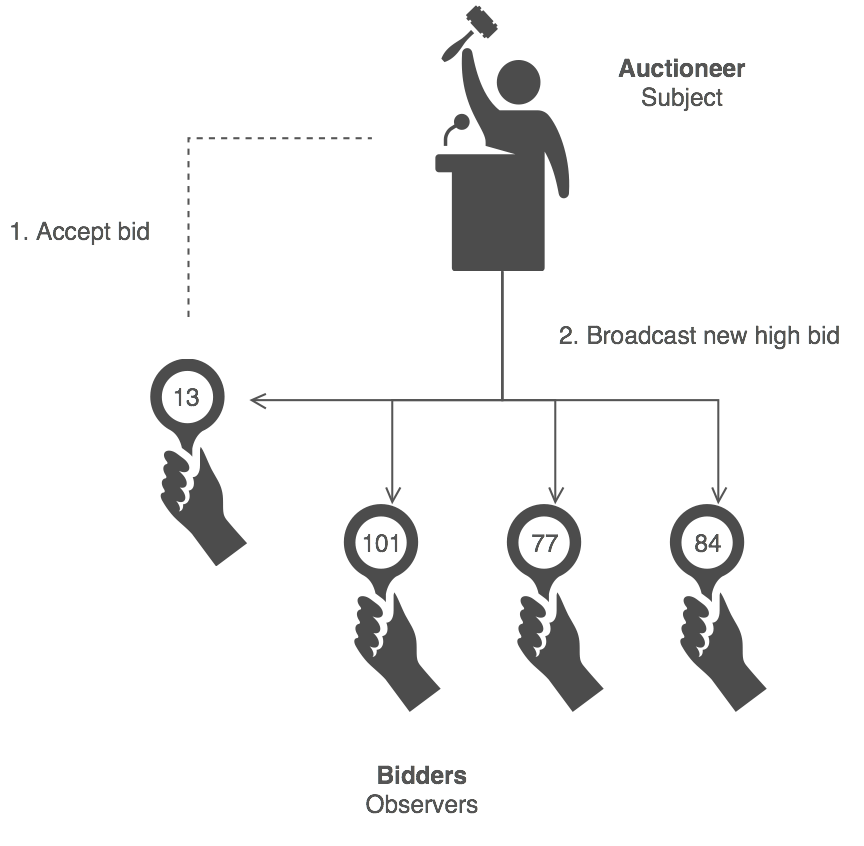
Observer Pattern
An object (the subject) maintains a list of its dependents and notifies them of any state changes.
Use when
- changes to one object requires notifying numerous dependent objects
- an object should be able to notify other objects without making assumptions about who those objects are
- process is event-driven
sourcemaking.com
Strategy (Policy) Pattern
There are many situations when cases only differ by their behavior. It is a good idea to isolate the algorithms into different classes to be able to be chosen at runtime.
Use when
- A family or group of algorithms are necessary to execute.
- Decision on which algorithm to use is dependent on the situation.




Credit
Debit
//Strategy pattern
DamageResistedStrategy dmgStrat = null;

switch (damage.getType()) {
    case MAGIC:
        dmgStrat = new MagicDamageResistedStrategy(damageAmount, target);
    case PHYSICAL:
        dmgStrat = new PhysicalDamageResistedStrategy(damageAmount, target);
    case PURE:
        dmgStrat = new PureDamageResistedStrategy(damageAmount, target);
}

resistedDamageAmount = dmgStrat.calculateResistance();
damageAmount -= resistedDamageAmount;
Design Pattern Group Activity
Test-Driven Development
- Write a failing unit test
- Write the minimum amount of code to make the test pass
- Refactor the new code to acceptable standards while keeping the test passing
Requirements must be completely understood through use cases and user stories.
- "Keep it simple, stupid"
- "You aren't gonna need it"
- "Fake it till you make it"
TDD Benefits
- TDD means writing more tests and programmers who write more tests are more productive.
- Beyond standard unit testing, TDD also drives the design of the application, allowing developers to consider how the API will be used by clients and writing for the interface instead of the implementation (DIP).
- Resulting code tends to be more modular because developers think in terms of smaller, testable units of code as they only write code to pass a testable unit. Using mock objects also helps contribute to modularity because it requires swapping out modules.
Unit Testing Conventions
Test structure
- Setup
- Execution
- Validation
- Clean up
- Treat your test code with the same respect as your production code
- Separate common set up and clean up logic
- Work with your team to review your tests and test practices
Avoid
- unnecessary or useless tests
- depending on external environments
- depending on system state manipulated by previously executed test cases
- dependencies between test cases
- testing execution timing or performance
    @Before
    public void setUp() {
        bill = new Bill(2, new Server("gtb012", "Reid"));
        calculator = new BillCalculator(.05);
    }

    @After
    public void tearDown() {
        bill = null;
        calculator = null;
    }

    @Test
    public void testCalculateTax() {
        bill.addItem(new Item("milk", 1.23));
        bill.addItem(new Item("cereal", 2.13));

        double tax = calculator.calculateTax(bill);
        assertEquals(0.17, tax);
    }
Unit Test Mocking
Mock objects can simulate the behavior of complex, real objects when the real object is impractical or impossible to incorporate in a unit test.
Creating a mock object will stub the method implementations.
Usage of a mock object by the unit under test (UUT) allows control and verification of the invocation of the mock by the UUT.
@Test
public void testReadConfigurationFromPropertiesFile_OneHttpStream() {
    when(appConfig.getProperty(StreamEmitterFactory.PROPS_KEY_STREAM_COUNT)).thenReturn(1);
    when(appConfig.getString(StreamEmitterFactory.PROPS_KEY_STREAM_PREFIX + 1 + "." + StreamEmitterFactory.PROPS_KEY_TYPE)).thenReturn("http");
    when(appConfig.getString(StreamEmitterFactory.PROPS_KEY_STREAM_PREFIX + 1 + "." + StreamEmitterFactory.PROPS_KEY_NAME)).thenReturn("http1");

    Iterator mockIter = mock(Iterator.class);
    when(appConfig.getKeys(StreamEmitterFactory.PROPS_KEY_STREAM_PREFIX + 1)).thenReturn(mockIter);

    //Iterate 4 times for 4 different property keys for http configuration
    when(mockIter.hasNext()).thenReturn(true, true, true, true, false);
    when(mockIter.next()).thenReturn("upf.dfs.stream1.type",
            "upf.dfs.stream1.name",
            "upf.dfs.stream1.host",
            "upf.dfs.stream1.port");

    when(appConfig.getString("upf.dfs.stream1.type")).thenReturn("http");
    when(appConfig.getString("upf.dfs.stream1.name")).thenReturn("http1");
    when(appConfig.getString("upf.dfs.stream1.host")).thenReturn("localhost");
    when(appConfig.getString("upf.dfs.stream1.port")).thenReturn("9000");

    streamFactory.readConfigurationFromPropertiesFile();

    verify(mockIter, times(5)).hasNext();
    verify(mockIter, times(4)).next();
    verify(appConfig, times(6)).getString(anyString());

    StreamEmitter emitter = streamFactory.getEmitter("http1");
    assertNotNull(emitter);

    StreamMessageEntryPoint entryPoint = emitter.getStreamMessageEntryPoint();
    assertNotNull(entryPoint);
}
Pair Programming
Driver
- Less experienced
- Focused on tactical decisions ("What code do I need to write right now to solve the problem?")
Navigator
- More experienced
- Focused on strategic decisions ("Is the driver writing effective code?" Where are we heading next?")
Exercise Requirements
Restaurant order and transaction system.
- Add orders to bills
- Finalize bill and add tax
- Table management
- Support for gratuity
- Coupons and comps
- Splitting bills
Adventures in Software Craftsmanship
By dyanos91
Adventures in Software Craftsmanship
Fall 2015 - Day 2