Git GitLab EE
Commit / Merge / Rebase / Workflow / Squash


Agenda
• Intro
• Merge / rebase
• Workflow
• Rebase onto
• Interactive Rebase & Squash
• Best Practicies
• Conclusion
The purpose of this section is to talk about GIT, some of its key concepts, and the workflow to adpot
Let’s build tomorrow’s workflow together!
Definition of Git
Svn vs Git
Definition of repository / Working Area/Staging Area
Definition of local repository / remote repository
Topics not covered !
Concepts
Basics
The commit !
The commit is the basic unit in Git used to build a project's timeline.
Definition
The commit !
The commit is the basic unit in Git used to build a project's timeline.
Definition
A commit is like a “Snapshot or milestone” of a Git project's state.
The commit !
The commit is the basic unit in Git used to build a project's timeline.
Definition
A commit is like a “Snapshot or milestone” of a Git project's state.
The “concept of time is essential” in the definition of a commit.
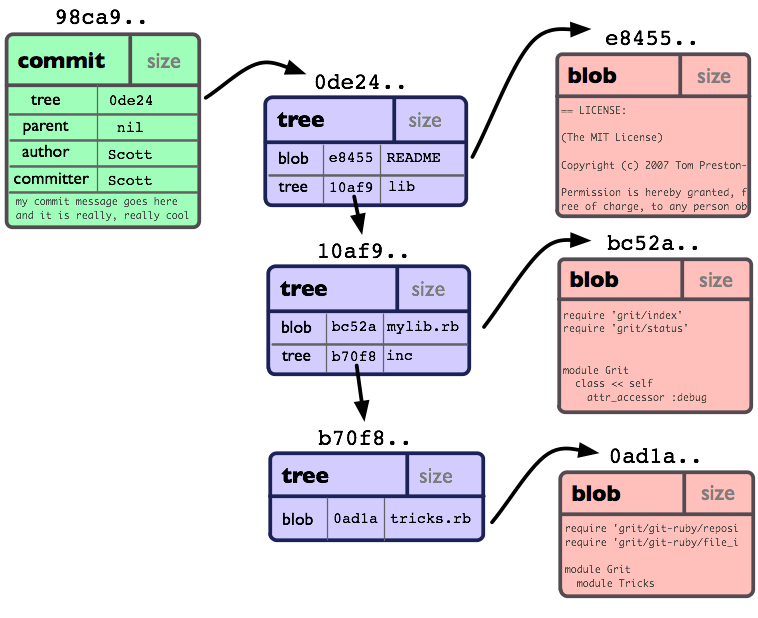
Commit anatomy
sha1(
    commit date

    commit message

    committer

    author

    author date

    tree
)
A commit = {} metadatas + project tree = a unique sha
La date du commit
Le message du commit
La personne qui commit
Le premier auteur du commit
Date de création du commit
Le tree de l'ensemble du projet
Commit anatomy
A commit = {} metadatas + project tree = a unique sha
The commit date
The commit message
The committer
The original author of the commit
The commit creation date
The project's complete tree
sha1(
    commit date

    commit message

    committer

    author

    author date

    tree
)
Commit tree - Data Model
Merge & Rebase
Merge vs Rebase
The purpose of a merge is to combine the work from two branches
A merge is a non-destructive operation; it does not alter the commit history of the merged branch
Definition
Merge fast-forward - limites
//Before                           |  //After
A----B----C         (develop/HEAD) |  A----B----C----1----2 (develop/HEAD, project)
           \                       |
            1-----2  (project)     |
Merging can be polluting because of the commit created on the target branch!
There are mainly two merge methods
Merge no-fast-forward
//Before                                 |  //After
A----B----C----D----E     (develop/HEAD) |  A----B----C----D----E----F  (develop/HEAD)
                \                        |                  \       /
                 1-----2  (project)      |                   1-----2  (project)
Pros
-
Commits with a unique SHA
-
Easy to revert a merge
-
Simplified conflict management
-
Preserve history
Cons
-
History pollution
-
Guitar effect on the history
The Pros and Cons of merging
The purpose of a rebase is to change the base of a branch
Rebase is a destructive operation - it alters the commits in the rebased branch
Definition
Rebase is a non-polluting operation !
There are several types of rebase (regular rebase, interactive rebase, rebase onto, etc.).
Example of rebase
//Before                           | //After
A----B----C----D    (develop/HEAD) | A----B----C----D----$1----$2  (develop/HEAD,project)
           \                       |
            1---- 2 (project)      |
Rebase is often used to clean up the history of Git branches, making it linear for better readability
$: indicates the change of commit SHA.
Pros
-
Replay commits one by one
-
Modify or delete commits during rebase
-
No history pollution
-
Linear and readable history
-
Encourages contributors to regularly clean up branch history before merging
Cons
-
Modifies commits SHA
-
Reverting a rebase is difficult
-
Force push required after a rebase
The Pros and Cons of rebase
merge vs rebase
When using Git, a common question at the start of every project is :
Should we work with merges or rebases ?
The answer is definitely not binary!
There is no one-size-fits-all solution for every situation.
What can help in making a decision :
-
Git history should be concise, clear, and easy to read!
-
Practices must be consistent within a team
-
Define and follow contribution workflow rules
Managing GIT
history
is not
important
Managing GIT
history
is not
it's very important
Keep in mind that Git history serves as a form of technical documentation for the code
Note!
Our new
Workflow Git
Defining a single and unique Git Workflow for all contributors is essential to ensure better collaboration and establish uniform contribution rules for everyone.
-
Direct commits on the main branch are forbidden
-
Force pushes on main branch are now blocked
-
Use of MR is mandatory
-
Rebase is required before accepting any MR
-
All merges use (--no-ff), except merges from develop to main
-
Only the develop branch can be merged into main (using ff)
-
The develop branch is rebased onto main at each release
The Workflow Guidelines
-
Project branches are created from develop
-
Feature branches are created from project branches
-
The first commit on a project branch must be easy to spot and identify (often the version change commit)!
-
New branch naming rules - see doc.
-
New commit message conventions - see. doc.
The Workflow Guidelines
Use of MR
-
When merging work from feature branch into the project branch
-
When merging a sub-branch of a project into the project branch
-
When merging the project branch into develop
-
When merging an mco (or any other maintenance branch) into develop
-
When merging a hotFix branch into develop
The Workflow Guidelines
A MR must/could not be approved by the contributor who created it.
In the new GitLab EE, it will not be possible to accept a merge request unless the source branche is rebased onto the target branch.
Use of merge & rebase
The Workflow Guidelines
-
Both methods, merge and rebase, will be used in our workflow
-
For each MR, a rebase is performed followed by a merge
-
Rebase and merge within a merge request are done through the GitLab UI
-
The contributor performs a local rebase only if GitLab cannot rebase automatically.
-
Rebasing develop onto master must not be done through the GitLab UI (follow the release process)
In the new GitLab EE, merge and rebase during a merge request will be performed automatically through the UI
GitLab EE hands control back to the contributor if it cannot make a decision and/or resolve conflicts.
Some examples !
Merge - Rebase / master - develop - feat
Workflow branch feat -> project
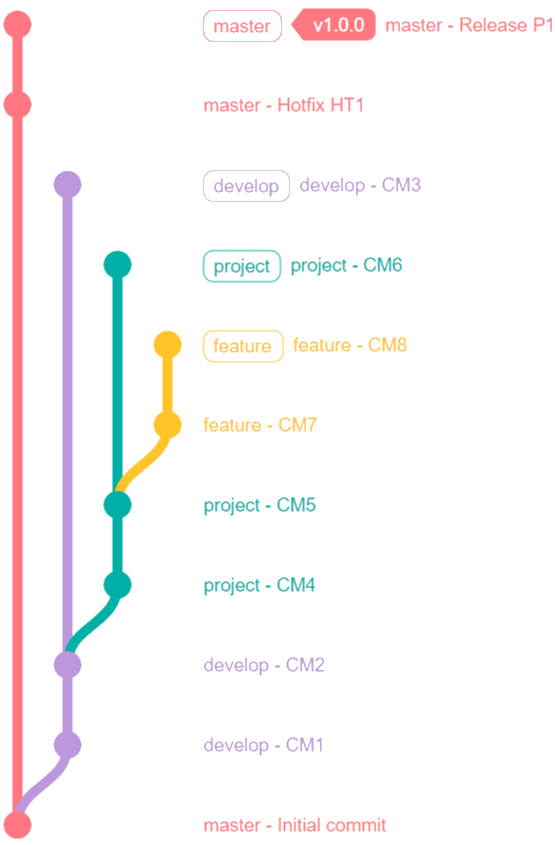
How to merge* the feature branch into the project branch ?
* The merge must be done through a MR
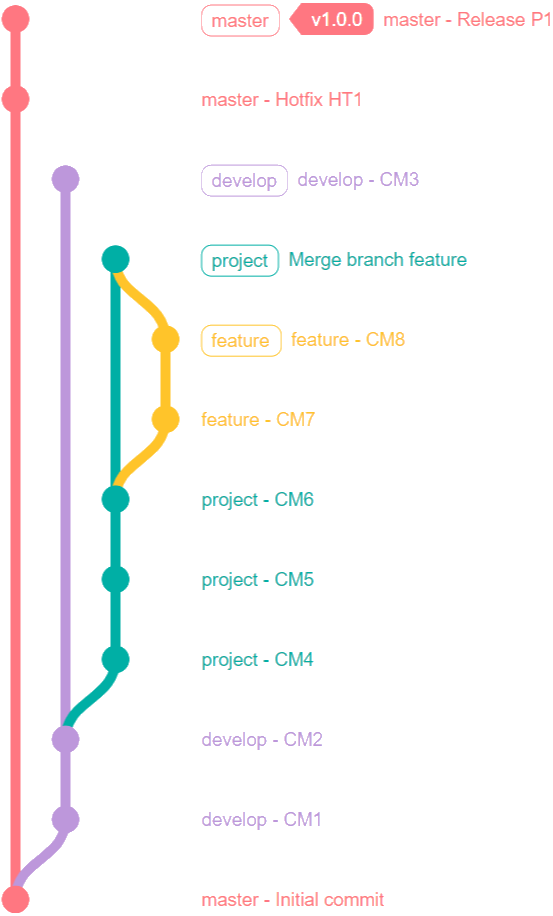
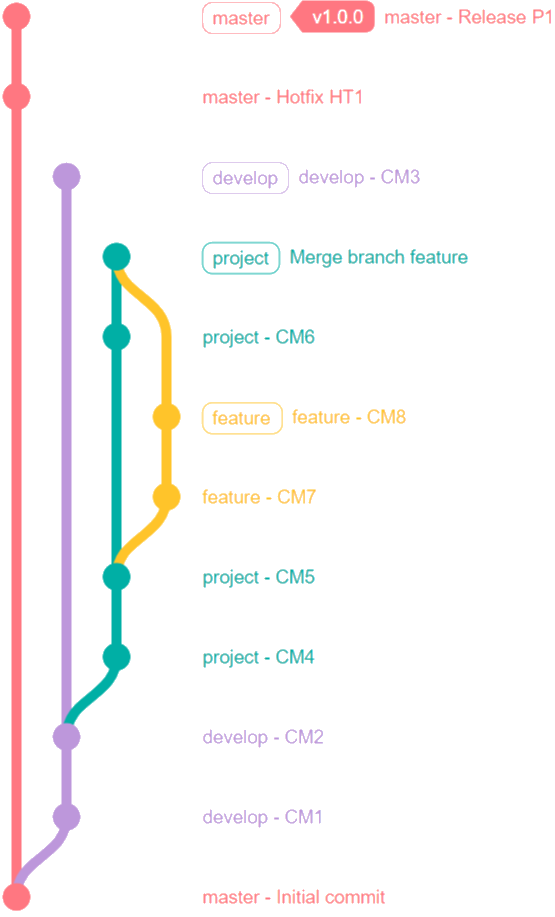
Case 1
Case 2
Workflow branch feat -> project
Case 1
Case 2
Workflow branch feat -> project
Workflow branch feat -> project
merge without rebase
rebase before merge (--no-ff)
Workflow branch project -> develop
How to merge* the project branch into the develop branch ?
* The merge must be done through a MR
Case 1
Case 2
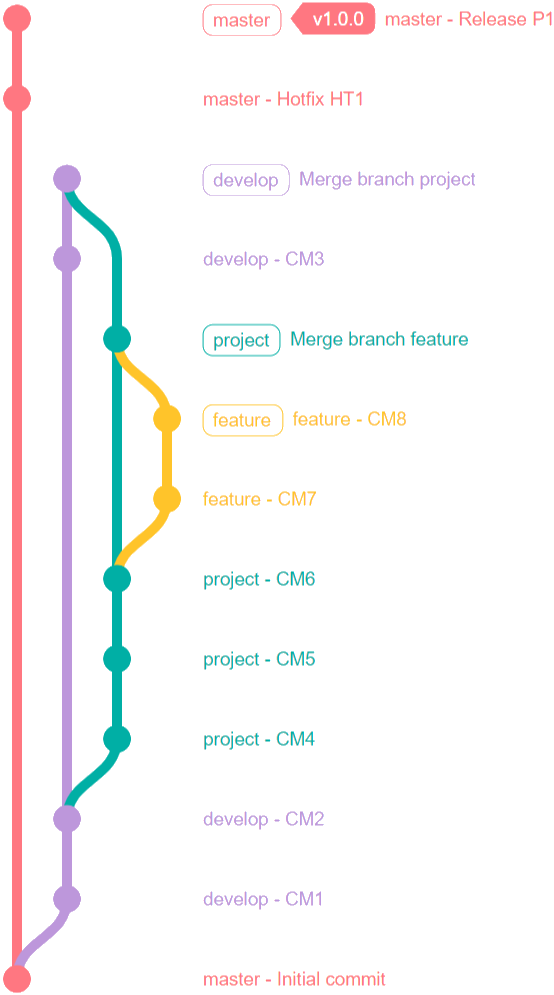
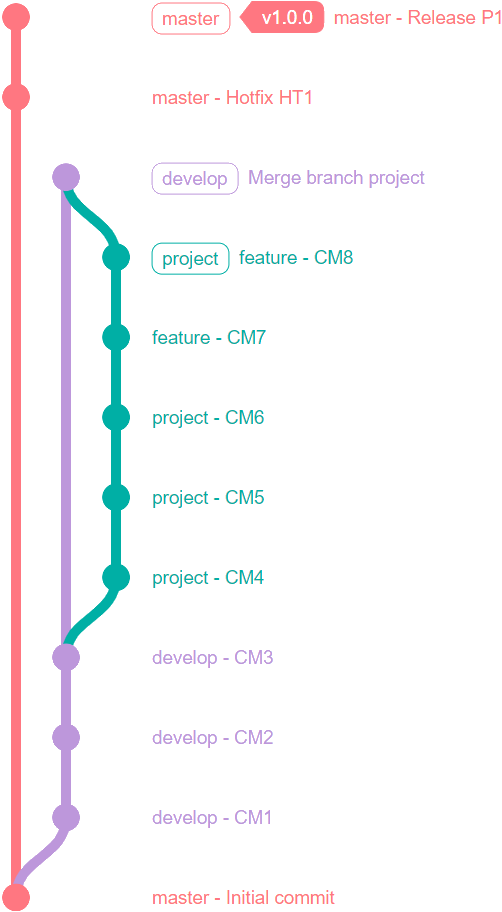
Workflow branch project -> develop
Case 1
Case 2
Workflow branch project -> develop
Case 1
Case 2
Workflow branch project -> develop
Case 1
Case 2
Workflow branch project -> develop
merge without rebase
rebase before merge (--no-ff)
Workflow branch project -> develop
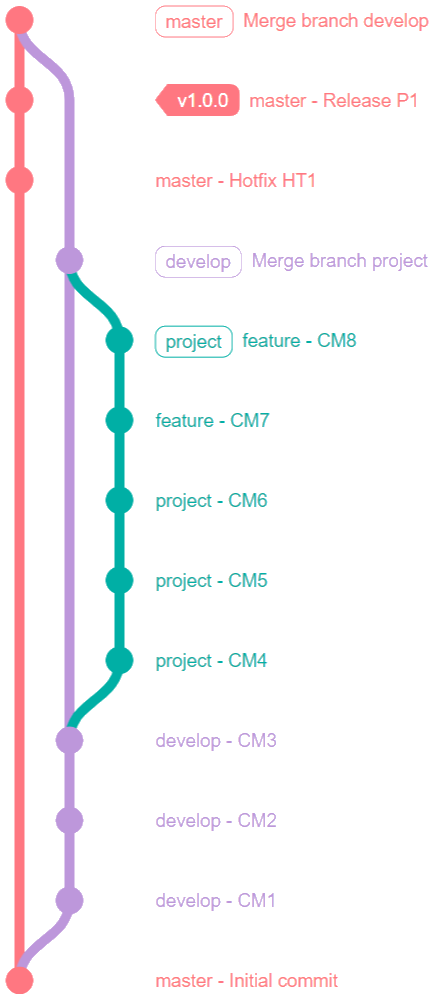
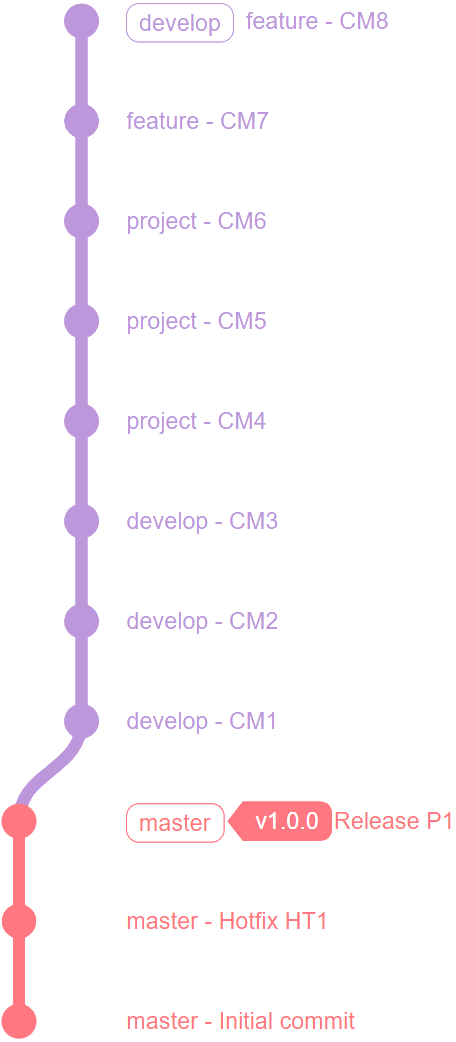
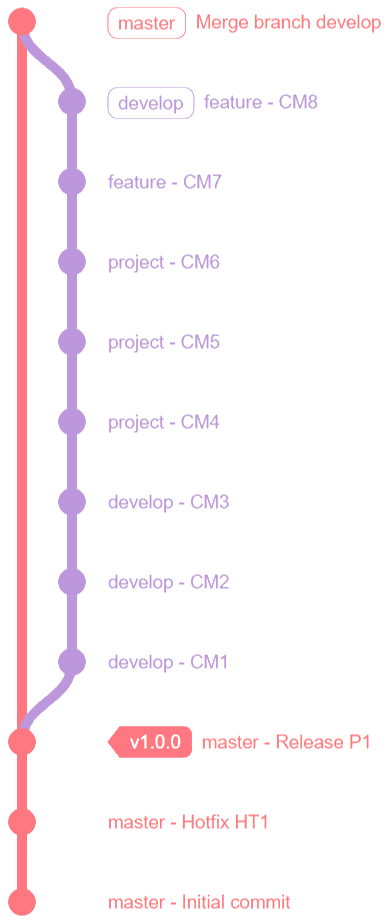
Workflow branch develop -> master
How to merge* develop branch onto master ?
* The merge must not be done through MR
Workflow branch develop -> master
Case 1
Case 2
Case 3
Case 1
Case 2
Case 3
Workflow branch develop -> master
Case 1
Case 2
Case 3
Workflow branch develop -> master
Case 1
Case 2
Case 3
Workflow branch develop -> master
Case 1
Case 2
Case 3
Workflow branch develop -> master
merge without rebase
rebase before merge (--ff)
rebase before merge (--no-ff)
Workflow branch develop -> master
Rebase --onto
Better control your rebase !
The rebase --onto makes rebasing easier, even for the most complex cases, without the drawbacks of a standard rebase.
It also provides flexibility in reorganizing commits (removing, renaming, reordering, etc.)
Definition
In certain situations, and with an unclear understanding of the concept, performing a rebase can be quite complex.
Example
//Initial state
A----B----C                          (main/HEAD)
      \
       D---...---Y---Z               (develop/HEAD)
                  \
                   1---2---3         (project/HEAD)
Situation
In certain situations, and with an unclear understanding of the concept, performing a rebase can be quite complex.
Example
//Initial state
A----B----C                          (main/HEAD)
      \
       D---...---Y---Z               (develop/HEAD)
                  \
1---2---3 (project/HEAD)$: indicates the change of commit SHA.
Situation
//Rebase develop onto main
A----B----C                          (main/HEAD)
           \
            $D---...---$Y---$Z       (develop/HEAD)
                   x                 (/This link is broken*/)
                    1---2---3        (project/HEAD)
In certain situations, and with an unclear understanding of the concept, performing a rebase can be quite complex.
Example
//Initial state
A----B----C                          (main/HEAD)
      \
       D---...---Y---Z               (develop/HEAD)
                  \
1---2---3 (project/HEAD)$: indicates the change of commit SHA.
Situation
//Rebase develop onto main
A----B----C                          (main/HEAD)
           \
            $D---...---$Y---$Z       (develop/HEAD)
                   x                 (/This link is broken*/)
                    1---2---3        (project/HEAD)
//Rebase project onto develop (without rebase --onto)
A----B----C (main/HEAD)
\
$D---...---$Y---$Z (develop/HEAD)
...\... (Try to find the oldest common ancestor*/)
1----2---3 (project/HEAD)rebase --onto syntax
git rebase --onto <newparent> <oldparent> <feature-branch/until> |
rebase --onto syntax
//Before                             |  //After
A----B----C----D     (develop)       |  A----B----C----D            (develop)
           \                         |                  \
            1----2   (project/HEAD)  |                   $1----$2   (project/HEAD)
git rebase --onto <newparent> <oldparent> <feature-branch/until> |
Example 1 - Standard rebase onto
//Before                                 |  //After
A----B----C----D----E    (develop)       |  A----B----C----D----E       (develop)
      \                                  |                  \
       1----2----3----4  (project/HEAD)  |                   $3----$4   (project/HEAD)
Example 2 - rebase onto with commits removal
$: indicates the change of commit SHA.
rebase --onto syntax
$ git checkout project
$ git rebase --onto D C

//Before                             |  //After
A----B----C----D     (develop)       |  A----B----C----D            (develop)
           \                         |                  \
            1----2   (project/HEAD)  |                   $1----$2   (project/HEAD)
git rebase --onto <newparent> <oldparent> <feature-branch/until> |
Example 1 - Standard rebase onto
$ git checkout project
$ git rebase --onto D 2

//Before                                 |  //After
A----B----C----D----E    (develop)       |  A----B----C----D----E       (develop)
      \                                  |                  \
       1----2----3----4  (project/HEAD)  |                   $3----$4   (project/HEAD)
Example 2 - rebase onto with commits removal
$: indicates the change of commit SHA.
rebase --onto syntax
git rebase --onto <newparent> <oldparent> <feature-branch/until> |
Example 3 - Previously discussed situation
$: indicates the change of commit SHA.
//Rebase project onto develop (without rebase --onto)
A----B----C                          (master/HEAD)
           \
            $D---...---$Y---$Z       (develop/HEAD)
      ...\...                        (Try to find the oldest common ancestor*/)
                         1----2---3  (project/HEAD)
//Rebase project onto develop
A----B----C (master/HEAD)
\
$D---...---$Y---$Z (develop/HEAD)
\
$1----$2---$3 (project/HEAD)Example 3 - Solution
rebase --onto syntax
git rebase --onto <newparent> <oldparent> <feature-branch/until> |
Example 3 - Previously discussed situation
$: indicates the change of commit SHA.
//Rebase project onto develop (without rebase --onto)
A----B----C (master/HEAD)
\
$D---...---$Y---$Z (develop/HEAD)
...\... (Try to find the oldest common ancestor*/)
1----2---3 (project/HEAD)$ git checkout project
$ git rebase --onto $Z CURRENT_PARENT (or $git rebase --onto develop CURRENT_PARENT)
//Rebase project onto develop
A----B----C                                  (master/HEAD)
           \
            $D---...---$Y---$Z               (develop/HEAD)
                              \
                               $1----$2---$3  (project/HEAD)
Example 3 - Solution
CURRENT_PARENT: is the commit immediately preceding the first commit of the project branch.
Les squash
Meld commits
Squash consists of combining n commits into 1 relevant, understandable and coherent commit.
The goal of squash is to make Git history readable, clear and meaningful.
Definition
Example of Git history
* e0d1c94 - 2022-09-30 (14 seconds)- feat(metier) sql create report request OK !!! (HEAD -> master)
* db37fe2 - 2022-09-30 (62 seconds)- feat(metier) oups!!! update 2 sql create report request
* 4f5e97f - 2022-09-30 (2 minutes)- feat(metier) update sql create report request
* 683d34b - 2022-09-30 (2 minutes)- feat(metier) add sql create report request
* 9ff0e10 - 2021-03-24 (1 year, 6 months)- chore(master) add .gitignore regenerate-*.bat
Situation
Start an interactive rebase (or perform it in an IDE, or other tools)
$ git rebase -i HEAD~4 (ou git rebase -i 9ff0e10)Follow the indicated steps - cf. doc.
Results
* 78fd32c - 2022-09-30 (2 minutes)- feat(metier) add sql create report request (HEAD -> master)
* 9ff0e10 - 2021-03-24 (1 year, 6 months)- chore(master) add .gitignore regenerate-*.bat
Best practices
-
Frequently rebase current branches
-
Use readable, consistent and concise commit messages.
-
Reduce the number of commits
-
Clean up the Git history of branches before opening MRs
-
Use squash
-
Use rebase --onto
-
Other recommandations will be provided in the upcoming documentation
Some best practices can help simplify daily version control management across different projects.
Note
Questions ?
If not, let’s see what you can do!
R.O.T.I
Return On Time Invested





Real-time evalutation of the return on time invested in following this presentation
Useless : A waste of time, i gained nothing, learned nothing
Useful : But it wasn't worth 100% of the time invested
Neutral : Not a waste of time, but nothing exceptional !
Good : I gained more than the time i invested
Excellent : I learned a lot. It was worth far more than the time I invested
Thank you !





Git/GitLab - EN
By Lyes CHIOUKH
Git/GitLab - EN
Dive into the heart of Git and GitLab EE through a concise presentation that combines theory with hands-on feedback. You'll discover the essential foundations of versioning, the difference between merge and rebase, as well as their strategic uses in a collaborative workflow. Advanced techniques such as rebase --onto, squash, and interactive rebase are introduced to help maintain a clean and meaningful history. The emphasis is placed on clear rules, consistent practices, and efficient branch management to streamline teamwork. This deliberately condensed content leaves out some more advanced concepts, which can be explored later and upon request.