
Marc Hauschildt
Web Technologies and Computer Software Development Instructor at Kirkwood Community College in Cedar Rapids, IA.
Week 12
What is each user's role in our system.
What will the users be doing with the system and why.
Example:
"As a [role], I need to [action] in order to [goal]."
For the Java 3 demo project, I would like to build a web application that manages intramural sports for colleges and universities.
There are three types of users:
Rec Center Admin
Student
Web Application Owner
As a user, I need to create a personal account and log in securely in order to access the application.
As a user, I need to be able to reset my password if I forget it in order to regain access to my account.
As a user, I need to manage my personal profile information and password in order to keep my details up to date.
As a Rec Center Admin, I need to create, edit, and delete locations, fields, and courts in order to manage our available facilities.
As a Rec Center Admin, I need to create and manage leagues, activities, and one-off games for teams and individuals in order to build out a season's schedule efficiently.
As a Rec Center Admin, I need to view and approve team registrations in order to ensure they meet league requirements before being added to a league.
As a Rec Center Admin, I need to enter and confirm game scores in order to update league standings automatically.
As a Rec Center Admin, I need to send messages to individuals, teams, and entire leagues in order to communicate important updates and announcements.
As a Student, I need to browse and search a list of available leagues, activities, and games in order to find something I want to join.
As a Student, I need to register as an individual or create a new team as a captain in order to participate in an activity.
As a Student, I need to accept or decline an invitation to join a team in order to be added to the roster.
As a Student, I need to view my personal and team schedule in order to know when and where my games are.
As a Student, I need to view league standings and team statistics in order to track my team's performance.
As a Student, I need to receive and reply to messages from the rec center admin and other participants in order to stay informed and coordinate with teammates.
As the Web App Owner, I need to create and manage school and Rec Center Admin accounts and set their privileges in order to onboard new customers.
As the Web App Owner, I need a support ticket system to manage and respond to issues from Rec Center Admins in order to provide effective customer service.
Goals:
Needs:
Goals:
Needs:
Goals:
Needs:
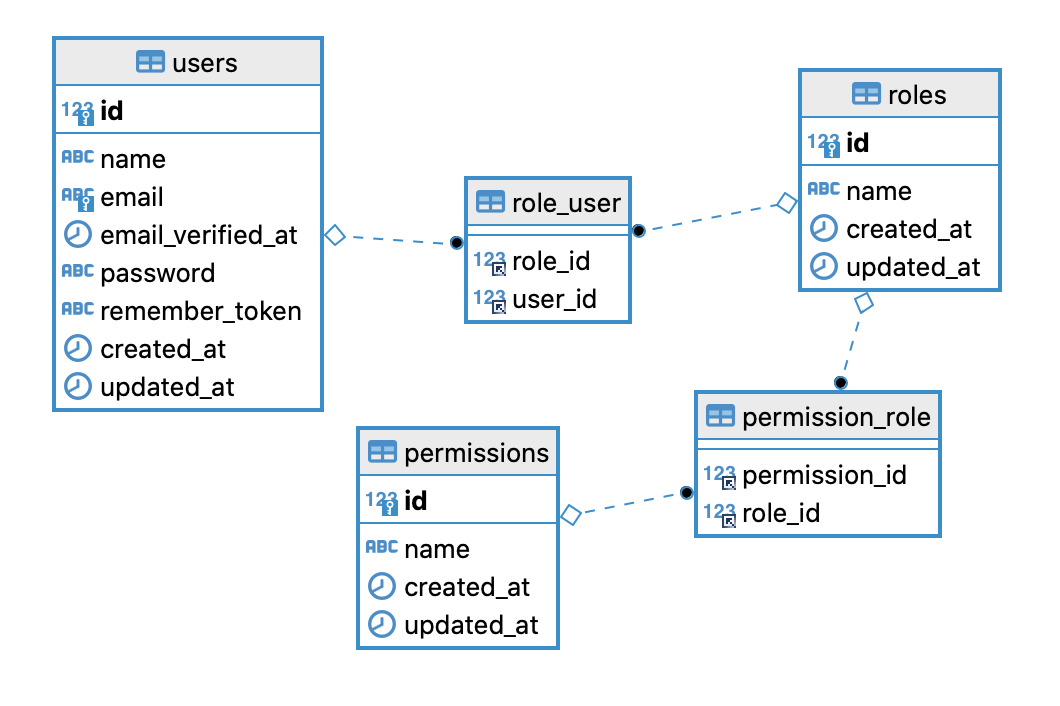
-- ---------------------------------
-- 1. `users`
-- Stores the main user account info.
-- ---------------------------------
CREATE TABLE users (
    id INT AUTO_INCREMENT PRIMARY KEY,
    first_name VARCHAR(50) NOT NULL,
    last_name VARCHAR(50) NOT NULL,
    email VARCHAR(100) NOT NULL UNIQUE,
    password_hash VARCHAR(255) NOT NULL,
    created_at TIMESTAMP DEFAULT CURRENT_TIMESTAMP,
    updated_at TIMESTAMP DEFAULT CURRENT_TIMESTAMP ON UPDATE CURRENT_TIMESTAMP
);


-- ---------------------------------
-- 2. `roles`
-- Stores the available roles (e.g., ADMIN, USER, GUEST).
-- ---------------------------------
CREATE TABLE roles (
    id INT AUTO_INCREMENT PRIMARY KEY,
    name VARCHAR(50) NOT NULL UNIQUE,
    description VARCHAR(255)
);


-- ---------------------------------
-- 3. `permissions`
-- Stores specific actions (e.g., CREATE_POST, DELETE_USER).
-- ---------------------------------
CREATE TABLE permissions (
    id INT AUTO_INCREMENT PRIMARY KEY,
    name VARCHAR(100) NOT NULL UNIQUE,
    description VARCHAR(255)
);


-- ---------------------------------
-- 4. `user_roles` (Junction Table)
-- Maps users to roles (Many-to-Many).
-- ---------------------------------
CREATE TABLE user_roles (
    user_id INT NOT NULL,
    role_id INT NOT NULL,
    PRIMARY KEY (user_id, role_id),
    FOREIGN KEY (user_id) REFERENCES users(id) ON DELETE CASCADE,
    FOREIGN KEY (role_id) REFERENCES roles(id) ON DELETE CASCADE
);


-- ---------------------------------
-- 5. `permission_role` (Junction Table)
-- Maps permissions to roles (Many-to-Many).
-- ---------------------------------
CREATE TABLE permission_role (
    permission_id INT NOT NULL,
    role_id INT NOT NULL,
    PRIMARY KEY (permission_id, role_id),
    FOREIGN KEY (permission_id) REFERENCES permissions(id) ON DELETE CASCADE,
    FOREIGN KEY (role_id) REFERENCES roles(id) ON DELETE CASCADE
);INSERT INTO roles (name, description) VALUES
('SCHOOL_ADMIN', 'Rec Center Admin: Can manage facilities, leagues, scores, and users.'),
('STUDENT', 'Student: Can join leagues, create teams, and view schedules.');INSERT INTO permissions (name, description) VALUES
-- Base "User" Permissions (for all logged-in users)
('MANAGE_OWN_PROFILE', 'Allows user to update their personal info and password.'),
('USE_MESSAGING', 'Allows user to send/receive messages with other participants.'),
-- Student Permissions
('VIEW_LEAGUES', 'Allows user to browse and search available leagues and activities.'),
('REGISTER_FOR_LEAGUE', 'Allows user to register as an individual for a league.'),
('CREATE_TEAM', 'Allows user to create a new team as a captain.'),
('MANAGE_TEAM_INVITATIONS', 'Allows user to accept or decline invitations to a team.'),
('VIEW_OWN_SCHEDULE', 'Allows user to view their personal and team game schedule.'),
('VIEW_STANDINGS', 'Allows user to view league standings and team statistics.'),
-- School Admin Permissions
('MANAGE_FACILITIES', 'Allows user to C/R/U/D locations, fields, and courts.'),
('MANAGE_SCHEDULES', 'Allows user to C/R/U/D leagues, activities, and games.'),
('MANAGE_REGISTRATIONS', 'Allows user to view and approve team registrations.'),
('MANAGE_SCORES', 'Allows user to enter and confirm game scores.'),
('SEND_ANNOUNCEMENTS', 'Allows user to send messages to individuals, teams, and leagues.');-- --- Assign permissions to STUDENT role ---
INSERT INTO permission_role (role_id, permission_id) VALUES
-- Base permissions
((SELECT id FROM roles WHERE name = 'STUDENT'), (SELECT id FROM permissions WHERE name = 'MANAGE_OWN_PROFILE')),
((SELECT id FROM roles WHERE name = 'STUDENT'), (SELECT id FROM permissions WHERE name = 'USE_MESSAGING')),
-- Student-specific permissions
((SELECT id FROM roles WHERE name = 'STUDENT'), (SELECT id FROM permissions WHERE name = 'VIEW_LEAGUES')),
((SELECT id FROM roles WHERE name = 'STUDENT'), (SELECT id FROM permissions WHERE name = 'REGISTER_FOR_LEAGUE')),
((SELECT id FROM roles WHERE name = 'STUDENT'), (SELECT id FROM permissions WHERE name = 'CREATE_TEAM')),
((SELECT id FROM roles WHERE name = 'STUDENT'), (SELECT id FROM permissions WHERE name = 'MANAGE_TEAM_INVITATIONS')),
((SELECT id FROM roles WHERE name = 'STUDENT'), (SELECT id FROM permissions WHERE name = 'VIEW_OWN_SCHEDULE')),
((SELECT id FROM roles WHERE name = 'STUDENT'), (SELECT id FROM permissions WHERE name = 'VIEW_STANDINGS'));
-- --- Assign permissions to ADMIN role ---
-- Admins get all permissions: their own, plus all student permissions.
INSERT INTO permission_role (role_id, permission_id) VALUES
-- Base permissions
((SELECT id FROM roles WHERE name = 'SCHOOL_ADMIN'), (SELECT id FROM permissions WHERE name = 'MANAGE_OWN_PROFILE')),
((SELECT id FROM roles WHERE name = 'SCHOOL_ADMIN'), (SELECT id FROM permissions WHERE name = 'USE_MESSAGING')),
-- Student view permissions (Admins need to see what students see)
((SELECT id FROM roles WHERE name = 'SCHOOL_ADMIN'), (SELECT id FROM permissions WHERE name = 'VIEW_LEAGUES')),
((SELECT id FROM roles WHERE name = 'SCHOOL_ADMIN'), (SELECT id FROM permissions WHERE name = 'REGISTER_FOR_LEAGUE')),
((SELECT id FROM roles WHERE name = 'SCHOOL_ADMIN'), (SELECT id FROM permissions WHERE name = 'CREATE_TEAM')),
((SELECT id FROM roles WHERE name = 'SCHOOL_ADMIN'), (SELECT id FROM permissions WHERE name = 'MANAGE_TEAM_INVITATIONS')),
((SELECT id FROM roles WHERE name = 'SCHOOL_ADMIN'), (SELECT id FROM permissions WHERE name = 'VIEW_OWN_SCHEDULE')),
((SELECT id FROM roles WHERE name = 'SCHOOL_ADMIN'), (SELECT id FROM permissions WHERE name = 'VIEW_STANDINGS')),
-- Admin-specific permissions
((SELECT id FROM roles WHERE name = 'SCHOOL_ADMIN'), (SELECT id FROM permissions WHERE name = 'MANAGE_FACILITIES')),
((SELECT id FROM roles WHERE name = 'SCHOOL_ADMIN'), (SELECT id FROM permissions WHERE name = 'MANAGE_SCHEDULES')),
((SELECT id FROM roles WHERE name = 'SCHOOL_ADMIN'), (SELECT id FROM permissions WHERE name = 'MANAGE_REGISTRATIONS')),
((SELECT id FROM roles WHERE name = 'SCHOOL_ADMIN'), (SELECT id FROM permissions WHERE name = 'MANAGE_SCORES')),
((SELECT id FROM roles WHERE name = 'SCHOOL_ADMIN'), (SELECT id FROM permissions WHERE name = 'SEND_ANNOUNCEMENTS'));-- Note: 'hashed_password_...' is just a placeholder for a real bcrypt/argon2 hash
INSERT INTO users (first_name, last_name, email, password_hash) VALUES
('Brett', 'School Admin', 'brett.baumgart@kirkwood.edu', 'hashed_password_for_brett'),
('Alex', 'Student', 'alex.student@student.kirkwood.edu', 'hashed_password_for_alex');
-- Assign roles to users
INSERT INTO user_roles (user_id, role_id) VALUES
((SELECT id FROM users WHERE email = 'brett.baumgart@kirkwood.edu'), (SELECT id FROM roles WHERE name = 'SCHOOL_ADMIN')),
((SELECT id FROM users WHERE email = 'alex.student@student.kirkwood.edu'), (SELECT id FROM roles WHERE name = 'EDITOR'));SELECT
u.id, u.first_name, u.last_name, u.email
r.name AS role_name,
p.name AS permission_name
FROM
users u
JOIN
user_roles ur ON u.id = ur.user_id
JOIN
roles r ON ur.role_id = r.id
JOIN
permission_role pr ON r.id = pr.role_id
JOIN
permissions p ON pr.permission_id = p.id
WHERE
u.email = 'brett.baumgart@kirkwood.edu';By Marc Hauschildt