waitpid and execvp
Ce diaporama est élaboré à partir de la présentation de l'université de stanford
waitpid and execvp
Comment notre programme peut-il créer et interagir avec d’autres programmes ?
Objectifs
- Entraînez-vous davantage à utiliser fork() pour créer de nouveaux processus
- Comprendre comment utiliser waitpid() pour coordonner les processus
- Apprendre comment execvp() nous permet d'exécuter un autre programme au sein d'un processus
- Objectif : écrire notre première implémentation d'un shell !

Plan de Cours
- Récapitulatif : fork()
- waitpid() attente des processus fils
- Démo
- execvp()
- Mettre tout ensemble : first-shell
- Exécution en arrière-plan
Plan de Cours
- Récapitulatif : fork()
- waitpid() et attente des processus enfants
- Démo
- execvp()
- Tout mettre ensemble : first-shell
- Exécution en arrière-plan
fork()
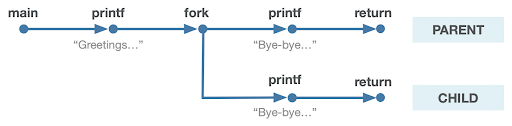
- Un appel système qui crée un nouveau processus fils
- Le "parent" est le processus qui crée l'autre processus "fils"
- À partir de ce moment, les deux processus exécutent le code après le fork
- Le processus fils est identique au parent, sauf :
- il a un nouvel identifiant de processus (PID)
- pour le parent, fork() retourne le PID du fils ; pour le fils, fork() retourne 0
- fork() est appelé une fois, mais retourne deux fois
pid_t pidOrZero = fork();
// both parent and child run code here onwards
printf("This is printed by two processes.\n");
Mémoire Virtuelle et Copie sur Écriture
Comment le parent et l'enfant peuvent-ils utiliser la même adresse pour stocker des données différentes ?
- Chaque programme pense qu'il a accès à toutes les adresses mémoire à utiliser
- Le système d'exploitation mappe ces adresses virtuelles aux adresses physiques
- Lorsqu'un processus fais appel à fork(), son espace d'adressage virtuel reste le même
- Le système d'exploitation mappera paresseusement les adresses virtuelles de l'enfant à des adresses physiques différentes de celles du parent
- Il leur fera partager des adresses physiques jusqu'à ce que l'un d'eux modifie le contenu de sa mémoire pour qu'il soit différent de celui de l'autre.
- C'est ce qu'on appelle la copie lors de l'écriture (ne faire des copies que lorsqu'elles sont écrites)
- Récapitulatif : fork()
- waitpid() et attente des processus enfants
- Démo
- execvp()
- Tout mettre ensemble : first-shell
- Exécution en arrière-plan
Plan de Cours
Ce serait bien s'il y avait une fonction qui « bloquerait » notre programme jusqu'à ce que l'enfant ait terminé.
waitpid()
Une fonction qu'un parent peut appeler pour attendre que son enfant sorte(meurt) :
pid_t waitpid(pid_t pid, int *status, int options);pid : le PID de l'enfant à attendre (nous verrons d'autres options plus tard)
status : où placer les informations sur la fin de l'enfant (ou NULL)
options : indicateurs facultatifs pour personnaliser le comportement (toujours 0 pour l'instant)
la fonction retourne lorsque le processus enfant spécifié se termine
la valeur de retour est le PID de l'enfant qui s'est terminé, ou -1 en cas d'erreur (par exemple, aucun enfant à attendre)
Si le processus enfant est déjà terminé, cela renvoie immédiatement - sinon, il se bloque
waitpid()
int main(int argc, char *argv[]) {
    printf("Before.\n");
    pid_t pidOrZero = fork();

    if (pidOrZero == 0) {
        sleep(2);
        printf("I (the child) slept and the parent still waited up for me.\n");
    } else {
        pid_t result = waitpid(pidOrZero, NULL, 0);
        printf("I (the parent) finished waiting for the child.  This always prints last.\n");
    }

    return 0;
}
$ ./waitpid
Before.
I (the child) slept and the parent still waited up for me.
I (the parent) finished waiting for the child. This always prints last.
$waitpid()
- Nous pouvons utiliser les macros fournies (voir la page de manuel pour la liste complète) pour extraire des informations de l'état. (programme complet, avec vérification des erreurs, lien ci-dessous)
- WIFEXITED: vérifier si l'enfant s'est terminé normalement
- WEXITSTATUS: obtenir le statut de sortie de l'enfant
-
Le résultat sera toujours le même ! Le parent attendra toujours que l'enfant ait fini avant de continuer.
int main(int argc, char *argv[]) {
    pid_t pid = fork();
    if (pid == 0) {
        printf("I'm the child, and the parent will wait up for me.\n");
        return 110; // contrived exit status (not a bad number, though)
    } else {
        int status;
        int result = waitpid(pid, &status, 0);

        if (WIFEXITED(status)) {
            printf("Child exited with status %d.\n", WEXITSTATUS(status));
        } else {
            printf("Child terminated abnormally.\n");
        }
        return 0;
    }
}
Passez l'adresse d'un entier comme deuxième paramètre pour obtenir le statut de l'enfant.
$ ./separate
I am the child, and the parent will wait up for me.
Child exited with status 110.
$Un processus parent doit toujours attendre ses processus enfants.
- Un processus qui s'est terminé mais qui n'a pas été attendu par son parent est appelé un zombie.🧟♂️.
- Les zombies occupent les ressources du système (jusqu'à ce qu'ils soient finalement nettoyés ultérieurement par le système d'exploitation)
- L'appel de waitpid dans le parent « reaps » le processus enfant (le nettoie)
- Si un enfant est toujours en cours d'exécution, waitpid dans le parent se bloquera jusqu'à ce qu'il se termine, puis le nettoiera
- Si un processus enfant est un zombie, waitpid reviendra immédiatement et le nettoiera
- Les processus enfants orphelins sont « adoptés » par le processus init (PID 1)
waitpid()
Make sure to reap your zombie children.
(Attends, quoi ?)
- Récapitulatif : fork()
- waitpid()et attente des processus enfants
- Démo: En attendant les enfants
- execvp()
- Tout mettre ensemble : first-shell
- Exécution en arrière-plan
Plan de Cours
Et si nous voulions attendre les enfants dans l'ordre dans lequel ils ont été créés ?
Consultez le programme abrégé ci-dessous (lien vers le programme complet en bas) :
int main(int argc, char *argv[]) {
    pid_t children[kNumChildren];

    for (size_t i = 0; i < kNumChildren; i++) {
        children[i] = fork();
        if (children[i] == 0) return 110 + i;
    }

    for (size_t i = 0; i < kNumChildren; i++) {
        int status;
        pid_t pid = waitpid(children[i], &status, 0);
        assert(WIFEXITED(status));
        printf("Child with pid %d accounted for (return status of %d).\n", children[i], WEXITSTATUS(status));
    }

    return 0;
}
En attente de plusieurs enfants, dans l'ordre
- Ce programme récolte les processus dans l’ordre dans lequel ils ont été générés.
- Les processus enfants ne peuvent pas se terminer dans cet ordre, mais ils sont récoltés dans cet ordre.
- Par exemple, le premier enfant pourrait finir dernier, retardant ainsi la première itération de la boucle.
- Exemple d'exécution ci-dessous : les PID changent entre les exécutions, mais même ceux-ci sont garantis d'être publiés dans un ordre croissant.
En attente de plusieurs enfants, dans l'ordre
$ ./reap-in-fork-order
Child with pid 12649 accounted for (return status of 110).
Child with pid 12650 accounted for (return status of 111).
Child with pid 12651 accounted for (return status of 112).
Child with pid 12652 accounted for (return status of 113).
Child with pid 12653 accounted for (return status of 114).
Child with pid 12654 accounted for (return status of 115).
Child with pid 12655 accounted for (return status of 116).
Child with pid 12656 accounted for (return status of 117).
$
Un parent peut appeler fork plusieurs fois, mais doit récupérer tous les processus enfants.
- Un parent peut utiliser waitpid pour attendre l'un de ses enfants en passant -1 comme PID.
- Idée clé : les enfants peuvent se terminer dans n'importe quel ordre !
- Si waitpid renvoie -1 et définit errno sur ECHILD, cela signifie qu'il n'y a plus d'enfants.
Démo : voyons comment nous pourrions utiliser cela.
En attente de plusieurs enfants, aucune ordonnance
- Récapitulatif : fork()
- waitpid()et attente des processus enfants
- Démo: En attendant les enfants
- execvp()
- Tout mettre ensemble : first-shell
- Exécution en arrière-plan
Plan de Cours
L'utilisation la plus courante de fork n'est pas de générer plusieurs processus pour diviser le travail, mais plutôt d'exécuter un programme complètement séparé sous votre contrôle et de communiquer avec lui.
- Voilà ce qu’est un shell ; c’est un programme qui vous demande des commandes et qui exécute ces commandes dans des processus distincts.
execvp()
execvp is a function that lets us run another program in the current process.
int execvp(const char *path, char *argv[]);execvp()
It runs the executable at the specified path, completely cannibalizing the current process.
- If successful, execvp never returns in the calling process
- If unsuccessful, execvp returns -1
To run another executable, we must specify the (NULL-terminated) arguments to be passed into its main function, via the argv parameter.
- For our programs, path and argv[0] will be the same
execvp has many variants (execle, execlp, and so forth. Type man execvp for more). We rely on execvp in CS110.
int main(int argc, char *argv[]) {
    char *args[] = {"/bin/ls", "-l", "/usr/class/cs110/lecture-examples", NULL};
    execvp(args[0], args);
    printf("This only prints if an error occurred.\n");
    return 0;
}
$ ./execvp-demo
total 26
drwx------ 2 troccoli operator 2048 Jan 11 21:03 cpp-primer
drwx------ 3 troccoli operator 2048 Jan 15 12:43 cs107review
drwx------ 2 troccoli operator 2048 Jan 13 14:15 filesystems
drwx------ 2 troccoli operator 2048 Jan 13 14:14 lambda
drwxr-xr-x 3 poohbear root 2048 Nov 19 13:24 map-reduce
drwx------ 2 poohbear root 4096 Nov 19 13:25 networking
drwxr-xr-x 2 poohbear root 6144 Jan 22 08:58 processes
drwxr-xr-x 2 poohbear root 2048 Oct 29 06:57 threads-c
drwxr-xr-x 2 poohbear root 4096 Oct 29 06:57 threads-cpp
$execvp()
execvp is a function that lets us run another program in the current process.
int execvp(const char *path, char *argv[]);Lecture Plan
- Recap: fork()
- waitpid() and waiting for child processes
- Demo: Waiting For Children
- execvp()
- Putting it all together: first-shell
- Background execution
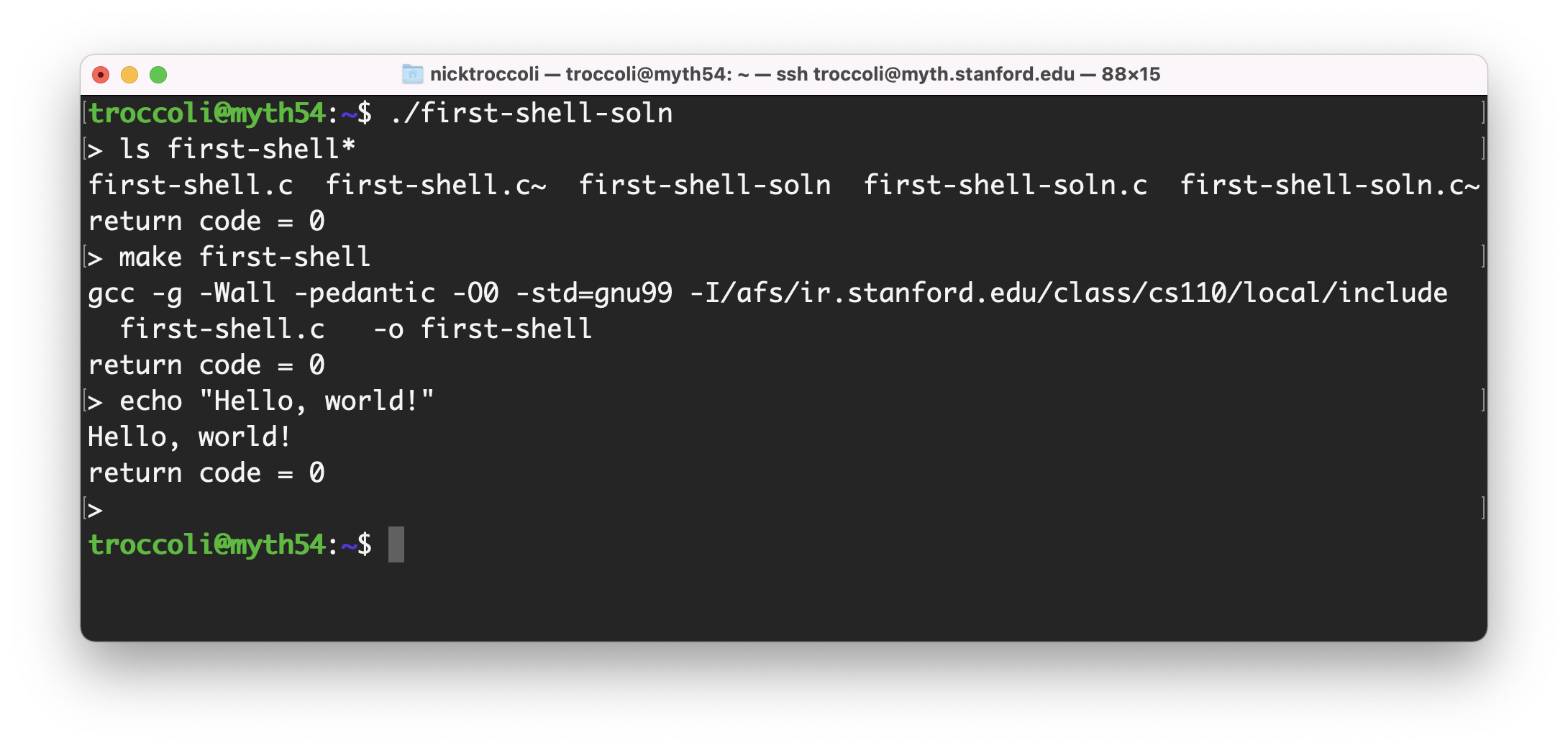
A shell is essentially a program that repeats asking the user for a command and running that command (Demo: first-shell-soln.c)
- Component 1: loop for asking for user input
- Component 2: way to run an arbitrary command
What Is A Shell?
system()
The built-in system function can execute a given shell command.
int system(const char *command);- command is a shell command (like you would type in the terminal); e.g. "ls" or "./myProgram"
- system forks off a child process that executes the given shell command, and waits for it
- on success, system returns the termination status of the child
int main(int argc, char *argv[]) {
    int status = system(argv[1]);
    printf("system returned %d\n", status);
    return 0;
}
$ ./system-demo "ls -l"
total 26
drwx------ 2 troccoli operator 2048 Jan 11 21:03 cpp-primer
drwx------ 3 troccoli operator 2048 Jan 15 12:43 cs107review
drwx------ 2 troccoli operator 2048 Jan 13 14:15 filesystems
drwx------ 2 troccoli operator 2048 Jan 13 14:14 lambda
drwxr-xr-x 3 poohbear root 2048 Nov 19 13:24 map-reduce
drwx------ 2 poohbear root 4096 Nov 19 13:25 networking
drwxr-xr-x 2 poohbear root 6144 Jan 21 19:38 processes
drwxr-xr-x 2 poohbear root 2048 Oct 29 06:57 threads-c
drwxr-xr-x 2 poohbear root 4096 Oct 29 06:57 threads-cpp
system returned 0
$mysystem()
We can implement our own version of system with fork(), waitpid() and execvp()!
int mysystem(const char *command);- call fork to create a child process
- In the child, call execvp with the command to execute
- In the parent, wait for the child with waitpid and then return exit status info
One twist; not all shell commands are executable programs, and some need parsing.
- We can't just pass the command to execvp
-
Solution: there is a program called sh that runs any shell command
- e.g. /bin/sh -c "ls -a" runs the command "ls -a"
- We can call execvp to run /bin/sh with -c and the command as arguments
- If execvp returns at all, an error occurred
- Why not call
execvpinside parent and forgo the child process altogether? Because
execvpwould consume the calling process, and that's not what we want. - Why must the child exit rather than return? Because that would cause the child to also execute code in main!
static int mysystem(char *command) {
    pid_t pidOrZero = fork();
    if (pidOrZero == 0) {
        char *arguments[] = {"/bin/sh", "-c", command, NULL};
        execvp(arguments[0], arguments);
        // If the child gets here, there was an error
        exitIf(true, kExecFailed, stderr, "execvp failed to invoke this: %s.\n", command);
    }

    // If we are the parent, wait for the child
    int status;
    waitpid(pidOrZero, &status, 0);
    return WIFEXITED(status) ? WEXITSTATUS(status) : -WTERMSIG(status);
}
Here's the implementation, with minimal error checking (the full version is linked at the bottom):
mysystem()
first-shell Takeaways
- A shell is a program that repeats: read command from the user, execute that command
- In order to execute a program and continue running the shell afterwards, we fork off another process and run the program in that process
- We rely on
fork,execvp, andwaitpidto do this! - Real shells have more advanced functionality that we will add going forward.
- For your fourth assignment, you'll build on this with your own shell,
stsh("Stanford shell") with much of the functionality of real Unix shells.
Lecture Plan
- Recap: fork()
- waitpid() and waiting for child processes
- Demo: Waiting For Children
- execvp()
- Putting it all together: first-shell
- Background execution
More Shell Functionality
Shells have a variety of supported commands:
- emacs & - create an emacs process and run it in the background
- cat file.txt | uniq | sort - pipe the output of one command to the input of another
- uniq < file.txt | sort > list.txt - make file.txt the input of uniq and output sort to list.txt
- In lecture and assign4, we will see all these features!
- Today, we'll focus on background execution
- only difference is specifying & with command
- shell immediately re-prompts the user
- process doesn't know "foreground" vs. "background"; this specifies whether or not shell waits
Supporting Background Execution
Let's make an updated version of mysystem called executeCommand.
- Takes an additional parameter bool inBackground
- If false, same behavior as mysystem (spawn child, execvp, wait for child)
- If true, spawn child, execvp, but don't wait for child
Supporting Background Execution
static void executeCommand(char *command, bool inBackground) {
    pid_t pidOrZero = fork();
    if (pidOrZero == 0) {
        // If we are the child, execute the shell command
        char *arguments[] = {"/bin/sh", "-c", command, NULL};
        execvp(arguments[0], arguments);
        // If the child gets here, there was an error
        exitIf(true, kExecFailed, stderr, "execvp failed to invoke this: %s.\n", command);
    }

    // If we are the parent, either wait or return immediately
    if (inBackground) {
        printf("%d %s\n", pidOrZero, command);
    } else {
        waitpid(pidOrZero, NULL, 0);
    }
}Supporting Background Execution
static void executeCommand(char *command, bool inBackground) {
    pid_t pidOrZero = fork();
    if (pidOrZero == 0) {
        // If we are the child, execute the shell command
        char *arguments[] = {"/bin/sh", "-c", command, NULL};
        execvp(arguments[0], arguments);
        // If the child gets here, there was an error
        exitIf(true, kExecFailed, stderr, "execvp failed to invoke this: %s.\n", command);
    }

    // If we are the parent, either wait or return immediately
    if (inBackground) {
        printf("%d %s\n", pidOrZero, command);
    } else {
        waitpid(pidOrZero, NULL, 0);
    }
}
Line 1: Now, the caller can optionally run the command in the background.
Supporting Background Execution
static void executeCommand(char *command, bool inBackground) {
    pid_t pidOrZero = fork();
    if (pidOrZero == 0) {
        // If we are the child, execute the shell command
        char *arguments[] = {"/bin/sh", "-c", command, NULL};
        execvp(arguments[0], arguments);
        // If the child gets here, there was an error
        exitIf(true, kExecFailed, stderr, "execvp failed to invoke this: %s.\n", command);
    }

    // If we are the parent, either wait or return immediately
    if (inBackground) {
        printf("%d %s\n", pidOrZero, command);
    } else {
        waitpid(pidOrZero, NULL, 0);
    }
}
Lines 11-16: The parent waits on a foreground child, but not a background child.
Supporting Background Execution
int main(int argc, char *argv[]) {
    char command[kMaxLineLength];
    while (true) {
        printf("> ");
        fgets(command, sizeof(command), stdin);

        // If the user entered Ctl-d, stop
        if (feof(stdin)) {
            break;
        }

        // Remove the \n that fgets puts at the end
        command[strlen(command) - 1] = '\0';

        if (strcmp(command, "quit") == 0) break;

        bool isbg = command[strlen(command) - 1] == '&';
        if (isbg) {
            command[strlen(command) - 1] = '\0';
        }

        executeCommand(command, isbg);
    }

    printf("\n");
    return 0;
}
In main, we add two additional things:
- Check for the "quit" command to exit
- Allow the user to add "&" at the end of a command to run that command in the background
Note that a background child isn't reaped! This is a problem - one we'll learn how to fix soon.
Lecture Recap
- Recap: fork()
- waitpid() and waiting for child processes
- Demo: Waiting For Children
- execvp()
- Putting it all together: first-shell
- Background execution
Next time: interprocess communication
Practice Problems
What if we want to spawn a single child and wait for that child before spawning another child?
static const int kNumChildren = 8;
int main(int argc, char *argv[]) {
    for (size_t i = 0; i < kNumChildren; i++) {
        pid_t pidOrZero = fork();
        if (pidOrZero == 0) {
            printf("Hello from child %d!\n", getpid());
            return 110 + i;
        }

        int status;
        pid_t pid = waitpid(pidOrZero, &status, 0);
        if (WIFEXITED(status)) {
            printf("Child with pid %d exited normally with status %d\n", pid, WEXITSTATUS(status));
        } else {
            printf("Child with pid %d exited abnormally\n", pid);
        }
    }

    return 0;
}
Waiting On Children
Check out the abbreviated program below (link to full program at bottom):
waitpid and execvp
By NadGy