<info 340/>
Interactive React
(continued)
Orson Xu
Spring 2023
Slides credited to Joel Ross
View of the Day
-
Q&A (pollev)
-
Review: Chat Interactivity so far
-
Adding more interactivity (switching users!)
-
React Libraries
Project Draft 2
What we are looking for: Refactored Draft 1 into a React App
Converted the HTML/CSS from draft 1 into a published React app. Began to add interactive functionality.
- App is built: Ran create-react-app, etc. See assignment for details
- ~90% of content rendered: "most" of your app should be there (main page at least, Components for everything else)
- Has Components w/ props and data: Organize your Components! Can hard-code sample data for now
- Has 1 feature almost implemented: Includes event handling and state manipulation
- Fixes issues from draft 1: You're revising the HTML/CSS, fix problems while you're at it!
-
Published to Firebase hosting: get that working this draft
(see assignment for details; demo next week)
Project Draft 2
Our current React can only render one index.html
Multiple HTML pages? How can React handle this?
Right answer: React Client-Side Routing!
But we will not cover that until week 8-2...
Solution for Draft 2:
1. Use comments to manually adjust which HTML page your React will show (preferably in App.js). Our TA will do the same
2. Learn routing early by yourself! (It's actually quite simple)
Q&A / Review

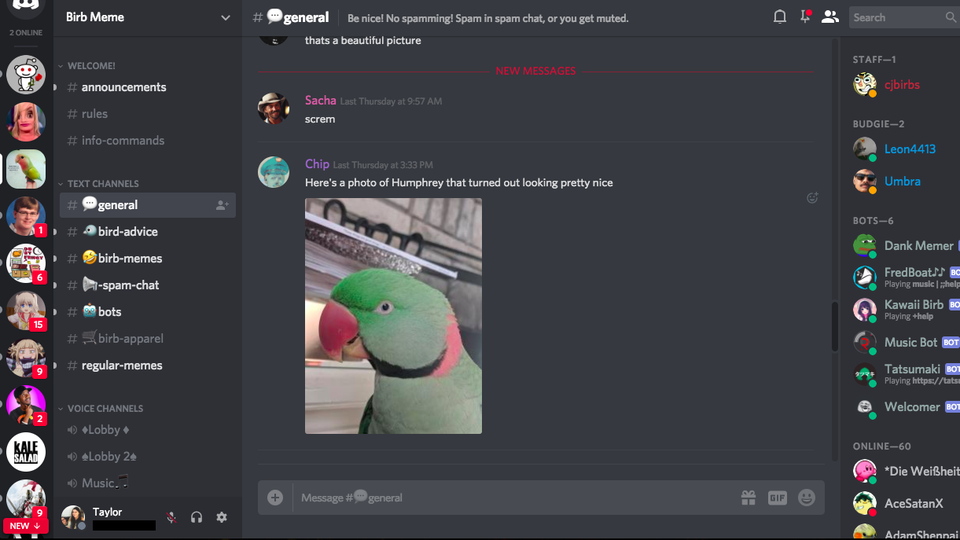
Our chat app so far...
Let's make a chat app!
React Events
We add user interaction in React the same way as with the DOM: by listening for events and executing callback functions when they occur.
function MyButton() {
  //A function that will be called when clicked
  //The name is conventional, but arbitrary.
  //The callback will be passed the DOM event as usual
  const handleClick = function(event) {
    console.log("clicky clicky");
  }

  //make a button with an `onClick` attribute!
  //this "registers" the listener and sets the callback
  return <button onClick={handleClick}>Click me!</button>;
}
special React prop
can only put listeners on HTML
elements, not Components!
function MyButton(props) {
  //A function that will be called when clicked
  //The name is conventional, but arbitrary.
  //The callback will be passed the DOM event as usual
  const handleClick = (event) => {
    console.log("clicky clicky");
  }

  //make a button with an `onClick` attribute!
  //this "registers" the listener and sets the callback
  return <button onClick={handleClick}>Click me!</button>;
}
You add state to a component by using a state hook. The hook defines a "state variable" which will retain its value across Component function calls, as well as a function to update that variable.
Using State Hooks
//import the state hook function `useState()` to define state
import React, { useState } from 'react';

function CountingButton(props) {
  const [count, setCount] = useState(0);


  const handleClick = (event) => {
    setCount(count+1); //update the state to be a new value
                       //and RE-RENDER the Component!
  }

  return (
      <button onClick={handleClick}>Clicked {count} times</button>
  );
}
state variable
update function
initial value for variable
Props vs State
props are for information that doesn’t change from the Component’s perspective, including “initial” data. state is for information that will change, usually due to user interaction (see React FAQ).
-
Is the value passed in from a parent via props? If so, it probably isn’t state.
-
Does the value remain unchanged within a single page viewing? If so, it definitely isn’t state.
- Can you compute it based on any other state or props in your component? If so, it definitely isn’t state.
props are for information that doesn’t change from the Component’s perspective, including “initial” data. state is for information that will change, usually due to user interaction (see React FAQ).
Lifting Up State
If multiple components rely on the same
data (variable), you should "lift up" that
state to a shared parent, who can pass the information back down as
props.
ChildA
ChildB
Parent
Has Data
(state)
Needs Data
<ChildA data={data} />
Has Data (prop)
Has Data (prop)
<ChildA data={data} />
Has Data (state)
Passing Callbacks
To allow child components to "update" the parent's state, pass them a callback function as a prop.
Style Guide: do not pass a state setter function directly.
function App(props) {
  const [data, setData] = useState([]);

  const addItemToData = (newItem) => {
    const newData = [...data, newItem]; //copy via spread
    setData(newData); //update state
  }

  return (
    <FruitButton callback={addItemToData} text={"Apple"} />
    <FruitButton callback={addItemToData} text={"Banana"} />
  )
}

function FruitButton(props) {
  //what to do when clicked
  const handleClick = (event) => {
    //call given callback, passing in given text
    props.callback(props.text);
  }

  return (
    <button onClick={handleClick}>{props.text}</button>
  )
}
State & Arrays/Objects
State variables will only be updated if a different value is passed to the setter function. For arrays and objects, pass a copy of the element with an updated element or property.
function TodoListWithError(props) {
  //a state value that is an array of objects
  const [todos, setTodos] = useState([{ text: 'Learn Hooks' }]);

  const handleClick = (event) => {
    todos[0].text = "Fix bugs"; //modify the object
                                //but don't make a new one
    setTodos(todos) //This won't work! Not "changing"
  }

  //...
}
function TodoList(props) {
  //a state value that is an array of objects
  const [todos, setTodos] = useState([{ text: 'Learn Hooks' }]);

  const handleClick = (event) => {
    //create a copy of the array using the `map()` function
    const todosCopy = todos.map((todoObject, index) => {
      const objCopy = {...todoObject}; //copy object as well
      if(index == 0) { //transform objects if needed
        objCopy.text = "Fix bugs"
      }
      return objCopy; //return object to go into new array
    })
    setTodos(todosCopy) //This works!
  }

  //...
}
React Form Inputs
To access the
value in an
<input>, save that value in the
state (and update it
onChange). This is called a controlled form.
use DOM event to refer to which input element
function MyInput(props) {
  const [inputValue, setInputValue] = useState('')

  const handleChange = (event) => {
    let newValue = event.target.value
    setInputValue(newValue);
  }

  return (
    <div>
      <input type="text" onChange={handleChange} value={inputValue} />
      You typed: {value}
    </div>);
  )
}
React Libraries
React components are structured to be self-contained, re-usable elements... so there are lots of pre-defined components online you can use!
In order to use a component in your app:
- Find it! (via npm, google, etc). Read the documentation
- Install it!
npm install lib-name - Import it!
import { ComponentName } from 'lib-name'- (import structure may vary per library)
- Render it!
<ComponentName />- Remember to pass any expected props!
External Libraries
Much of the web (and software in general) is built on shared, reusable libraries.

"Protestware"

Action Items!
Action Items!
-
Review Ch 15-16: React & Interactive React
-
Read Ch 17: Client-Side Routing
-
Problem Set 07 due Wednesday
-
Treat this as a hard deadline!
-
-
Project Draft 2 due Sunday
-
This is a hard deadline.
-
Next time: Router (multiple pages & navigation!)
info340b-sp23-interactive-react-2
By Orson (Xuhai) Xu