
Inline-styling
<body style="background:blue; color:white;">
     Everything inside your body.
</body>
<style> tag
<head>
    <style>
      body{
        background: black;
        color: white;
      }
    </style>
</head>
External stylesheet
<head>
  <link rel="stylesheet" href="styles.css">
</head>
CSS
selector {

    property_1: value_1;
    property_2: value_3;
    property_3: value_3;

}
Basic CSS Example
body{
  background: blue;
  color: white;
  font-size: 35px;
}
Inline style
Hard to maintain
<h1 style="font-size: 22px; colour: red;
padding: 10px 15px;">
Welcome to StudyOwl
</h1>
Internal style
Better, but still hard to maintain
<html>
<head>
    <style>
    h1 {
         font-size: 22px;
         color: red;
         padding: 10px;
    }
    </style>
</head>
<body>
<h1>Welcome to the  Lancashire Digital website</h1>
</body>
</html>
What's the best way?
Always use external CSS* (where possible)
<html>
<head>

    <link rel="stylesheet" href="css/main.css">

</head>
<body>
<!-- you style elements in here via CSS -->
</body>
</html>
The BOX Model
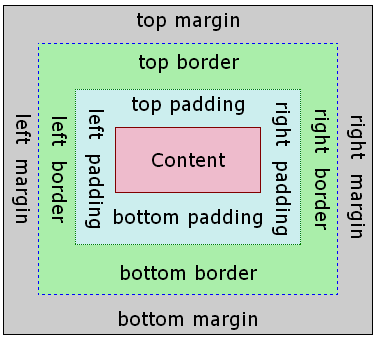
css StudyOWL
By Parth
css StudyOWL
next to deck