Reaching new heights with
Angular.js
What is Angular.js ?
Angular.js is a structural framework for dynamic web apps.
It aims to make HTML a language as declarative in dynamic documents as it is for static.
What do I mean by this ?
<!-- angular directive example -->

<banner-pic></banner-pic>

    ^
    |
    |

<div class="bannerpic-xl">
    <img src="../assets/img/bannerpic.png"/>
</div>
The Angular philosophy
"Angular is built around the belief that declarative code is better than imperative when it comes to building UIs and wiring software components together, while imperative code is excellent for expressing business logic."
source - docs.angularjs.doc
Angular Goodness
- Separation of concern's - Angular allows DOM manipulation to be decoupled from application logic.
- Parallel development - By decoupling the client side and the server side, framework allows for parallel development.
- Opinionated - Guides developers in developing layouts, writing business logic and testing.
- Components - Angular's component based architecture allows developers to reuse code and be nested, so much so that it makes common tasks trivial and difficult tasks possible.
- Structure - Angular's highly opinionated structural paradigm allows for readability and testing.
Wait there is more :3
- Angular rids you off unwanted call backs.
- Low-level DOM manipulation ? aint nobody got time for that !
- Smooth flow of data from the server to -> an internal application model -> to a UI component -> and back again.
- Boiler plate code ? thanks to the brilliant DI model of angular, its history.
When to Angular ?
Angular was built with CRUD application in mind, luckily it's CRUD applications that represent the majority of web applications !
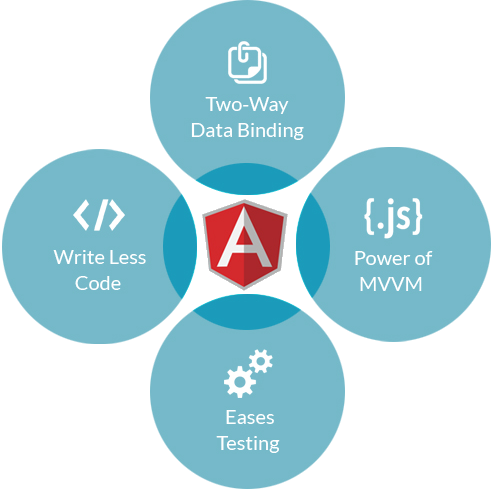
& Remember Angular allows for easier development of these applications by offering the developer ...
and many more ...
When not to Angular.
Angular simplifies application development by presenting a higher level of abstraction to the developer, but this abstraction comes at the cost of flexibility. In other words angular is not the best fit for every application.
Applications which need intensive DOM manipulation is beyond the scope of Angular.js framework.
Choose Wisely !
Angular.js Framework
Other Frameworks or Libraries
Letssssssss get started !
You can include angular.js in your project couple of different ways.
CDN
https://cdnjs.cloudflare.com/ajax/libs/angular.js/1.5.0/angular.jsPackage Manager
bower install angular<script type="text/javascript" src="/bower_components/angular/angular.min.js"></script>
What defines an angular app ?
ng-app attribute
<!doctype html>
<html ng-app >
    <head>
        <script type="text/javascript" src="/bower_components/angular/angular.min.js"></script>
    </head>
    <body></body>
</html>
Am I violating HTML standards ?
<!doctype html>
<html data-ng-app >
    <head>
        <script type="text/javascript" src="/bower_components/angular/angular.min.js"></script>
    </head>
    <body></body>
</html>
Ohh yeah, much better !
Bootstrapping
Automatic Initialization
<html data-ng-app="myApp"></html>Manual Initialization
<script>
    angular.element(document).ready(function(){
        angular.module('myApp', []);
        angular.bootstrap(document, ['myApp']);
    });
</script>
Lets take it for a spin
Markup
<body ng-app='TestDrive'>
    <div ng-controller='testCtrl'>
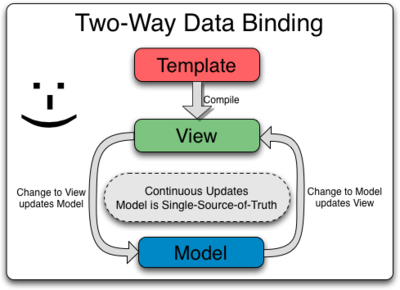
      <div>Name: <input type='text' ng-model='name' /></div>
      <div>Age: <input type='number' ng-model='age' /></div>
      <div><p>Hi, my name is {{name}} and i'm {{age}} years old.</p></div>
    </div>
</body>
JS
<script>
    var testDrive = angular.module('TestDrive',[]);

    testDrive.controller('testCtrl', function($scope){
        $scope.name = '';
        $scope.age = '';
    });
</script>
Two-way data binding !
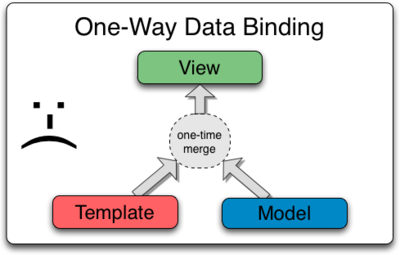
One-way data binding !
Modularity in angular
The angular framework thrives on being modular.
Each ng-app is a module which depends on other modules and inherits their services, factories, constants, directives and filters.
From last versions, Angular.js was split in modules:
ngRoute, ngAnimate
Module Declaration
Sample
angular.module('alertModule', [])
       .service(function () {
          this.showAlert = function (msg) {
             alert(msg);
          }
       })
Module's injected as dependencies into other modules.
var demoAlert = angular.module('demoAlert', ['alertModule']);
demoAlert.controller('alertCtrl', function($scope, alertService) {
    $scope.clicked = alertService.showAlert.bind(alertService, 'test');
});
<div data-ng-app="demoAlert" data-ng-controller="alertCtrl">
<button data-ng-click="clicked()">Push me</button>
</div>Dependency Injection
The angular DI is based on component names.
demoApp.controller('demoController', function ($scope, $timeout, $q) {});How to overcome this issue ?
demoApp.controller('demoController', ['$scope', '$timeout', '$q',
  function ($scope, $timeout, $q) {

}]);
Controllers
They are the behaviour behind the DOM elements and let you relax about updating the DOM, register callbacks or watch model changes.
Your logic is one level higher than DOM manipulation.
Controller Declaration
$scope is an object that refers to the application model. It is an execution context for expressions. Scopes are arranged in hierarchical structure which mimic the DOM structure of the application. Scopes can watch expressions and propagate events
angularApp.controller('ctrlName', ['$scope', function ($scope) {
   // application logic
}]);
<div data-ng-controller="ctrlName">
<!-- application markup -->
</div>
$scope in Practice
scopeDemoApp.controller('demoCtrl', function ($scope) {
  $scope.text = 'Hi How are you, ';

  $scope.obj = { who: 'Random Citizen' };

  $scope.func = function () {
  	$scope.obj.who = 'My Special Person !';
  }
});
<div data-ng-controller="demoCtrl">
{{ text }} {{ obj.who }}! <br />
<button data-ng-click="func()">Switch Greet</button>
</div>
Concepts
Each web application you build is composed of objects that collaborate to get stuff done. These objects need to be instantiated and wired together for the app to work. In Angular apps most of these objects are instantiated and wired together automatically by the injector service.
Classes? Objects? Functions? Constants?
Constants
Simple and Usefull
myApp.constant('NAME', value);Example
myApp.constant('APIKEY', '0123456789');You can also use it to save objects like so :
myApp.constant("myConfig", {
        "url": "http://localhost",
        "port": "80"
    });
Services & Factories
module.factory('userService', function(){

    var fac = {};

    fac.users = ['John', 'James', 'Jake'];

    return fac;

});
Services and Factories are singleton object's that can be used through out an angular app injected into a controller, factory or directive.
var module = angular.module('myapp', []);

module.service('userService', function(){
    this.users = ['John', 'James', 'Jake'];
});
Services vs Factories
Providers
If your app is so complicated that needs a configuration phase, your services can be providers.
myApp.provider('helloWorld', function() {
  this.name = 'Default';

  this.$get = function() {
    var name = this.name;
    return {
      sayHello: function() {
        return "Hello, " + name + "!"
      }
    }
  };

  this.setName = function(name) {
    this.name = name;
  };
});
Providers in use.
//hey, we can configure a provider!
myApp.config(function(helloWorldProvider) {
helloWorldProvider.setName('World');
});
Angular default Services
- $document → A jQuery or jqLite wrapper for the browser's window.document object.
- $location → The $location service parses the URL in the browser address bar
- $log → Simple service for logging. Default implementation safely writes the message
- $q → A promise/deferred implementation inspired by Kris Kowal's Q
- $rootScope → $scope of ng-app
Angular Internal Services
- $window → A reference to window object
- $timeout / $interval → An implementation of setTimeout with $scope.$digest
- $http → The $http service is a core Angular service that facilitates communication with the remote
- $compile → Compiles an HTML string or DOM into a template and produces a template function
- etc.. etc..
$Http Service
- Ajax interface
- Based on Deferred / Promises API
$http({
  method: 'GET',
  url: '/someUrl'
}).success(function(data, status, headers, config) {
  // Some stuff
}).error(function(data, status, headers, config) {
  // Other stuff
});- Shortcuts? Of course! $http.get, .head, .post, .put, .delete, .jsonp
- Configurable and interceptable
$document Service
If jQuery is available, angular.element is an alias for the jQuery function. If jQuery is not available, angular.element delegates to Angular's built-in subset of jQuery, called "jQuery lite" or "jqLite."
- addClass()
- after()
- append()
- attr()
- bind() - Does not support namespaces, selectors or eventData
- children() - Does not support selectors
- clone()
- contents()
- css()
and may more .......
Directives
- At a high level, directives are markers on a DOM element (such as an attribute, element name, comment or CSS class) that tell AngularJS's HTML compiler ($compile) to attach a specified behavior to that DOM element (e.g. via event listeners), or even to transform the DOM element and its children.
- Angular comes with a set of these directives built-in, like ngBind, ngModel, and ngClass. Much like you create controllers and services, you can create your own directives for Angular to use. When Angular bootstraps your application, the HTML compiler traverses the DOM matching directives against the DOM elements.
Directive examples
Q & A
Copy of Reaching new heights with Angular.js
By Praveen Poonia
Copy of Reaching new heights with Angular.js
A beginners intro into Angular.js