






















Fanis Prodromou
I am a Senior Software Engineer with a passion for Front End development with Angular. I have developed vast experience in code quality, application architecture, and application performance.
Fanis Prodromou
Code. Teach. Community. Angular.
https://blog.profanis.me
/prodromouf
@prodromouf
profanis
profanis
Target Audience
Ready to modernize workflows and move away from "spaghetti" monoliths.
Forward-Thinking Engineers
Familiar with Core-Feature-Shared but ready for a more scalable approach.
Architecture Seekers
1+ years of professional experience with the core framework.
Experienced Angular Developers
profanis
What You DON'T Need to Know
Learn how to simplify your code and reduce boilerplate with Signal patterns.
No Mastery of RxJS Required
We will cover the mental shift from Zone.js to fine-grained reactivity.
No Prior Signals Knowledge Needed
We’ll learn the CLI and workspace structure from the ground up.
No Prior Nx Experience Required
🧑💻 Nx Foundation & Architecture
90 mins
☕ Short Break
15 mins
🧑💻 Nx Architecture & the Intelligent Graph
90 mins
🍌 Short Break
15 mins
🧑💻 Introducing Signals
90 mins
🧑🍳 Lunch Break
45 mins
🧑💻 Advanced Reactivity
90 mins
🍌 Short Break
15 mins
🙋 Wrap up and Q&A
30 mins
profanis
Building Scalable "Moduliths" with Angular
profanis
profanis
profanis
profanis
Products List
Product Details
Infinite Scroll
Search Functionality
tbd...
profanis
profanis
profanis
We aren't here to just learn a new library.
We are here to fix the way we work.
profanis
Daily frustrations we all face
Fearing circular dependencies and accidental coupling when sharing code.
The "Spaghetti" Fear
Debating folder structures because the standard CLI lacks a roadmap for scale.
Architecture Debt
Running 1,000 tests when you only touched two files.
Wasted Effort
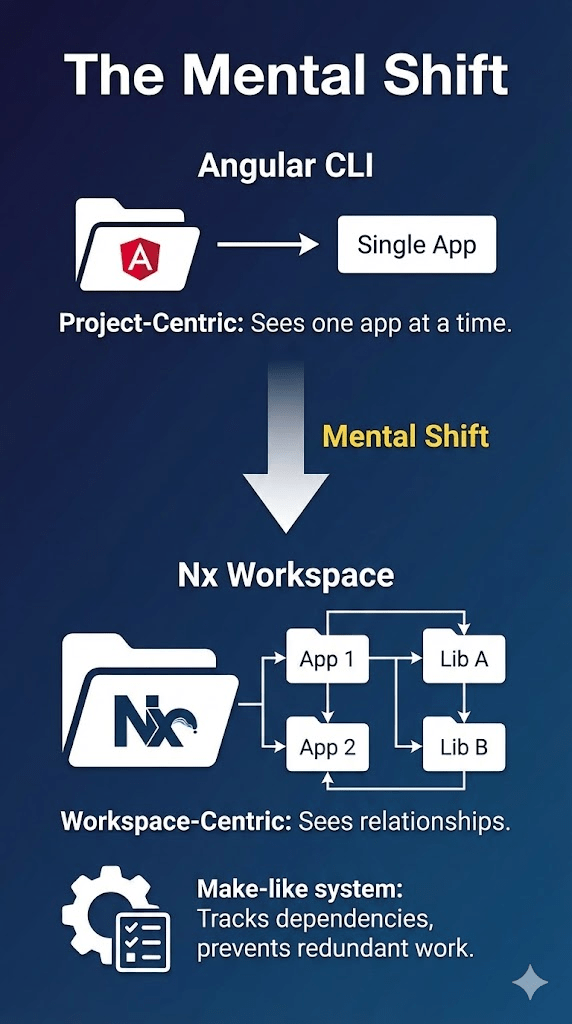
A smart build system (like Angular CLI on steroids)
Modern Tooling
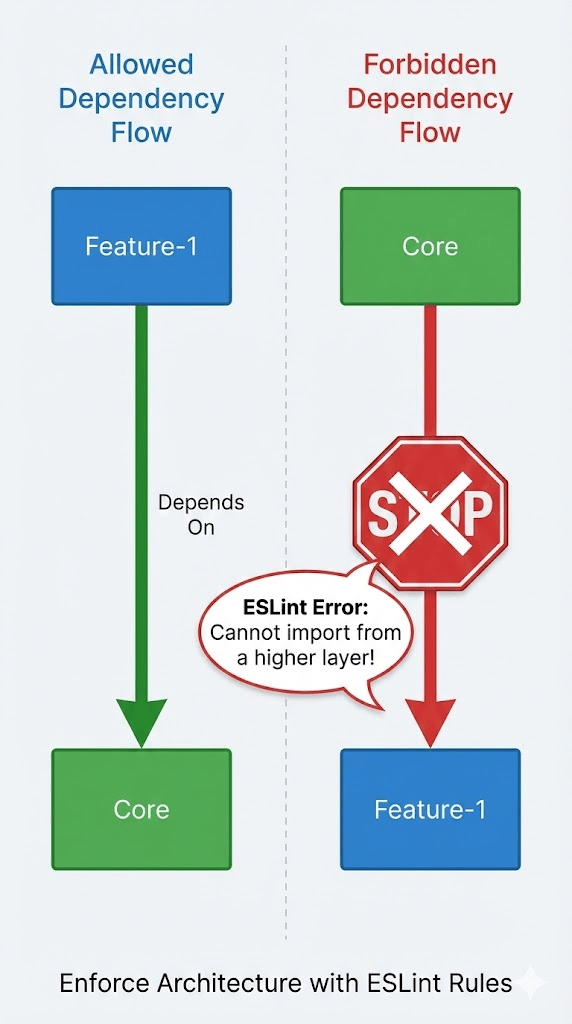
Architectural Guardrails
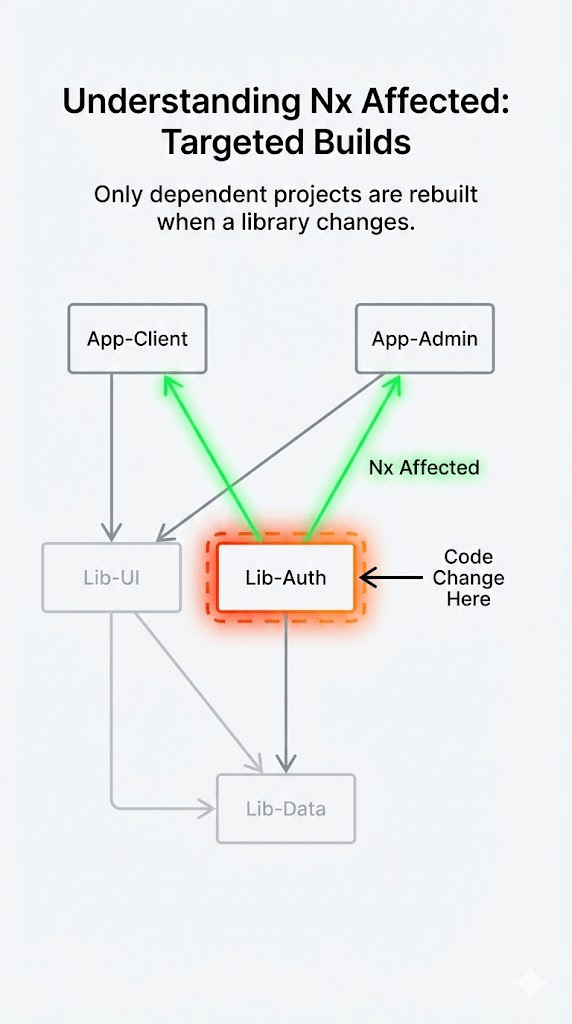
Smart Rebuilds ("Affected")
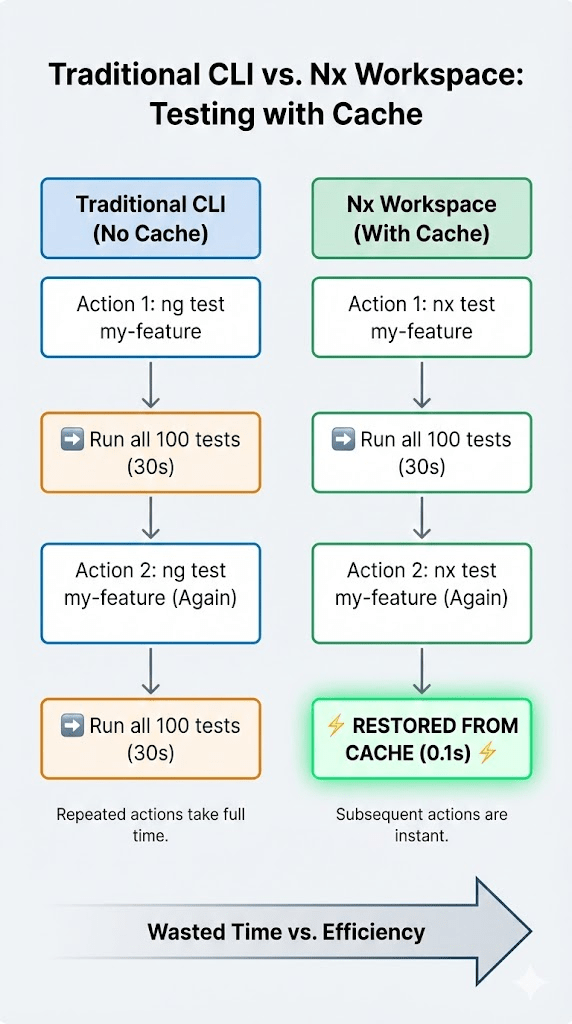
Computation Caching
profanis
A smart build system (like Angular CLI on steroids)
Computation Caching
profanis
nx testA smart build system (like Angular CLI on steroids)
Smart Rebuilds ("Affected")
profanis
nx build --affectedA smart build system (like Angular CLI on steroids)
Architectural Guardrails
profanis
nx lintA smart build system (like Angular CLI on steroids)
Modern Tooling
profanis
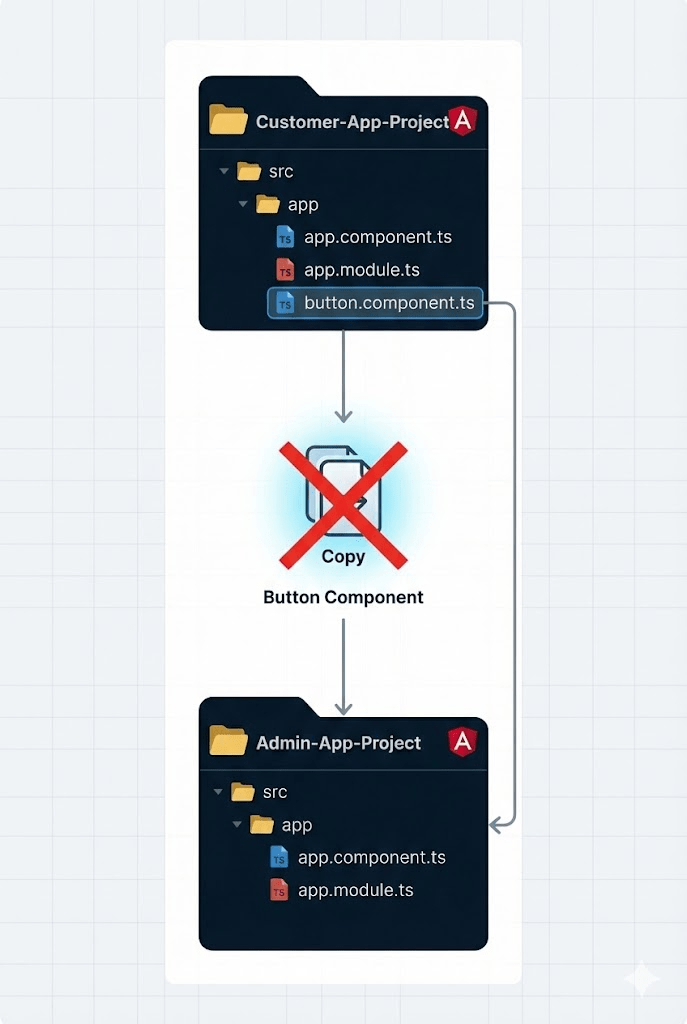
Reusing code between a Customer App and an Admin App is difficult.
Hard to Share
Compiles one project at a time
Project Centric
Features accidentally depend on each other
Tight Coupling
Dump everything into src/app
profanis
src/
└── app/
    ├── core/
    │   ├── guards/
    │   │   ├── auth.guard.ts
    │   │   └── auth.guard.spec.ts
    │   ├── header/
    │   │   ├── header.component.ts
    │   │   ├── header.component.html
    │   │   └── header.component.scss
    │   ├── core.service.ts
    │   └── core.service.spec.ts
    ├── features/
    │   ├── feature-1/
    │   │   ├── feature-1.component.ts
    │   │   ├── feature-1.component.html
    │   │   ├── feature-1.routes.ts
    │   │   └── feature-1.service.ts
    │   └── feature-2/
    │       ├── feature-2.component.ts
    │       ├── feature-2.component.html
    │       ├── feature-2.routes.ts
    │       └── feature-2.service.ts
    ├── shared/
    │   ├── components/
    │   │   ├── button/
    │   │   │   ├── button.component.ts
    │   │   │   ├── button.component.html
    │   │   │   └── button.component.scss
    │   │   └── input/
    │   │       ├── input.component.ts
    │   │       ├── input.component.html
    │   │       └── input.component.scss
    │   ├── guards/
    │   │   ├── can-leave.guard.ts
    │   │   └── can-leave.guard.spec.ts
    │   └── pipes/
    │       ├── format-date.pipe.ts
    │       └── format-date.pipe.spec.ts
    ├── app.component.ts
    ├── app.component.html
    ├── app.routes.ts
    ├── app.config.ts
    └── main.ts
dump everything into src/app
profanis
src/
└── app/
    ├── core/
    │   ├── guards/
    │   │   ├── auth.guard.ts
    │   │   └── auth.guard.spec.ts
    │   ├── header/
    │   │   ├── header.component.ts
    │   │   ├── header.component.html
    │   │   └── header.component.scss
    │   ├── core.service.ts
    │   └── core.service.spec.ts
    ├── features/
    │   ├── feature-1/
    │   │   ├── components/
    │   │   │   ├── component-a.ts
    │   │   │   └── component-b.ts
    │   │   ├── services/
    │   │   │   ├── service-a.ts
    │   │   │   └── service-b.ts
    │   │   ├── pipes/
    │   │   │   ├── pipe-a.ts
    │   │   │   └── pipe-b.ts
    │   │   ├── feature-1.component.ts
    │   │   ├── feature-1.component.html
    │   │   ├── feature-1.routes.ts
    │   │   └── feature-1.service.ts
    │   └── feature-2/
    │       ├── feature-2.component.ts
    │       ├── feature-2.component.html
    │       ├── feature-2.routes.ts
    │       └── feature-2.service.ts
    ├── app.component.ts
    ├── app.component.html
    ├── app.routes.ts
    ├── app.config.ts
    └── main.ts
dump everything into src/app
profanis
Features accidentally depend on each other
Tight Coupling
// src/app/core/logger.service.ts

import { FeatureAServiceService }
	from '../features/feature-a.service'; // <-- Oops

@Injectable({ providedIn: 'root' })
export class LoggerService {
  private featureService = inject(FeatureAService)
}
// src/app/feature-1.service.ts
import { Feature2Service }
from '../feature-2.service'; // Dependency A -> B
@Injectable()
export class Feature1Service {
}
// src/app/feature-2.service.ts
import { Feature1Service }
from '../feature-1.service'; // Dependency B -> A
export class Feature2Service {
}profanis
Compiles one project at a time
Project Centric
profanis
Reusing code between a Customer App and an Admin App is difficult.
Hard to Share
profanis
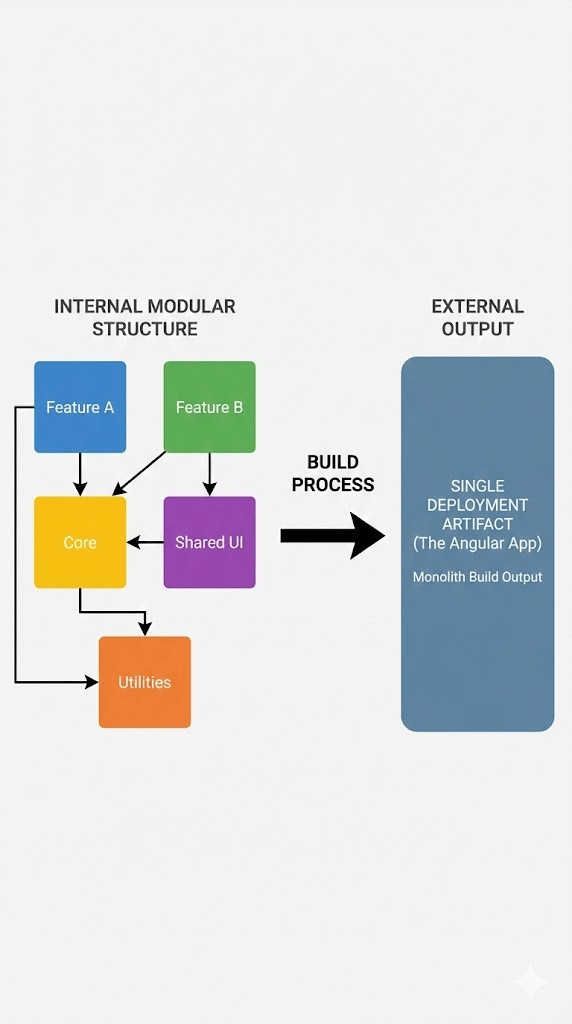
You don't need 50 apps to use Nx
Concept
- We build a Single Application
Monolith deployment
- We structure it like Microservices
Modular development
profanis
my-workspace/
├── apps/
│   └── main-app/
│       ├── app.component.ts
│       ├── app.config.ts
│       ├── app.routes.ts
│       └── main.ts
└── libs/
    ├── auth/
    │   └── guards/
    │       ├── auth.guard.ts
    │       └── auth.guard.spec.ts
    ├── shared/
    │   ├── ui/
    │   │   └── header/
    │   │       ├── header.component.ts
    │   │       ├── header.component.html
    │   │       └── header.component.scss
    │   └── data-access/
    │       ├── core.service.ts
    │       └── core.service.spec.ts
    ├── feature-1/
    │   ├── components/
    │   ├── services/
    │   ├── pipes/
    │   ├── feature-1.component.ts
    │   ├── feature-1.routes.ts
    │   └── index.ts
    └── feature-2/
        ├── feature-2.component.ts
        ├── feature-2.routes.ts
└── index.tsYou don't need 50 apps to use Nx
Strategy
- Treat your libs folder like internal npm packages
- Strict boundaries between features
- Clear public APIs
profanis
You don't need 50 apps to use Nx
Why
Lack of organization slows down engineers
profanis
/apps
- The shell
- Entry point that wires everything up
/libs
- business logic
- components
- UI components
📂 workspace-root/
├── 📂 apps/
│   ├── 📂 customer-portal/  <-- App Shell
└── 📂 libs/
    ├── 📂 data-access/      <-- Shared Logic
    ├── 📂 ui-components/    <-- Shared UI
    └── 📂 feature-orders/   <-- Feature Logic
profanis
/apps
/libs
📂 workspace-root/
├── 📂 apps/
│   ├── 📂 customer-portal/  <-- App Shell
└── 📂 libs/
    ├── 📂 data-access/      <-- Shared Logic
    ├── 📂 ui-components/    <-- Shared UI
└── 📂 feature-orders/ <-- Feature Logicprofanis
Utility
- Like Date Formatters
Data-Access
- Like our Product API Service
UI
- Like our Product Card
The structure is the solution
Feature
- Like our Catalogue Page
profanis
my-workspace/
├── apps/
│   └── main-app/
│       ├── app.component.ts
│       ├── app.config.ts
│       ├── app.routes.ts
│       └── main.ts
└── libs/
    ├── auth/
    │   └── guards/
    │       ├── auth.guard.ts
    │       └── auth.guard.spec.ts
    ├── shared/
    │   ├── ui/
    │   │   └── header/
    │   │       ├── header.component.ts
    │   │       ├── header.component.html
    │   │       └── header.component.scss
    │   └── data-access/
    │       ├── core.service.ts
    │       └── core.service.spec.ts
    ├── feature-1/
    │   ├── components/
    │   ├── services/
    │   ├── pipes/
    │   ├── feature-1.component.ts
    │   ├── feature-1.routes.ts
    │   └── index.ts
    └── feature-2/
        ├── feature-2.component.ts
        ├── feature-2.routes.ts
└── index.tsOnly Export What You Mean To Share
The Problem
- developers can import any file deep within another library
import { InternalHelper }
	from 'libs/data-access/src/lib/internal-folder/helper.service'
profanis
Only Export What You Mean To Share
The Solution
- Every Nx library has a barrel file, typically located at libs/my-lib/src/index.ts
- Anything you don't export from this file is considered "private" to that library.
profanis
Only Export What You Mean To Share
Example
📂 libs/data-access/
├── 📂 src/lib/
│   ├── internal-helper.service.ts  <-- Private file
│   └── public-product.service.ts   <-- Public file
└── index.ts                        <-- Public API
// index.ts content:
export * from './src/lib/public-product.service';
// We do NOT export internal-helper.service.ts here!profanis
NX Tooling
Powerful CLI
# Create a feature library
npx nx g @nx/angular:library --name=feature-home
							 --directory=libs/feature-home

# Create a UI library
npx nx g @nx/angular:library --name=ui-header
							 --directory=libs/shared/ui/header
profanis
Create a workspace
Create a Library
Generate a Component
CLI
more: https://nx.dev/docs/technologies/angular/guides/nx-and-angular
https://nx.dev/docs/reference/nx-commands
profanis
npx create-nx-workspace@latestnx generate @nx/angular:library [name]nx generate @nx/angular:component [name] --project=[project-name]NX Tooling
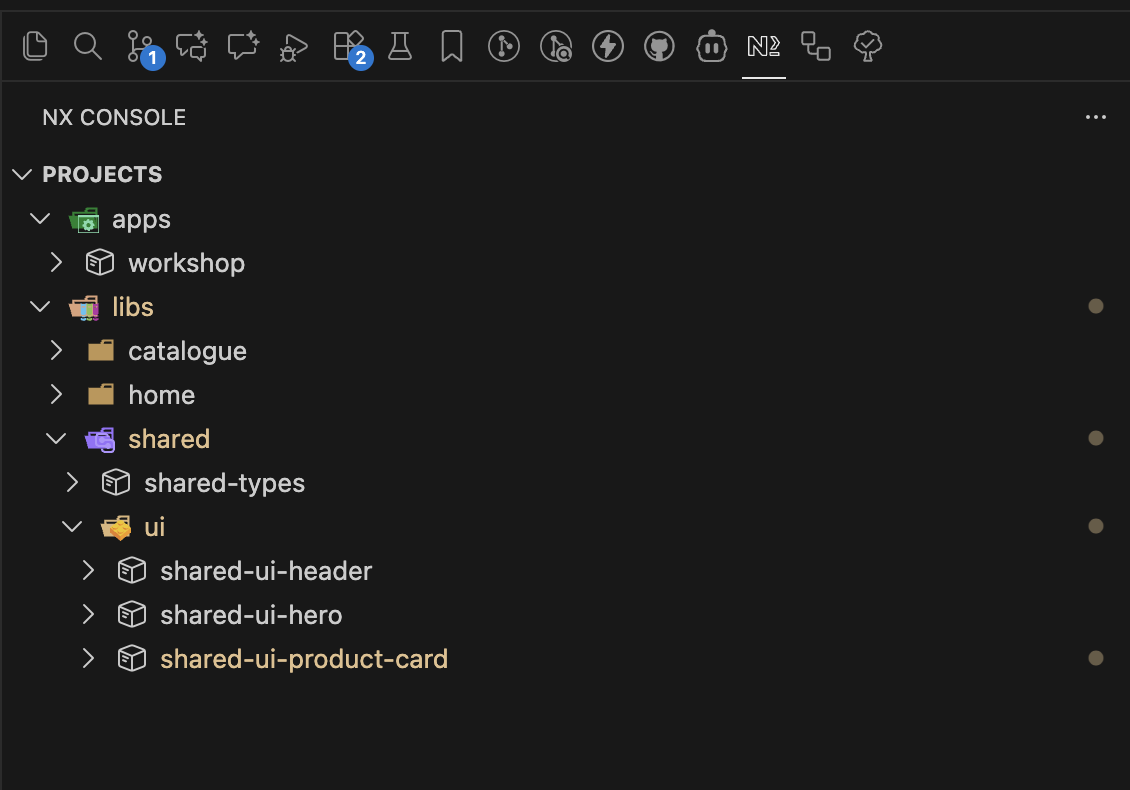
NX Console
profanis
profanis
profanis
profanis
profanis
Hands-on
The shape you will have built by the end of this section
workshop/
├── apps/
│   └── workshop            the shell — routes and nothing else
└── libs/
    ├── feature-home           @workshop/feature-home
    └── feature-catalogue      @workshop/feature-catalogue
- The app wires. The libraries own.
- Every library is a lazy route boundary.
- Every library has exactly one public entry point: index.ts
profanis
Five steps
1 Create the Nx workspace
2 Install the Nx Console plugin
3 Generate feature-catalogue with the Nx CLI
4 Generate feature-home with the Nx Console
5 Wire the router and verify
You are building this one from nothing. Section 2 starts from a repo that already has it — falling behind here costs you nothing later.
profanis
STEP 1 / 5
Create the Nx workspace
TASK
npx create-nx-workspace@latest --preset angular-monorepoWhy the monorepo preset: it gives you an apps/ and a libs/ from minute one. The standalone preset does not, and retrofitting the split later is the expensive version of this decision.
The installer will ask you eleven questions. Only four of them matter — next slide.
profanis
STEP 1 / 5
Create the Nx workspace
HINT
Workspace / application name
Bundler
Stylesheet format
SSR / SSG
workshop
esbuild
scss
No
Everything else — test runner, e2e, CI provider, Nx Cloud — press enter or skip. None of it changes the architecture we are building.
profanis
STEP 1 / 5 · CHECK
Two files decide everything
CHECKPOINT
apps/workshop/project.json
you should see "projectType": "application"
nx.json
you should see plugins, targetDefaults, namedInputs
nx.json is workspace-wide policy. project.json is the per-project exception. If you are editing the second one often, the first one is wrong.
profanis
STEP 2 / 5
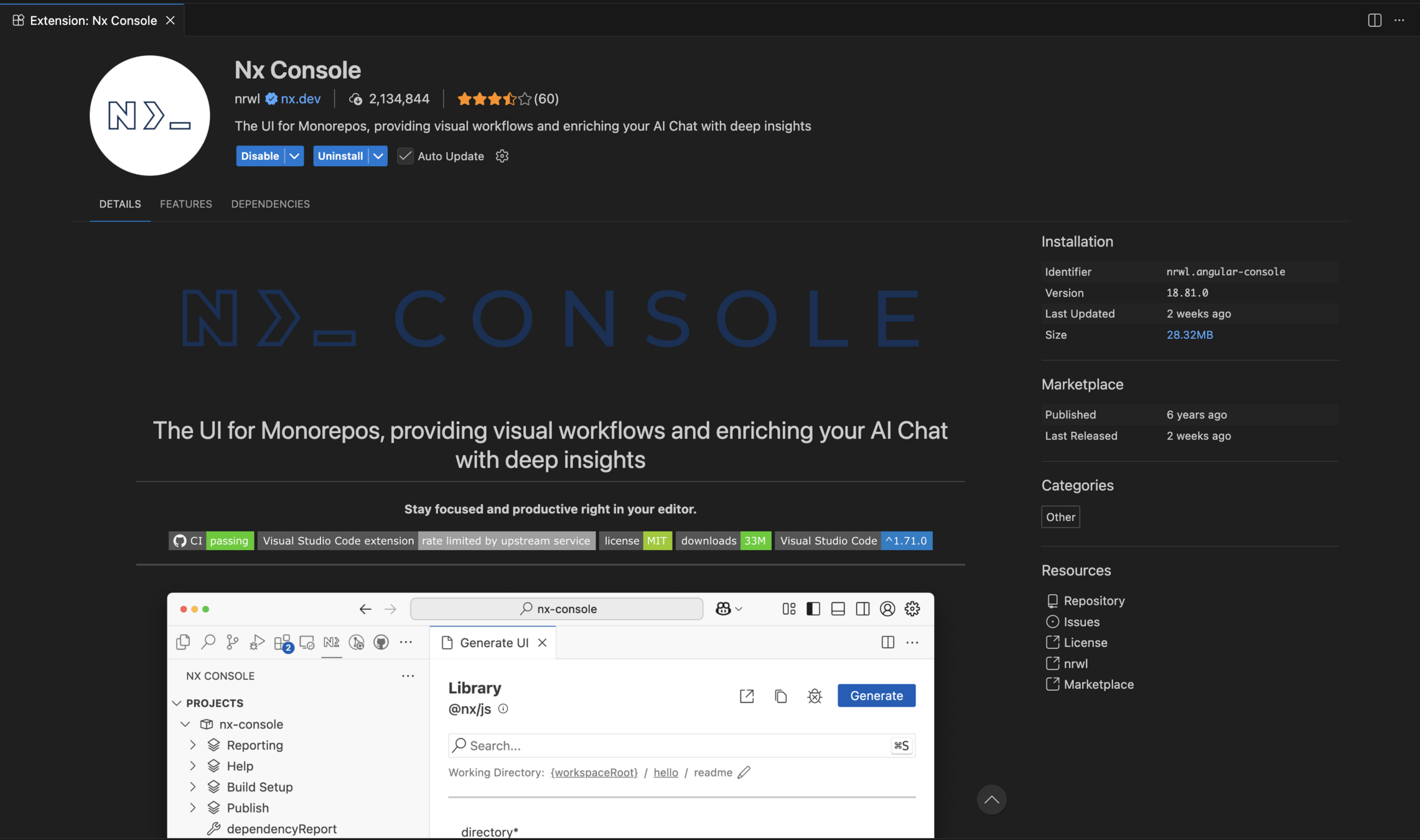
Install the Nx Console plugin
TASK
Extensions → search
nrwl.angular-console
WebStorm: same name in Plugins
Why bother, if the CLI already works: the generator UI lists every flag a generator accepts, with its description. It is the fastest documentation Nx has — and in step 4 you will use it to discover options you did not know existed.
profanis
STEP 3 / 5
Generate feature-catalogue with the Nx CLI
npx nx g @nx/angular:library \
  --name=feature-catalogue \
  --directory=libs/feature-catalogue
A library, not a folder. A folder gives you a path. A library gives you a name, a public API and a boundary the tooling can enforce. That difference is the whole workshop.
The feature- prefix is not decoration — it is the type of the library, and later it becomes the tag we lint against.
profanis
TASK
STEP 3 / 5
What is this library actually called?
CHECKPOINT
// tsconfig.base.json
"paths": {
  "@workshop/feature-catalogue": ["libs/feature-catalogue/src/index.ts"]
}
The alias was generated for you, and it points at index.ts — never at the folder. That file is the library's front door, and this is the only place the real name is written down.
Open the file. Whatever your paths say is what you import in step 5 — not what is on my slide.
profanis
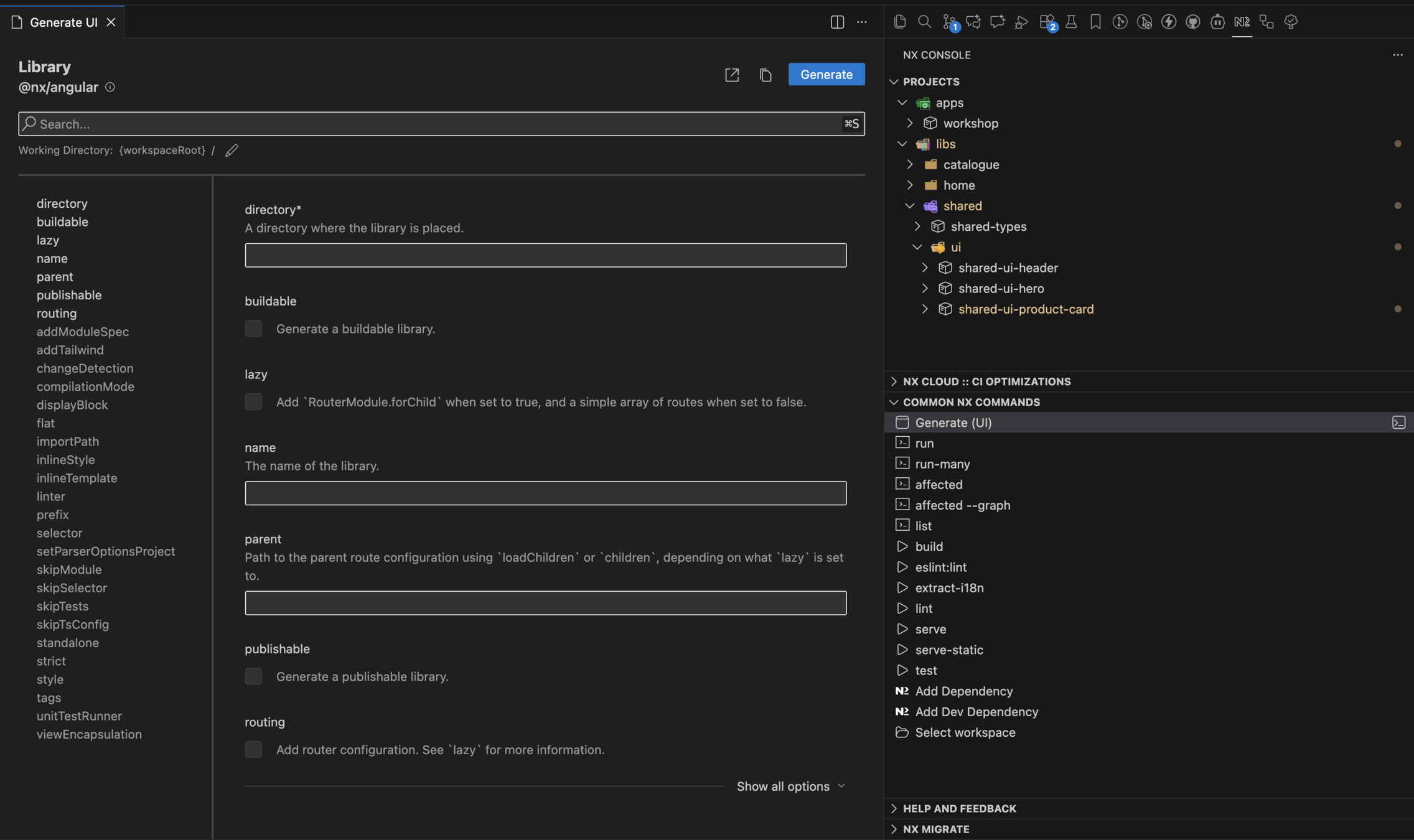
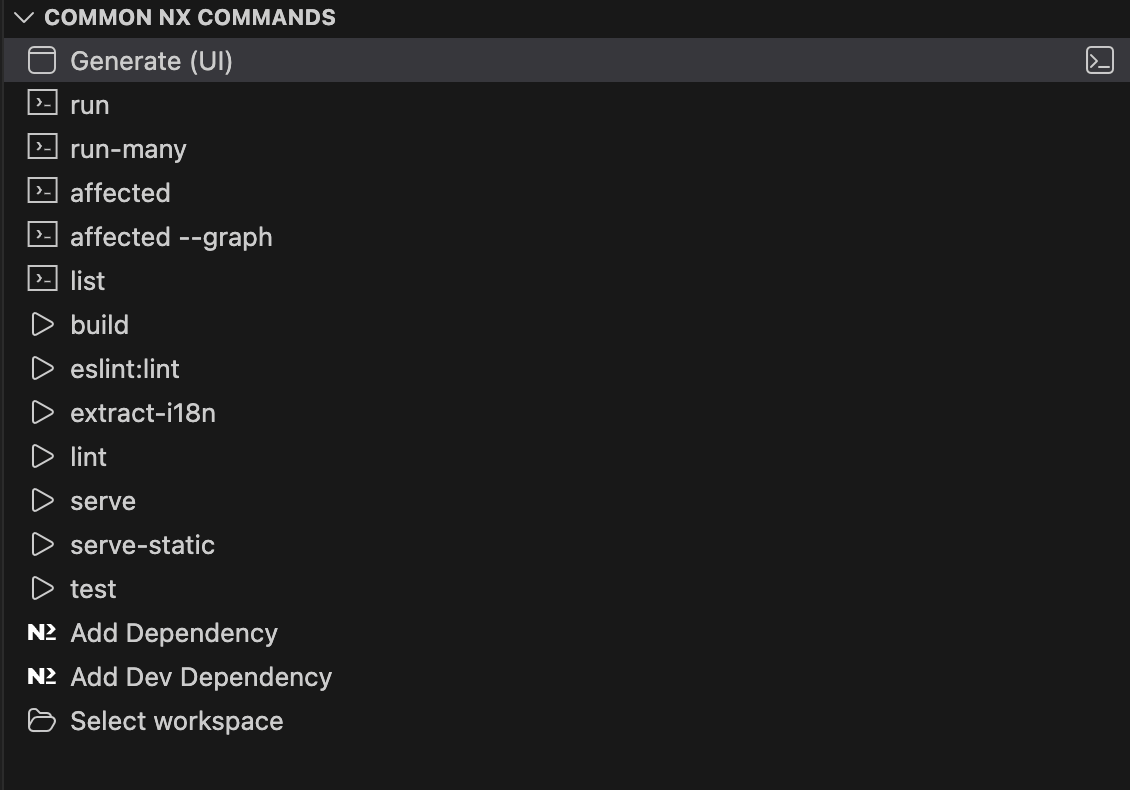
Generate feature-home with the Nx Console
TASK
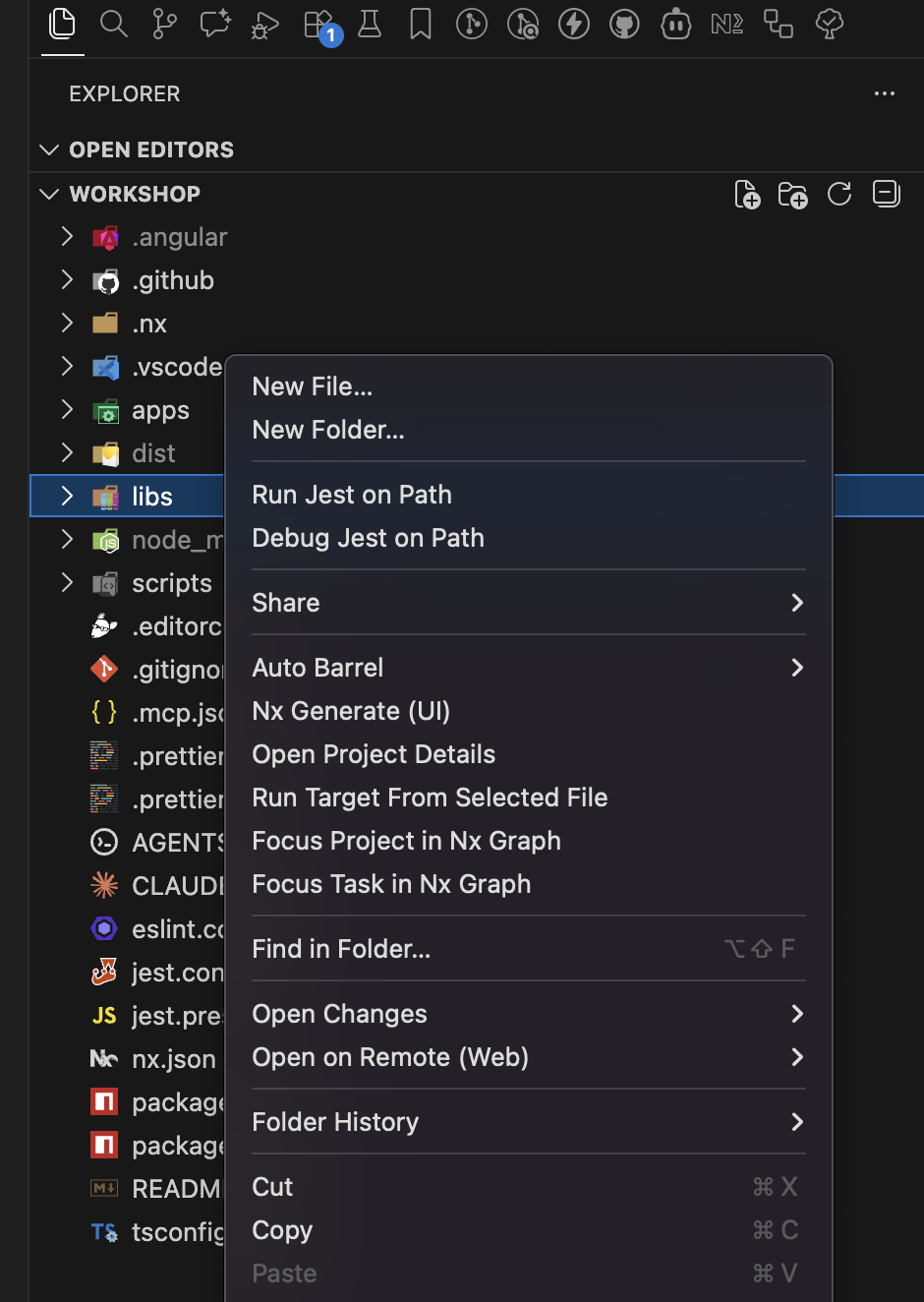
1 right-click the libs folder
2 Nx Generate (UI)
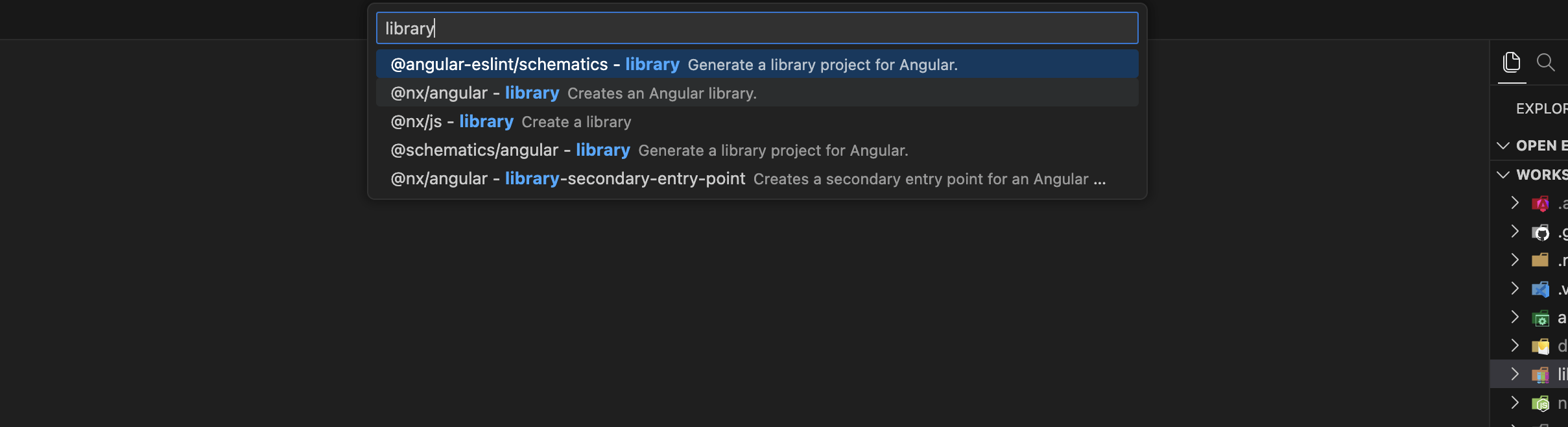
3 pick @nx/angular - library
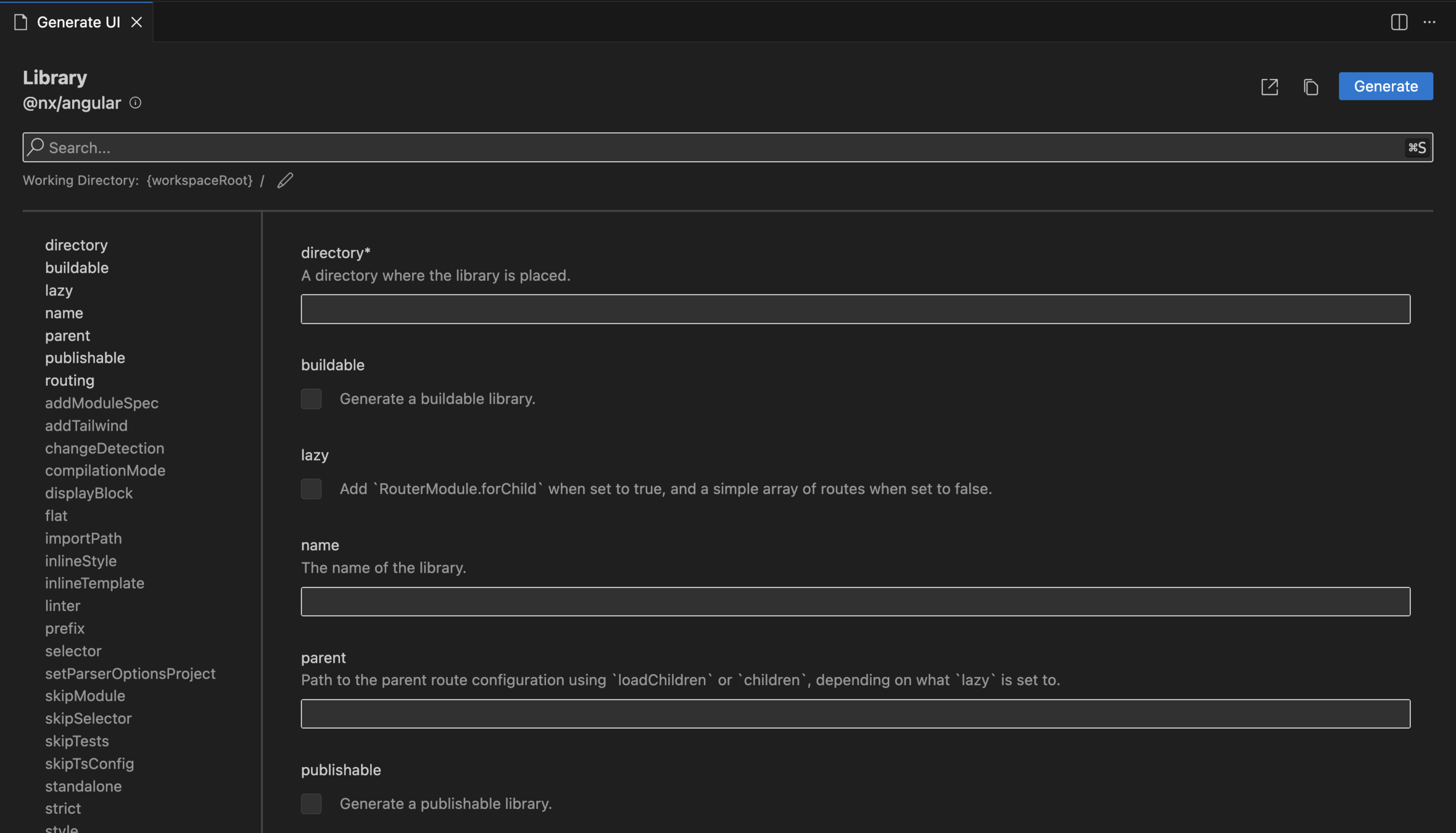
Four entries match "library". @angular-eslint and @schematics/angular are not the ones you want — they do not know about Nx projects.
profanis
STEP 4 / 5
STEP 4 / 5
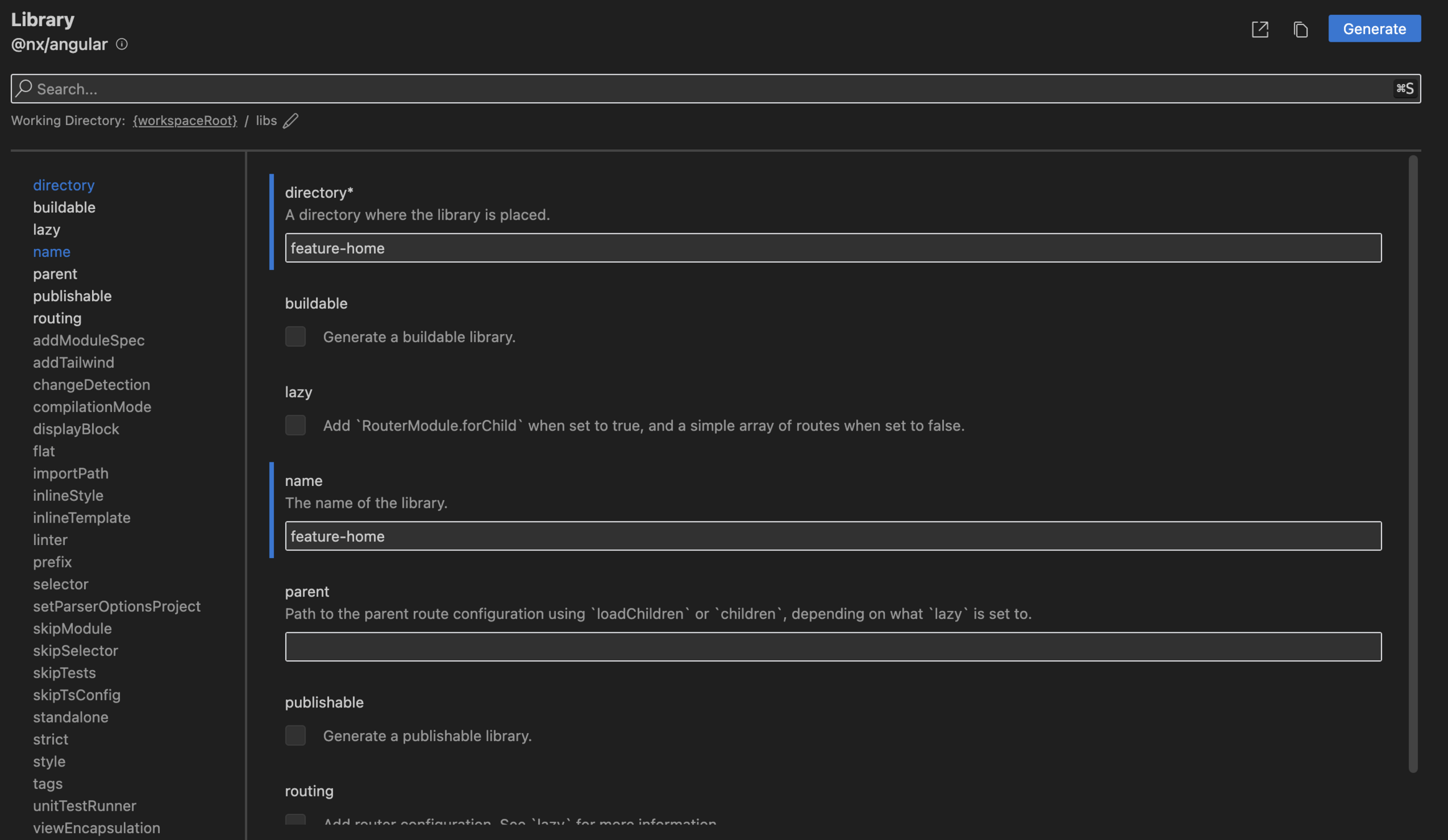
Three fields, then Generate
HINT
Working Directory
directory
name
everything else
{workspaceRoot} / libs
feature-home
feature-home
leave as-is
Before you hit Generate, read the field list on the left of the form. That is the full contract of the generator.
Same result as step 3. Two doors into the same room — the CLI for speed, the UI for discovery.
profanis
STEP 4 / 5
STEP 4 / 5 · CHECK
Two libraries, two public APIs
CHECKPOINT
// libs/feature-home/src/index.ts
export * from './lib/feature-home/feature-home';

// libs/feature-home/project.json
"projectType": "library"
If a file is not exported from index.ts, no other project can reach it. That is the boundary — enforced by tooling, not by a code review comment.
Same check on feature-catalogue. Both should look identical apart from the name.
profanis
STEP 5 / 5
Wire the router
TASK
// apps/workshop/src/app/app.routes.ts
export const appRoutes: Route[] = [
  {
    path: '',
    loadComponent: () =>
      import('@workshop/feature-home').then((m) => m.FeatureHome),
    pathMatch: 'full',
  },
  {
    path: 'catalogue',
    loadComponent: () =>
      import('@workshop/feature-catalogue').then((m) => m.FeatureCatalogue),
  },
];
The route is the boundary. loadComponent means feature-catalogue never enters the home bundle — the folder structure becomes a shipping decision.
profanis
STEP 5 / 5
Give yourself something to click
HINT
<!-- apps/workshop/src/app/app.html -->
<nav>
  <a routerLink="/">Home</a>
  <a routerLink="/catalogue">Catalogue</a>
</nav>
<router-outlet />

// app.ts  —  the line everyone forgets
imports: [RouterLink, RouterOutlet]
npx nx serve workshop
Delete the Nx welcome markup from app.html first, so there is nothing to squint at.
profanis
STEP 5 / 5 · CHECK
You are done when all three are true
CHECKPOINT
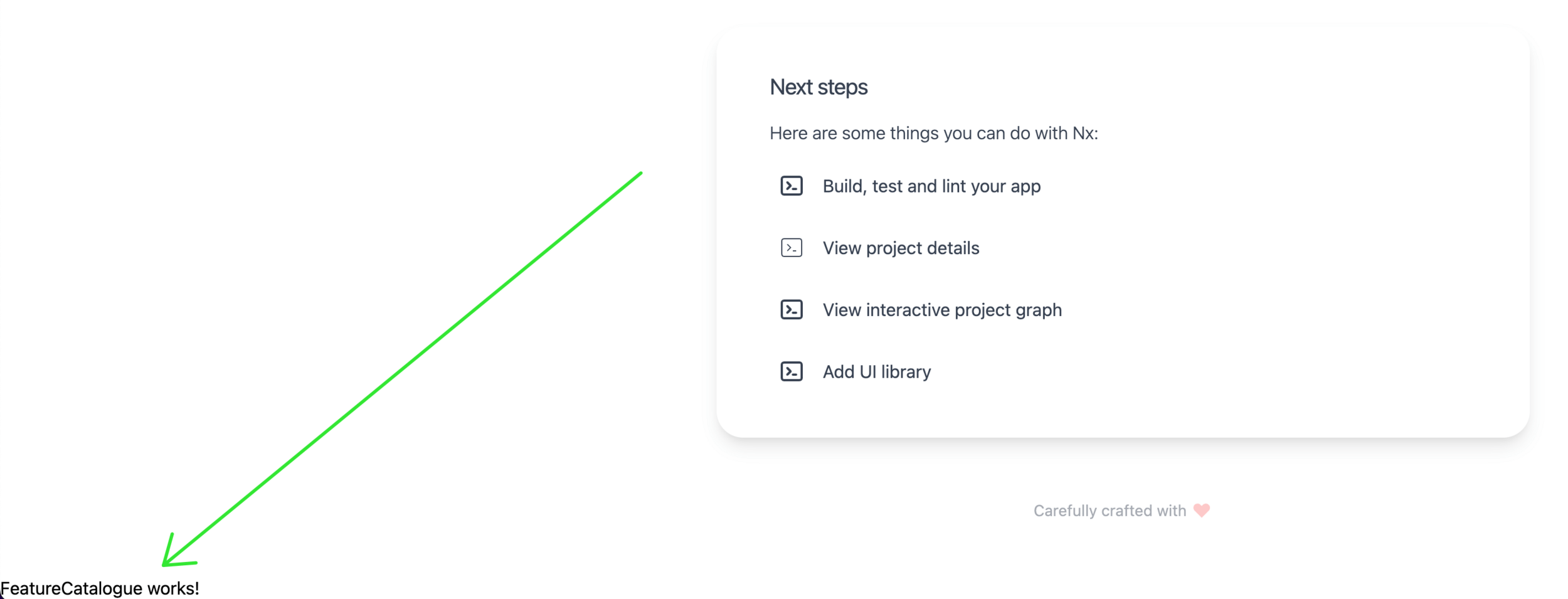
✓ / renders FeatureHome works!
✓ /catalogue renders FeatureCatalogue works!
✓ DevTools → Network: a new chunk arrives only when you click Catalogue
The third one is the point of the whole exercise. Two lazy chunks means the boundary is not a naming convention — it is in the build output.
Stuck on any of the three? git checkout step-5 and compare.
profanis
3 projects — one shell, two features
2 public APIs, one per library
2 lazy boundaries, visible in the network tab
0 dependencies between the two features
That last one holds because nothing has needed it yet.
Next: what happens the first time feature-catalogue wants something from feature-home?
profanis
- Create the Nx Workspace
- Install the Nx Console plugin in VS Code/WebStorm.
- Generate the feature-catalogue using NX CLI
- Generate the feature-home using the NX Console
- Setup the router
profanis
Create the NX Workspace
npx create-nx-workspace@latest --preset angular-monorepoHint
profanis
✔ Where would you like to create your workspace? · greenHeaven
✔ Application name · greenHeaven
✔ Which bundler would you like to use? · esbuild
✔ Default stylesheet format · scss
✔ Do you want to enable Server-Side Rendering (SSR) and Static Site Generation (SSG/Prerendering)? · No
✔ Which unit test runner would you like to use? · jest
✔ Test runner to use for end to end (E2E) tests · none
✔ Try the full Nx platform? · skip
✔ Which CI provider would you like to use? · skip
✔ Would you like remote caching to make your build faster? · skip
Create the NX Workspace
profanis
Install the Nx Console plugin in VS Code
profanis
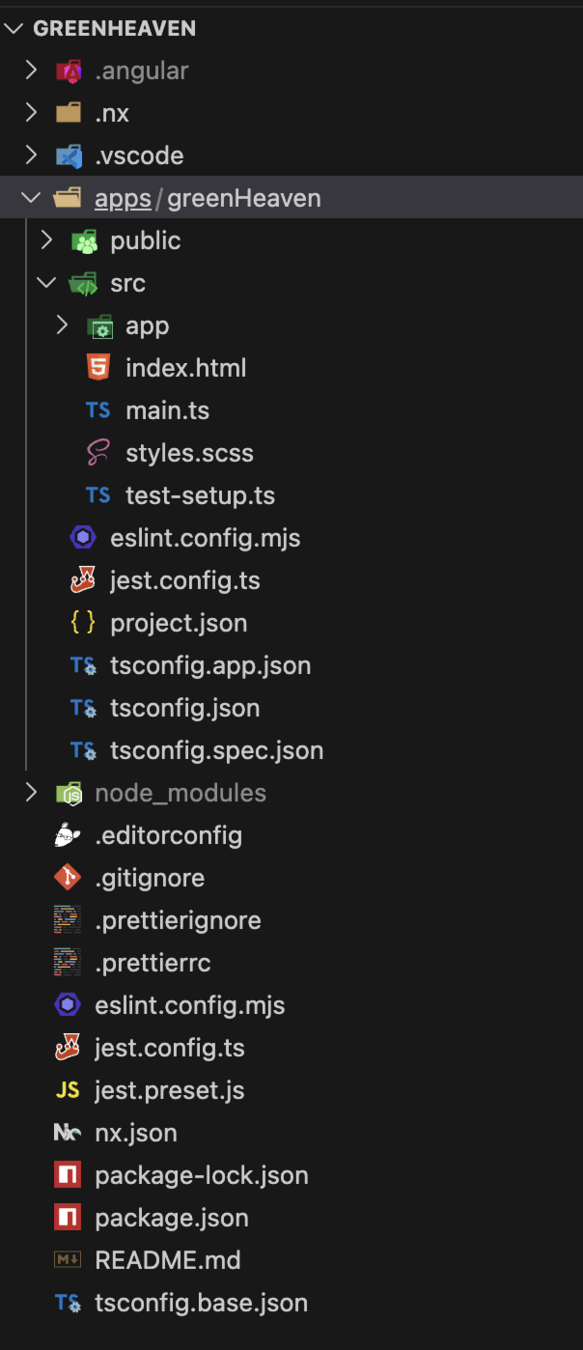
Setup & Exploration
Explore the file system
and identify the:
- apps/greenHeaven/project.json
- nx.json
profanis
Create the Products-List Feature using the NX CLI
npx nx g @nx/angular:library --name=feature-catalogue
							 --directory=libs/feature-catalogue
Hint
profanis
Create the Home Feature using the NX Console
Hint
profanis
- right click on the libs directory
- click the Nx Generate (UI)
Create the Home Feature using the NX Console
profanis
- select @nx/angular - library
Create the Home Feature using the NX Console
Hint
profanis
Verify the barrel files and the project.json
- Open the index.ts of both libraries and verify the components are exported.
- Open the project.json of each library and identify the name of the library and the projectType
profanis
Create the Routing
// apps/greenHeaven/src/app/app.routes.ts

export const appRoutes: Route[] = [
  {
    path: '',
    loadComponent: () =>
      import('@green-heaven/feature-home').then((m) => m.FeatureHome),
    pathMatch: 'full',
  },
  {
    path: 'catalogue',
    loadComponent: () =>
      import('@green-heaven/feature-catalogue').then((m) => m.FeatureCatalogue),
  },
];
profanis
Create the Routing
- Update app.html to include a simple navbar (just text links for now)
- npx nx serve greenHeaven
- Navigate between "Home" and "Catalogue"
profanis
Create the Routing
Ensure the Feature is Rendered
profanis
Types, Scopes, and the Shell Pattern
profanis
profanis
State (Signals), NGXS/NGRX, HTTP Services
Data-Access (type:data-access)
Dumb components. Pure presentation
UI (type:ui)
Pure functions, helpers, validators
Utility (type:util)
The building blocks
The "Smart" logic and routing.
Feature (type:feature)
profanis
type:feature
Rules
It’s the only library type allowed to have routes.
profanis
The role
Smart components that orchestrate the UI components.
GreenHeaven example
feature-catalogue
What it does
Orchestrates the entire page
Contains
Domain-specific logic
Page Layouts
Services / Facades
type:ui
GreenHeaven example
ui-product-card
Rules
It just receives input(s) and emits output(s)
profanis
The role
"Dumb" components focused on pure presentation.
Contains
Cards
Business UI Components
Buttons
What it does
A UI unit of the entire application
type:data-access
GreenHeaven example
catalogue-data-access
profanis
The role
Managing State and API communication.
Contains
HTTP Services
NGXS/NGRX
Angular Signals/State
What it does
Communicates with the HTTP API
Rules
It has no UI components
type:util
profanis
The role
Low-level, pure helper functions
Contains
Date formatters
Math helpers
Custom validators
GreenHeaven example
-
What it does
Increases the reusability
Rules
Has zero dependencies on other library types.
Q: "Where do I put this file?"
Which project owns this responsibility?
A: Yes -> create a feature library
A: Yes -> create a UI library
A: Yes -> create a data-access library
Q: "I should develop a new pageable component"
Q: "I should develop a reusable UI element
Q: "I should develop a state management slice
src/
└── app/
    ├── core/
    │   ├── guards/
    │   │   ├── auth.guard.ts
    │   │   └── auth.guard.spec.ts
    │   ├── header/
    │   │   ├── header.component.ts
    │   │   ├── header.component.html
    │   │   └── header.component.scss
    │   ├── core.service.ts
    │   └── core.service.spec.ts
    ├── features/
    │   ├── feature-1/
    │   │   ├── components/
    │   │   │   ├── component-a.ts
    │   │   │   └── component-b.ts
    │   │   ├── services/
    │   │   │   ├── service-a.ts
    │   │   │   └── service-b.ts
    │   │   ├── pipes/
    │   │   │   ├── pipe-a.ts
    │   │   │   └── pipe-b.ts
    │   │   ├── feature-1.component.ts
    │   │   ├── feature-1.component.html
    │   │   ├── feature-1.routes.ts
    │   │   └── feature-1.service.ts
    │   └── feature-2/
    │       ├── feature-2.component.ts
    │       ├── feature-2.component.html
    │       ├── feature-2.routes.ts
    │       └── feature-2.service.ts
    ├── app.component.ts
    ├── app.component.html
    ├── app.routes.ts
    ├── app.config.ts
    └── main.ts
Q: "Do I need a library even for a component?"
A: No -> the component is an implementation detail
The feature library is allowed to be "fat" internally
Use the index.ts to hide the complexity
Organizing by Domain
As the app grows, a flat libs/ folder with 100+ libraries becomes hard to find code and hard to see ownership
The problem
Group libraries by Scope (Domain)
The solution
profanis
App
Util
Data
UI
Feat
UI
UI
Feat
Data
UI
UI
Util
UI
Util
Feat
Feat
Feat
Feat
Feat
profanis
App
Util
Data
UI
Feat
UI
UI
Feat
Data
UI
UI
Util
UI
Util
Feat
Feat
Feat
Feat
Feat
Scope A
Scope B
Scope C
profanis
App
Util
Data
UI
Feat
UI
UI
Feat
Data
UI
UI
Util
UI
Util
Feat
Feat
Feat
Feat
Feat
Scope A
Scope B
Scope C
profanis
The Entry Point for a domain
If the App knows about "List" and "Details", the App is too smart
The problem
The App knows the Shell.
The Shell sets up the child routes for the domain
The solution
profanis
App
Util
Data
UI
Feat
UI
UI
Feat
Data
UI
UI
Util
UI
Util
Feat
Feat
Feat
Feat
Feat
Scope A
Scope B
Scope C
profanis
App
Util
Data
UI
Feat
UI
UI
Feat
Data
UI
UI
Util
UI
Util
Feat
Feat
Feat
Feat
Feat
Scope A
Scope B
Scope C
Shell
Shell
Shell
profanis
App
Util
Data
UI
Feat
UI
UI
Feat
Data
UI
UI
Util
UI
Util
Feat
Feat
Feat
Feat
Feat
Scope A
Scope B
Scope C
Shell
Shell
Shell
profanis
App
Util
Data
UI
Feat
UI
UI
Feat
Data
UI
UI
Util
UI
Util
Feat
Feat
Feat
Feat
Feat
Scope A
Scope B
Scope C
Shell
Shell
Shell
profanis
It orchestrates how the work is started and displayed.
A specific sidebar, header, or footer that only appears within this feature module
Wrapper Layouts
Provides NGXS/NgRx state slices for the entire domain.
State Bootstrapping
Handle the auth guards and route resolvers
Guards and Resolvers
Defines the top-level routes that the main app loads.
Routing & Lazy Loading
profanis
App
Util
Data
UI
Feat
UI
UI
Feat
Data
UI
UI
Util
UI
Util
Feat
Feat
Feat
Feat
Feat
Scope A
Scope B
Scope C
Shell
Shell
Shell
profanis
The Entry Point for a domain
// src/app/routes.ts

export const appRoutes: Route[] = [
  { path: '', pathMatch: 'full', redirectTo: 'home' },
  {
    path: 'catalogue',
    loadComponent: () =>
      import('@workshop/catalogue-feature-catalogue-list').then(
        (m) => m.CatalogueComponent
      ),
  },
  {
    path: 'catalogue/:id',
    loadComponent: () =>
      import('@workshop/catalogue-feature-catalogue-details').then(
        (m) => m.CatalogueDetailsComponent
      ),
  },
  { path: '**', redirectTo: '' },
];
profanis
The Entry Point for a domain
// src/app/routes.ts

export const appRoutes: Route[] = [
  { path: '', pathMatch: 'full', redirectTo: 'home' },
  {
    path: 'catalogue',
    loadChildren: () =>
      import('@workshop/catalogue-feature-shell').then(
        (m) => m.catalogueRoutes
      ),
  },
  { path: '**', redirectTo: '' },
];
profanis
App
Scope A
Scope B
Scope C
Feat
UI
Data
Util
UI
Feat
Util
Util
Feat
UI
Data
profanis
App
UI
Data
Util
Feat
Feat
UI
Util
Util
UI
Data
Feat
Scope A
Scope B
Scope C
profanis
How does Nx know that feature-list is a "Feature"? We tell it.
type: segregates the technical responsibility
scope: segregates the functional responsibility
profanis
How does Nx know that feature-list is a "Feature"? We tell it.
// project.json

{
  "name": "catalogue-feature-catalogue-details",
  "$schema": "../../../node_modules/nx/schemas/project-schema.json",
  "sourceRoot": "libs/catalogue/feature-catalogue-details/src",
  "prefix": "lib",
  "projectType": "library",
  "tags": ["scope:catalogue", "type:feature"],
  "targets": {
    "test": { ... },
    "lint": { ... }
  }
}
profanis
Scope A
Util
Feat
UI
Data
How does Nx know that feature-list is a "Feature"? We tell it.
profanis
How does Nx know that feature-list is a "Feature"? We tell it.
// eslint.config.mjs

{
	"sourceTag": "type:feature",
	"onlyDependOnLibsWithTags": [
		"type:ui",
		"type:util",
		"type:feature",
		"type:data-access"
	]
},
{
	"sourceTag": "type:ui",
	"onlyDependOnLibsWithTags": [
		"type:util",
		"type:ui",
	]
}
profanis
How does Nx know that feature-list is a "Feature"? We tell it.
profanis
scope: catalogue
scope: shared
UI
Data
Util
How does Nx know that feature-list is a "Feature"? We tell it.
Feat
Util
Util
UI
Util
Util
UI
profanis
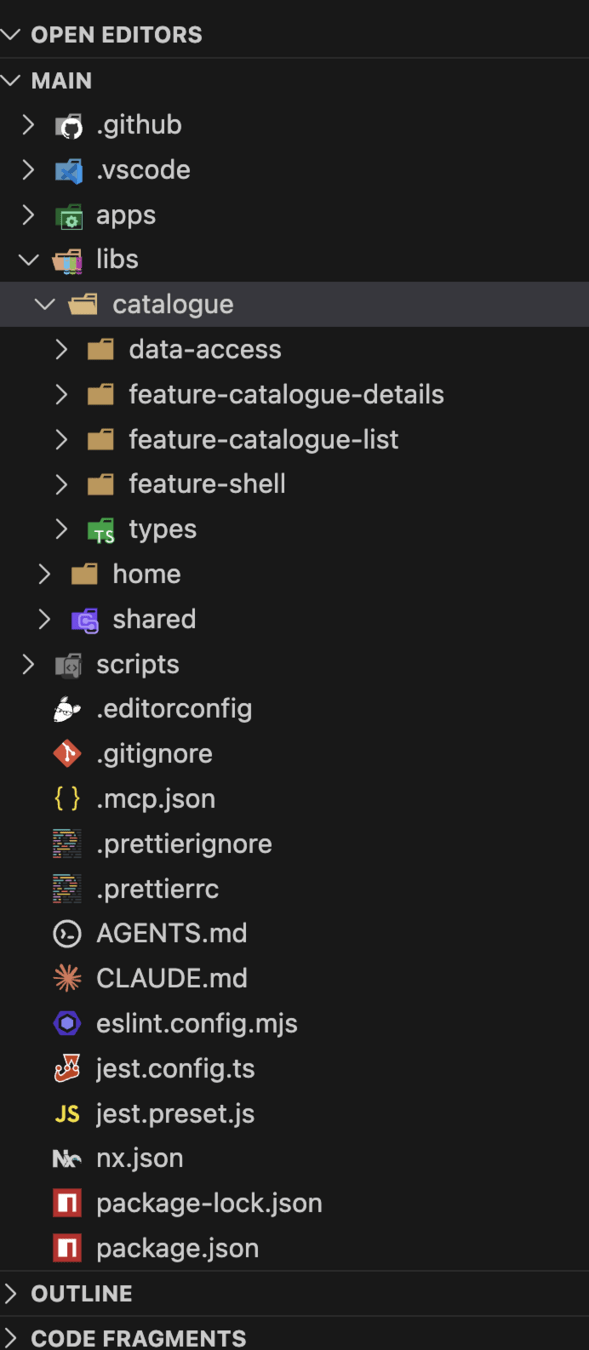
Organizing by Domain
Within a single domain, we apply our Taxonomy to keep the internal structure clean
libs/
└── catalogue/                      <-- The Domain Boundary
    ├── data-access/                🧠 State & API
    ├── feature-catalogue-details/  📄 Catalogue Details Page
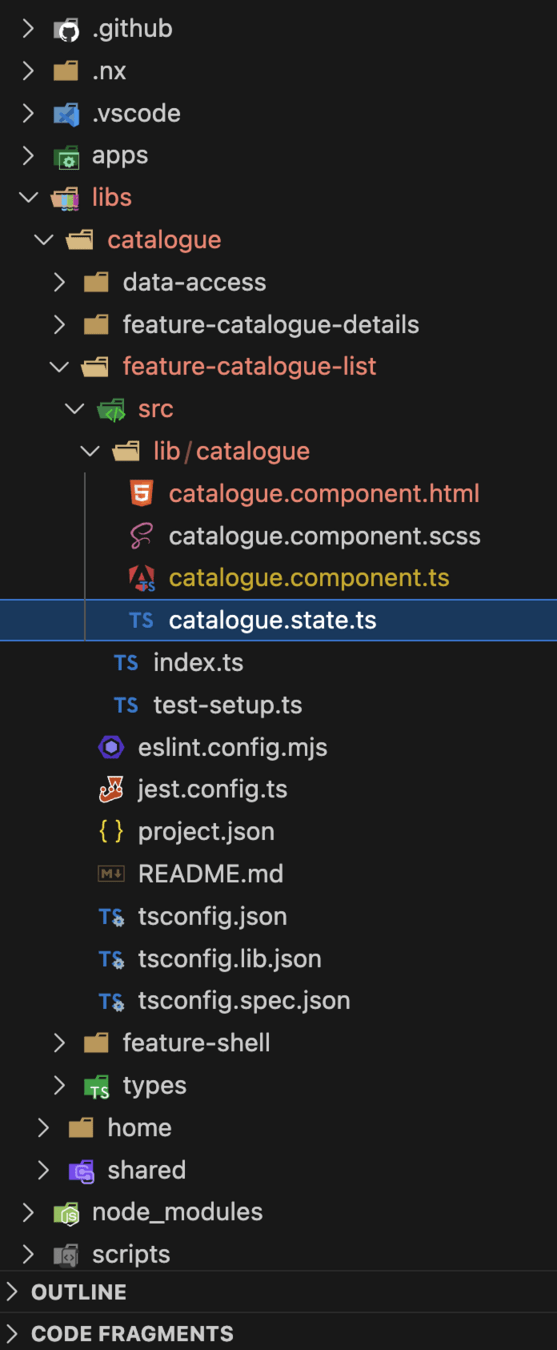
    ├── feature-catalogue-list/   	📄 Catalogue List Page
    ├── feature-shell/     			🐚 Entry Point & Internal Routing
    └── types/     					🐚 Domain specific types
profanis
// project.json

{
  "name": "catalogue-feature-catalogue-details",
  "$schema": "../../../node_modules/nx/schemas/project-schema.json",
  "sourceRoot": "libs/catalogue/feature-catalogue-details/src",
  "prefix": "lib",
  "projectType": "library",
  "tags": ["scope:catalogue", "type:feature"],
  "targets": {
    "test": { ... },
    "lint": { ... }
  }
}
Naming consistency is key for tools and humans
profanis
Naming consistency is key for tools and humans
Data
Util
UI
scope: users
Data
Util
UI
scope: catalogue
product-list
product-list
profanis
Naming consistency is key for tools and humans
Data
Util
UI
scope: users
Data
Util
UI
scope: catalogue
product-list
product-list
product-list
product-list
profanis
scope-type-identifier*
catalogue
shared
auth
feature
ui
data-access
catalogue-list
header
users*
profanis
scope-type-identifier*
catalogue-feature-catalogue-list
shared-ui-header
auth-data-access-users
profanis
scope-type-identifier*
catalogue-feature-catalogue-list
shared-ui-header
auth-data-access-users
// project.json

{
  "name": "catalogue-feature-catalogue-list",
  "$schema": "../../../node_modules/nx/schemas/project-schema.json",
  "sourceRoot": "libs/catalogue/feature-catalogue-list/src",
  "prefix": "lib",
  "projectType": "library",
  ....
}
profanis
scope-type-identifier*
catalogue-feature-catalogue-list
shared-ui-header
auth-data-access-users
@org/catalogue-feature-catalogue-list
@org/shared-ui-header
@org/auth-data-access-users
profanis
scope-type-identifier*
catalogue-feature-catalogue-list
shared-ui-header
auth-data-access-users
@org/catalogue-feature-catalogue-list
@org/shared-ui-header
@org/auth-data-access-users
// tsconfig.base.json

{
  "compilerOptions": {
    "paths": {
      "@org/catalogue-feature-catalogue-list": [
        "libs/catalogue/feature-catalogue-list/src/index.ts"
      ],
      "@org/shared-ui-header": [
      	"libs/shared/ui/ui-header/src/index.ts"
      ],
      "@org/auth-data-access-users": [
      	"libs/auth/data-access/src/index.ts"
      ]
    }
  }
}
profanis
Visualize your architecture
Defines the top-level routes that the main app loads.
nx graphVisualize only the affected by your changes projects
nx graph --affectedVisualize only the affected by your changes projects - CI
nx affected -t build --base=origin/main~1 --head=origin/mainprofanis
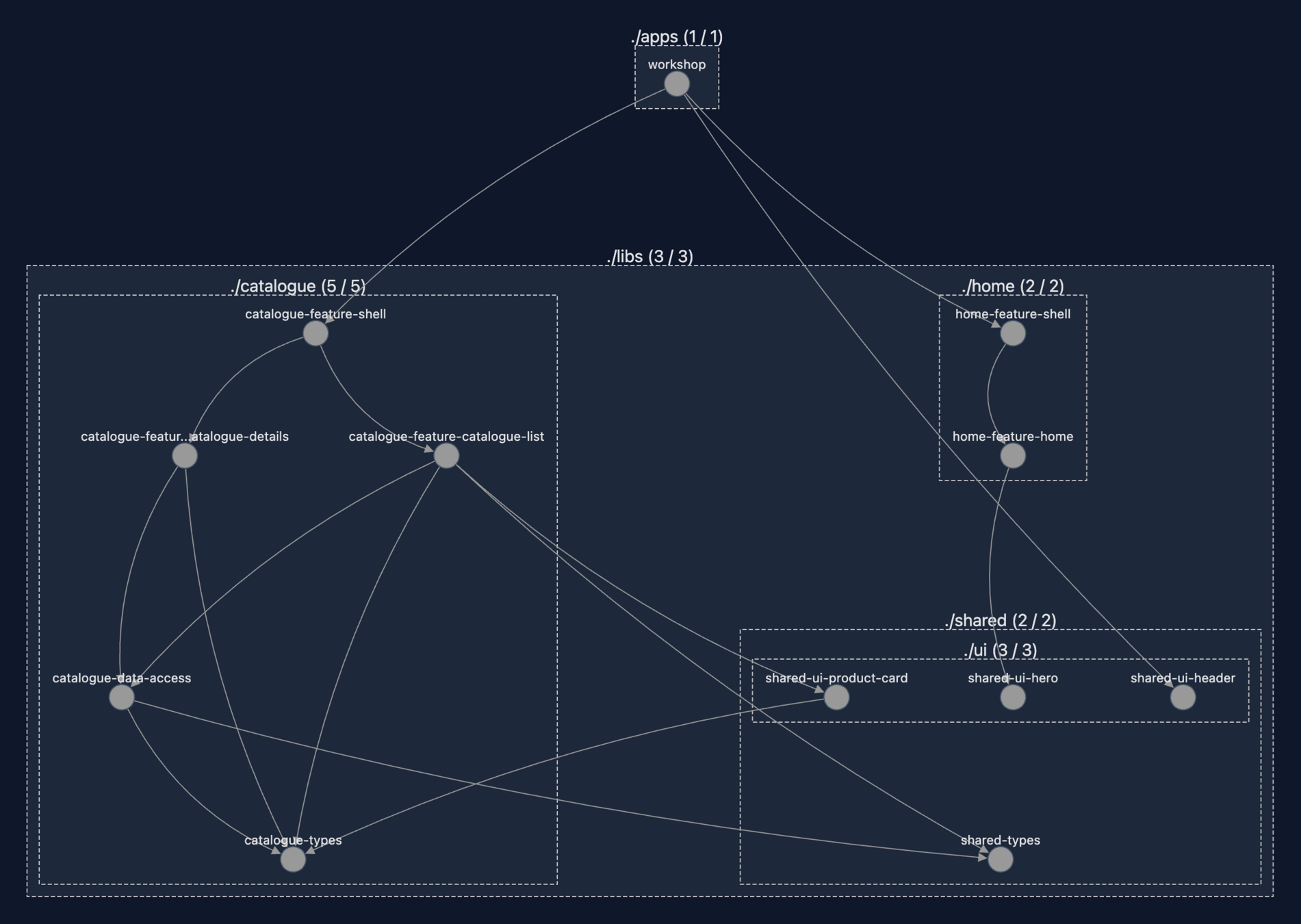
Visualize if your architecture is messy > nx graph
profanis
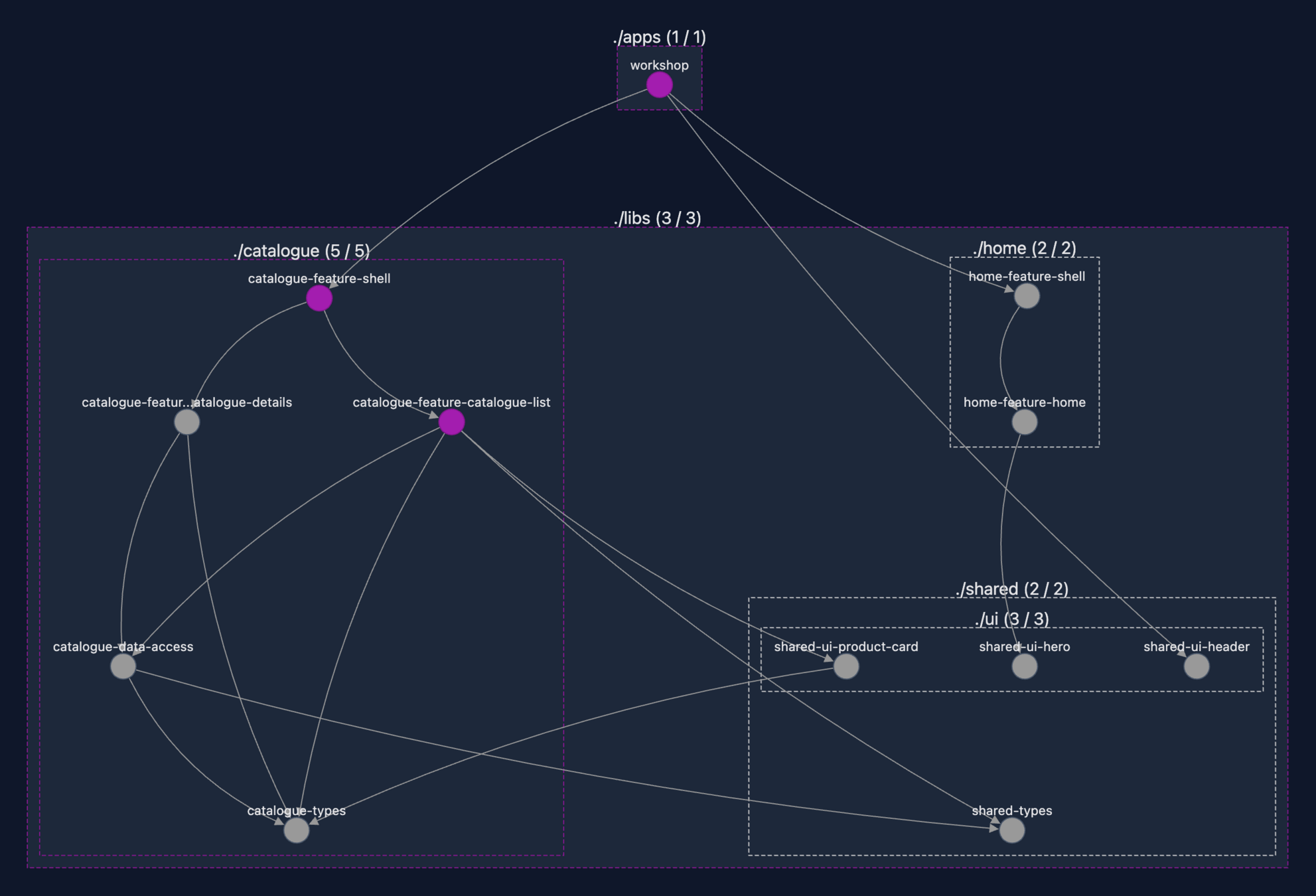
Visualize if your architecture is messy > nx graph --affected
profanis
Visualize if your architecture is messy > detect an error
profanis
Context is King: Supercharging AI with Nx
profanis
The problem with Agents
Linear View vs. Graph Map
- AI sees a flat list of files.
Logic vs. Boundaries
- AI understands the code, but ignores the library limits.
The "Spaghetti" Risk
- Illegal imports and circular dependencies
profanis
The problem with Agents
Inconsistent Code
- Breaks your workspace global standards
The "Token Trap"
Massive waste feeding 150+ libs
Guesswork vs. Knowledge
Broken refactors from "guessing" paths
profanis
Instant Architectural Understanding
The Bridge
- Nx Graph acts as an instant workspace "map"
Deep Insights
- AI moves from Autocomplete to Architect
Efficient Discovery
- Faster results using significantly fewer tokens
profanis
Deep workspace architecture
- What projects exist
- How they relate
- What tasks can be run
- Faster discovery
- Better understanding
- Fewer tokens
Instant Architectural Understanding
nx graph
instant architectural understanding
profanis
Instant Architectural Understanding
{
  "graph": {
    "nodes": {
      "catalogue-feature-catalogue-details": {
        "name": "catalogue-feature-catalogue-details",
        "type": "lib",
        "data": {
          "root": "libs/catalogue/feature-catalogue-details",
          "targets": {
            "eslint:lint": {
              "cache": true,
              "options": {
                "cwd": "libs/catalogue/feature-catalogue-details",
                "command": "eslint ."
              },
              "inputs": [
                "default",
                "^default",
                "{workspaceRoot}/eslint.config.mjs",
                "{workspaceRoot}/libs/catalogue/feature-catalogue-details/eslint.config.mjs",
                "{workspaceRoot}/tools/eslint-rules/**/*",
                {
                  "externalDependencies": [
                    "eslint"
                  ]
                }
              ],
              "outputs": [
                "{options.outputFile}"
              ],
              "metadata": {
                "technologies": [
:
profanis
nx graph --printAgent Skills
profanis
From Infrastructure to Intelligence
The System-Configured Era
- MCP servers lived in your local machine settings
The Repo-Integrated Era
- Both MCP servers AND skills live inside the repo
The Modern Workflow Split
- Skills tell the agent what to know. MCP tools tell the agent what to do.
Versioned Intelligence
- AI rules evolve alongside your code
profanis
Stopping the "Token Tax"
Contrast with the old way
- Skills loaded when needed, not stuffed upfront
profanis
Code generators
Deep workspace architecture
The Nx solution - beyond autocomplete
CI pipeline integration
profanis
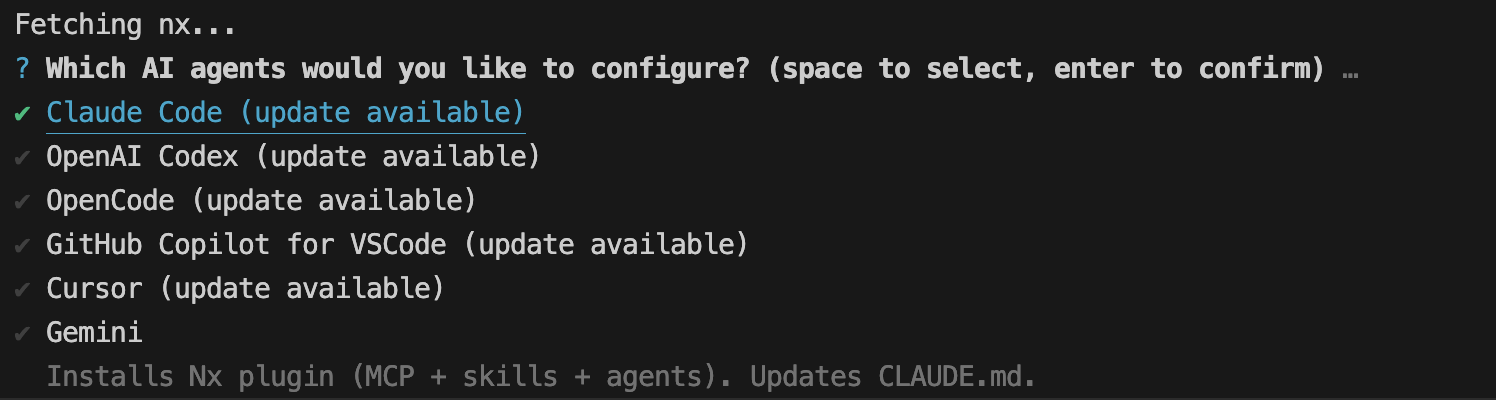
Set it up
npx nx configure-ai-agentsprofanis
Set it up - claude
profanis
Set it up - claude
Generates
// .claude/settings.json

{
  "extraKnownMarketplaces": {
    "nx-claude-plugins": {
      "source": {
        "source": "github",
        "repo": "nrwl/nx-ai-agents-config"
      }
    }
  },
  "enabledPlugins": {
    "nx@nx-claude-plugins": true
  }
}
...and CLAUDE.md file
profanis
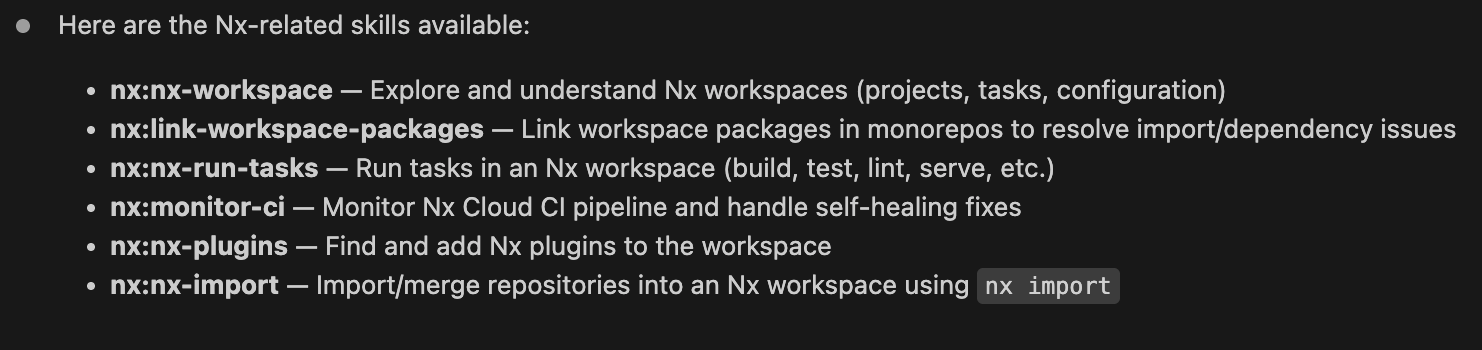
Set it up - claude
prompt
"list the Nx related skills you see"
There are no Nx-specific skills in the currently available skill list.
profanis
Set it up
claude plugin install nx@nx-claude-pluginsInstall Claude Code: https://code.claude.com/docs/en/quickstart
profanis
Set it up - claude
prompt
"list the Nx related skills you see"
> ls -la ~/.claude/plugins/marketplaces/nx-claude-plugins/skills/
profanis
Set it up - claude - skills in repo
npx skills add nrwl/nx-ai-agents-configprofanis
Set it up
npx nx configure-ai-agentsNx MCP server
- Provides connectivity to Nx Cloud CI pipelines
Agent skills
- Domain-specific knowledge for monorepo workflows
Agent Configuration files
- CLAUDE.md, AGENTS.md with workspace-specific guidelines
profanis
nx-workspace/- Explore workspace structure — list projects, query targets, inspect dependencies
nx-generate/- Scaffold new apps/libs using Nx generators
nx-import/- Import existing projects into the Nx workspace
profanis
nx-plugins/- Discover and configure Nx plugins
nx-run-tasks/- Run Nx tasks correctly (nx run, nx run-many, nx affected)
link-workspace-packages/- Link local packages within the monorepo
link-workspace-packages/- Link local packages within the monorepo
profanis
monitor-ci/- The main CI monitoring orchestrator. Polls Nx Cloud, handles self-healing fixes, spawns subagents, and runs local fixes when CI fails.
profanis
Skills
Reusable AI behaviors invoked via slash commands or automatically
profanis
Skills - how to run them
- /monitor-ci or /nx-workspace
You explicitly run /skill-name
- guided by instructions in CLAUDE.md
Claude invokes them automatically
Bottom line: You don't need to manually run /skill-name for most things.
profanis
Skills - how to run them
Using the /nx-workspace skill, analyze the code in @libs/catalogue/types/src/lib/product.ts and the current project graph. Based on our library type definitions (Feature, UI, Data-Access, Util), identify the correct architectural home for this file. Explain why the current location is a violation and suggest the target library.
profanis
Skills - how to run them
Show me the dependency graph for the shared-ui-product-card lib and list any circular dependencies.
What are the available targets for the shared-ui-product-card library?
profanis
multi-step prompt
1. Use /nx-workspace to find all projects tagged with type:ui and identify the directory pattern used for @libs/shared/ui/ui-product-card.
2. Use /nx-generate to create a new Angular UI library named product-mini-card in that same directory, ensuring it has the type:ui tag.
3. Once generated, use the component in ui-product-card as a template. Create the product-mini-card component but strip out any action-related HTML elements (like buttons or link containers) to keep it as a pure display card.
profanis
Skills - how to run them
Analyze the workspace and identify the libraries that should be refactored with the correct tags and with the correct project name. Identify if they are under the correct directory.
A correct project name is scope-target-identifier.
The libraries with type:ui should be located in libs/shared/ui directory.
Use the skills to move the library to the correct directory. Then run the linter. Commit the files and move to the next library
Hands-on
What changed while you were at the break
SECTION 1
flat libs/
2 libraries
no tags
you built it from nothing
SECTION 2
grouped by domain
7 libraries across 3 scopes — you make it 11
scope: and type: on every one
it exists — you extend it
Same product: the GreenHeaven plant shop. The Nx workspace is called workshop, so every import you write starts with @workshop/
Flat libs/ stops working somewhere around library number ten. This is what you reach for next.
profanis
Six steps
1 Shell library for the catalogue
2 Shell library for the home — on your own
3 Catalogue data-access library
4 Shared ui library for the product card
5 Tag everything, then let lint check your work
6 Find the boundary violation in the graph
Branch: lab/one · you keep this workspace for the rest of the section
Fell behind? The next lab starts from a branch that already contains all of this. Nobody gets stranded.
profanis
SETUP
Get the workspace
TASK
git clone --branch lab/one https://github.com/profanis/nx-signals-workshop.git
cd nx-signals-workshop/
npm i
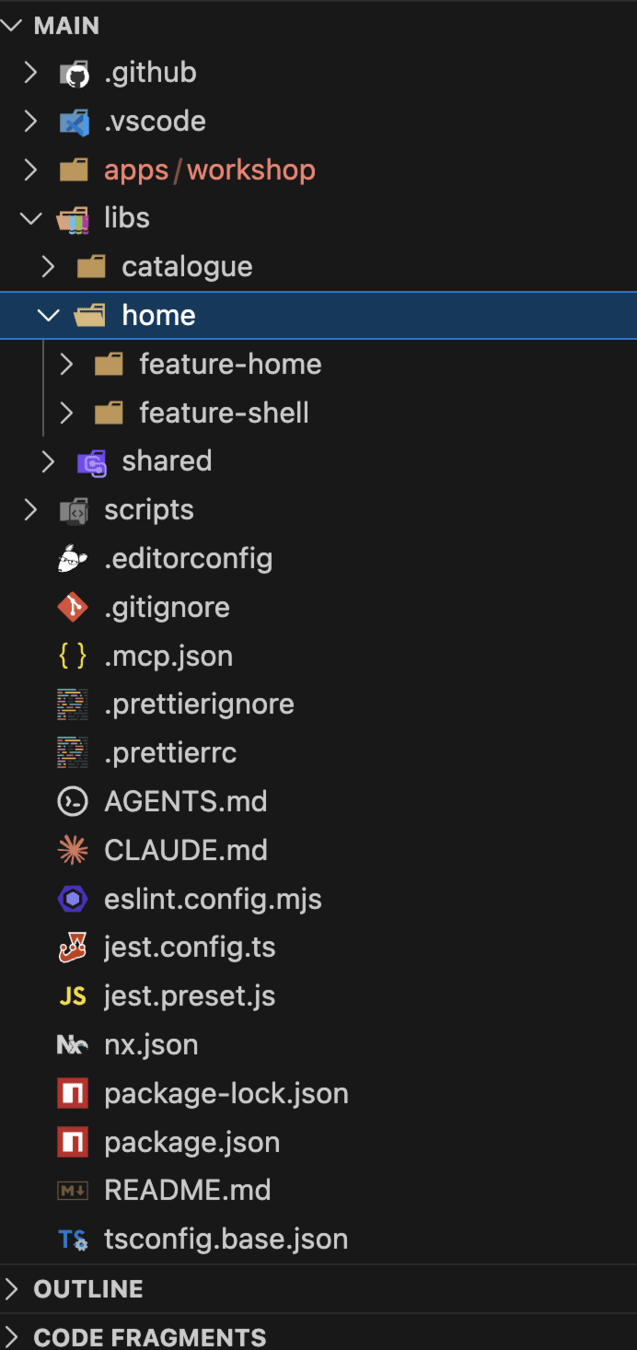
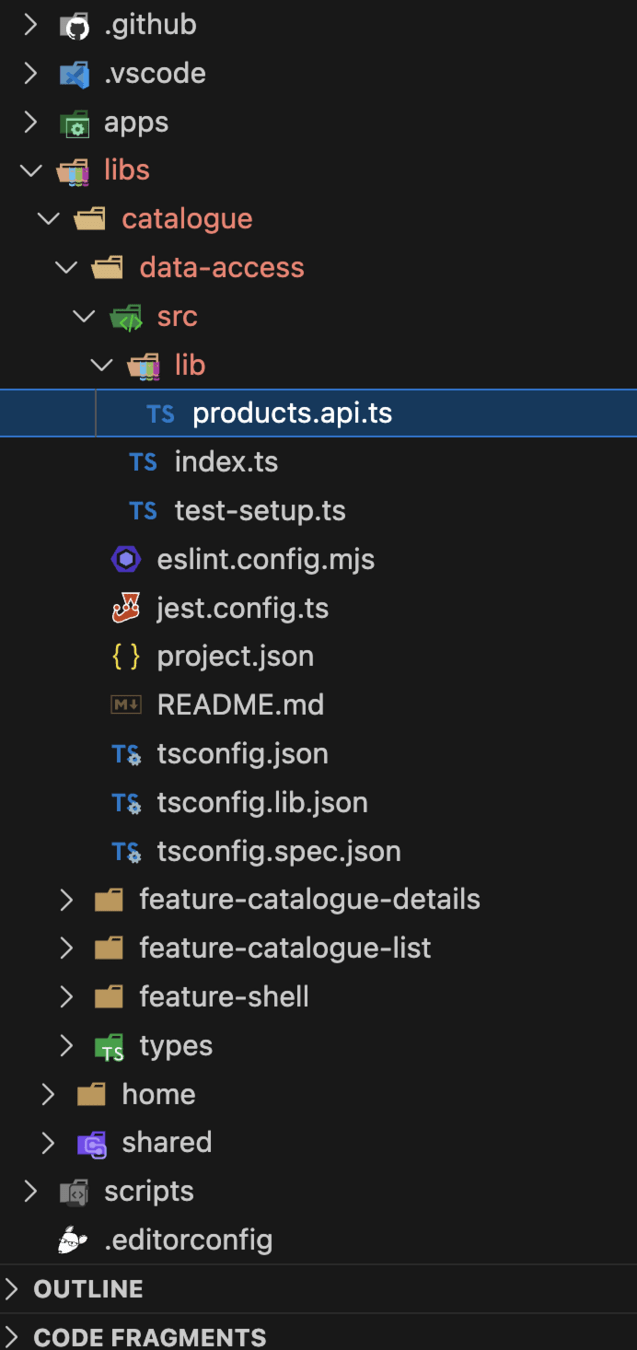
Already there: the workshop app and 7 libraries — catalogue list, catalogue details, catalogue types, home, shared types, ui-header, ui-hero.
You will add 4: two shell libraries, one data-access library, one ui library — plus the tags that hold the whole thing together.
Run npx nx graph once now. That picture is the "before".
profanis
STEP 1 / 6
A shell library for the catalogue
TASK
npx nx g @nx/angular:library \
  --directory=libs/catalogue/feature-shell \
  --name=catalogue-feature-shell
Then delete the generated component, and create lib.routes.ts next to it.
A shell has no UI of its own. It owns the domain's routes and nothing else — so the component the generator gives you is dead weight.
Name follows scope-type-identifier: directory is the path, project name is flat and globally unique.
profanis
STEP 1 / 6
Fill in the two routes
HINT
// libs/catalogue/feature-shell/src/lib/lib.routes.ts

export const catalogueRoutes: Route[] = [
  {
    path: '',        // the list page
    // ??
  },
  {
    path: ':id',     // the details page
    // ??
  },
];
Both feature libraries already exist. You are only pointing at them.
Their import paths are in tsconfig.base.json — look there rather than guessing.
profanis
STEP 1 / 6
Hand the domain to the shell
HINT
// apps/workshop/src/app/app.routes.ts

{
  path: 'catalogue',
  loadChildren: () =>
    import('PATH TO FEATURE SHELL').then((m) => m.catalogueRoutes),
},
Find the real path in tsconfig.base.json → paths
loadChildren, not loadComponent. The app hands over the whole branch and stops caring what is inside it — that is the entire point of a shell.
profanis
STEP 1 / 6 · CHECK
The catalogue shell
CHECKPOINT
export const catalogueRoutes: Route[] = [
  {
    path: '',
    loadComponent: () =>
      import('@workshop/catalogue-feature-catalogue-list').then((m) => m.CatalogueComponent),
  },
  {
    path: ':id',
    loadComponent: () =>
       import('@workshop/catalogue-feature-catalogue-details')
         .then((m) => m.CatalogueDetailsComponent),
  },
];
✓ /catalogue shows the list, /catalogue/3 shows the details
✓ app.routes.ts no longer names any catalogue page
profanis
STEP 2 / 6
Now the home domain — on your own
TASK
Same four moves. No hand-holding this time.
1 Generate — use the Nx Console, and work out the project name yourself
2 Delete the generated component
3 Add lib.routes.ts exporting homeRoutes
4 Point app.routes.ts at it with loadChildren
Directory: libs/home/feature-shell · the name follows from scope-type-identifier
profanis
STEP 2 / 6
Two domains, two shells
CHECKPOINT
✓ Your project is named home-feature-shell
✓ /home and /catalogue both still work
✓ app.routes.ts contains exactly two loadChildren entries and nothing else
That third one is the win. The app no longer knows any page in the product — only two domains. Adding a third domain is now one line.
profanis
STEP 3 / 6
Get the API service out of the feature
TASK
npx nx g @nx/angular:library \
  --directory=libs/catalogue/data-access \
  --name=catalogue-data-access
move
libs/catalogue/feature-catalogue-list/src/lib/services/products.api.ts
into the new library, then export it from its index.ts
Anything that talks to HTTP or holds state is data-access — never a feature's private detail. Otherwise the details page can't reuse it without importing the list page.
profanis
STEP 3 / 6
Moving a file breaks three things
HINT
1 The new library's index.ts — nothing is public until you export it there
2 The old relative import in feature-catalogue-list — becomes @workshop/catalogue-data-access
3 The now-empty services/ folder — delete it
// libs/catalogue/data-access/src/index.ts
export * from './lib/products.api';   // wherever you dropped it
profanis
STEP 4 / 6
The product card belongs to everyone
TASK
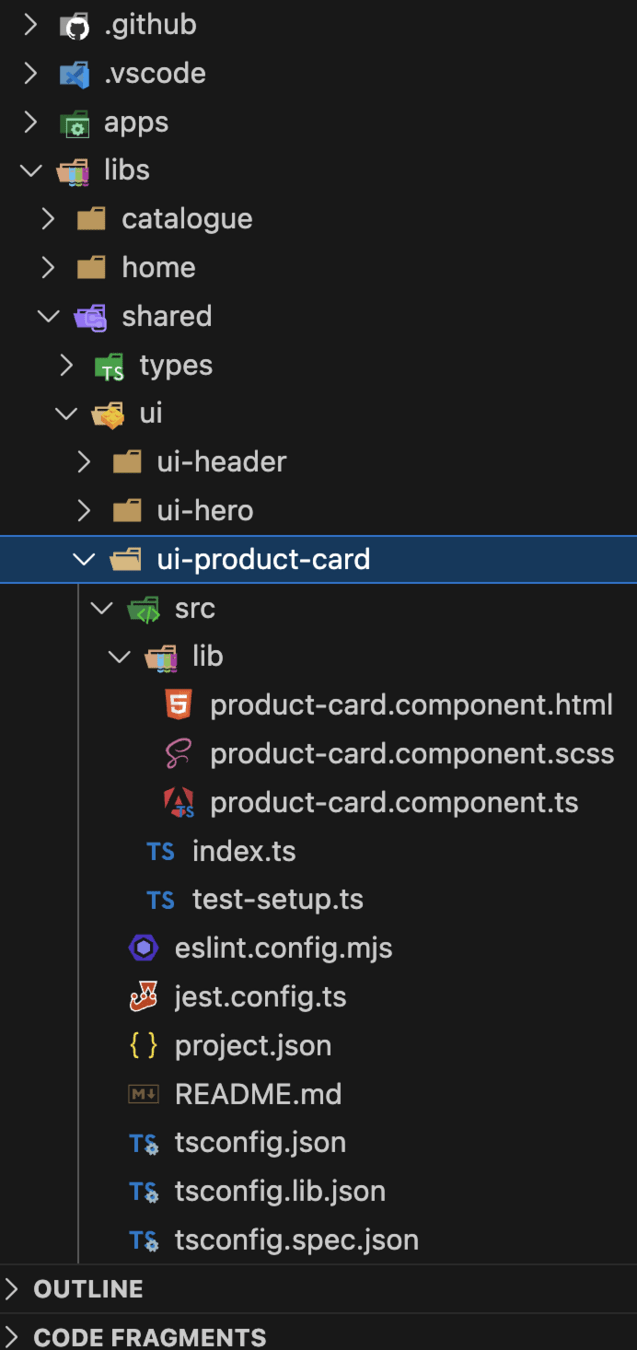
npx nx g @nx/angular:library \
  --directory=libs/shared/ui/ui-product-card \
  --name=shared-ui-product-card
move
libs/catalogue/feature-catalogue-list/src/lib/components/product-card.component.ts
same three fixes as last time: barrel, import, empty folder
It takes inputs and emits outputs. That makes it type:ui, and it goes in scope:shared — not in the domain that happened to need it first.
profanis
STEPS 3–4 / 6 · CHECK
The feature got smaller
CHECKPOINT
✓ The app still serves and the catalogue still renders cards
✓ feature-catalogue-list has no services/ and no components/ folder left
✓ Every import it makes now starts with @workshop/
Relative imports are how a feature quietly grows tentacles. Once everything crosses a package boundary, the graph can see it — and so can lint.
Which is exactly what happens next.
profanis
STEP 5 / 6
Ask the tooling what it thinks
TASK
npx nx run-many -t lintit fails — linting home-feature-home
A project tagged type:feature can only depend on libs tagged
type:ui, type:util, type:model, type:feature, type:data-access
@nx/enforce-module-boundaries
Read it carefully. The library it is complaining about is not tagged at all.
profanis
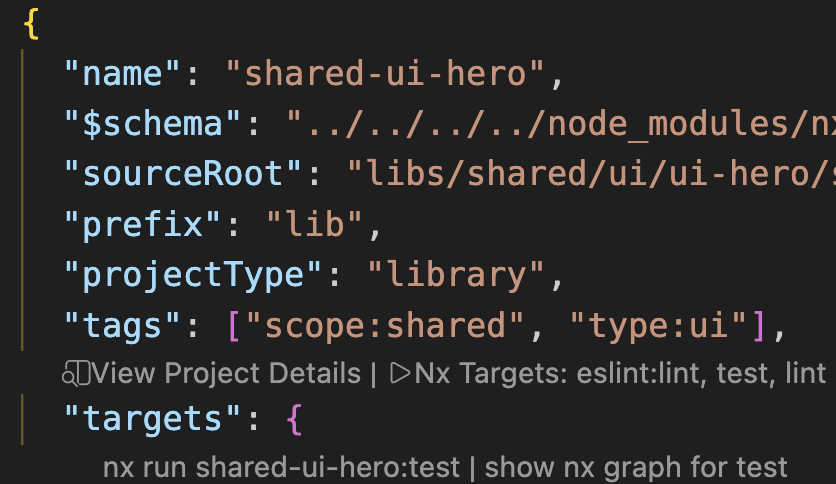
STEP 5 / 6
Tell Nx what these libraries are
HINT
open the project.json of
shared-ui-header
shared-ui-hero
shared-ui-product-card
"tags": ["scope:shared", "type:ui"]Run npx nx run-many -t lint again — it should pass.
Then open eslint.config.mjs and read depConstraints. That is the whole architecture, written down as rules.
type: is what a library is. scope: is who it belongs to. You need both.
profanis
STEP 5 / 6 · CHECK
Every library declares itself
CHECKPOINT
✓ npx nx run-many -t lint passes on every project
✓ The libraries you created in steps 1–4 all carry a scope: and a type:
✓ You can point at the rule in eslint.config.mjs that would have caught it
An untagged library is invisible to the rules — it is not "allowed everywhere", it is unenforceable. Tag on creation, not later.
profanis
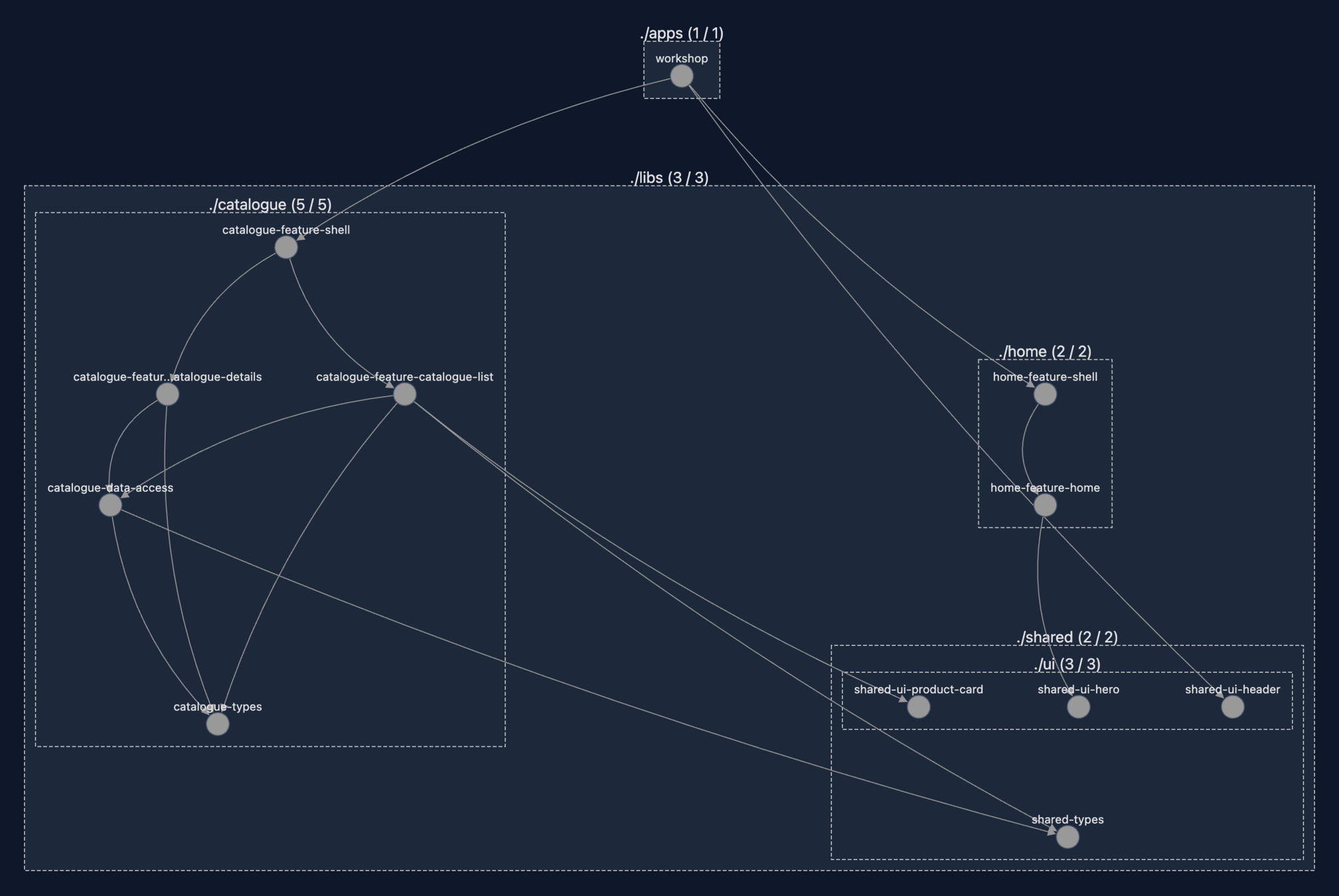
Lint is happy. The graph is not.
TASK
npx nx graphFind the edge that leaves scope:shared and lands inside scope:catalogue.
One arrow. Everything else is fine.
profanis
STEP 6 / 6
STEP 6 / 6
Shared code cannot know about domains
HINT
shared-ui-product-card → catalogue-types
A scope:shared library may depend on other shared libraries only. The moment it reaches into a domain, it stops being shared — it is a catalogue library sitting in the wrong folder.
The fix
Move the type the card needs into shared-types, and re-point both importers at it.
Ask first whether the type is really catalogue-specific. If two scopes need it, it was never domain knowledge.
profanis
STEP 6 / 6 · CHECK
No arrow leaves shared
CHECKPOINT
✓ The card now imports from shared-types
✓ Lint still passes
✓ The app still serves
Lint never complained about this one. The graph found it.
Worth adding a scope: constraint so it can never come back.
profanis
4 new libraries, each one a deliberate type
2 shells — the app knows domains, not pages
1 lint rule that now fails the build on a bad import
1 violation you found by looking at a picture
The structure is settled. Nothing you add from here can quietly break it.
Next: what actually goes inside these libraries — and why the way we manage state has to change too.
profanis
Hands-on
- Create a "shell" library for the Catalogue
- Create a "shell" library for the Home
- Create a catalogue data-access library
- Create a ui product-card library
- Identify and solve the problem with the product.ts
profanis
Start Fresh
Preparation
git clone --branch lab/one https://github.com/profanis/nx-signals-workshop.git
cd nx-signals-workshop/
npm i
Let me guide you through...
profanis
Create a "shell" library for the Catalogue 1/3
Hint
npx nx g @nx/angular:library --directory=libs/catalogue/feature-shell --name=catalogue-feature-shell- Use the Nx CLI
profanis
- Delete the auto-generated component
- Create the lib-routes.ts file under lib dir
Create a "shell" library for the Catalogue 2/3
Hint
// lib.routes.ts

export const catalogueRoutes: Route[] = [
  {
    path: '',
    // ??
  },
  {
    path: ':id',
    // ??
  },
];
profanis
Create a "shell" library for the Catalogue 3/3
Hint
- Update the app/app.routes.ts
// app/app.routes.ts

{
    path: 'catalogue',
    loadChildren: () =>
      import('PATH TO FEATURE SHELL').then(
        (m) => m.ROUTES
      ),
  },
profanis
(note: locate the path of the library in the tsconfig.base.json)
Create a "shell" library for the Home
Hint
- Update the app/app.routes.ts
  {
    path: 'home',
    loadChildren: () =>
      import('PATH TO FEATURE SHELL').then(
         (m) => m.ROUTES
      ),
  }
- Use the NX console and give the correct project name
profanis
Create a catalogue data-access library
- Move the file from
libs/catalogue/feature-catalogue-list/src/lib/services/products.api.ts
to data-access library
profanis
Create a ui library for the product-card
- Move the file from
libs/catalogue/feature-catalogue-list/src/lib/components/product-card.component.ts
to ui-product-card
profanis
lint all - problem
npx nx run-many -t lintRun the command
it will throw...
...

Linting "home-feature-home"...

/libs/home/feature-home/src/lib/home-page.component.ts

2:1   error    A project tagged with "type:feature" can only depend on libs tagged with
 "type:ui", "type:util", "type:model", "type:feature", "type:data-access"
 @nx/enforce-module-boundaries
profanis
lint all - solution
Identify the project.json of the libraries:
Add the tag -> "type:ui"
npx nx run-many -t lintRun the command again:
Identify the module boundaries in the eslint.config.mjs
profanis
Identify and solve the problem with the product card
Hint
nx graphprofanis
Identify and solve the problem with the product card -> solution
Hint
nx graphprofanis
Βridge the Structure (Nx) and State (Signals)
profanis
profanis
- smart variables that notify anyone who's interested when their value changes.
What are Signals?
- Traditional change detection checks everything. Signals allow tracks specific values
profanis
- Traditional Change Detection can be slow on complex applications
Why Signals?
- zone.js is great but triggers the CD multiple times
profanis
Zone.js
User Interaction
dom event (click)
zone.js
(Angular Zone)
Change Detection
UI Update
profanis
profanis
Angular checks the entire component tree when the micro-task queue is empty
profanis
Default + Observable
OnPush + Observable
OnPush + Signals
profanis
OnPush + Observable
OnPush + Signals
profanis
OnPush + Signals
profanis
profanis
Observers
Subject
Consumers
Producers
profanis
Template
counter
Consumers
Producers
profanis
counter = signal<number>(0);
Producer
profanis
counter = signal<number>(0);
Returns a WritableSignal
Producer
profanis
counter = signal<number>(0);
Define the type
Producer
profanis
counter = signal<number>(0);
Default value
Producer
profanis
<div>
  {{ counter() }}
</div>
Consumer
Template Context
Consumer
profanis
const evenOrOdd =
      computed(() => counter() % 2 === 0 ? 'even' : 'odd');
Consumer & Producer
Producer
Consumer
profanis
computed
profanis
const derivedState =
         computed(() => mySignalArray().length);
- The derivedState is getting updated when the source signal has a change
* source signal = mySignalArray()
profanis
effect
profanis
constructor() {
   effect(() => {
      console.log(mySignalArray().length)
   })
}
- The effect runs synchronously
- The effect registers the referenced signals as dependencies.
- Logging
- DOM Manipulation
- Storage handling (e.g. localStorage)
- Update other signals*
Use for
profanis
equality
profanis
mySignalArray = signal([], { equal: _.isEqual })

constructor() {
   effect(() => {
      console.log(mySignalArray().length)
   })
}
- by default signals use the Object.is() comparison
- optionally provide an equality function
profanis
signal
inputs
profanis
@Component({...})
export class MyComponent {
  @Input() isChecked = false;
}
profanis
@Component({...})
export class MyComponent {
  isChecked = input(false);
}
read-only signal
profanis
export interface UserModel {
  name: string;
  age: number;

  /*Social*/
  address: string;
  twitter: string;
  linkedin: string;
  github: string;
  instagram: string;
  facebook: string;
  website: string;
  email: string;
}
profanis
@Component({...})
export class MyComponent implements OnChanges {
  @Input({ required: true }) user!: UserModel;
  userSocials: string[] = [];

  ngOnChanges(changes: SimpleChanges): void {
    if (changes.user) {
      const { name, age, ...userSocials } = this.user;
      this.userSocials = Object.values(userSocials);
    }
  }
}
profanis
@Component({...})
export class MyComponent {
  user = input.required<UserModel>();
  userSocials = computed(() => {
    const { name, age, ...userSocials } = this.user();
    return Object.values(userSocials);
  });
}
profanis
model input
profanis
@Component({...})
export class ChildComponent {
  @Input({ required: true }) name!: string;
  @Output() nameChange = new EventEmitter<string>();
}
profanis
@Component({
  selector: 'app-parent',
  standalone: true,
  imports: [ChildComponent],
  template: `
    <app-child 	[name]="username"
				(nameChange)="changeHandler($event)" />
  `,
})
export class ParentComponent {
   username = 'profanis';
}
profanis
@Component({
  selector: 'app-parent',
  standalone: true,
  imports: [ChildComponent],
  template: `
    <app-child 	[name]="username"
				(nameChange)="changeHandler($event)" />
  `,
})
export class ParentComponent {
   username = 'profanis';
}
profanis
@Component({
  selector: 'app-parent',
  standalone: true,
  imports: [ChildComponent],
  template: ` <app-child [(name)]="username" /> `,
})
export class ParentComponent {
  username = 'profanis';
}
profanis
@Component({...})
export class ChildComponent {
  // @Input({ required: true }) name!: string;
  // @Output() nameChange = new EventEmitter<string>();
  name = model<string>();
}
profanis
@Component({...})
export class ChildComponent {
  // @Input({ required: true }) name!: string;
  // @Output() nameChange = new EventEmitter<string>();
  name = model.required<string>();
}
profanis
@Component({...})
export class ChildComponent {
  name = model<string>(); // writable signal

  addTitle() {
    this.name.update((name) => `Mr. ${name}`);
  }
}
profanis
@Component({...})
export class ChildComponent {
  name = model<string>(); // writable signal

  titleExists = computed(() => this.name().startsWith('Mr.'));
}
profanis
@Component({
  selector: 'app-parent',
  standalone: true,
  imports: [ChildComponent],
  template: ` <app-child [(name)]="username" /> `,
})
export class ParentComponent {
  username = 'profanis';
}
profanis
new output
profanis
@Component({...})
export class ChildComponent {
  name = input.required<string>();
  @Output() nameChange = new EventEmitter<string>();
}
profanis
@Component({...})
export class ChildComponent {
  name = input.required<string>();
  nameChange = output<string>()
}
profanis
@Component({...})
export class ChildComponent {
  @Output() formIsValid = this.form.statusChanges.pipe(
     map((status) => status === 'VALID'),
  );
}
profanis
import { outputFromObservable } from '@angular/core/rxjs-interop';

@Component({...})
export class ChildComponent {
  formIsValid = outputFromObservable(
    this.form.statusChanges.pipe(
            map((status) => status === 'VALID'))
  );
}
profanis
profanis
view queries
@Component({
  selector: 'app-parent',
  template: ` <div #child>Child wrapper</div> `,
})
export class ParentComponent {
  child = viewChild('child', { read: ElementRef<HTMLElement> });

  constructor() {
    effect(() => {
      const child = this.child();
      if (child) {
        console.log('Child element:', child.nativeElement);
      }
    });
  }
}
profanis
@Component({
  selector: 'app-parent',
  template: ` <div #child>Child wrapper</div> `,
})
export class ParentComponent {
  child = viewChild.required('child', { read:
                                       	ElementRef<HTMLElement> });

  constructor() {
    effect(() => {
      const child = this.child();
      console.log('Child element:', child.nativeElement);
    });
  }
}
profanis
<app-parent>
    <app-child></app-child>
</app-parent>
profanis
@Component({
  selector: 'app-parent',
  imports: [ChildComponent],
})
export class ParentComponent {
  child = contentChild(ChildComponent);

  constructor() {
    effect(() => {
      const childComponent = this.child();
    });
  }
}
<app-parent>
<app-child></app-child>
</app-parent>profanis
@Component({
  selector: 'app-parent',
  imports: [ChildComponent],
})
export class ParentComponent {
  child = contentChild.required(ChildComponent);

  constructor() {
    effect(() => {
      const childComponent = this.child();
    });
  }
}
@Component({ })
export class ChildComponent {
buttonClick = output<void>();
onButtonClick() {
this.buttonClick.emit();
}
}
profanis
export class ParentComponent {
  child = contentChild(ChildComponent);

  constructor() {
    effect(() => {
      const childComponent = this.child();

      if (childComponent) {
        const buttonClick$ = outputToObservable(childComponent.buttonClick);

        buttonClick$.subscribe(() => {
          console.log('Child button was clicked!');
        });
      }
    });
  }
}
Hands-on
The libraries are in place. Now what goes inside them.
Three exercises, one idea:
stop recomputing, start deriving
1 A value the template keeps asking for → derive it once
2 Two components that need to talk → signal in, signal out
3 State two features share → one signal, many readers
profanis
Three exercises
1 Get the function out of the template — use computed
2 A filter component with signal input and output
3 Favourite products — shared state in a service
Branch: lab/two — it already contains every answer from the last section, so nobody starts behind.
profanis
SETUP
Move to the next branch
TASK
git stash push -u -m "my lab one work"
git checkout lab/two
npm i
lab/two already has the two shells, the data-access library, the ui library and every tag you added. Your own version is safe in the stash if you want it later.
The exercises below are marked TODO in the code. Search the workspace for it if you lose your place.
profanis
EXERCISE 1 / 3
Get the function out of the template
TASK
libs/catalogue/feature-catalogue-details/…/product-details.component.ts
1 Replace getStarArray() with a computed called commentsView
2 Each comment carries its own stars array
3 Update the template, then delete the function
Why it matters: a function in a template runs on every change detection pass, for every comment, forever. Angular cannot know whether the answer changed, so it asks again.
A computed runs once and then only when something it reads actually changes.
profanis
EXERCISE 1 / 3
Shape of the answer
HINT
commentsView = computed(() =>
  this.comments().map((comment) => ({
    ...comment,
    stars: Array.from({ length: 5 }, (_, i) => i < comment.rating),
  }))
);
<!-- template: iterate commentsView(), read comment.stars -->
@for (comment of commentsView(); track comment.user) { ... }profanis
EXERCISE 1 / 3 · CHECK
Derived, not recomputed
CHECKPOINT
✓ The stars still render on the product details page
✓ getStarArray is gone — not unused, gone
✓ There is no () call in the template except reading a signal
Worth noticing: the shape of the data changed to fit the view. That is what a view model is, and it belongs next to the component — not in the type library.
profanis
EXERCISE 2 / 3
Make the filter a real component
TASK
libs/catalogue/feature-catalogue-list/…/plant-filter.component.ts
1 Turn searchTerm from a local signal into an input
2 Add a search output and emit from the template
3 Delete emitAnEvent — it was scaffolding
4 Use the component in catalogue.component.html
The component owns no state. It is handed a value and reports an intent. Everything else stays where it was.
profanis
EXERCISE 2 / 3
Inside the filter
HINT
export class PlantFilterComponent {
  searchTerm = input<string>();
  search = output<string>();
}
<!-- in the component's own template -->
<input matInput [value]="searchTerm()"
(input)="search.emit($event.target.value)" />Both are functions you call. input() gives you a read-only signal; output() gives you something with .emit() — and no RxJS in sight.
profanis
EXERCISE 2 / 3
Use it in the catalogue
HINT
<!-- catalogue.component.html — replaces the whole mat-form-field -->
<lib-plant-filter
  [searchTerm]="state.searchTerm()"
  (search)="onSearchChange($event)"
/>
Easy to forget: add PlantFilterComponent to the imports array of CatalogueComponent.
onSearchChange already exists and already does the right thing. You are only changing who calls it.
profanis
EXERCISE 2 / 3 · CHECK
Same behaviour, one less responsibility
CHECKPOINT
✓ Typing in the box still filters the list
✓ Clearing the search from the empty state still works
✓ PlantFilterComponent holds no state of its own
The second check is the interesting one. The clear button calls onSearchChange(''), the state updates, and the input follows — because the value flows down as a signal rather than being held in two places.
profanis
EXERCISE 3 / 3
Favourite products — the state
TASK
libs/catalogue/data-access/src/lib/favorites.state.ts
1 A private writable signal holding the favourite IDs
2 count — a computed, not a signal you maintain by hand
3 isFavorite(id) returning a boolean
4 toggleFavorite(id) adding or removing
The signal is private on purpose. Nobody outside this service is allowed to write to it — they go through the two methods. That is the whole discipline.
profanis
EXERCISE 3 / 3
Shape of the answer
HINT
private favorites = signal<Set<string>>(new Set());

count = computed(() => this.favorites().size);

isFavorite(productId: string): boolean {
  return this.favorites().has(productId);
}

toggleFavorite(productId: string): void {
  this.favorites.update((current) => {
    const next = new Set(current);          // a NEW Set — this matters
    if (next.has(productId)) next.delete(productId);
    else next.add(productId);
    return next;
  });
}
Mutate the existing Set and nothing will re-render. Signals compare by reference — same object, no change, no notification.
profanis
EXERCISE 3 / 3
Two readers, one source
TASK
5 catalogue.component.ts — a computed that pairs each product with its favourite flag, and onToggleFavorite calling the service
6 app.ts — read count and feed the header badge
Two parts of the app, in different libraries, reading the same state. Neither one knows the other exists.
Nothing subscribes. Nothing unsubscribes. Nothing needs to be told to refresh.
profanis
EXERCISE 3 / 3
Shape of the answer
HINT
// catalogue.component.ts
productsWithFavorites = computed(() =>
  this.state.products().map((product) => ({
    ...product,
    isFavorite: this.favoritesState.isFavorite(product.id),
  }))
);
// app.ts
private readonly favoritesState = inject(FavoritesState);
favoriteCount = this.favoritesState.count;
// app.html
<lib-ui-header [favoriteCount]="favoriteCount()" />profanis
EXERCISE 3 / 3 · CHECK
One click, two places update
CHECKPOINT
✓ Clicking a heart fills it in and the header count goes up
✓ Clicking it again reverses both
✓ Search for something, clear it — your favourites survive
✓ Nothing in the codebase says subscribe
Ask yourself
The app now imports from catalogue-data-access. Does that break the rules you set up in the last section?
profanis
A value the template stopped asking for
A component that owns nothing and reports everything
State two libraries share without knowing about each other
All of it synchronous. All of it already in memory.
Next: what happens when the value has to come from a server — and has not arrived yet.
profanis
Hands-on
- Stop calling a function in the template. Use computed
- Create a filter component and use signal input/output
- Manage Favorite Products
profanis
Stash your changes
Preparation
git stash push -u -m "my changes: lab two"Checkout
git checkout lab/twoLet me guide you through...
profanis
Stop calling a function in the template. Use computed
1. Locate the product-details.component.ts
2. The getStarArray function is currently called in the template. This is inefficient. Refactor it to use a computed signal.
Create a computed signal called commentsView that derives the comments with stars from the existing data.
3. Update the template
profanis
Create a filter component and use signal input/output
1. Locate the plant-filter.component.ts
2. Define a searchTerm input (searchTerm = input<string>())
3. Define an output for when the user types.
4. Update the catalogue.component.html and replace the plain input with this component
profanis
Manage Favorite Products 1/2
1. Locate the favorites.state.ts
2. Define a private writable signal to hold the list of favorite product IDs
3. Expose a computed signal count that returns the number of favorites
4. Expose a method isFavorite(id: string) that returns boolean for a specific ID
5. Implement toggleFavorite(id: string) to update the state
profanis
Manage Favorite Products 2/2
6. Inject the FavoritesState in the catalogue.component.ts and create a computed property that returns the products and the correct isFavorite boolean value
7. Inject the FavoritesState in the app.ts and use the favoriteCount as badge
profanis
Resources, I/O & Forms
profanis
profanis
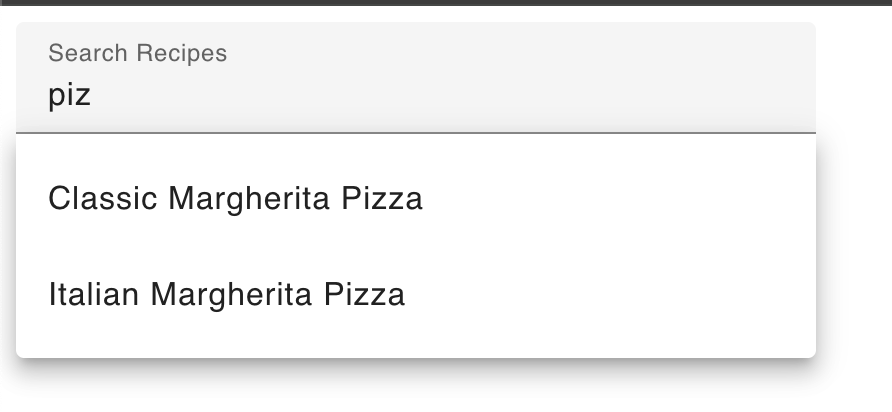
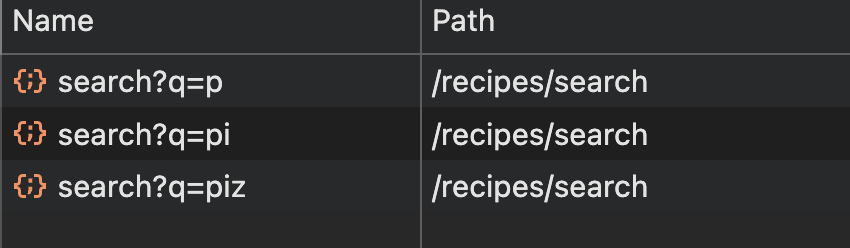
data fetching
profanis
profanis
signal<string>
profanis
signal<string>
profanis
signal<string>
cancel
cancel
profanis
How about effect?
profanis
time - 0
time - 1
request
request
100ms
500ms
profanis
time - 0
time - 1
request
request
100ms
500ms
profanis
time - 0
time - 1
request
request
100ms
500ms
profanis
time - 0
time - 1
request
request
100ms
500ms
profanis
Sync
Async
At some point we will have the data
profanis
At some point we will have the data
We will always have data
profanis
http
isLoading
error
data
profanis
http
isLoading()
error()
data()
profanis
httpResource
profanis
httpResource makes a reactive HTTP request and exposes the request status and response value
profanis
httpResource(
	?,
	?
)
profanis
httpResource(
	string | object | function ,
	?
)
profanis
httpResource(
	string | object | function ,
	options
)
profanis
// String
httpResource(`https://api.com/${signalValue()}`)
dependency
profanis
// Object
httpResource(
	{
		url: `https://api.com/${signalValue()}`,
		method: 'GET',
		params: { type: `${queryParamSignalValue()}` }
	}
)
dependency
profanis
// Object
httpResource(
	{
		url: `https://api.com/${signalValue()}`,
		method: 'GET',
		params: { type: `${queryParamSignalValue()}` }
	}
)
dependency
profanis
// Object
httpResource(
	{
		url: `https://api.com/${signalValue()}`,
		method: 'GET',
		params: { type: `${queryParamSignalValue()}` }
	}
)
Http verb
profanis
// Function
httpResource(() => `https://api.com/${signalValue()}`)
profanis
// Function
httpResource(() =>
             signalValue() ?
             `https://api.com/${signalValue()}` :
             undefined
)
profanis
// String with Options
httpResource(`https://api.com/${signalValue()}`, {
	defaultValue: {},
	parse: (response) => zodSchema.parse(response),
})
profanis
// String
resource = httpResource(`https://api.com/${signalValue()}`)
@if (resource.isLoading()) {
<div>Loading...</div>
}
@if (resource.error()) {
<div>Oops...</div>
}
@if (resource.value()) {
<div>{{ resource.value() }}</div>
}profanis
// String
resource = httpResource(`https://api.com/${signalValue()}`)
derivedState = computed(
() => resource.value().map(it => it.title)
)profanis
resource = rxResource({
  params: () => ({
    paramName: this.paramNameAsSignal(),
  }),
  stream: ({ params }) => this.serviceApi.get(params.paramName),
});
Dependency
Service to call
profanis
linkedSignal
profanis
listOfItems = signal(['item1', 'item2', 'item3']);

countOfItems = linkedSignal(() => this.listOfItems().length);
countOfItems.set(0)
listOfItems = signal(['item1', 'item2', 'item3']);

countOfItems = computed(() => this.listOfItems().length);
countOfItems.set(0)
profanis
listOfItems = signal(['item1', 'item2', 'item3']);

countOfItems = linkedSignal(() => this.listOfItems().length);
countOfItems.set(0)
listOfItems = signal(['item1', 'item2', 'item3']);

countOfItems = linkedSignal({
    source: this.listOfItems,
    computation: (items) => items.length,
});
countOfItems.set(0)
profanis
listOfItems = signal(['item1', 'item2', 'item3']);

countOfItems = linkedSignal({
    source: this.listOfItems,
    computation: (items) => items.length, // 3
});
countOfItems.set(0)
profanis
listOfItems = signal(['item1', 'item2', 'item3', 'item4']);

countOfItems = linkedSignal({
    source: this.listOfItems,
    computation: (items) => items.length, // 4
});
countOfItems.set(0)
profanis
profanis
profanis
profanis
listOfItems = signal([
  { name: 'item 1' },
  { name: 'item 2' },
  { name: 'item 3' }
]);


// keeps the selected item
selectedItem = listOfItems[0];
profanis
listOfItems = signal([
  { name: 'item 1' },
  { name: 'item 2' },
  { name: 'item 3' }
]);


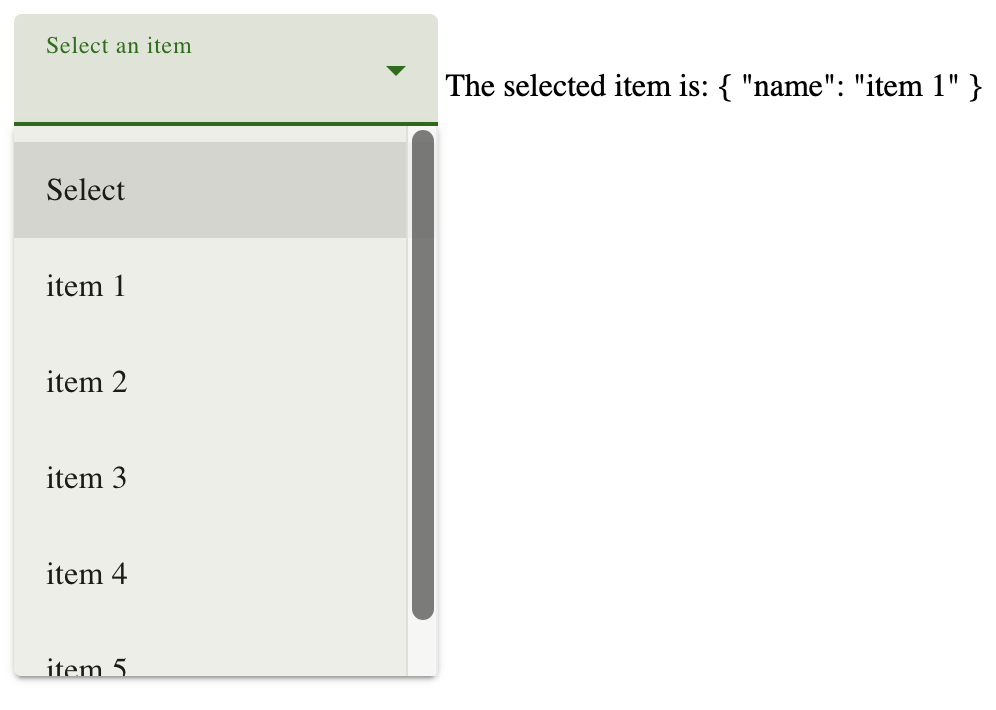
// an HTTP call is happening
http.get().subscribe(data =>
	this.listOfItems.set([...data])
)
profanis
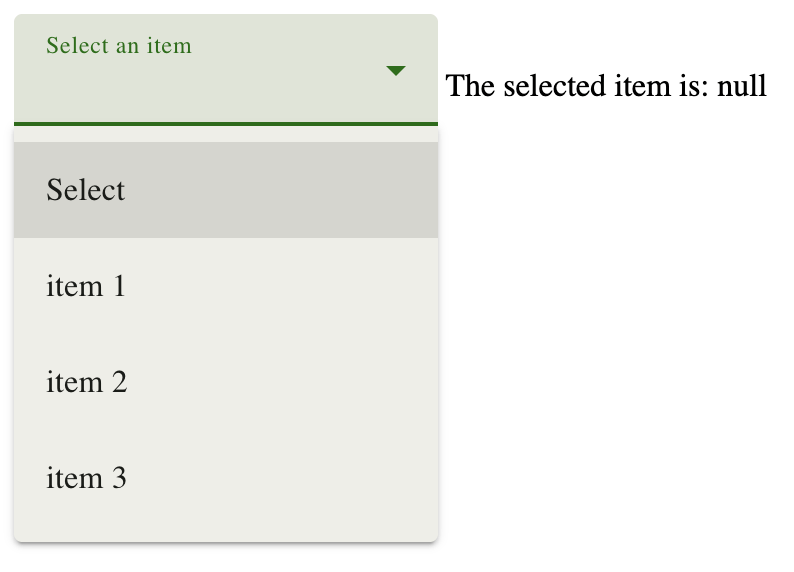
profanis
listOfItems = signal([
  { name: 'item 1' },
  { name: 'item 2' },
  { name: 'item 3' }
]);


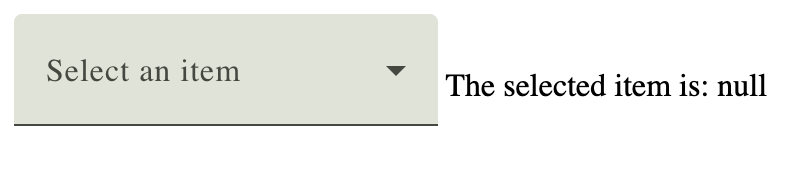
selectedItem = signal<Item | null>(null);
profanis
listOfItems = signal([
  { name: 'item 1' },
  { name: 'item 2' },
  { name: 'item 3' }
]);


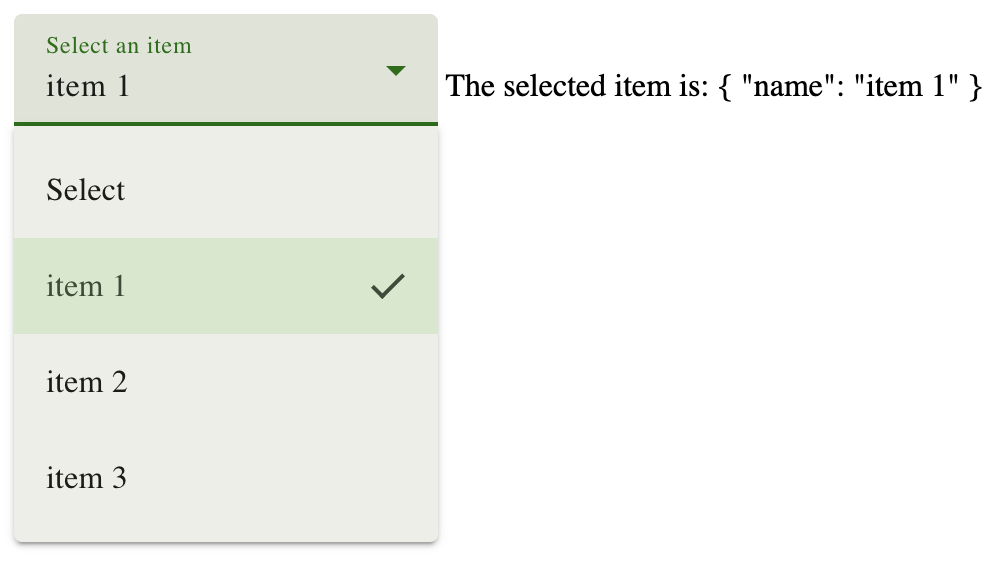
selectedItem = linkedSignal({
  source: this.listOfItems,
  computation: (items, previous) =>
    items.find((item) => item.name === previous?.value.name),
});
profanis
listOfItems = signal([
  { name: 'item 1' },
  { name: 'item 2' },
  { name: 'item 3' }
]);


selectedItem = linkedSignal({
  source: this.listOfItems,
  computation: (items, previous) =>
    items.find((item) => item.name === previous?.value.name),
});
profanis
source
value
profanis
const counter = signal(0);profanis
const counter = signal(0);profanis
<div> {{ counter() }} </div>profanis
<div> {{ counter() }} </div>profanis
<div> {{ counter() }} </div>profanis
<div> {{ counter() }} </div>const evenOrOdd =
computed(() => counter() % 2 === 0 ? 'even' : 'odd');profanis
<div> {{ counter() }} </div>const evenOrOdd =
computed(() => counter() % 2 === 0 ? 'even' : 'odd');profanis
<div> {{ counter() }} </div>const evenOrOdd =
computed(() => counter() % 2 === 0 ? 'even' : 'odd');profanis
"Since Angular knows how the data flows, can have a more fine-grained change detection"
profanis
profanis
const isValid = signal(true);
const username = signal('profanis');

effect(() => {
  if (isValid() === true) {
    console.log(username());
  }
});

// Update signal values
isValid.set(false);
username.set('profanis2');
profanis
effect(() => {
  if (isValid() === true) {
    console.log(username());
  }
});

// Update signal values
isValid.set(false);
username.set('profanis2');
Consumers
Producers
isValid
effect
username
Push (notification)
profanis
effect(() => {
  if (isValid() === true) {
    console.log(username());
  }
});

// Update signal values
isValid.set(false);
username.set('profanis2');
Consumers
Producers
isValid
username
Push (notification)
effect
profanis
effect(() => {
  if (isValid() === true) {
    console.log(username());
  }
});

// Update signal values
isValid.set(false);
username.set('profanis2');
Consumers
Producers
isValid
username
Pull (value)
effect
profanis
effect(() => {
  console.log(`${isValid()} - ${username()}`);
});

isValid.set(false);
username.set('profanis2');
Consumers
Producers
isValid
username
Push (notification)
effect
profanis
Consumers
Producers
isValid
username
Push (notification)
effect(() => {
  console.log(`${isValid()} - ${username()}`);
});

isValid.set(false);
username.set('profanis2');
effect
profanis
Consumers
Producers
isValid
username
Pull (value)
Pull (value)
effect(() => {
  console.log(`${isValid()} - ${username()}`);
});

isValid.set(false);
username.set('profanis2');
effect
profanis
effect
isValid
username
profanis
Agentic Coding with AI
profanis
Bridging the Framework Gap
The Legacy Trap
- LLMs often default to NgModules and decorators
Agent Skills (The Brain)
- In-repo rules for signals and modern angular
MCP Servers (The Hands)
- Get best practices, search documentation
profanis
Set it up
npx skills add https://github.com/angular/skills
profanis
Templates for Modern Generation
angular-signals
- Primitives: signal, computed, resource
angular-component
- Standalone with signal-based I/O
profanis
Set it up
ng mcpprofanis
Example
# To start using the Angular CLI MCP Server,
# add this configuration to your host:

{
  "mcpServers": {
    "angular-cli": {
      "command": "npx",
      "args": ["-y", "@angular/cli", "mcp"]
    }
  }
}
.mcp.json
profanis
{
  "enabledMcpjsonServers": ["angular-cli"], // <-- you need this line
  "extraKnownMarketplaces": {
    "nx-claude-plugins": {
      "source": {
        "source": "github",
        "repo": "nrwl/nx-ai-agents-config"
      }
    }
  },
  "enabledPlugins": {
    "nx@nx-claude-plugins": true
  }
}
.claude/settings.json
profanis
Framework Intelligence inside the Modulith
The Synergy
- Nx defines the where (Architecture); Angular MCP ensures the how (Standards).
Angular CLI MCP tools
- list_projects -> requires an angular.json
- get_best_practices -> useful
- search_documentation -> useful
- find_examples -> useful
- onpush_zoneless_migration -> useful
- ai_tutor -> useful (teach me angular signal forms)
profanis
workflow 1 -> Find & Migrate Legacy Inputs
Search all libs in this Nx workspace for components still using the @Input() decorator. For each one found, use the angular-cli MCP modernize tool with the signal-input-migration transformation to convert them to the signals-based input() function.
profanis
Find the affected changes using Nx skills. For each project, use the angular-cli MCP search_documentation to look up the relevant breaking change, then use find_examples to show the correct modern pattern. Apply the fix.
workflow 2 -> Modernize → Targeted Fix
profanis
Using the /nx-workspace skill, list all projects in this workspace and identify which are applications vs libraries — including their source root paths.
Then use the angular-cli MCP onpush_zoneless_migration on each library's source root and report back a summary of what needs to change in each project before we can go zoneless.
workflow 3 -> Agentic Migration Audit
Everything so far was already in the browser
The catalogue has been showing you eight hardcoded plants all day.
Time to delete them.
1 A request that refires when its inputs change → rxResource
2 State that follows a source but keeps its history → linkedSignal
3 A view over all of it → computed, same as this morning
profanis
Three exercises, about 25 minutes
1 Fetch the products with rxResource
2 Accumulate pages with linkedSignal
3 Filter the result with computed
Branch: lab/three — everything from this morning is already in it.
All three live in one file: catalogue.state.ts. Do them in order — each one keeps the app running.
profanis
SETUP
Last branch of the day
TASK
git stash push -u -m "my lab two work"
git checkout lab/three
One file does almost all the work today:
libs/catalogue/feature-catalogue-list/src/lib/catalogue/catalogue.state.ts
Open it now and read it top to bottom before you change anything. Two of the three answers are already half-written in there.
profanis
EXERCISE 1 / 3
Fetch the products
TASK
1 Create a private productsResource that reloads whenever page changes
2 Make totalProducts read the real total instead of the hardcoded 70
3 Delete mockProducts — all 8 of them
You are not calling the API. You are declaring which signals the request depends on. Angular decides when to run it.
The catalogue keeps rendering the mock list until exercise 3 — that is deliberate, so nothing goes blank while you work.
profanis
EXERCISE 1 / 3
Shape of the answer
HINT
private productsResource = rxResource({
  params: () => ({ page: this.page() }),
  stream: ({ params }) => this.productsApi.getProducts(params.page),
});

totalProducts = computed(() => this.productsResource.value()?.total || 0);
params is the dependency list. Read a signal in there and the request refires when it changes.
stream is the call itself. It receives what params produced — it does not read signals of its own.
.value() is undefined until the first response lands. That is why the ?. is there.
profanis
EXERCISE 1 / 3 · CHECK
The request fires by itself
CHECKPOINT
✓ DevTools → Network shows one products request on load — nobody called it
✓ "Showing 8 of … plants" now reads a number that came from the server
✓ The grid still shows the same 8 plants. It should — you have not switched it over yet
No ngOnInit. No subscribe. No takeUntilDestroyed. The request exists because something reads its value.
profanis
EXERCISE 2 / 3
Keep the pages you already loaded
TASK
1 combinedProducts is already written — except for its source. Give it one.
2 Read the computation underneath it. Be ready to say out loud what previous.value is for.
Why not a computed? A computed throws its previous value away every time. Page 2 would replace page 1 instead of joining it.
A linkedSignal follows a source and can see what it held before. Read the computation that is already there — previous.value is the whole point.
profanis
EXERCISE 2 / 3
One line. That is the whole exercise.
HINT
// catalogue.state.ts
private combinedProducts = linkedSignal({
  source: this.productsResource.value,   // <- the only line you write
  computation: (source, previous) => { /* already written for you */ },
});
profanis
EXERCISE 2 / 3 · CHECK
Still eight plants on screen
CHECKPOINT
✓ The app compiles and still shows the mock plants
✓ Clicking Load More fires a second request, for the next page
✓ No error in the console — the linkedSignal now has a real source to call
Nothing new appears in the grid yet, because the grid still reads the mock list. The plumbing is done; the tap is closed.
Watch the Network tab instead of the page. That is where exercise 2 is visible.
profanis
EXERCISE 3 / 3
Open the tap
TASK
1 Turn products into a computed over combinedProducts
2 Filter it by searchTerm — empty term means everything
This is the one line that connects everything: the resource feeds the linkedSignal, the linkedSignal feeds this, and this feeds the grid.
Nothing downstream changes. productsWithFavorites in the component keeps working, untouched, because it only ever asked for products().
profanis
EXERCISE 3 / 3
Shape of the answer
HINT
products = computed(() => {
  const term = this.searchTerm().toLowerCase().trim();

  if (!term) {
    return this.combinedProducts();
  }

  return this.combinedProducts().filter((product) =>
    product.name.toLowerCase().includes(term)
  );
});
Delete mockProducts now if you have not already. TypeScript will tell you if anything still points at it.
profanis
EXERCISE 3 / 3 · CHECK
Seventy plants, no subscriptions
CHECKPOINT
✓ Real plants from the server, not the eight you knew by heart
✓ Load More appends — the grid grows, it does not swap
✓ Search still filters, and your favourites survive both
Now break it
Search for a plant you have not scrolled to yet. Nothing comes back.
You are filtering the pages you happen to have loaded, not the catalogue. What would you change — and which signal would the search term have to reach?
profanis
An empty folder and a CLI command
Then boundaries a linter could enforce
Then state that derives itself
Then a catalogue that fills itself from a server
Not one subscription. Not one ngOnInit. Not one manual refresh.
The architecture told you where code goes. The signals told you when it runs. Neither works as well without the other.
profanis
Hands-on
Fetch data using the rxResource
- Fetch data using rxResource
- Apply a pagination
profanis
Stash your changes
Preparation
git stash push -u -m "my changes: lab three"Checkout
git checkout lab/threeLet me guide you through...
profanis
Fetch data using rxResource
- In the catalogue.state.ts use an rxResource to get products on every page change
(get rid of the mockProducts)
profanis
Filter data using computed
- In the catalogue.state.ts convert the products to a computed property and use the searchTerm to filter the initial products
profanis
Apply a pagination
- In the catalogue.component.html invoke the onLoadMore
- Use a LinkedSignal
profanis
By Fanis Prodromou
Angular Signals: A Look Under the Hood and Beyond