Database Backups 101

Jeff Taylor
Principal Data Consultant
Database Consulting, LLC


Jeff Taylor
Principal Data Consultant
Database Consulting, LLC






Super Hero Suit


Database Backups 101
Jeff Taylor
Principal Data Consultant
Database Consulting, LLC
Database Backups 101
Questions
- What is a database backup?
Database Backups 101
Questions
- How many of you are DBA's?
- How many of you have backups of all of your databases?
- How many of you have restored one of those databases you backed up?
Database Backups 101
Outline
- Why should you back up your databases?
- That's what you were hired to do.
Database Backups 101
Questions
- Why should you restore your backups?
- So you don't get fired!
Database Backups 101
Backup Types
What Backup Types Are There?
- Full
- Copy Only
- Differential
- Transaction
- VM Snapshot
Database Backups 101
Recovery Models
Backup Types are based on your selected Recovery Model
- Full - Recovery Model: Full, Bulk-Logged, Simple
- Copy Only - Recovery Model: Full, Bulk-Logged, Simple
- Differential - Recovery Model: Full
- Transaction - Recovery Model: Full, Bulk-Logged
- VM Snapshot - Recovery Model: Full, Bulk-Logged, Simple
Database Backups 101
Backup Types
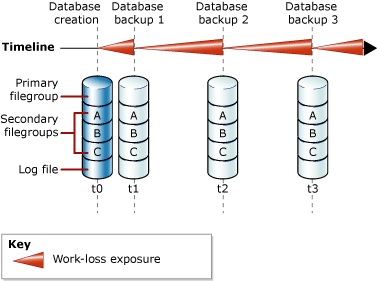
Simple - Maximum Risk, No Point In Time Recovery
Database Backups 101
Backup Types
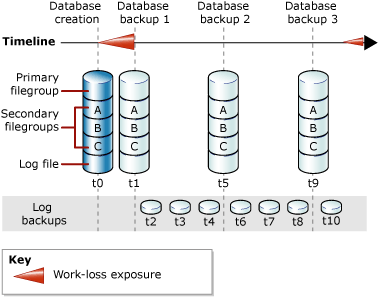
Full, Bulk Logged - Minimum Risk, Point in Time Recovery (RTO), Recovery Point (RPO)
Database Backups 101
Copy Only
- Copy Only is essentially a Full backup, but...
- No LSN
- No transaction continuity
- It doesn't break LSN
- How many files?
- Compression
- Decide Location - Network? Local? Fast Disk?
Database Backups 101
Full
- Creation point for LSN
- Required for point-in-time
- Required for transaction logs
- How many files?
- Decide Location - Network? Local? Fast Disk? Both? Blob? S3?
Database Backups 101
Transaction Logs
- Required for Full and Bulk Logged Recovery Models
- Don't forget - The log file will expand - potentially filling up your log drive
- Decide on your interval
- Monitor transactions and file size - increase/decrease
- How many files?
- Decide Location - Fast Disk
Database Backups 101
Always
- Always Checksum
- Always Verify
- If not using TDE, encrypt backups
- Use Compression
- Cleanup Backups
- Alert on Failures
- Add indexes to MSDB Backup tables
- Cleanup MSDB Backup Tables
Database Backups 101
Software
- SQL Server Maintenance Plans - Not extremely customizable - Free
-
RedGate - Customizable - UI - Job Based - Costs
-
Idera SQL Safe - Wouldn't Install without domain - UI - Costs
-
VM Snapshots - Not customizable - No point in time - All or nothing - entire server
- Ola Hallengren - Completely customizable - Free
Database Backups 101
Cons
- SQL Server Maintenance Plans - Very Limited, Issues with upgrades, accounts
-
RedGate - Customizable - UI can be heavy at times due to records kept in MSDB
-
Idera SQL Safe - Wouldn't Install without a domain
-
VM Snapshots - No point in time, freezes IO
-
If you have multiple backup software, you will break LSNs
- Ola Hallengren - Completely customizable, can backup in other formats
Database Backups 101
Full Sample
USE [DBA];
GO
EXEC [dbo].[DatabaseBackup]
@Databases = 'ALL_DATABASES',
@Directory = 'C:\Files\DatabaseBackups',
@BackupType = 'FULL',
@Verify = 'Y',
@CheckSum = 'Y',
@CleanupMode = 'AFTER_BACKUP',
@Compress = 'Y',
@CopyOnly = 'N',
@ChangeBackupType = 'Y',
@BackupSoftware = NULL,
@NumberOfFiles = 4,
@Description = 'Full Backup',
@DirectoryStructure = '{BackupType}{DirectorySeparator}{DatabaseName}{DirectorySeparator}',
@FileName = '{DatabaseName}_{BackupType}_{Year}{Month}{Day}_{Hour}{Minute}{Second}_{FileNumber}.{FileExtension}',
@CleanupTime = 336,
@LogToTable = 'Y';
Database Backups 101
Differential Sample
USE [DBA];
GO
EXEC [dbo].[DatabaseBackup]
@Databases = 'ALL_DATABASES',
@Directory = 'C:\Files\DatabaseBackups',
@BackupType = 'DIFF',
@Verify = 'Y',
@CheckSum = 'Y',
@CleanupMode = 'AFTER_BACKUP',
@Compress = 'Y',
@CopyOnly = 'N',
@ChangeBackupType = 'N',
@BackupSoftware = NULL,
@NumberOfFiles = 4,
@Description = 'Diff Backup',
@DirectoryStructure = '{BackupType}{DirectorySeparator}{DatabaseName}{DirectorySeparator}',
@FileName = '{DatabaseName}_{BackupType}_{Year}{Month}{Day}_{Hour}{Minute}{Second}_{FileNumber}.{FileExtension}',
@CleanupTime = 168,
@LogToTable = 'Y';
Database Backups 101
Transaction Sample
USE [DBA];
GO
EXEC [dbo].[DatabaseBackup]
@Databases = 'ALL_DATABASES',
@Directory = 'C:\Files\DatabaseBackups',
@BackupType = 'LOG',
@Verify = 'Y',
@CheckSum = 'Y',
@CleanupMode = 'AFTER_BACKUP',
@Compress = 'Y',
@CopyOnly = '',
@ChangeBackupType = '',
@BackupSoftware = NULL,
@NumberOfFiles = 1,
@Description = 'Tran Backup',
@DirectoryStructure = '{BackupType}{DirectorySeparator}{DatabaseName}{DirectorySeparator}',
@FileName = '{DatabaseName}_{BackupType}_{Year}{Month}{Day}_{Hour}{Minute}{Second}_{FileNumber}.{FileExtension}',
@CleanupTime = 7,
@LogToTable = 'Y';
Resources
Questions

Thank you
Jeff Taylor


Thank you for attending my session today. If you have any additional questions, please don't hesitate to reach out. My contact information is below.
Database Backups 101
By reviewmydb