Angular 2
Services + DI

Data Model
- In Angular 2 (similar to 1.x), data model is separated from the view.
- Data model is implemented as Services which are actually injectable classes
- Angular 2 uses a Dependency Injection mechanism to instansitate and inject Services
Dependency Injection & Provider
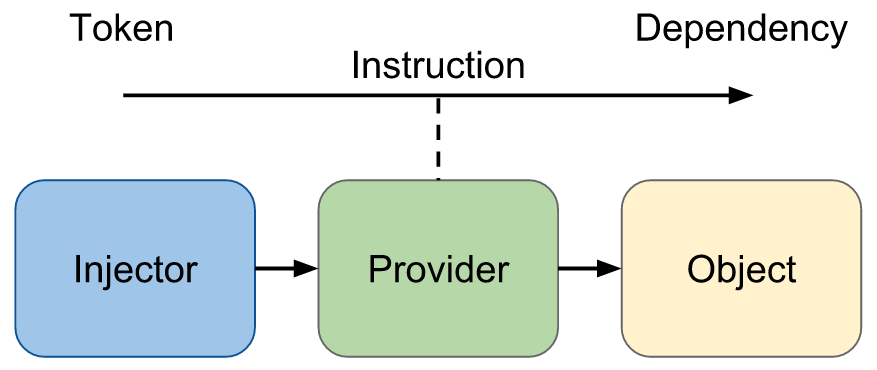
- The Angular 2 DI mechanism includes the following:
- Injector - The injector object that exposes APIs to us to create instances of dependencies.
- Provider - A provider is like a recipe that tells the injector how to create an instance of a dependency. A provider takes a token and maps that to a factory function that creates an object.
- Dependency - A dependency is the type of which an object should be created.
Service
- In Angular 2, a Service is simply a class that can be injected.
- @Injectable decorator is used to create an injectable service
import (Injectable) from 'angular2/core';

@Injectable()
export class DataService {
}- To use the service we need to tell the DI mechanism about the injectable object and its type
Depenency Injection Provider
- Telling the DI mechanism how to instanciate an inject is done by a Provider (a provider is like a recipe that tells the injector how to create an instance of a dependency)
-
Injector services are singletons (created once)
- Angualr 2 dependency injection support differnt types of providers: Classes, Factories and Values
- Angular 2 includes a provider API:
- provide(<provider token>, { useClass: <class name> })
- provide(<provider token>, { useFactory: <factory name> })
- provide(<provider token>, { useValue: <value name> })
- The provider token is the unique identifier for the Injector. It can be a string or better an OpaqueToken object
Depenency Injection Provider
- Providers can be created as needed either at Component level or bootstrap level
- At Component level, the decorator includes a providers list that can include needed providers
- For classes, instead of the long syntax for creating a provider we can just use the Injectable class type
import {Component, provide} from 'angular2/core';
import {DataService} from './data.service';

@Component({
    selector: 'my-component',
    template: `<div>My Component</div>`,
    // providers: [provide(DataService, {useClass: DataService}]
    providers: [DataService]
})
class MyComponent {
    constructor() {}
}
Service
- Once a provider is available, we can use Inject decorator to resolve and create the class instance (as described for the provider)
import {Component, Inject} from 'angular2/core';
import {DataService} from './data-service';

@Component({
    selector: 'my-component',
    template: `<div>My Component</div>`,
    providers: [DataService]
})
class MyComponent {

    constructor(@Inject(DataService) dataService : DataService) {
        console.log(this.dataService.data);
    }
}
Service
- TypeScript allows a shorter syntax instead of using @Inject
import {Component, Inject} from 'angular2/core';
import {DataService} from './data-service';

@Component({
    selector: 'my-component',
    template: `<div>My Component</div>`,
    providers: [DataService]
})
class MyComponent {

    constructor(private dataService : DataService) {
        console.log(this.dataService.data);
    }
}
Dependecy Injection Provider
- We can use providers not only for class but for other types for example values
import {Component, Inject, provide, OpaqueToken} from 'angular2/core';
import {DataService} from './data-service';

const LoginToken = new OpaqueToken('LoginServiceConfig');

@Component({
    selector: 'my-component',
    template: `<div>My Component</div>`,
    providers: [DataService,
                provide(LoginToken, { useValue: { url: 'myurl' } })]
})
class MyComponent {

    constructor(private dataService : DataService,
                @Inject(LoginToken) myLoginServiceConfig) {
        console.log(this.dataService.data);
        console.log(this.myLoginServiceConfig.url);
    }
}
Dependecy Injection Provider
- In Angular 2, there is no single injector. We can also have child injectors
- Child injectors can also have child injectors resulting in a hierarchy of injectors
- Each injector is a stand-alone injector that can have providers to resolve and create instances
Dependecy Injection Provider
- Child injectors are special in a way that if a dependency is not resolved, it will keep looking at the parent injector
- The top most injector is the root injector. Providers for it can be defined during application bootstrap
-
In Angular 2, root , partent and child injectors are created automatically when we define providers at any level
- Even if not completely true, it is useful to pretend that every component has its own injector.
Dependecy Injection Provider
- Example
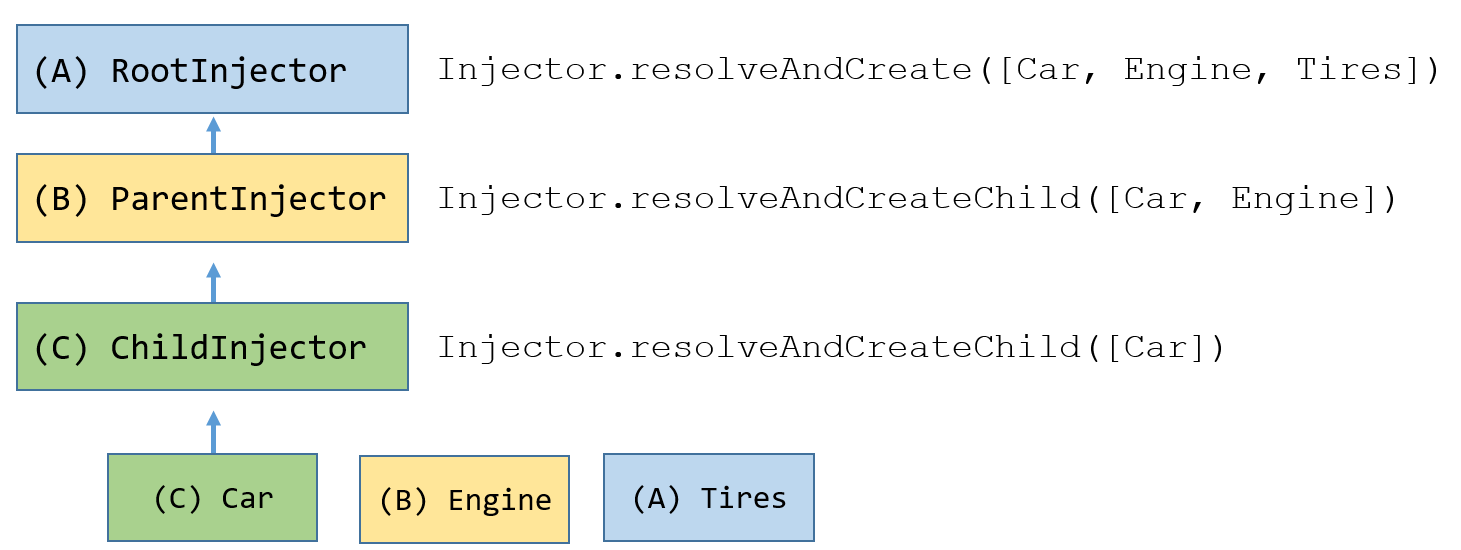
- If we want to have a Singelton Service for all Components it should be defined at Root Injector
Dependecy Injection Provider
- Adding providers for root injector at bootstrap can be done as additional parameter to bootstrap
import {bootstrap, provide} from 'angular2/platform/browser';

import {MyComponent} from './my-component.component';
import {DataService} from './data-service';

const LoginToken = new OpaqueToken('LoginServiceConfig');

bootstrap(MyComponent, [
         DataService, // same as provide(DataService, {useClass: DataService})
         provide(LoginToken, { useValue: { url: 'myurl' }})

     ])  // Additional parameter is an array of providers
    .catch( err => console.log(err));
Dependecy Injection Provider
- The major use for providers is for data model Services
- We can also use value providers for other types of Angular objects like Directives, PIPES, Validators, etc.
- Using value providers for other types enable us to take advantage of the DI mechanism for other types and not only for Services / Constants
@Directive(...)
class Draggable { }

@Directive(...)
class Morphable { }

@Component(...)
class RootCmp { }

// at bootstrap
bootstrap(RooCmp, [
  provide(DRAG_DIRECTIVES, {useValue: Draggable }),
  provide(MORPH_DIRECTIVES, {useValue: Morphable })
]);
Dependecy Injection Provider
- Angular 2 also comes with bulitin providers that we can use:
- ENV_PROVIDERS, HTTP_PROVIDER, ROUTER_PROVIDERS, etc.
import {bootstrap, provide} from 'angular2/platform/browser';

import {MyComponent} from './my-component.component';
import {DataService} from './data-service';

const LoginToken = new OpaqueToken('LoginServiceConfig');

bootstrap(MyComponent, [
         ...ENV_PROVIDERS,
         ...HTTP_PROVIDERS,
         ...ROUTER_PROVIDERS,
         DataService, // same as provide(DataService, {useClass: DataService})
         provide(LoginToken, { useValue: { url: 'myurl' }})

     ])  // Additional parameter is an array of providers
.catch( err => console.log(err));- The builtin providers are arrays. The '...' notation is a short syntax for breaking array to elements.
Dependecy Injection Provider
- Angular 2 also supports multi providers which means we can provide multiple values to a single token
- Angular 2 includes builtin multi providers called PLATFORM_PROVIDERS that are automatically added for root injector
- These providers can be used to add custom providers, (Services, Direictives, validations, pipes, etc.) to Angular's global ones
- This can be done using the "multi" parameter of the provide function. This parameter is mandatory when using multi providers (otherwise it will not work properly)
bootstrap(RooCmp, [
  provide(PLATFORM_DIRECTIVES, {useValue: Draggable, multi: true}),
  provide(PLATFORM_DIRECTIVES, {useValue: Morphable, multi: true})
]);
Dependecy Injection Provider
- Angular 2 several builtin multi providers
- PLATFORM_DIRECTIVES - Used for Directives
- PLATFORM_PIPES - Basically same as PLATFORM_DIRECTIVES just for pipes
- NG_VALIDATORS - Interface that can be implemented by classes that can act as validators
- PLATFORM_INITIALIZER - Can be used to perform initialization work
- EVENT_MANAGER_PLUGINS - Plugins to extend the event system with custom events and behavior (this might be refactored with a different system soon)
Dependecy Injection Provider
- It is possible to create our own lists of providers, directives, either using PLATFORM or just for packaing serveral providers together
export const DIRECTIVES = [
  provide(PLATFORM_DIRECTIVES, {useValue: APPLICATION_DIRECTIVES, multi: true})
];
Dependecy Injection Provider
- In Angular 2, we can also access to an Injector and use its API by importing the Injector module. This can be useful for testing
- Injector has API to resolve and create instances:
- resolveAndCreate()
- resolveAndCreateChild()
- get
- ...
- Additional advanced options (TBD):
- @Host, @Optional, UseExisting
Angular 2 Services + DI
By risweb