Research & Info Desk Basics
Summer Intensive 2022
Research & Info Desk Basics
Desk Shift Responsibilities
- Desk & Phone
- Chat & Email
R&I Desk Policies
Customer* Service
Sample Emails
Missing a Shift + Finding a Substitute
Agenda
R&I Desk Shift Responsibilities
Desk shifts involve:
- Staffing the Research & Info Desk in McCabe Library
- Answering questions (in-person, phone, email, chat)
- Keeping statistics
Communication channels:
- Chat: button on Tripod and Libraries site (LibAnswers)
- Email: librarian@swarthmore.edu (Swat Gmail)
Statistics:
- Use the Qualtrics survey to record in-person and phone questions:
- Add "Answered" or "Forwarded" labels to email questions
Chat & Email: How to Staff
LibAnswers Chat
- Public-facing: Chat button in Tripod & Libraries website
- Staff-facing: LibAnswers Chat, bit.ly/swat-libanswers-login
-
Tutorials & screenshots: bit.ly/swat-libanswers-howto
Email: librarian@swarthmore.edu
- To access, click the logo in top right corner of your Swat email. Choose Librarian Reference Desk (librarian@swat).
Remember to sign out of email and chat when your shift is done!
Let's test out everyone's accounts and practice using the chat.
field trip
(to the research & info desk)
How to Staff the Desk
Start your shift:
- Set out your name plate and put on a RIAs name tag.
- Log into LibAnswers chat. (bit.ly/swat-libanswers-login)
- Check the Librarian email. (Swat Gmail)
- If the phone has a red light, check the voicemail.
Throughout your shift:
- Answer in-person questions and phone calls
- Respond to LibAnswers chat and librarian email
- Keep statistics:
- In-person and phone questions: fill out the survey
- Email questions: add the Gmail label (Answered or Forwarded)
End of shift: Log out of LibAnswers and Swat Google
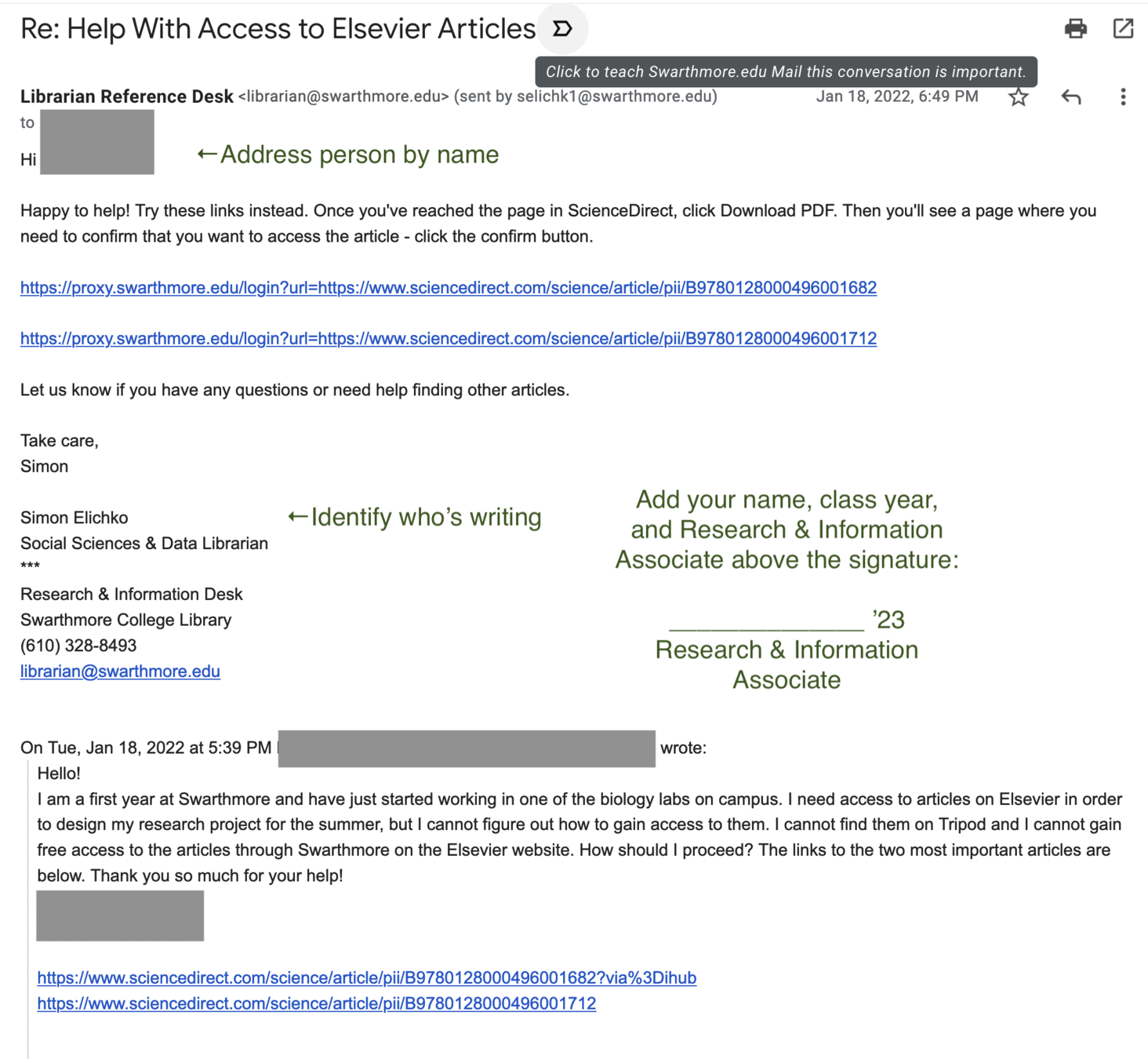
Email Sample: Answering
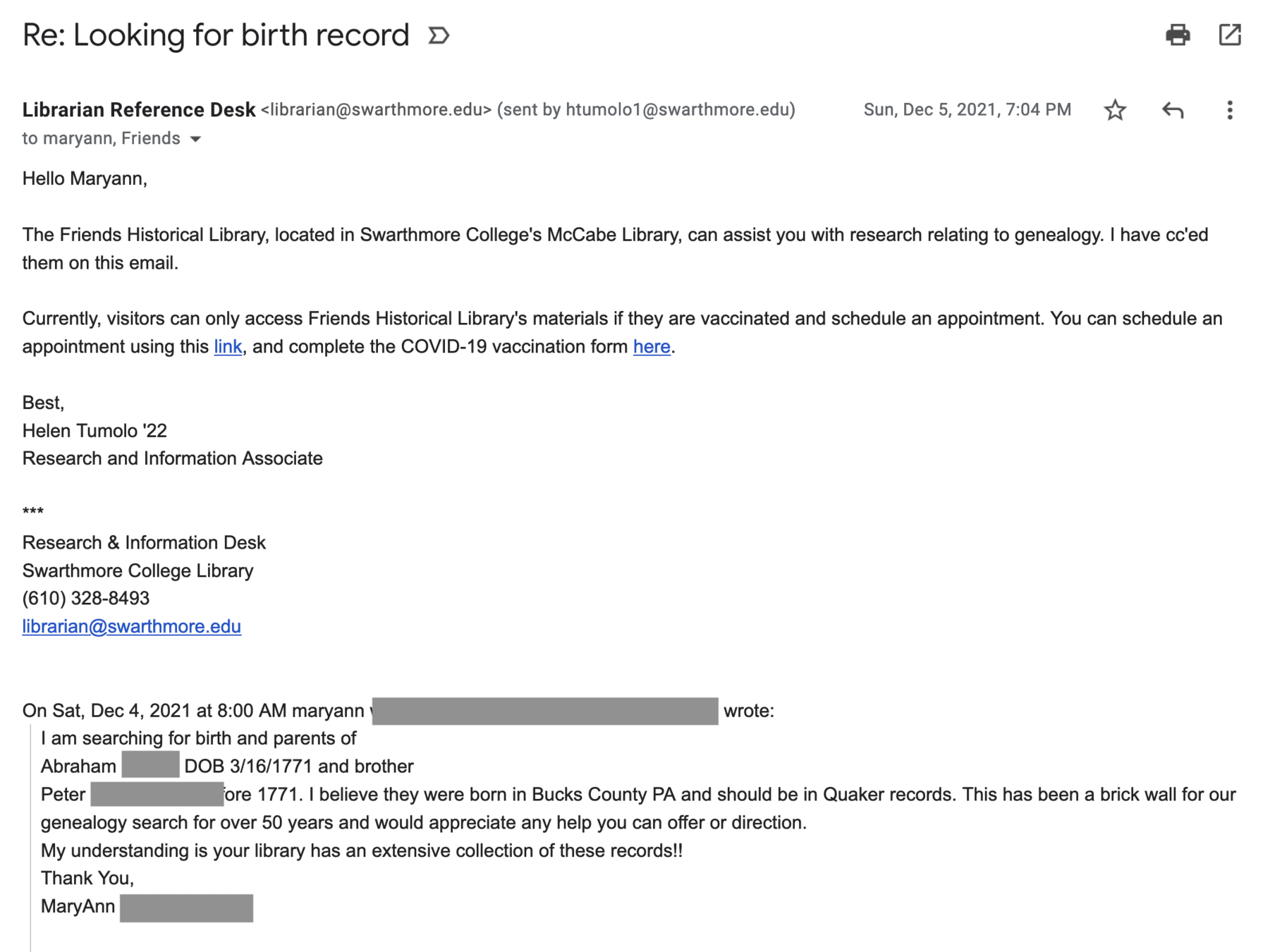
Email Sample: Forwarding
R&I Desk Policies
Be present - Respect the colleague staffing before you by arriving on-time. Be ready to answer questions asked in-person, on the phone, through chat, and by email.
Check in from your reading/homework frequently. People may feel less comfortable asking for help if they think they're interrupting the RIA (or librarian).
Keep chat active - Remember to keep the computer from going to sleep. This will help keep chat active and available for use.
Use your downtime Take a moment to review your RIAs emails, check for deadlines, and update your timesheet.
Customer* Service
- Be courteous, kind, and respectful
- Begin with introducing yourself
- Use the patron's name when possible.
- Be mindful about pronouns (don't assume, e.g. when explaining a patron's question to a colleague)
- Let the patron lead, consider asking questions to clarify their request
- Ask for their email and follow-up as necessary
- Refer to the Libraries website, these slides, and other important documents to assist you in responding
* not the best term, but close enough
Substitutes for Shifts
Have to miss a shift?
Email all-rias@swarthmore.edu and refdesk@swarthmore.edu as soon as possible
to find a substitute.
- All-RIAs = Google Group with all of the RIAs (surprise!) and Simon.
- Refdesk = Google Group with all of the librarians who work on the reference desk.
It's okay to ask for substitutes. Ask as soon as you know.
Cover each other's shifts, help each other out :)
Please use reply-all when replying to someone's request
Look ahead at your schedule. Do you anticipate missing a
certain shift? Consider asking for a substitute in advance.
r&i desk basics recap:
- Be present and ready to help folks during your shift
- If you can't make a shift, ask for a substitute
- email all-rias@swarthmore.edu & refdesk@swarthmore.edu
-
Record any questions asked in-person or on the phone using the Qualtrics survey.
- Record any email questions by adding the appropriate label (Forwarded or Answered) in Gmail. Then Archive the message.
- Chat questions are recorded automatically.
RIAs Summer Intensive: Research & Info Desk Basics
By Swarthmore Reference