





Tim Carlson
I'm a lecturer at University of Washington
(it will also mirror the videos)
The complete HTML & CSS. A static "screenshot" of what your app will look like.
Code requirements:
Working as a group:
The policy for this course:
For full details, see the syllabus and the Gen AI in Projects Guidelines
It depends:
normal images:
<img src="picture.png" alt="Description of picture">
background images:
If image is background without semantic meaning: do nothing
If there is meaning and you are using for styling: use aria-label tag
<div style="background-image: url(picture.png)"; aria-label="Descpt of Pic">
/* My first program (in JavaScript) */
console.log("Hello world!"); //prints
script.js
<!DOCTYPE html>
<html>
<head>
  <!-- include here to load before page -->
  <script src="js/my-script.js"></script>
</head>
<body>
   ... content ...


   <!-- include here to load "after" html -->
   <!-- put it here for this course -->
   <script src="js/my-script.js"></script>
</body>
<html><script src="path/to/my-script.js"></script>
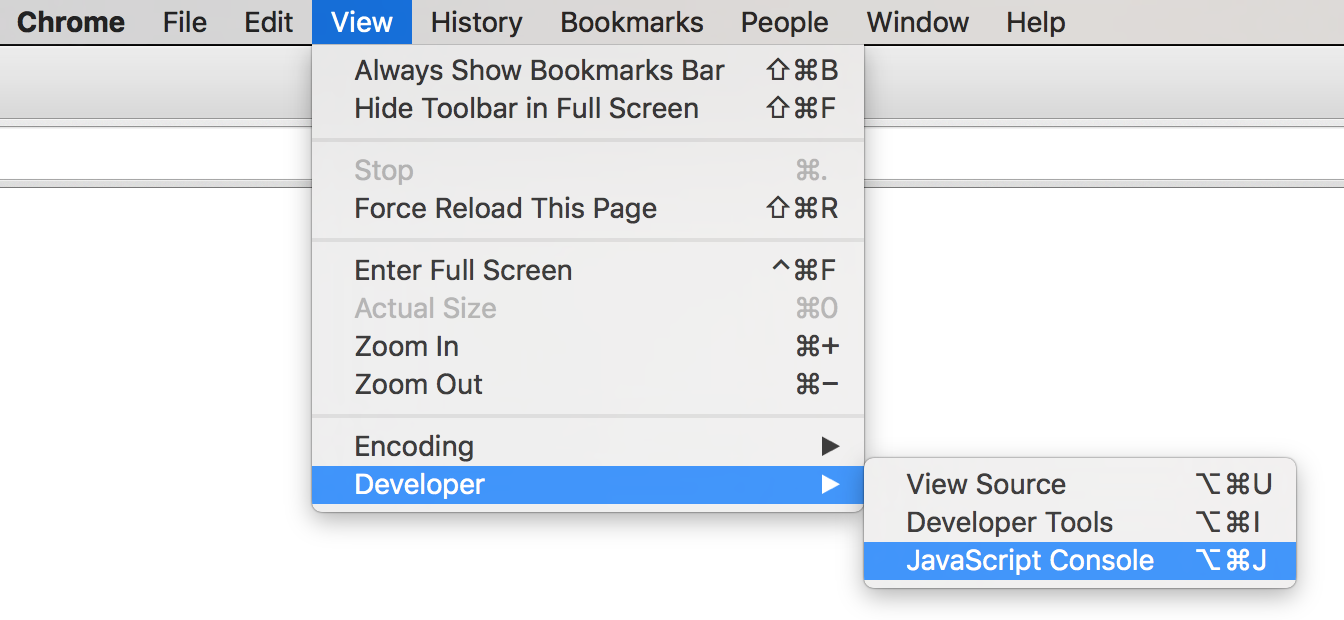
Open
"terminal"
Similar to R and Python, JavaScript has no main() method. Instead, each line of code in the script file is executed one at a time, top to bottom.
It's like the entire file is the body of main()!
/* index.js */
/* This is the ENTIRE contents of the file! */
console.log("Hello world!");  //executed first
console.log("I'm doing JavaScript!"); //executed secondUse two (2) console.log() statements to say hello to your neighbor. Show them your message in your browser!
foo.bar();
Variables are dynamically typed, so they take on the type (Number, String, Array, etc) of their current value.
let x = 'hello'; //value is a String

x = 42; //value is now a Number
Any
unassigned
variable has a
value of
undefined
//create a variable (not assigned)
let hoursSlept;
console.log(hoursSlept); //=> undefined
declare as variable
no let (already declared)
let and const
const x = 4;
x = 5; // TypeError: Assignment to constant variable.

let y = 1.5;
y = 2; // ok!
Variables declared with const are constant and cannot be reassigned later (though properties can be changed).
Variables declared with let can be reassigned.
Best practice is to use const whenever you can.
Do not use var.
//Numbers (no difference between int and float)
const x = 4;   //'number'
const y = 1.5; //'number'

//Strings (single or double quotes, just be consistent)
const message = "Hello world";

//Booleans
const likesCode = true;

//Arrays - like lists in Python
const letters = ['a', 'b', 'c']; //literal syntax
const things = ['raindrops', 2.5, true, [3,4,3]]; //mix types
console.log(letters[0]); //'a'
console.log(letters[4]); //undefined
letters[5] = 'f'; //assigning out of bounds grows array
console.log(letters); //['a', 'b', 'c', , , 'f']
letters.push('z'); //arrays have methods as wellDefine an array that includes 3 strings: your name and the names of two neighbors. Then console log that array.
Arrays can contain any data type... including other arrays!
This is called a nested array or two-dimensional array.
// an array of different dinners available at a fancy party
// this list has 4 elements, each of which is a list of 3 elements
// the indentation is just for human readability
const dinnerOptions = [
    ['chicken', 'mashed potatoes', 'mixed veggies'],
    ['steak', 'seasoned potatoes', 'asparagus'],
    ['fish', 'rice', 'green beans'],
    ['portobello steak', 'rice', 'green beans']
];

console.log(dinnerOptions.length); //4

const fishOption = dinnerOptions[2]; // ['fish', 'rice', 'green beans']

// fishOption is an array, so can reference its elements by index
console.log(fishOption[0]); //"fish"

// Access the 2th element's 0th element
console.log(dinnerOption[2][0]); //"fish"
// an array of different dinners available at a fancy party
// this list has 4 elements, each of which is a list of 3 elements
// the indentation is just for human readability
const dinnerOptions = [
['chicken', 'mashed potatoes', 'mixed veggies'],
['steak', 'seasoned potatoes', 'asparagus'],
['fish', 'rice', 'green beans'],
['portobello steak', 'rice', 'green beans']
];
console.log(dinnerOption[2][0]); //?? What is this?JavaScript will "coerce" operators to try and match types.
'40' + 2
'40' - 4

const num = 10
const str = '10'


// What are the values of each expression?
// (they will all be booleans, true/false)
const compare1 = (num == str)
const compare2 = (num === str)
const compare3 = ('' == 0) //empty String compare to 0
Objects are an unordered set of key-value-pairs.
Like a dictionary: have the word (the key) and the definition (the value). Use the key to "look up" the value.
a.k.a a Map or a Hash (HashMap in Java, list in R, dict in Python)
a.k.a. an associative array
Objects are like arrays, except the "indices" are strings!
const ages = {'sarah':42, 'amit':35, 'zhang':13}

//can omit quotes on keys, but they are actually strings!
const englishToSpanish = {one:'uno', two:'dos'}
const numWords = {1:'one', 2:'two', 3:'three'}
const keys = Object.keys(numWords) //[ '1', '2', '3' ]

//mixed values
const typeExamples = {'anInt':12, 'aStr':'dog', 'anArr':[1,2]}
const empty = {}Access individual values in a dictionary by using bracket notation, using the key as the "index".
const ages = {alice:40, bob:35, charles:13};

//access ("look up") values
console.log( ages['alice'] ); //=> 40
console.log( ages['bob'] ); //=> 35
console.log( ages['charles'] ); //=> 13

//keys not in the object have undefined values
console.log( ages['fred']); //=> undefined

//assign values
ages['alice'] = 41;
console.log( ages['alice'] ); //=> 41

ages['fred'] = 19; //adds the key and assigns value
can assign to any key w/o initializing!
const person = {
  firstName: 'Alice',
  lastName: 'Wong',
  age: 40,
  favorites: {
    music: 'jazz',
    food: 'pizza',
    numbers: [12, 42]
  }
};

const name = person['firstName']; //get value of 'firstName' key
person['lastName'] = 'Jones'; //set value of 'lastName' key
console.log(person['firstName']+' '+person['lastName']); //"Alice Jones"

const chosenValue = "food" //e.g., from user input
const favFood = person['favorites'][chosenValue]; //object in the object
                //object           //value

const firstNumber = person['favorites']['numbers'][0]; //12
person['favorites']['numbers'].push(7); //push 7 onto the Array
keys can be variables
Can reference values (called properties) with bracket notation, using the "key" as the "index"
Can also reference values using dot notation (like attributes
of a class). Similar in concept to $ notation in R.
const person = {
  firstName: 'Alice',
  lastName: 'Wong',
  age: 40,
  favorites: {
    music: 'jazz',
    food: 'pizza',
    numbers: [12, 42]
  }
};

const name = person.firstName; //get value of 'firstName' key
person.lastName = 'Jones'; //set value of 'lastName' key
console.log(person.firstName+' '+person.lastName); //"Alice Jones"

const chosenValue = "food" //e.g., from user input
const favFood = person.favorites.chosenValue; //undefined!!
              //object         //value

const firstNumber = person.favorites.numbers[0]; //12
person.favorites.numbers.push(7); //push 7 onto the Array
no variables in this syntax
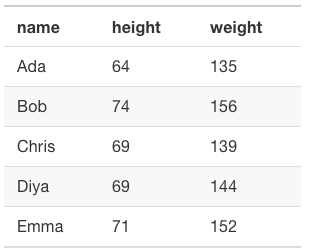
Use an array of objects with shared properties to represent a data table (like from a spreadsheet)
//Arbitrary list of people's names, heights, and weights
const people = [
    {name: 'Ada', height: 64, weight: 135},
    {name: 'Bob', height: 74, weight: 156},
    {name: 'Chris', height: 69, weight: 139},
    {name: 'Diya', height: 69, weight: 144},
    {name: 'Emma', height: 71, weight: 152}
]JavaScript supports if/else statements just like Java or R.
if(outsideTemperature < 60) {
  console.log("Wear a jacket");
}
else if(outsideTemperature > 90) {
  console.log("Wear sunscreen");
}
else if(outsideTemperature == 72) {
  console.log("Perfect weather!");
}
else {
  console.log("Wear a t-shirt");
}
JavaScript does support a "for in" syntax (similar to enhanced for loop in Java), but it should only be used to iterate through Object (keys). Use "for of" (ES6) to iterate through arrays.
const myArray = [1, 2, 3, 4];
for(const theItem of myArray) { //loop array items
  console.log(theItem)
}


const myObject = {a: 1, b: 2, c: 3};
for(const theKey in myObject) { //loop object keys
  console.log(theKey, ":", myObject[theKey])
}

//explicit key looping - We prefer this
const keys = Object.keys(myObject);
for(const theKey of keys) { /*...* /}
Functions in JavaScript are like
static methods in Java
//JavaScript
function greet(greeting, name){
    return greeting + ", " + name;
}


const msg = greet("Hello", "World");
//Java
public static String greet(String greeting, String name){
return greeting + ", " + name;
}
public static void main(String[] args){
String msg = greet("Hello", "World");
}
No
access modifier
or return type declared
parameters have no type
parameters are
comma-separated
Call with parens and assign result, like Java
Functions in JavaScript look like functions in Python, except with C-style blocks (using {})
//JavaScript
function greet(greeting, name){
    return greeting + ", " + name;
}


const msg = greet("Hello", "World");
# Python
def greet(greeting, name):
return greeting + ", " + name
msg = greet("Hello", "World")Complete task list for Week 4 (items 1-7)
Read: through Chapter 11
Problem Set 05 due Friday
Can do problems a & b now
This week is really busy! Don't fall behind!
Next: Functions and Functional Programming
By Tim Carlson