Model Context Protocol: A year later
Tomasz Godzik
VirtusLab
What do I do?
Maintainer of multiple Scala tools including Metals, Bloop, Scalameta, Munit, Mdoc and parts of the Scala 3 compiler.
Maintainer of multiple Scala tools including Metals, Bloop, Scalameta, Munit, Mdoc and parts of the Scala 3 compiler.
Release officer for Scala LTS versions
Maintainer of multiple Scala tools including Metals, Bloop, Scalameta, Munit, Mdoc and parts of the Scala 3 compiler.
Release officer for Scala LTS versions
Part of the Scala Core team as coordinator and VirtusLab representative
Maintainer of multiple Scala tools including Metals, Bloop, Scalameta, Munit, Mdoc and parts of the Scala 3 compiler.
Release officer for Scala LTS versions
Part of the Scala Core team as coordinator and VirtusLab representative
Part of the moderation team
Model Context Protocol
what is it?
01
02
03
04
MCP & Scala
Executable MCP and skills
Questions
Model Context Protocol

Model Context Protocol is very similar to Language Server Protocol, but instead of people it's for agents.
Host with MCP Client
MCP protocol
MCP protocol
MCP protocol
MCP Server 1
MCP Server 2
MCP Server 2
Local Data Source 1
Local Data Source 2
Web API
Why do we even need Model Context Protocol?
AI can sometimes go bonkers

Hallucinations are a problem, we want to reduce the amount of non-determinism in your tools
MCP provides information to your AI coding agent that it can use to verify and enrich its responses
But it's also a way to better query your information
Core MCP Concepts
MCP uses Json RPC, so each possible request and response is represented by json schema
Agents can ask the server for static content (resources) that might be useful for the current context
resources/list - list all available resource
resources/read - read specific resource
Resources
{
  uri: string;           // Unique identifier for the resource
  name: string;          // Human-readable name
  description?: string;  // Optional description
  mimeType?: string;     // Optional MIME type
}
Resources
Example
{
  uri: "file:///logs/app.log",
  name: "Application Logs",
  mimeType: "text/plain"
}
Agents interact with external systems, perform computations, and take actions in the real world.
tools/list - list all the tools available on the server
tools/call - invoke the tool
Tools
{
  name: string;          // Unique identifier for the tool
  description?: string;  // Human-readable description
  inputSchema: {         // JSON Schema for the tool's parameters
    type: "object",
    properties: { ... }  // Tool-specific parameters
  },
  annotations?: {}       // Optional hints about tool behavior
}
Tools
Example
{
  "name" : "compile-file",
  "description": "Compile a chosen Scala file",
  "schema" : {
    "type": "object",
    "properties": {
      "fileInFocus": {
         "type": "string",
         "description": "The file to compile..."
      }
    }
  }
}
- reusable prompt templates and workflows
- standardize and share common LLM interactions
- prompts/list and prompts/get requests
Prompts

{
  name: string;              // Unique identifier for the prompt
  description?: string;      // Human-readable description
  arguments?: [              // Optional list of arguments
    {
      name: string;          // Argument identifier
      description?: string;  // Argument description
      required?: boolean;    // Whether argument is required
    }
  ]
}
Prompts
Example
{
  name: "explain-code",
  description: "Explain how code works",
  arguments: [
      {
        name: "code",
        description: "Code to explain",
        required: true
      },
      {
        name: "language",
        description: "Programming language",
        required: false
      }
    ]
}
How it's used
- You first need to add mcp servers to your config (there is a lot of them!)
- They can be enabled and disabled as needed.
- Agents will ask before using each tool, take care not to allow all on tools contacting outside world (YOLO mode is dangerous)
MCP with Scala

Metals

Metals is a language server protocol server.





Metals is also a model context protocol server.




Why do it in Metals?
Metals has the exact data to serve both purposes and makes it easier for people who already use it.
And soon there will be default standalone MCP server for use outside Metals (Intellij!)
You can also build your own servers with Chimp, your own agents with sttp-ai
compile-full: Compile the entire Scala project.
compile-module: Compile a single module
compile-file: Compile current module and show errors from the current file
Most used by the agents, quick feedback loop and perfect for YOLO mode.
Compile Tools
test: Run a Scala test suite or case
Test tools
Often used, but my require additional direction for the agent
glob-search: Search for symbols using a glob pattern.
typed-glob-search: Search for symbols by type.
inspect: Inspect a symbol for members, signatures...
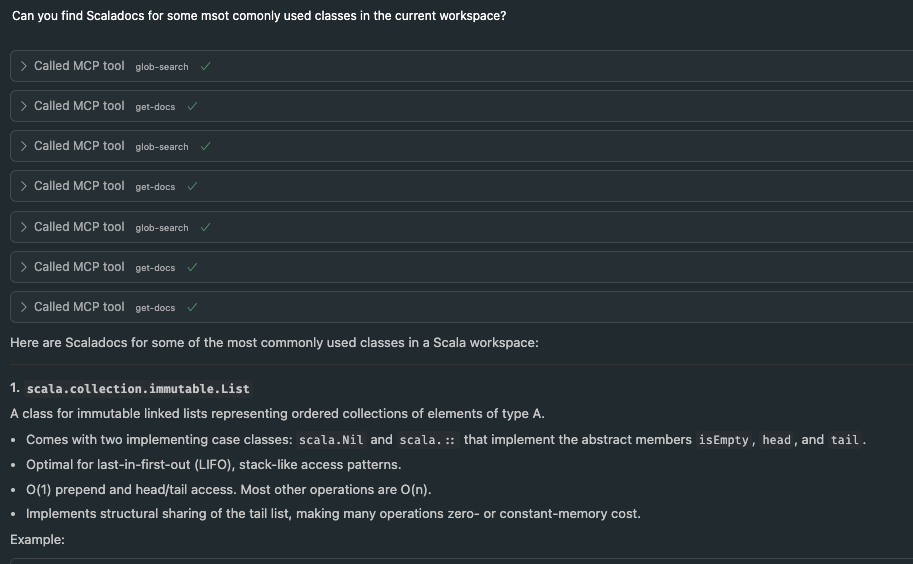
get-docs: Retrieve documentation for a symbol
get-usages: Find usages of a symbol.
Search Tools
Rarely used, requires prompting the agent. A lot of the times replaced by grep even if the data is outside the workspace.
import-build: Trigger a build import in the IDE. format-file: Format given file, results applied directly find-dep: API to allow coursier complete-dep
Utility Tools
Custom, mostly needs to be prompted or added in agent context
generate-scalafix-rule: ask metals to compile and run given generate scalafix rule
run-scalafix-rule: run existing or previously generated rule
list-scalafix-rules: list all existing and previously generated rules
Scalafix Tools
Experimental, works only when user knows what they want.
What's your tool idea!?
Might be worth implementing in Metals if general enough
More Tools
It requires a lot of work to make a good and useful tool.
MCP Tools
And it might not even be used!
MCP Tools

But it's still useful to have that in your arsenal
- Keep note of what model is used whether it uses some tools.
- Add agentic files to force agent to use the tools at specific times.
- Don't add too many tools! Context is king.
MCP Tools
Problems with MCP
- The more tools you have the more context is taken up
- Model efficiency might go down and it might start hallucinating more
- Data returned from the tools might go through the model adding to the context
Problems with MCP
- In some cases people had context filled up to 20-30 % only by using MCP tools, system prompts etc. before even running the main prompt
- It's often recommended to keep the context down at 50 % -> this depends on the model
Problems with MCP
- In some cases good CLI might be enough and better than creating additional MCP tools
- For example scala-cli might not need to be run through Metals, sbt might be a good candidate
Is there another option?

Executable tools and skills

Code execution with MCP
- Instead of having all tools listed we can have a hierarchical list of toolsets and then tools within them
servers
├── metals
│   ├── globSearch.scala
│   ├── getDocs.scala
│   ├── ... (other tools)
│   ├── clientUtils.scala
├── github
│   ├── issue.scala
│   ├── ... (other tools)
└── ... (other servers)- Each toolset and tool can be a separate mini library
// ./servers/metals/globSearch.scala
package metals.mcp

/* Potential pseudocode of a library with Ox */
def globSearch(
    fullyQualifiedName: String,
    target: Option[String]): String =
  client.callTool("glob-search", fullyQualifiedName, target)
Code execution with MCP
- The agent queries each toolset it needs and creates executable code
Code execution with MCP
// ./skills/getDocsFor.scala
import metals.mcp.*

@main
def main(nameToLookFor: String) =
  val allMatching = globSearch(fullyQualifiedName, None)
  val fqcns = allMatching.split("\n")
  val result = fqcns.map{
    fullName => getDocs(fullName)
  }.mkString("\n")
  println(result)
}
- To improve discoverability we can have an additional tool for searching within the existing tools
- Metals or Intellij could set up the basic servers as tools
- We need a client for MCP, that could also help with other MCP servers
- The code could then be generated from the tool definitions
Code execution with MCP
Existing code executions
- We already have some tools that work in this manner
- Scalafix rule generation that is available in Metals MCP
- Results are applied directly, they don't go through the model
- LLMs only generate code that works on your codebase
Benefits
- If you're working on confidential data, this can be handled in the script and not fed to the LLM
- And that data will also not make the context any bigger

Benefits
- Much smaller context than normal MCP since models are efficient at navigating file trees, they only pick what they need
- You can do much more even with short scripts instead of relying on model to do the right thing
Security
- You still need to check the code and make sure it does what you want it to do
- You cannot YOLO mode it for sure
- Come to ScalarConf if you want to hear more about this topic, there is something brewing at EPFL

This is all still a lot of work

Skills
- Each such generated script can be saved to your personal library of "skills", which is another related agentic topic
- Their main goals:
- Specialize: Tailor capabilities for domain-specific tasks
- Reduce repetition: Create once, use automatically
- Compose capabilities: Combine Skills to build complex workflows
Skills
You can think of it as your personal library of scripts that will also be available to the agents. And obviously you will be able to run them as well.
You can create skills based on session with and agent, so that next time you will get instant results.
Skills
- Similar and based on the lesson from MCP we want to avoid overloading the context
- There are three types of Skill content, three levels of loading
- Only first level is loaded by default and is added at the start of SKILL.md file
---
name: get-docs-for-glob
description: Search for classes that satisfy this search parameters and...
---
Skills
- Second level is actual inctructions further in the SKILL.md file
# Glob search

## Quick start

Run the script if you want to return users entire
documentation based on specific glob
(part of the name user is looking for)

```bash
scala-cli search-script.scala
```
Skills
- Third level is resources mentioned in the main SKILL.md file, they are loaded as needed.
glob-skill/
├── SKILL.md (main instructions)
├── REFERENCE.md (detailed API reference)
└── scripts/
    └── globSearch.scala (utility script)
Skills
---
name: your-skill-name
description: Brief description of what this Skill does and when to use it
---

# Your Skill Name

## Instructions
[Clear, step-by-step guidance for Claude to follow]

## Examples
[Concrete examples of using this Skill]
Skills, MCP and MCP tool execution all ties together
Skills, MCP and MCP tool execution all ties together
but
there is some work needed to make it for Scala for more complex usage
Usage
Not every tool will be able to use it.
Cursor generates a query that creates a new skill you might need.
Claude might also help, but you need to make sure the new file is created in .claude/skills
Thank You
Tomasz Godzik
Bluesky: @tgodzik.bsky.social
Mastodon: fosstodon.org/@tgodzik
Discord: tgodzik
tgodzik@virtuslab.com
Some links:
https://www.anthropic.com/engineering/code-execution-with-mcp
MCP a year later
By Tomek Godzik