Introduction to Koha
Alex Buckley and Aleisha Amohia
19 July 2022
Agenda
- Who are we?
- The Koha story: Collaboration and development
- An overview of Koha and its functionality
- Koha integration and extension examples
- Stories about Koha libraies
- Q&A
Who are we?
Alex Buckley
- Koha Developer at Catalyst since 2015
- Based in Nelson
- Data migrations, new implementations, integrations, training

Aleisha Amohia
- Koha Developer at Catalyst since 2014
- Development, mentoring, communications

The Koha story
- 1999
- Koha was born as a defense to the Y2K bug for Horowhenua Libraries in New Zealand
- Funded Katipo Communications to develop a new open source library system
- Koha went live 3 Jan 2000
Collaboration and development
As an open source project, Koha depends on a community to maintain it.
Every six months the Koha community releases a new version of Koha with fixes, features and enhancements.
Catalyst is a regular contributor to the Koha community, in different ways.
Catalyst Open Source Academy

More information: https://www.catalyst.net.nz/academy
Contributing to Koha
Koha on a page
- fully-featured, integrated, scalable library system
- multilingual and translatable
- platform-independent due to being web-based
- compliant with library standards and protocols
- hundreds of system preferences that allow the library full control of its system appearance and behaviour
- the ability to share data with, and view data from, other Koha libraries
- powerful full text searching, and enhanced catalogue display, which can pull content from external sources such as Amazon and Google
Test sites for today's training
Staff interface:
https://demo-admin.catalyst-koha.com.au/
username: staff
password: staff1
Koha features
- circulation
- tabbed and inline cataloguing interfaces
- MARC frameworks
- tools
Circulation
- Loan periods, issue limits, reserve limits, renewal limits and more, are configured using circulation and fines rules and system preferences
- Issuing and returning items takes place in the staff interface
- Reserves can be placed through both the staff interface and the OPAC (if enabled), then filled through the staff interface
- Recalls can only be placed through the OPAC at the moment, then filled through the staff interface
- Returning an item will trigger the process to fill a recall or reserve, or transfer the item
Cataloguing
- Default cataloguing interface is a tabbed editor, where MARC tags are split into tabs (i.e. 2xx tags are in tab 2, 5xx tags are in tab 5, and so on)
- Can also enable an inline/text editor if preferred
- Cataloguing depends on configuration of MARC bibliographic frameworks. These are templates for building bibliographic records and can be customised for different record types
- Frameworks can specify default values or call plugins which are used to generate values or link to other data (i.e. plugins are used to fetch timestamps and item types, or linking to authors, subjects and headings)
Tools - Members
- Import members using a CSV file. Can choose to overwrite or preserve existing member data, including passwords
- Define notices & slips sent to members about overdues, reserves, fines and fees, and other messages.
-
Set overdue notice actions and delays
-
Modify a batch of members using card numbers, member ID numbers, or a member list
Tools - Catalogue
- Define sets of actions to apply to records using MARC modification templates
- Modify or delete a batch of items using barcodes
- Modify or delete a batch of records using a file or list, and a MARC modification template
- Stage MARC records and later import records into the catalogue
- Create printable labels and barcodes from catalogue data
- Perform inventory of your catalogue
Additional tools
- Define days when the library is closed using the calendar
- Browse system logs to view actions taken within the library and the responsible member
- Define news or other HTML custom content for the OPAC
Short break
Koha features
- acquisitions
- serials and subscriptions
- system administration
- global system preferences
- reporting
Acquisitions
- Must have an active currency, budget, and fund
- Create a vendor to store contact details and ordering information
- Create a basket, indicating when to create items and whether these are standing orders or not
- Add an order to the basket, from a range of sources
- Receive a shipment of orders from closed baskets
- View late orders, calculated using the delivery time set for the vendor
Serials and subscriptions
- Create a subscription. This can be done from Acquisitions with an existing record, or from a newly created record. A vendor must be linked to claim missing and late issues.
- Receive serials by marking them as Arrived. When creating the subscription you can choose to create an item record when receiving.
- Generating the next serial will mark the previously expected serial as Late.
- Claim late issues by sending a notification to the vendor (requires vendor to have an email contact)
Manual instructions for adding a subscription: https://koha-community.org/manual//22.05/en/html/serials.html#add-a-subscription
System administration
- Koha requires the configuration of libraries, item types, and member categories. These are then used when setting circulation and fines rules
- Configure authorised values, which are lists of controlled terms, phrases or codes, used in different places around Koha
- Set up additional Z39.50 or SRU targets to copy both bibliographic and authority records from external sources
System preferences
- Global system preferences control the way Koha looks and behaves, and should be configured first
- There are hundreds of system preferences available for configuration across a range of sections:
- accounting
- acquisitions
- administration
- authorities
- cataloguing
- circulation
- enhanced content
- internationalisation/
localisation
- local use
- logs
- OPAC
- members
- searching
- serials
- staff interface
- tools
- web services
Reports
- Direct view access to your library database
- Create guided reports using the wizard
- Write your own SQL reports
- Use the provided statistics wizards and built-in reports
- Use the schema for database guidance when writing reports: https://schema.koha-community.org/22_05/
- Use reports written by the community, shared on the Koha wiki: https://wiki.koha-community.org/wiki/SQL_Reports_Library
Customise the OPAC
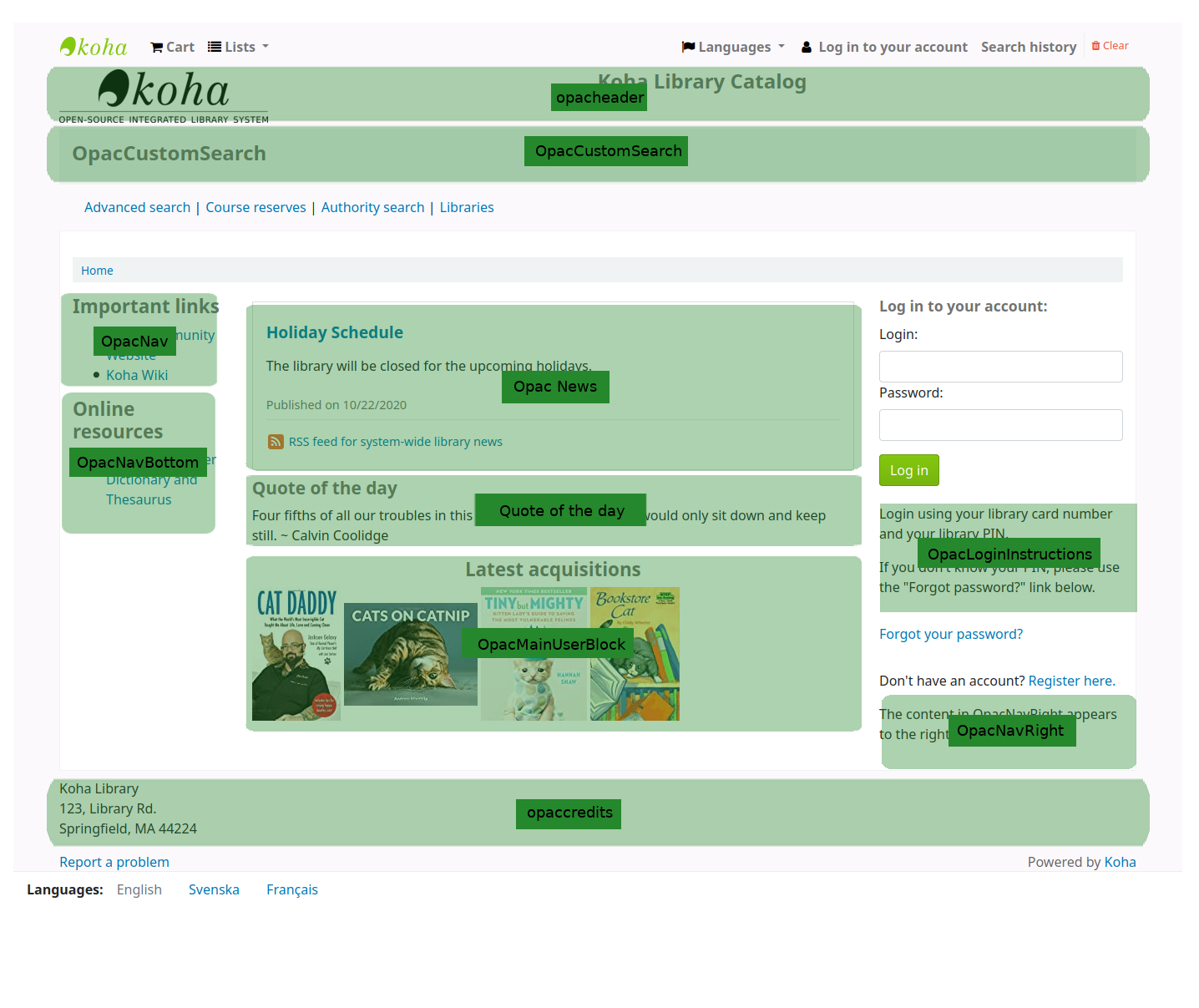
OPAC system preferences
- OPACAdvSearchOptions - Hide options from the OPAC advanced search page
- OPACSuggestionsUnwantedFields - Hide fields from OPAC suggestion page
- hidelostitems - Hide lost items from search and detail pages
- HighlightOwnItemsOnOPAC & HighlightOwnItemsOnOPACWhich - Move items to the front and increase font size from patrons home library
OPAC system preferences
- OPACHighlightedWords - Choose if patrons search terms are highlighted in result and detail pages
- NotHighlightedWords - Stopwords that should never be highlighted
- OPACMySummaryHTML - Add a column in the tables on the 'My summary' and 'My checkout history' pages for logged in OPAC users
- OPACNoResultsFound - HTML to be displayed when no results are found for an OPAC search
OPAC system preferences
- OPACUserSummary - Show summary of checkouts, overdues, holds and charges on OPAC home page
- OPACReportProblem - Allow patrons submit problems in OPAC to KohaAdminEmailAddress
- OPACHiddenItems - Rules to hide items from OPAC
- OPACHiddenItemsExceptions - Patron categories that can see otherwise hidden items
Make your OPAC accessible
- Use headings well
- Use Koha News to show custom content in your installed languages
- Avoid including images of text, just use text
- Images that add information must have alt text
Making Koha data useful to your users
Read the blog post
- Put Koha data on other webpages that your users are on
- Collect useful data about patrons using Koha extended attributes
- Exhibit your catalogue
Elasticsearch
- a super fast, super powerful search engine
- better monitoring capabilities
- on a server external to your Koha, so shouldn't be affected by Koha outages
- an interface for libraries to add and control search indexes
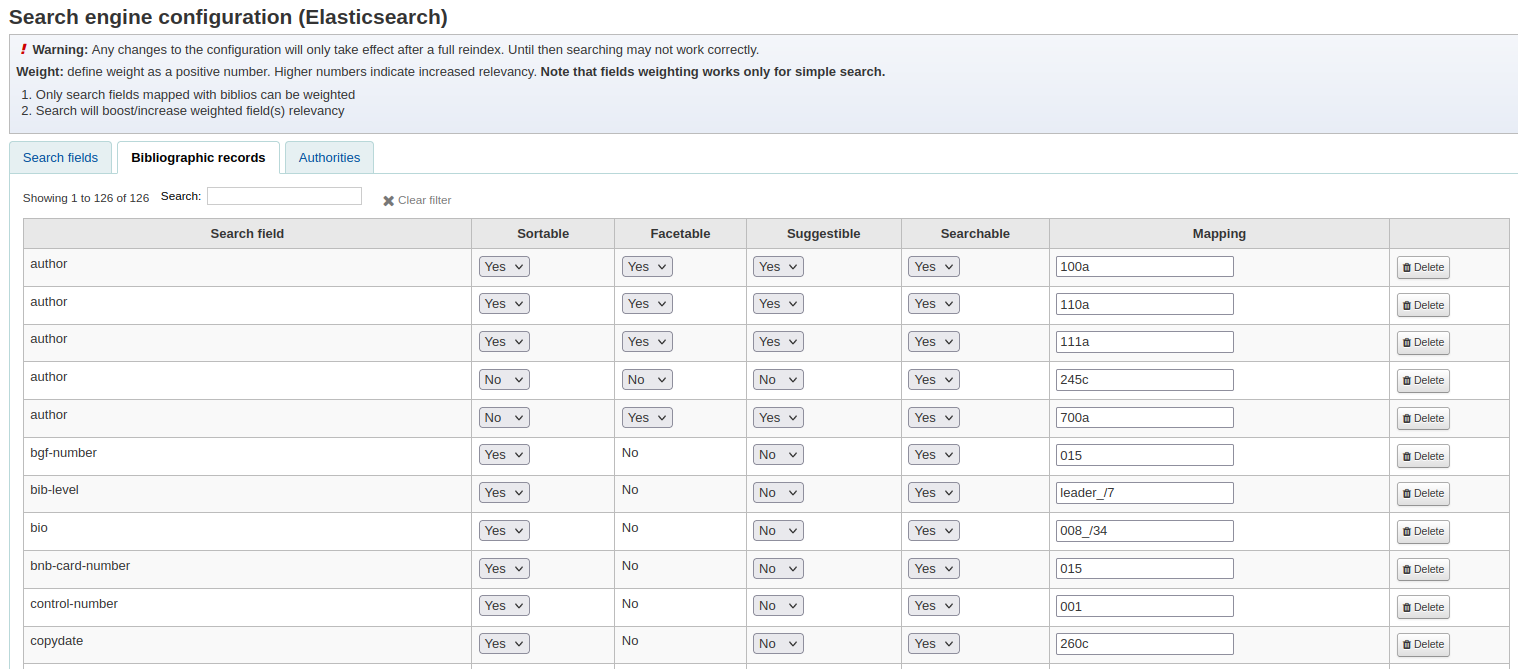
Searching with ES
- specify an index
title:digital author:andrew
- boolean operators
batman OR robin
design AND standard
- wildcards and truncation
super*
d?g
- negating and requiring search terms
design -standard
More search examples: https://bywatersolutions.com/education/elastic-searching
Try Elasticsearch on a Koha library: https://toiohomai.mykoha.co.nz/cgi-bin/koha/opac-search.pl
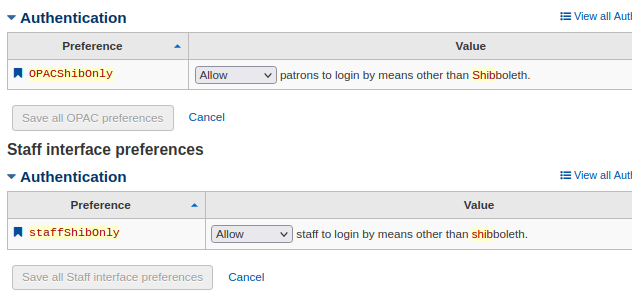
Shibboleth
What is Shibboleth?
- A way of implementing Single Sign On (SSO)
- SSO is an authentication method that only requires users to login once to access multiple different systems
-
Some of our libraries use self-checkin and self-checkout integrated with Shibboleth. This removes the need to enter their username and password.
Discovery platform
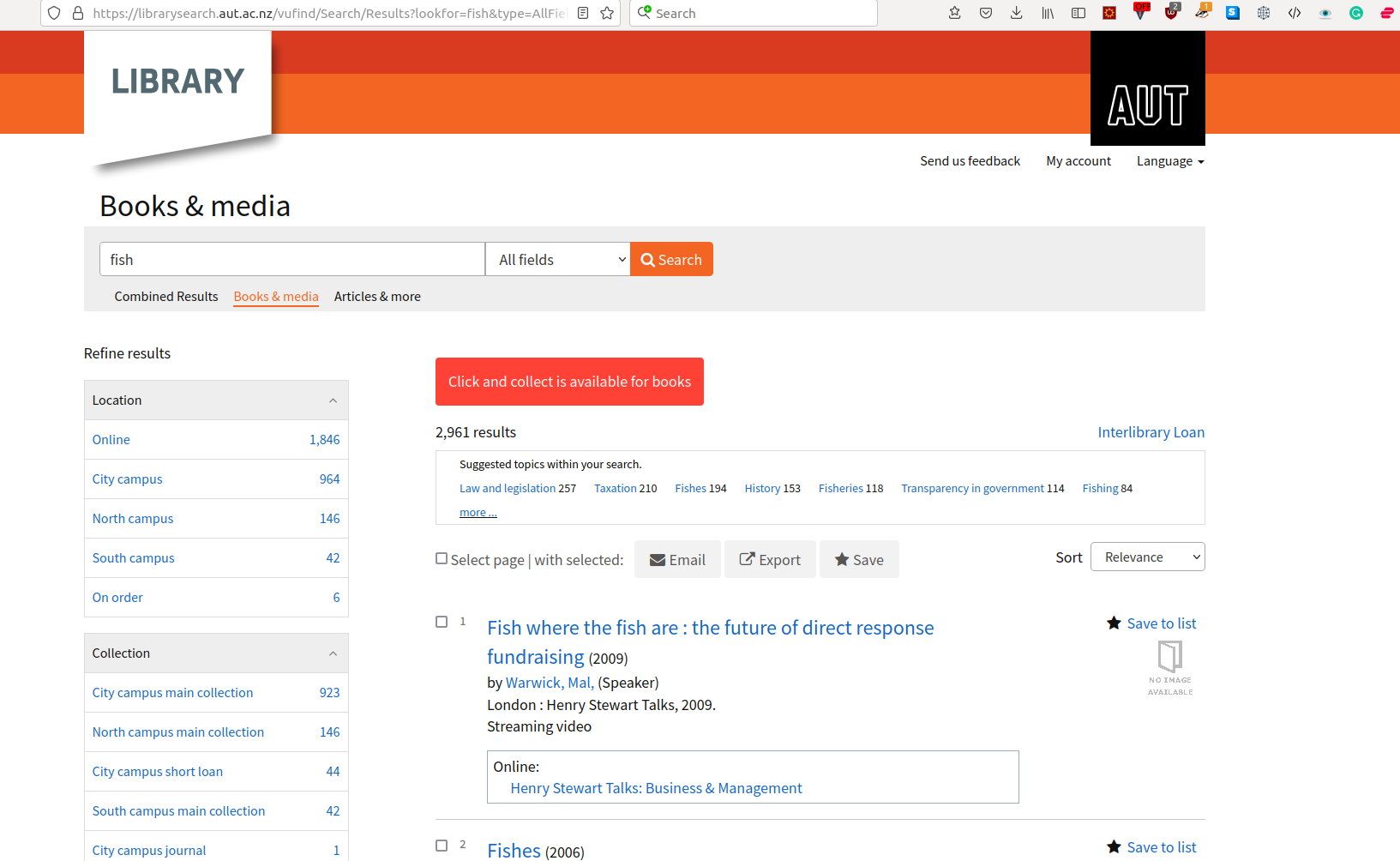
VuFind
- Open source alternative to Koha OPAC
- Does API calls to Koha to fetch information
- Example: AUT https://librarysearch.aut.ac.nz
EBSCO Discovery Search
- A search interface that returns matching records from both the Koha catalogue and the EDS platform.
- Many libraries using the EBSCO Discovery Search have a tab for the EBSCO search, and another for the Koha search
Set up Koha to be harvested by EBSCO
- Enable the OAI-PMH system preference in Koha.
- EBSCO will need to undertake an initial full index of the Koha catalogue from OAI-PMH.
- Thereafter, EBSCO harvests (usually nightly) the Koha OAI-PMH service to return record additions and deletions over a specified datetime range.
Showcasing
Koha libraries
Any questions?
Thank you for coming!
Contact us:
koha-support@catalyst-au.net
More about Koha with Catalyst:
https://catalyst-au.net/solutions/koha-library-software
Introduction to Koha 19 July
By aleisha
Introduction to Koha 19 July
Introduction to Koha AUS - 19 July