USING REDUX FOR BUILDING APPLICATIONS WITH NATIVESCRIPT ANGULAR
by Alexander Vakrilov



Single Page Apps






Mobile Apps
Managing State
- State becomes more complex
- Lost of parts that are interconnected
- Fragmented pieces of state inside components, services, directives, etc
- Adding more features becomes harder
- Mutable state doesn't make things easier
As the app gets bigger:
What We Need
-
Extensible
-
Testable
-
Predictable / Understandable
-
Performant
-
Debugging & Tooling & Dev Experience
Redux


Dan Abramov
3 Rules of Redux
Single source of truth
The state of your whole application is stored in an object tree within a single store.
State is read-only
The only way to change the state is to emit an action, an object describing what happened.
Changes are made with pure functions
To specify how the state tree is transformed by actions, you write pure reducers.
Pure Functions
-
Depend only on input parameters
-
Have no observable side effects
What that means:
- No internal state
- Completely isolated
- Predictable / Easy to understand
- Easy to test
- Composlable
Reducer
let reducer = (prev, curr) => {
    return prev + curr;
}

[1, 2, 3, 4].reduce( reducer, 0 ); // => 10
Execution:
arr[0] : reducer( 0,  1 ) -> 1
arr[1] : reducer( 1,  2 ) -> 3
arr[2] : reducer( 3,  3 ) -> 6
arr[3] : reducer( 6,  4 ) -> 10
Example:
Redux Reducer
(state: T, action: Action) => TExample:
function counterReducer (state: number = 0, action: Action) {
    switch (action.type) {
        case INCREMENT:
            return state + 1;

        case DECREMENT:
            return state - 1;

        default:
            return state;
    }
};
Definition:
Action Interface
interface Action {
    type: string;
    payload?: any;
}
Examples
// Simple increment
lat incrementAction = { type: "INCREMENT" };
// Complex action with payload
lat setValue = {
type: "SET",
payload: { value: 2000 }
};All the information describing and action in one object
Data Flow
Current State
Action
Reducer
New State



Action Stream
Initial State
Action
Reducer
State
Action
Reducer
State
Action
Reducer
State
Action Stream
Initial State
Final State
Wait but ...
Entire app state in a
single global object!?
Entire app state in a
single immutable object!
But ...
How to enforce immutability?
- Manually
- Use a library (Immutable.js)
Manual Immutability
-
Use Object.assign to create new object instances.
- Use only array methods that return new arrays:
- slice, map, filter etc.
- Spread operator [...arr]
- No splice
-
Use Object.freeze()
- Be careful
Immutable.js
var list1 = Immutable.List.of(1, 2);
var list2 = list1.push(3, 4, 5); // new list

var map1 = Immutable.Map({a:1, b:2, c:3});
var map2 = map1.set('b', 50); // new map
Example:
- Improved memory footprint
- Be less careful
And also:
Wait but ...
My app will be
one giant reducer
function ?!
( with one switch and hundreds of cases! )
My app will be
many isolated reducer
functions !
( with one switch and a couple of cases! )

A gular
- Angular 2 bindings for Redux
- Build on top of Redux libaray
- Compatible with Redux DevTools and existing ecosystem


Tic Tac Toe
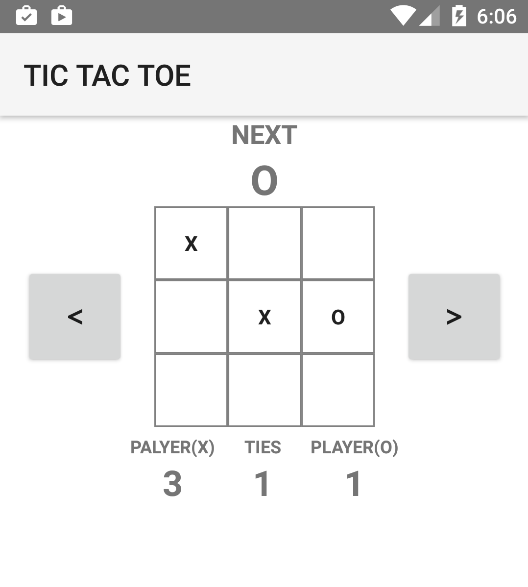
Board Reducer
const initialState = [0, 0, 0, 0, 0, 0, 0, 0, 0];

export function boardReducer(
  state: Array<number> = initialState,
  action: Action): Array<number> {

  switch (action.type) {
    case PLAY_X:
      return setTile(state, action.payload, 1);
    case PLAY_O:
      return setTile(state, action.payload, -1);
    case FINISH:
      return initialState;
    default:
      return state;
  }
};

function setTile(board: Array<number>, pos: number, val: number): Array<number> {
  return [
    ...board.slice(0, pos),
    val,
    ...board.slice(pos + 1, board.length)];
}
Score Reducer
export interface Score {
  xWins: number;
  oWins: number;
  draws: number;
}

const initialState = { xWins: 0, oWins: 0, draws: 0};

export function scoreReducer(score: Score = initialState, action: Action): Score {
  if (action.type === FINISH) {
    switch (action.payload.winner) {
      case 0:
        return Object.assign({}, score, { draws: score.draws + 1 });
      case 1:
        return Object.assign({}, score, { xWins: score.xWins + 1 });
      case -1:
        return Object.assign({}, score, { oWins: score.oWins + 1 });
  }

  return score;
}
Ngrx Setup
import { StoreModule, combineReducers } from '@ngrx/store';

import { scoreReducer } from './score/score.reducer';
import { boardReducer } from './board/board.reducer';

let rootReducer = combineReducers({
  board: boardReducer,
  score: scoreReducer
});

interface AppState {
  board: Array<number>;
  score: Score;
}

@NgModule({
  declarations: [AppComponent, ...],
  imports: [
    // ...
    StoreModule.provideStore(rootReducer),
  ],
  bootstrap: [AppComponent]
})
class AppModule { };
app.module.ts
Subscribe to Store
import {Store} from '@ngrx/store';

interface AppState {
  board: Array<number>;
  score: Score;
}

@Component({ ... })
export class AppComponent implements OnDestroy {
  board$: Observable<Array<number>>;
  score$: Observable<Score>;
  boardFull$: Observable<Score>;

  constructor( public store: Store<AppState> ) {

    this.board$ = store.select(s => s.board.present);
    this.score$ = store.select(s => s.score);
    this.boardFull$ = this.board$.map(b => !b.some(val => val === 0));
  }
}
app.component.ts
Use async pipe
<grid-layout rows="auto, auto, auto, auto, *">
  ...

  <grid-layout row="2" class="board">
    <tic-board [board]="board$ | async"
        (positionSelected)="positionSelected($event)"></tic-board>
  </grid-layout>

  <grid-layout row="3" class="board">
    <tic-score [score]="score$ | async"></tic-score>
  </grid-layout>

  <grid-layout *ngIf="boardFull$ | async"
    rowSpan="4" rows="auto *" class="popup">
    <!-- Show this when the game ends -->
  </grid-layout>
</grid-layout>
app.component.html
Dispatching an Action
<grid-layout rows="auto, auto, auto, auto, *">
  ...
    <tic-board [board]="board$ | async"
        (positionSelected)="positionSelected($event)"></tic-board>
  ...
</grid-layout>
app.component.html
export class AppComponent {

  constructor(public store: Store<AppState>) { ... }

  // ...

  positionSelected(position: number) {
    this.store.dispatch({
      type: this.currentPlayer ? PLAY_X : PLAY_O,
      payload: position
    });
  }
}
app.component.ts
Presentational Components
(a.k.a Dumb Components)
- Responsible for rendering only
- Gets data with @Input()
- Emits events with @Output()
Presentational Component
@Component({
  selector: "tic-board",
  template: `
  <wrap-layout itemWidth="50" itemHeight="50" width="150" height="150">
    <button class="tile"
      *ngFor="let val of board; let i = index"
      [text]="val | player"
      (tap)="!val && action.next(i)" >
      </button>
  </wrap-layout>`,
  changeDetection: ChangeDetectionStrategy.OnPush
})
export class BoardComponent {

  @Input() board: Array<number>;

  @Output() positionSelected = new EventEmitter<number>();

}
score.component.html
OnPush CD Strategy
Change Detection on the component will fire only:
-
An @input is changed (ref check)
-
If the component emits an event
To work properly OnPush needs immutable objects
OnPush Performance
Performance benefits:
-
Make only ref checks (no deep object checking)
-
Skip entire component sub-trees from being checked
Meta-Reducers
-
Logging
-
Crash reporting
-
Provide Undo/Redo functionality
-
Persist state
A way to plug into the redux workflow
Logger Meta-Reducer
function logger(reducer) {
  return function (state, action) {
    console.log('---- DISPATCHED ACTION: ' + JSON.stringify(action));

    // Calculate next state using original reducer
    let nextState = reducer(state, action);

    console.log('---- NEW STATE: ' + JSON.stringify(nextState));
    return nextState;
  };
};
let rootReducer = combinerReducers({...});
rootReducer = logger(rootReducer);logger.meta-reducer.ts
Wrap the rootReducer:
Demo
DevTools
What We Need
-
Extensible
-
Testable
-
Predictable / Understandable
-
Performant
-
Debugging & Tooling
-
Extensible
-
Testable
-
Predictable / Understandable
-
Performant
-
Debugging & Tooling
Resources
PING ME

@

Q & A
Slides that
didn't make it
Combining reducers
import { combineReducers } from '@ngrx/store';
import { scoreReducer } from './score/score.reducer';
import { boardReducer } from './board/board.reducer';

let rootReducer = combineReducers({
  board: boardReducer,
  score: scoreReducer
});
Use combineReducer to assemble a root reducer:
Why Pure Functions
-
Predictable
-
Easy to understand
-
No hidden internal state
-
Composable
-
Synchronous
-
Easy to test
Testing
describe('CoutnerReducer', () => {
  it('INCREMENT should increment', () => {
    const oldState = 0;
    const action = { type: INCREMENT };
    const newState = 1;
    assert.equal(newState, counterReducer(oldState, action));
  });

  it('DECREMENT should decrement', () => {
    const oldState = 0;
    const action = { type: DECREMENT };
    const newState = -1;
    assert.equal(newState, counterReducer(oldState, action));
  });
});
counter.reducer.spec.ts
So simple it can be auto-generated
Angular2 + NativeScript + Redux
By Alexander Vakrilov