Disclaimer
There are a lot of strong opinions around CSS in JS. These are just my views.
It's also a huge topic, that I'll only touch on.
Issues with CSS
- Global namespace
- Repetitive code, less expressive
- Dead code elimination
- Order of loading / Cascading
- Animations
- Selectors
Problems with the global namespace
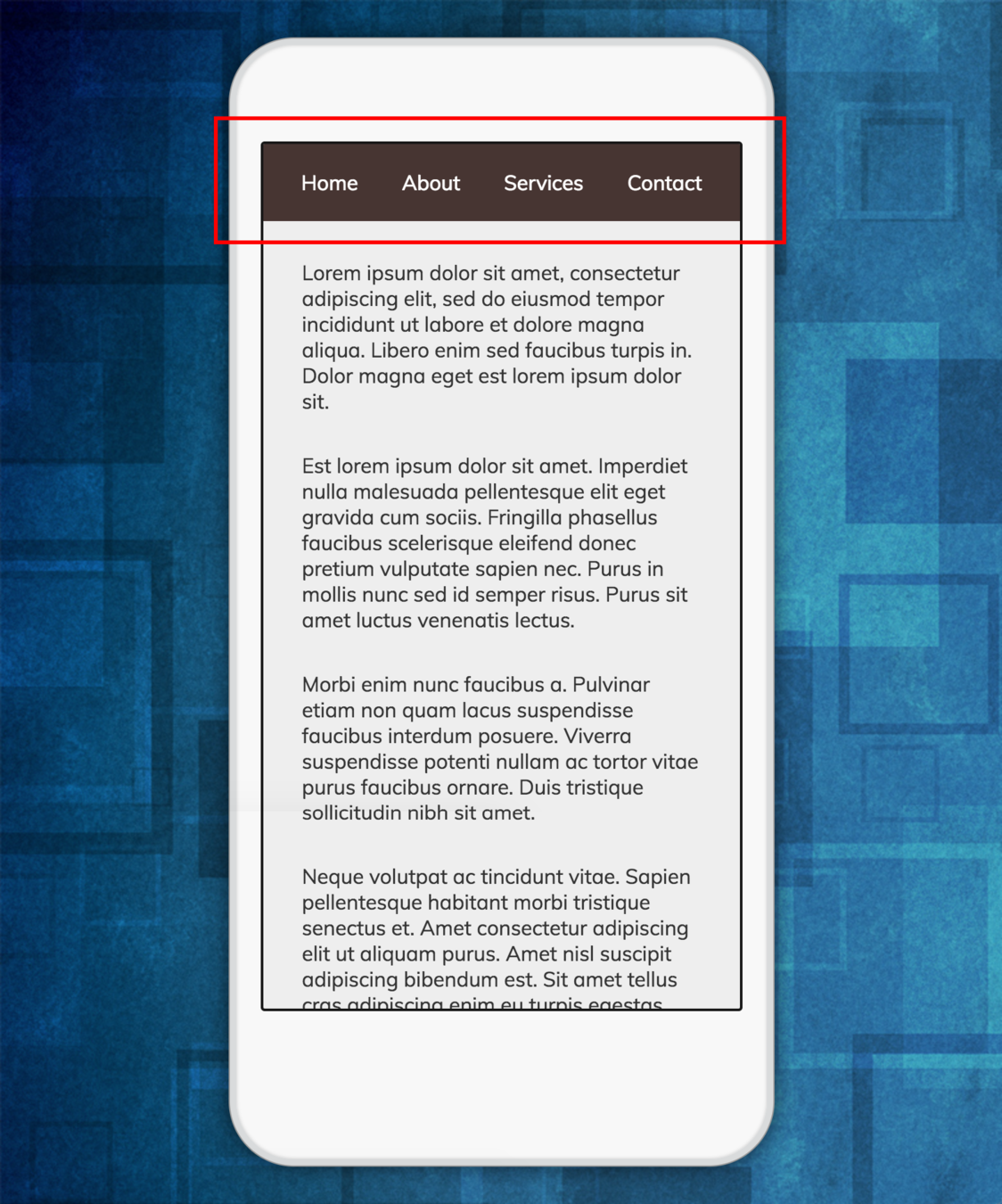
Let's make a nav bar
.nav {
  padding: 0;
  text-align: center;
  list-style-type: none;
  background-color: #483531;
  color: white;
  height: 60px;
}
.nav li {
  display: inline-block;
  padding-left: 20px;
  padding-right: 20px;
  line-height: 60px;
}
Someone else developing in isolution creates a page sub navigation and unknowingly gives it the same class name
.nav {
  background-color: #143d5d;
  color: #d0dded;
  display: inline-block;
  padding-right: 20px;
}

.nav li {
  margin: 40px 0px;
}
After both changes are committed the expected result is broken


Expected Result
Actual Result
CSS is not very expressive
You can't do:
shapes.forEach(shape => {
  .$shape.name {
    width: $shape.width;
    height: $shape.height;
  }
})
.myClass {
position: absolute;
left: Math.random() * 400;
}Loops
Non simple math
.content {
  if ($backgroundColor == light)
    color: black;
  else ($backgroundColor == dark)
    color: white;
}
If / Else
.overlay {
  opacity: calculateTransparency($animationStep);
}
Custom functions
You can now do
element {
  --main-bg-color: brown;
}

element {
  background-color: var(--main-bg-color);
}
Variables Custom Properties
Dead code elimination
It's a problem with all code, but it's easily done with CSS
Remove some html and often the css it uses isn't removed
Why? There's no easy way of knowing if those classes are used somewhere else. Let alone in html but also there may be JavaScript references
const box = document.querySelector('.largeBox')

const bounds = box.getBoundingClientRect()
It's safer to never delete CSS code.
So it often grows and grows and never shrinks
Order of loading / Cascading
Can't drop style sheets. The order they are defined affects the presentation
Makes it hard to asynchronously load styles
Can mean a user's navigation behavior will impact how pages are rendered
Can create hard to reproduce bugs
A really contrived example:



/home
/loading
/home
Styles from the loading page override the home page styling and it looks horrible
/loading
/home
/loading

Can create hard to reproduce bugs
Loading page looks completely different
User instead decides to refresh the browser here
Animations
CSS animations are flawed, they're not interruptible
You have to wait for them to finish
Not useful when user does things quickly or clicks something in the middle of a transition
95% of the time you want to animate UI components
Fire and forget
Selectors
Breaks component encapsulation
Easy to trip up
Can mean nested components end up with styles from parent components
Other solutions
Avoid non specific selectors if possible
With React, give everything an explicit class name, don't rely on selectors
.container {
  width: 400px;
}

.container ul {
  padding-left: 0;
}

.container ul li {
  display: inline-block;
}
.container {
width: 400px;
}
.list {
padding-left: 0;
}
.listItem {
display: inline-block;
}Instead of
Do this
Preprocessors
LESS, SASS, SCSS
Solves some of the issues with CSS, gives you:
• Variables
• Scope
Problems:
• Is it even needed? Now we have native variables
• Have to learn a new language
Use inline styles everywhere
Was popular around 2015/16
Actually solves loads of CSS problems
Was the predecessor to CSS in JS
Problems:
• Hard to do pseudo styles and media queries
• Cascading not an option for times that's useful
• Overriding styles becomes hard
CSS Modules
Local scoped class names
Solves global name space class name collisions
Can still write native CSS
CSS in JS
How it works
Write CSS in JavaScript
var navStyles = {
  padding: 0,
  textAlign: 'center',
  listStyleType: 'none',
  backgroundColor: '#483531',
  color: 'white',
  height: 60,
}
var navItem = {
  display: 'inline-block',
  paddingLeft: 20,
  paddingRight: 20,
  lineHeight: 60,
}
Delimiter case -> Camel case
Can drop the 'px'
Values becomes strings or numbers
Example:
A few different implementations
react-look
Seemed a great solution, solved a lot of the problems but then creator stopped maintaining it in favor of building fela.
Same syntax as react-native
const styles = StyleSheet.create({
  header: {
    transition: '200ms all linear',
    '@media (min-height: 800px)': {
      fontSize: 13,
      ':hover': {
        fontSize: 15
      }
    },
  },
  title: {
    fontWeight: 800,
    // use functions to inject props,
    // state or context values
    fontSize: (props, state, context) =>
        props.size * state.zoom
  }
})

export default look(Header)
class Header extends Component {
render() {
return (
// Styles are basically applied
// using the `className` property
<header className={styles.header}>
<h1 className={styles.title}>
{this.props.title}
</h1>
</header>
)
}
}Example code
styled-components
Advantages
• Is very popular
• Easy barrier to entry
(if you're new to CSS in JS, can still write styles in CSS syntax)
// Create a <Title> react component that
// renders an <h1> which is centered,
// palevioletred and sized at 1.5em
const Title = styled.h1`
  font-size: 1.5em;
  text-align: center;
  color: palevioletred;
`;

// Create a <Wrapper> react component
// that renders a <section> with some
// padding and a papayawhip background
const Wrapper = styled.section`
  padding: 4em;
  background: papayawhip;
`;
Disadvantage
• Less flexible than writing styles as JS objects
• Less flexibility by blurring styles and classes
// Use them like any other React component
// – except they're styled!
<Wrapper>
  <Title>
    Hello World, this is my first
    styled component!
  </Title>
</Wrapper>
Example
fela
Haven't used it in a real world project yet but author has a proven track record with react-look, rendering looks similar to styled-components.
Advantages
• Very powerful and flexible
• Functional, complements JS well
• Easily pass in props for dynamic styles
Disadvantages
• More verbose
• High barrier to entry
const rule = state => ({
  textAlign: 'center',
  padding: '5px 10px',
  background: state.primary ?
    'green' : 'blue',
  fontSize: '18pt',
  borderRadius: 5,
  ':hover': {
    background: state.primary ?
        'chartreuse' : 'dodgerblue',
    boxShadow: '0 0 2px rgb(70, 70, 70)'
  }
})
import {
  createComponent,
  Provider
} from 'react-fela'

const Button = createComponent(rule, 'button')

// Render as JSX
<Provider renderer={renderer}>
  <Button primary>Primary</Button>
  <Button>Default</Button>
</Provider>
Example
jss and react-jss
My package of choice.
Solves most issues
const styles = {
  button: {
    background: props => props.color
  },
  label: {
    fontWeight: 'bold'
  }
}
const Button = ({classes, children}) => (
<button className={classes.button}>
<span className={classes.label}>
{children}
</span>
</button>
)
export default injectSheet(styles)(Button)Example
How does it solve the original CSS issues?
Global class name collisions
const wrapperStyles = {
  wrapper: {
    position: 'relative',
    marginBottom: 120,
  },
  header: {
    display: 'inline-block',
    background: '#ebebeb',
  },
}

const loginStyles = {
  error: {
    color: 'red'
  },
}
Example
Like CSS Modules, all styles are automatically locally scoped
When rendered as CSS on the page name collisions are automatically avoided
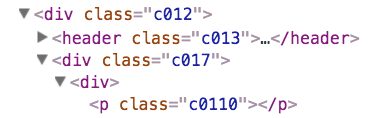
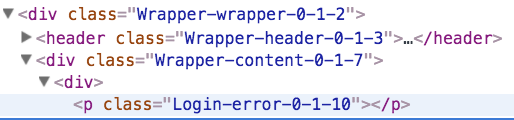
In development
In production
Output on the page
It's very expressive
It's just JavaScript, so its extremely expressive.
const styles = {
  button: {
    background: props => props.color
  },
}
Can make css choices using component props
const styles = {
  label: (props) => {

    var color

    switch (props.animalType){
      case 'dog': color = 'brown'; break;
      case 'lion': color = 'yellow'; break;
      default: color: 'blue'
    }

    return {
      display: 'block',
      color,
    }
  }
}
Can use functions, with dynamic logic to figure out styles
const styles = {},
  colors = ['red', 'blue', 'yellow'],
  classes = ['header', 'footer', 'content']

classes.forEach((c, index) => {
  styles[c] = {
    backgroundColor: colors[index],
  }
})
Could build classes from data structures
Dead code elimination
Styles are only used by their component
So removing a component removes all CSS which is now dead code
Much easier to manage
Order of loading / cascading
Stylesheets are automatically mounted and dismounted
Hooks into React's component mount and unmount life cycle
Only stylesheets needed for the current view are in the DOM
When the user navigates, unused stylesheets are dismounted
Solving animations
react-motion is an incredible tool
uses springs - no duration required
Just provide the start and end states and the in between states are automatically calculated.
You can use props and state to trigger it to animate to a new state.
Interruption automatically handled
Usage
import {Motion, spring} from 'react-motion';
// In your render...
<Motion defaultStyle={{x: 0}} style={{x: spring(10)}}>
  {value => <div>{value.x}</div>}
</Motion>
Selectors
As you're only styling a single component its very easy to give each aspect of the component its own class name, therefore selectors usually aren't needed
End
https://slides.com/allytaft
CSS in JS
By Ally Taft
CSS in JS
Highlighting and solving some of the problems of CSS by using JavaScript