Tutorial
By Anand Sundaram
What is AngularJS?
- A client-side MVC framework, maintained by Google
- Not the same as jQuery, which is a library
Why should you use it?
- Open-source, sponsored by Google
- Allows you to organise your frontend, makes HTML more readable
- Great to test your application
- Especially great for building single-page applications
What You'll Learn Today
- By the end of today's tutorial you will be familiar with the basics of AngularJS
- Introduction to Angular Material, a good UI substitute for Bootstrap
- All code demonstrated today is on Github
Disclaimer
- Angular 2.0 coming out soon
- Breaking changes as the framework has been rewritten
Learn Angular 1.x anyway, since so many existing web apps use it, but be ready for change
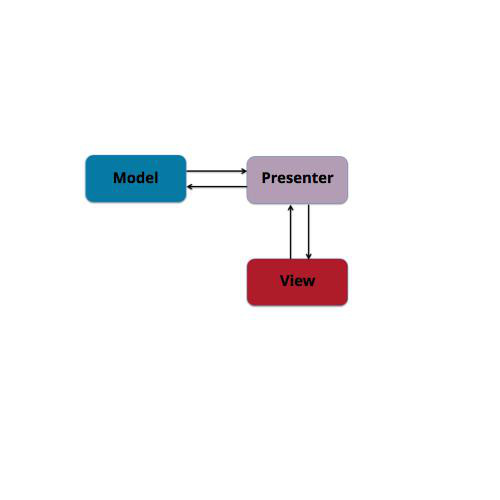
MVC
- The model is defined by JavaScript variables
- The view is the HTML template
- Controller is implemented using Directives which are associated with JavaScript functions
Setup
Add one line of code at the end of the body element in your HTML file
<script type="text/javascript"
src="https://ajax.googleapis.com/ajax/libs/angularjs/1.3.15/angular.min.js">
</script>
Preferably host the webpages in the tutorial on a server (localhost)
Create an Angular App
Create a JavaScript file with the following
(function() {
    var app = angular.module(‘AppName’, [‘dependencies’]);
})();
A module is basically a container for the different parts of your app. It allows you to bundle code into reusable packages. You can think of it as different classes in a program. The main app in itself is a module.
ngApp is a directive
A Directive is an HTML attribute which associates the view with a controller which manipulates the model
Include the following line in your HTML page, and add a link to your JavaScript file at the end, after the link to the AngularJS files
<html ng-app="AppName">Dynamic Expressions
You can evaluate JavaScript expressions in HTML
<p>
    The sum of 4 + 6 = {{4 + 6}}
    <br>
    The answer to life, universe and everything is {{7*6}}
</p>
Controllers
Inside a module you can have functions called controllers which can be used to manipulate the view/model
app.controller(‘NameOfController’, function () {});You use the ngController directive to link the controller with the part of the view it handles
<div ng-controller="NameOfController as alias">Let's Create Shopper World!
Create a new module named 'tutorial' and define a new controller called 'StoreController'
(function() {
	var app = angular.module('tutorial', []);

	app.controller('StoreController', function() {
		this.product = {
			name: "Milk",
			price: "2"
		}
	});
})();
Include the controller using the ngController directive
<div ng-controller="StoreController as store">
	<h3>
		{{store.product.name}}
	</h3>
	<h3>
		${{store.product.price}}
	</h3>
</div>
Angular Material
A neat alternative to Bootstrap, goes well with Angular (documentation)
<link rel="stylesheet"
href="https://ajax.googleapis.com/ajax/libs/angular_material/0.9.4/angular-material.min.css">
<link rel="stylesheet"
href="https://fonts.googleapis.com/css?family=RobotoDraft:300,400,500,700,400italic">
<script
src="https://ajax.googleapis.com/ajax/libs/angular_material/0.9.4/angular-material.min.js">
</script>You also need to add 'ngMaterial' to the list dependencies for your app module
Other Useful Directives
ngRepeat allows you to repeat HTML code while you iterate through an array
<div ng-repeat="item in items">
    <p>
        Code to be repeated
    </p>
</div>
ngShow lets you control when a certain HTML element is shown
<div ng-show="condition">
    <p>
        Now you seen me, now you don't
    </p>
</div>
Likewise, you can use ngHide to hide an element based on a condition
Filters
You can add filters to your expressions to either filter out data or to change format
{{ data | filter:options }}

<!--examples-->

{{product.price | currency}}

{{ store.date | date:'EEEE, dd MMMM yy'}}
More Useful Directives
ngClick executes a statement when the element is clicked, typically leading to a change in the model
<md-grid-tile class="green" ng-repeat="product in store.products"
ng-click="store.selectProduct(product)">
this.selectProduct = function(prod) {
this.selectedProduct = prod;
}When the model changes, the view changes automatically.
So the expressions are evaluated each time there is a change to the model.
This is known as two-way data binding.
More Useful Directives
ngModel is used to bind properties with input, selections and other form elements. It creates a model on the current scope and bind it to the view.
<md-input-container flex>
    <label>Review</label>
    <input ng-model="store.review.content">
</md-input-container>
<md-input-container flex>
    <label>Email</label>
    <input ng-model="store.review.author" type="email">
</md-input-container>
Angular Form Validation
The $valid property comes built-in with forms in Angular
<md-button class="md-raised md-primary" ng-click="reviewForm.$valid && store.addReview(review)">
    Submit Review
</md-button>
The ‘$’ sign is used for built-in features in Angular
Custom Directives
They can either be HTML elements or attributes of existing elements. It allows you to abstract a piece of HTML code and reuse it. It also makes your code a lot more expressive.
app.directive('headerBar', function() {
	return {
		restrict: 'E',
		templateUrl: 'header-bar.html'
	};
});
The above code allows you to use the <header-bar> element in your HTML
Services
Services are substitutable objects that a controller depends on. They are used to share code between controllers in your app, and extend the functionality of your app.
app.controller(“StoreController”, [“$http”, function($https) {
	$http.get(‘url/to/’).success(function(data) {
});
}]);
- When Angular is loaded it creates something called the Angular Injector
- Services register themselves with the Angular Injector
- When the app loads and the controller is run, it requests the Injector for these services, and they get passed as arguments to the controller
Dependency Injection
Exercises
- Extend the app to enable addition of items to cart. Integrate the cart into the UI (look up sidenav in the angular-material docs). Simple implementation – create a list inside the controller, create a function which adds to the list, and which is triggered by clicking on the Add to Cart button.
- Create product pairings for the combo offers. They should be displayed on the combo offer list of both products.
Questions?
Fin.
AngularJS Tutorial
By Anand Sundaram
AngularJS Tutorial
The slides presented in the tutorial for AngularJS as part of the Orbital Programme in NUS