Design Patterns II
Agenda
- Refresh
- OOD Principles
- Design Patterns
- Factory Method
- Singleton
- Structural
- Adapter
-
Composite
- Behavioral
- Observer
Refresh
OOD Principles
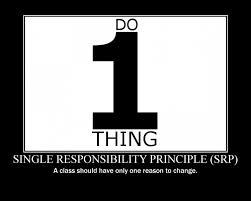
Single Responsibility
Open-Closed

Open for extension, Closed for modification.
Liskov Substitution

Refresh
Design Patterns
Design Patterns Catalog
Creational
Structural
Behavioral
Creational
Factory Method
Singleton
Adapter Pattern
Convert the interface of a class into another interface clients expect.
Adapter lets classes work together that couldn't otherwise because of incompatible interfaces.
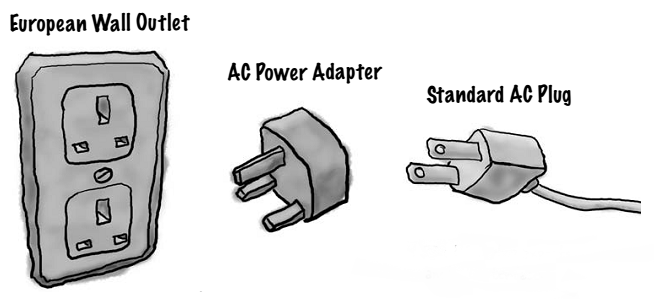
Motivation
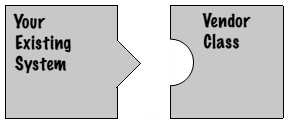
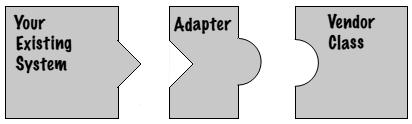
Adapter Example
Let's implement it
 // Adapter pattern -- Structural example

using System;

namespace DoFactory.GangOfFour.Adapter.Structural
{
    /// <summary>
    /// MainApp startup class for Structural
    /// Adapter Design Pattern.
    /// </summary>
    class MainApp
    {
        /// <summary>
        /// Entry point into console application.
        /// </summary>
        static void Main()
        {
            // Create adapter and place a request
            Target target = new Adapter();
            target.Request();

            // Wait for user
            Console.ReadKey();
        }
    }

    /// <summary>
    /// The 'Target' class
    /// </summary>
    class Target
    {
        public virtual void Request()
        {
            Console.WriteLine("Called Target Request()");
        }
    }

    /// <summary>
    /// The 'Adapter' class
    /// </summary>
    class Adapter : Target
    {
        private Adaptee _adaptee = new Adaptee();

        public override void Request()
        {
            // Possibly do some other work
            //  and then call SpecificRequest
            _adaptee.SpecificRequest();
        }
    }

    /// <summary>
    /// The 'Adaptee' class
    /// </summary>
    class Adaptee
    {
        public void SpecificRequest()
        {
            Console.WriteLine("Called SpecificRequest()");
        }
    }
}
Pros and Cons
- Pros:
- Only one new object.
- Can override adaptees behavior as required
- Cons:
- Requires Sub-Classing
Composite
Compose objects into tree structures to represent part-whole hierarchies.
Composite lets clients treat individual objects and compositions of objects
uniformly.

Composite Example
UML Diagram

Let's implement it
 // Composite pattern -- Structural example

using System;
using System.Collections.Generic;

namespace DoFactory.GangOfFour.Composite.Structural
{
    /// <summary>
    /// MainApp startup class for Structural
    /// Composite Design Pattern.
    /// </summary>
    class MainApp
    {
        /// <summary>
        /// Entry point into console application.
        /// </summary>
        static void Main()
        {
            // Create a tree structure
            Composite root = new Composite("root");
            root.Add(new Leaf("Leaf A"));
            root.Add(new Leaf("Leaf B"));

            Composite comp = new Composite("Composite X");
            comp.Add(new Leaf("Leaf XA"));
            comp.Add(new Leaf("Leaf XB"));

            root.Add(comp);
            root.Add(new Leaf("Leaf C"));

            // Add and remove a leaf
            Leaf leaf = new Leaf("Leaf D");
            root.Add(leaf);
            root.Remove(leaf);

            // Recursively display tree
            root.Display(1);

            // Wait for user
            Console.ReadKey();
        }
    }

    /// <summary>
    /// The 'Component' abstract class
    /// </summary>
    abstract class Component
    {
        protected string name;

        // Constructor
        public Component(string name)
        {
            this.name = name;
        }

        public abstract void Add(Component c);
        public abstract void Remove(Component c);
        public abstract void Display(int depth);
    }

    /// <summary>
    /// The 'Composite' class
    /// </summary>
    class Composite : Component
    {
        private List<Component> _children = new List<Component>();

        // Constructor
        public Composite(string name)
            : base(name)
        {
        }

        public override void Add(Component component)
        {
            _children.Add(component);
        }

        public override void Remove(Component component)
        {
            _children.Remove(component);
        }

        public override void Display(int depth)
        {
            Console.WriteLine(new String('-', depth) + name);

            // Recursively display child nodes
            foreach (Component component in _children)
            {
                component.Display(depth + 2);
            }
        }
    }

    /// <summary>
    /// The 'Leaf' class
    /// </summary>
    class Leaf : Component
    {
        // Constructor
        public Leaf(string name)
            : base(name)
        {
        }

        public override void Add(Component c)
        {
            Console.WriteLine("Cannot add to a leaf");
        }

        public override void Remove(Component c)
        {
            Console.WriteLine("Cannot remove from a leaf");
        }

        public override void Display(int depth)
        {
            Console.WriteLine(new String('-', depth) + name);
        }
    }
}
Pros and Cons
- Pros:
- Makes it easy to add new components.
- Makes clients simpler.
- Cons:
- Harder to restrict the type of components of a composite.
Observer Pattern
Define a one-to-many dependency between objects so that when one object changes state, all its dependents are notified and updated automatically.
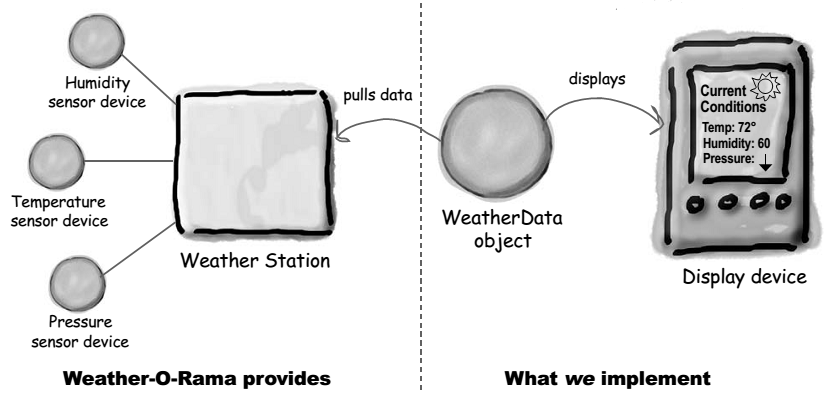
Observer Example
UML Diagram

Let's implement it
 // Observer pattern -- Structural example
//http://www.dofactory.com/Patterns/PatternObserver.aspx#_self1
using System;
using System.Collections.Generic;

namespace DoFactory.GangOfFour.Observer.Structural
{
    /// <summary>
    /// MainApp startup class for Structural
    /// Observer Design Pattern.
    /// </summary>
    class MainApp
    {
        /// <summary>
        /// Entry point into console application.
        /// </summary>
        static void Main()
        {
            // Configure Observer pattern
            ConcreteSubject s = new ConcreteSubject();

            s.Attach(new ConcreteObserver(s, "X"));
            s.Attach(new ConcreteObserver(s, "Y"));
            s.Attach(new ConcreteObserver(s, "Z"));

            // Change subject and notify observers
            s.SubjectState = "ABC";
            s.Notify();

            // Wait for user
            Console.ReadKey();
        }
    }

    /// <summary>
    /// The 'Subject' abstract class
    /// </summary>
    abstract class Subject
    {
        private List<Observer> _observers = new List<Observer>();

        public void Attach(Observer observer)
        {
            _observers.Add(observer);
        }

        public void Detach(Observer observer)
        {
            _observers.Remove(observer);
        }

        public void Notify()
        {
            foreach (Observer o in _observers)
            {
                o.Update();
            }
        }
    }

    /// <summary>
    /// The 'ConcreteSubject' class
    /// </summary>
    class ConcreteSubject : Subject
    {
        private string _subjectState;

        // Gets or sets subject state
        public string SubjectState
        {
            get { return _subjectState; }
            set { _subjectState = value; }
        }
    }

    /// <summary>
    /// The 'Observer' abstract class
    /// </summary>
    abstract class Observer
    {
        public abstract void Update();
    }

    /// <summary>
    /// The 'ConcreteObserver' class
    /// </summary>
    class ConcreteObserver : Observer
    {
        private string _name;
        private string _observerState;
        private ConcreteSubject _subject;

        // Constructor
        public ConcreteObserver(
          ConcreteSubject subject, string name)
        {
            this._subject = subject;
            this._name = name;
        }

        public override void Update()
        {
            _observerState = _subject.SubjectState;
            Console.WriteLine("Observer {0}'s new state is {1}",
              _name, _observerState);
        }

        // Gets or sets subject
        public ConcreteSubject Subject
        {
            get { return _subject; }
            set { _subject = value; }
        }
    }
}
Pros and Cons
- Pros:
- Abstract coupling between subject and observer.
- Allows you to send data to many other objects in a very efficient manner.
- No modification is need to be done to the subject to add new observers.
- Cons:
- If not used carefully the observer pattern can add unnecessary complexity
Any Questions ?!
Thank You ;)
The End
By Anas A. Ismail / @_aaIsmail
Design Patterns
By anas_awad
Design Patterns
2nd Session, Summer Course'13, FCIS. [Adapter, Composite, Observer]