Andres Alvarez

Full-Stack Developer

Instructor activity
Topics
- Code Review
- Lecture
- Live Coding
1. Code Review
Pokemon REST API
- Fetch all pokemons
- Fetch pokemon
- Fetch pokemon attacks
- Create pokemon
- Update pokemon
- Delete pokemon
Fetch pokemons
const data = [
  {id: '001'},
  {id: '003'}
] // all the pokemons

app.get('/pokemon', function (req, res) {
  res.send({some: data});
})

app.get('/pokemon/:id', function (req, res) {
  let id = data[req.params.id-1];
  id
  ? res.send({some: data[req.params.id-1]})
  : res.status(404).send("Pokemon not found");
})

app.get('/pokemon/:id/attacks', function (req, res) {
  res.send({some: data[req.params.id-1].attacks})
})
Data structure
const pokemons = [
  {id: '001'},
  {id: '002'}
]
const pokemon = pokemons.find(pokemon => pokemon.id === id)

// vs

const pokemons = {
  '001': {id: '001'},
  '002': {id: '002'}
}

const pokemon = pokemons[id]
Repository
class PokemonRepository {
  constructor(pokemons = {}) {
    this._pokemons = {...pokemons}
  }

  findAll() {
    return Object.values(this._pokemons)
  }

  findOne(id) {
    return this._pokemons[id]
  }
}
Repository
const PokemonRepository = require('./PokemonRepository.js');
const pokemons = require('./data/pokemon.js');

const repository = new PokemonRepository(pokemons)
Fetch pokemons
app.get('/pokemon', function (req, res) {
  const pokemons = repository.findAll()
  res.send(pokemons);
})

app.get('/pokemon/:id', function (req, res) {
  const { id } = req.params
  const pokemon = repository.findOne(id)

  if (!pokemon) {
    res.status(404).send();
    return
  }
  res.send(pokemon)
})

app.get('/pokemon/:id/attacks', function (req, res) {
  const { id } = req.params
  const pokemon = repository.findOne(id)

  if (!pokemon) {
    res.status(404).send();
    return
  }
  res.send(pokemon.attacks)
})
Manage pokemons
app.post('/pokemon', function (req, res) {
  let newPokemon = {} // data

  data[139]
  ? res.status(409).send("this pokemon does already exist")
  : res.send(data.push(newPokemon));
})

app.put('/pokemon/:id', function(req, res) {
  data[req.params.id-1]
  ? data[req.params.id-1].name = "Pokemon with New Name"
  : res.status(404).send("Pokemon not found");
})

app.delete('/pokemon/:id', function(req,res) {
  data[req.params.id-1]
  ? delete data[req.params.id-1]
  : res.status(404).send("Pokemon not found");
})
Manage pokemons
class PokemonRepository {
  create(pokemon) {
    const {id} = pokemon
    const isFound = !!PokemonRepository.findOne(id)

    if (isFound) {
      throw new Error()
    }

    this._pokemons[id] = pokemon

    return pokemon
  }

  update(id, data) {
    const pokemon = PokemonRepository.findOne(id)

    if (!pokemon) {
      throw new Error()
    }

    this._pokemons[id] = {...pokemon, ...data}

    return this._pokemons[id]
  }
}
Manage pokemons
class PokemonRepository {
  remove(id) {
    const pokemon = PokemonRepository.findOne(id)

    if (!pokemon) {
      throw new Error()
    }

    delete this._pokemons[id]

    return pokemon
  }
}
Manage pokemons
app.post('/pokemon', function (req, res) {
  const data = req.body

  try {
    const pokemon = repository.create(data)
    res.status(201).send(pokemon);
  } catch(error) {
    res.status(409).send()
  }
})

app.put('/pokemon/:id', function(req, res) {
  const { id } = req.params
  const {data} = req.body

  try {
    const pokemon = repository.update(id, data)
    res.send(pokemon);
  } catch(error) {
    res.status(404).send()
  }
})
Manage pokemons
app.delete('/pokemon/:id', function(req,res) {
  const { id } = req.params

  try {
    const pokemon = repository.remove(id)
    res.send(pokemon);
  } catch(error) {
    res.status(404).send()
  }
})
A real pokemon trainer
Testing
npm install -D jest supertest
Unit Testing
const pokemons = require('./data/pokemon.js');
const PokemonRepository = require('./PokemonRepository.js');

describe("PokemonRepository", () => {
  it("should find a pokemon by id", async () => {
    const repository = new PokemonRepository(pokemons)
    const pokemon = repository.findOne("001");

    expect(pokemon.id).toEqual("001");
  });

  it("should return null if pokemon is not found by id", async () => {
    const repository = new PokemonRepository(pokemons)
    const pokemon = repository.findOne("010");

    expect(pokemon).toBeFalsy()
  });
});
Integration Testing
const app = require('./app.js');
const request = require("supertest");

describe("app", () => {
  it("GET /pokemon/:id 200", async () => {
    const { body } = await request(app).get("/pokemon/001");

    expect(body.id).toEqual("001");
  });
});
2. Lesson
You need to create a web app from scratch




Choose a framework
Setup
- Bundler
- Routing
- Performance
- Fast Refresh
- Error boundaries
- Rendering


Create React App


Next.js
React framework that handles the tooling and configuration needed for React, and provides additional structure, features, and optimizations ✨
A brief introduction to Next.js
Basic React knowledge is needed
Next.js
npx create-next-app@latest

# or
yarn create next-app

# or
pnpm create next-app

# using an example
npx create-next-app --example with-chakra-ui
Next.js
# Development mode
npm run dev

# Build the application for production
npm run build

# Start a Next.js production server
npm run start
Page
// /pages/about.jsx

function AboutPage() {
  return <div>About</div>
}

export default AboutPage
Routes
- /pages/index.jsx ➡️ /
- /pages/about.jsx ➡️ /about
- /pages/about/index.jsx ➡️ /about
- /pages/products/[id].jsx ➡️ /products/1
- /pages/products/[...all].jsx ➡️ /products/1/2/3
Links
import Link from 'next/link'

function IndexPage() {
  // scroll, prefetch, ...

  return (
    <ul>
      <li>
        <Link href="/">
          <a>Home</a>
        </Link>
      </li>
      <li>
        <Link href="/about">
          <a>About Us</a>
        </Link>
      </li>
    </ul>
  )
}

export default IndexPage
Head
import Head from 'next/head'

function IndexPage() {
  return (
    <div>
      <Head>
        <title>My page title</title>
    	<description>My page description</description>
      </Head>
      <p>Hello world!</p>
    </div>
  )
}

export default IndexPage
Router
import { useRouter } from 'next/router'

function DetailPage() {
  const router = useRouter()
  const { slug } = router.query

  return <h1>Post Slug: {slug}</h1>
}

export default DetailPage
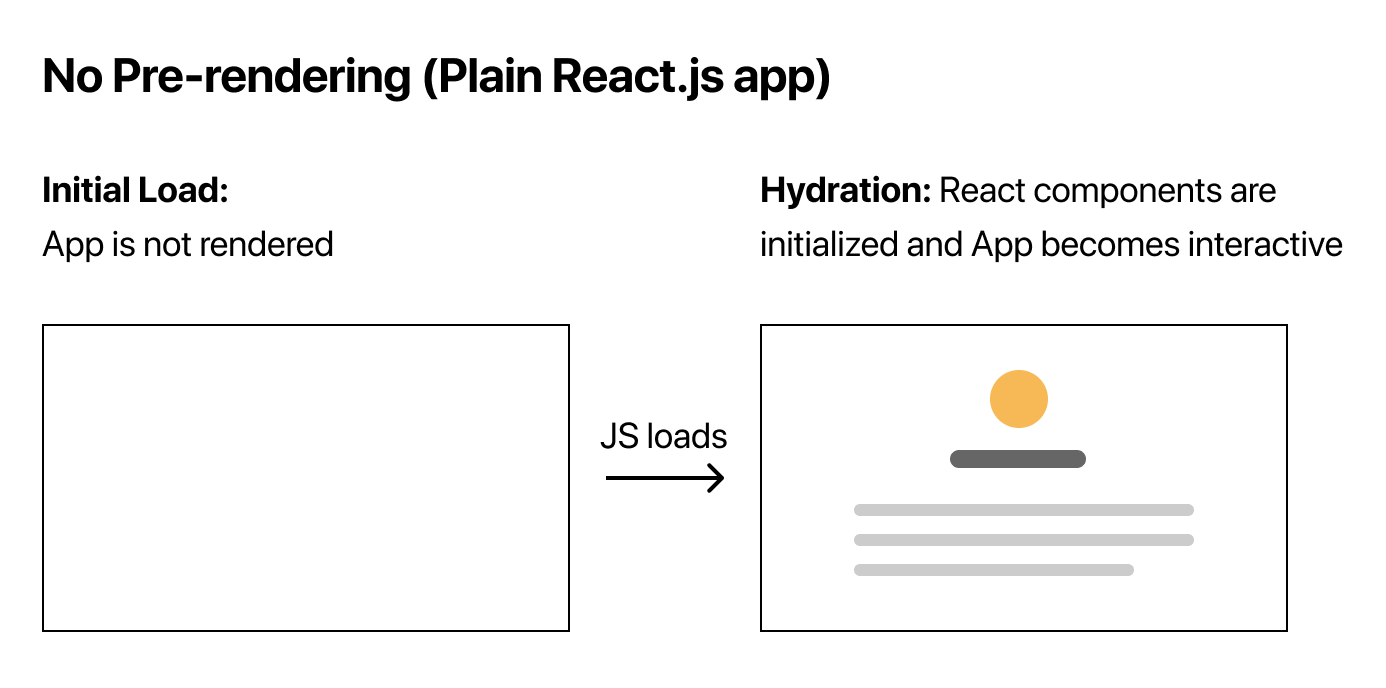
Non pre-rendering
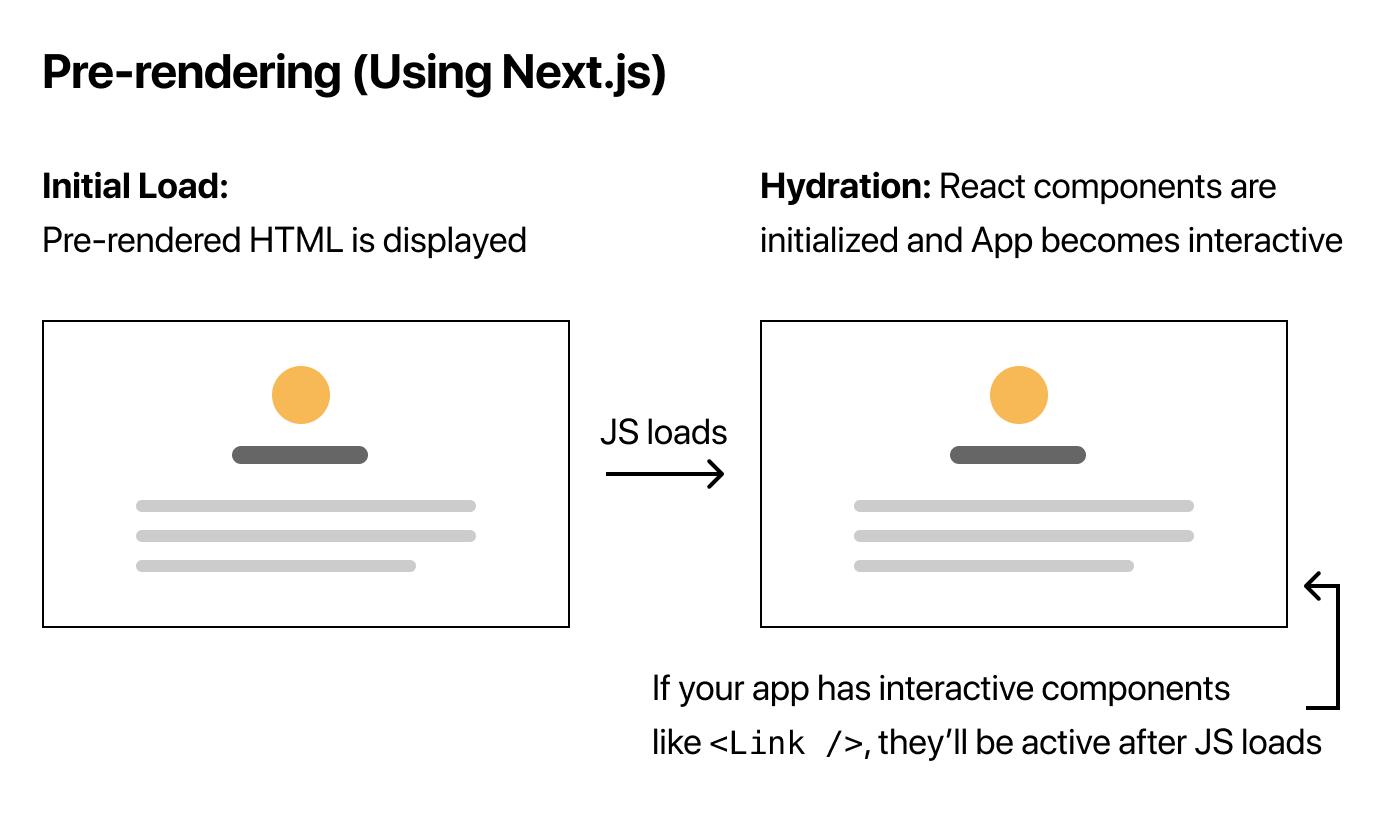
Pre-rendering
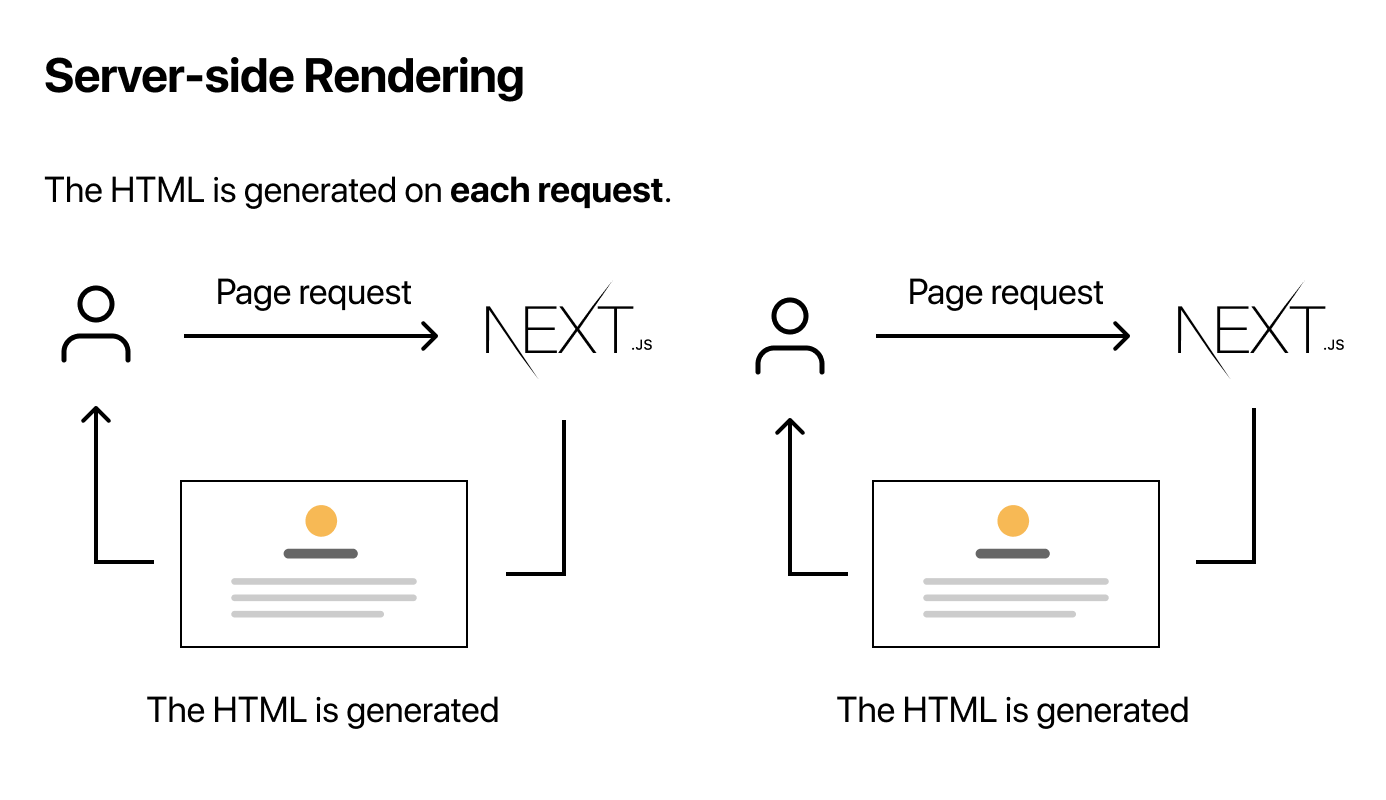
Server-Side Rendering
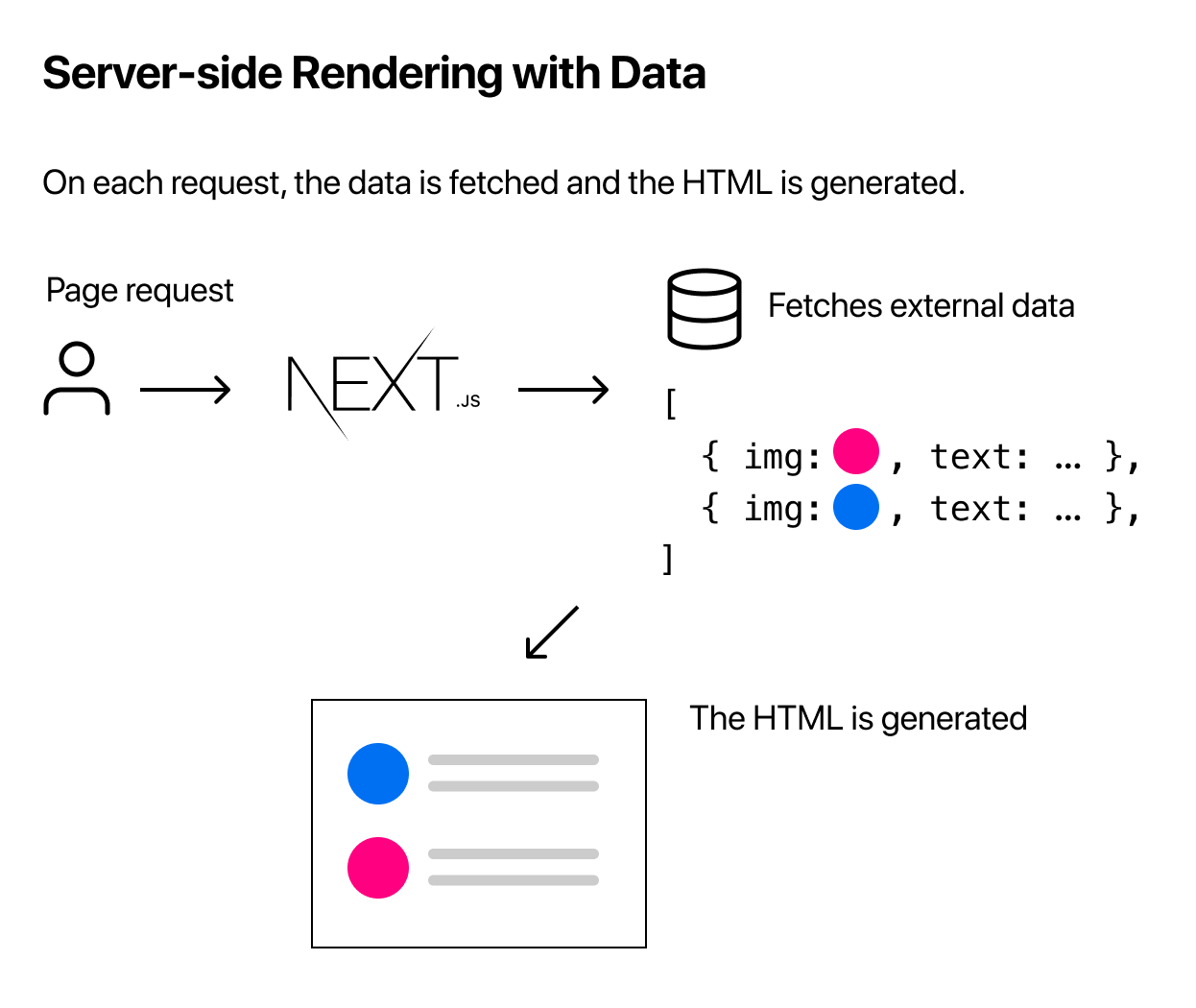
Server-Side Rendering
Static-Site Generation
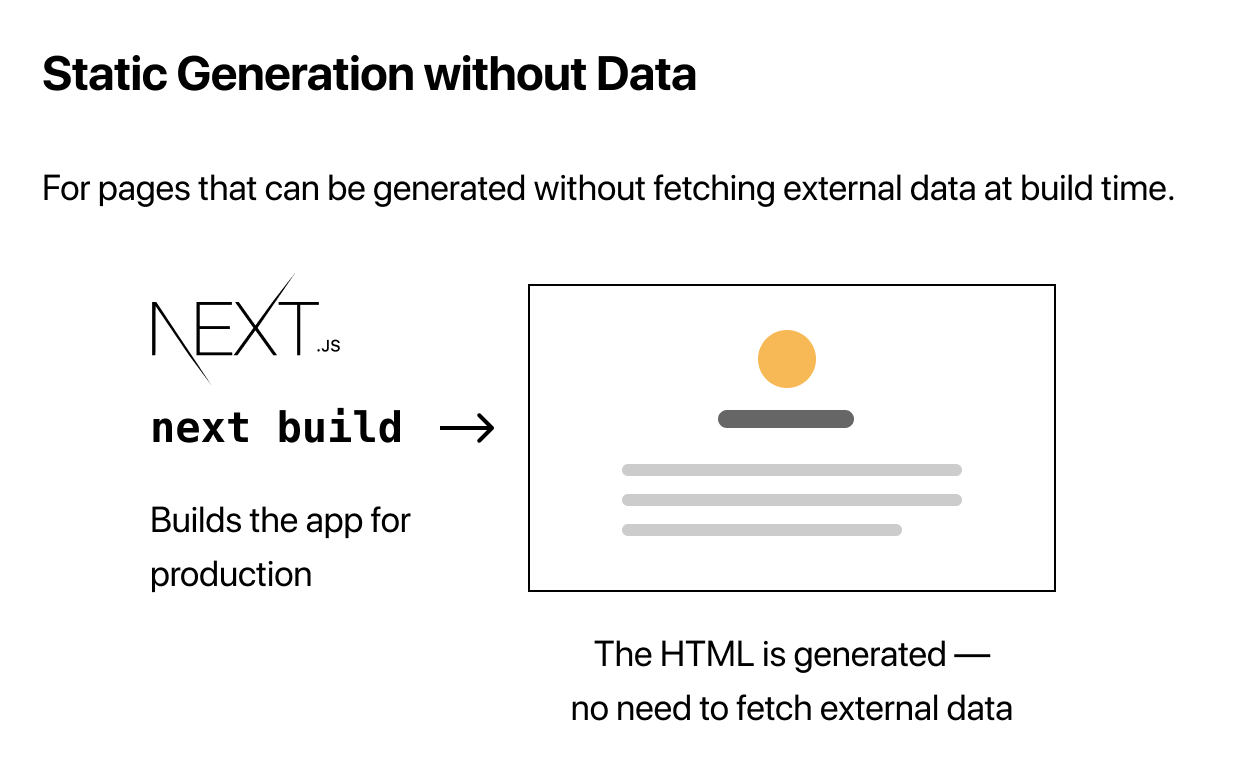
Static-Site Generation
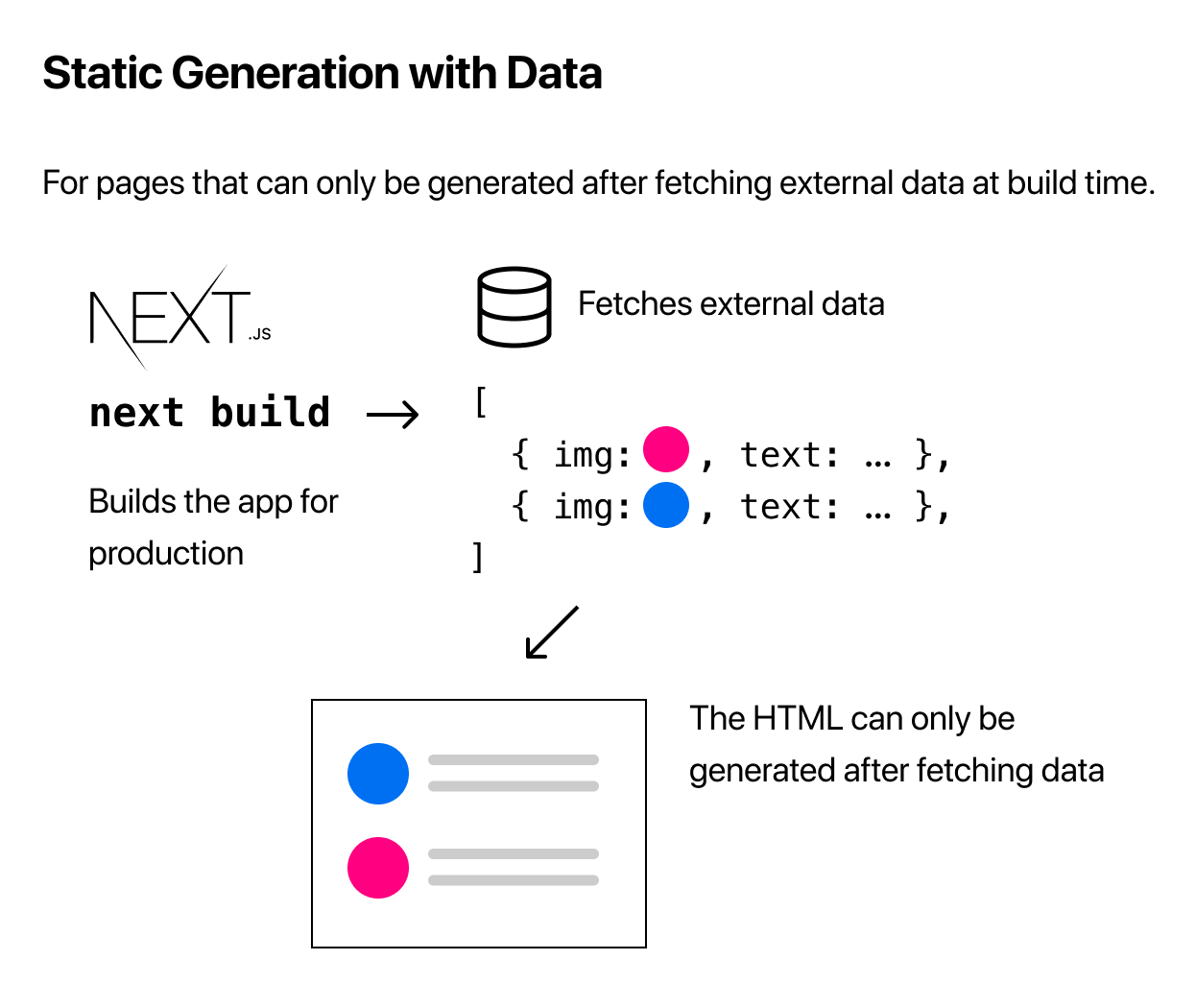
Data Fetching
Thank you!
Client-Side Rendering
import {useEffect} from 'react'

function PokemonDetailPage() {
  const [pokemon, setPokemon] = useState(null)

  useEffect(() => {
    const fetchPokemon = () => {
      const response = await axios.get('https://.../pokemon/001')
      const {data: pokemon} = response

      setPokemon(pokemon)
    }

    fetchPokemon()
  }, [])

  return <div>{pokemon ? pokemon.name : 'Loading'}</div>
}

export default PokemonDetailPage
Static-Site Generation
function PokemonDetailPage({ pokemon }) {
  return <div>{pokemon.name}</div>
}

export async function getStaticProps() {
  const response = await axios.get('https://.../pokemon/001')
  const {data: pokemon} = response

  return {
    props: {
      pokemon,
    },
  }
}

export default PokemonDetailPage
Server-Side Rendering
function PokemonDetailPage({ pokemon }) {
  return <div>{pokemon.name}</div>
}

export async function getServerSideProps() {
  const response = await axios.get('https://.../pokemon/001')
  const {data: pokemon} = response

  return {
    props: {
      pokemon,
    },
  }
}

export default PokemonDetailPage
Who's that pokemon ?

006




006
006
Pokemon REST API
Charizard
{
  "id": "006",
  "name": "Charizard",
  "classification": "Flame Pokémon",
  "types": [
    "Fire",
    "Flying"
  ],
  "resistant": [
    "Fire",
    "Grass",
    "Fighting",
    "Bug",
    "Steel",
    "Fairy"
  ],
  "weaknesses": [
    "Water",
    "Electric",
    "Rock"
  ]
}
codeops
By andresz