e2e test framework




Process Overview
- Jira story contains feature and scenarios
- created as part of story grooming
- ba + dev + tester + product owner involvment
- should not cover every eventuality - keep it simple
- Tester migrates into test framework
- manual for now
- creates any missing step definitions
- works with developer to ensure code is testable
- Tests
- are executed automatically as part of CI/CD pipeline
- begin to pass as development is completed
- become part of automated regression suite
- specifics still being defined - flexible.
Technical Overview
- All test assets currently live in common app
- shared across product units
- shared across product units
- Tests defined in cucumber feature files
- using the nodejs implementation to execute
- integrated with protractor for angular apps
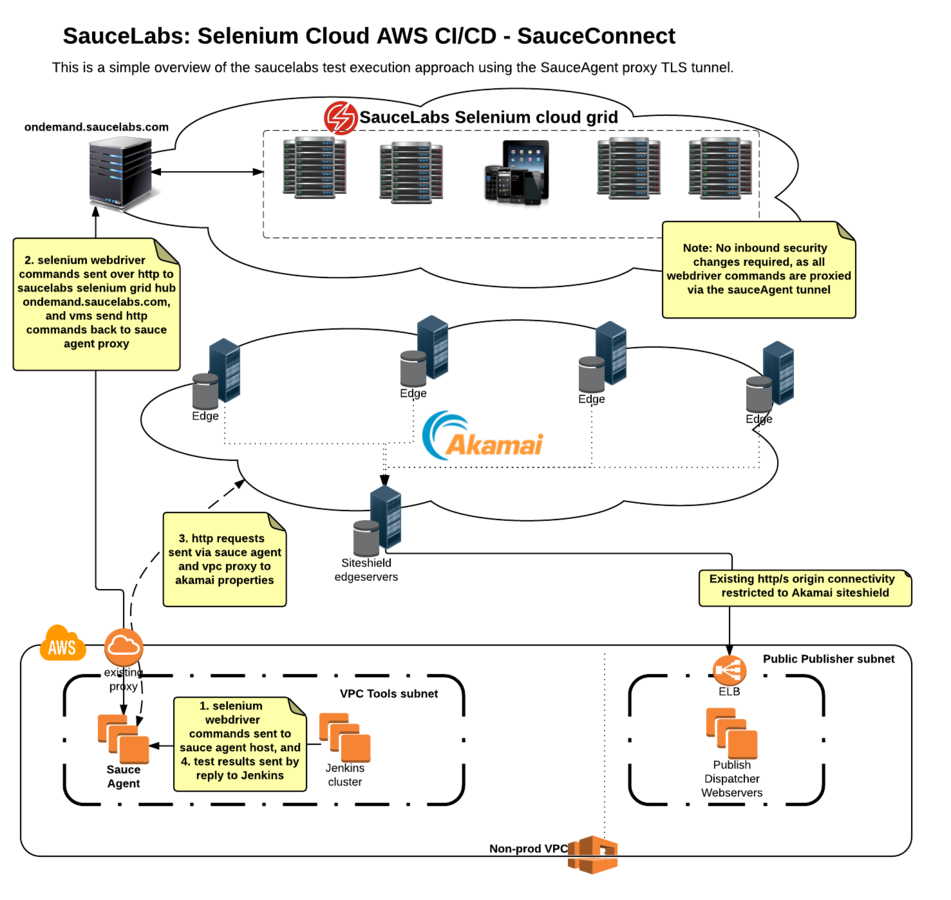
- Selenium grid is hosted by SauceLabs
- 700+ browser/device combinations
- local selenium chromedriver for development
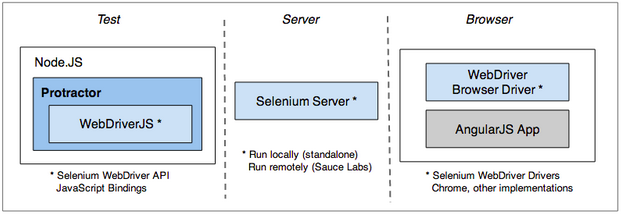
Selenium Webdriver and Protractor
- protractor wraps selenium webdriver
- adds extra locators
- knows about angular digest loop - reduce waits
- can test non angular sites
- can do everything that standard webdriver can do
- has out of the box saucelabs support
-
feature files (*.feature)
- document feature and purpose
- document scenarios to check feature works
-
page objects (*.page.js)
- industry best practice model
- define url
- define how to check page loaded ok
- define addressable page elements
-
step definitions (*.step.js)
- define what each line of feature files do
- can be lower level interactions, however..
- ideally uses business domain language
Test development - three asset types
Feature files
- use gherkin DSL
- industry standard for BDD testing
- tagging for grouping of features/scenarios
- site eg. @site-something
- function eg. @func-search
- type/group eg. @regression / @speed-slow / @mobile-only
- background block
- used to define steps to be prepended to each scenario
- scenario outline
- used to loop over a given set of data
- hooks
- more advanced events prior/after scenarios
Feature: Some terse yet descriptive text of what is desired
  In order to realize a named business value
  As an explicit system actor
  I want to gain some beneficial outcome which furthers the goal

  Scenario: Some determinable business situation
    Given some precondition
      And some other precondition
     When some action by the actor
      And some other action
      And yet another action
     Then some testable outcome is achieved
      And something else we can check happens too

  Scenario: A different situation
      ...
Scenario Outline: Eating
Given there are <start> cucumbers
When I eat <eat> cucumbers
Then I should have <left> cucumbers
Examples:
| start | eat | left |
| 12 | 5 | 7 |
| 20 | 5 | 15 |Feature: Multiple site support
Background:
Given a global administrator named "Greg"
And a blog named "Greg's anti-tax rants"
And a customer named "Wilson"
And a blog named "Expensive Therapy" owned by "Wilson"
Scenario: Wilson posts to his own blog
Given I am logged in as Wilson
When I try to post to "Expensive Therapy"
Then I should see "Your article was published."
Scenario: Greg posts to a client's blog
Given I am logged in as Greg
When I try to post to "Expensive Therapy"
Then I should see "Your article was published."Feature gherkin examples
Page objects
- Define page objects up front for pages to be tested
- A page object has a one-to-one relationship with a url/route
- Centrally maintain element locators for reuse
- Many feature files can reuse page objects
- Auto documented if structured correctly
- Documentation published on GitHub
-
Try to avoid fragile locators
- don't use by.xpath
- prefer by.id
- option to add ids to markup if required
- Review locators available:
Page object example
/**
 * @class Page object for the site search page
 */
var siteNameSearch = function siteNameSearch() {

    // get some environment config, and configure browser
    var environment = browser.params.environment.siteName;
    var pageUtils = require('../../PageUtils.js');
    pageUtils.configureBrowser(browser, environment);

    // targets for scenario keywords
    this.searchField = element(by.id('q'));
    this.searchButtonLink = element(by.css('.someclass button'));

    // load page
    this.get = function () {
        return browser.get(environment.siteHostPrefix + '/page-path');
    };

    // field to check on load
    this.loadCheck = element(by.cssContainingText('.bootstrap-title h1', 'Page Title'));
    this.waitForLoaded = function () {
        return browser.wait((function (_this) {
            return function () {
                return _this.loadCheck.isPresent();
            };
        })(this), environment.maxPageLoadTime);
    };
};

module.exports = {
    "class": siteNameSearch,
    name: 'siteNameSearch'
};
Step definitions
- Define work carried out by lines in scenarios
- Step defn is located via regex match of step text
- supports capturing of variables
- Step defs operate with the context of the currentPage object loaded by prior step.
- CukeFarm library enforces use of page objects, and provides some basic generic step definitions. click, type etc
- https://github.com/ReadyTalk/cukefarm
- Custom step defs can easily be created, however we should try to make them reusable, while not clashing with other product unit future requirements. eg. 'Given i have logged out' might be too generic as it does not indicate site.
Step definition examples
(function() {
    module.exports = function() {

        this.World = require('cukefarm').World;

        this.When(/^I delete all cookies$/, function() {
            return browser.manage().deleteAllCookies();
        });
    }
}).call(this);
(function() {
module.exports = function() {
this.World = require('cukefarm').World;
this.Then(/^the "([^"]*)" should not be present$/, function(el) {
this.el = this.transform.stringToVariableName(el);
return this.expect(this.currentPage[this.el].isPresent()).to.eventually.equal(false);
});
}
}).call(this);These are quite low level. Over time should ideally have business language steps such as 'Given I am logged in to ...'
Reporting and test results
- Each test generates a report for each browser type across all tagged features that were executed. This is generated locally and relates the scenario steps to selenium results.
- If an error occurred in a given scenario, a screenshot is taken and becomes part of the html report.
- SauceLabs/Selenium has no knowledge of the cucumber features generating the webdriver commands, so these reports are not in the SauceLabs console.
- SauceLabs does however keep videos and selenium logs of each test run, and these can be viewed on their console.
- Each test 'build' is named in SauceLabs by the jenkins job name and is tagged in their system with the cucumber tags used to filter the test suite.
Test creation workflow
- Create any missing page objects and step defs.
- Test locally with chromedriver
- Test against saucelabs from local machine with small browser set.
- Test using larger browser set via saucelabs Jenkins jobs.
- Debug browser issues, and adjust tests if required.
Common issues
- Chromedriver unable to click element (offscreen). scroll to element first.
- Responsive mobile screen size - element not visible. Saucelabs will run fullscreen, so can resize locally. If too many issues, consider a mobile specific test tag, and separate test run.
- Dynamic elements causing unexpected results - deal with on case-by-case basis.
Debugging tests
- Pause the test using browser.pause() and inspect the DOM
- Look carefully at the console output - it should give you fairly specific reasons for failures.
- Use console.log to debug step defs, or try attaching a debugger and set break points.
- Use the protractor elementExplorer to test locators.
- http://www.protractortest.org/#/debugging
- Watch the test video on SauceLabs, and/or download the logs.
- It can be useful to add a specific tag to the test you are working on so that you can execute it on its own. @debug-[initials] ..just remove before commit.
- Tests that are not ready can be tagged @wip and we can exclude these from test runs.
Some best practices
- Keep it simple, and don't try to test every possible use case.
- If a proposed scenario is complex - does its value justify the effort taken to build it? If not, negotiate a simpler test with stakeholder.
- Be conscious of test fragility. Could introduce a @fragile tag which will be excluded from automated tests for devops to tag tests that are causing problems. eg. timing related, or selector problems.
- Don't test things that we can reasonable expect the browser to take care of - focus on our code. eg. If a radio has been clicked, we should not need to verify that it is checked.
- Don't test css styling such as colours. There are other ways to deal with visual regressions.
- Accept that there will be ongoing test maintenance effort, and decide how your team will deal with this.
- Avoid waits - in most cases they are not required.
Next steps
- Continue to incorporate feedback and refine framework
- Complete integration with CI/CD pipeline via GitHub pull requests.
- Integrate plugins such as automated accessibility testing.
- Decide on model for centralized sharing of test assets.
- Refine sharing of test asset documentation on GitHub.
e2e test framework
By Andrew Vaughan