Progressive Web App
Arvin
What we will cover today
- What is progressive web app (PWA) ?
- What do you need to build a PWA ?
- Demo
- Some resources
What PWA want to do ?
- Add to Home Screen
- App-like
- Offline support
- Push notification
- Splash Screen


Why we need PWA?
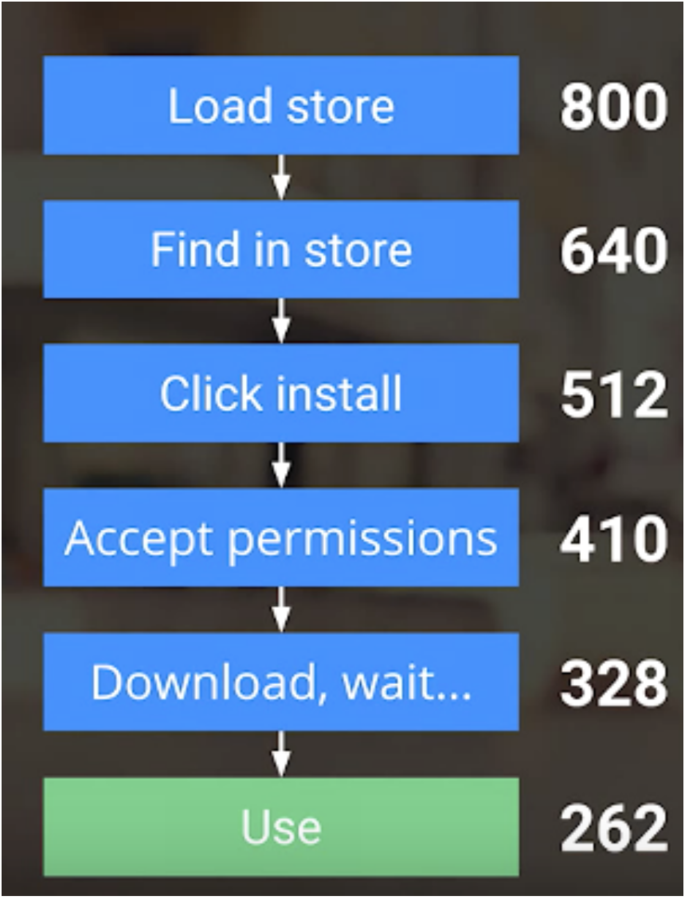
- Provide user a better experience on the web.
- More users will come.
- It's a Win-win game.
PWA design principle
-
Progressive
-
Responsive
-
App-like
-
Fresh
-
Safe ( HTTPS )
-
Discoverable (manifest.json)
-
Re-engageable
-
Installable
-
Linkable
Supported by Service worker
Web Worker
Four kinds of worker :
- Dedicated workers
- Shared worker
- Service worker
- Audio worker
Web Workers provide a simple means for web content to run scripts in background threads.
Different scope with Window
Access global variable via Self
Can't manipulate DOM
Use postMessage() to communicate
importScripts();
Service Worker
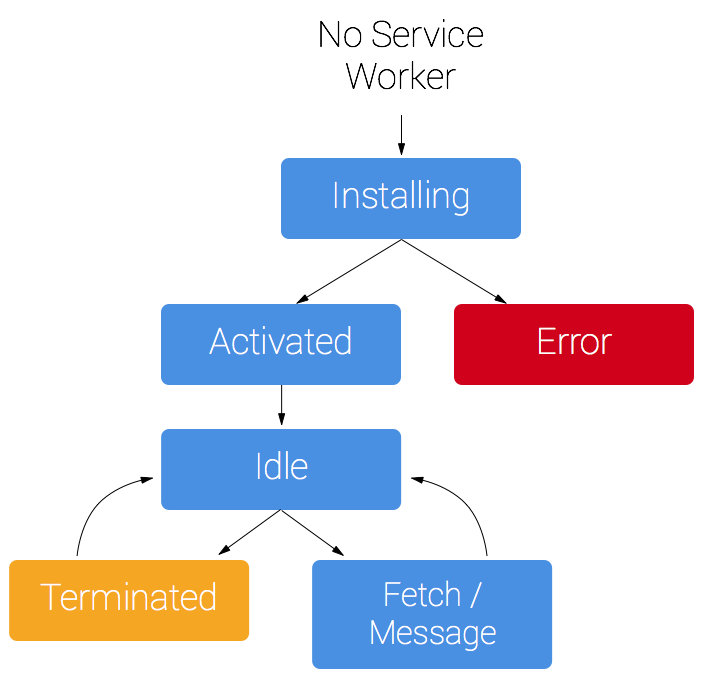
- Javascript worker - can't manipulate DOM directly
- Intercept network request
- Promise
- IndexDB may help
Register service-worker
(() => {
  if ('serviceWorker' in navigator) {
    navigator.serviceWorker.register('/sw.js').then(function(registration) {
      // Registration was successful
      console.log('ServiceWorker registration successful with scope: ',registration.scope);
    }).catch(function(err) {
      // registration failed :(
      console.log('ServiceWorker registration failed: ', err);
    });
  }
})();
check your current service-worker: chrome://serviceworker-internals
service-worker lifecycle: Installing
const CACHE_NAME = 'my-site-cache-v1';
const urlsToCache = [
  '/',
  '/styles/main.css',
  '/script/main.js'
];

self.addEventListener('install', (event) => {
  // Perform install steps
  event.waitUntil(
    caches.open(CACHE_NAME)
      .then(function(cache) {
        console.log('Opened cache');
        return cache.addAll(urlsToCache);
      })
  );
});
mdn: cache api
App Shell
service-worker lifecycle: Fetch
self.addEventListener('fetch', (event) => {
  event.respondWith(
    caches.match(event.request)
      .then(function(response) {
        // Cache hit - return response
        if (response) {
          return response;
        }

        return fetch(event.request);
      }
    )
  );
});
mdn: fetch api
self.addEventListener('fetch', (event) => {
  event.respondWith(
    caches.match(event.request)
      .then(function(response) {
        // Cache hit - return response
        if (response) {
          return response;
        }

        // IMPORTANT: Clone the request.
        let fetchRequest = event.request.clone();

        return fetch(fetchRequest).then(
            (response) => {
            // Check if we received a valid response
            if(!response || response.status !== 200 || response.type !== 'basic') {
              return response;
            }

            // IMPORTANT: Clone the response.
            let responseToCache = response.clone();

            caches.open(CACHE_NAME)
              .then((cache) => {
                cache.put(event.request, responseToCache);
              });

            return response;
          }
        );
      })
    );
});
Outside of service-worker lifecycle: Updating static cache
Updating

- Update version of cache name in service-worker
- We need to kill old cache
Outside of service-worker lifecycle: Updating static cache
self.addEventListener('activate', (e) => {
  console.log('[ServiceWorker] Activate');
  e.waitUntil(
    caches.keys().then((keyList) => {
      return Promise.all(keyList.map((key) => {
        console.log('[ServiceWorker] Removing old cache', key);
        if (key !== cacheName) {
          return caches.delete(key);
        }
      }));
    })
  );
});
PWA design principle
-
Progressive
-
Responsive
-
App-like
-
Fresh
-
Safe ( HTTPS )
-
Discoverable (manifest.json)
-
Re-engageable
-
Installable
-
Linkable
Manifest.json
Web App Manifest
-
Have a nice Icon on homescreen
-
Full screen mode, no more url bar!
-
Control screen orientation。
-
Splash screen setting
-
Tracking your app open from app or url
{
  "name": "REACT PWA",
  "short_name": "REACT PWA",
  "icons": [{
    "src": "images/icons/icon-128x128.png",
      "sizes": "128x128",
      "type": "image/png"
    }, {
      "src": "images/icons/icon-144x144.png",
      "sizes": "144x144",
      "type": "image/png"
    }, {
      "src": "images/icons/icon-152x152.png",
      "sizes": "152x152",
      "type": "image/png"
    }, {
      "src": "images/touch/icon-192x192.png",
      "sizes": "192x192",
      "type": "image/png"
    }, {
      "src": "images/touch/icon-256x256.png",
      "sizes": "256x256",
      "type": "image/png"
    }],
  "start_url": "/",
  "display": "standalone",
  "background_color": "#3E4EB8",
  "theme_color": "#2F3BA2"
}
One more thing...
<!DOCTYPE html>
<html>
<head>
  <meta charset="utf-8">
  <meta http-equiv="X-UA-Compatible" content="IE=edge">
  <meta name="viewport" content="width=device-width, initial-scale=1.0">
  <title>React PWA</title>
  <link rel="manifest" href="/manifest.json">

  <meta name="apple-mobile-web-app-capable" content="yes">
  <meta name="apple-mobile-web-app-status-bar-style" content="black">
  <meta name="apple-mobile-web-app-title" content="PWA">
</head>
<body>
  <div id='app'>
  </div>
<script type="text/javascript" src="bundle.510aef2ba974480fc6df.js"></script></body>
</html>
Resources
Offline Web Applications (udacity)
Demo
Progressive Web App
By arvinh