RESTful Web Services
Chapter 11 & 12
Chapter 11. Ajax Applications as REST Clients
What is Ajax
-
Definition
-
An Ajax application is a web service client that runs inside a web browser.
-
-
Examples
-
a JavaScript form validator and a Flash graphics demo are not Ajax
-
Gmail is Ajax
-
AJAX vs. Ajax
-
AJAX: an acronym for Asynchronous JavaScript And XML.
-
Ajax: an architectural style that doesn’t need to involve JavaScript or XML.
Ajax architecture
-
A user, controlling a browser, makes a request for the main URI of an application.
-
The server serves a web page that contains an embedded script.
-
The browser renders the web page and either runs the script, or waits for the user to trigger one of the script’s actions with a keyboard or mouse operation.
-
The script makes an asynchronous HTTP request to some URI on the server. The user can do other things while the request is being made, and is probably not even aware that the request is happening.
-
The script parses the HTTP response and uses the data to modify the user’s view. This might mean using DOM methods to change the tag structure of the original HTML page. It might mean modifying what’s displayed inside a Flash application or Java applet.
Pros and Cons
- Pros
- Often praised as working like desktop applications.
- This saves bandwidth and reduces the psychological effects on the end user.
- Cons
- Addressability and statelessness are destroyed.
A del.icio.us Example
Example 11-1. An Ajax client to the del.icio.us web service
Not interesting.
REST Goes Better
-
Ajax applications are web service clients, but why should they be clients of RESTful web services
- if your application does something useful, people will figure out your web service and write their own clients
- all web services should be RESTful: addressability, statelessness, and the rest
- every Ajax application runs inside a capable HTTP client. Almost every web browser gives XMLHttpRequest access to the five basic HTTP methods, and they all let you customize the request headers and body.
- basically “GET a URI” and “use data from the URI to modify the view.” That fits in quite well with the Resource-Oriented Architecture.
Making the Request
- JavaScript HTTP client library called XMLHttpRequest
-
request = new XMLHttpRequest();
-
request.open([HTTP method], [URI], true (whether asynchronous), [Basic auth username], [Basic auth password]);
-
request.setRequestHeader([Header name], [Header value]);
-
request.send([Entity-body]);
-
Handling the Response
-
Eventually the request will complete and the browser will call your handler function for the last time. At this point your XMLHttpRequest instance gains some new and interesting abilities:
-
The status property contains the numeric status code for the request.
-
The responseXML property contains a preparsed DOM object representing the response document—assuming it was served as XML and the browser can parse it. HTML, even XHTML, will not be parsed into responseXML, unless the document was served as an XML media type like application/xml or application/xhtml+xml.
-
The responseText property contains the response document as a raw string—useful when it’s JSON or some other non-XML format.
-
Passing the name of an HTTP header into the getResponseHeader method looks up the value of that header.
-
JSON
- Example 11-6. An Ajax client that calls out to a service that serves JSON representations
- Not interesting.
Don’t Bogart the Benefits of REST
- No addressability for you!
- No statelessness for you!
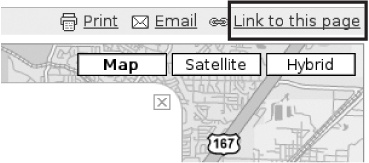
- But even an Ajax application can give its users the benefits of REST, by incorporating them into the user interface.
Cross-Browser Issues and Ajax Libraries
-
XMLHttpRequest
-
use the XMLHttpRequest test suite to find out about more minor cross-browser quirks
-
-
Liberaries hiding the differences between browsers
-
Prototype
-
Dojo
-
script.aculo.us (based on Prototype)
-
...
<script src="prototype.js"></script>
<script type="text/javascript">
  ...
  var request = new Ajax.Request("https://api.del.icio.us/v1/posts/recent",
                                 {method: 'get', onSuccess: populateLinkList,
                                 onFailure: reportFailure});
  function reportFailure() {
    setMessage("An error occured: " + request.transport.status);
  }

  // Called when the HTTP request has completed.
  function populateLinkList() {
    setMessage("Request complete.");
    if (netscape.security.PrivilegeManager.enablePrivilege) {
      netscape.security.PrivilegeManager.enablePrivilege("UniversalBrowserRead");
    }

    posts = request.transport.responseXML.getElementsByTagName("post");
    ...
Subverting the Browser Security Model
- A web browser enforces a general rule that’s supposed to prevent it from using code found on domain A to make an HTTP request to domain B.
-
Request Proxying
-
JavaScript on Demand
-
Dynamically writing the script tag
-
Library support
-
JSONscriptRequest
-
Dojo
-
-
-
Chapter 12. Frameworks for RESTful Services
Three popular framworks
- Ruby on Rails
- Restlet (for Java)
- Django (for Python)
Ruby on Rails
Routing
Example 12-1. A simple routes.rb file

# routes.rb
ActionController::Routing::Routes.draw do |map|
  map.resources :weblogs do |weblog|
    weblog.resources :entries
  end
end
Two controllers:
-
WeblogsController handles requests for the URI /weblogs, and for all URIs of the form /weblogs/{id}.
-
EntriesController handles requests for the URI /weblogs/{weblog_id}/entries, and all URIs of the form /weblogs/{weblog_id}/entries/{id}.
Resources, Controllers, and Views
Five standard methods per controller
- WeblogsController#index
- WeblogsController#create
- WeblogsController#show
- WeblogsController#update
- WeblogsController#delete
Two special view templates through HTTP GET
- GET /weblogs/new
- GET /weblogs/{id};edit
Outgoing Representations
Example 12-2. Serving one of several representations

respond_to do |format|
  format.html { render :template => 'weblogs/show' }
  format.xml  { render :xml => weblog.to_xml }
  format.png  { render :text => weblog.generate_image,
                       :content_type => "image/png" }
end
Incoming Representations
- Rails sees its job as turning an incoming representation into a bunch of key-value pairs, and making those key-value pairs available through the params hash. By default, it knows how to parse form-encoded documents of the sort sent by web browsers, and simple XML documents like the ones generated by to_xml.
- If you want to get this kind of action for your own incoming representations, you can add a new Proc object to ActionController::Base.param_parsers hash. The Proc object is a block of code whose job is to process an incoming representation of a certain media type.
Web Applications as Web Services
-
Rails comes with a code generator called scaffold which exposes a database table as a set of resources. You can access the resources with a web browser, or with a web service client like ActiveResource.
The Rails/ROA Design Procedure
-
Figure out the dataset.
-
Assign the dataset to controllers.
For each controller:
-
Does this controller expose a list or factory resource?
-
Does this controller expose a set of object resources?
-
Does this controller expose a creation form or editing form resource?
For the list and object resources:
-
Design the representation(s) accepted from the client, if different from the Rails standard.
-
Design the representation(s) served to the client.
-
Connect this resource to existing resources.
-
Consider the typical course of events: what’s supposed to happen? The database-backed control flow from Chapter 9 should help here.
-
Consider error conditions: what might go wrong? Again, you can often use the database-backed control flow.
-
-
Restlet
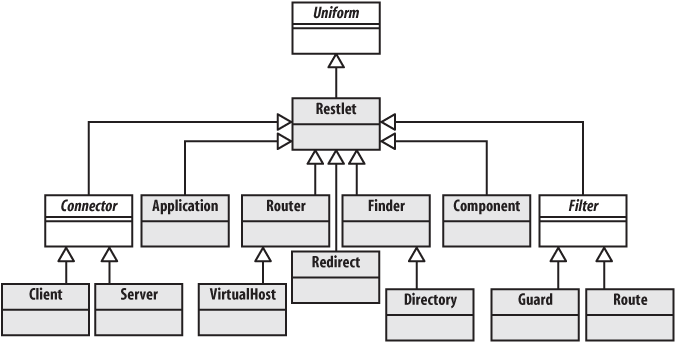
The Restlet philosophy is that the distinction between HTTP client and HTTP server is architecturally unimportant. A single piece of software should be able to act as a web client, then as a web server, without using two completely different APIs.
Basic Concepts
Writing Restlet Clients
Example 12-3. A Restlet client for Yahoo!’s search service

// YahooSearch.java
import org.restlet.Client;
import org.restlet.data.Protocol;
import org.restlet.data.Reference;
import org.restlet.data.Response;
import org.restlet.resource.DomRepresentation;
import org.w3c.dom.Node;

/**
 * Searching the web with Yahoo!'s web service using XML.
 */
public class YahooSearch {
    static final String BASE_URI =
	"http://api.search.yahoo.com/WebSearchService/V1/webSearch";

    public static void main(String[] args) throws Exception {
        if (args.length != 1) {
            System.err.println("You need to pass a term to search");
        } else {
            // Fetch a resource: an XML document full of search results
            String term = Reference.encode(args[0]);
            String uri = BASE_URI + "?appid=restbook&query=" + term;
            Response response = new Client(Protocol.HTTP).get(uri);
            DomRepresentation document = response.getEntityAsDom();

            // Use XPath to find the interesting parts of the data structure
            String expr = "/ResultSet/Result/Title";
            for (Node node : document.getNodes(expr)) {
                System.out.println(node.getTextContent());
            }
        }
    }
}
Example 12-5. A Restlet client for Yahoo!’s JSON search service
// YahooSearchJSON.java
import org.json.JSONArray;
import org.json.JSONObject;
import org.restlet.Client;
import org.restlet.data.Protocol;
import org.restlet.data.Reference;
import org.restlet.data.Response;
import org.restlet.ext.json.JsonRepresentation;
/**
* Searching the web with Yahoo!'s web service using JSON.
*/
public class YahooSearchJSON {
static final String BASE_URI =
"http://api.search.yahoo.com/WebSearchService/V1/webSearch";
public static void main(String[] args) throws Exception {
if (args.length != 1) {
System.err.println("You need to pass a term to search");
} else {
// Fetch a resource: a JSON document full of search results
String term = Reference.encode(args[0]);
String uri = BASE_URI + "?appid=restbook&output=json&query=" + term;
Response response = new Client(Protocol.HTTP).get(uri);
JSONObject json = new JsonRepresentation(response.getEntity())
.toJsonObject();
// Navigate within the JSON document to display the titles
JSONObject resultSet = json.getJSONObject("ResultSet");
JSONArray results = resultSet.getJSONArray("Result");
for (int i = 0; i < results.length(); i++) {
System.out.println(results.getJSONObject(i).getString("Title"));
}
}
}
}Writing Restlet Services
Example 12-6. The Application.main method: setting up the application

public static void main(String... args) throws Exception {
    // Create a component with an HTTP server connector
    Component comp = new Component();
    comp.getServers().add(Protocol.HTTP, 3000);

    // Attach the application to the default host and start it
    comp.getDefaultHost().attach("/v1", new Application());
    comp.start();
}
Example 12-7. The Application.createRoot method: mapping URI Templates to restlets
public Restlet createRoot() {
Router router = new Router(getContext());
// Add a route for user resources
router.attach("/users/{username}", UserResource.class);
// Add a route for user's bookmarks resources
router.attach("/users/{username}/bookmarks", BookmarksResource.class);
// Add a route for bookmark resources
Route uriRoute = router.attach("/users/{username}/bookmarks/{URI}",
BookmarkResource.class);
uriRoute.getTemplate().getVariables()
.put("URI", new Variable(Variable.TYPE_URI_ALL));
}Example 12-8. The UserResource constructor
/**
* Constructor.
*
* @param context
* The parent context.
* @param request
* The request to handle.
* @param response
* The response to return.
*/
public UserResource(Context context, Request request, Response response) {
super(context, request, response);
this.userName = (String) request.getAttributes().get("username");
ChallengeResponse cr = request.getChallengeResponse();
this.login = (cr != null) ? cr.getIdentifier() : null;
this.password = (cr != null) ? cr.getSecret() : null;
this.user = findUser();
if (user != null) {
getVariants().add(new Variant(MediaType.TEXT_PLAIN));
}
}Example 12-9. UserResource.getRepresentation: building a representation of a user
@Override
public Representation getRepresentation(Variant variant) {
Representation result = null;
if (variant.getMediaType().equals(MediaType.TEXT_PLAIN)) {
// Creates a text representation
StringBuilder sb = new StringBuilder();
sb.append("------------\n");
sb.append("User details\n");
sb.append("------------\n\n");
sb.append("Name: ").append(this.user.getFullName()).append('\n');
sb.append("Email: ").append(this.user.getEmail()).append('\n');
result = new StringRepresentation(sb);
}
return result;
}Django
Django is a framework that makes it easy to develop web applications and web services in Python. Its design is very similar to Rails, though it makes fewer simplifying assumptions.
Create the Data Model
Example 12-10. The Django model (models.py)

from datetime import datetime
from django.db import models
from django.contrib.auth.models import User

class Tag(models.Model):
    name = models.SlugField(maxlength=100, primary_key=True)

class Bookmark(models.Model):
    user                = models.ForeignKey(User)
    url                 = models.URLField(db_index=True)
    short_description   = models.CharField(maxlength=255)
    long_description    = models.TextField(blank=True)
    timestamp           = models.DateTimeField(default=datetime.now)
    public              = models.BooleanField()
    tags                = models.ManyToManyField(Tag)
Define Resources and Give Them URIs
-
A single bookmark
-
The list of a user’s bookmarks
-
The list of bookmarks a user has tagged with a particular tag
-
The list of tags a user has used
Example 12-11. A Django URI configuration: urls.py

from django.conf.urls.defaults import *
from bookmarks.views import *

urlpatterns = patterns('',
    (r'^users/([\w-]+)/$',              bookmark_list),
    (r'^users/([\w-]+)/tags/$',         tag_list),
    (r'^users/([\w-]+)/tags/([\w-]+)/', tag_detail),
    (r'^users/([\w-]+)/(.*)',           BookmarkDetail()),
)
Implement Resources as Django Views
Example 12-12. First try at the bookmark list view

from bookmarks.models import Bookmark
from django.contrib.auth.models import User
from django.core import serializers
from django.http import HttpResponse
from django.shortcuts import get_object_or_404

def bookmark_list(request, username):
    u = get_object_or_404(User, username=username)
    marks = Bookmark.objects.filter(user=u, public=True)
    json = serializers.serialize("json", marks)
    return HttpResponse(json, mimetype="application/json")
Bookmark list view
Example 12-14. Second try at the bookmark list view

import datetime
from bookmarks.models import Bookmark
from django.contrib.auth.models import User
from django.core import serializers
from django.http import *
from django.shortcuts import get_object_or_404

# Use the excellent python-dateutil module to simplify date handling.
# See http://labix.org/python-dateutil
import dateutil.parser
from dateutil.tz import tzlocal, tzutc

def bookmark_list(request, username):
    u = get_object_or_404(User, username=username)

    # If the If-Modified-Since header was provided,
    # build a lookup table that filters out bookmarks
    # modified before the date in If-Modified-Since.
    lookup = dict(user=u, public=True)
    lm = request.META.get("HTTP_IF_MODIFIED_SINCE", None)
    if lm:
        try:
            lm = dateutil.parser.parse(lm)
        except ValueError:
            lm = None # Ignore invalid dates
        else:
            lookup['timestamp__gt'] = lm.astimezone(tzlocal())

    # Apply the filter to the list of bookmarks.
    marks = Bookmark.objects.filter(**lookup)

    # If we got If-Modified-Since but there aren't any bookmarks,
    # return a 304 ("Not Modified") response.
    if lm and marks.count() == 0:
        return HttpResponseNotModified()

    # Otherwise return the serialized data...
    json = serializers.serialize("json", marks)
    response = HttpResponse(json, mimetype="application/json")

    # ... with the appropriate Last-Modified header.
    now = datetime.datetime.now(tzutc())
    response["Last-Modified"] = now.strftime("%a, %d %b %Y %H:%M:%S GMT")
    return response
Bookmark detail view
def bookmark_detail(request, username, bookmark_url):
    if request.method == "GET":
        # Handle GET
    elif request.method == "POST":
        # Handle POST
    elif request.method == "PUT":
        # Handle PUT
    elif request.method == "DELETE":
        # Handle DELETE
Example 12-15. The bookmark detail view, part 1: dispatch code
class BookmarkDetail:
def __call__(self, request, username, bookmark_url):
self.request = request
self.bookmark_url = bookmark_url
# Look up the user and throw a 404 if it doesn't exist
self.user = get_object_or_404(User, username=username)
# Try to locate a handler method.
try:
callback = getattr(self, "do_%s" % request.method)
except AttributeError:
# This class doesn't implement this HTTP method, so return
# a 405 ("Method Not Allowed") response and list the
#allowed methods.
allowed_methods = [m.lstrip("do_") for m in dir(self)
if m.startswith("do_")]
return HttpResponseNotAllowed(allowed_methods)
# Check and store HTTP basic authentication, even for methods that
# don't require authorization.
self.authenticate()
# Call the looked-up method
return callback()Example 12-16. The bookmark detail view, part 2: authentication code
from django.contrib.auth import authenticate
class BookmarkDetail:
# ...
def authenticate(self):
# Pull the auth info out of the Authorization header
auth_info = self.request.META.get("HTTP_AUTHORIZATION", None)
if auth_info and auth_info.startswith("Basic "):
basic_info = auth_info[len("Basic "):]
u, p = auth_info.decode("base64").split(":")
# Authenticate against the User database. This will set
# authenticated_user to None if authentication fails.
self.authenticated_user = authenticate(username=u, password=p)
else:
self.authenticated_user = None
def forbidden(self):
response = HttpResponseForbidden()
response["WWW-Authenticate"] = 'Basic realm="Bookmarks"'
return responseExample 12-17. The bookmark detail view, part 3: GET
def do_GET(self):
# Look up the bookmark (possibly throwing a 404)
bookmark = get_object_or_404(Bookmark,
user=self.user,
url=self.bookmark_url
)
# Check privacy
if bookmark.public == False and self.user != self.authenticated_user:
return self.forbidden()
json = serializers.serialize("json", [bookmark])
return HttpResponse(json, mimetype="application/json")Example 12-18. The bookmark detail view, part 4: PUT
def do_PUT(self):
# Check that the user whose bookmark it is matches the authorization
if self.user != self.authenticated_user:
return self.forbidden()
# Deserialize the representation from the request. Serializers
# work the lists, but we're only expecting one here. Any errors
# and we send 400 ("Bad Request").
try:
deserialized = serializers.deserialize("json",
self.request.raw_post_data)
put_bookmark = list(deserialized)[0].object
except (ValueError, TypeError, IndexError):
response = HttpResponse()
response.status_code = 400
return response
# Look up or create a bookmark, then update it
bookmark, created = Bookmark.objects.get_or_create(
user = self.user,
url = self.bookmark_url,
)
for field in ["short_description", "long_description",
"public", "timestamp"]:
new_val = getattr(put_bookmark, field, None)
if new_val:
setattr(bookmark, field, new_val)
bookmark.save()
# Return the serialized object, with either a 200 ("OK") or a 201
# ("Created") status code.
json = serializers.serialize("json", [bookmark])
response = HttpResponse(json, mimetype="application/json")
if created:
response.status_code = 201
response["Location"] = "/users/%s/%s" % \
(self.user.username, bookmark.url)
return responseExample 12-19. The bookmark detail view, part 5: DELETE
def do_DELETE(self):
# Check authorization
if self.user != self.authenticated_user:
return self.forbidden()
# Look up the bookmark...
bookmark = get_object_or_404(Bookmark,
user=self.user,
url=self.bookmark_url
)
# ... and delete it.
bookmark.delete()
# Return a 200 ("OK")
response = HttpResponse()
response.status_code = 200
return responseRESTFul Web Services Chapter 11 & 12
By bawu