JavaScript OLOO
JavaScript 偽類別 缺點
- 與傳統類別機制不同,容易產生誤導
- 沒有 copy
- 原型式繼承 (.__proto__)
- 語法的繁雜
- 大部分可透過 ES6 的 class 解決
JavaScript 改善原型使用方法
- 不使用偽類別
- 簡化語法
- 盡量避免使用 prototype 字眼
- 完整發揮 [[Prototype]] 的威能
JavaScript 改善原型使用方法
- 自己建立物件與物件之間的連接
- 不透過 constructor 創建
JavaScript OLOO
- Object Linked to Other Object
JavaScript OLOO 概念
- 物件 與 物件 間互相委派
- 物件間並非互相繼承,而是對等的關係
- 因此方法不會同名
- 物件間並非互相繼承,而是對等的關係
偽類別 vs OLOO
偽類別 範例
function Foo(who) {
	this.me = who;
}
Foo.prototype.identify = function() {
	return "I am " + this.me;
};

function Bar(who) {
	Foo.call( this, who );
}
Bar.prototype = Object.create( Foo.prototype );

Bar.prototype.speak = function() {
	alert( "Hello, " + this.identify() + "." );
};

var b1 = new Bar( "b1" );
var b2 = new Bar( "b2" );

b1.speak();
b2.speak();
OLOO 範例
var Foo = {
	init: function(who) {
		this.me = who;
	},
	identify: function() {
		return "I am " + this.me;
	}
};

var Bar = Object.create( Foo );

Bar.speak = function() {
	alert( "Hello, " + this.identify() + "." );
};

var b1 = Object.create( Bar );
b1.init( "b1" );
var b2 = Object.create( Bar );
b2.init( "b2" );

b1.speak();
b2.speak();
Just like constructor
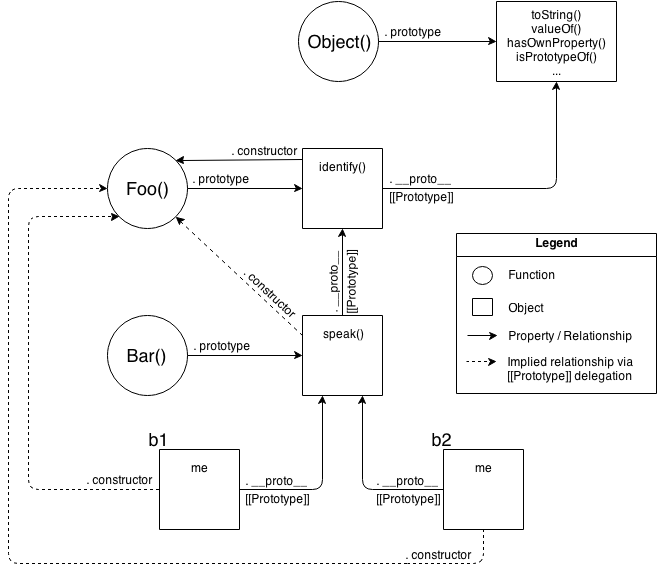
偽類別 心智模型
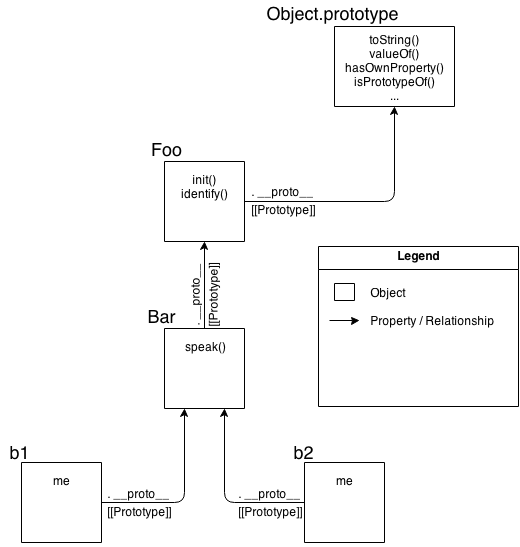
OLOO 心智模型
More Examples
Widget & Button
偽類別
// Parent class
function Widget(width,height) {
	this.width = width || 50;
	this.height = height || 50;
	this.$elem = null;
}

Widget.prototype.render = function($where){
	if (this.$elem) {
		this.$elem.css( {
			width: this.width + "px",
			height: this.height + "px"
		} ).appendTo( $where );
	}
};

// Child class
function Button(width,height,label) {
	// "super" constructor call
	Widget.call( this, width, height );
	this.label = label || "Default";

	this.$elem = $( "<button>" ).text( this.label );
}

// make `Button` "inherit" from `Widget`
Button.prototype = Object.create( Widget.prototype );

// override base "inherited" `render(..)`
Button.prototype.render = function($where) {
	// "super" call
	Widget.prototype.render.call( this, $where );
	this.$elem.click( this.onClick.bind( this ) );
};

Button.prototype.onClick = function(evt) {
	console.log( "Button '" + this.label + "' clicked!" );
};

$( document ).ready( function(){
	var $body = $( document.body );
	var btn1 = new Button( 125, 30, "Hello" );
	var btn2 = new Button( 150, 40, "World" );

	btn1.render( $body );
	btn2.render( $body );
} );
ES6 偽類別
class Widget {
	constructor(width,height) {
		this.width = width || 50;
		this.height = height || 50;
		this.$elem = null;
	}
	render($where){
		if (this.$elem) {
			this.$elem.css( {
				width: this.width + "px",
				height: this.height + "px"
			} ).appendTo( $where );
		}
	}
}

class Button extends Widget {
	constructor(width,height,label) {
		super( width, height );
		this.label = label || "Default";
		this.$elem = $( "<button>" ).text( this.label );
	}
	render($where) {
		super.render( $where );
		this.$elem.click( this.onClick.bind( this ) );
	}
	onClick(evt) {
		console.log( "Button '" + this.label + "' clicked!" );
	}
}

$( document ).ready( function(){
	var $body = $( document.body );
	var btn1 = new Button( 125, 30, "Hello" );
	var btn2 = new Button( 150, 40, "World" );

	btn1.render( $body );
	btn2.render( $body );
} );
OLOO
var Widget = {
	init: function(width,height){
		this.width = width || 50;
		this.height = height || 50;
		this.$elem = null;
	},
	insert: function($where){
		if (this.$elem) {
			this.$elem.css( {
				width: this.width + "px",
				height: this.height + "px"
			} ).appendTo( $where );
		}
	}
};

var Button = Object.create( Widget );

Button.setup = function(width,height,label){
	// delegated call
	this.init( width, height );
	this.label = label || "Default";

	this.$elem = $( "<button>" ).text( this.label );
};
Button.build = function($where) {
	// delegated call
	this.insert( $where );
	this.$elem.click( this.onClick.bind( this ) );
};
Button.onClick = function(evt) {
	console.log( "Button '" + this.label + "' clicked!" );
};

$( document ).ready( function(){
	var $body = $( document.body );

	var btn1 = Object.create( Button );
	btn1.setup( 125, 30, "Hello" );

	var btn2 = Object.create( Button );
	btn2.setup( 150, 40, "World" );

	btn1.build( $body );
	btn2.build( $body );
} );
結論
- 優點:
- 架構較簡單
- 缺點:
- 與 JS 設計原意不同
- 心智模型需轉換
- 使用 ES6 後,優勢較不明顯
JavaScript OOLO
By Chang Henry