Content ITV PRO
This is Itvedant Content department
CartSure JMeter Assertions & Response Validation
Business Scenario
You are working as a Performance Tester on the CartSure Project.
Your manager has assigned you to add JMeter Assertions and verify the Response Content, Response Time, and Response Size. Use Response Assertion, Duration Assertion, and Size Assertion, then execute and analyze the results.
Save the completed project as CartSure_Assertion_Test.jmx.
Pre-Lab Preparation
Topic : Weaving the world of Web
1) Navigating the world of Web
2) Building Blocks of Website,
3) Tag Titans: Fundamental Web Construct.
git pull origin branchNameGit Pull
Task 1: Validate Response Content with Response Assertion
Understand Response Assertion
1
What is Response Assertion?
A Response Assertion is a JMeter component used to verify whether the response received from the application contains the expected content.
For example, CartSure may return:
CartSure
A Response Assertion can verify whether the response contains:
iPhone
If the expected content is found, the assertion passes.
If the expected content is not found, the assertion fails.
Add Response Assertion
2
In the existing JMeter project:
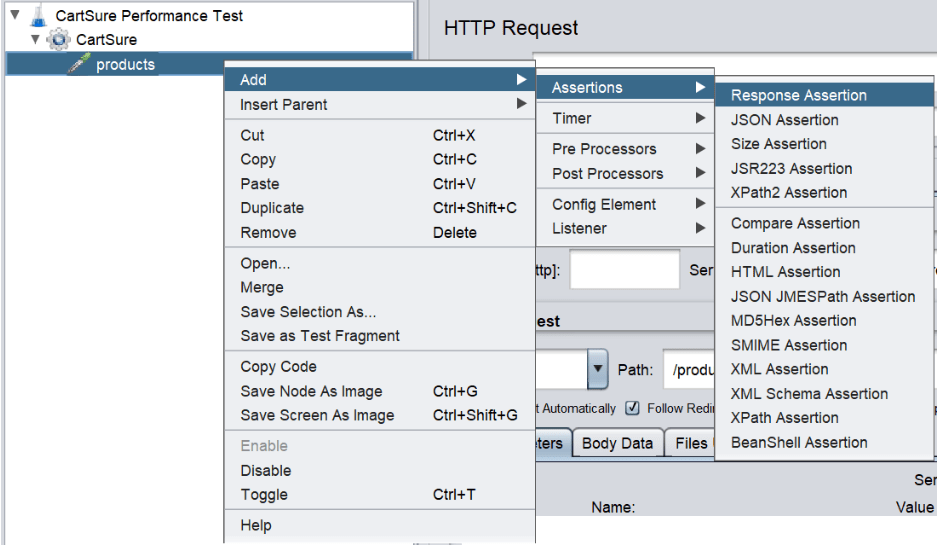
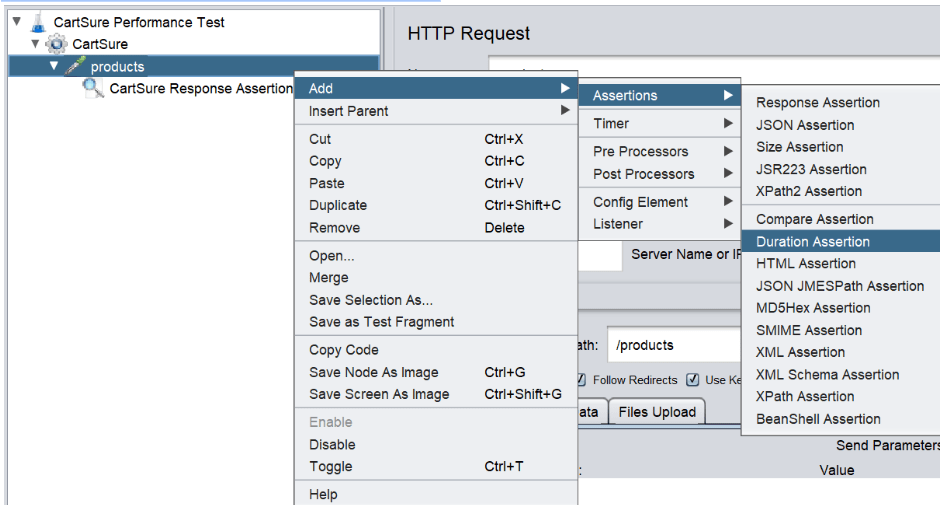
Right-click CartSure Request.
Select Add.
Select Assertions.
Select Response Assertion.
5. Rename the assertion to:
CartSure Response Assertion
Configure Response Assertion
3
Click CartSure Response Assertion.
In the assertion configuration, enter:
CartSure
This will instruct JMeter to check whether the expected text is present in the response.
Execute the Test
4
Run the JMeter test.
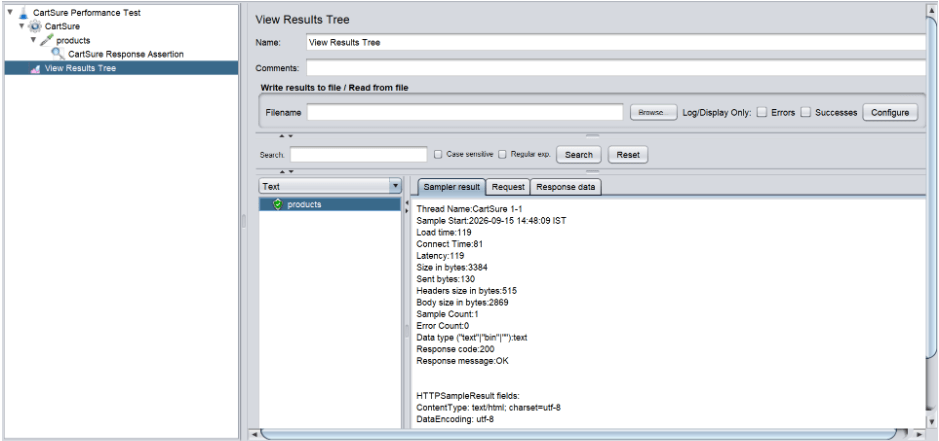
Open the existing View Results Tree listener.
Check the response and assertion result.
If the response contains the expected text:
Response Assertion → PASS
If the expected text is not present:
Response Assertion → FAIL
Task 2: Validate CartSure Response Time Using Duration Assertion
Understand Duration Assertion
1
What is Duration Assertion?
A Duration Assertion is a JMeter component used to verify that a request is completed within a specified maximum response time.
For example, if the performance requirement states that a CartSure request should complete within 5 seconds, a Duration Assertion can validate this requirement.
Add Duration Assertion
2
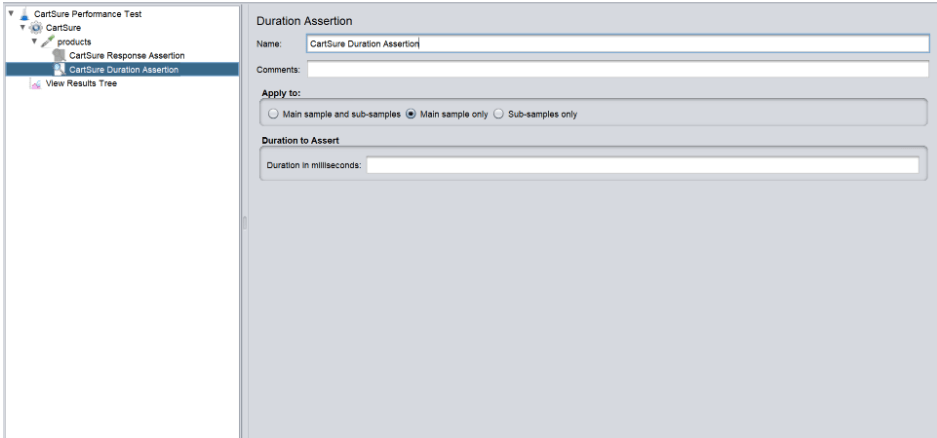
Right-click CartSure Request.
Select:
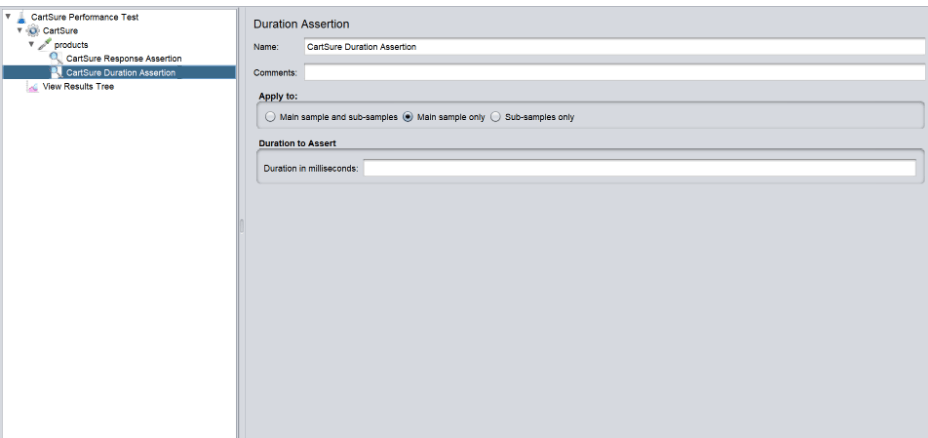
Add → Assertions → Duration Assertion
Rename the assertion to:
CartSure Response Time Assertion
Configure Duration Assertion
3
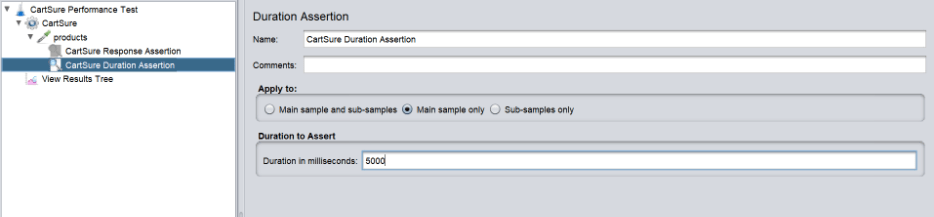
Click CartSure Response Time Assertion.
Set:
Duration in milliseconds: 5000
This means the response must be completed within 5,000 milliseconds (5 seconds).
Execute the Test
4
Run the JMeter test again.
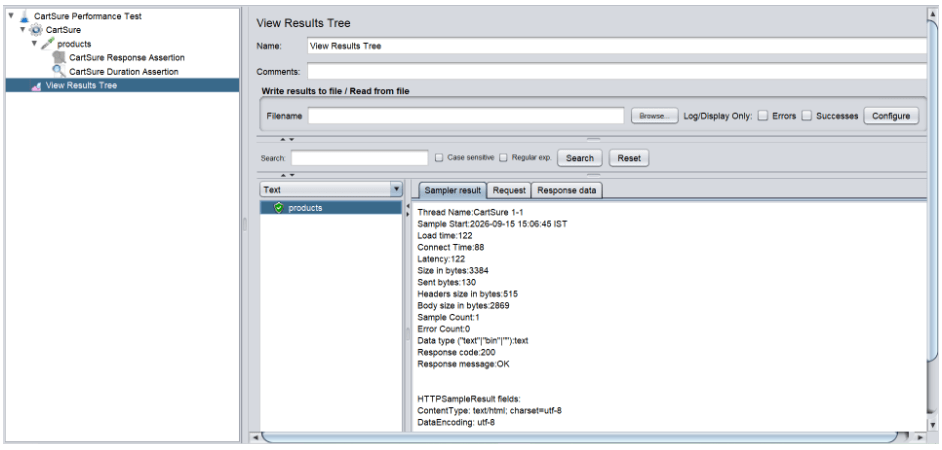
Open View Results Tree and check the result.
If the response is received within 5 seconds:
Duration Assertion → PASS
If the response takes more than 5 seconds:
Duration Assertion → FAIL
Task 3: Validate CartSure Response Size Using Size Assertion
Understand Size Assertion
1
What is Size Assertion?
A Size Assertion is a JMeter component used to verify whether the response received from the application meets a specified size requirement.
For example, if a response is unexpectedly small, it could indicate that the application returned incomplete or unexpected data
Add Size Assertion
2
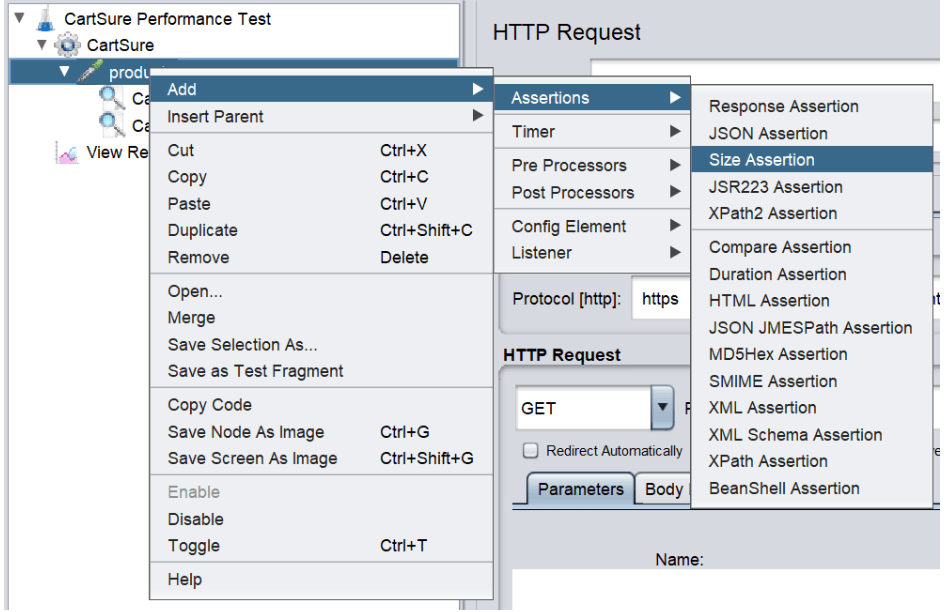
Right-click CartSure Request.
Select:
Add → Assertions → Size Assertion
Rename the assertion to:
CartSure Response Size Assertion
Configure Size Assertion
3
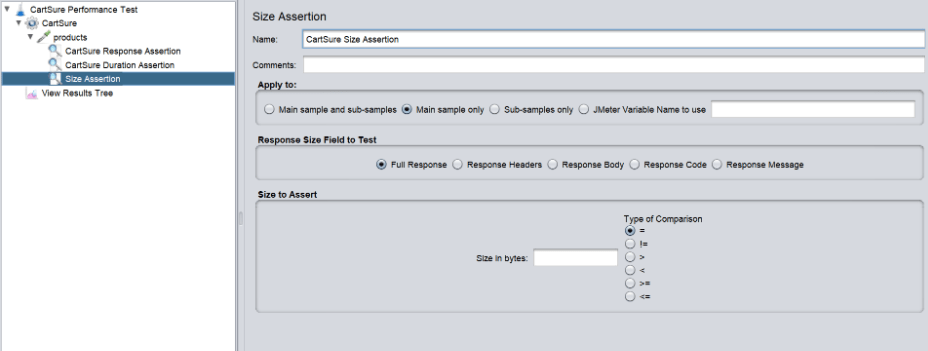
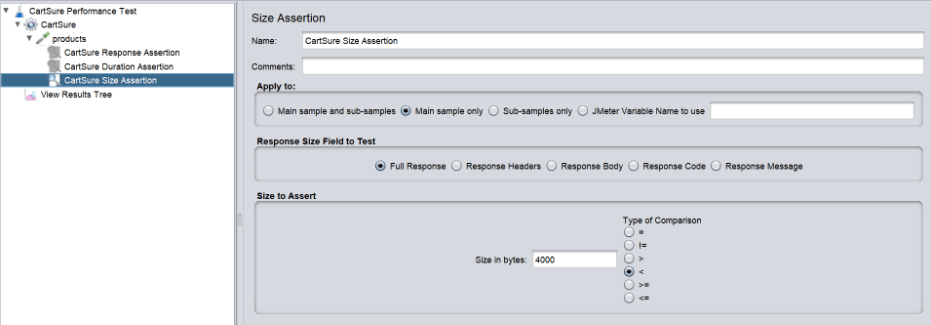
Click CartSure Response Size Assertion.
Set:
Size in bytes: less than 4000
Configure the assertion to verify that the response is at least the specified size.
Execute the Test
4
Run the JMeter test again.
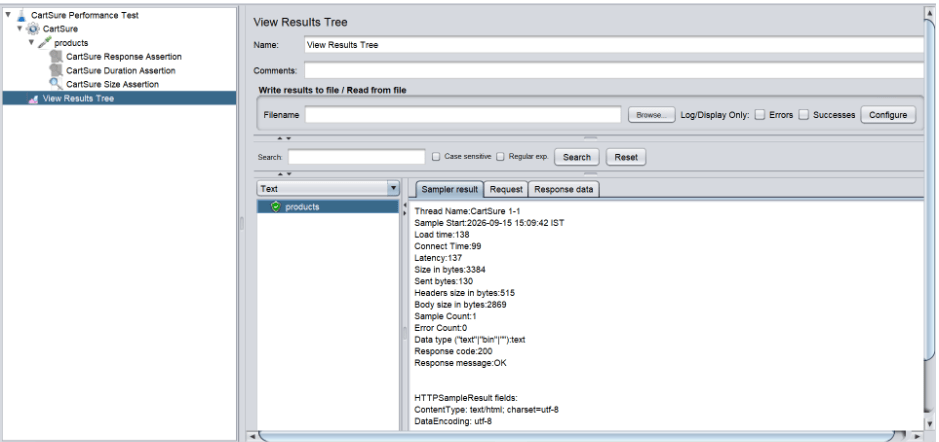
Open View Results Tree and check the result.
If the response meets the configured size requirement:
Size Assertion → PASS
If the response does not meet the requirement:
Size Assertion → FAIL
Task 4: Review Assertion Results and Save the Test Plan
Understand Assertion Result Analysis
1
What is Assertion Result Analysis?
Assertion result analysis is the process of reviewing whether the configured validation conditions have passed or failed during test execution.
The three assertions validate:
Response Assertion
↓
Response Content
↓
Duration Assertion
↓
Response Time
↓
Size Assertion
↓
Response Size
Together, they help determine whether the CartSure response meets the defined validation requirements.
Review the Final Results
2
Open View Results Tree and review the results after all three assertions have been added.
A successful validation may look like:
Response Assertion PASS
Duration Assertion PASS
Size Assertion PASS
If an assertion fails, identify which validation requirement was not satisfied.
For example:
Response Assertion PASS
Duration Assertion FAIL
Size Assertion PASS
This means the response content and size were acceptable, but the response exceeded the defined response-time limit.
Verify the Final JMeter Structure
3
Your final JMeter structure should look like:
CartSure Performance Test
|
+-- CartSure Users
| |
| +-- CartSure Request
| |
| +-- CartSure Response Assertion
| |
| +-- CartSure Response Time Assertion
| |
| +-- CartSure Response Size Assertion
|
+-- View Results Tree
Save the JMeter Project
4
From the top menu, select:
File → Save Test Plan As...
In the File Name field, enter:
CartSure_Assertion_Test.jmx
Click Save.
Go to the selected folder and verify that the following file has been created succesfully.
Good Job!!
In this lab, you learned JMeter Assertions, Response Assertion, Duration Assertion, and Size Assertion for response validation.
You also practiced Configuring Assertions, Executing JMeter Tests, and analyzing PASS/FAIL Results to validate application responses and save the .jmx Project.
Checkpoint
Next-Lab Preparation
Git Push
git push origin branchNameTopic : Working with a Text and Listin HTML
1) Power of HTML text tags
2) Customizing your style with CSS
3) Listing it right using HTML
4) HTML Link up , attributes of tag, block vs inline elements
Text box Width : 887
Business Scenario, Pre-lab Preparation, Next-lab Preparation, Task, Activity, Checkpoint : 90%.
Steps : 1,2,3 [Sub Steps - a,b,c]
Normal Text, Topic Name : 80%
Subtopic : 70%
Code Box font Size : 16px
By Content ITV