Content ITV PRO
This is Itvedant Content department
CartSure Testing Strategy & STLC Setup
Business Scenario
Today is the 3rd day of our project development journey.
We are working on a real-time client project to design a complete Testing Strategy & STLC Setup for an eCommerce web application called CartSure.
Our focus is on testing critical features like user registration, product search, cart management, checkout, payment processing, and order tracking.
Pre-Lab Preparation
The goal is to ensure the application is secure, reliable, and delivers a high-quality user experience.
Testing Techniques
Black Box vs White Box
Equivalence Partitioning
Boundary Value Analysis
Decision Table & State Transition
git pull origin branchNameGit Pull
Task 1: Identify STLC Phases
The Software Testing Life Cycle (STLC) for CartSure includes:
Example for CartSure:
Requirements: Users should be able to login, browse products, add to cart, and checkout.
Testable scenarios:
Login with valid credentials
Login with invalid credentials
Browse by category or search
Add product to cart
Remove product from cart
Checkout with valid payment
Requirement Analysis
a
Entry Criteria: Requirements document available
Exit Criteria: Test scenarios and RTM prepared
Example for CartSure:
Scope: Test all modules (Login, Browsing, Cart, Checkout)
Testing types: Functional, Integration, Regression, UAT
Resources: 2 QA testers, 1 automation tester
Timeline: 2 weeks for functional testing, 1 week for regression
Entry Criteria: Approved requirement document
Exit Criteria: Test plan ready and approved
Test Case Development
c
Test Planning
b
| Test Case ID | Module | Scenario | Test Data | Expected Result |
|---|---|---|---|---|
| TC_001 | Login | Valid Login | Username: User1, Password: Pass123 | User logged in successfully |
| TC_002 | Login | Invalid Login | Username: User1, Password: Wrong123 | Error Message Displayed |
| TC_003 | Cart | Add to Cart | Product: iPhone 14 | Item added to cart |
Entry Criteria: Test plan approved
Exit Criteria: Test cases and test data ready
d
Test Environment Setup
Example for CartSure:
Setup QA server with CartSure app installed
Database seeded with products and test users
Browsers: Chrome, Firefox
Devices: Desktop and Mobile
Entry Criteria: Test cases ready
Exit Criteria: Environment ready
d
Test Execution
Example for CartSure:
Execute TC_001 → Login successful → Pass
Execute TC_002 → Error message appears → Pass
Execute TC_007 → Item added to cart → Pass
If a bug occurs (e.g., product price not updating in cart), log in Jira
Entry Criteria: Stable build available
Exit Criteria: All test cases executed; defects logged & retested
Test Closure
e
Example for CartSure:
Prepare Test Summary Report:
Total test cases: 50
Passed: 47
Failed: 3
Lessons learned: Checkout module needs additional performance testing
Sign-off: Stakeholders approve testing completion
Entry Criteria: Test execution completed
Exit Criteria: Testing closure report ready and signed off
Task 2: Define Entry & Exit Criteria
Entry Criteria
Requirements approved
Test plan ready
Exit Criteria
All test cases executed
Critical defects fixed
Test summary report completed
Stakeholder approval received
Test environment available
Test data prepared
Task 3:Identify Testing Types
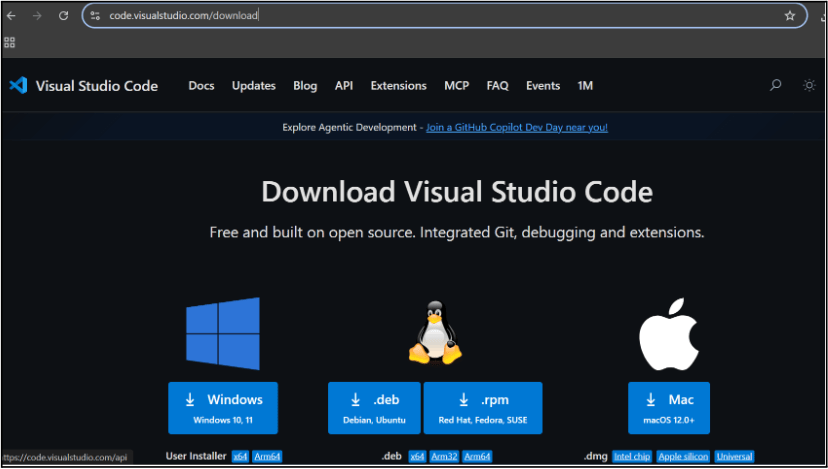
Choose your operating system(windows / Mac) and download the installation file.
Double click on the download app and Accept the agreement and click next
2
It is a long established fact that a reader will be distracted
b
Sub Steps
a
Double click on the download app and Accept the agreement and click next
public class MathSample {
    public static void main(String[] args) {
        int x = 10;
        int y = 20;
        int sum = x + y;

        System.out.println("The sum is: " + sum);
    }
}
public class MathSample {
public static void main(String[] args) {
int x = 10;
int y = 20;
int sum = x + y;
System.out.println("The sum is: " + sum);
}
}
public class MathSample {
public static void main(String[] args) {
int x = 10;
int y = 20;
int sum = x + y;
System.out.println("The sum is: " + sum);
}
}
Great job!
You have successfully completed your first lab on BiteBox Project Onboarding.
In this lab, you have: Understood the BRD, Created a wireframe, Set up your development environment, Organised your project structure, Run your first program
You are now ready to move to the next stage of development
Checkpoint
Next-Lab Preparation
Git Push
git push origin branchNameTopic : Working with a Text and Listin HTML
1) Power of HTML text tags
2) Customizing your style with CSS
3) Listing it right using HTML
4) HTML Link up , attributes of tag, block vs inline elements
Text box Width : 887
Business Scenario, Pre-lab Preparation, Next-lab Preparation, Task, Activity, Checkpoint : 90%.
Steps : 1,2,3 [Sub Steps - a,b,c]
Normal Text, Topic Name : 80%
Subtopic : 70%
Code Box font Size : 16px
By Content ITV